
Quick Answer: Running Google Ads on a Shopify storefront is mechanically easy — install the Google & YouTube channel app, link Merchant Center, launch Performance Max — and that easy path is what blows up most print-on-demand accounts. The default install ships order-subtotal as conversion value to a margin-blind algorithm, syncs every variant to Merchant Center as feed bloat, ignores the 2–6% refund rate baked into POD apparel, and lets Smart Bidding scale spend toward the lowest-margin SKUs in the catalog.
The Google-Ads-side strategy that actually produces profit on a Shopify-hosted POD store: brand-defense Search week one, Standard Shopping with a curated and margin-labeled feed weeks two through four, Performance Max with margin-tier segmentation and Customer Match audience signals from week five, Target ROAS calibrated against Printify- or Printful-corrected margin (not subtotal), refund events wired to offline conversion adjustments, and weekly reconciliation against true Shopify Profit. Six campaign-side moves before scaling spend past $50/day.
Why Google-Ads-on-Shopify defaults break for print-on-demand
The Shopify Google & YouTube channel app is a remarkable piece of integration. It authenticates the Google account, provisions a Merchant Center if one isn't linked, syncs the full product catalog within hours, sets up a Customer Events pixel that fires the Google Ads Purchase conversion on every order, and exposes a one-click Performance Max launcher inside the Shopify admin.
For an owned-inventory ecommerce brand at 55–65% gross margin running 100–500 catalog SKUs, the defaults are a reasonable starting point. The campaign converges, the reported ROAS is recognizable, and the operator iterates from there.
For print-on-demand, every default in that flow encodes an assumption that's structurally wrong. Margin runs 28–35% blended on apparel after Printify or Printful supplier cost, shipping, and processing — half of what owned-inventory advertisers operate at.
A 250-design POD store can ship 2,000–3,000 variants to Merchant Center if no one curates, drowning Smart Bidding's product-level signal in noise. Refund rates run 2–6% concentrated on the highest-AOV designs (custom apparel returns are a category-wide reality), and Google never sees a refund unless an offline adjustment is wired. The Customer Events pixel reports order subtotal as conversion value, so Google Ads reads $42 on a hoodie order it should read $21 against — and Smart Bidding optimizes against that wrong-unit value signal for the life of the account unless someone overrides the pixel.
The result of "default install + scale spend" on a POD store is predictable. Performance Max reports a 4x ROAS that's roughly 1.3x against margin — breakeven before refunds and processing fees.
The operator scales to $200/day, watches the green numbers hold, and only catches the divergence when reconciling against the bank account at quarter end. The Google Ads-side fixes below aren't more aggressive bidding or smarter creative — they're a campaign architecture and a calibration loop that gives Smart Bidding the right inputs. The Complete Google Ads Playbook for Print-on-Demand Sellers is the cluster pillar with the full strategic frame; this guide stays focused on the Google-Ads-side moves specifically when the storefront is Shopify.
Google Ads account setup for a Shopify-hosted POD store
Before any campaign launches, the Google Ads account itself needs a few POD-specific configurations the default Shopify channel app flow doesn't set up. Each takes 5–15 minutes once and pays back across every campaign for the life of the account.
- Conversion goals trimmed to one primary. Default install creates Purchase, Begin Checkout, Add to Cart, and View Item as conversion actions, all marked "primary." Smart Bidding then optimizes against the weighted average of all four — which means the algorithm reads cart adds and item views as success signals. POD-correct: Purchase as the only primary conversion, the rest demoted to "secondary" for diagnostic visibility. The change takes 60 seconds inside Tools → Conversions and resets Smart Bidding's optimization target to the only event that actually matters.
- Conversion data exclusions on storefront-side noise. The Customer Events pixel can fire on test orders, abandoned-checkout recoveries, and back-end manual orders. None of those should train Smart Bidding. Add a conversion-action filter that requires
order_source = online_storefrontand excludes orders below a $5 floor. Five minutes; preserves training data quality. - Account-level negative keyword list applied to Search and PMax. POD-relevant universal negatives: "free," "wholesale," "bulk," "blank," "supplier," "printify," "printful," "etsy," "redbubble" (unless your strategy includes brand bidding on competitors, which it generally shouldn't). Build the list once in the Shared Library and apply it as a negative keyword list to every Search campaign and as PMax account-level brand exclusions where the UI allows. Saves $200–800/month in qualified-but-non-converting click waste depending on niche.
- Brand exclusion list and brand-traffic isolation. Your own brand terms should run on a Brand Search campaign, never inside Performance Max. Add the brand to PMax's brand exclusion list (a 2025 feature finally fully rolled out) so PMax can't cannibalize the cheapest conversions in the account and inflate reported ROAS with traffic that would have converted organically anyway.
- Geographic targeting set to "Presence" not "Presence or interest." Default is the latter, which means searches by users interested in the targeted country also qualify — surfacing a lot of low-intent international clicks. POD apparel margins can't absorb a click from a market the store doesn't ship to profitably. The flip is one toggle inside campaign settings; do it on every campaign at launch.
Each item above is a Google-Ads-side change, not a Shopify-side one. None of them require touching the storefront or the channel app. Done at account inception they take 30 minutes total. Done at month six after the account has accumulated six months of misdirected training data, the relearning period costs more than the setup time would have. Google Ads Shopify Strategy for Print-on-Demand covers the broader account-architecture decisions in depth.
Which conversion actions to enable, and which to ignore
The conversion-action layer is the single highest-leverage decision in a POD Google Ads account on Shopify. It controls what Smart Bidding optimizes against, and getting it wrong invisibly miscalibrates every bid the algorithm makes for months.
The Shopify Google & YouTube channel app, on default settings, ships four conversion actions to Google Ads via the Customer Events pixel: Purchase (with value set to order subtotal), Begin Checkout, Add to Cart, and View Item. All four are created as "primary" conversions by default. The right configuration for a POD account on Shopify:
- Purchase — primary, margin-corrected value. The single primary conversion Smart Bidding optimizes toward. The
valuefield needs to be overridden from order subtotal to margin-corrected value — order subtotal minus Printify or Printful supplier cost (read from a Shopify product metafield), summed across line items. The override is five lines of pixel JavaScript inside the Shopify Customer Events editor. Once it's live, Smart Bidding's training data is in the right unit. Shopify Google Ads Conversion Strategy for Print-on-Demand details the override pixel. - Purchase — Subtotal Reference — secondary. Keep the original subtotal as a secondary conversion event so the weekly reconciliation can compare margin and subtotal numbers side-by-side. Don't include in conversions. Diagnostic-only.
- Begin Checkout — secondary. Useful diagnostic during the learning period to see if traffic is reaching the checkout. Don't include in conversions; a campaign optimizing toward checkout-starts will burn budget on cart abandoners that never pay.
- Add to Cart and View Item — disabled or secondary, never primary. Including these as primary conversions teaches Smart Bidding that an item view is a success. POD storefronts get high item-view-to-purchase ratios because design exploration is part of the buying process — optimizing for views floods the account with cheap, non-converting traffic.
- Refund Adjustment — wired separately. Refunds aren't a conversion action; they're an offline conversion adjustment that subtracts margin from previously-credited GCLIDs. Configured via the Google Ads Offline Conversion Adjustments API or a Zapier-based pipeline. Detailed in the refund section below.
The "include in conversions" toggle is the single most miscalibrated setting in default Shopify Google Ads accounts. Operators who set this correctly out of the gate spend the next six months optimizing inside a Smart Bidding configuration that's actually pointing at margin. Operators who don't are tuning bids and audiences while the algorithm chases cart adds and item views — a category-of-error correction, not a magnitude correction. Set Up Google Ads Conversions on Shopify Strategy for Print-on-Demand walks the conversion-action wiring step by step.
The six-campaign mix and the order to launch them
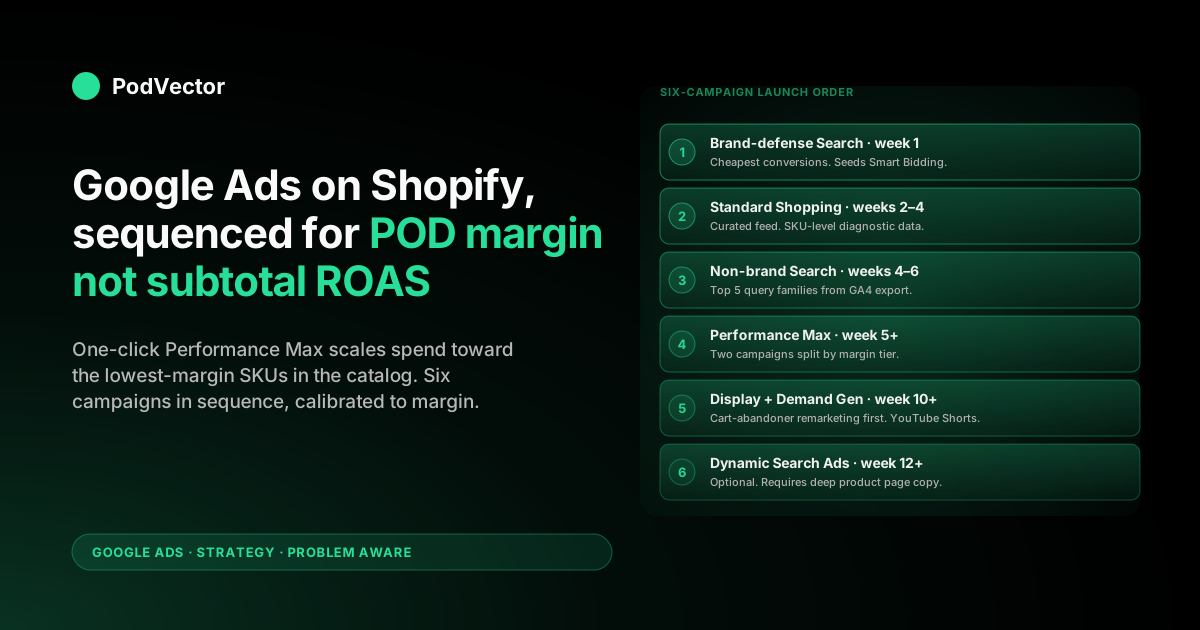
The campaign architecture below is the launch sequence that produces profitable scale on a POD storefront on Shopify. Each campaign depends on data the previous campaign generated; running them in parallel from day one means every campaign launches blind and the budget burns 4–6 weeks of diagnostic time the operator could have skipped by waiting two weeks per phase.
- Brand-defense Search ($5–10/day, week one). Exact-match Search on your brand name, store name, and any branded design lines that get organic search volume. Cheapest conversions in the account, blocks competitor brand-bidding, and seeds clean Smart Bidding history with high-intent converters. Configure as a separate Search campaign so it doesn't pollute non-brand Search optimization. Needs nothing from Shopify beyond the live storefront.
- Standard Shopping with curated feed ($20–30/day, weeks 2–4). Standard Shopping (not Performance Max) for the diagnostic period because product-group-level reporting is granular and SKU-level performance data is the input PMax will need later. Curate the Google sales channel app to "Selected products" mode scoped to the top-20% of designs by trailing-90-day Shopify revenue. Populate margin-tier custom labels (custom_label_0 through custom_label_4) using the supplier-cost metafield. Bid by product groups segmented on margin tier. Maximize Conversion Value during the first 30 conversions per product group. Google Shopping Ads Shopify Strategy for Print-on-Demand covers Standard Shopping configuration.
- Non-brand Search on top 5 query families (weeks 4–6). Pull a GA4 export of which organic queries already convert on the storefront. Build Search ads against those exact phrases — match types Phrase or Exact, never Broad on a POD account at this budget size. Match Shopify product page intent to the query intent (don't send "vintage band tee" traffic to a generic collection page). Maximize Conversions until 30 conversions; switch to Target CPA from there. Google Ads keyword research for ecommerce strategy for print-on-demand covers query-family extraction.
- Performance Max with audience signals (week 5+). Two PMax campaigns, split by margin tier (high-margin and medium-margin), not one PMax campaign across the catalog. Each campaign feeds: the curated feed scoped to its margin tier (filtered via custom_label_0), Customer Match top-10% LTV uploaded as audience signal, GA4 cart-abandoner and high-intent product-viewer audiences, lifestyle creative replacing flat Printify mockups on the top 10 designs. Target ROAS calibrated against margin-corrected value. Brand exclusion list applied so PMax doesn't cannibalize Brand Search. Run alongside Standard Shopping, not in place of it. Shopify Performance Max campaigns explained for print-on-demand goes deep on the segmentation.
- Display remarketing and Demand Gen (week 10+). Once 100+ unique Customer Match converters and the refund-adjustment loop are running, layer Display remarketing on cart abandoners (highest ROI in the account by a wide margin) and Demand Gen on YouTube Shorts for prospecting. Demand Gen needs steady creative cadence — 4–6 lifestyle stills and 2–3 short-form videos per active design tier per month — so it's a creative-budget question more than a media-budget question.
- Dynamic Search Ads (week 12+, optional). Useful only if the Shopify storefront has 100+ product pages, well-structured collection pages, and copy that maps cleanly to long-tail design searches. DSA on a POD store with thin product copy and generic collection headers wastes budget on irrelevant queries. Skip if those preconditions aren't met. Add as a measured experiment if they are.
The launch order matters because the diagnostic data accumulates phase by phase. Brand-defense Search produces baseline cost-per-conversion data that calibrates every other ROAS target.
Standard Shopping produces SKU-level diagnostic data that determines which products belong in PMax. Non-brand Search produces query-level conversion data that informs creative and landing page work.
PMax produces audience priors that make remarketing efficient. Skipping a phase doesn't break the next campaign immediately — it just means the next campaign launches without ground truth, runs hot for 4–6 weeks, and burns budget the operator could have saved by waiting. Shopify Google Ads Strategy for Print-on-Demand covers the full sequence from a Shopify-side vantage point.
The Shopping feed Google receives from Shopify, and how to fix it
What Standard Shopping and Performance Max read about your catalog is the Merchant Center feed, not the Shopify product database directly. The Google sales channel app translates between the two. Five feed-quality levers on the Google Ads side determine whether Smart Bidding has a sharp or noisy signal:
- Sync mode. Default is "All products"; POD-correct is "Selected products" scoped to the top-20% of designs by trailing-90-day Shopify revenue. A 1,800-SKU feed across 250 designs dilutes every bid signal. A 360-SKU feed across the proven design lines focuses the algorithm on the products that have actually converted before. Refresh the selection monthly via Shopify customer reports → curated collection → channel app sync.
- Custom labels populated. custom_label_0 = margin tier (A: ≥35%, B: 28–35%, C: <28%); custom_label_1 = design family or niche; custom_label_2 = product type (tee, hoodie, mug); custom_label_3 = trailing-90-day revenue band; custom_label_4 = launch date for new-design surfacing. Without populated custom labels, you can't bid by margin tier, segment PMax campaigns by margin, or surface new designs separately from evergreen winners. Populate via a metafield-to-channel-app mapping on the Shopify side.
- Title and description quality. Default Shopify-to-Merchant-Center sync uses the product title verbatim. POD product titles often read like "Unisex Hoodie — Cosmic Cat Design 2025-A" — which is internally meaningful and externally invisible. Override the channel app's title field with a search-optimized version that leads with the search intent ("Cosmic cat unisex hoodie | soft cotton, sizes XS–3XL"). The first 70 characters dominate Shopping ad surface area. Google Shopping Ads Shopify Setup Guide covers title formatting in detail.
- Image quality. Default Printify mockup imagery (flat product on white background) converts at one rate. Lifestyle imagery (product worn on a model, in context) converts 40–80% better in head-to-head tests across the POD category. AI rendering tools cost $30–60 per design and the lift compounds for the life of the design. Push rendered lifestyle images back into Shopify; the channel app syncs the new primary image to Merchant Center within 24 hours.
- Feed attribute hygiene. No fabricated GTINs (Google catches and disapproves), no aspirational free-shipping flags, no free-returns claim if the policy excludes personalized items, accurate availability, accurate price including any subscribe-and-save discount that Smart Bidding might otherwise be confused by. Clean attributes reduce disapprovals, improve Quality Score, and unlock surfaces (rich results, free Shopping listings) that disapproved listings can't access.
The single highest-leverage feed change for most POD accounts is the sync-mode flip from All to Selected. It takes one click in the Shopify admin and produces a measurable lift on Smart Bidding's per-product cost-per-conversion within two weeks.
The image quality lift takes longer to compound but has the higher ceiling. Both can run in parallel. Shopify Google Merchant Center Strategy for Print-on-Demand covers the curation cadence and the feed audit checklist.
Bidding strategy when conversion value is margin, not subtotal
Once Purchase is shipping margin-corrected value to Google Ads, the bidding strategy choices reset. Standard ecommerce advice ("Target ROAS at 4x") is wrong in unit before it's wrong in number. The bidding sequence for a margin-valued POD account on Shopify:
- Maximize Conversion Value, no target, first 30 conversions per campaign. Smart Bidding is in learning mode; let it spend daily budget chasing the highest-margin orders without a constraint. Constraining Target ROAS during learning traps the algorithm in a narrow bid range and slows convergence. After 30 conversions per campaign, switch to Target ROAS.
- Target ROAS at 1.4–1.7x of margin from conversion 31 onward. A 1.5x ROAS on margin-corrected value equals roughly 4.5x on subtotal in the old unit at 33% margin, which is the equivalent of "Target ROAS at 4.5x" in an owned-inventory account at 60% margin. The reported number will look unfamiliar — that's because it's now in the right unit and tells the operator the campaign is making real money on each conversion.
- Stratified ROAS targets by margin tier. High-margin PMax campaign (custom_label_0 = A): 1.4x of margin, tolerates lower efficiency because absolute margin per conversion is bigger. Medium-margin PMax campaign (custom_label_0 = B): 1.7x of margin, needs tighter discipline. Standard Shopping inherits the same logic via product-group-level bid adjustments by margin tier.
- Avoid Target CPA on storefront-side campaigns. Target CPA optimizes against conversion count, not value, which means a $14 mug conversion gets the same weight as a $58 hoodie conversion. POD's design-tier mix means CPA-optimized campaigns systematically over-bid for low-AOV conversions. Use Target CPA only for non-brand Search at the bottom of the funnel.
- Portfolio bid strategies once 5+ campaigns are mature. Group Standard Shopping + PMax + non-brand Search into a portfolio targeting 1.5x of margin. Smart Bidding rebalances spend across campaigns daily based on which is converting best at the target ROAS. Account-level efficiency improves 8–12% over per-campaign targets in mature accounts.
- Seasonality adjustments for design-cycle peaks. POD revenue is seasonally peaky — Q4 holiday, niche-specific spikes (Father's Day for dad-joke designs, Mother's Day for craft niches). Use Smart Bidding's seasonality adjustment feature to forecast 2x conversion-rate periods 7–14 days in advance; otherwise Smart Bidding is reading a sudden conversion-rate jump as overheating and pulling back bids exactly when the operator wants to lean in.
The bidding sophistication available in 2026 — portfolio strategies, seasonality adjustments, conversion adjustments — is the same toolkit owned-inventory advertisers use. The POD operator's leverage is that almost no one in the category is using these tools on margin-corrected value, so accounts that do are bidding against accounts still optimizing on subtotal. The competitive moat is the value-signal correction, not the bid-strategy choice. Google Ads Tracking Shopify Strategy for Print-on-Demand covers the offline-adjustment plumbing the bidding strategy depends on.
Audience signals: Customer Match, GA4, and Shopify segments
Performance Max weights audience signals more aggressively than feed signals when both are present, which means the audience layer is a direct lever on cost-per-conversion. The audience inputs Google Ads should be reading from a Shopify-hosted POD store:
- Customer Match — Top-10% LTV. Filter Shopify customers by total spent in top decile, last order within 365 days. Export emails monthly. Upload to Customer Match. Add as audience signal on every PMax campaign. PMax optimizes against lookalikes of the highest-value customers, not lookalikes of every converter — cold acquisition cost-per-conversion drops 12–20% within 30 days when this signal is active.
- Customer Match — Repeat Buyers. Filter: number of orders ≥ 2. Upsell-creative remarketing seed. Higher AOV ceiling than the cold or one-time cohorts.
- Customer Match — Churned 90+ days. Filter: last order >90 days, number of orders ≥ 1. Discount-led winback campaigns excluding active buyers. POD niche-affinity is real — fans of a specific design house come back for new drops if reminded.
- GA4 — Cart abandoners. 30-day window, added to cart but didn't purchase. Highest-ROI remarketing audience in the account. GA4 audiences sync to Google Ads automatically once GA4-to-Ads linking is configured; the audience is available for use within 24–48 hours of definition.
- GA4 — High-intent product viewers. 14-day window, viewed a product page for ≥30 seconds, didn't add to cart. Lower-intent than cart abandoners but a much larger audience for top-of-funnel PMax signal weighting.
- Suppression audiences — Active buyers and one-time buyers (last 30 days). Exclude both from cold prospecting campaigns to avoid paying acquisition CPMs to reach customers who just bought. The suppression layer is what keeps cold campaigns honest — without it, PMax happily re-acquires recent buyers and the account looks more efficient than it is.
The maintenance discipline most operators skip is the monthly refresh. POD customer lists turn over fast — last quarter's top-10% is half-stale today.
Static Customer Match audiences degrade as a PMax signal within 60–90 days. Schedule a recurring monthly export from Shopify customer reports, manual or Zapier-automated upload, audience age tracked in Google Ads. Operators with disciplined Customer Match feeding outperform operators with the same feed and the same budgets because the signal layer is doing more of the targeting work. Google Ads for Ecommerce Strategy for Print-on-Demand covers customer-data architecture more broadly.
Closing the loop: refund-aware offline conversion adjustments
POD apparel sees 2–6% refund rates concentrated on higher-AOV designs. Google Ads doesn't see refunds unless an offline conversion adjustment is wired.
Reported ROAS over-credits the refunded GCLIDs; real Shopify Profit absorbs the loss. Smart Bidding then over-bids on the design lines with the worst real return rates because the algorithm can't tell the difference between a kept order and a refunded one.
The pipeline is a Shopify webhook → cloud function or Zapier → Google Ads Offline Conversion Adjustment endpoint:
- Subscribe to Shopify's
refunds/createwebhook. Each refund event payload includes the originating order ID, refunded line items, and refund amount. - Look up the GCLID stored on the originating order. Shopify stashes GCLIDs from URL parameters into a customer or order metafield via a small Customer Events snippet — the same pixel layer as the conversion-value override. Without GCLID stored at order time, the offline adjustment has nothing to match against, which is the most common implementation failure mode.
- Compute the margin adjustment. Refunded line item × supplier-cost metafield → margin loss. Send the negative adjustment to Google Ads' Offline Conversion Adjustments endpoint with the original GCLID, the original conversion timestamp, and the new (lower) value.
- Run nightly. Refund events from the previous 24 hours, batched. Google Ads accepts adjustments up to 90 days after the original conversion — daily cadence keeps Smart Bidding's training data current and inside the adjustment window.
The full pipeline is 50–80 lines of code (Cloud Run function, Zapier zap, or Shopify Functions handler). The lift on Smart Bidding accuracy shows up within two weeks: PMax stops over-bidding on chronic-return design lines, cost-per-conversion on tier-A campaigns drops 6–10%, and the gap between reported ROAS and real Shopify Profit narrows materially. Shopify Google Ads Tracking Issues Strategy for Print-on-Demand walks the specific webhook implementation. Google Ads attribution explained for POD sellers covers the attribution layer that determines which GCLID gets credited.
Weekly reconciliation against real Shopify Profit
The override pixel ships margin-corrected value. The refund adjustment pipeline corrects for returns. Smart Bidding's signal stack is good. None of that proves the account is profitable. Google Ads' reported ROAS — even after both fixes — diverges from real Shopify Profit in three remaining ways the standard playbook doesn't address:
First, fixed costs Google never sees: Shopify subscription, app stack, payment processing, returns shipping, design tooling. These don't appear anywhere in Google Ads reporting; they appear on the Shopify side and only when reconciled.
Second, attribution model mismatch. Google Ads credits conversions to its last-click GCLID by default; Shopify's analytics show the multi-touch journey.
The same conversion can show 1.5x ROAS in Google Ads (last click, with assist credit elsewhere) and 1.1x in a multi-touch model. The "right" number depends on which question you're asking — and a sophisticated operator looks at both rather than picking one.
Third, supplier cost variance. Printify and Printful occasionally adjust supplier costs on specific products; if the Shopify metafield isn't updated, the margin-corrected conversion value is using a stale cost basis. Smart Bidding optimizes against last-month's margin reality; this month's reality is different by 3–7% on impacted SKUs. Printify pricing explained for POD sellers and Printful pricing explained for POD sellers cover the pricing-update cadences each supplier publishes.
The weekly reconciliation that catches all three: pull Google Ads spend by campaign, Shopify orders by GCLID, Printify or Printful supplier cost by SKU, and refund events by order. Calculate true profit per campaign, per design tier, per audience segment.
Compare to Google Ads' reported ROAS. The disagreement is the diagnostic.
Climbing reported ROAS with flat real profit usually means Smart Bidding is finding cheap conversions on the wrong margin tier. Declining reported ROAS with steady profit usually means a refund spike on a specific design line. Stable both means the account is healthy.
Most POD operators run this reconciliation in a spreadsheet weekly and burn 4–6 hours pulling it together. PodVector AI joins Google Ads spend, Shopify orders, Printify or Printful supplier cost, and refund events live in a warehouse so the reconciliation is the default view. Victor — the AI employee layer on top of that join — answers "which Google-Ads-on-Shopify campaigns should I scale and which should I pause based on real profit, not reported ROAS?" without anyone touching a spreadsheet.
Victor answers your questions and acts (pause underperforming PMax asset groups, lift bids on margin-tier-A SKUs scaling profitably, pause campaigns on a refund-spike design family) once the operator approves a level of autonomy. The operator stays in control of the margin math; Victor does the joining and the surfacing.
Eight Google-Ads-on-Shopify mistakes that quietly bleed POD margin
- Launching Performance Max from the Shopify channel app's one-click flow. Skips the Standard Shopping diagnostic period and gives the black box 100% of budget control before SKU-level performance data exists. Run Standard Shopping for 60+ days first.
- Leaving Add to Cart and View Item as primary conversions. Smart Bidding optimizes against the weighted average of all primary conversions. POD storefronts have high view-to-purchase ratios — including views as primary floods the account with cheap, non-converting traffic. Demote both to secondary.
- Default conversion value (subtotal, not margin). The single highest-leverage misconfiguration in the account. Override Customer Events to ship margin-corrected value before launching any Smart Bidding strategy.
- One PMax campaign across the entire catalog. The high-margin and medium-margin design tiers want different ROAS targets. One campaign means one target, which over-bids on the medium-margin tier or under-bids on the high. Two campaigns segmented on custom_label_0 fixes it.
- "Presence or interest" geographic targeting. Default is the latter; surfaces low-intent international clicks the POD store can't ship to profitably. Flip to "Presence" on every campaign at launch.
- Brand traffic running through PMax. Inflates reported ROAS with conversions that would have happened organically and starves Brand Search of impression share. Add the brand to PMax's brand exclusion list and run Brand Search separately.
- No refund offline-adjustment loop. 2–6% of POD revenue is being credited to GCLIDs Smart Bidding then over-bids against. The fix is 50–80 lines of code that pays for itself within 30 days on any account spending $50/day or more.
- Reading reported ROAS without weekly Shopify Profit reconciliation. Reported ROAS over-credits in three structural ways even after the override and refund fixes. Without the reconciliation, the operator never sees which campaigns are climbing reported ROAS while bleeding real profit.
FAQs
Is the Shopify Google & YouTube channel app required, or can I run Google Ads without it?
You can run Google Ads on a Shopify storefront without the channel app — manual GTM tagging, manual Merchant Center feed, manual Customer Match list uploads. For sub-1,000-SKU POD storefronts (the vast majority), the channel app is the right answer; it auto-syncs custom labels, handles Customer Events conversion routing, refreshes inventory and price within 24 hours, and doesn't require a tag manager. The custom path is only worth the engineering cost for storefronts with extreme catalog scale (5,000+ SKUs) or aggressive feed-segmentation needs the channel app can't express. The Complete Guide to Google Ads + Shopify Integration for POD covers the integration mechanics in depth.
How quickly does Smart Bidding adapt after I switch to margin-corrected conversion value?
Roughly 7–14 days. Smart Bidding's relearning period kicks in whenever the conversion-value distribution shifts materially.
The shift from subtotal to margin is a ~3x downward distribution change at 33% margin — Smart Bidding notices, recalibrates bids, and the reported ROAS number lands in a new range within two weeks. During the relearning window, lower the daily budget by 20–30% and don't make other structural changes; let the bidding strategy converge before adding new variables.
Can I run Performance Max on Shopify without doing all of this?
Yes — and you'll lose money slowly. Default-configured Performance Max on a default Shopify channel app installation, with subtotal-valued conversions and an over-stuffed feed, will report a 4x ROAS that's roughly 1.3x against margin.
That's breakeven before refunds and processing fees. Operators in this configuration usually scale spend for 60–90 days, watch reported ROAS hold up, and only catch the divergence when they reconcile against the bank account at quarter end. The Google-Ads-side strategy work above is what turns "Performance Max doesn't work for POD" into "Performance Max works for POD when the inputs are right." Both statements are true depending on which configuration is meant.
What's the minimum daily budget to make this strategy work?
Brand-defense Search runs profitably at $5–10/day on its own. Standard Shopping with curated feed needs $20–30/day to accumulate 30 conversions per product group inside the learning-period window (60 days).
Performance Max needs $30–50/day per campaign — and you want two campaigns segmented by margin tier — so PMax phase needs $60–100/day. Total account spend at full architecture is $100–150/day minimum to give Smart Bidding enough conversion volume to optimize. Operators below that volume should compress to Brand Search + Standard Shopping only and revisit PMax once weekly conversions exceed 50.
What's the highest-ROI single change I can make today?
The Customer Events conversion-value override on the Shopify side, paired with demoting Add to Cart and View Item from primary to secondary conversions on the Google Ads side. Five lines of pixel JavaScript and 60 seconds inside Tools → Conversions, total time under 30 minutes including the supplier-cost metafield population, immediate effect on every Smart Bidding decision the account makes from that point forward.
Until both are done, every other optimization — bid adjustment, audience signal, feed curation — is being applied on top of a wrong value signal pointed at a noisy conversion taxonomy. Most POD accounts pay for two months of misdirected optimization before realizing the value signal and conversion taxonomy were the problem. For external context on the standard ecommerce flow this guide diverges from, the Shopify blog's How To Set Up a Google Ads Campaign walks through the default install — useful as a reference for the steps this guide assumes are already complete.
Does this strategy work for Etsy or other channels too, or is it Shopify-specific?
The campaign architecture and bidding strategy generalize to any storefront. The Shopify-specific pieces are the Customer Events override, the channel app's Selected-products mode, and the Shopify customer-segment-to-Customer-Match pipeline — those have direct equivalents on WooCommerce (a custom GTM tag override, manual Merchant Center feed curation, customer-export plugins) but the implementation differs. Etsy doesn't expose pixel-level customization or customer-list export, so the strategy doesn't apply directly there. The Complete Guide to Google Ads + Shopify Integration for POD covers the Shopify-specific seams.
See which Google-Ads-on-Shopify campaigns are actually profitable
The reconciliation work in this guide — joining Google Ads spend, Shopify orders, Printify or Printful supplier cost, and refund events into one margin-corrected view — is what PodVector AI does live in a warehouse so you don't have to maintain the spreadsheet. Victor answers "which campaigns should I scale and which should I pause based on real profit, not reported ROAS?" from the joined data.
Try Victor free