
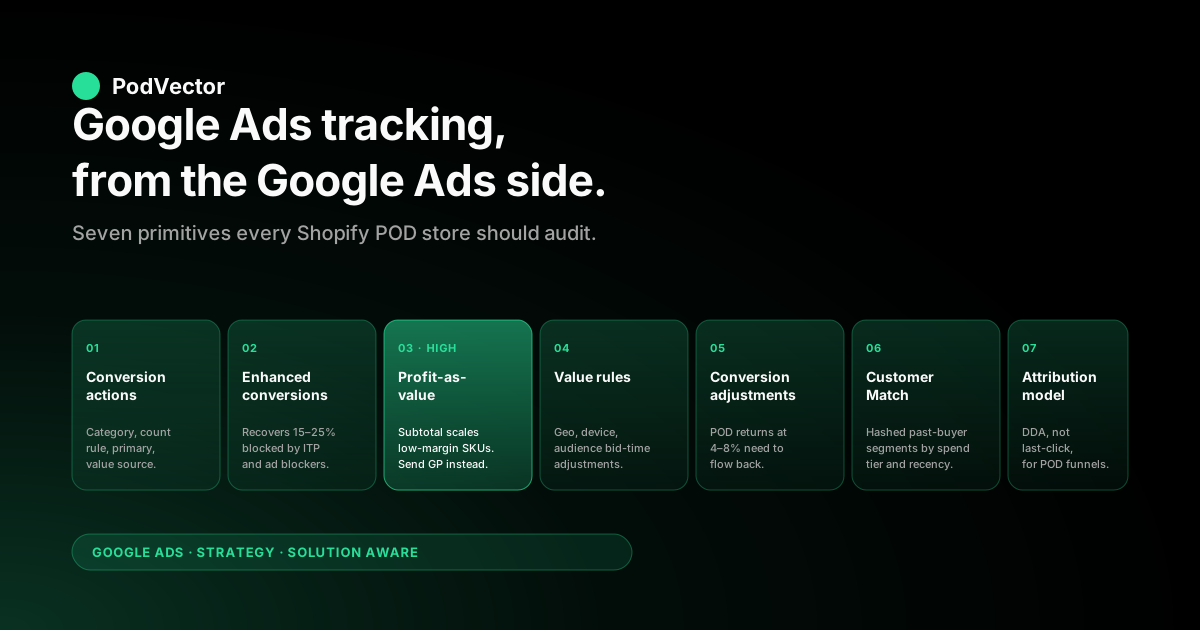
Quick Answer: Most setup guides walk through Google Ads tracking from the Shopify side — install the app, fire the tag, verify the event. This piece flips the lens. It walks through the seven Google Ads tracking primitives a print-on-demand store should be using on a Shopify catalog (conversion actions, enhanced conversions, value rules, conversion adjustments, GA4 imports, Customer Match, attribution model), what each one is built to do, where the Shopify-plus-POD edge cases break the default behavior, and the configuration that actually feeds Smart Bidding gross profit instead of subtotal. The plumbing is in Shopify; the strategy lives in Google Ads' settings.
Why look at tracking from the Google Ads side
If you read the standard Shopify-side guides — Shopify's own conversion tracking blog, Stape's setup walkthrough, GemPages' two-method comparison — you come away believing tracking is a single decision: install the Google & YouTube app or wire up GTM. That framing is correct for the plumbing and incomplete for the strategy.
The Google & YouTube app fires a purchase event. What that event means inside Google Ads — what action it represents, what value Smart Bidding sees, what attribution model splits the credit, what adjustment flows in three weeks later when the customer returns the shirt — is configured on the Google Ads side. Most print-on-demand stores spend hours getting the Shopify side clean and then accept whatever default Google Ads chose for everything downstream.
The tracking primitives Google Ads exposes for a Shopify catalog are not many — there are seven that matter for a POD store, and the defaults are wrong on at least three of them for any catalog with mixed-margin SKUs. This piece walks through each, in the order the conversion event encounters them after it leaves Shopify.
For the symmetric view starting from the Shopify tracking layers, our Shopify Google Ads tracking strategy for POD piece is the companion. Both belong to the broader frame in the complete Google Ads playbook for print-on-demand sellers, and the cluster index lives at the Google Ads strategy cluster hub. Topic-level context: the Google Ads for POD topic hub.
Conversion actions: the unit of tracking
A conversion action in Google Ads is a single named outcome with a value, a category, an attribution model, and a count rule. The Google & YouTube app, when you connect it, creates four by default: Purchase, Add to Cart, Begin Checkout, View Item.
Most stores leave them as-is. For a POD store the default configuration silently does three things you probably do not want.
The default category is Purchase, fine. The default count rule is "every conversion" rather than "one per click", which inflates conversion counts when a returning customer places a second order off the same gclid within the attribution window. For high-AOV one-shot apparel buys this rarely matters; for a store running retargeting on a buyer audience, it inflates ROAS readings of the retargeting campaigns specifically. Set Purchase to "one per click" if your retargeting Performance Max or Demand Gen campaigns look suspiciously efficient.
The default primary action set in Smart Bidding includes only Purchase — also fine for almost every POD store. Resist the temptation, common in non-POD ecommerce articles, to also mark Add to Cart or Begin Checkout as primary.
Smart Bidding will then optimize toward the lower-funnel proxy, and POD's wide margin spread between SKUs makes proxy optimization more dangerous than for a fixed-margin catalog. Mark them as secondary (observation) so you can see them in the report without letting them steer bids.
The default conversion value is order subtotal pulled from the Shopify checkout payload. This is the costly default. Subtotal does not subtract Printify or Printful supplier cost.
Subtotal does not subtract Shopify Payments or Stripe processing fees. Subtotal does not subtract shipping when shipping is bundled into the buyer price.
For a POD store with a mug at 65% gross margin and a heavy hoodie at 18% gross margin in the same catalog, telling Smart Bidding both orders are worth their subtotal is telling it to scale the hoodie. The fix — replacing subtotal with gross profit on the conversion event — is structurally a Shopify-side change but its outcome is read on the Google Ads side. We walk the mechanics in the Shopify Google Ads conversion strategy piece and detail the per-line-item cost rollup in the Set Up Google Ads conversions on Shopify strategy piece.
Configure conversion actions once correctly and the rest of Google Ads' tracking primitives have something honest to work on. Skip the audit and you carry the wrong value through every other layer.
Enhanced conversions: making them work with Shopify checkout
Enhanced conversions ship hashed first-party identifiers — email and phone — to Google Ads alongside the conversion event so Google can match the conversion back to the user even when the third-party click cookie has been blocked, expired, or never set. In a 2026 web where a meaningful share of paid clicks land in browsers running ITP-style restrictions, an ad blocker, or a privacy extension, enhanced conversions are the difference between Google Ads seeing 75% of your real conversion volume and seeing 95% of it.
For Shopify the activation path is now in the Google & YouTube app — toggle "Enhanced conversions for web" in the connection settings and it pulls hashed customer email from the order/create event. That works. Three things still go wrong on POD-heavy stores:
- Match rates below 60%. Visible in Google Ads at Tools → Conversions → click the action → Diagnostics. A match rate under 60% usually means the email field in the payload is blank because the buyer checked out as a guest with phone-only auth, or the third-party app stack stripped customer info before the tag fired. Both are fixable but neither shows up unless you check.
- Stale customer match scope. Enhanced conversions are an account-level setting; if you also have other Google Ads accounts (e.g., a separate one for Meta-driven retargeting) connected to the same Merchant Center, confirm enhanced conversions is enabled on each one independently. Linked accounts do not inherit it.
- Checkout extension migration gaps. Shopify's 2024 migration to checkout extensions broke older third-party tracking apps that injected scripts via the legacy checkout. If your enhanced conversions are wired through a third-party app rather than Shopify's native Google & YouTube app, confirm the app has shipped its Web Pixels API update. Older versions silently send the conversion without the hashed identifiers, which Google Ads displays as "active" but with a nonsensical match rate.
The diagnostic page tells you what is happening; the fix is usually a config change in the Shopify-side tag. For more on the Shopify-side mechanics, the Shopify Google Ads conversion tracking setup guide for POD walks the install end to end.
Value rules: the underrated POD lever
Value rules in Google Ads let you adjust conversion value at bid time based on attributes of the click — geography, device, audience membership. Most ecommerce articles either skip them or describe them as a fine-tuning lever for already-mature accounts. For POD they are quietly the most useful Google Ads tracking primitive, because POD margins vary by exactly the things value rules can read.
Three POD-specific value rule patterns worth running:
- Geography rule for international shipping. Printify and Printful charge meaningfully more to fulfill outside the buyer's region — a US t-shirt to a Canadian buyer adds $4–7 in cross-border shipping that you may or may not pass through to the customer. Build a value rule that subtracts an estimated cross-border premium from international clicks. Smart Bidding will then bid less aggressively into geographies where your unit economics are worse.
- Device rule for mobile vs. desktop. If your Shopify analytics shows mobile cart-abandonment after add-to-cart at 1.5x the desktop rate (very common for POD) but ROAS is similar at the campaign level, the underlying truth is that mobile costs you more clicks per conversion. A small negative value rule on mobile — 5% to 10% — tells Smart Bidding the mobile click is worth slightly less and rebalances bids accordingly. Test on a single campaign first.
- Audience rule for repeat buyers. POD repeat buyers convert at 2–3x the rate of first-touch buyers and at higher AOV. A positive value rule on a Customer Match segment of past buyers tells Smart Bidding to bid harder on retargeting clicks, often the difference between a working retargeting campaign and one that quietly underspends.
Value rules sit in front of Smart Bidding, not in the conversion event itself, which means they apply equally well whether you are sending subtotal or gross profit as the underlying conversion value. They are a bid-time adjustment on whatever value you fed in. Combine them with profit-as-value (Layer 3 in the tracking layers piece) and the signal Smart Bidding optimizes against starts to look like real per-click contribution margin.
Conversion adjustments: refunds and restatements
Conversion adjustments are the second-most-skipped Google Ads tracking feature for POD stores, after value rules. The mechanic: for an order that has already converted, you post an adjustment record back to Google Ads with the same gclid, telling it the order was actually worth a different amount (a refund, a partial refund, a chargeback). Google Ads then revises the conversion value retroactively and Smart Bidding learns from the corrected number.
POD apparel return rates run 4–8% in our customer cohort, against a 2–3% ecommerce average. POD usually does not resell the returned unit, so a return is essentially a full reversal of the order's contribution margin. If your tracking does not feed those adjustments back, Smart Bidding believes refunded orders converted at full value and bids harder for the SKUs and audiences with the highest return rates — exactly the opposite of what you want.
The Google Ads-side configuration:
- Adjustment type.
RETRACTfor full refunds,RESTATEfor partials. POD support flows that issue partial credits — for "wrong size, keep the wrong one and get a discount" — should useRESTATE, notRETRACT. - Adjusted value. If you are sending gross profit as the original value, the adjustment should send adjusted gross profit, not adjusted revenue. For a full refund where the supplier still bills you for the produced unit, the adjusted value is often a small negative number (the supplier cost) rather than zero.
- Adjustment time. The refund timestamp from Shopify, not the original order time. Google Ads' adjustment window is 55 days from the conversion; refunds outside that window cannot be posted and silently fail. Apparel returns over 60 days from purchase do not get adjusted, which is fine — the volume there is low.
The adjustments view in Google Ads (Tools → Conversions → Adjustments) tells you whether anything is being posted. An empty page means you are not running this feature. We have not yet seen a Shopify POD store under $20K/month spend that runs this layer cleanly without a server-side relay or a tracking app that ships native refund support.
For how attribution and adjustment interact in the report — what gets adjusted, where, and how Smart Bidding incorporates the change — see our attribution models piece for POD.
GA4 imports vs. native Google Ads tracking
A common Shopify Google Ads question we get: "I already have GA4 firing on my checkout. Can I just import the GA4 purchase event into Google Ads instead of running a separate Google Ads conversion?" The answer is yes, and for a POD store the answer to "should I" is more often no.
What you give up with GA4 imports:
- Latency. GA4 imports run on a delay (sometimes hours, occasionally a day). Smart Bidding learns slower from delayed signal. For a campaign that fires fewer than 30 conversions per week, the latency materially hurts learning.
- Attribution-window mismatch. GA4's default attribution window is different from Google Ads' default. Importing means you accept GA4's window for that conversion action, which is rarely what you want for paid optimization.
- Enhanced conversions are not imported. The hashed-identifier match-back signal that recovers the 15–25% of conversions blocked by ad blockers and ITP only flows through native Google Ads tracking, not GA4 imports.
What GA4 imports do well: cross-channel attribution sanity-checks, content/SEO conversion tracking that does not need to feed Smart Bidding directly, and consolidated reporting if your team already lives in GA4. Run GA4 alongside native Google Ads tracking, not as a replacement. The two are complementary instruments.
For a side-by-side on choosing measurement tooling, see our Shopify Google Ads apps strategy piece, which compares native, GA4-fed, and third-party server-side options.
Customer Match and offline conversion imports
Customer Match lets you upload hashed customer email lists to Google Ads and target (or exclude) those audiences in campaigns. Offline Conversion Imports let you upload conversion events that did not happen on a tracked browser — a phone-order purchase, a marketplace order matched back to a Google Ads click, a refunded order being adjusted — using the gclid as the join key.
For a Shopify POD store the two ride together. The Customer Match audience of past buyers, hashed from Shopify, is the targeting layer for high-value retargeting campaigns.
The Offline Conversion Imports endpoint is how those campaigns' adjustments and gross-profit-aware conversions get fed back. Both are configured on the Google Ads side; both depend on a clean Shopify-side hashing pipeline.
The mechanical setup involves either a Shopify app that handles Customer Match uploads natively (Elevar, Littledata, AdTrack all do this) or a custom job that reads from Shopify, hashes appropriately, and posts via the Google Ads API. The non-mechanical question is what segments to maintain. For POD specifically:
- Past buyers, by recency. 0–30 days, 30–90 days, 90–365 days. Targeting hardness drops with recency.
- Past buyers, by spend tier. Top 20% of buyers by lifetime contribution margin, not lifetime revenue. Lifetime revenue mis-classifies high-discount, low-margin buyers as VIPs.
- Cart abandoners with intent. Reached checkout, did not convert. Bid harder on this segment in Demand Gen and Performance Max.
- Designs-of-interest. Bought a specific design family — useful for new-launch retargeting in the same family. Requires a Shopify-side tag for design family.
The hard part of Customer Match for POD is keeping the segments fresh. A weekly export job is the minimum cadence; daily is better for stores running aggressive new-launch cycles. Most Shopify apps that "support" Customer Match upload once on connection and never refresh. Confirm refresh cadence before relying on the segment.
Attribution model: how to read the report
The conversion data flowing through every primitive above is then split across touchpoints by an attribution model. Google Ads' default since 2023 is data-driven attribution (DDA); some accounts still default to last-click for legacy reasons. The model determines which campaigns get credit for each conversion, which directly shapes Smart Bidding's bid decisions in the next learning cycle.
For POD the practical guidance:
- Use data-driven attribution (DDA) for everything that meets the volume threshold. DDA needs ~300 conversions per 30 days at the campaign group level; below that it falls back to last-click. Most POD stores hit the threshold at the account level but not always at the campaign level. The account-level model still applies even when individual campaigns fall below threshold.
- Do not switch attribution models frequently. Each switch resets Smart Bidding's learning. Pick one and run it for at least a quarter before reconsidering.
- Read the Paths report (Tools → Attribution → Paths) at least quarterly. For POD, the path report often shows a long discovery-then-conversion pattern: Demand Gen / YouTube touch → branded search → conversion. Last-click would assign the conversion to branded search; DDA splits the credit and tells Smart Bidding the upper-funnel touchpoint is doing real work.
For a deeper walkthrough of attribution models specifically for POD, see data-driven attribution for POD and the Google Ads attribution window explained for POD.
A Google Ads-side diagnostic in seven minutes
Run these seven checks inside Google Ads. Each takes about a minute. Failing any of them tells you which primitive to fix first. Open Tools → Conversions in your Google Ads account.
- Conversion action count. Should be three or four per Shopify connection (Purchase, Add to Cart, Begin Checkout, View Item). More than that, and you have stale duplicates from an old install. Pause the duplicates.
- Primary vs. secondary. Only Purchase should be marked Primary. If Add to Cart or Begin Checkout is Primary, demote them to Secondary (observation).
- Count rule on Purchase. "One per click" for retargeting-heavy accounts; "Every" only if you have a strong reason. Default is "Every", which inflates retargeting ROAS.
- Conversion value. Compare the average conversion value to your AOV in Shopify. If they are within 5%, you are sending subtotal — Layer 3 (profit-as-value) is not running. This is the highest-leverage gap.
- Enhanced conversions diagnostic. Click into the Purchase action → Diagnostics. Look for "Recording active" and a match rate > 60%. Lower means the hashed-identifier payload is incomplete.
- Conversion adjustments view. Tools → Conversions → Adjustments. Should show non-zero adjustments approximately matching Shopify refund volume. Empty page = Layer 4 missing.
- Attribution model on Purchase. Should be DDA unless you have an explicit reason otherwise. Last-click on a 2026 POD account is almost certainly suboptimal.
Three "fail" results out of seven is the typical state of a Shopify POD account that has never been audited from the Google Ads side. None of the fixes are large; they accumulate to a Smart Bidding signal that more closely tracks your actual P&L.
For the POD-shaped reading of the resulting data — which campaigns are actually winning on profit ROAS this week, which are drifting under hurdle — Victor connects Shopify, Printify, Printful, Google Ads, and Meta into one live data warehouse view and answers those questions in seconds. Asking "which campaigns made profit ROAS > 1.5x last week, net of returns?" is a one-line conversation; rebuilding the same view in spreadsheets is several days of work that goes stale the moment you finish. Victor answers your questions and acts on those answers — gated through your approval.
For ongoing benchmarking against the patterns we see across stores, the best practices for Shopify Google Ads (compared) piece pulls together what consistently moves the number across our POD customer set.
FAQs
Is Google Ads tracking on Shopify the same as Shopify Google Ads tracking?
Strictly the same workflow, different starting point. "Google Ads tracking Shopify" is the lens of someone managing the Google Ads account who wants to know how Shopify's data shows up in Google Ads' settings; "Shopify Google Ads tracking" is the lens of a Shopify operator getting events out the door. The mechanics of getting the conversion event from Shopify's checkout to Google Ads' conversion action are identical. The strategic decisions split — one set lives on the Shopify side (server-side relay, profit-as-value enrichment, refund webhook handling), the other lives on the Google Ads side (conversion action configuration, enhanced conversions toggle, value rules, conversion adjustments, attribution model).
A complete POD setup needs both. Our Shopify-side companion piece walks the four tracking layers; this piece walks the seven Google Ads-side primitives.
Does Google Ads tracking on Shopify need GTM, or is the Google & YouTube app enough?
For most POD stores under $5K/month in Google Ads spend, the Google & YouTube app is enough. Above that, two limits push you toward GTM (especially server-side GTM): the Google & YouTube app sends order subtotal as conversion value with no extension point, and it does not handle refund adjustments.
GTM is the lower-friction path to running profit-as-value and refund adjustments without writing custom backend code. Most operators we work with start on the app and migrate to server-side GTM (or a Shopify app like Elevar that wraps server-side GTM) when monthly spend crosses the $5K mark.
How do I confirm Google Ads is receiving Shopify conversions?
Three places to look. First, Tools → Conversions and check the recent conversion count for Purchase.
Second, the Diagnostics tab on the Purchase action — it shows whether the tag is firing, whether enhanced conversions match, and whether the value is being received. Third, place a real test order from a Google Ads click and look in the order timeline 24 hours later for the gclid.
If any of the three is empty, the Shopify-side tag is not firing or the gclid is dropping at checkout. Our Shopify Google Ads conversion tracking setup guide for POD walks the install verification.
What is enhanced conversions and is it worth enabling for a Shopify POD store?
Enhanced conversions sends hashed first-party identifiers (email, phone) along with the conversion event so Google Ads can match the conversion back to the user even when the third-party click cookie has been blocked. For a POD store running paid traffic in 2026, where 15–25% of clicks land in browsers with ITP-style restrictions or ad blockers, enhanced conversions typically recovers most of those otherwise-lost conversions.
Yes, it is worth enabling. The toggle is in the Google & YouTube app's connection settings; verify it is recording with a match rate above 60% via the Diagnostics tab.
Can I use value rules to fix my Shopify Google Ads tracking instead of switching to profit-as-value?
Partly. Value rules are a bid-time adjustment on the value you sent.
They can correct for click-attribute differences (geography, device, audience). They cannot correct for SKU-level margin variation, which is the dominant unit-economics issue for POD.
A hoodie at 18% margin and a mug at 65% margin sent through the same campaign will both be adjusted by the same value rule. Profit-as-value, sent on the conversion event itself, is the only way to differentiate at the SKU level. Use value rules and profit-as-value, not value rules instead of profit-as-value.
How long does it take Smart Bidding to relearn after I switch to gross profit as conversion value?
Plan for 14 days. The first 5–7 days will look erratic — CPC may rise, conversion volume may dip, ROAS targets will read very differently from before because the units changed.
Do not make other campaign changes during the relearning window; you will not be able to attribute the cause of any later movement. After 14 days, target ROAS values land at 1.2–1.6x for proven SKUs (versus the 3.5–4.5x of revenue ROAS), and Smart Bidding's bidding behavior reflects the actual contribution margin you care about.
Should I import GA4 conversions into Google Ads instead of using Google Ads' native tracking?
Not as a replacement. GA4 imports run on a delay, do not carry the enhanced-conversions match-back signal, and use GA4's attribution window rather than Google Ads'.
Run native Google Ads tracking for the conversion that feeds Smart Bidding; run GA4 alongside it for cross-channel sanity checks and content/SEO reporting. The two are complementary, not interchangeable.
What attribution model should a Shopify POD store use in Google Ads?
Data-driven attribution (DDA), unless you have an explicit measurement reason to use last-click. DDA reflects the upper-funnel work (YouTube, Demand Gen, Discovery) that POD stores often run alongside Search and Performance Max.
Last-click would assign all the credit to the bottom-of-funnel branded search click and starve the discovery campaigns of attributed conversions, which over time skews Smart Bidding away from the campaigns doing real acquisition work. Switch only after a quarter of stable readings on the current model.
Tracking is the input. Reading it is where decisions get made.
Once your Google Ads tracking primitives are configured cleanly — profit as value, enhanced conversions matching, adjustments flowing, DDA splitting credit honestly — the next question every week is which campaigns made money on profit ROAS, net of returns. Victor connects Shopify, Printify, Printful, Google Ads, and Meta into one live data warehouse view and answers that question in seconds. No spreadsheet, no dashboard build, no Sunday-morning reconciliation.
Try Victor free