
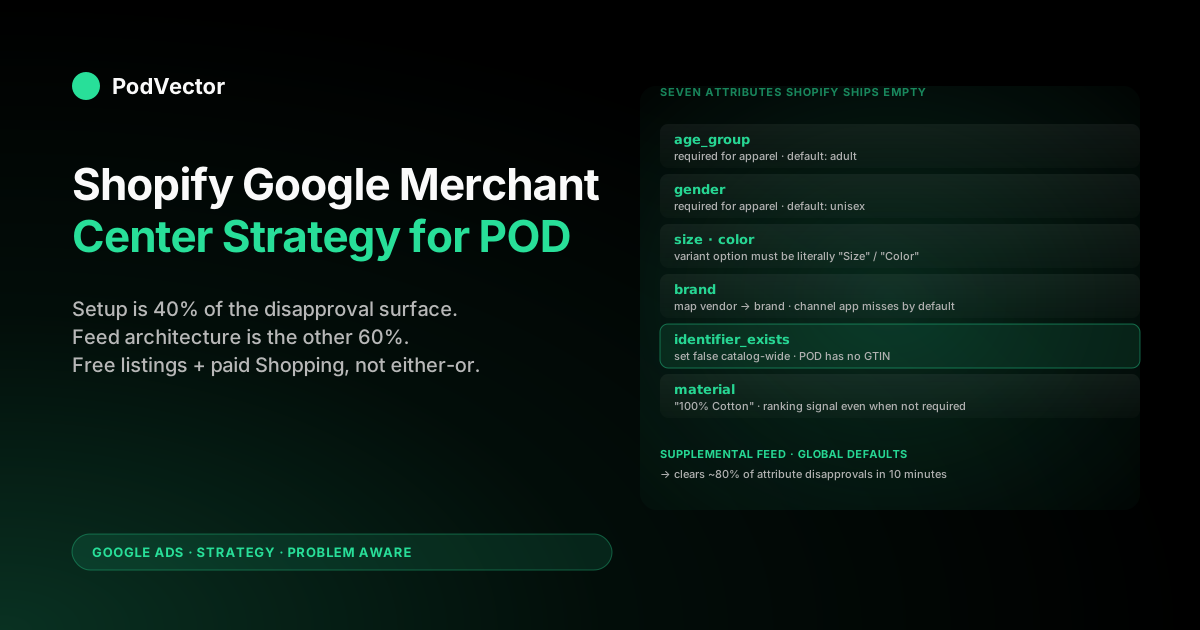
Quick Answer: A Shopify Google Merchant Center strategy for print-on-demand stores is mostly a feed-cleanup problem, not a setup problem. The Google & YouTube channel app installs in seven steps and the median Shopify owner is live in an afternoon — but it ships POD apparel to Merchant Center with seven required attributes empty (age_group, gender, size, color, brand, gtin/identifier_exists, and a real material), Printify mockup images that fail Google's 800×800 floor or trigger the text-overlay disapproval, shipping zones set to your Shopify HQ instead of the Printify partner that actually fulfills, and a default return-policy attribute that promises free returns Printify won't honor. Strategy here means deciding which fixes happen at the Shopify product level, which at the Merchant Center supplemental-feed level, and which at the channel-app override layer — then sequencing the launch so disapprovals don't burn three weeks of feed-review backlog before paid Shopping campaigns even bid.
Why Merchant Center is a strategy problem, not a setup problem
The published guides treat Merchant Center as connect-and-go. Adwisely's 9,000-word Shopping setup guide walks through Merchant Center wiring, feed validation, and Shopping campaign creation in one sequence. Shopify's own Merchant Center overview covers the four upload methods, five core advertising features, and a comparative FAQ. Both are correct for the median Shopify advertiser running owned-inventory product lines with stable SKUs and consistent fulfillment locations.
For Shopify print-on-demand, the same setup ships a feed Merchant Center will reject in three predictable waves: an initial review wave that catches missing apparel attributes, a post-approval wave that catches image and shipping mismatches once orders start flowing, and a policy wave that suspends the account if anyone audits whether the free returns attribute is honored. The setup steps the standard guides emphasize — connect the channel app, verify the domain, configure shipping — clear maybe 40% of the disapproval surface. The other 60% is feed-architecture decisions the channel app's defaults make wrong for POD on day one.
Strategy here means deciding the fixes upfront, not absorbing the disapproval queue as it arrives. Three structural decisions, made before the first Shopping campaign turns on, determine whether the Merchant Center account ramps cleanly to Shopping spend in 30 days or fights through a three-month disapproval backlog.
The companion complete Google Ads playbook for print-on-demand sellers covers the Google Ads side of the same architecture — campaign sequence, bidding, account structure. This article focuses specifically on the Merchant Center feed and policy layer that has to clear first.
The disapproval taxonomy that breaks POD feeds
Merchant Center's policy engine evaluates a Shopify feed against four buckets: required-attribute completeness, image quality, shipping accuracy, and policy compliance. POD stores fail in each bucket for a different structural reason, and the fixes live at different layers — Shopify product level, channel-app settings, supplemental feed in Merchant Center directly, or Merchant Center policy settings. Knowing which bucket a disapproval falls into is half the recovery.
| Bucket | Typical POD failure | Where to fix | Days to clear |
|---|---|---|---|
| Required attribute | Missing age_group, gender, size, color, brand, gtin/identifier_exists | Shopify product metafields → channel app maps to attributes | 3–5 days after fix syncs |
| Image quality | Below 800×800, text overlay on mockup, watermark, low-contrast Printify default | Replace at Shopify media library; channel app re-syncs | 1–3 days |
| Shipping accuracy | Shopify "ships from California" but Printify ships from Latvia partner | Merchant Center shipping settings + Shopify zone reset | 2–7 days |
| Policy compliance | free returns attribute set true while Printify won't accept buyer's-remorse returns | Merchant Center Account → Business information → Shipping & returns | 1–2 days, but suspension risk if caught at audit |
The 60% of disapprovals the standard setup guides don't catch live in two of those buckets — required attribute and policy compliance. Image and shipping disapprovals are loud, fire alerts in the Merchant Center dashboard, and resolve in days.
Required-attribute failures are quiet — Merchant Center will approve the SKU but suppress it from auctions, which looks like "feed approved, just not getting impressions" until someone notices the brand field is empty across 4,000 variants. Policy compliance failures are quietest of all and produce the worst outcome: the account approves, runs for two months, gets policy-audited, and suspends with a 7–14-day reinstatement window during peak season.
Apparel attributes: the seven Shopify ships empty
Shopify's product schema and Merchant Center's feed schema overlap maybe 70% out of the box. The Google & YouTube channel app populates the overlapping attributes automatically and leaves the rest empty.
For non-apparel categories that's fine. For POD apparel — which is most of POD — Merchant Center treats the empty attributes as suppression triggers. Seven attributes ship empty by default and matter for POD:
age_group— required for all apparel. Shopify has no native field; the channel app leaves it blank. Merchant Center expects one ofnewborn,infant,toddler,kids,adult. Fix at the Shopify product metafield level (namespacemm-google-shopping, keyage_group) so it propagates per product, or set a global default in Merchant Center supplemental feeds.gender— required for apparel. Shopify product type alone won't infer it. Set per-product tomale,female, orunisex. Most POD apparel isunisex— set that as a supplemental-feed default and override per-product where designs are explicitly gendered.size— required for apparel. Shopify variants carry size as a variant option, but the channel app maps it tosizeonly if the option is literally named "Size" with that capitalization. Variants with options named "T-Shirt Size" or "Item Size" silently fail to populate. Standardize variant option naming across the catalog.color— required for apparel. Same issue as size — variant option must be literally "Color" (or "Colour") for the channel app to map. POD stores often use "Style" or "Variant" as the option name; those don't map.brand— required for almost all categories. Shopify has a vendor field but the channel app populatesbrandfrom product type by default, not vendor. Manually set the Shopify vendor field to your storefront brand name on every product, then map vendor → brand in the channel app's attribute mapping.gtin/identifier_exists— POD products have no GTIN. Setidentifier_existstofalseat the supplemental-feed level for the entire catalog. Without this, Merchant Center assumes you have a GTIN you forgot to provide and disapproves.material— strongly recommended for apparel; affects ranking even when not required. "100% Cotton" or "50/50 Cotton-Poly Blend" pulled from the Printify product description. The channel app doesn't map this from Shopify product description text — it has to be set per-product or via supplemental feed.
The cleanest fix is supplemental feeds for the global defaults (identifier_exists: false, age_group: adult, gender: unisex, brand: [your store name]) and Shopify metafields for the per-product overrides. Set the supplemental feeds in Merchant Center directly under Products → Feeds → Supplemental feed; they layer on top of the primary Shopify feed without the channel app overwriting them. The companion piece on Google Merchant Center Shopify strategy for print-on-demand walks the supplemental-feed configuration step by step.
Image strategy: clearing the 800×800 floor and beating mockup CTR
Merchant Center's image policy has two layers: a hard technical floor (≥800×800 pixels, no text overlay covering more than 25% of the image, no watermark, no promotional badges) and a soft ranking layer that influences which Shopping placement wins the auction. POD stores fail the technical floor more than any other ecommerce category, and the soft ranking layer is where the biggest Shopping ROAS lever sits.
The technical floor. Older Printify mockup templates render at 600×600, which fails the 800×800 minimum. Newer templates and most Printful mockups render at 1500×1500 or higher and clear the floor.
The disapproval reads "Image too small" and the fix is to regenerate mockups in the Printify or Printful product editor at the higher-resolution template, which pushes a new image URL to Shopify on the next sync. The channel app picks up the new URL within 24 hours and Merchant Center reviews within 1–3 days. About 15% of POD stores have at least one design still on a legacy 600×600 mockup; those SKUs get suppressed silently until someone audits.
The text-overlay disapproval. Mockup templates that bake "BESTSELLER," "SALE 50% OFF," "NEW," or any promotional badge into the image trigger automatic disapproval under the "promotional overlay" policy. POD designers sometimes use these on Printify's product page in the design overlay zone — they look fine on the storefront, fail Merchant Center.
Fix is to use a clean mockup as the primary product image in Shopify and reserve any promotional treatment for storefront-only banners or merchandising tiles. The Shopify product page can have the promo image as a secondary image; the channel app pushes only the first image (the featured image) to Merchant Center, so the featured image has to be clean.
The soft ranking layer — lifestyle vs flat mockup. Once the technical floor is cleared, image quality drives ~30–60% of the variance in Shopping CTR for apparel. Flat Printify or Printful mockups (the t-shirt floating on white background) clear the floor but consistently lose to lifestyle imagery (model wearing the shirt, environmental context).
The lift in CTR runs 1.4–2.1x in apparel categories when flat mockups are replaced with AI-rendered model imagery from tools like Botika, Zmo.ai, or BotMockup at $30–60 per design and 24-hour turnaround. Push the rendered image back to Shopify's media library, set it as the featured image, and the channel app syncs it to Merchant Center automatically.
Image priority strategy: for the top 20% of designs by trailing-90-day Shopify revenue, replace flat mockups with lifestyle renders. For the long tail, leave flat mockups in place — the CTR lift doesn't justify the per-design cost on SKUs that ship one unit a month.
The 80/20 here is real: 4 in 5 POD stores get most of their Shopping clicks from less than 20% of the catalog, and image quality on that 20% moves the entire account ROAS more than any campaign-level optimization. The deeper play on Shopping image strategy is in Google Shopping Ads Shopify strategy for print-on-demand.
Shipping configuration for Printify and Printful fulfillment
Shipping is where the Shopify–Printify–Merchant Center trio fights itself most. Shopify ships shipping zones based on where the operator told Shopify the store is located ("ships from California" — that's where the store owner lives).
Printify ships from whichever print partner is closest to the buyer ("Printify Latvia" for EU orders, "Printify Texas" for US Central). Merchant Center treats the Shopify-declared origin as the shipping origin and validates the configured rates against the destination zone. When the Shopify-declared origin and the actual Printify origin diverge, three things go wrong:
- Shipping rate disapproval. Merchant Center's policy engine compares your declared shipping rate against the median for the declared origin → destination route. POD stores commonly under-declare ("Free shipping over $35") because that's the storefront promise, while Printify charges the operator $4–8 per unit for actual shipping. Merchant Center validates against what the storefront promised, not what Printify charges. Approves. Then a buyer somewhere clicks the ad, lands on the product page, sees a different shipping cost at checkout, and the policy engine flags the discrepancy on the next post-click crawl.
- Calculated-at-checkout suppression. Most POD stores set Shopify shipping to "Calculated at checkout" because Printify invoices actual rates. Merchant Center treats this as missing shipping data and either disapproves or suppresses the SKU from competitive auctions. The fix is to set a flat-rate fallback in Shopify (or in Merchant Center directly under Shipping & returns) that approximates Printify's domestic shipping — typically $5.50 for apparel as of 2026, $7.50 for Printful — and let it ship to Merchant Center as the declared rate. The buyer still pays whatever the storefront calculates at checkout; Merchant Center just needs a number to validate against.
- Origin–destination mismatch on policy audits. If you've set Shopify origin to your home address but Printify ships the actual order from a partner three time zones away, the buyer's tracking experience won't match the Merchant Center declared origin. Most of the time this never gets caught. When it does — usually during a policy audit triggered by a buyer complaint — the resolution requires updating Shopify origin to match the dominant Printify partner location for your highest-volume zone and adding a clear note in Merchant Center's business information about distributed fulfillment.
The cleanest configuration, in our pattern matching across POD operators: set Shopify origin to the Printify partner location that handles most of your orders (US Central for most US-targeting stores), set a Merchant Center flat-rate shipping table that approximates Printify's actual rates per zone, and ship "free shipping over $X" only as a Merchant Promotion attribute (which Merchant Center reads as a discount, not a shipping rate). The companion piece on the complete guide to Google Ads + Shopify integration for POD covers the Shopify-side shipping configuration in more depth.
Return policy: the free-returns suspension trap
Merchant Center's return_policy attribute and the free returns business setting are the single highest-stakes policy decision in a POD Shopify Merchant Center configuration. The default Shopify channel-app install does not set the attribute. The Merchant Center "Recommended" setup wizard prompts the operator to enable free returns to "improve product visibility." Most POD operators — running 2–6% return rates on apparel they can't accept back because Printify doesn't accept returns — click the recommended setting and walk into the suspension trap.
What Google verifies. Merchant Center's policy engine doesn't validate the free returns attribute on the way in. It validates on audit, triggered by buyer complaints filed via the Google Shopping listing or by random sampling of accounts.
The audit checks whether the storefront product page and checkout flow honor what the Merchant Center attribute promises. POD stores that promise free returns in Merchant Center but route returns through "contact us, we evaluate case-by-case" on the storefront fail the audit.
Suspension is 7–14 days during reinstatement. During Q4 that's catastrophic.
The safe configuration. Disable the free returns attribute. Set the storefront return policy to whatever Printify or Printful actually allows (typically: returns accepted only for printing defects or wrong item shipped, customer pays return shipping for buyer's-remorse refunds — though most POD operators just refund without accepting the return).
Document the real return policy in Merchant Center → Account → Business information → Shipping & returns. The product listings get a "no free returns" badge in some Shopping placements, which has measurable but small impact on CTR (-3% to -5% in apparel categories per our pattern matching). The cost is real but bounded.
The middle path. If the storefront brand can support a 30-day refund window without requiring the buyer to physically return the item (POD's natural shape — refund the buyer's card and let them keep the printed item, since accepting it back doesn't recover the supplier cost anyway), you can set the Merchant Center attribute to "30-day refund, no return required" honestly. That's the configuration that actually matches POD economics, holds up to audit, and avoids the CTR hit from the "no returns" badge. The legal-language version of that policy lives in the storefront refund page; the Merchant Center attribute mirrors it.
This is the disapproval bucket where Shopify's setup wizard most actively misleads POD operators. The companion at Shopify Google Ads strategy for print-on-demand walks the broader policy alignment between Shopify storefront, Printify supplier reality, and the Google ads layer.
Free product listings vs paid Shopping: the POD allocation
Merchant Center exposes Shopping inventory in two surfaces: free product listings (Google Shopping tab, Search shopping placements without a paid bid) and paid Shopping campaigns. POD operators tend to underuse free listings and over-rely on paid Shopping, which is exactly backwards for the margin profile.
The economic argument: free listings have zero CPA. Every conversion from a free listing is pure margin.
They convert at lower volume than paid Shopping (free listings get roughly 5–15% of the impression share their paid equivalent would, depending on category competitiveness), but the conversions cost nothing. For a 32% margin POD apparel store, a $100 sale via free listing is $32 profit; the same sale via paid Shopping at 4.4x reported ROAS is roughly $0 profit before reconciling supplier cost.
Three free-listing optimizations specific to POD:
- Long-tail design queries the paid Shopping budget can't afford. Most POD designs target niche queries that don't justify a paid bid because the search volume is too low. Free listings still surface for those queries. Make sure every design in the long tail has a Shopify product title that matches the niche query exactly — "Funny accountant CPA shirt 2026 graphic tee" beats "Funny Shirt #4127" on the long-tail Google Shopping query "funny CPA shirt." The product title is what Google Shopping indexes.
- Google Shopping tab placement. The Google Shopping tab (https://www.google.com/shopping) shows free listings prominently. Buyers who browse the tab — typically gift-buyers and price-comparison shoppers — convert at higher rates than buyers who land via paid Shopping ads on Search. Make sure your top-20% designs have full attribute completeness so they qualify for tab placement (not all listings do; the more complete your feed attributes, the higher the tab visibility).
- Promotion attribute on free listings. Merchant Promotions (the discount badge that appears on Shopping listings) work on free listings too. A "10% off" promo badge on a free listing can lift CTR 8–15% with no paid spend impact. Set up promotions in Merchant Center under Marketing → Promotions and they apply to both free and paid surfaces.
The right allocation, in our pattern matching: don't pick free or paid; configure both and let the long-tail catalog ride free listings while the top-20% of designs run in curated Performance Max. The two surfaces don't cannibalize — paid Shopping and free listings can both surface the same SKU on the same SERP without conflict. Most POD operators leave free-listing impression share on the table by treating Merchant Center as a paid-Shopping setup tool rather than a dual-surface distribution channel.
Supplemental feeds and custom labels for margin-tier curation
The Shopify channel app produces one primary feed. Merchant Center allows up to 100 supplemental feeds layered on top. POD operators who run only the primary feed forfeit the cleanest mechanism for catalog curation, attribute defaults, and margin-tier bidding signals.
Three supplemental-feed strategies that work for Shopify POD:
- Global attribute defaults supplemental feed. A single Google Sheet with
idand the seven default attributes (identifier_exists: false,age_group: adult,gender: unisex,brand: [storefront],material: 100% Cotton, etc.). Apply to all products. Override per-product via Shopify metafields where the default is wrong. This single feed clears 80% of the required-attribute disapproval surface in 10 minutes. - Custom-label margin-tier feed. A second supplemental feed mapping each Shopify product ID to a margin tier custom label (
custom_label_0: high_margin,medium_margin,low_margin) based on Printify or Printful supplier cost relative to retail price. The feed is regenerated weekly from a Shopify export joined against your supplier-cost spreadsheet. In paid Shopping, split product groups by custom_label_0 and bid higher CPC ceilings on the high-margin tier. In Performance Max, build asset groups around the high-margin tier exclusively for the most efficient ROAS targets. The cluster piece on Google Ads Shopify strategy for print-on-demand covers the bidding-by-margin layer in depth. - Curated-feed inclusion list. A third supplemental feed that uses the
excluded_destinationattribute to suppress the bottom 80% of designs from paid Shopping while letting them remain on free listings. Top 20% by trailing-90-day revenue rides paid Shopping with a tight tROAS target; long tail rides free listings only. Refresh monthly. The Shopping budget concentrates on the SKUs that actually convert; the long tail still earns free impressions without contaminating Smart Bidding's learning signal.
Supplemental feeds attach in Merchant Center under Products → Feeds → Supplemental feed → Add. They can pull from Google Sheets (refreshes on a schedule), an SFTP location, or a direct URL.
Google Sheets is fastest for getting the global-defaults feed live; SFTP scales when the per-product mapping grows past ~5,000 rows. The companion piece at Shopify and Google Merchant Center strategy for print-on-demand walks the supplemental-feed implementation in technical detail.
The disapproval-recovery playbook
Most Shopify POD Merchant Center accounts hit a disapproval wave within 14 days of going live. The wave isn't a sign of failure — it's the policy engine doing what it's supposed to. The recovery playbook is what separates accounts that clear in five business days from accounts that fight through six weeks of partial approvals.
Triage by impact, not by alert volume. Merchant Center's diagnostics dashboard ranks issues by SKU count affected, which surfaces low-volume long-tail issues first. The right ranking is by trailing-30-day Shopify revenue affected.
Sort the disapproval list by which products are actually selling, fix those first, and let the long tail catch up in batch. Most POD stores find that 10–15 SKUs account for half the disapproval-related revenue loss; the other 1,500 SKUs in the queue can wait a week.
Fix at the source, not at the Merchant Center surface. The "Edit" affordance in Merchant Center diagnostics lets you fix a single attribute on a single SKU directly in the Merchant Center UI. The fix lasts until the next channel-app sync — 24 hours — and then gets overwritten.
Always fix at the Shopify product or supplemental feed layer so the fix survives the sync. The exception is the global defaults (identifier_exists: false, etc.) that ride on a dedicated supplemental feed.
Use the resubmit-for-review queue. After a feed fix, Merchant Center re-reviews on the next crawl, typically 24–72 hours. For high-impact fixes you can request expedited review via the diagnostics → Issue → "Request review" button, which moves the item into a 24-hour queue. Use sparingly — Google rate-limits the expedited queue and overuse can flag the account for manual review, which is slower than the automatic queue.
Watch for silent suppression vs explicit disapproval. Explicit disapprovals show in the Diagnostics dashboard. Silent suppressions don't — the SKU shows "Approved" but Merchant Center deprioritizes it in auctions because of attribute incompleteness or low image quality.
The diagnostic is impression-share dropping on a SKU that previously won impressions. Cross-check with Performance reports → Shopping → Impressions by product.
If a previously-strong SKU's impression share drops 60%+ without a campaign-level change, suppression is the likely culprit. Audit the SKU's full attribute set and image quality.
A 60-day Merchant Center ramp for Shopify POD
One operator-tested ramp from "channel app installed" to "feed clean, paid Shopping ramping, free listings live" on a Shopify POD store with 200–400 SKUs:
- Days 1–3: Install Google & YouTube channel app. Verify domain. Submit primary feed. Configure shipping (flat-rate fallback at $5.50 domestic). Disable
free returnsattribute. Set business-information return policy to match Printify reality. Submit for initial Merchant Center review. - Days 4–7: Build global-defaults supplemental feed in Google Sheets (
identifier_exists: false,age_group: adult,gender: unisex,brand: [storefront],material: 100% Cottonper default). Attach to Merchant Center. Resolve any Tier 1 image disapprovals (under 800×800, text overlays). - Days 8–14: Initial review concludes. Fix any required-attribute disapprovals at the Shopify metafield layer. Standardize variant option naming (Color, Size, Material) across the catalog so the channel app maps correctly. Top-20% designs get lifestyle-render image upgrades.
- Days 15–21: Free listings go live. Submit feed for Promotion attribute eligibility. Build margin-tier custom-label supplemental feed and attach. Free listings start producing low-volume conversions (5–25/week typical).
- Days 22–35: Standard Shopping launches at $25/day with curated-feed supplemental feed (top-20% designs only). Daily disapproval triage on the trailing-30-day-revenue-weighted issue list. Most second-wave disapprovals (post-approval crawls catching shipping or image quirks) clear in this window.
- Days 36–60: Performance Max launches with margin-tier asset groups, customer-match audience signals, tROAS set against margin-corrected conversion value. Free listings and paid Shopping run in parallel. Monthly supplemental-feed refresh cycle established (margin tiers, top-20% inclusion list). Total Shopping budget ~$80–120/day, free-listing impressions ~10,000–25,000/day depending on niche.
The 60 days produce a feed that's clean against Merchant Center's policy engine, a Shopping ramp that sequenced behind clean conversion data instead of fighting through disapprovals, and a free-listing surface earning incremental revenue at zero CPA. For the broader Google Ads ramp that runs in parallel, see the cluster pillar at the complete Google Ads playbook for print-on-demand sellers.
FAQs
Do I need a separate Merchant Center account if I run multiple Shopify POD stores?
No. Use one Merchant Center account with separate sub-accounts per Shopify store. Each sub-account links to one Shopify store via the Google & YouTube channel app and submits its own primary feed.
The parent Merchant Center account aggregates reporting across stores. Fragmenting Merchant Center accounts by store forfeits cross-store policy compliance signal — Google's policy engine builds reputation against the parent account, and a clean track record across multiple stores carries more weight than three siloed accounts each starting from zero.
What's the fastest way to clear required-attribute disapprovals on a 1,000+ SKU POD catalog?
Build a global-defaults supplemental feed in Google Sheets, attach it to Merchant Center, and let it layer the seven required attributes (identifier_exists: false, age_group: adult, gender: unisex, brand: [storefront], material: 100% Cotton, plus default size and color where variant naming is non-standard) across the entire catalog in 10 minutes. This clears about 80% of the required-attribute disapproval surface in one batch. Per-product overrides via Shopify metafields handle the remaining 20% — designs that are explicitly gendered, kids' apparel that needs age_group: kids, etc. The supplemental-feed approach scales; product-by-product editing in Shopify or Merchant Center does not.
Can I use "Calculated at checkout" shipping in Merchant Center?
Not directly. Merchant Center treats "Calculated at checkout" as missing shipping data and either disapproves the affected SKUs or suppresses them from competitive auctions.
The fix is to set a flat-rate fallback in Shopify (or in Merchant Center directly under Shipping & returns) that approximates Printify or Printful's actual domestic shipping rate — typically $5.50 for Printify apparel, $7.50 for Printful, as of 2026. The buyer still pays whatever your storefront calculates at checkout; Merchant Center just needs a number for policy validation. Most POD stores under-set this and don't notice the auction suppression because impressions drop quietly without a Diagnostics alert.
Should I enable free returns in Merchant Center for a POD store?
No, unless your storefront actually offers a 30-day refund without requiring physical return. The default "free returns" attribute promises Google what Printify won't accept (buyer's-remorse returns on printed apparel), and the policy engine validates the attribute on audit — triggered by buyer complaints or random sampling.
POD stores that promise free returns and route them through case-by-case review fail the audit and suspend for 7–14 days during reinstatement. The safer configuration is to disable the attribute, accept a small (~3–5%) CTR hit from the "no free returns" badge, and document the real Printify-aligned return policy in Merchant Center → Account → Business information → Shipping & returns. The middle path: refund the card, let the buyer keep the printed item, and configure Merchant Center as "30-day refund, no return required" — that's the only configuration that simultaneously matches POD economics, audits cleanly, and avoids the CTR hit.
How much does the image quality really matter for a POD Shopping feed?
For the technical floor (≥800×800, no text overlay, no watermark), it's binary — fail and the SKU disapproves. For the soft ranking layer (lifestyle vs flat mockup), image quality drives 30–60% of the variance in Shopping CTR for apparel.
AI-rendered model imagery from Botika, Zmo.ai, or BotMockup at $30–60 per design lifts CTR 1.4–2.1x over flat Printify mockups in our pattern matching across POD operators. Apply selectively — top 20% of designs by trailing-90-day revenue justify the per-design cost; long tail can ride flat mockups. The 80/20 here is real: image quality on the top 20% moves total account ROAS more than any campaign-level optimization.
How does PodVector AI help with Merchant Center for a Shopify POD store?
PodVector AI is a profit dashboard that joins Google Ads spend, Shopify orders, Merchant Center performance data, and Printify or Printful supplier cost into one live view per design, per campaign, per day. Most POD operators discover that their Merchant Center "approved" SKU count and their Merchant Center "earning impressions" SKU count differ by 30–60% — silent suppression that doesn't show in Diagnostics.
Victor surfaces the gap directly: "of your 1,200 approved SKUs, 740 earned zero Shopping impressions in the last 30 days; here are the 12 that account for half your Shopping revenue and the 4 silent-suppression patterns affecting the rest." The Merchant Center strategy in this article works without PodVector AI; it just requires the operator to maintain the cross-platform reconciliation manually in spreadsheets, weekly. PodVector AI replaces that work with a live view connected to your live data.
See which Merchant Center SKUs actually earn impressions — and which silently suppress
PodVector AI connects your Shopify store, Google Ads account, Merchant Center feed, and Printify or Printful catalog and shows you which SKUs are approved-but-suppressed, which are paying after supplier cost, and which Shopping placements (free listings vs paid) drive real margin. Most Shopify POD operators discover that 30–60% of their "approved" Merchant Center catalog earns zero impressions, and that the campaigns they were scaling were running against the silently-suppressed long tail. And see the Merchant Center reconciliation in under 10 minutes.
Try Victor free