
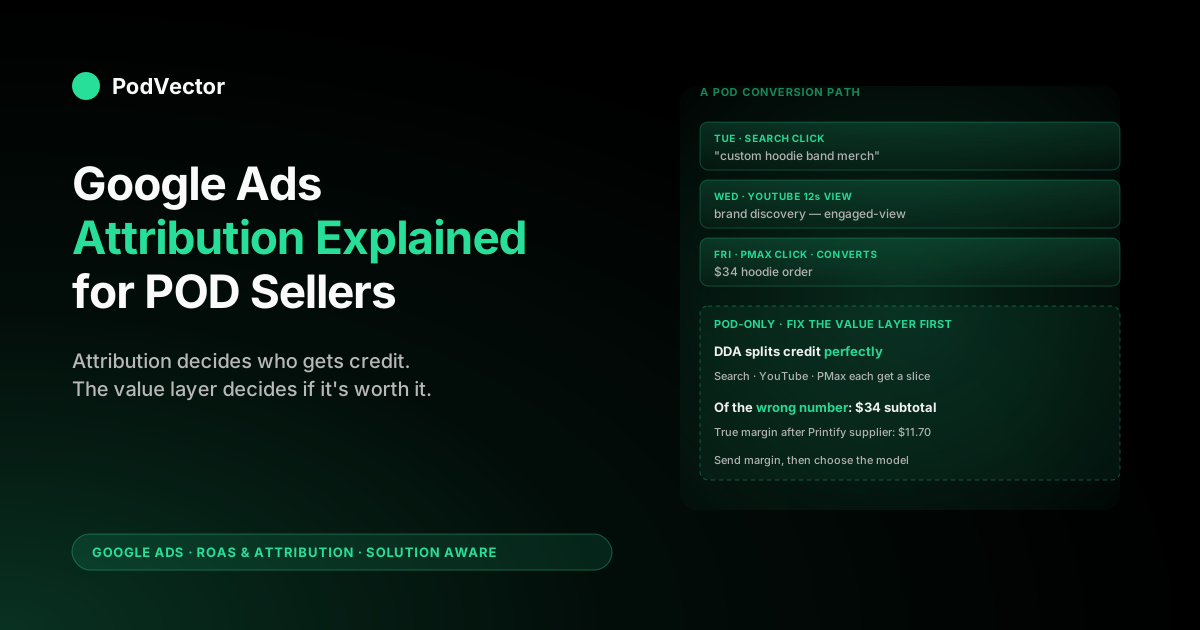
Quick Answer: Google Ads attribution is how the platform decides which click, view, or interaction gets credit for each conversion. For most accounts in 2026, that means data-driven attribution (DDA) — a machine-learning model trained on your account's conversion paths.
The piece nobody tells POD sellers: attribution decides who gets credit, but the conversion value Google uses is order subtotal by default, which masks Printify and Printful supplier cost. So even with perfect attribution, Smart Bidding optimises toward thin-margin SKUs because the value layer lies.
Fix the value layer first (send contribution margin, not subtotal), then choose the model. Otherwise you're tuning attribution on top of bad numbers.
What Google Ads attribution actually is in 2026
Attribution in Google Ads is the rule that decides which ad interaction gets credit for a conversion when a customer touched more than one before buying. Someone clicks a Search ad on Tuesday, then watches a YouTube ad on Wednesday, then comes back via a Performance Max click on Friday and orders a hoodie.
One conversion, three interactions. Attribution decides whether the Search click, the YouTube view, the Performance Max click, or some weighted combination receives the conversion in your reports.
That sounds like reporting trivia. It isn't. Attribution determines three downstream things, in order of how much they affect your account:
- What Smart Bidding learns from. Every Smart Bidding strategy — Maximize Conversions, Target ROAS, Maximize Conversion Value — feeds on the conversion data the attribution model assigns. Change the model, and you change which keywords, audiences, and placements look profitable. The same campaign can read as ROAS 3.2 under last-click and ROAS 4.1 under DDA because credit shifts upstream to discovery touches.
- Which channels look like they're working. YouTube and Display almost always under-credit themselves on last-click because they're rarely the final touch. Switching to DDA usually shifts 20–40% of credit upward into those channels, which changes whether your YouTube spend is a "waste" or a "discovery engine."
- How you make budget decisions. If Search keeps getting last-click credit for conversions YouTube actually started, the obvious move is to cut YouTube. The obvious move is wrong. Attribution is what makes the upstream value visible.
Google deprecated four rules-based attribution models in September 2023 — Linear, Time Decay, Position-based, and First Click — citing low adoption rates. As of 2026, you have two choices for new conversion actions: data-driven attribution (the default and Google's recommendation) and last-click attribution (the legacy fallback). Everything else is gone from the dropdown.
For the broader picture of how attribution sits inside the full Google Ads measurement stack for POD, see the cluster pillar at the complete guide to Google Ads ROAS and attribution for POD.
Why POD sellers have a different attribution problem
The attribution literature is written for retailers with stable margin and predictable inventory cost. POD breaks four of those assumptions, and the standard advice — "switch to DDA, set Target ROAS, let it run" — fails in specific, measurable ways when the underlying business is print-on-demand.
- Conversion value is wrong before attribution even runs. Google Ads receives
checkout.subtotal_pricefrom the default Shopify pixel. For a $34 hoodie, that's $34. The actual contribution margin after Printify supplier cost ($18), processor fees ($1.30), and shipping subsidy ($3) is more like $11.70. DDA attributes credit perfectly across touches — but to a $34 number that bears no relationship to profit. Smart Bidding then optimises toward the cheapest acquisitions of that $34 number, which often means the lowest-margin SKUs. Attribution becomes a polished mirror of a wrong measurement. - Conversion volume is often below DDA's training threshold. Google requires roughly 300 conversions in 30 days per conversion action for DDA to produce stable models. A POD store at $10–30K monthly revenue with $35 AOV has 280–860 monthly conversions before refunds. That's right at the edge. Below the threshold, Google falls back to a generic model trained on similar accounts in your vertical — meaning your "DDA" is partially someone else's data.
- Refund rates are 2–6% and aren't fed back. Apparel and mug returns are higher than the ecommerce average. Google Ads gets the order conversion when checkout completes; it doesn't get the refund unless you wire up an offline conversion adjustment. Smart Bidding chases refunded orders the same as fulfilled ones, and attribution credits get assigned to interactions that led to a return.
- Cross-device research-then-buy is the default for visual products. POD shoppers — especially in apparel and home goods — Pinterest-pin on phone, research on desktop, buy on mobile. Google's cross-device modeling depends on signed-in Chrome sessions to stitch the path. Privacy-led measurement makes that less reliable each year. The attribution model assumes a path it can no longer fully see.
None of this means attribution is broken for POD. It means the off-the-shelf setup needs three POD-specific fixes — value layer, refund feedback, and conversion-window tuning — before the attribution model has a chance to give you a useful answer. The rest of this article walks each piece.
The attribution models available today
As of April 2026, Google Ads offers two attribution models for new conversion actions. Older accounts may still see legacy models on existing actions, but you can't create new conversions with anything else.
- Data-driven attribution (DDA). The default. Machine learning analyses your account's conversion paths and assigns fractional credit to each interaction based on how much it actually changed the probability of conversion. Different campaigns and even different keywords get different credit weightings depending on what role they played in the path. Requires sufficient conversion volume to build the model; otherwise Google falls back to a vertical-similar generic model.
- Last-click attribution. 100% of credit goes to the final ad interaction before conversion. Simple, intuitive, and almost always wrong about upper-funnel channels. Use this only if your account is structurally a single-channel Search account with no Display, YouTube, or Performance Max — which most POD accounts aren't, even when sellers think they are.
The four deprecated models — Linear, Time Decay, Position-based, First Click — are still mentioned in tutorial articles dated 2024 or earlier. Ignore those. They aren't selectable for new conversion actions. If you read advice about "switching to time decay for shorter sales cycles," the advice is from before September 2023 and the option no longer exists. Conversion actions that used to run on those models were auto-upgraded to DDA, so if you haven't touched your account in two years it's already on data-driven whether you chose it or not.
One setup gotcha that trips up POD sellers running multiple stores under one roof: if you use cross-account conversion tracking (a manager / MCC account feeding several Shopify stores), the attribution model is selected at the manager account level, not the individual account. Set it once in the MCC and it applies down the tree — changing it on a sub-account silently does nothing.
For a deeper dive on the model that's now the default, see Google Ads data-driven attribution explained for POD sellers.
How data-driven attribution actually works
DDA is not a rule. It's a per-account machine-learning model that Google retrains continuously. The mechanic is worth understanding because it explains why DDA behaves erratically on small accounts and stably on big ones.
The model compares paths that converted to paths that didn't. For each ad interaction in a path, it calculates the counterfactual: how much did the probability of conversion change because that interaction happened?
An interaction that nudged a 5% chance of conversion to a 35% chance gets a lot of credit. An interaction that moved 95% to 96% gets very little, because the user was probably converting anyway. The credits assigned to interactions in a converting path always sum to one.
The minimum-volume threshold Google publishes is 300 conversions on the conversion action in 30 days, plus 3,000 ad interactions in 30 days. Below either threshold, the action enters "limited" DDA — Google still labels the model "data-driven," but it's blending your data with a vertical-typical training set. POD stores at sub-$15K monthly revenue often sit in this band without realising it.
Two practical implications for POD sellers:
- Promote a micro-conversion if you're under threshold. If Purchase volume can't sustain DDA, add Begin checkout or Add to cart as a co-primary conversion. Begin checkout typically runs 3–5x Purchase volume and gives DDA enough signal to train. The trade-off: Smart Bidding will partially optimise toward checkout starts, which inflates the metric Google reports without inflating revenue. Watch Purchase ROAS, not the headline conversion column.
- DDA's "improvement" over last-click is bigger when you have real upper-funnel spend. A pure Search account moving from last-click to DDA might see credit shift by 5%. A Performance Max + Search + YouTube account often sees 25–40% of credit shift upstream. If you're running PMax — which most POD apparel sellers are by 2026 — DDA materially changes which campaigns look profitable.
Attribution windows: click, engaged-view, view-through
Attribution windows are the time bounds inside which an ad interaction can claim credit for a conversion. They're configured per conversion action, separately from the model itself. Three windows matter:
- Click-through window. Default 30 days. Range: 1–90 days. The window during which a click can be credited for a conversion. POD default-friendly: 30 days is right for impulse apparel; consider 60 days for higher-AOV custom products where the path includes review reading and design iteration.
- Engaged-view window. Default 3 days. The window during which a 10+ second YouTube view (or full skippable view) can be credited. Worth keeping at 3 days; longer windows over-credit YouTube on impulse purchase categories.
- View-through window. Default 1 day. The window during which a Display impression (no click) can be credited. Most POD sellers should leave this at 1 day or turn it off. View-through Display credits look like cheap conversions but rarely correspond to incremental revenue.
The window matters more than most setup guides admit. Lengthening the click window from 30 to 60 days will increase reported conversions by 5–15% in apparel POD because shoppers genuinely have a longer consideration cycle than the default assumes. But: it also expands the path DDA learns from, which can shift credit toward upper-funnel touches that are now technically "in-window." Don't change windows mid-campaign without expecting a Smart Bidding reset.
For the focused walkthrough on choosing and changing windows, see Google Ads attribution window explained for POD sellers.
How attribution shapes Smart Bidding
This is the connection that turns attribution from a reporting concept into a P&L lever. Smart Bidding strategies — Maximize Conversion Value, Target ROAS, Maximize Conversions, Target CPA — bid on every auction using the conversion-value signal Google has for that campaign. The conversion value Google has is whatever the attribution model assigned, weighted by your conversion-action value setting.
The chain is:
- Customer interacts with ads → conversion happens.
- Attribution model distributes credit across the touches in the path.
- Conversion value (subtotal, by default) is multiplied by each touch's credit fraction.
- Smart Bidding sees per-keyword, per-audience, per-placement conversion value totals.
- Smart Bidding adjusts bids to maximise the metric you set as objective.
If the conversion value is wrong (subtotal instead of margin), Smart Bidding's optimisation target is wrong — and DDA's beautiful credit distribution just spreads the wrongness more evenly across your account. This is why fixing the value layer is the first job and choosing the model is the second job, not the other way around.
Google's official guidance for Target ROAS bidding is to set the model to DDA before launching the strategy; switching attribution mid-flight resets the bidder's learning. If you're about to launch Target ROAS or Maximize Conversion Value on a POD campaign, complete two prerequisites first: send margin-based conversion value (not subtotal), and let DDA accumulate at least 14 days of post-fix data. Otherwise you're training the bidder on numbers you're about to invalidate.
True ROAS: the value-layer fix POD needs first
The default Shopify-to-Google-Ads pipe sends order subtotal as the conversion value. For a POD seller, that produces "ROAS" numbers Google Ads displays in dashboards that have no relationship to your bank balance. We call the corrected number true ROAS: revenue minus Printify or Printful supplier cost minus payment processor fees, divided by ad spend.
Three ways to fix the value layer, in increasing order of work and accuracy:
- Static margin assumption. Pick one margin percentage that approximates your catalog (POD apparel: 35–45% after supplier and processor). Multiply
checkout.subtotal_priceby that percentage in the Shopify Additional Scripts field, or set "Use the same value for each conversion" with a fixed dollar amount. Cheap, fast, and wrong on outlier orders — but better than raw subtotal. Right for stores with one or two product types. - Per-SKU margin lookup. Maintain a SKU-to-margin mapping (spreadsheet or database) and have your conversion event look up the margin for each SKU in the order. Right for stores with 10–50 SKUs and stable supplier pricing.
- Live margin computation. Pull Printify or Printful supplier cost via API per order, subtract from Shopify order data, send the result. Right for stores with 100+ SKUs, multi-supplier setups, or seasonal pricing changes — the tier where static and per-SKU break down. This is what Victor does automatically: live data joins of Shopify orders, Printify/Printful supplier invoices, and ad spend, surfaced as per-campaign true ROAS without you maintaining a margin spreadsheet.
The point isn't which method you pick. The point is that the conversion value Google Ads receives needs to approximate contribution margin, not subtotal, before any attribution conversation matters. For the dedicated walkthrough including the Shopify code edit, see add Google Ads conversion tracking to Shopify.
Attribution reports: what to actually look at
Google Ads attribution reports live under Tools → Measurement → Attribution. Most POD sellers either ignore them entirely or get lost in the dropdown options. Three views are worth your time; the others are noise for accounts at POD scale.
- Top conversion paths. Shows the actual sequences of interactions that led to conversions. Look for paths longer than two interactions — those are where DDA differs most from last-click. If most paths are single-touch, last-click would have given you essentially the same answer as DDA, and the attribution debate is moot for your account.
- Path metrics. Average path length, average days to conversion, percent of paths involving multiple campaigns. POD apparel path length is typically 1.8–2.6 interactions and 4–9 days to conversion. If yours is longer, your attribution window is doing more work than you think; if shorter, single-touch attribution is approximately right.
- Model comparison. The single most useful view for POD sellers. Compares conversion credit by campaign under DDA versus last-click. Campaigns that gain credit under DDA are upper-funnel discovery channels that last-click was undervaluing; campaigns that lose credit are bottom-funnel closers that last-click over-credited. Use this to spot YouTube or PMax campaigns you might otherwise cut.
For the focused report walkthrough including screenshots of the model comparison view, see Google Ads attribution reports explained for POD sellers.
Choosing a model when you sell POD
If you read the Google Ads Help docs, the answer is "DDA, always." That's mostly right — but for POD specifically, the answer depends on three account-state questions.
- Are you above DDA's volume threshold? 300 conversions per conversion action in 30 days. If yes: DDA. If no: DDA is partially generic-vertical data and you're better served either promoting a higher-volume micro-conversion (Begin checkout) so DDA has enough signal, or accepting that DDA will behave like a smoothed last-click for now.
- Do you run upper-funnel channels? If you run YouTube, Performance Max, or Display alongside Search, DDA will materially redistribute credit. Use it. If you run only Search with manual placements: last-click and DDA produce nearly identical results, and the simpler model is fine.
- Have you fixed the value layer? If conversion value is still raw subtotal, the attribution model doesn't matter much — you're optimising on the wrong number either way. Fix value layer first, then DDA. The order matters because DDA takes 14+ days to retrain after a value-layer change.
For most POD stores doing $10K–$100K monthly with at least one upper-funnel campaign, the answer ends up being: DDA + 30-day click window + margin-based conversion value + offline refund adjustments. That combination is the floor for an attribution setup that doesn't actively mislead Smart Bidding.
Common attribution mistakes POD sellers make
Five patterns we see repeatedly when auditing POD ad accounts. Each one wastes spend in a way the dashboards don't surface.
- Using DDA without fixing conversion value. Polished credit distribution on top of subtotal-not-margin produces ROAS reports that look credible and budgets that bleed slowly. Fix value first.
- Switching attribution mid-Smart-Bidding-cycle. Each model change resets the bidder's learning. Pick a model before launching Target ROAS or Maximize Conversion Value and leave it alone for at least 30 days.
- Not feeding refunds back as offline conversion adjustments. Apparel POD has a 2–6% return rate. Without the adjustment API hooked up, Smart Bidding optimises toward orders that ship and orders that refund equivalently. Over 90 days that meaningfully shifts budget toward higher-return SKUs.
- Lengthening attribution windows during a slow month. Tempting because reported conversions go up. The downside: Smart Bidding's training data shifts and the bidder takes 7–14 days to recalibrate. Don't tune attribution to make a month look better.
- Comparing GA4 attribution to Google Ads attribution and panicking when they disagree. They use different models, different windows, and different conversion definitions. Reconciling them is its own multi-hour exercise. Pick one as your operational source of truth (Google Ads, for ad-spend decisions) and treat the other as cross-check.
For the broader strategic context on running Google Ads as a POD operator, see the complete Google Ads playbook for print-on-demand sellers.
FAQs
What's the default attribution model in Google Ads in 2026?
Data-driven attribution (DDA) is the default for new conversion actions. Last-click is the only other selectable option. The four legacy models — Linear, Time Decay, Position-based, First Click — were deprecated in September 2023 and can no longer be assigned to new conversion actions.
Does DDA work for low-volume POD accounts?
Below 300 conversions per action in 30 days, Google blends your account data with a generic vertical-similar training set. The conversion column still says "data-driven attribution," but the model isn't fully account-specific. Workaround: promote a higher-volume micro-conversion like Begin checkout so DDA has enough signal to train on your actual paths.
How long does DDA take to learn after a change?
14–30 days. Major changes — switching from last-click, changing conversion value formulas, adjusting attribution windows — all force DDA to rebuild. Don't make multiple structural changes in the same week if you want to read the cause-and-effect cleanly.
Should POD sellers use last-click instead?
Only if you run pure Search with no Display, YouTube, or Performance Max — and almost no POD seller does in 2026. For multi-channel POD accounts, last-click systematically under-credits upper-funnel discovery channels, which leads to budget cuts where they shouldn't go.
What's the right click-through window for POD?
30 days for impulse apparel and accessories. 60 days for higher-AOV custom products where buyers research multiple options before purchasing. Avoid 90 days unless you've measured a genuine multi-week consideration cycle in your data — the longer the window, the more upstream noise gets credited.
Why is my Google Ads ROAS different from my actual profit margin?
Because the conversion value Google receives is order subtotal, not contribution margin. After Printify or Printful supplier cost, payment processor fees, and shipping subsidy, your actual margin is typically 35–45% of subtotal for POD apparel.
Send margin-based conversion value to Google Ads and the dashboard ROAS will start matching reality. See the true ROAS section above for the three implementation methods.
Do refunds reduce my conversion credit automatically?
No. Google Ads receives the conversion when the order is placed and never hears about the refund unless you wire up an offline conversion adjustment via the Google Ads API or a tool that does it for you. Until you do, refunded orders are credited the same as fulfilled ones in attribution and Smart Bidding.
How does attribution change when third-party cookies finally go away?
Cross-device path stitching becomes less reliable, which means more conversions get attributed to a single touch (typically the conversion-driving one) because the upstream touches are no longer visible to Google. The practical effect: DDA starts to look more like last-click on your account because the data that distinguished them is gone. Enhanced conversions and first-party data passthrough partially compensate; they don't fully restore visibility.
Want true ROAS, not subtotal ROAS?
Victor joins your Shopify orders, Printify/Printful supplier invoices, and Google Ads spend in a warehouse the moment the data lands — so the ROAS number you see is computed against contribution margin, not order subtotal. Ask in plain English ("which campaign actually made money last week after supplier cost?") and get the answer from live data, not a stale dashboard.
Try Victor free