
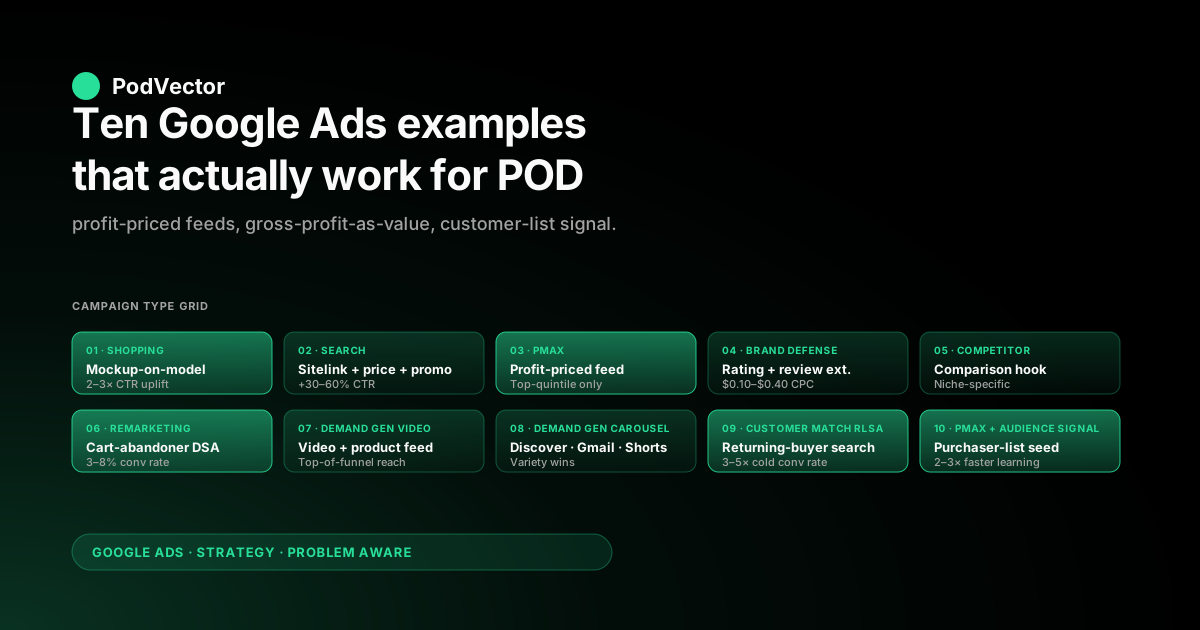
Quick Answer: The Google Ads examples that work for general ecommerce — Shopping ads with sharp product imagery, search ads with sitelink and price extensions, Performance Max with curated feeds, dynamic remarketing on cart abandoners, Demand Gen video with product feed — also work for print-on-demand, but only after three POD-specific adjustments. First, the conversion value sent to Google Ads must be gross profit, not subtotal, because POD margin variance across SKUs (sticker at 70%, hoodie at 18%) makes subtotal-based bidding teach Smart Bidding the wrong product mix.
Second, the product feed needs lifestyle imagery and design-on-product mockups rather than supplier blanks, because the SERP rewards visual differentiation. Third, the campaign type mix should bias toward Shopping, PMax, and Demand Gen for the long tail of designs, with search ads reserved for branded and high-intent commercial queries. Below: ten concrete examples with what to copy and what to adapt.
What counts as a "Google Ads example" for POD
The top-ranking articles for "google ads examples for ecommerce" — Shopify's twelve-brand listicle and Do Dropshipping's fifteen-example roundup — show search-ad screenshots from companies like Glossier, MVMT, Boden, and Argos. They are useful as inspiration, but every one of them is a fixed-margin SKU brand, not a POD seller. The format that works for selling a $50 Glossier moisturizer at 60% gross margin every time does not automatically work for selling a $50 hoodie that has a $26 supplier cost on Printify and a $19 supplier cost on Printful, on a catalog of 800 designs that turns over weekly.
The reason is structural. POD has three traits that change which Google Ads patterns convert:
- Margin variance across SKUs. Stickers, mugs, hoodies, and posters have different supplier-cost-to-retail-price ratios. A campaign optimizing for revenue scales the lowest-margin product fastest. A campaign optimizing for gross profit scales the right product mix.
- Design churn. The catalog turns over weekly or monthly as new designs replace old ones. Ad assets and feeds need to update without manual per-SKU work.
- Supplier latency and stock realities. Printify and Printful have provider-level stockouts and per-region production times. Ads pointing to out-of-stock variants waste click spend and damage Quality Score.
Each of the ten examples below is a real ad pattern in production on at least one general-ecommerce store today. For each, this piece covers what the ad does well, what a POD seller should copy unchanged, and what to adapt for the three POD traits above. For the strategic frame these ad-level decisions sit inside, see our complete Google Ads playbook for POD; for the specific Shopify-side conversion setup that makes value-based bidding work, see the Shopify Google Ads conversion strategy piece.
1. Shopping ad with mockup-on-model imagery
What it looks like. A Google Shopping ad in the Shopping carousel above search results: product image, price, store name, free-shipping or "in stock" badge, sometimes a star rating. Compare two cells of the carousel side by side and the difference is almost always the image.
The winning image shows the product on a model in lifestyle context — a t-shirt on a person walking a dog, a hoodie on someone at a coffee shop. The losing image is a flat-lay product shot on white background.
Why it works. Google's Shopping carousel is a visual auction. Click-through rate compounds: the higher-CTR image gets more impressions, more clicks, more learning signal, and lower CPC over a 30-day window. The visual differentiation matters more than the text — operators tuning title and description copy for weeks miss that the image is doing 80% of the click decision.
POD adaptation. Printify and Printful supply blanks-on-white as the default product image. That image loses every Shopping auction it enters.
The fix is a mockup-on-model image: either a photographed model wearing the design, or a generated mockup using a tool like Placeit or a Printify mockup template, with the product on a real-looking person in a real-looking environment. The same SKU with a model-mockup image vs. a blank-on-white image typically shows 2–3x CTR difference in Shopping.
For any POD seller, this is the highest-leverage single change available in Google Ads — and it is upstream of Google Ads itself, in the product feed sent to Google Merchant Center. The relevant Shopping-ad setup walkthrough lives in our Google Shopping ads for ecommerce piece.
2. Search ad with sitelink, price, and promotion extensions
What it looks like. A search ad on a brand or category query. The headline is the product line.
Beneath the headline are four to six sitelinks (each a link to a category page with its own one-line description), then a price extension showing 4–6 starting prices ("Hoodies from $34, T-shirts from $24"), then a promotion extension banner ("15% off ends Sunday"). The visible footprint of the ad on a desktop SERP is roughly four times the height of a vanilla text ad.
Why it works. Google ranks ads by Ad Rank, which combines bid, Quality Score, and ad asset utility. Adding sitelinks, price, and promotion extensions raises the asset-utility score, which raises Ad Rank at the same bid.
The CTR of an ad with full extensions is typically 30–60% higher than the same ad without. The conversion-rate impact is smaller (the sitelink doesn't change which page the customer lands on most of the time) but the cost-per-click drop and impression-share gain compound across the campaign.
POD adaptation. The price extension needs care: POD price ranges shift with supplier cost changes from Printify and Printful, and a stale price extension showing $24 t-shirts when the real starting price is $28 fails Google's accuracy review and gets disapproved. Either feed the price extension dynamically from the same source as the product feed, or commit to refreshing it monthly.
The sitelinks should target the highest-margin categories, not the highest-traffic ones — for a POD store this is usually hoodies and crewnecks, not stickers, even if stickers have more SKUs. The promotion extension is straightforward as long as the underlying discount actually exists on the landing page.
3. Performance Max with a curated, profit-priced feed
What it looks like. A single PMax campaign covers Shopping, Search, Display, YouTube, Discover, and Gmail inventory. The product feed is filtered to a subset of the catalog — typically 20–80 SKUs that pass a profit-priced threshold — rather than the full 800-design catalog.
Asset groups are organized by audience signal (existing customers vs. similar audiences vs. interest-based prospects). Conversion goal is value, with target ROAS set 20–30% above current account average for the first 30 days.
Why it works. PMax's reinforcement-learning engine needs conversion volume to learn. Feeding it the entire catalog dilutes signal — the algorithm spends learning budget on SKUs that will never convert.
Feeding it the curated profit-priced subset concentrates learning on SKUs that already convert at a sustainable margin. The asset-group separation by audience signal lets PMax allocate inventory differently to known customers vs. cold prospects, which is its main lever beyond the feed itself.
POD adaptation. The "profit-priced threshold" is the POD-specific lever. For a fixed-catalog ecommerce store the filter is usually inventory-based (in-stock SKUs only).
For POD, the filter is a custom label tagged with "profit-tier" that the feed-generation script populates from a join of Shopify orders, Printify/Printful supplier costs, and the SKU's average gross profit per order. The PMax campaign targets only profit-tier-1 (top quintile by gross-profit-per-order).
This is the same idea as a "winning products only" PMax setup that competent dropship operators run, but the threshold is profit, not units sold. The campaign-type-specific walkthrough is in our Shopify Performance Max campaigns explained piece.
4. Brand-defense search ad with rating and review extensions
What it looks like. A search ad triggering on the brand's own name as a keyword. The ad shows the brand headline, a star rating from Google Customer Reviews or a third-party review aggregator, and a review extension highlighting a single five-star review. The CPC is typically $0.10–$0.40 because Quality Score on a brand keyword is at the ceiling and competition is low.
Why it works. Without a brand-defense ad, competitor brands can show their ad above the organic listing on a query for your brand. The first-position competitor ad steals 5–15% of branded clicks.
The brand-defense ad reclaims the top position cheaply. Beyond defense, the ad is also where the brand's social proof shows up: the rating extension turns a search result into a trust signal, which raises CTR on every impression including non-branded queries when the same rating extension appears on the broader account.
POD adaptation. The rating extension requires a minimum number of verified reviews on Google Customer Reviews (at the time of writing, 100 reviews in the past 12 months for the seller rating to display). A new POD store has zero.
The path to ratings is the Google Customer Reviews program (free, opt-in via Shopify checkout) which collects reviews automatically from buyers. Plan for it from launch — the reviews accumulate slowly, and the ad-side benefit kicks in only when the threshold is crossed. The brand-defense ad itself is worth running before the rating extension is live; the extension is a multiplier, not a prerequisite.
5. Competitor-brand search ad with comparison hook
What it looks like. A search ad triggering on a competitor's brand name. The headline is "Looking for [competitor]? Try [your brand] — [differentiator]." The landing page is a comparison page or a category page with a single-sentence comparison header. Common in software (Mailchimp vs. ConvertKit) and increasingly in DTC apparel (Bonobos vs. UNTUCKit, etc.).
Why it works. Customers searching a competitor's brand name are mid-funnel: they have intent for the category, they know one brand, they don't know yours. A well-targeted comparison ad converts at 5–15% click-to-purchase rates, much higher than cold prospecting. The Quality Score on competitor keywords is lower than on brand keywords (Google penalizes ads using a competitor's name in the headline and ad copy), so CPCs are higher, but the funnel position offsets the cost.
POD adaptation. Most POD sellers do not have a competitor brand worth targeting, because the POD competitor set is fragmented across thousands of small Etsy shops, Shopify stores, and Amazon Merch listings. The exception is niche-specific: a POD brand selling NFL-licensed apparel can target unlicensed competitor brand names; a POD brand selling enamel pins for a specific fandom can target the in-fandom competitor.
When the competitor exists, the ad pattern works; when it doesn't, this example is one to skip rather than force. For broader competitive positioning advice, see our best practices for Shopify Google Ads compared piece.
6. Dynamic remarketing display ad on cart abandoners
What it looks like. A display ad on the Google Display Network. The ad creative is dynamically generated from the product feed: the same product image the visitor viewed on the store, the same price, sometimes a "Still thinking it over?" overlay.
Audience: visitors who added to cart but did not check out, within the last 14 days. Frequency cap: 3 impressions per user per day. Bid strategy: Target ROAS at 200–400% of new-customer ROAS.
Why it works. Cart abandonment is the highest-intent unconverted audience segment. Reminding the visitor of the exact product they viewed, with the exact price, on a third-party site they're already on, is a high-conversion remarketing pattern.
Conversion rates of 3–8% are typical, against new-customer rates of 0.5–2%. The cost per acquired customer is usually 30–50% of the new-customer CAC.
POD adaptation. Dynamic remarketing requires the Google tag to fire enhanced ecommerce events with product IDs that match the IDs in the Merchant Center feed. The most common POD setup error: the tag fires Shopify's variant ID while the feed sends Shopify's product ID (or vice versa), so the dynamic creative shows wrong products or no products.
The fix is usually in the tag configuration on the Shopify side, not in Merchant Center. The setup walkthrough lives in our set up Google Ads conversions on Shopify piece. The other POD-specific note: a 14-day window is too short for some POD purchase cycles (specialty apparel, gift-occasion-driven items) — extend to 30 days for those.
7. Demand Gen video ad with product feed
What it looks like. A 15- or 30-second video ad on YouTube, Discover, or Gmail. The video shows the product in use — a hoodie being unboxed, a t-shirt being worn at a concert, a poster being hung on a wall.
Below the video, a product carousel pulls 3–6 SKUs from the Merchant Center feed. The CTA button reads "Shop now" linking to the matching collection page.
Why it works. Video + product feed is the strongest top-of-funnel format Google currently offers. The video does the brand-building and category-introduction work; the product feed does the direct-response work. Conversion rates are lower than search or remarketing, but the prospecting reach is much larger and the cost-per-impression is well below paid social on the same audiences.
POD adaptation. The video creative is the bottleneck. POD sellers don't have studio shoots and product designers don't film unboxing content.
Two paths work: user-generated content from existing customers (post-purchase email asking for a 15-second clip, $10 store credit incentive), or AI-generated mockup video from a tool that animates the static product image into a 5–10 second loop. The UGC path produces better conversion rates; the AI path produces faster turnaround for the next-design cycle. Either way, the matched product feed in the carousel is doing more conversion work than the video itself, which is why the feed quality (mockup-on-model images, accurate prices, tagged custom labels) matters as much in Demand Gen as in Shopping.
8. Demand Gen carousel on Discover, Gmail, and YouTube Shorts
What it looks like. A horizontally-scrolling carousel ad in the Google Discover feed, the Gmail Promotions tab, and YouTube Shorts. Each card shows one product image, one short headline ("New design drop"), and a price. The whole carousel is one ad asset; the user scrolls through 3–10 cards.
Why it works. Discover and Gmail Promotions are passive-browse environments — users are not searching for products, they are scrolling. The carousel format matches the scroll pattern: each card is a potential product, and one good one is enough to drive a click.
YouTube Shorts is a similar passive-discovery surface for younger audiences. The combination reaches mid-funnel audiences that Search and Shopping miss because those audiences aren't searching yet.
POD adaptation. The carousel rewards visual variety: 6–10 different design styles in a single carousel out-performs 6–10 variations of the same design. POD's natural advantage here is that the catalog is varied by definition.
Build the carousel from one product per design family (one shirt per niche) rather than 10 shirts of one design. The custom label that filters PMax to top-quintile SKUs (Example 3) also works as the source for Demand Gen carousel selection — the SKUs that perform best in PMax are usually the ones that perform best in the carousel format too.
9. Customer Match RLSA upper-funnel search ad
What it looks like. A search ad on a broad informational keyword (for example, "gifts for runners" or "matching couple shirts") that triggers only when the searcher is in a Customer Match audience — usually existing customers or email-list subscribers. The bid is 30–50% higher than the open-auction bid on the same keyword would be. The ad copy speaks to the existing relationship ("Welcome back — new designs are in").
Why it works. RLSA (Remarketing Lists for Search Ads) lets a campaign bid differently on the same keyword based on whether the searcher is a known existing customer. Existing customers convert at 3–5x the rate of cold searchers on the same broad keyword, which justifies the bid premium and pulls profitable conversions out of broad keywords that would lose money in the open auction.
POD adaptation. The Customer Match list itself needs to be built from Shopify customer emails (uploaded directly or via the Google & YouTube app's customer sync). For a POD store with seasonal repeat-purchase patterns — same buyer comes back for next holiday season's design drop — RLSA is one of the few campaign types that can scale broad informational keywords profitably.
Without the existing-customer list, the same broad keyword in the open auction usually loses money on cold traffic. The approach generalizes beyond search: Customer Match audiences are also the seed for similar audiences in PMax and Demand Gen, where they signal which prospects look like converters.
10. PMax with audience signal seeded from a purchaser list
What it looks like. A Performance Max campaign whose audience signal is set to the Customer Match list of past purchasers, plus a "similar audiences" expansion. PMax doesn't strictly target the audience — it uses the signal as a seed for its own audience modeling — but the seed shapes which prospects PMax explores in the early learning period. The asset group includes high-quality video, lifestyle imagery, and 5–8 headlines and descriptions in PMax-friendly formats.
Why it works. PMax's biggest weakness is the early learning period (first 30 days) where it explores too widely and burns budget on bad audience segments. A purchaser-list audience signal narrows the early exploration. Combined with the curated profit-priced feed from Example 3, PMax converges on profitable conversions 2–3x faster than a generic feed and no audience signal — typically 2–3 weeks instead of 6–8.
POD adaptation. The Customer Match list quality matters. Many POD stores upload only the email column to Customer Match, which gives Google's matching algorithm one identifier to work with.
Match rates of 30–50% are typical for email-only. Adding hashed phone number, hashed first name, and hashed last name to the upload pushes match rates to 60–80%, which is the difference between a useful audience signal and a noisy one.
Shopify exposes all four fields in the customer object; the upload script just needs to send them. For more on the data-flow mechanics that make this work, see our complete guide to Google Ads + Shopify integration for POD.
What every effective POD Google Ads example has in common
Stepping back from the ten examples, three patterns appear in every one of them. They are the three traits that distinguish ads that work for POD from ads that look like they should work but don't.
Pattern 1: The conversion value is gross profit, not subtotal. Examples 3, 7, 8, 9, and 10 are all value-based bidding strategies — they tell Google to optimize for revenue, ROAS, or value-per-click. None of them work correctly when the value sent is subtotal, because subtotal-as-value tells Smart Bidding to scale the lowest-margin SKU.
Sending gross profit (subtotal minus supplier cost minus payment processing fee) makes Smart Bidding optimize for what actually keeps the store alive. The conversion-value setup is upstream of every value-based campaign type. If it's wrong, every value-based example below stops working.
Pattern 2: The product feed is the asset doing 50–80% of the conversion work. Examples 1, 3, 6, 7, 8, and 10 all depend on the product feed: feed image quality, feed price accuracy, feed custom labels for filtering, feed product IDs matching the tag's product IDs. Operators tuning ad copy for weeks while the feed images are blanks-on-white are tuning the wrong lever. The feed is the leverage point — if the feed is right, mediocre ad copy converts; if the feed is wrong, perfect ad copy doesn't.
Pattern 3: The audience signal sources from the Shopify customer list. Examples 6, 9, and 10 all depend on a clean Customer Match list with phone, email, and name hashed. Examples 4 and 5 depend on a similar identity signal in the form of Google Customer Reviews tied to verified buyers.
The Shopify customer list is the highest-leverage first-party data a POD store has, and most stores under-use it. Uploading email-only is leaving 30–40% of match rate on the table; not uploading at all leaves the audience-signal lever dark entirely. For the broader treatment of how POD-specific Google Ads strategy is structured around these three patterns, see our Google Ads strategy for ecommerce piece.
How to evaluate any Google Ads example for POD fit
The three patterns above also serve as a quick filter on any new Google Ads example a POD operator runs across in a competitor analysis or a case study. Before adopting an example, ask:
- Does the example assume fixed-margin SKUs? If the case study shows a brand running a $50 product at a known 60% margin, the bidding strategy described will not transfer to a $50 product at a 18% margin. Subtract the assumption from the example. The pattern (campaign type, audience signal, feed structure) often still works; the bid targets and budget pacing usually do not.
- Does the example depend on a media budget the example brand has? Brands like Glossier or MVMT have $50K+ monthly Google Ads budgets, which gives Smart Bidding more learning data per week than a $2K-per-month POD store will ever generate. Some examples (especially long-tail Discovery and YouTube prospecting) require a learning-budget floor that small accounts cannot meet. The example is not wrong; it is wrong-sized for a smaller account.
- Does the example require infrastructure you don't have? Examples 6, 9, and 10 require functioning conversion tracking, a Customer Match upload pipeline, and a clean product feed. If any of those are broken, the example will not produce the result the case study reports — but the failure looks like the example's fault, not the upstream infrastructure's. Always check the infrastructure first. The conversion-tracking audit lives in our Google Ads tracking ID for Shopify piece; the broader topic-level overview is in the Google Ads for POD topic hub and the playbook lives in the Google Ads strategy cluster hub.
FAQs
What's the simplest Google Ads example a new POD store should start with?
A standard Shopping campaign with a clean product feed is the simplest starting point. The feed needs mockup-on-model imagery (not blank-on-white), accurate prices, and Shopify product IDs that match the IDs the Google tag fires on conversion.
The campaign uses Manual CPC or Maximize Clicks for the first 30 days while conversion data accumulates, then switches to Maximize Conversion Value once the account has 30+ conversions. Skip Performance Max, Demand Gen, and competitor-brand search at the start — they require infrastructure or learning-budget volumes that a new account doesn't have yet.
Are search ads a good Google Ads example to start with for POD?
Search ads work less well for cold POD prospecting than Shopping ads do, because POD products are visual and the click decision is mostly visual. Search ads are most useful for branded keywords (your own brand name, defending against competitor brand-name ads) and for narrow high-intent commercial keywords ("custom dad birthday shirt", "personalized mug for nurses"). Broad-category search ads ("t-shirts", "hoodies", "mugs") almost always lose money for POD because the impression is too cold and Shopping owns the visual surface above the search ads. The Shopping-vs-search trade-off is covered in more depth in our Google Shopping ads for ecommerce piece.
What's the budget required to make these Google Ads examples work?
The minimum learning-budget floor for value-based Smart Bidding strategies is roughly 30 conversions per 30 days at the campaign level. Below that, Smart Bidding doesn't have enough signal to optimize and reverts to broad averages.
For a POD store with a $40 average order value and a 15% gross profit rate, the $1,200 in conversion volume per 30 days corresponds to roughly $1,000–$1,500 in monthly ad spend depending on conversion rate. Below that floor, run Manual CPC or Maximize Clicks (volume-based bidding) until conversion volume is enough to support value-based bidding.
Do these Google Ads examples require Performance Max?
No. Performance Max is one of ten examples. Examples 1, 2, 4, 5, 6, and 9 work without Performance Max — they rely on Standard Shopping, Search, and Display campaigns.
Performance Max is the right answer for accounts with conversion volume, clean feeds, and bandwidth to manage asset groups carefully. For accounts under 30 conversions per month or without a curated feed, Standard Shopping with Manual CPC out-performs PMax for the first 60–90 days, then PMax becomes worth testing once the data foundation is in place.
How do I find Google Ads examples from POD competitors specifically?
Google's Ads Transparency Center shows the Search, Display, YouTube, and Demand Gen creative every advertiser is running. Search a competitor POD brand by domain and the tool returns every active ad they've shown to anyone in the last 30 days, including video.
Combined with the SimilarWeb traffic source breakdown for the same competitor, this gives a reliable picture of what's working for them. The Transparency Center is more useful for POD competitor analysis than the SERP-screenshot listicles in the top three search results, because the SERP listicles show non-POD brands by default.
What's the most common mistake POD sellers make when copying Google Ads examples?
Copying the campaign structure but skipping the conversion-value setup. The example articles (Shopify's, Do Dropshipping's, Store Growers') all assume the conversion value sent to Google Ads is meaningful.
For most POD stores, the default Shopify–Google Ads integration sends subtotal as the value, which is meaningful for fixed-margin brands but actively misleading for POD with margin variance. Smart Bidding optimizes against the wrong number, scales the wrong product mix, and the operator concludes "the example doesn't work." It does work — the value setup upstream of the example is what breaks it. Fix value-as-gross-profit first, then run the examples.
How long does it take for these Google Ads examples to start producing results?
Standard Shopping and Search campaigns produce conversion data within 7–14 days of launch, enough to start optimizing. Performance Max needs 30 days of learning before its bidding stabilizes; longer (45–60) without a curated feed and audience signal. Demand Gen and YouTube prospecting are slower — 60–90 days before the cost-per-acquisition stabilizes — and require ad creative refreshes every 30–45 days to avoid creative fatigue. Customer Match RLSA produces results immediately for accounts that already have a customer list large enough to match (usually 1,000+ matched users); for smaller lists, the audience signal is too thin to move the needle.
Every Google Ads example assumes you know which campaigns are profitable. POD doesn't always.
The examples above all depend on the same upstream signal: which of your campaigns is making profit ROAS net of Printify or Printful supplier cost, payment processing, and refunds. Most POD operators reconcile this in a Sunday-morning spreadsheet — sales by campaign on one tab, supplier cost by SKU on another, ad spend by campaign on a third. Victor connects Shopify, Printify, Printful, Google Ads, and Meta into one live data warehouse view and answers "which campaigns should I scale, which should I pause?" in seconds.
Try Victor free