
Quick Answer: Adding Google Ads to a Shopify print-on-demand store is a strategy decision before it's a technical install. The mechanics — Google & YouTube channel app, Merchant Center, conversion tag — take an afternoon.
The strategy decisions made before the install determine whether the account compounds or quietly burns: which products to advertise out of a 200-SKU catalog, what conversion value Google sees (subtotal vs. profit after Printify or Printful supplier cost), how much budget is realistic at 28–35% contribution margin, and which campaign type matches your listing maturity. This playbook walks through those five decisions in order, then the install, then the first 30 days of profit-aware monitoring. POD is not generic ecommerce on the cost side, so the generic Shopify Google Ads playbook misses where POD accounts actually fail.
When adding Google Ads makes sense for a POD Shopify store
Most published guides — Shopify's own campaign guide, Jonny Swift's Shopify Google Ads walkthrough, Stape's conversion tracking guide — start with the assumption that you've already decided to add Google Ads. For owned-inventory ecommerce at 50–60% gross margin, that assumption is usually fine; Google Ads is one of the few channels that scales predictably and the math survives almost any campaign-quality bar.
Print-on-demand is different. At Printify or Printful supplier costs running 50–65% of retail before any ad spend, contribution margin per order sits between 28% and 35% on a typical $30 t-shirt or $35 hoodie.
Add a Meta retargeting cost, Shopify transaction fees, and a payment processor cut, and the realistic ad budget is closer to $4–$7 per order rather than the $12–$15 owned-inventory operators model around. That changes when adding Google Ads is the right move.
Add Google Ads when at least three of these are true:
- You have at least 90 days of organic Shopify orders with a clear pattern of which 10–20 SKUs convert. Google Ads on a cold catalog with no demand signal is expensive guessing; Google Ads on a catalog with a known top-decile is leverage.
- Your Printify or Printful product list has accurate per-variant supplier costs in Shopify metafields, so you can compute true profit per order programmatically. Without this, you cannot pass a profit-aware conversion value, and Smart Bidding will optimize toward order volume at the expense of margin.
- Your average contribution margin per order is at least $8 after fulfillment cost, payment fees, and shipping. Below that, Google Ads' minimum useful daily budget ($25–$30 to escape learning purgatory) burns through margin faster than scale can fix it.
- Your product titles and descriptions are differentiated beyond the Printify default. Generic POD listings ("Premium Cotton T-Shirt - Custom Design") get fragmented into Performance Max's lowest-CPC placements and don't develop a moat. The first hundred orders will tell you whether your listings have search-friendly bones.
- You have either GA4 or a profit dashboard already in place, not as a nice-to-have but as the only way to validate Google's claimed ROAS. Google Ads' attribution lives inside Google's measurement; profit lives in your bank account. The gap between those two numbers is wider on POD than anywhere else.
If fewer than three of those are true, the right next move is usually not adding Google Ads — it's tightening the catalog and listings first, then revisiting in 60 days. The pillar piece on the complete Google Ads playbook for print-on-demand sellers covers the broader sequencing question; this article assumes you've passed the readiness bar and are ready to add.
Five decisions to make before you touch the install
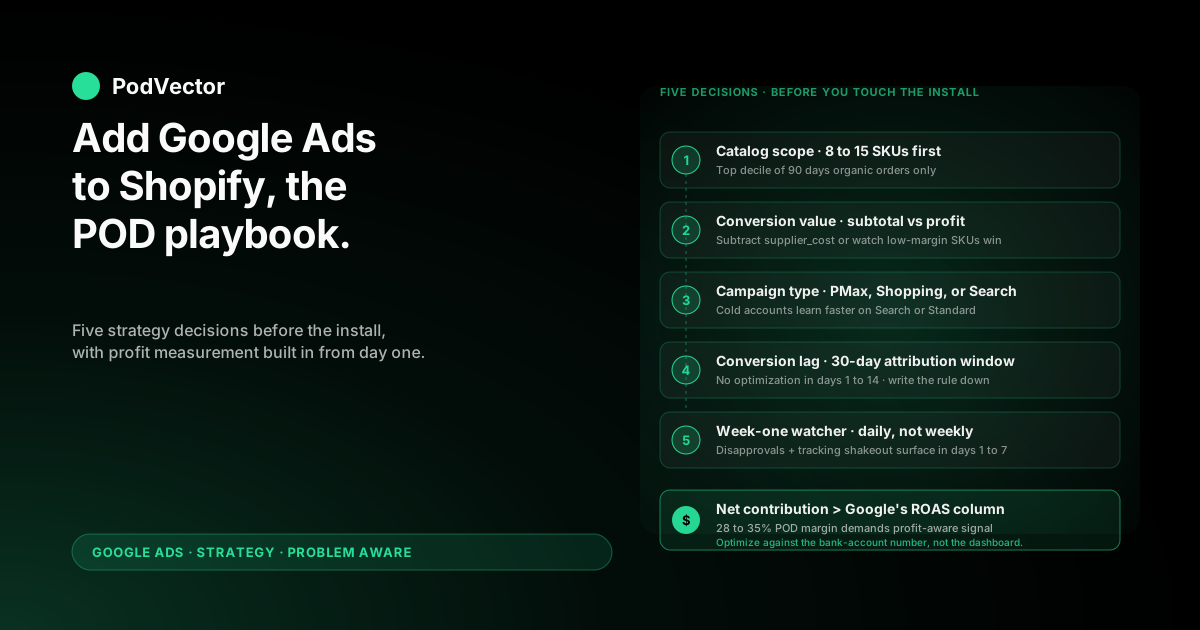
The install itself is reversible. The strategy decisions you encode during the install are not — once Smart Bidding has trained on the wrong signal for two weeks, you're rebuilding the campaign rather than tuning it. Make these five decisions in writing before you open the Google & YouTube channel app.
Decision 1: Which 8–15 SKUs go in the first feed
Don't sync your full catalog on day one. Performance Max with 200 SKUs and a $30/day budget will spread learning data so thin that no SKU gets enough signal to be ranked.
Pick the 8–15 SKUs that account for the top decile of your last 90 days of organic Shopify orders, and submit only those. Add the rest in cohorts of 5–10 every two weeks once the initial group has stabilized.
Decision 2: Subtotal or profit as conversion value
Default Shopify integrations send subtotal (or sometimes order total including tax/shipping) as the conversion value to Google Ads. For owned inventory at 60% gross margin, that's tolerable; Google Ads optimizing toward subtotal still optimizes toward profitable customers.
For POD, optimizing toward subtotal means Google Ads will chase the highest-revenue SKUs, which are often the lowest-margin ones (oversized hoodies, full-color all-overs). The right signal is profit after supplier cost.
Decide now whether you'll set up the profit-value override (covered in section 6) or accept the default and budget the misallocation. Either is defensible. Mixing them is not.
Decision 3: Performance Max or Search-only as the first campaign
Performance Max is what every Shopify Google Ads guide recommends because it's the channel app's default and Google's marquee 2025–2026 product. For POD on a cold account, Performance Max is also where most of the budget gets wasted — it spreads spend across Display, YouTube, Discover, and Search asset groups, learning slowly and burning fast.
Many POD operators do better starting with a Search-only campaign on three to five high-intent commercial keywords for their flagship niche, then layering Performance Max on top once the account has 30–40 conversions of training data. Decide your launch path now.
Decision 4: How conversion lag interacts with reporting
Google Ads' default reporting window is 30 days for conversion attribution. POD orders fulfilled by Printify or Printful take 5–9 business days to ship and another 1–2 days for delivery confirmation.
If you're checking ROAS three days after launch, you're seeing a partially loaded number; the conversion that fired today will keep crediting itself against today's clicks for another 27 days. Decide upfront that you will not make optimization decisions in the first 14 days based on reported ROAS, and write that rule down before you can talk yourself out of it.
Decision 5: Who watches the account in week one
Adding Google Ads is not a "set and forget" operation, especially in the first seven days when broken disapprovals, feed errors, and missing tracking surface. Decide who looks at the Google Ads UI, the Merchant Center diagnostics tab, and your Shopify Profit Reports daily for the first week. If the answer is "I'll check when I remember," budget another $200–400 of avoidable spend into the launch as a tax for inattention.
Budget reality at print-on-demand margins
Generic Shopify Google Ads guides quote $20–$30 per day as a "minimum meaningful budget." That number assumes 50%+ margins. For POD, the math has to start from contribution margin per order and work backward.
Take a typical $30 t-shirt sold via Printify Premium ($15.20 supplier cost), fulfilled through Shopify ($1.05 transaction fee at 2.9% + $0.30), with $4 average shipping markup margin and a 1% return rate. True contribution margin per order: roughly $9.50.
To break even on ads, you need to convert one in every $9.50 worth of clicks. At a $0.45 average Google Shopping CPC for apparel, that's break-even at 21 clicks per order — a 4.7% conversion rate, which is achievable but at the upper end of POD store benchmarks.
The honest budget framework:
- Floor: $25–$30/day for 14 days ($350–$420). Below this, Smart Bidding doesn't accumulate enough conversion data to exit the learning phase. This is non-negotiable; halving the budget doesn't halve the cost, it eliminates the chance of useful learning.
- Realistic: $40–$60/day for the first 30 days ($1,200–$1,800). Enough headroom for Performance Max to find profitable placements, with margin to absorb the inevitable bad-placement spend in week one.
- Aspirational: $100+/day, only if you've already validated organic demand and have the working capital to absorb 30–45 days of negative ROAS while the account trains.
If those numbers feel uncomfortable, the right move is not halving the budget; it's deferring the launch until margin or working capital improves. POD operators who add Google Ads on $15/day budgets reliably report worse-than-no-ads outcomes because the spend depletes runway without producing data. Read the companion piece on Google Ads services for ecommerce strategy for print-on-demand if you're considering an agency to manage the addition.
The install, compressed to what actually matters
The mechanical install is well-covered elsewhere. We've written the full POD-specific walkthrough at get Google Ads on Shopify strategy for print-on-demand and a sibling install guide at the complete guide to Google Ads + Shopify integration for POD. The compressed version is six steps:
- Create Google Ads and Merchant Center accounts manually, on a brand-domain Google account, before opening the channel app. App-created accounts inherit defaults you can't audit.
- In Shopify Admin → Apps, install "Google & YouTube". Connect to your existing Google Ads and Merchant Center accounts (not the "create new" path).
- Configure the product feed. Set primary identifier (GTIN or MPN; for unique POD designs neither applies — leave blank and set
identifier_exists= no). Decide variant submission strategy: per-variant for color/size SKUs that have meaningfully different demand; parent-only for SKUs where variants don't differentiate (most POD apparel). - Add the Google site tag and conversion tag. The channel app installs a default tag firing on Purchase events. Verify in Tag Assistant that the conversion event fires once (not twice from a duplicate Shopify Customer Events tag) and that the value passed is what you want — see set up Google Ads conversions on Shopify strategy for print-on-demand for the profit-value override walkthrough.
- Wait 24–72 hours for Merchant Center to crawl and approve products. Don't launch campaigns until at least 80% of your submitted SKUs show as "Approved" in the Diagnostics tab. Approve a campaign over disapproved products and Google will quietly serve none of them.
- Launch your first campaign manually, ignoring the channel app's auto-suggested Performance Max. The default suggestion is usually a $20/day Performance Max with all SKUs included — wrong on both counts for a POD launch.
Adding the right campaign type, not the default
Three campaign types are worth considering for a POD Shopify launch. Pick one based on where your account is, not which one Google's UI defaults to.
Standard Shopping (still available, still useful)
Google has been pushing Performance Max as the successor to Standard Shopping since 2022, but Standard Shopping is still available for new campaigns and still produces tighter, more controllable spend on small POD catalogs. You see exactly which SKUs spent how much, you can negative-keyword aggressively, and you can adjust bids per product group.
The trade-off is that Standard Shopping won't access YouTube, Discover, or Display inventory — but for a launch, the constraint is feature, not bug. Read more at Google Shopping Ads Shopify strategy for print-on-demand.
Performance Max (the default, with caveats)
Performance Max is the channel app's default and the right choice once you have ≥30 conversions of historical data and a stable feed. Out of the gate on a cold account, Performance Max's machine learning has nothing to optimize against — it will spend across all asset groups roughly evenly for the first two weeks, much of which is YouTube and Display impressions that don't convert for POD apparel.
If you launch with Performance Max, expect the first 14 days to look bad and budget for it. Detailed coverage at Shopify Performance Max campaigns explained strategy for print-on-demand.
Search (high-intent, narrow keyword, lowest variance)
If your POD store has a defined niche — "vintage mountain biking apparel," "anime cat illustrations on hoodies," "minimalist climbing prints" — three to five tightly themed exact-match keywords on a Search campaign produce the most predictable launch numbers. CPCs are higher per click ($0.80–$1.50 vs $0.35–$0.55 for Shopping), but conversion rates are also higher because intent is fully expressed in the query. Many POD operators do best running a Search-only campaign for the first 30 days, accumulating 30+ conversions, and only then layering Performance Max on top to scale.
Profit-aware conversion value: the one thing nobody else covers
This is where the generic Shopify Google Ads playbook misses POD entirely. Every guide we read for SERP analysis told operators to "track conversions" and stopped. None of them addressed which value the conversion event passes to Google Ads, which is the single most important configuration choice for a POD account.
The default Shopify Google Ads conversion event passes order.subtotalPrice — the order subtotal before tax and shipping. Smart Bidding receives that number and uses it to compute campaign ROAS, then optimizes for high-ROAS-vs-subtotal customers.
For POD, this is structurally wrong: a $40 hoodie at $20 supplier cost is 50% gross margin; a $30 t-shirt at $15 supplier cost is also 50%; a $50 all-over-print sweatshirt at $35 supplier cost is 30%. Optimizing toward order subtotal will systematically over-allocate spend toward the lowest-margin SKUs because they have the highest sticker price.
The fix is a profit-aware conversion value: subtract supplier cost from order subtotal before passing the number to Google Ads. Two ways to implement:
- Static profit margin override. If your POD catalog is uniform (e.g., all 50% margin), set the conversion event to multiply
order.subtotalPriceby 0.5 before sending. Crude but better than the default. - Dynamic per-line-item supplier cost lookup. Read each line item's
supplier_costmetafield (which you populated from Printify or Printful at product import time), sum the costs, subtract from subtotal, pass the result. This requires a Shopify Customer Events custom pixel or a server-side tag implementation, and it's where serious POD accounts find their edge over generic-setup competitors.
The full implementation walkthrough lives at set up Google Ads conversions on Shopify strategy for print-on-demand; the higher-level integration architecture is at the complete guide to Google Ads + Shopify integration for POD.
The reason this matters operationally: once Smart Bidding has trained on profit-after-supplier-cost as the conversion value rather than subtotal, it will allocate spend toward your highest-profit SKUs even when their sticker price is lower than the all-over-prints. We've seen POD accounts move from negative blended ROAS to 1.8–2.4x net contribution within 60 days of switching the conversion-value signal — same campaigns, same SKUs, same budget, just truer math.
The first 30 days: what to monitor and what to ignore
Most operators add Google Ads, look at the dashboard daily, panic at week one's numbers, and either kill the campaign prematurely or move budget to the wrong levers. A 30-day monitoring rhythm prevents both failure modes.
Days 1–7: install integrity, not performance
You're not measuring ROAS in week one. You're confirming the plumbing works.
- Merchant Center Diagnostics: ≥80% of submitted SKUs approved by day 4. Resolve disapprovals in the first three days; account-level suspensions cascade fast.
- Google Ads conversion tracking: at least one conversion fired by day 5 (assuming non-zero traffic). Verify in Tools → Conversions → All conversions that the conversion shows up. If it doesn't, the tag is broken; fix before further spend.
- Conversion value sanity check: pick three actual orders, compute true profit-after-supplier-cost, and confirm Google Ads' reported conversion value matches (within rounding) what your override should be sending. If subtotal numbers are showing up where profit numbers should, your override isn't wired correctly.
- Spend pacing: actual spend within ±25% of daily budget. Wild swings (zero spend one day, 3x budget the next) usually mean a bid strategy misconfiguration.
Days 8–14: don't optimize, observe
Performance Max requires roughly 30 conversions to exit the learning phase. Search campaigns can train faster on tight keyword sets but still need 7–10 days of stable bidding before optimization is meaningful.
Make no campaign-level changes in this window unless something is structurally broken. Specifically: don't pause underperforming SKUs, don't lower budget on bad days, don't add negatives based on three search-term entries. Optimization in the learning phase resets learning.
Days 15–30: optimize against profit, not Google's ROAS column
By day 15 you have a usable signal. Now the optimization rhythm starts. Two numbers matter, and they're not the same number:
- Google Ads' reported ROAS = conversion value (whatever you sent) / spend. Useful for comparing campaigns within Google Ads.
- Net contribution per dollar spent = (Shopify revenue − Printify/Printful supplier cost − Shopify fees − ad spend) / ad spend. The number that determines whether the addition is paying its rent.
If you implemented the profit-aware conversion value override in Step 4, those two numbers will track each other closely. If you didn't, expect Google's ROAS to read 30–50% higher than your true net contribution.
Optimize against the second number. Pause campaigns whose true net contribution is below break-even for two consecutive weeks; scale campaigns whose true net contribution is above 1.3x for the same period. Read more on the optimization side at Shopify Google Ads strategy for print-on-demand.
Six mistakes that turn an addition into a subtraction
- Syncing the entire 200-SKU catalog on day one. Performance Max with broad inventory and small budget produces no learning signal. Start with 8–15 SKUs, expand in cohorts.
- Accepting subtotal as conversion value. Smart Bidding will optimize toward your lowest-margin SKUs. The profit-aware override is the difference between a paid channel and a leak.
- Pausing a campaign on day 5 because ROAS is bad. Conversion lag means day 5's numbers credit only a fraction of orders that day's clicks will eventually produce. Wait 14 days minimum.
- Letting the channel app create your Merchant Center account. App-created accounts inherit defaults you can't audit and ownership transfers later are painful. Create manually before installing the channel app.
- Ignoring the Diagnostics tab. Merchant Center disapprovals don't generate alerts; they silently shrink your impression footprint. Check daily in week one, weekly thereafter.
- Comparing Google Ads ROAS to your Shopify Profit Reports without reconciling. The two numbers measure different things (last-click attribution at conversion-event time vs. order-level profit at fulfillment time). Build a weekly reconciliation that explains the gap, or rebuild ad strategy on a phantom number.
FAQs
How much should I spend per day when I first add Google Ads to a Shopify POD store?
$25–$30 per day is the minimum to escape the learning phase within two weeks. $40–$60 is the realistic operating budget for a 30-day launch window. Below $20/day, the spend rate is too low for Smart Bidding to accumulate useful conversion data and you're effectively buying noise.
Should I use Performance Max or Standard Shopping for my first POD campaign?
For a cold account with under 30 historical conversions, Standard Shopping or a tight Search campaign produces more predictable launch numbers because they don't spread budget across YouTube/Display/Discover inventory that doesn't convert for POD apparel. Move to Performance Max once you have 30+ conversions of training data and a profit-aware conversion value signal.
What conversion value should I send to Google Ads from Shopify?
Profit after supplier cost, not order subtotal. The default Shopify Google Ads integration sends subtotal, which causes Smart Bidding to over-allocate to your lowest-margin SKUs (because those are often the highest-priced in POD apparel). Implement a profit-value override at the conversion-tag layer; the implementation guide is at set up Google Ads conversions on Shopify strategy for print-on-demand.
How long until I know if adding Google Ads is working?
30 days minimum, 60 days for confidence. Days 1–14 are install and learning-phase noise. Days 15–30 produce the first usable signal. Days 31–60 stabilize the trend. Operators who kill campaigns in week two routinely kill campaigns that would have been profitable by week six.
Can I add Google Ads to Shopify if I'm using Printify, Printful, or Gelato?
Yes, the Google Ads integration is identical across POD suppliers — all three behave as standard Shopify product imports. The supplier-specific consideration is the per-variant supplier cost field: ensure your import process populates a supplier_cost metafield (or equivalent) on each product so you can compute profit-aware conversion value. Without that field, you're back to subtotal-as-signal and the systemic over-allocation toward low-margin SKUs returns.
Do I need a Google Ads agency to add Google Ads to my Shopify store?
No, but the implementation quality varies sharply. Operators who self-manage tend to skip the profit-aware conversion value override (it's an extra hour of setup and hard to find documentation for), and they tend to make optimization decisions inside the learning phase.
An agency can shorten the learning curve, but a $1,500–$2,500/month agency retainer on a $1,800/month ad budget rarely pencils for POD margins. Self-manage with a documented playbook for the first 90 days, then evaluate. The companion buyer's guide is at Google Ads services for POD: the complete buyer's guide.
What's the most common reason adding Google Ads fails for POD stores?
Premature optimization. The second-most-common is sending subtotal as conversion value.
The third is starting on too small a budget to produce useful learning. The fourth is launching with the full catalog rather than the proven top decile. In our pattern matching across POD accounts, those four failure modes account for the majority of "Google Ads didn't work for us" stories.
Add Google Ads with profit measurement built in from day one
The hardest part of adding Google Ads to a Shopify POD store isn't the install — it's knowing whether what you added is paying its rent against your real, after-supplier-cost margin. PodVector AI connects directly to your Shopify, Google Ads, and Printify or Printful accounts and computes blended profit per ad dollar in real time, so the question "should I scale this campaign or pause it?" has a number behind it instead of a guess. Victor, the AI employee inside PodVector AI, answers that question in plain English using your live data — not last quarter's snapshot. And add Google Ads to Shopify the way POD operators with margin discipline actually run it.
Try Victor free