
Quick Answer: Most Shopify Google Ads tracking issue guides walk through the same five fixes — verify the tag with Tag Assistant, reinstall the Google & YouTube app, check Customer Events for the new checkout, audit GTM, look at GDPR consent. Those fixes are real and we cover them.
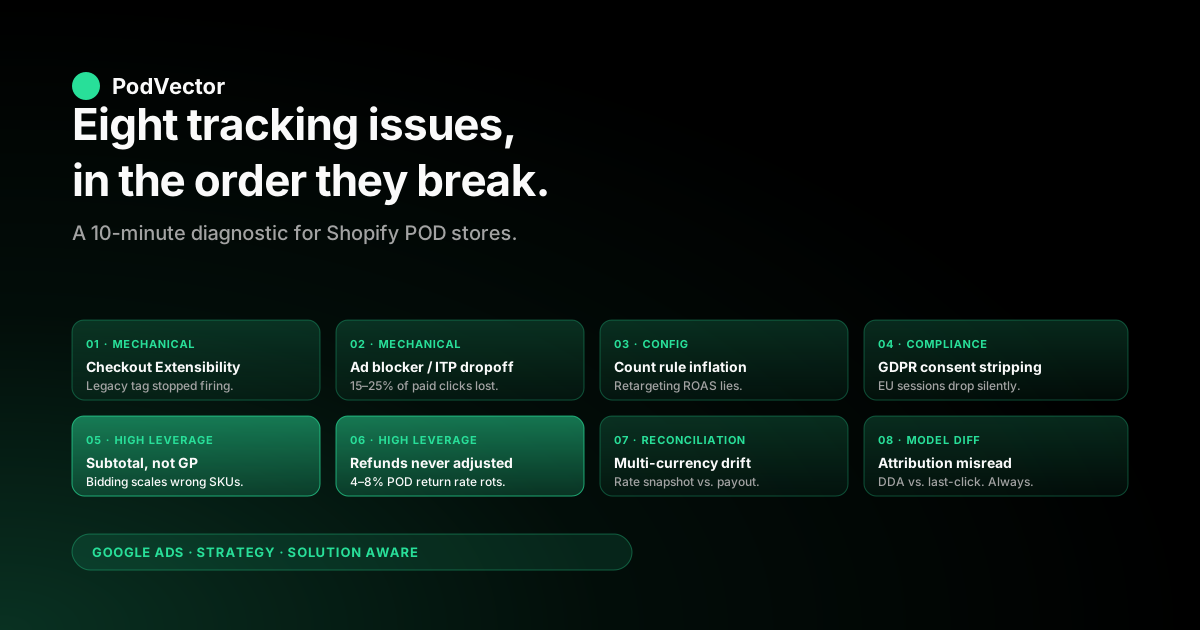
The bigger issue, specifically for print-on-demand stores, is that "tracking working" is a much weaker bar than operators think. A POD store can have its conversion tag firing cleanly, enhanced conversions matching, and the Google & YouTube app reporting healthy — and still be feeding Smart Bidding a number that systematically scales the wrong SKUs. This piece walks the eight Shopify Google Ads tracking failure modes in the order they typically surface (checkout migration, ad blocker dropoff, count rule inflation, GDPR consent gaps, conversion value mismatch, refund leakage, multi-currency drift, attribution model misread), the diagnostic that surfaces each one in under a minute, and the fix that actually holds.
Why Shopify Google Ads tracking issues are a POD-specific problem
Search "Shopify Google Ads tracking issues" and the top results — Analyzify's troubleshooting hub, the FirstPier walkthrough, the Shopify Community threads about the new Checkout Configurations — all answer a narrower question than the title suggests. They answer: "my Google Ads conversion count does not match my Shopify order count, what is broken?" That is one tracking issue.
It is the most common one. It is not the most expensive one for a print-on-demand store.
The tracking issues that actually cost a POD operator money fall into three layers. The first layer is mechanical — the tag is not firing, or it is firing but Google Ads is not recording the conversion.
Most public articles end here. The second layer is signal-quality — the tag fires and the conversion is recorded, but the value Smart Bidding sees is the wrong number for the catalog you actually run.
The third layer is reconciliation — Google Ads and Shopify will never agree exactly, and the gap between them is the diagnostic surface that tells you which mechanical or signal-quality issue is in play. POD stores are uniquely exposed on layers two and three because the catalog has wide margin spread (a $14 mug at 65% margin sitting next to a $35 hoodie at 18% margin from the same Printify or Printful supplier) and apparel return rates running 4–8% versus the 2–3% ecommerce baseline.
This piece walks eight specific tracking issues in the order they tend to surface, with the diagnostic for each. For the strategic frame on what tracking should be doing in the first place, our Shopify Google Ads tracking strategy for POD piece lays out the four-layer tracking stack; the symmetric view from the Google Ads side is in Google Ads tracking Shopify strategy for POD. Both belong to the complete Google Ads playbook for print-on-demand sellers; the cluster index is the Google Ads strategy cluster hub and the broader topic context lives at the Google Ads for POD topic hub.
Issue 1: The Checkout Extensibility migration broke your old tag
The most common tracking issue we see in 2026 is also the most fixable. Shopify's migration from the legacy checkout.liquid theme customization to Checkout Extensibility (Customer Events plus the new Checkout Configurations) made any conversion tracking that injected scripts into the legacy additional_scripts or order_status.liquid page silently stop firing.
The Google Ads conversion count drops to zero or near-zero overnight, while orders continue normally in Shopify. Plus' merchants on legacy checkouts hit this hardest because the migration was non-optional after Shopify's deprecation cutoff.
The fix is not a bug fix — it is a re-platform of the tag. You have three viable paths:
- Use the official Google & YouTube app. The app moved to the Web Pixels API early and handles Customer Events automatically. For most stores, uninstalling the legacy tracking and connecting the Google & YouTube app fresh is the lowest-risk option. The conversion ID and label are auto-configured from your linked Google Ads account.
- Wire up Customer Events directly. Settings → Customer events in Shopify admin, add a custom pixel, paste the gtag conversion snippet adapted for the Web Pixels sandbox API. This works but requires careful handling of the sandboxed iframe context — the standard Google Ads gtag snippet does not work unmodified.
- Move to server-side via GTM. Server-side GTM via a Shopify app like Elevar, Stape, or Littledata. This is the right answer above ~$5K/month in spend because it also unlocks profit-as-value enrichment and refund adjustments later (Issues 5 and 6). The Shopify Community thread on the Checkout Configurations breakage walks one operator's full migration.
Diagnostic: the conversion count graph in Google Ads (Tools → Conversions → Purchase action) shows a cliff. If your conversion count fell off after a Shopify checkout update was rolled out, this is the issue.
Issue 2: Ad blocker and ITP dropoff
Once the tag is firing again, the next issue is the gap between conversions Google Ads sees and conversions that actually happened. In 2026, a meaningful share of paid traffic — our customer cohort sees 15–25% — lands in browsers running an ad blocker, ITP-style cookie restrictions, or a privacy extension that prevents the client-side conversion tag from firing or strips the click identifier.
Google Ads sees a conversion that happened on those clicks, sometimes, via enhanced conversions match-back. Often it does not. The store sees this as a steady gap between Shopify orders sourced from Google Ads UTM parameters and Google Ads' own conversion count.
Two fixes, in this order:
- Enable enhanced conversions if it is not already on. Google & YouTube app → connection settings → toggle "Enhanced conversions for web". This sends hashed customer email and phone alongside the conversion event, letting Google Ads match the conversion back to the user even when the click cookie is blocked. Verify it is recording with a match rate above 60% via Tools → Conversions → Purchase → Diagnostics.
- Add a server-side relay. The client tag still gets blocked even with enhanced conversions enabled, because the tag itself never fires when blocked. Server-side delivery from Shopify's order webhook to Google Ads (via server-side GTM, an app like Elevar, or a custom Cloud Run job) survives ad blockers entirely because the call originates from your server. Server-side typically recovers 60–80% of the conversions client-side was missing.
Diagnostic: in Google Ads, compare Purchase conversion count to your Shopify order count for orders attributed to Google in Shopify's marketing report. A persistent gap of more than 20% with enhanced conversions enabled means client-side blockage and a server-side layer is the structural fix. We walk the four layers in the tracking strategy piece.
Issue 3: Conversion count rule inflating retargeting
This issue is rarely listed in standard troubleshooting articles, which is exactly why it persists. The Google & YouTube app's default conversion count rule for Purchase is "every conversion" rather than "one per click".
For first-touch acquisition campaigns (Search, Performance Max with new-customer focus) this rarely matters because each conversion is a different click. For retargeting campaigns where the same buyer might place a second order off the same gclid within the 30-day attribution window, "every conversion" credits both orders to the retargeting click, inflating retargeting ROAS.
Symptom: your retargeting Performance Max or Demand Gen campaign reports a ROAS that looks suspiciously good — 8x or 10x against a 3x or 4x target — while the rest of the account sits at expected levels. The conversion count in the campaign report exceeds the unique-buyer count for that campaign. Smart Bidding then over-bids into retargeting and starves first-touch acquisition.
Fix: Tools → Conversions → Purchase action → Edit settings → Count → "One per click". For an apparel POD catalog with high repeat-buyer LTV this materially changes the bidding picture, usually within 7–14 days of the relearning window. For more on how this interacts with the rest of the conversion action setup, our Shopify Google Ads conversion strategy piece walks each conversion action's defaults.
Issue 4: GDPR consent stripping conversions silently
If your POD store sells into the EU, EEA, or UK, Shopify's consent banner (or your installed CMP — OneTrust, Cookiebot, Iubenda) controls whether the conversion tag is allowed to fire on a given session. With Google Consent Mode v2 and the EU's enforcement of opt-in consent, a non-trivial fraction of EU traffic — 30–50% in our customer cohort, depending on banner design — refuses analytics and ad-storage consent, and the conversion tag does not fire for those sessions.
This is correct behavior, not a bug. The issue arises when the operator does not realize how much of their EU conversion volume is being filtered, and how much of that is recoverable through Consent Mode v2 modeling.
Consent Mode v2 sends a consent-aware ping to Google even when consent is denied, allowing Google to model the missing conversions probabilistically. The model is not perfect but it recovers a meaningful share — typically 30–40% of the consent-denied conversions.
Fix:
- Confirm Consent Mode v2 is implemented. Shopify's native consent banner ships with Consent Mode v2 by default; third-party CMPs require explicit configuration. Check the Tag Assistant output on a real EU click — you should see
consent_modeparameters in the tag fire even when ad consent is denied. - Audit banner design for consent rate. A "Reject all" button equally prominent to "Accept all" produces a 60–70% reject rate. A two-step "Manage preferences" pattern produces a 30–40% reject rate at the cost of regulatory friction. Pick deliberately.
- Track behavioral modeling separately. In Google Ads, conversion counts split between observed and modeled. Modeled is shown with a flag in the report — read both numbers, do not treat them as one figure.
Diagnostic: if your EU traffic has a noticeably worse measured ROAS than US/UK traffic in the same campaign — and Shopify shows similar conversion rates by geography — Issue 4 is in play. The fix is rarely "fix the tag"; it is "configure Consent Mode v2 properly so the modeled signal flows".
Issue 5: Conversion value is subtotal, not gross profit
Of the eight issues in this piece, this is the one that costs POD operators the most money and shows up the least in standard troubleshooting articles. The Shopify Google & YouTube app, when it fires the purchase conversion, sends order subtotal as the value.
Subtotal does not subtract Printify or Printful supplier cost. It does not subtract Shopify Payments processing fees. It does not subtract shipping cost when shipping is bundled into the buyer-facing price.
For a POD store with a $14 mug at 65% gross margin sitting next to a $35 hoodie at 18% gross margin in the same Performance Max campaign, telling Smart Bidding both orders are worth their subtotal tells it to scale whichever has the higher subtotal — the hoodie. Smart Bidding does what you asked.
The store grows revenue and shrinks contribution margin. Six weeks in, the operator looks at their P&L and asks why ad spend went up but profit went down.
Tracking was working the entire time. It was sending the wrong number.
Fix: replace subtotal with gross profit per order on the conversion event itself. Mechanically this requires:
- A per-line-item cost lookup against your Printify/Printful supplier catalog or your CSV of base costs
- A gross profit computation per order (selling price minus supplier cost minus payment processing minus shipping if bundled)
- The gross profit value attached to the Google Ads conversion ping at fire time
Server-side GTM via Elevar handles this with native Printify/Printful integrations. Custom server-side via Cloud Run reading Shopify webhooks and calling the Google Ads API works for stores that prefer not to add another vendor.
Either way, the work is structurally a Shopify-side change but its outcome is read on the Google Ads side. Our Set Up Google Ads conversions on Shopify strategy piece details the per-line-item cost rollup.
The diagnostic: compare average conversion value in Google Ads to your AOV in Shopify. Within 5%, you are sending subtotal — Issue 5 is in play.
Issue 6: Refunds and returns never adjusted
POD apparel return rates run 4–8% in our customer cohort, against a 2–3% ecommerce average. POD usually does not resell the returned unit (the supplier already produced and shipped it; you eat the cost), so a return is essentially a full reversal of the order's contribution margin plus the supplier cost as a write-off.
If your tracking does not feed those refunds back to Google Ads as conversion adjustments, Smart Bidding believes refunded orders converted at full value and bids harder for the SKUs and audiences with the highest return rates — exactly the opposite of what you want. The signal slowly rots over the quarter as returns accumulate.
Most Shopify POD stores never run this layer. We have not yet seen a Shopify POD store under $20K/month spend that runs refund adjustments cleanly without either a server-side tracking app that includes native refund support (Elevar's "Refund Tracking" feature, Littledata's equivalent) or a custom job that listens for Shopify's refund/create webhook and posts to the Google Ads API.
The Google Ads-side mechanic:
- Adjustment type.
RETRACTfor full refunds,RESTATEfor partials. POD support flows that issue partial credits — "wrong size, keep the wrong one and get a discount" — should useRESTATE, notRETRACT. - Adjusted value. If you are sending gross profit as the original conversion value (Issue 5 fix in place), the adjustment should send adjusted gross profit. For a full refund where the supplier still bills you for the produced unit, the adjusted value is often a small negative number — supplier cost as a write-off — rather than zero.
- Adjustment window. Google Ads accepts adjustments up to 55 days from the original conversion. Refunds outside that window cannot be posted and silently fail.
Diagnostic: Tools → Conversions → Adjustments. An empty page means Issue 6 is in play. A non-empty page with adjustment volume roughly matching Shopify's monthly refund volume means it is working.
Issue 7: Multi-currency drift between Shopify and Google Ads
Shopify Markets and Shopify Payments both support multi-currency selling. Google Ads' conversion action has a single account currency.
When a UK buyer pays £29 for a t-shirt that lists at $35 in your USD store, the Shopify Google & YouTube app converts the GBP value to USD using a rate snapshotted at the time of the conversion event. That rate may not match the rate Shopify ultimately used for the payout. Over months, the drift can compound.
The drift becomes a tracking issue when the operator reconciles Shopify's USD revenue (using payout-time rates) against Google Ads' USD conversion value (using conversion-time rates). They will not match, and the gap is sometimes large enough to obscure other tracking issues. Stores that sell heavily in non-USD currencies — especially GBP, EUR, AUD, CAD where rates have moved meaningfully in recent quarters — see this most acutely.
Fix:
- Run reconciliation in your Shopify currency, not the buyer currency. Set Google Ads' account currency to the same one Shopify uses for reporting. Send the converted-to-account-currency value on the conversion event. Stop trying to reconcile two different currency sources.
- Document the rate-snapshot lag. A 0.5–2% reconciliation gap between Google Ads and Shopify is normal and is FX, not a tracking issue. Above 2–3%, look at other issues.
- For seriously multi-currency catalogs, run Google Ads accounts per major region. A US Google Ads account, a UK Google Ads account, an EU Google Ads account. More overhead, cleaner attribution, no FX drift inside any single account.
Issue 8: Attribution model misread (Shopify shows X, Google Ads shows Y)
The eighth issue is the one that drives the most "is my tracking broken?" tickets, even when nothing is broken. Shopify's marketing attribution report (Analytics → Reports → Sessions and orders by marketing) attributes orders using last-click.
Google Ads' default is data-driven attribution (DDA). They will never report the same conversion count for the same campaign, and the gap is structural, not a bug.
Concretely: a buyer clicks a Demand Gen ad on day 1, browses, leaves, returns three days later via a branded search Google Ads click, and converts. Shopify's last-click report credits the branded search session.
Google Ads' DDA splits the credit across both touchpoints — the branded search campaign gets less than 1.0 conversion credit, the Demand Gen campaign gets some fractional share. Same buyer, same order, two different attribution truths.
This is an issue, but it is not a tracking issue. It is a model-difference issue. The right responses:
- Pick one model as the source of truth for paid optimization. Google Ads' DDA is the right one for Smart Bidding decisions, because it is what Smart Bidding actually optimizes against. Shopify's last-click report is fine for owned-channel reporting and quick directional checks but should not be used to override Google Ads' bidding decisions.
- Reconcile at the channel total, not the campaign level. Shopify total Google Ads attributed orders should be within 5–10% of Google Ads' total Purchase conversions over a 30-day window with enhanced conversions and a server-side relay. Campaign-by-campaign matching is structurally impossible because the attribution models split credit differently.
- Consider the Paths report in Google Ads. Tools → Attribution → Paths. The path patterns for POD usually show a long-discovery-then-conversion shape: Demand Gen / YouTube → branded search → conversion. DDA reads that pattern correctly; last-click does not.
For a deeper walkthrough on attribution models specifically for POD, our Shopify Google Ads conversion strategy piece covers conversion-action setup, and the broader complete guide to Google Ads Shopify integration for POD covers how the two systems connect end-to-end.
The 10-minute diagnostic that surfaces all eight
Run this once. Each step takes about a minute. The output is a list of which of the eight issues are currently active on your account. None of the fixes are large in isolation; together they accumulate to a Smart Bidding signal that tracks your actual P&L instead of a degraded approximation of it.
- Open Tools → Conversions in Google Ads. Confirm Purchase action exists, has a recent conversion in the last 24 hours, and is marked Primary. (If recent count is zero: Issue 1 — Checkout Extensibility migration broke the tag.)
- Click Purchase → Diagnostics. Look for "Recording active" green badge and enhanced conversions match rate above 60%. (If match rate below 60%: Issue 2 — ad blocker dropoff or hashed-identifier payload incomplete.)
- Compare Purchase count to Shopify orders attributed to Google. A persistent gap of >20% with enhanced conversions on means client-side blockage. (Issue 2 — server-side relay needed.)
- Check the count rule on Purchase. Edit settings → Count. "One per click" if you run retargeting Performance Max or Demand Gen; otherwise "Every" is acceptable. (Default is "Every" — Issue 3 if your retargeting ROAS reads suspiciously high.)
- Test a real EU click. If you sell into the EU, open an incognito window with a VPN to an EU country, click an ad, look at Tag Assistant.
consent_modeshould appear in the tag fire even when ad consent is denied. (If absent: Issue 4 — Consent Mode v2 not implemented.) - Compare average conversion value to AOV. Average conversion value (Tools → Conversions → Purchase) versus AOV (Shopify analytics). Within 5% means subtotal — Issue 5, the highest-leverage gap.
- Open Tools → Conversions → Adjustments. Empty page means refund adjustments are not posting. (Issue 6.)
- Confirm Google Ads account currency matches Shopify reporting currency. Settings → Sub-account settings → Currency. Mismatch means FX drift on every reconciliation. (Issue 7.)
- Read the attribution model on Purchase. Should be DDA. If last-click and you have meaningful upper-funnel spend, switch (and accept a 14-day relearning window). Then expect Shopify and Google Ads to disagree, structurally. (Issue 8.)
Three fails out of the nine checks (above) is the typical state of a Shopify POD account that has never been audited from this angle. The first three issues are mechanical and can be fixed in an afternoon.
Issues 5 and 6 are the ones that need real engineering investment but pay back through Smart Bidding's relearning. Issue 8 is mostly an education issue inside the team — accept that the two reports will never match exactly and stop treating the gap as a bug.
Why Google Ads and Shopify counts will never match exactly
This is the single most common "tracking issue" ticket we see, and it is not a tracking issue. Even with perfect tag firing, perfect enhanced conversions match, server-side relay, and DDA configured, Google Ads' Purchase count and Shopify's Google-attributed order count will differ. Specifically:
- Attribution windows differ. Google Ads' default click attribution window is 30 days; Shopify's marketing attribution uses a different window. A buyer who clicks day 1 and converts day 25 counts in Google Ads but may or may not count in Shopify depending on the window setting.
- Attribution models differ. Google Ads DDA splits credit across touchpoints; Shopify uses last-click. A 1.0-credit conversion in Shopify can be 0.6 + 0.4 across two campaigns in Google Ads.
- Modeled conversions count in Google Ads. Google Ads modeled conversions (from Consent Mode v2 or enhanced conversions match-back) appear in the Purchase count but were never observed as a tag fire. Shopify cannot include them because Shopify only sees actual orders.
- Refunds adjust Google Ads but not Shopify orders. A refunded order disappears from Google Ads' adjusted conversion value but remains as an order in Shopify (with refund applied separately).
A 5–15% gap between the two reports over a 30-day window is normal and healthy. A gap larger than 20% means one of Issues 1, 2, or 4 is in play.
A gap that fluctuates wildly week to week means the tag is firing inconsistently — usually Issue 1 with a partial migration. The fix is not "make Shopify match Google Ads" — that goal is structurally impossible and chasing it wastes time. The fix is "reduce the gap to within the structural minimum and accept the rest as model difference".
For ongoing benchmarking against the patterns we see across stores, the best practices for Shopify Google Ads (compared) piece pulls together what consistently moves the number across our POD customer set. For comparing Shopify Google Ads tooling options that handle these issues differently, our Shopify Google Ads apps strategy piece compares native, GA4-fed, and third-party server-side options.
FAQs
Why are my Shopify Google Ads conversions not tracking after the new checkout?
Almost certainly Shopify's Checkout Extensibility migration. The legacy checkout.liquid theme injection point and additional_scripts are deprecated; the new pattern is Customer Events (Settings → Customer events) for client-side tags or the Web Pixels API for sandboxed pixels.
The Google & YouTube app handles the migration automatically. Third-party tracking apps need to have shipped a Web Pixels API update; older versions silently stop firing.
The fix is to uninstall and reconnect the Google & YouTube app, or move to a server-side stack via Elevar / Stape / Littledata. The Shopify Community thread walks one operator's full migration. See Issue 1 above.
Why does Google Ads show fewer conversions than Shopify?
Three likely reasons in order of frequency. First, ad blockers and ITP restrictions on a meaningful share of paid clicks (15–25% in 2026) blocking the client-side conversion tag — fix by enabling enhanced conversions and adding a server-side relay (Issue 2).
Second, GDPR consent declines on EU traffic preventing the tag from firing for non-consenting sessions — fix via Consent Mode v2 (Issue 4). Third, structurally, Google Ads modeled conversions are only counted on the Google Ads side — your Shopify count cannot include them because they were never actual orders. A gap of 5–15% is normal. A gap above 20% with enhanced conversions and Consent Mode v2 in place is a real tracking issue worth investigating.
Why does Google Ads show more conversions than Shopify?
Less common but it happens. Usually one of three things: the conversion count rule is "Every" instead of "One per click" and a returning buyer placed two orders off the same gclid (Issue 3); modeled conversions are inflating the count above observed; or duplicate conversion actions are double-counting because an old install was never paused. Tools → Conversions → look at the recent conversion count split between observed and modeled, and check whether you have one Purchase action or several. The cleanup takes a few minutes.
How do I fix Shopify Google Ads conversion tracking that says "inactive" or "no recent conversions"?
Tools → Conversions → click the Purchase action. The Status column tells you which subset of the diagnostic is failing. "No recent conversions" with the tag still firing usually means the conversion action ID changed during a re-install but the Shopify-side tag still references the old ID. Fix: either update the Shopify-side tag's conversion ID/label to match the current Google Ads action, or pause the old action and re-link the new one in the Google & YouTube app. "Tag inactive" means the tag itself is not firing; check Customer Events in Shopify admin (Issue 1) and run Tag Assistant on a real test order.
Are my Shopify Google Ads tracking issues caused by ad blockers?
Partially, almost certainly. In 2026 between 15% and 25% of paid clicks land in browsers running an ad blocker, ITP-style restrictions, or a privacy extension that blocks the client-side conversion tag.
Enhanced conversions recovers some of that loss via hashed-identifier match-back; server-side delivery from Shopify's order webhook recovers most of the rest. If your ROAS has been steadily declining over the past year without a corresponding decline in real revenue, the underlying cause is often not "the ads got worse" but "the tracking lost more clicks to blockers". The fix is enhanced conversions plus server-side relay (Issue 2).
Should I use Google Tag Manager or the Google & YouTube app to fix tracking issues?
For most POD stores under $5K/month spend, the Google & YouTube app is the right answer because it handles Customer Events, enhanced conversions, and the Checkout Extensibility migration automatically with no engineering. Above $5K/month, server-side GTM (or a Shopify app like Elevar that wraps server-side GTM) becomes worth the setup cost because it is the lowest-friction path to running profit-as-value enrichment (Issue 5) and refund adjustments (Issue 6) without writing custom backend code. Most operators we work with start on the Google & YouTube app and migrate to server-side GTM when monthly spend crosses the $5K mark.
Why does my Google Ads ROAS look good but my actual profit looks bad?
This is Issue 5 — your conversion value is order subtotal, not gross profit, and Smart Bidding is scaling whichever SKUs have the higher subtotal regardless of the per-unit margin. POD catalogs are uniquely exposed because the same supplier (Printify, Printful, Gelato) charges very different unit costs across a single product family — a $14 mug at 65% margin and a $35 hoodie at 18% margin on the same Performance Max campaign.
Replace subtotal with gross profit on the conversion event itself (server-side GTM, Elevar, or a custom Cloud Run job reading the Shopify webhook). Plan for a 14-day Smart Bidding relearning window after the switch.
Do refunds and returns affect Google Ads tracking?
They should, and on most POD stores they do not. Apparel return rates run 4–8% in our customer cohort, and most of those refunds are never posted back to Google Ads as conversion adjustments, which means Smart Bidding bids harder for the SKUs and audiences with the highest return rates because it does not see the reversed value.
Tools → Conversions → Adjustments tells you whether anything is being posted; an empty page means Issue 6. The fix is either an app with native refund support (Elevar, Littledata) or a custom job listening for Shopify's refund/create webhook and posting via the Google Ads API.
Why don't my Google Ads conversions match my Shopify orders exactly?
They never will, and that is structural rather than a bug. Different attribution windows, different attribution models (Google Ads DDA vs. Shopify last-click), modeled conversions counted only on the Google Ads side, and refunds adjusting Google Ads but not Shopify orders all create a gap that cannot be closed.
A 5–15% gap over a 30-day window is normal. Reconcile at the channel total, not the campaign level — campaign-by-campaign matching is structurally impossible because the two systems split credit using different rules. See Issue 8 above.
Tracking is the input. Reading it cleanly is where decisions get made.
Once your Shopify Google Ads tracking primitives are configured correctly — Checkout Extensibility migration done, enhanced conversions matching, server-side relay running, profit-as-value sent on the conversion event, refund adjustments flowing, DDA splitting credit honestly — the next question every week is which campaigns made money on profit ROAS, net of returns. Victor connects Shopify, Printify, Printful, Google Ads, and Meta into one live data warehouse view and answers that question in seconds. No spreadsheet, no dashboard build, no Sunday-morning reconciliation. Victor answers your questions and acts on those answers — gated through your approval.
Try Victor free