
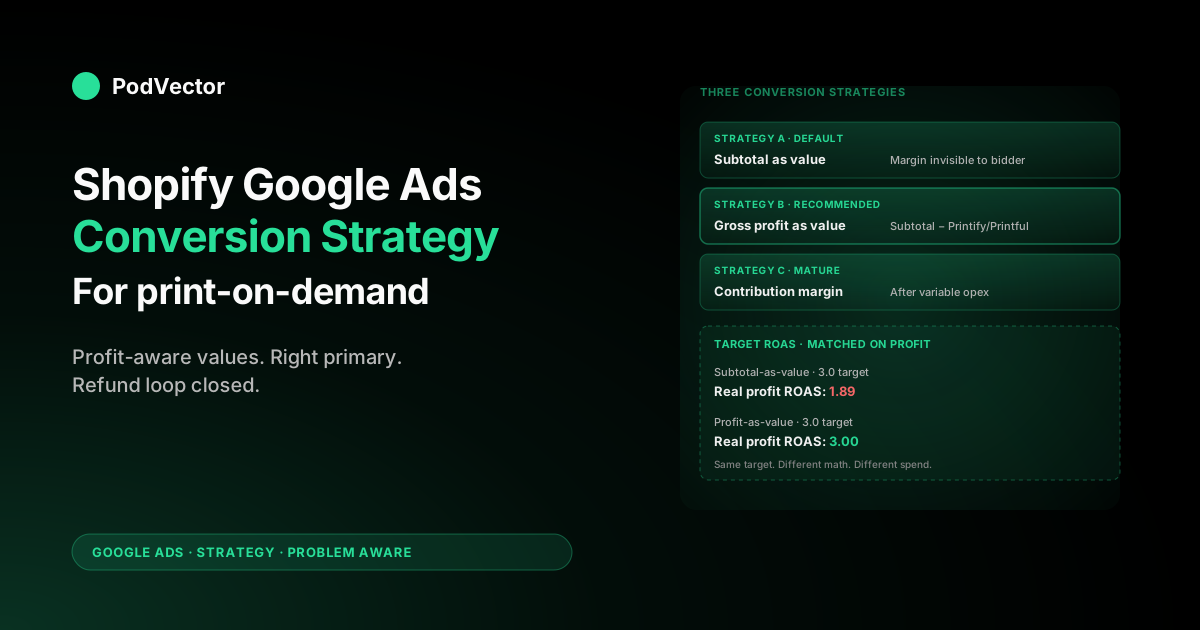
Quick Answer: A Shopify Google Ads conversion strategy for POD has three jobs that the default install does not do. First, the conversion value you send to Google has to be gross profit, not subtotal — otherwise Smart Bidding optimises toward the highest-revenue orders rather than the most profitable ones, and a $42 hoodie from a $14-COGS Printify supplier looks the same as a $42 hoodie from a $26-COGS supplier.
Second, you need an explicit conversion architecture (which conversion is primary, what attribution model, which Smart Bidding mode) that evolves as your monthly volume grows. Third, you need an offline-conversion feedback loop so refunds, chargebacks, and post-pixel orders flow back to Google Ads.
Tracking is the install. Strategy is what you do for the next twelve months on top of it.
Conversion tracking is not a conversion strategy
Most POD operators come to Google Ads with the same plumbing question: "How do I make sure my Shopify orders show up as conversions inside Google Ads?" That question gets answered by an integration. Install the Google & YouTube channel, accept the four auto-created conversion actions, turn on enhanced conversions, watch the data appear within 24–48 hours.
Done. The default mechanics are documented end-to-end in our complete guide to Google Ads + Shopify integration for POD.
That answers the tracking question. It does not answer the strategy question, which is the part that determines whether the next 90 days of ad spend are profitable.
Tracking is a verb the engineering team finishes once. Strategy is a set of decisions you make on day one and re-make every quarter as your store grows. The two are routinely conflated, especially in the POD vendor space, because the strategy decisions are invisible at install time — they only manifest months later when target ROAS is hitting but contribution margin is shrinking.
The strategic decisions that the install does not make for you:
- What value do you send on the Purchase conversion? Subtotal, gross revenue, gross profit, or contribution margin? Each one trains a different Smart Bidding model with different blind spots.
- Which conversion is primary, and at what volume threshold do you switch? Smart Bidding optimises against primary conversions. The right primary action when you do 20 orders a month is not the right one when you do 200.
- Which attribution model are you on? Last-click, position-based, time decay, or data-driven attribution behave differently for the multi-touch, mobile-heavy intent patterns POD audiences show.
- How do refunds and chargebacks flow back? Default Shopify integrations do not negative-adjust conversions. Without that loop, Smart Bidding keeps bidding aggressively for audiences that produce 8% refund rates.
- How does the strategy evolve from $5K to $50K monthly spend? The campaign architecture, conversion mix, and bidding mode all change at scale breakpoints. A static strategy is a strategy that stops working.
This guide focuses on those decisions. If you have not yet wired up the basics, start with our guide on setting up Google Ads conversions on Shopify and come back here once the data is flowing. The pillar that bundles all of this for the campaign-design layer is the complete Google Ads playbook for POD sellers.
The three conversion strategies POD stores actually use
Across the POD operators we work with, almost every Shopify store is running one of three identifiable conversion strategies. Naming them out loud is useful because most operators are not aware which one they are on, which means they are not aware of its trade-offs.
Strategy A — "Default channel app, revenue-as-value." The Google & YouTube channel installed, Purchase set as primary, conversion value equal to order subtotal, no negative adjustments for refunds. This is the strategy that ships out of the box.
It works at launch, it gives Smart Bidding enough signal to find buyers, and it consistently produces ROAS numbers that look reasonable on the dashboard. It also leaves 15–35% of effective ad spend on the table at scale because Smart Bidding has no view into supplier-cost variance, refund rates, or reorder behaviour. Most POD stores below $10K monthly spend live here, often without realising they have made a choice.
Strategy B — "Profit-aware value, single primary." Same install, but the conversion value passed to Google is calculated as subtotal minus Printify or Printful supplier cost minus Shopify processing fees, sent as value on the Purchase event. Refund adjustments flow back via the Conversions API or the Shopify channel's webhooks.
Customer Match feeds high-LTV customer audiences. This is where most $10K–$50K POD stores should be operating, and it is where a noticeable chunk of margin recovery comes from after the install is finished. It needs the COGS data to exist somewhere queryable — a Shopify metafield, an export, or a warehouse — but it does not require any Google-side complexity beyond enhanced conversions and offline imports.
Strategy C — "Profit-aware value plus contribution-margin overlay." Strategy B with a second conversion action that sends contribution margin (gross profit minus the proportion of variable opex like apps, returns processing, and customer-service overhead) instead of gross profit. The contribution-margin signal is what Smart Bidding optimises against once monthly spend crosses ~$30K and the gap between gross profit and bankable margin matters more than first-order metrics.
This is rare among POD stores because most do not have the variable-cost data in a queryable form. The ones that do are the ones whose ROAS dashboards stop disagreeing with their P&L.
The decision is not "which is best in the abstract" but "which does our cost data support today and where do we want to be in twelve months." Picking strategy C with strategy A's data infrastructure produces garbage values that train a worse Smart Bidding model than the default.
Profit-aware target ROAS: the math that beats default revenue ROAS
Every POD operator who has run Google Ads for more than two months has had this conversation: "Our target ROAS is 3.0, we're hitting 3.2, and our bank balance is going down." That is not Google Ads breaking. That is the conversion-value strategy working as designed and revealing that revenue ROAS is the wrong metric.
The arithmetic for a typical Printify apparel order:
- Subtotal billed to customer: $42.00
- Printify supplier cost: $14.00
- Shipping cost (charged through to customer at $5.50): $5.50 — net zero
- Shopify payment processing (2.9% + $0.30): $1.52
- Contribution per sale: $26.48 (subtotal minus supplier and processing)
If you send $42.00 as the conversion value, Google Ads needs your campaign to generate $14.00 of conversion value per $1.00 of ad spend to break even, after backing out the $26.48 / $42.00 = 63% margin. The default revenue ROAS that breaks you even is 1.59, not 1.00. Your "Target ROAS 3.0" campaign is actually a "Target gross-profit ROAS 1.89" campaign, and any campaign sitting at 2.0 revenue ROAS is unprofitable while still appearing to hit some imaginary target.
If you send $26.48 as the conversion value instead — gross profit, after supplier and processing — the same target becomes a real profit metric. A 3.0 target on profit-as-value is a 3.0 target on profit.
The difference between the two strategies is not the reporting; the reporting can be reconciled either way. The difference is what Smart Bidding learns from.
When the value is profit, the algorithm prefers SKUs, audiences, and times of day that produce higher-margin orders. When the value is subtotal, the algorithm cannot tell margin apart and tends to drift toward whichever variants happen to convert most reliably — which, in POD, is almost always your highest-supplier-cost SKUs because they are the most familiar branded styles.
Target ROAS settings under each strategy:
- If sending subtotal as value: set Target ROAS at (1 / your gross margin) × (your desired profit ROAS). For a 63% gross margin and a 2.0 profit-ROAS target, that is 1.59 × 2.0 = 3.18. Adjust upward as your supplier mix shifts toward more expensive SKUs.
- If sending gross profit as value: set Target ROAS directly at your desired profit ROAS. A 2.0 target means $2 of gross profit per $1 of ad spend. No mental arithmetic required. This is the entire point of the value-strategy switch.
- If sending contribution margin as value: set Target ROAS directly at your desired contribution-margin ROAS. Typically 1.5–1.8 for $30K+ POD stores given variable-cost overhead.
The reporting reconciliation is straightforward: keep your Shopify Google Ads attribution dashboard tracking revenue (for stakeholder reporting), and keep your Google Ads UI tracking profit-as-value (for the bidding model). They will disagree on the absolute conversion-value number; that is correct, and not a problem.
Picking an attribution model for POD intent patterns
Google Ads now defaults to data-driven attribution (DDA) for accounts with sufficient conversion volume, and that default is usually right for POD — but not always, and the cases where it is not have a specific shape worth recognising.
POD intent patterns differ from generic ecommerce in two ways that affect attribution choice. First, POD purchases are heavily driven by inspiration and identity, not need.
A buyer searching "vintage motorcycle t-shirt" is not solving a problem; they are responding to a moment of recognition. That intent pattern produces longer browse-then-buy paths with multiple touchpoints across Shopping, Display, YouTube, and brand search. Second, POD audiences skew younger and more mobile-first, with higher rates of "saw the ad on phone, bought later on desktop" cross-device journeys.
The attribution-model decision matrix:
- Data-driven attribution (default). Use this once you have 300+ conversions per month at the account level. DDA learns which touchpoints actually contributed to each conversion based on your account's historical data. For multi-touch POD journeys, DDA is meaningfully better than last-click and is what Google's bidding algorithms expect to see. We cover the mechanics in Google Ads attribution explained for POD sellers.
- Last-click (legacy default). Reserve this for accounts under 300 conversions/month where DDA does not have enough data to model reliably. The risk: last-click overweights brand search and remarketing relative to upper-funnel Shopping and YouTube discovery, which means your discovery campaigns will appear less efficient than they really are and you will starve them.
- Position-based. A reasonable middle ground if you have 100–300 conversions/month and DDA is unstable but last-click is too narrow. Gives 40% credit to first click, 40% to last, 20% spread across the middle. Works for POD because it credits both the discovery moment and the conversion-decision moment.
- Time decay. Rarely the right default for POD. Time decay assumes recency matters more than position, which is true for high-urgency commerce (deals, restock alerts) but false for inspiration-driven POD where the first touchpoint often plants the brand affinity that converts weeks later.
One subtlety worth flagging: if you are running Performance Max campaigns alongside Search and Shopping (which most POD stores should), Performance Max effectively uses its own internal DDA-like model regardless of your account-level attribution setting. The account setting still affects Search and Shopping; it does not override Performance Max's internal attribution. We unpack the broader trade-offs in our honest breakdown of Hyros and Google Ads attribution for POD sellers.
How your conversion strategy evolves as you scale
The single biggest mistake POD operators make with conversion strategy is treating it as static. The right architecture for a $5K/month account is the wrong architecture for a $50K/month account, and operators routinely run a launch-stage strategy for years past its expiration date.
Stage 1: Launch ($0–$5K/month spend, < 30 monthly purchases per campaign). Smart Bidding does not have enough purchase signal to learn against. Run Begin checkout as your primary conversion to give the algorithm 5–10× the volume to optimise toward.
Stay on Maximize Conversions (no target ROAS yet) so the bidder is not constrained by an arbitrary value goal it cannot hit. Send subtotal as value because the strategic difference between subtotal and gross profit is not worth the implementation overhead at this volume.
Stage 2: Growing ($5K–$15K/month, 30–100 monthly purchases per campaign). Promote Purchase to primary; demote Begin checkout to secondary. Switch to Maximize Conversion Value.
Implement the gross-profit value layer — this is where strategy B's profit recovery starts paying for itself. Enable enhanced conversions and Customer Match if you have not. The ROAS targeting is still loose; use Maximize Conversion Value without an explicit target until you have 30 days of profit-as-value data to set one against.
Stage 3: Scaling ($15K–$50K/month, 100–500 monthly purchases per campaign). Add Target ROAS to your highest-volume campaigns, set against gross-profit value. Begin running Performance Max alongside Shopping.
Wire offline conversion imports for refunds — at this volume, refund leakage compounds visibly. Start segmenting Customer Match audiences by LTV bucket (one-time buyers vs. repeat customers vs. high-LTV repeat customers) and let Smart Bidding bid more aggressively for high-LTV-similar prospects. We cover the broader campaign-mix decisions in our Google Ads for Shopify strategy guide.
Stage 4: Mature ($50K+/month, 500+ monthly purchases per campaign). Move to contribution-margin as conversion value (strategy C). Run separate brand and non-brand campaigns with different Target ROAS values — brand traffic typically converts at 4–6× non-brand and should be optimised separately.
Implement value-rules to up-weight new-customer conversions vs. returning-customer conversions if your business case favours acquisition over repeat purchase economics. Quarterly reviews of the conversion strategy itself, not just the campaigns running on it.
Most POD stores stall in Stage 1 or Stage 2 not because their creative or product is bad but because their conversion strategy never advanced. The Shopify Google Ads dashboard hides this — it shows revenue, ROAS, and conversion volume, none of which surface the underlying strategy choice. We've written about how this same problem manifests at the broader campaign level in our Shopify Google Ads strategy guide for POD.
Customer Match: turning Shopify orders into bidding signal
Customer Match is the single most underused part of a Shopify conversion strategy for POD. The mechanics are simple: hashed email lists from your Shopify customer base get uploaded to Google Ads, where they become an audience Smart Bidding can bid for, against, or relative to. The value is that it gives Smart Bidding a first-party signal that is immune to pixel restrictions, ad blockers, and iOS privacy changes.
For POD, three Customer Match segments are worth maintaining as separate lists:
- All purchasers (last 540 days). Use as an exclusion on prospecting campaigns to prevent reacquiring existing customers at prospecting CPCs, and as a similar-audience seed for net-new prospecting (Google generates a "lookalike" without requiring any explicit lookalike toggle anymore — Smart Bidding does it automatically when the audience is observation-targeted).
- Repeat purchasers (2+ orders). Higher-LTV cohort. Use as a seed for an aggressive Target ROAS campaign focused on similar prospecting, and use as an inclusion on remarketing campaigns to nudge a third purchase.
- High-LTV (top 20% of customer LTV, last 12 months). Your most economically valuable cohort. The similar-audience signal here is the most concentrated. POD stores at $30K+ monthly spend that have implemented this list and let Smart Bidding bid into similar audiences typically see prospecting CPA drop 15–25% within 60 days because the algorithm is now hunting for high-LTV-shaped users specifically.
The list maintenance itself is the operational hard part. Manual exports go stale within weeks; you want this on a daily or weekly automated upload. Options range from the Google Ads Shopify channel's built-in customer sync (simplest, syncs all-purchasers list automatically) to Customer Match upload via the Google Ads API from your data warehouse (necessary for the segmented LTV lists since the channel app does not segment).
The reason this is a strategic decision and not a tactical one: Customer Match is the layer that lets your conversion strategy keep working as iOS, ad blockers, and third-party-cookie deprecation eat into the pixel. If your conversion strategy depends entirely on the Google & YouTube channel pixel to produce signal, that signal is degrading every quarter. If it has Customer Match feeding first-party data alongside, the bidding model has an independent source of truth that does not degrade.
Closing the loop: offline conversion imports for refunds and reorders
Offline Conversion Import (OCI) is the layer most POD strategies skip and shouldn't. The default Shopify integration sends one conversion event per order at checkout; it does not adjust that conversion when the order is refunded, when a chargeback hits 60 days later, or when a customer reorders months down the line. The result is a Smart Bidding model that thinks every order is a profitable forever-customer, which is not how POD economics actually work.
The three loops worth wiring:
- Refund adjustments. When a Shopify order is refunded, send a negative conversion adjustment to Google Ads via the Conversions API, equal to the refunded conversion value. POD apparel categories typically run 2–6% refund rates; mug, frame, and seasonal categories higher. Without this loop, every refund stays inside the bidding model as a positive signal and Smart Bidding keeps bidding aggressively for the audiences that produced it. Most apparel POD stores recover a noticeable amount of efficient spend just from wiring this one feedback loop, with no other strategy changes.
- Chargeback adjustments. Same mechanism, longer lag. Chargebacks land 30–90 days after the order. The conversion adjustment closes the loop on payment-disputed orders that were not voluntary refunds. POD stores selling into trend-driven niches see chargeback rates 2–3× the average and benefit disproportionately from this loop.
- Reorder uplifts (advanced). When a customer places a second or third order, send an offline conversion adjustment that adds the LTV uplift back to the original Google Ads-attributed first order. The effect is that prospecting campaigns that acquired the customer get retroactively credited for their full LTV value, not just the first order's gross profit. This is what makes prospecting CPAs look sustainable when the first-order numbers alone do not.
The implementation lives outside Shopify itself. The Conversions API call needs the original GCLID (or wrapped first-party ID) from the order plus the adjustment amount, and a server somewhere to send it. Common patterns: a Cloudflare Worker reading Shopify webhooks, a Make/Zapier scenario, a Google Cloud Function on Shopify webhook subscriptions, or — for stores already running a data warehouse — a scheduled warehouse export to the Google Ads API.
The reason this stays out of most strategy guides is that it requires non-trivial engineering. The reason it deserves to stay in this one is that it produces 5–15% headline ROAS improvement on its own, and is the difference between a Smart Bidding model that knows POD economics and one that thinks every order is forever-revenue.
Diagnostics: signs your conversion strategy is failing
A failing conversion strategy rarely throws errors. The pixel keeps firing, dashboards keep populating, target ROAS keeps hitting. The failure shows up downstream as drifting bank balance and "the ads worked last quarter, now they don't" without an obvious cause. Five symptoms to watch for:
- Google Ads ROAS hits target, P&L margin shrinks. Classic signature of revenue-as-value strategy with shifting supplier mix. The campaigns are doing exactly what you told them to do; the value strategy is wrong. Move to gross-profit value (strategy B) and rebuild Target ROAS against profit.
- Conversion-value to Shopify-revenue ratio drifts more than 5%. Track this monthly. Total Google Ads conversion value ÷ total Google-Ads-attributed Shopify revenue. Should sit near 1.0 with subtotal-as-value or near (1 - your gross margin) with profit-as-value. Drift means either COGS data is stale (Printify/Printful repriced and you didn't update) or pixel doublefires snuck back in after a theme migration.
- Smart Bidding drifts toward fewer, more expensive products. Look at your top 20 SKUs by Google Ads conversions over a rolling 30 days. If the list concentrates over time toward your highest-COGS SKUs (premium hoodies, high-supplier-cost styles), the value strategy is wrong — Smart Bidding is preferring high-revenue orders without seeing they are also high-cost orders.
- New-customer rate falls below 60% of total acquisitions. When too much spend goes to remarketing audiences, Customer Match exclusions are not configured correctly. The bidding model is reacquiring existing customers at prospecting CPCs. Add an All Purchasers (540-day) Customer Match list as a campaign exclusion on prospecting campaigns.
- Refund rate creeps up while ROAS appears stable. Without offline conversion adjustments wired, increasing refund rates do not register inside the bidding model. The Smart Bidding side keeps bidding for the same audiences while the P&L side bleeds. Wire OCI refund loops first; then watch reported ROAS drop 8–12% and your P&L stop diverging.
None of these diagnostics requires a tool. They require a quarterly review with the conversion strategy explicitly on the agenda — not just campaign performance, but the strategy choices behind the campaigns. We cover the broader operational rhythm in our Google Ads Shopify strategy guide.
Quarterly review: keeping the strategy aligned with the business
A strategy that is right for Q1 may not be right for Q3. Set a quarterly checkpoint with these five questions:
- Has our gross margin shifted by more than 3 percentage points since last quarter? If yes, recompute the Target ROAS conversions for any campaigns running revenue-as-value (strategy A). If you are on profit-as-value (strategy B or C), the values self-adjust because supplier costs flow through the conversion value automatically — but verify the COGS metafields are still being maintained.
- Has any campaign crossed a volume threshold that should change its primary conversion? Specifically: campaigns crossing 30 monthly purchases should switch primary from Begin checkout to Purchase. Campaigns crossing 100 monthly purchases should add Target ROAS on top of Maximize Conversion Value. Most operators forget to make this switch and continue running Stage-1 architecture deep into Stage-3 volume.
- Are our Customer Match lists still fresh? If you are uploading manually, audit the list dates. Stale lists train Smart Bidding on customers who churned a year ago. Automated daily or weekly syncs solve this; quarterly checks catch when the automation breaks.
- Have any new conversion actions appeared that we did not authorise? Every few months, Google or Shopify adds a new conversion action via auto-tagging, plug-in updates, or Performance Max experiments. Review the list and demote or delete any that are not part of your strategy. Unauthorised conversion actions running as primary or secondary corrupt Smart Bidding's signal mix.
- Is our conversion data still tracking our actual orders? Pull a Shopify export of Google-Ads-attributed orders for the quarter and reconcile against Google Ads' reported conversions. Healthy variance is 5–15%. Wider gaps mean enhanced conversions are misconfigured, the pixel is double-firing, or the channel app has lost OAuth.
The questions are not technical. They are business questions answered with conversion data. A strategy review that does not connect back to the P&L is a campaign review with a different name.
FAQs
What's the difference between conversion tracking and conversion strategy?
Tracking is the install — wiring the pixel, accepting the auto-created conversions, turning on enhanced conversions. Strategy is what value you send, which conversion is primary, which attribution model you use, and how those choices evolve as you scale. The install takes 30 minutes. The strategy is a set of decisions you re-make every quarter.
Should I send order subtotal or gross profit as my Google Ads conversion value?
Gross profit (subtotal minus supplier cost minus processing fees) once your store has the COGS data in a queryable form. Subtotal is fine for the first 60 days at launch when you do not have profit data wired up; switch as soon as you can. Sending subtotal at scale means Smart Bidding optimises against revenue, not margin, and your highest-revenue orders are usually not your highest-margin orders.
Do I need a separate conversion action for refund adjustments?
No. Refund adjustments are sent as conversion adjustments against the original conversion event via the Google Ads Conversions API, not as a separate conversion action. The mechanism takes the original GCLID and reduces the conversion value by the refunded amount.
How long does it take for a new conversion strategy change to show up in Smart Bidding?
The data appears in reports within 24–48 hours. Smart Bidding's behaviour changes over 14–28 days as the model retrains on the new signal. Do not change strategy and bidding mode in the same week — change one, wait two weeks for the model to stabilise, then change the other. Stacking changes makes it impossible to attribute the result to either one.
Can I run different conversion strategies for different Shopify stores under the same Google Ads MCC?
Yes. Each Google Ads account inside an MCC has its own conversion settings, including value strategy, primary action, and attribution model. POD operators running multiple niche stores commonly run strategy A on launch-stage stores and strategy B on mature stores under the same MCC. The MCC-level reporting reconciles them.
Should small POD stores skip conversion strategy entirely until they have more volume?
Skip the advanced layers — contribution-margin value, offline conversion imports, segmented Customer Match — until you cross $10K monthly spend. Don't skip the basics: enhanced conversions on, Begin checkout as primary while sub-30-purchases-per-campaign, Customer Match all-purchasers list uploaded.
The basics are 10 minutes of work; the advanced layers are weeks. Match the work to the volume.
Does Performance Max use my account-level conversion strategy?
Performance Max uses your conversion actions and primary conversion settings, but its internal attribution behaves like data-driven attribution regardless of your account-level setting. The conversion value you send still matters — Performance Max optimises against it the same way Search and Shopping do — but the attribution-model decision applies mostly to Search and Shopping campaigns. Worth keeping in mind when reading Performance Max reports.
How do I handle conversion strategy across multiple Google Ads campaigns?
The conversion actions are account-level; the bidding strategy and value goals are campaign-level. That means every campaign on the account inherits the same conversion definitions but can target different ROAS values, bidding modes, and budget caps. POD stores should typically run two-to-four distinct ROAS targets across campaigns: brand search at the highest target, prospecting Shopping at a middle target, Performance Max at a slightly lower target to give it learning room, and discovery/upper-funnel campaigns at the lowest target or none.
Stop guessing which campaigns are actually profitable
The conversion strategy on this page only works if you can answer "which campaigns are unprofitable this week?" without rebuilding a spreadsheet. Victor sits on top of a live data warehouse joining your Shopify orders to Printify and Printful supplier costs in real time, so the gross-profit value flowing into Google Ads matches the gross profit hitting your bank — and the question becomes one chat message instead of a Sunday-night exercise.
Try Victor freeFurther reading: Shopify's official Google Ads conversion tracking guide covers the install layer in depth. The Google Ads strategy cluster covers the broader campaign decisions across our POD stack. The Google Ads topic hub indexes everything we've published on Google Ads for POD sellers.