
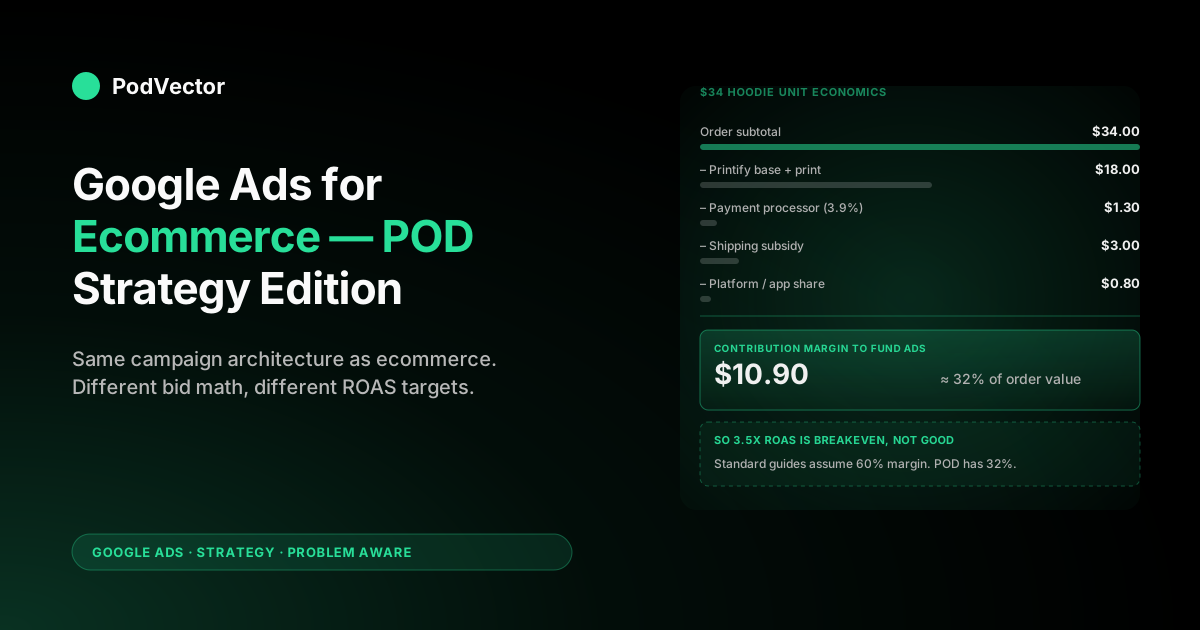
Quick Answer: A Google Ads strategy for ecommerce gives the same advice to a $50 hoodie store and a $500 mattress brand — bid on commercial-intent keywords, fund Performance Max, optimize the product feed, scale toward target ROAS. For print-on-demand, three of those four steps mislead you unless you adjust for the supplier-cost stack: a $34 hoodie sale carries roughly $11.70 of contribution margin after Printify, fees, and shipping, so a "good" 3.5x ecommerce ROAS is breakeven for POD. The strategy that works is the same campaign mix the ecommerce guides describe, but bid against margin-based conversion value (not order subtotal) and measure profit per campaign, not Google's reported revenue.
Why POD ecommerce needs a different read of the same playbook
Open any of the major ecommerce Google Ads guides — Store Growers' Ultimate Guide, Inflow's 14-strategy playbook, Sellbrite's beginner walkthrough — and the campaign mechanics line up: Search captures intent, Shopping shows products, Performance Max blends channels, target ROAS bidding scales what works. The mechanics are correct. What's missing is that those guides assume an ecommerce brand owns its inventory and its margin structure.
Print-on-demand sellers don't. Every order routes through Printify, Printful, Gelato, or a similar supplier, and the supplier takes the largest single bite of the order value. A $34 hoodie sale on Shopify breaks down roughly like this:
- Order subtotal: $34.00
- Printify base + print cost: $18.00
- Payment processor (Shopify Payments, ~3.9%): $1.30
- Shipping subsidy (free shipping baked into price, real cost ~$5, charged $2): $3.00
- Shopify subscription / app share, allocated: ~$0.80
- Contribution margin available to fund ads: $10.90
That number — $10.90, or about 32% of order value — is what you have to advertise against. For a generic ecommerce store with 60–70% gross margin, a 3.5x reported ROAS in Google Ads is profitable.
For this POD example, the same 3.5x ROAS means $9.71 of ad spend per order (revenue ÷ 3.5) against $10.90 of margin: $1.19 profit per sale before refunds. After 4% returns, you're underwater.
The playbook that the standard ecommerce guides describe still applies. The numbers you target inside it don't. Everything below is the same campaign architecture they recommend, with the bid math, value tracking, and measurement layer rebuilt for POD economics. For the broader cluster context, see the complete Google Ads playbook for print-on-demand sellers.
The foundation: Merchant Center and feed for POD
Every ecommerce Google Ads strategy starts with the product feed, and POD is where most feeds quietly fail. Three issues come up before any campaign runs:
- Variant proliferation. A single Printify hoodie product becomes 60–120 variants once you cross sizes (S–3XL), colors, and gender cuts. Google Merchant Center accepts every variant, but Shopping ads will only ever surface one variant per query, and your feed file size starts breaking sync limits past about 5,000 variants. Curate which variants ship to Merchant Center — the bestseller size and the two most popular colors per design is usually enough.
- "Free returns" attribute. POD doesn't typically offer returns the way a traditional retailer does (Printify accepts returns for misprints and damage, not buyer's-remorse). If you flag
free returnsin the feed and Google verifies you don't honor it, the account gets suspended. Leave it off and write your real return policy on the product page. - Image quality. Printify's mockup generator outputs 2000×2000 images, which Google requires (Shopping ads need 800×800 minimum, ideally 1200×1200+). Fine. The trap is that POD mockups all look like mockups — too clean, no shadows, no model. CTR on lifestyle images runs 1.4–2.1x mockup-only images in apparel. Pay $30–60 once for AI-rendered model images per design (Botika, Zmo.ai) and your CPCs drop without changing bids.
For the connection setup itself, see how to connect Shopify to Google Merchant Center. For shopping-specific feed optimization, the Ad Types cluster has the deeper walkthroughs: Google Shopping Ads for ecommerce covers feed-driven CTR and optimizing Google Shopping ads covers title and category tuning.
Campaign mix: which campaigns work for POD, which waste money
Google Ads exposes seven campaign types. Five of them matter for POD ecommerce, and only three should run from day one:
| Campaign type | POD verdict | When to add |
|---|---|---|
| Search (commercial keywords) | Day 1 | Brand defense + product-category keywords |
| Shopping (Standard) | Day 1 | Once Merchant Center is live |
| Performance Max | After 30 conversions | Need real conversion data to train |
| Demand Gen | After scale ($300/day spend) | For prospecting once you've built audiences |
| YouTube (Video) | Optional, brand stage | Only with a real creative team |
| Display (Smart) | Skip | View-through credit inflates POD ROAS without revenue |
| App campaigns | N/A | POD doesn't have an app |
The two trap campaigns for POD specifically:
- Performance Max from day one. Google's account reps push PMax aggressively because it's their highest-margin product. PMax needs ~30 conversions in 30 days to bid intelligently. A new POD store hits that on volume but PMax with no first-party data optimizes against view-through credit on cheap Display impressions, returning a 6x phantom ROAS while actual incremental revenue is flat. Run Search + Standard Shopping first. Add PMax once you have 60+ Purchases tracked with margin-based value.
- Smart Display campaigns. Google's automated Display product is a near-guaranteed loss for POD apparel. The audiences are too broad, the inventory skews to MFA (made-for-advertising) sites, and the view-through model overcounts conversions you would have gotten from organic.
For the comprehensive ad-types breakdown, see the complete guide to Google ad types for POD sellers.
Search ads strategy for POD
Search is the most legible channel for POD because the queries map directly to commercial intent. The ecommerce playbooks recommend three campaign tiers; for POD the right structure is four, with brand defense as a non-negotiable first line:
- Brand defense. One campaign, exact-match on your store name and any niche-specific brand terms you've earned (e.g., "[YourStore] hoodie"). Bid aggressive — these clicks convert at 8–14% and competitors will bid on your name to siphon traffic. Budget cap at $5–15/day; this is insurance, not growth.
- Category-bottom-funnel. Phrase match on commercial-intent terms with your product category: "vintage hiking shirt," "funny dad joke t-shirt," "minimalist running mug." These convert at 3–6% and are where Search earns its keep for POD.
- Modifier-heavy long-tail. Broad match (with negative-keyword discipline) on "[design theme] + [product type] + [modifier]" — "retro motorcycle hoodie gift for dad," "personalized cat lover mug funny." Lower CPCs, higher CTR, but you need a healthy negative list (see below) to stop them firing on freebie or template queries.
- Skip generic head terms. "Hoodie," "t-shirt," "mug" — too expensive ($1.50–4.00 CPC), competing against Amazon, Target, and direct manufacturers with margin you don't have. Let Shopping pick up the generic browse traffic.
The negative-keyword list is the difference between Search Ads working and Search Ads bleeding. Day-one negatives for POD: "free," "template," "svg," "png," "mockup," "blank," "wholesale," "bulk," "[competitor] coupon." Add the actual product noun as a negative to the long-tail campaign so it doesn't cannibalize the category campaign. For the focused walkthrough on POD keyword research, see Google Ads keyword research for ecommerce.
Shopping and Performance Max strategy
Standard Shopping is the workhorse. The data the SERP guides cite — Inflow notes Shopping wins ~85% of retail clicks and converts 30% better than text ads — holds for POD with one POD-specific caveat: Shopping shows your price next to competitors. A POD hoodie at $34 sitting next to a generic Amazon hoodie at $18 has to compete on the design hook in the title and image, not the price.
Practical Shopping setup for POD:
- Title structure: [Brand] [Design Hook] [Garment Type] [Color] [Audience] — e.g., "PinePeak Co. Vintage Mountains Sunset Hoodie Forest Green Hiking Gift Mens." Google's Shopping algorithm reads titles heavily; design-hook keywords near the front lift impression share for niche queries.
- Custom labels: Tag products by margin tier (label_0 = "high_margin" for $5+ contribution, "low_margin" for sub-$5). You can then bid differently per tier or exclude low-margin SKUs from PMax once you scale.
- Priority and bidding: Start with Manual CPC at $0.30–0.50 across all products, let it run 14 days, then switch to Maximize Conversion Value with a target ROAS once you have 30+ conversions. The target ROAS you set is the math from the bidding section below, not whatever Google suggests.
For Performance Max — once you've earned the right to run it — three rules keep it from torching budget on POD:
- Feed margin-based conversion value, not subtotal. Non-negotiable. PMax bids harder on high-value conversions; if your "value" is order revenue, PMax over-spends on $34 hoodies that yield $10 margin while under-spending on $48 sweatshirts that yield $19 margin.
- Use the asset group + audience signal as a creative gate, not a literal targeting rule. PMax treats audience signals as suggestions. Provide them, then judge by conversion behavior over the first 14 days, not impressions distribution.
- Cap PMax to your top-margin products via custom label exclusion. Don't let PMax bid against your $4-margin clearance design with the same urgency it bids against your $19-margin signature piece. The same target ROAS produces different real outcomes per SKU.
The deeper PMax-on-Shopify walkthrough lives in Shopify Performance Max campaigns explained.
Bidding strategy with POD margins
This is where the standard ecommerce strategy guides quietly assume you have 60% gross margin and the math breaks for POD. Run the calculation explicitly.
Target ROAS formula: what reported ROAS does Google need to hit for you to make money?
Target ROAS = AOV ÷ (Contribution Margin per Order × (1 − target net margin))For the $34 hoodie example with $10.90 contribution and a 15% net target:
Target ROAS = 34 ÷ (10.90 × 0.85) = 34 ÷ 9.27 = 3.67xThat's the breakeven-plus-margin floor for the campaign reporting against subtotal value. In practice, you want to set target ROAS slightly above that to give the bidder headroom — 3.9x to 4.2x for this product.
Now compare to Inflow's industry benchmark of 4x ROAS being "good" for ecommerce: for this POD example, 4x is barely sustainable, not good. Your "good" is 5x+.
The fix: send margin-based value to Google Ads, not subtotal. When you change the conversion value Google receives from $34 to $10.90, the math inverts. The same campaign at the same physical performance now reports a 1.15x ROAS for breakeven, and your target ROAS bid setting becomes:
Target ROAS (margin-based) = 1 ÷ (1 − target net margin) = 1 ÷ 0.85 ≈ 1.18xSet target ROAS at 1.3–1.5x against margin-based value, and Smart Bidding optimizes against the only number that matters: profit. Every conversion value Google ingests is now an honest signal, and the bidder spends harder on customers and SKUs with higher real margin.
The implementation lives in your Shopify pixel — replace checkout.subtotal_price with a calculated margin field, or send margin via offline conversion uploads. The conversion-tracking cluster covers this end-to-end: add Google Ads conversion tracking to Shopify includes the code edit, and Google Ads enhanced conversion setup on Shopify covers the privacy-safe parameter passing.
Conversion tracking pitfalls unique to POD
The standard ecommerce guides treat conversion tracking as a checklist item — install the tag, verify the firing, move on. POD has four tracking pitfalls that will silently distort every bid decision until you fix them:
- Variant SKUs collapse to the parent. Shopify's Google Ads pixel reports the parent product ID by default, not the variant. If your $24 t-shirt and $36 hoodie are separate Shopify products it works; if they're variants of one product, they all report the parent's price. Send the variant ID and price explicitly.
- Refunds aren't fed back. Google Ads gets the conversion when the order completes. It never hears about the Printify-driven refund or the size exchange that becomes a refund. POD apparel runs 2–6% returns; PMax and Smart Bidding need that signal back via offline conversion adjustments. Shopify Google Ads tracking issues walks through the API setup.
- Multi-domain pixels. If you run a Shopify storefront and a custom landing page on a separate domain, the Google Ads tag has to fire on both with the same conversion ID. Many POD sellers split-test landers on Shogun or Replo subdomains and lose 15–30% of conversion attribution.
- Enhanced conversions and hashed-email. POD checkouts ask for email — feed it (hashed, automatic in Shopify's Google channel app) to enhanced conversions. Lifts attributed conversions 8–14% in apparel without changing real performance, just recovers paths that ITP/cookie blocking lost.
For the integrations cluster overview, start at the complete guide to Google Ads + Shopify integration for POD.
Scaling: when to add Performance Max and YouTube
The pattern that consistently works for POD stores moving from $5K/mo to $50K/mo on Google Ads:
- Weeks 1–4: Search (brand + category) and Standard Shopping only. Goal: 30+ conversions logged with margin-based value. Spend ceiling: $50–80/day, target ROAS 1.3x against margin.
- Weeks 5–8: Layer in Performance Max with the top-margin SKUs only (custom label filter). Keep Standard Shopping running on the same products — they coexist; PMax mostly cannibalizes the lower-funnel queries Search would have caught anyway, but in aggregate the combined campaign mix lifts revenue 25–40%.
- Weeks 9–12: Add a Demand Gen campaign for prospecting if your asset library is good (lifestyle images of products in use). Demand Gen is where POD stores with strong creative pull ahead — it's effectively the new Discovery, with image-heavy placements Gmail and YouTube Shorts.
- Month 4+: YouTube only if you have video content. Don't outsource generic stock-footage video ads — they perform worse than no YouTube. Real product-in-use clips (UGC, behind-the-scenes design process) on TrueView for Action campaigns are the format that works for POD.
The trap at every scaling step is reading Google's reported ROAS without checking real margin. A new PMax campaign showing 6x ROAS at week 5 may be 95% bidding on your existing brand traffic that Search was already capturing — phantom incremental revenue.
Run a brand-search query report after PMax goes live and see what share of "conversions" came from queries containing your store name. Subtract those from your incremental performance read.
Measuring profit, not just ROAS
The number Google Ads reports is a function of what value you sent it. Everything in this article is wasted effort if you don't measure performance against true profit at the campaign level. The standard ecommerce stack gives you Google Ads' reported ROAS; the POD stack needs three layers stacked on top:
- Order-level cost tracking. Pull Printify or Printful's per-order supplier cost via API into your data layer. Subtract that from the order revenue to get gross margin per order. Most POD stores don't do this; the ones that do can answer "which campaign sells profitable orders" instead of "which campaign sells orders."
- Refund-aware revenue. Wait 30 days from order date before counting it as profit. POD apparel returns peak between days 8 and 22. If you're judging campaigns at day 7, you'll re-fund losers.
- Per-campaign profit reporting. Join the order-margin data to the campaign-attribution data so the question "what did campaign X profit me last week" has an answer in seconds, not in a 45-minute spreadsheet build.
This is why we built Victor — PodVector AI's AI employee that reads your live Shopify, Printify, and Google Ads data through a live data warehouse and answers profit questions directly. Victor answers "which Google Ads campaigns profited the most last week after Printify cost and refunds?" in plain English, sourced from the same data-warehouse views that power your dashboards.
Victor also acts on those answers with your approval — flagging losers, drafting bid adjustments. The job is the same job an in-house analyst does, just available 24/7 against your real data. For the broader ROAS-and-attribution context, the cluster pillar at the complete Google Ads playbook ties this measurement layer to bidding strategy.
A 90-day Google Ads plan for a POD store
Compressed timeline if you're starting fresh or restarting after a stalled account:
- Week 1: Merchant Center connection, feed cleanup, conversion tracking with margin-based value wired up before any campaign launches. Brand defense Search campaign live at $5/day.
- Week 2: Standard Shopping campaign live with curated SKUs (highest-margin 20–40 designs). Manual CPC. $30/day cap.
- Week 3: Category Search campaign live (phrase match, 8–15 keyword groups). Negative-keyword list day-one negatives applied.
- Weeks 4–6: Optimize. Pause negative-ROI ad groups. Add long-tail Search campaign once category campaign has clean signal. Target: 30+ conversions logged.
- Week 7: Switch Shopping to Maximize Conversion Value with target ROAS. Layer in PMax, top-margin SKUs only.
- Weeks 8–10: Scale daily budgets in 15–20% increments while ROAS holds. First refund-adjusted profit read at week 10.
- Weeks 11–13: Add Demand Gen for prospecting if asset library supports it. Begin first incrementality test (geo holdout) on PMax.
The cluster has more focused walkthroughs for each phase: Shopify Google Ads conversion tracking setup for week 1, Google Shopping Ads Shopify setup for week 2, and the Strategy hub itself at /articles/google-ads/strategy for the rest of the cluster as it fills in.
FAQs
Is Google Ads worth it for a print-on-demand store?
Yes, with the same caveat that applies to any paid channel for POD: only if you measure against margin, not subtotal. The math in the bidding section shows why. POD stores running Google Ads against subtotal ROAS targets typically lose money for the first 60–120 days while convincing themselves they're profitable. The same campaigns measured against margin-based value, with refund feedback wired in, are profitable inside 30–45 days for stores with reasonable creative and product-market fit.
Can I use Google Shopping Ads for print-on-demand?
Yes. The community-thread confusion comes from older Google policies around drop-shipping that prohibited misrepresentation.
As long as you're shipping the product within the timeframe shown on the product page, run accurate ad copy, and meet Google's free-returns / shipping-policy requirements, POD is allowed on Shopping. The accounts that get suspended typically misrepresent shipping times or claim free returns they don't honor — that's a self-inflicted policy issue, not a POD ban.
What's a good ROAS for a POD store on Google Ads?
Reported ROAS depends entirely on what conversion value you send Google. Against subtotal: 4–5x is profitable for POD apparel (vs. 2.5–3x for owned-inventory ecommerce).
Against margin-based conversion value: 1.3–1.5x reported is profitable, because Google now sees margin not revenue. The "good ROAS" question only has an answer once you specify the value definition. Most accounts that ask are looking at subtotal ROAS, in which case 4x is the floor and 6x+ is the goal.
Should a POD store start with Performance Max or Search?
Search and Standard Shopping first. PMax needs ~30 conversions in 30 days to bid intelligently.
A POD account starting fresh hits that volume but PMax with no first-party data ends up bidding view-through Display credit on cheap inventory, returning a phantom 6x ROAS while real incremental revenue is flat. Run Search + Shopping for 30–45 days, build the conversion data, then layer in PMax with margin-based value and custom-label SKU restrictions.
How much should I budget for Google Ads as a new POD store?
$30–80/day is the sweet spot to start. Below $30/day Smart Bidding doesn't get enough signal; above $80/day at the start, you'll burn too much before you have conversion data to optimize against.
Once you have 30+ conversions logged with margin-based value (typically week 4–6), scale the daily budget by 15–20% per week as long as target ROAS holds. The constraint isn't budget appetite, it's how fast you can earn data to bid intelligently against.
Do I need a Shopify store, or does Google Ads work with Etsy / Amazon Merch?
Google Ads works best with a Shopify storefront because you control the conversion tracking, product feed, and post-purchase experience. Etsy doesn't let sellers run native Google Ads against their listings (Etsy runs platform-level Offsite Ads, which they bill you for separately).
Amazon's PPC is its own system, separate from Google Ads. Print-on-demand sellers serious about Google Ads typically operate a Shopify or WooCommerce storefront alongside their marketplace presence, using Google Ads to drive traffic to the storefront where margin and tracking are under their control.
How does PodVector AI help with Google Ads for POD?
PodVector AI connects your Shopify, Printify, and Google Ads data through a live data warehouse and runs Victor — an AI employee that answers profit-after-COGS questions about your campaigns in plain English. Today: "which campaigns profited last week after Printify cost and refunds?" gets a sourced answer in seconds.
Victor also flags losing campaigns, drafts bid adjustments, surfaces SKU-level margin issues. The piece the standard ecommerce Google Ads stack misses — true profit per campaign — is the piece Victor is built to answer.
Ask Victor which of your Google Ads campaigns are actually profitable
Connect your Shopify, Printify, and Google Ads data once. Victor reads your a live unified warehouse and answers "which campaigns profited last week after Printify cost and refunds?" in plain English — sourced from the same data that powers your dashboards.
Try Victor free