
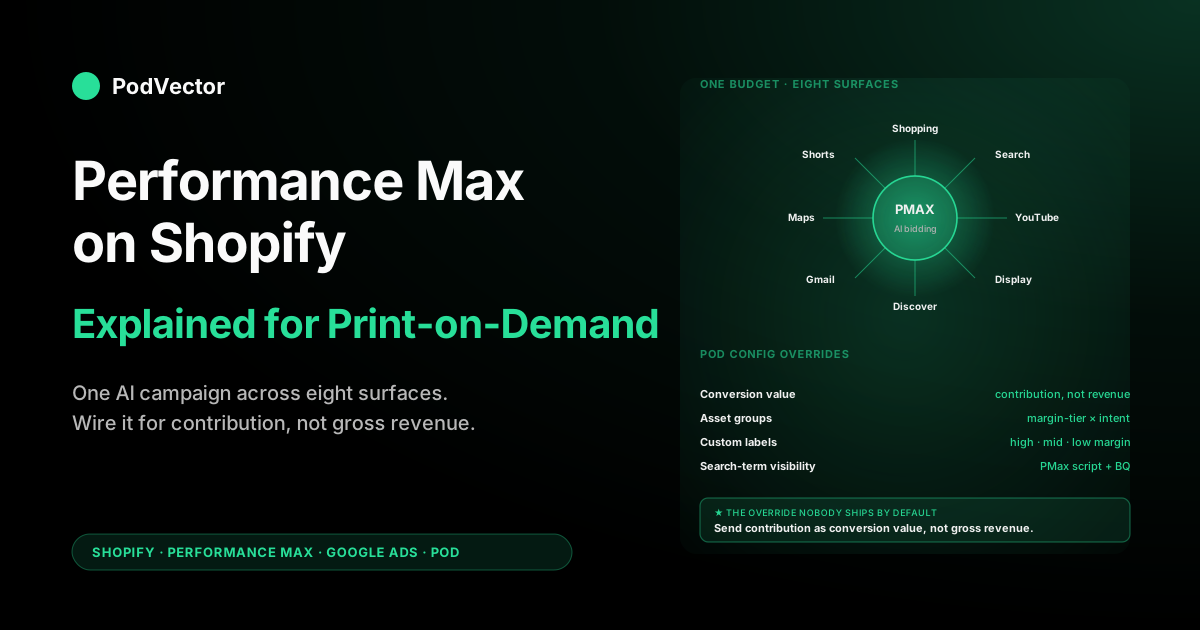
Quick Answer: Performance Max (PMax) is Google's AI-driven campaign type that spreads one budget across Search, Shopping, YouTube, Display, Discover, Gmail, and Maps, and decides which surface, audience, and creative gets each impression. For a Shopify print-on-demand (POD) store, Shopping placements do most of the converting — your product feed matters more than your creative.
PMax scales whatever conversion value you feed it. Leave the default (gross revenue: the full $32 shirt price) in place and it will grow your worst-margin SKUs; feed it contribution margin ($32 minus supplier cost minus shipping) and its tROAS numbers become real profit targets.
This guide covers the asset-group structure for a POD catalog, the bidding ramp, feed prep, the newer campaign-level controls Google shipped in 2025, and the measurement setup to finish before your first dollar of spend.
What Performance Max actually is (and why Shopify stores adopted it)
Performance Max replaced Smart Shopping campaigns in 2022 and consolidated what used to be six discrete Google campaign types — Shopping, Search, Display, YouTube, Discovery, and Gmail — into one ad surface controlled by a single bidding algorithm. The merchant supplies a product feed, a budget, a conversion goal, and creative assets (images, videos, headlines, descriptions).
Google's machine learning decides everything else: which surface to serve on, which user to target, which asset combination to render, and how much to bid. The merchant gets a single reporting view; the algorithm gets full discretion.
For a Shopify store, this is operationally seductive. One campaign replaces what used to be three to five.
Setup time drops from a half-day per launch to under an hour. Google publishes case-study numbers in the 18–30% conversion-lift range over Standard Shopping for accounts that meet PMax's data thresholds (50+ conversions per month, 30+ days of conversion history, contribution-true conversion value flowing in). The Shopify-Google integration via the Google & YouTube Shopify app pre-wires most of the plumbing — product feed, conversion tracking, customer match — which lowers the technical barrier further. Google's own documentation on creating Performance Max with Shopify reflects this default-on positioning.
The risk for POD stores hides inside the same automation. PMax is a bid-optimization engine; it will scale spend toward whatever you tell it is "valuable." If your conversion value is gross revenue and your supplier cost is 40–55% of revenue (a typical Printify or Printful tee), PMax will happily spend more to acquire customers buying your worst-margin SKUs.
The campaign reports a positive ROAS while your Shopify P&L bleeds. The same automation that makes PMax efficient for a wholesale retailer with consistent 60–70% gross margins makes it dangerous for a POD operator with margin variance from 18% to 65% across the catalog.
The PMax architecture: one campaign, eight surfaces, one objective
Understanding what PMax does internally helps explain the configuration choices that follow. A PMax campaign holds:
- One conversion goal — usually "Maximize conversion value" with a target ROAS, but optionally "Maximize conversions" or "Maximize new customers."
- One budget, distributed across all surfaces by the algorithm.
- One product feed from Merchant Center, optionally filtered by a listing group.
- One or more asset groups — logical containers that combine an audience signal, a set of creative assets, and a slice of the product feed. Asset groups are PMax's primary lever; they're how the merchant communicates intent to the algorithm without losing the unified-bidding benefit.
- Audience signals per asset group — first-party customer lists, custom segments, in-market segments, demographics. Signals are seeds, not constraints; PMax may serve to people outside the signal if its model predicts they'll convert.
The eight surfaces PMax can serve on, in rough order of conversion contribution for typical Shopify POD accounts: Google Shopping (60–70%), Google Search text ads (10–15%), YouTube in-stream and shorts (8–12%), Display Network remarketing (5–8%), Discover feed (3–5%), Gmail promotions tab (1–3%), Maps (1–2%), and Search Partners (variable). Shopping placements dominate because product feeds with images and prices match commerce intent better than text or video creative. This ordering is the single most important fact about PMax on Shopify: a well-tuned product feed will earn most of your conversions, and the creative assets are supplementary.
Prerequisites before you launch a PMax campaign
PMax penalizes accounts that launch without infrastructure. The algorithm needs about 30 days of clean conversion data to exit the learning phase; if conversions are misconfigured, the campaign learns the wrong objective and the cost of recovery is real money. The non-negotiable prerequisites:
- Approved Merchant Center feed. No suspensions, no warnings on the SKUs you want to advertise. PMax serves nothing if Shopping placements are blocked, and the failure mode is silent — the campaign appears to be running while delivering only Search and Display impressions.
- Conversion tracking firing on every checkout. Validate using Google Tag Assistant on a real test order, not just the preview tool. The Shopify-Google integration installs basic tracking automatically, but enhanced conversions (hashed customer email and phone) are an extra step worth taking before launch — it recovers 15–25% of attribution lost to mobile privacy changes.
- Conversion value set to contribution, not gross revenue. This is the single most consequential override for a POD store. Override the Shopify-Google integration's default conversion-value variable in Google Tag Manager to compute
order_total - supplier_cost - shipping_cost - processing_fee. Once contribution flows as conversion value, a tROAS of 100% literally means break-even and a tROAS of 200% means doubling money. Without this override, every tROAS number in PMax is a fiction. Our Shopify integration strategy guide walks through this conversion-value override as Flow 2 of the four-flow architecture. - Supplier cost in Shopify metafields. Printify and Printful both expose per-product cost via API. Pull it nightly into a
supplier_costmetafield on each variant. Without this, the conversion-value JavaScript has nothing to subtract and the contribution math collapses back to gross revenue. - Custom labels in the product feed. At minimum, label every SKU with its margin tier:
custom_label_0= "high_margin" (45%+), "mid_margin" (25–45%), or "low_margin" (under 25%). Without labels, you can't isolate or exclude products by margin profile, which removes your only structural lever inside PMax. - Minimum 30 conversions per month at the account level before PMax can exit learning. A new Shopify store with under 30 monthly conversions should run Manual CPC Search and Standard Shopping until the conversion count clears the threshold; PMax launched too early thrashes through budget without finding the bid signal.
Skip any of these and PMax will still launch. It will not, however, optimize toward the thing you actually want it to optimize toward. The setup walkthrough that pairs with this guide is our Google Shopping Shopify setup guide; it covers the click-by-click prerequisites that PMax inherits from a working Shopping foundation.
Asset group strategy for a POD catalog
Asset groups are how a POD operator imposes structure on what is otherwise a black box. The default impulse — one asset group, all products, generic creative — produces a campaign that under-serves your good SKUs and over-serves your worst. The structure that consistently outperforms in POD accounts splits asset groups along three dimensions, in this priority order:
- Margin tier — high-margin asset group, mid-margin asset group, low-margin asset group. Use the
custom_label_0tier set in feed prep. Each asset group serves only its tier of products, so PMax cannot trade a high-margin sale for two low-margin sales when reaching the same tROAS target. The campaign shows one ROAS per asset group in reporting; you scale budget toward the high-margin group and starve the low-margin one. - Buyer-intent type — "design-led" (people searching the niche: "cottagecore strawberry shirt"), "category-led" (people searching the product: "graphic tee for women"), and optionally "gift-led" (seasonal). Different asset groups let you tune the audience signal and creative per intent type. Design-led groups should get tighter custom-segment audience signals seeded with niche keywords; category-led groups can run broader.
- Lifecycle — "new product launch" (under 90 days, no conversion history) versus "evergreen winner" (90+ days, proven conversion volume). New products need a separate asset group with their own budget cap so the algorithm doesn't starve them while it explores; once they accumulate 20+ conversions they can graduate into the evergreen group.
For a 200-SKU Shopify POD store, a workable structure is six asset groups: high/mid/low margin × design/category intent. Lifecycle is a temporary fourth dimension — a "new launch incubator" group separate from the six until products graduate. More than eight asset groups in a single campaign tends to fragment the data thin enough that PMax's learning slows; more than one campaign should be reserved for genuinely separate strategies (for example, a Customer Acquisition campaign with the "Maximize new customers" goal alongside a Retention campaign with the standard tROAS goal).
Asset requirements per group: 5+ headlines (30 chars each), 5+ long headlines (90 chars), 5+ descriptions (90 chars), 1+ long description (90 chars), 4+ landscape images (1200×628), 4+ square images (1200×1200), 1+ portrait image (960×1200), 1+ video (any orientation), and a logo. PMax will auto-generate a video from your images if you don't supply one, and the auto-generated videos are notably worse than even a simple Canva slideshow. Spend the 20 minutes to upload a real video per asset group; it materially affects YouTube and Shorts performance.
Bidding and budget strategy: tROAS, target value, and the ramp curve
PMax offers three bidding strategies; for Shopify POD, only two are useful. Skip "Maximize conversions" — it ignores conversion value and will scale you into low-AOV, low-margin orders. Use:
- Maximize conversion value (no target) for the first 30 days after launch. The algorithm spends to maximize total conversion value within budget, and the lack of a tROAS target lets it learn faster. Expect tROAS in the 200–400% range during this phase if your conversion value is contribution and your feed is well-prepped; that's not a profitability signal yet, just a learning signal.
- Maximize conversion value with a tROAS target after 30 days of clean data and 50+ conversions in the campaign. Set the initial tROAS at the median of the actual ROAS PMax achieved during the no-target phase. Tightening the tROAS slows learning and reduces volume; loosening it scales spend but trades away margin. Adjust in 10–15% increments, no more often than every 14 days, so the algorithm can re-stabilize between changes.
Budget mechanics: PMax respects your daily budget on a monthly average, not a daily ceiling. On any given day it can spend up to 2× the daily budget; over a 30-day window it averages back to the set value.
Plan cash flow accordingly. A $100/day budget can spend $200 on a Black Friday Saturday and $50 on the following Tuesday.
The ramp curve: launch at the budget you want to be spending in 60 days, not at a small "safe" budget you plan to scale. PMax's learning is budget-sensitive — a $20/day campaign explores a different solution space than a $200/day campaign, and the small-budget exploration doesn't extrapolate.
If your real budget is $200/day, launch at $200/day and accept that the first 14 days will spend faster than they convert. The alternative — ramping from $20 to $200 over six weeks — resets learning every time you raise the budget.
Product feed optimization for PMax
PMax's Shopping placements run on the same Merchant Center feed that Standard Shopping uses, so the same feed-optimization rules apply — just amplified. The algorithm has more freedom and less merchant oversight, so feed errors compound faster. The non-negotiable feed work:
- Search-optimized titles via a
google_titlemetafield that overrides the storefront product title. Storefront titles are written for browsing ("Summer Vibes Tee"); search titles need to start with the most-searched attributes ("Cottagecore Strawberry Aesthetic Graphic T-Shirt for Women"). Title is the single strongest relevance signal in Shopping, and PMax has no way to compensate for a weak title. - Deep Google product category — specify the full taxonomy path (
Apparel & Accessories > Clothing > Shirts & Tops > T-Shirts) rather than letting the integration guess from your Shopify product type. Specificity here lifts PMax's auction-eligibility and reduces wasted impressions on irrelevant queries. - Multiple high-quality images per product. Merchant Center accepts up to 10 additional images per item; supply at least three. PMax will use additional images on Display and YouTube placements where a single product image would look bare. POD mockups vary; standardize a square on-model lifestyle as primary, white-background flat lay as additional, and detail shot as third.
- Custom labels for margin tier as covered in prerequisites. PMax cannot serve "only my high-margin products" without this.
- Honest shipping cost in Merchant Center. POD shipping is variable (Printful's per-item formula, Printify's per-provider rates); the closest flat-rate approximation that stays within Merchant Center's tolerance is fine. PMax will lose impressions on suspended SKUs without warning, so accuracy matters more here than under Standard Shopping where you'd notice the drop in the Shopping report.
The complete walkthrough of feed-flow architecture — how Shopify, Merchant Center, and Printify or Printful each own a piece of the truth, and where you transform data at the boundary — is in our Shopify Google Shopping strategy guide. The integration-level detail behind those flows is in how to integrate Google Shopping Ads with your Shopify store. PMax inherits the same feed; if it's working for Standard Shopping, it's working for PMax.
Measuring PMax: what reporting actually shows you (and what it hides)
PMax's reporting started life as a black box and has been prised open in stages — per-asset-group performance in 2023, then a bigger wave of controls in 2025. The Google Ads UI now shows campaign-level spend, conversions, conversion value, and asset-group splits. What you get, and what still hides:
- Search terms — PMax now has a search-terms report (rolled out through 2025) that shows query-level data much closer to what Standard Shopping provides, alongside the older categorical "search themes" insight. Review it weekly; for automated alerts or trend analysis across campaigns, a Google Ads script or warehouse export is still the better tool.
- Channel-level breakdown — also new in 2025: the UI reports spend and conversions per channel (Shopping, Search, YouTube, Display, Discover, Gmail, Maps) with diagnostics, so you no longer need the API to see where the budget went. The remaining gap is granularity: channel splits live at the campaign level, not per asset group.
- Per-product performance. The product-level report exists but lags 24–72 hours and aggregates inconsistently with what the Shopify side shows. For real per-product profitability, you still have to join Google Ads' product report against your Shopify orders — the integration's reporting won't do this for you.
- Negative keywords at the campaign level — generally available since 2025, with room for thousands of negatives per campaign. Use them to cut unprofitable query patterns the search-terms report surfaces; keep brand-exclusion lists (added 2023) for your branded queries, since they block brand serving more cleanly than one-by-one negatives.
The reconciliation that has to happen weekly: PMax's reported conversion value (which you've configured to be contribution) versus actual contribution from your Shopify P&L for the same orders. They should match within 5%.
Drift wider than 10% means either the conversion-value JavaScript is broken (Theme update? Tag fired twice?) or supplier costs in metafields are stale relative to what Printify or Printful actually billed.
The fix is upstream — in Flow 4 of the integration architecture — not inside PMax. Our complete guide to Google Ads-Shopify integration covers the warehouse-side joins that make the reconciliation cheap to run.
Common PMax mistakes specific to print-on-demand
Eight failure modes recur often enough across POD accounts to constitute a checklist. If you see your own campaign in any of these, the fix is named below it:
- Conversion value is gross revenue, not contribution. The most expensive mistake. PMax scales spend toward gross revenue, the algorithm finds your low-AOV high-CPC items efficient, and the P&L breaks while the Ads dashboard looks healthy. Fix: install the contribution-value override in GTM before the campaign accumulates 14 days of spend, or you'll be unwinding learned behavior.
- One asset group with all products. PMax cannot tell a $40 hoodie from a $24 mug from a $12 sticker, so it serves whichever has the highest predicted conversion rate per click and starves the others. Fix: split into the margin-tier × intent-type structure described above.
- tROAS set against gross revenue. If conversion value is gross revenue, a 300% tROAS means a 12–15% contribution margin, which is below most POD operating costs. Fix: ensure conversion value is contribution before setting any tROAS target.
- Brand search cannibalization. PMax will spend on your branded queries by default, double-counting conversions you'd have gotten from organic — brand leakage that makes the campaign look better than it is. Fix: enable campaign-level brand exclusions for your own brand terms, route brand queries to a Standard Search campaign on Manual CPC at low bids, and use campaign-level negative keywords for the near-brand variants exclusion lists miss.
- Asset group with no audience signal. Audience signals seed PMax's targeting; without them the campaign explores randomly for the first 14 days. Fix: at minimum, attach your customer match list and one in-market segment per asset group at launch.
- Auto-generated video instead of supplied video. The auto-generated video is a slideshow of your images with stock music, and it's bad enough that YouTube placements underperform their potential by 30–50%. Fix: upload even a 15-second Canva-built video per asset group.
- Single image per product in the feed. Display and YouTube placements use multiple images; one image looks empty. Fix: supply 3+ additional images per SKU.
- Letting PMax run on a $20/day budget. PMax's learning is budget-sensitive; small budgets explore solutions that don't generalize. Fix: launch at the budget you intend to spend at scale, or run Standard Shopping until you can.
When PMax is right (and when Standard Shopping still wins)
PMax is not strictly better than Standard Shopping; it's a different trade-off. The trade looks roughly like this:
- PMax wins when: account has 50+ monthly conversions, contribution-true conversion value is firing, daily budget is $100+, catalog spans multiple intents (some category searches, some niche searches), and the operator wants minimum hands-on management. PMax also wins on iterating creative for YouTube and Display, where Standard Shopping doesn't compete.
- Standard Shopping wins when: under 50 monthly conversions, conversion-value tracking is still being debugged, daily budget under $50, catalog is narrow (one product type), or the operator needs full search-term visibility to inform broader strategy. Standard Shopping also wins as a diagnostic tool — running it alongside PMax shows you what queries PMax is choosing to bid on.
Whichever way you go, decide the campaign's role before you judge its ROAS. A PMax campaign doing prospecting, one doing Shopping expansion, and one soaking up remarketing traffic will post very different numbers — and a campaign quietly consuming branded demand can fake success entirely. Name the job first; then the reporting means something.
The pragmatic graduation path most successful POD accounts follow: launch with Standard Shopping for the first 60–90 days, debug Flows 1, 2, and 4 of the integration architecture, accumulate 50+ conversions per month with contribution-true conversion value firing, then graduate the high-confidence segment of the catalog into a PMax campaign while keeping Standard Shopping running on the long-tail or new-launch SKUs. Many accounts run both indefinitely; the segments are different enough that they don't cannibalize.
For the broader campaign-architecture decisions across all of Google Ads — not just PMax — our complete Google Ads playbook for POD sellers covers when each campaign type pays for itself. The Google Ads topic hub indexes the per-campaign-type pieces, and the Ad Types cluster hub covers the cross-channel comparisons (Google vs Meta vs Microsoft) at the same level of detail.
FAQs
How long does PMax need to learn before tROAS targets become meaningful?
About 30 days of clean conversion data and 50+ campaign-level conversions, whichever comes later. The campaign shows "Learning" in the status column during this period; setting a tROAS target before learning completes will throttle delivery without improving efficiency. After learning, set the initial tROAS at the median of what the no-target phase produced, then adjust in 10–15% increments every 14 days.
Can I run PMax alongside Standard Shopping without cannibalizing?
Yes — PMax outranks Standard Shopping for any product they overlap on, but you can structurally separate them with feed filters. The cleanest split: PMax serves the proven evergreen winners (90+ days of history, 20+ conversions), Standard Shopping serves new launches and long-tail SKUs. Use a custom_label_4 with values "pmax" and "shopping" and configure each campaign to filter on its label.
Why is PMax more expensive than Standard Shopping per click?
PMax bids across surfaces with different CPC profiles — YouTube and Display CPCs are higher than Shopping. Average CPC across the campaign rises while the conversion rate stays similar. Compare cost per conversion (or cost per contribution dollar), not CPC, when evaluating the trade.
How do I see search terms in PMax?
PMax now includes a query-level search-terms report in the Google Ads UI (rolled out through 2025), alongside the older categorical "search themes" insight. Check it weekly and turn what you find into campaign-level negative keywords, which PMax also supports as of 2025. For automated monitoring across campaigns, a Google Ads script (Mike Rhodes' PMax script family is the most-used) or a warehouse export still earns its keep.
Should I use the "Maximize new customers" goal for a POD store?
Only if your repeat-purchase rate is above 25% and your customer LTV is documented in Google Ads via the Customer Lifetime Value goal. Most POD stores have lower repeat rates and shouldn't pay the new-customer premium — PMax will bid 20–40% higher for users it predicts are first-time buyers, and the LTV math doesn't justify it without proven retention.
What happens if my supplier (Printify or Printful) raises costs mid-campaign?
Conversion value collapses immediately on the next order if the supplier_cost metafield reflects new cost; PMax sees ROAS drop and slows spend automatically. If the metafield is stale (pulled monthly, say), conversion value over-reports and PMax keeps spending against the old margin assumption. Pull supplier cost daily, and re-validate per-product margin after any provider price change.
Can PMax replace Meta ads for a Shopify POD store?
For demand capture, yes — PMax's Search and Shopping placements absorb the high-intent traffic Meta can't reliably reach. For demand creation (people who don't yet know they want your product), Meta still has a structural advantage on Reels and Stories. Most successful POD operators run both, with PMax sized to the high-intent floor and Meta sized to the discovery ceiling. Our Meta ad types guide covers the comparison.
Does the Google & YouTube Shopify app set PMax up correctly out of the box?
The app sets up a PMax campaign with safe defaults, but those defaults are wrong for POD in three places: conversion value is gross revenue (should be contribution), there are no margin-tier custom labels, and there's a single asset group covering all products. Treat the app's PMax launcher as a starting scaffold, then fix the three defaults before letting the campaign accumulate spend.
PMax optimizes against whatever you tell it is "valuable." Let Victor run that layer.
Performance Max will scale unprofitable products faster than profitable ones if your conversion value is gross revenue instead of contribution. Victor is an AI employee, not a dashboard: he keeps live Printify and Printful supplier costs flowing into your conversion-value math, holds your margin-tier custom labels in sync when providers reprice, and proposes the tROAS and budget moves your numbers justify — then executes once you approve. The Monday-morning PMax babysitting becomes a review-and-approve. And hand him the campaign upkeep.
Try Victor free