
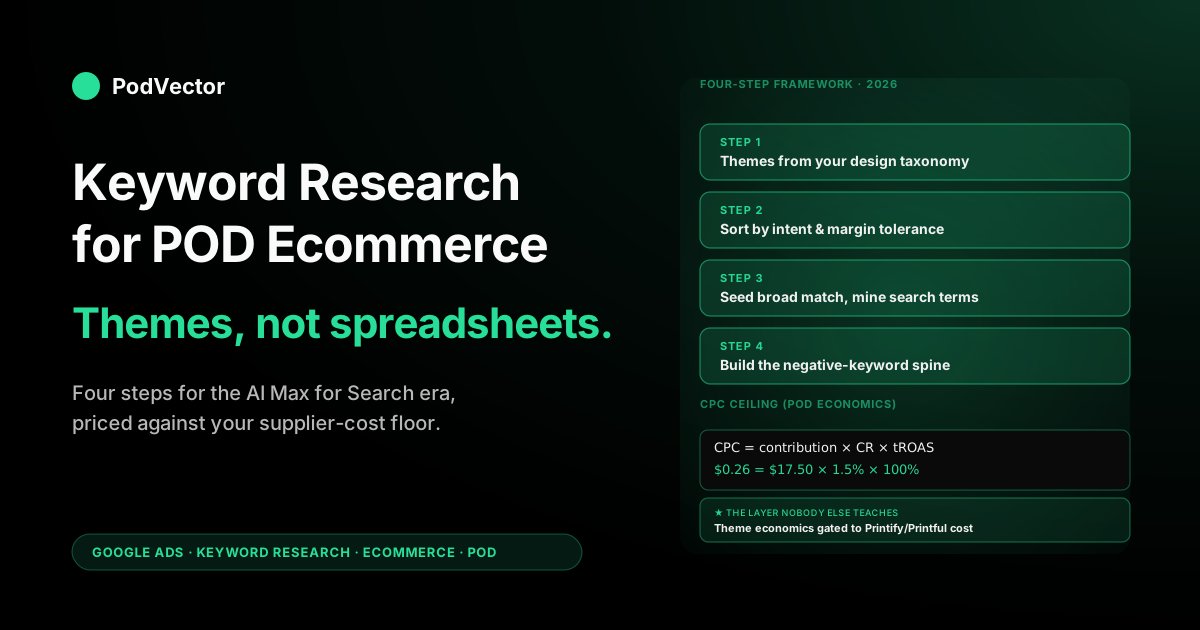
Quick Answer: Keyword research for a print-on-demand store in 2026 is no longer about long lists of exact-match phrases — it's about choosing the right themes, the right negatives, and the right contribution-margin ceilings for each design niche. The job is to give Google's AI Max for Search engine enough thematic signal to find buyers who will pay above your blank-plus-shipping cost, while excluding the apparel-bargain-hunter queries that POD economics can't survive. This guide runs the four-step research framework, the POD-specific layer of variant and niche multipliers, and the negative-keyword spine that protects your margin from the Printify-or-Printful cost floor up.
Why ecommerce keyword research changed in 2026
If the last keyword-research guide you read recommended building 200-row spreadsheets of single-keyword ad groups (SKAGs), throw it out. The rules underneath ecommerce search advertising changed twice in the last eighteen months, and POD sellers are paying retail every time the old playbook bumps into the new auction.
The first change is match-type semantics. Phrase match no longer matches phrases — it matches meaning.
Exact match is the only type that still tries to honor the literal string, and even that has loosened to "close variants" that include re-phrasings of the same query. Google's own documentation now describes match types as "thematic signals" rather than literal triggers. The 2024-style spreadsheet of 400 phrase-match keywords is just an expensive way to tell Google's AI which themes you're willing to bid on.
The second change is AI Max for Search, which went generally available on April 15, 2026. AI Max is one toggle that consolidates three previously separate ML features: search-term matching that goes well beyond keyword match types, AI-generated text customization that adapts headlines and descriptions to the query, and final-URL expansion that routes the click to the most relevant landing page.
Whether you flip the toggle or not, the auction is using these signals; the toggle just decides whether your specific ads benefit. For ecommerce sellers, AI Max is now the default starting position — and it changes what keyword research is for.
The job of keyword research in 2026 is no longer to enumerate every query a buyer might type. The job is to:
- Tell Google's AI which themes are profitable for your store.
- Tell Google's AI which themes are poison for your store (the negative-keyword spine).
- Tell Google's AI how much each theme is worth to you (target ROAS or target CPA, set per ad group or campaign).
That's it. Three signals. Nail those three and AI Max will run a better search-term match than any human spreadsheet ever did. Miss any of the three and AI Max will burn through your daily budget on queries that buy nobody anything.
For the broader 2026 strategy frame — including how this keyword work fits into Performance Max, Demand Gen, and Shopping — see the complete Google Ads playbook for print-on-demand sellers. This article zooms in on the keyword half.
The POD economics layer Google's defaults ignore
Every ecommerce keyword-research guide assumes a wholesale-retail margin structure: 2× to 4× markup on cost of goods, with cost-of-goods being a fixed warehouse line item per SKU. POD violates this assumption in two ways that change keyword research mechanically, not just philosophically.
First, your cost-of-goods is cost-of-goods plus shipping, charged per unit, not per order. A $32 t-shirt sold via Printify might cost $14.50 to fulfill (blank + print + shipping). Your contribution margin is $17.50, not $32 minus a vague "20% COGS" line.
If your CPC ceiling for the keyword "graphic t-shirt" is $1.20, and your conversion rate is 1.5%, you're paying $80 in ad cost per sale on a $17.50 contribution. The keyword economically can't work, no matter how much volume it brings.
Second, your variant matrix multiplies the keyword search-space without multiplying margin. One design times five colors times four sizes is twenty SKUs, but it's still one design selling at one contribution margin. Google's auction sees twenty individual products competing for one query; your accounting sees one design earning one contribution dollar.
Most keyword-research workflows pretend each variant is a unique product. POD operators have to think at the design level for keyword themes, and at the variant level only for feed optimization in Shopping. (The variant-level mechanics live in our Google Shopping × Shopify integration architecture; this article stays at the design level where keyword research belongs.)
The practical upshot: every keyword theme has to be evaluated against your per-design contribution margin, not your gross revenue. Build a one-line CPC ceiling for every theme before you bid:
CPC ceiling = (contribution per sale) × (target conversion rate) × (target ROAS / 100)For a $17.50 contribution design at a 1.5% conversion rate and a 100% target ROAS (break-even on contribution — reasonable for a new design you're testing), that's a $0.26 max CPC. Themes that auction above $0.26 are out.
Themes that auction below $0.26 are in. This single calculation is the discipline that separates POD operators who scale on Google Ads from POD operators who quietly switch back to Etsy.
Step 1 — Build keyword themes from your design taxonomy
Forget keyword tools for the first hour. Start with a list of every design you sell, grouped by what they're about. The design taxonomy is the spine of your keyword research because every keyword theme that converts will trace back to a design pillar you already understand.
For most POD stores, designs cluster into one of these pillars:
- Identity / community — profession, hobby, fandom, language, identity, alma mater. ("ICU nurse shirt", "Dungeons and Dragons DM gift", "polyglot t-shirt")
- Aesthetic / vibe — visual or lifestyle subculture. ("cottagecore strawberry shirt", "dark academia hoodie", "y2k aesthetic tee")
- Occasion — event, holiday, milestone. ("nurse graduation shirt", "first day of kindergarten teacher tee", "engagement gift hoodie")
- Humor / phrase — joke, quote, slogan. ("introvert in training shirt", "gardener's revenge tomato tee")
- Niche-craft — activity-specific. ("sourdough starter shirt", "pickleball pun hoodie", "fly fishing dad tee")
For each pillar your store actually sells, list the seed phrase, the audience word, and the product noun. That's your theme:
theme = [audience word] + [aesthetic / occasion / phrase] + [product noun]
example = "nurse" + "shift survival" + "t-shirt"
This is also the structure you want in product titles flowing into Merchant Center. The keyword research and the feed optimization are the same exercise; only the surface differs. (For the feed-side mechanics, see our Google Shopping ads Shopify strategy.)
Aim for 8–15 themes per design pillar. Fewer than 8 means you're not exploring enough variation; more than 15 means you're listing variants of the same theme, which AI Max will handle for you anyway. For a POD store with five design pillars, that's 40–75 themes total — a one-afternoon job, not a one-week spreadsheet project.
Step 2 — Sort themes by buying intent and margin tolerance
Not every theme deserves a bid. Sort the 40–75 themes from Step 1 into three buckets:
Buying-intent themes — queries that include "buy", "shop", "store", "for sale", a product noun ("t-shirt", "hoodie", "mug"), or a gift framing ("gift for a nurse", "Christmas present for fly fisherman"). These are the only themes where Search and Shopping campaigns earn their CPC.
A 2–5% conversion rate is realistic. The CPC ceiling math from the previous section applies cleanly.
Mid-funnel exploration themes — queries that imply purchase consideration but no immediate buying intent ("nurse shirt ideas", "best gifts for sourdough bakers", "pickleball gift guide"). Conversion rate drops to 0.3–1%. CPC ceiling drops with it. These themes earn their place in Performance Max audience signals or Demand Gen, but rarely in Search.
Top-of-funnel discovery themes — queries with no commercial intent ("what is cottagecore", "Dungeons and Dragons rules"). Conversion rate is essentially zero on Search. These should be negatives on Search and Shopping campaigns, even though they're directionally on-topic. Discovery themes belong on YouTube and content, not paid search.
The discipline: only buying-intent themes get bid on at the keyword level in Search and Shopping. Everything else either flows into PMax as audience signal or gets negated explicitly. This sort is the difference between a keyword list that funds growth and a keyword list that subsidizes Google's AI training data.
One more cut: margin-tolerance. For each buying-intent theme, run the CPC ceiling formula. Themes whose competitive auction CPC sits 2× or more above your ceiling are off the bid list, period.
There's no clever bidding strategy that turns a $1.40 auction into a profitable $0.26 click. (If your contribution per sale is high enough to absorb the higher CPC — e.g., a $48 hoodie at $24 contribution — the math shifts. Recalculate per design pillar, not per store.)
Step 3 — Seed broad match, mine the search-terms report
Once your buying-intent themes are sorted, the build phase is anticlimactic by 2024 standards: one or two broad-match keywords per theme, in a thematic ad group, with target ROAS or target CPA bidding. That's it.
For the "nurse shift survival" theme, your broad-match seed might be:
nurse shift survival t-shirtfunny ICU nurse shirt
Two keywords. Broad match. AI Max for Search will fan out from those seeds across phrasings, query stems, and language variations far better than any human-built phrase-match list ever did — because it has access to query embeddings the keyword tools don't.
The work that used to be Step 3 (compiling 40 phrase-match variations) is now the search-terms report's job. Two weeks after launch, pull Google Ads > Insights and reports > Search terms. You'll see the literal queries Google matched your broad-match seed to. Three columns matter:
- Cost / conversion — queries that converted at or below your CPC ceiling get promoted to exact-match keywords in their own ad group. This is the data-driven exact-match list keyword tools cannot generate.
- Cost / no conversion — queries that spent meaningfully (e.g., 3× your average CPC) without a conversion get added to the negative-keyword list at the campaign level. This is where 80% of POD ad-spend leaks happen.
- Search terms with high impressions, low CTR — queries on which your ad showed but didn't get clicked. Often these are off-theme (your "nurse shirt" ad showed for "nursing bra"). They go on the negative list before they spend a dime.
The cadence for a POD store at moderate volume (3,000–10,000 monthly Google Ads sessions) is a 30-minute search-terms review every Monday morning. Three buckets, three actions: promote, negate, ignore. Define Digital Academy's 2026 keyword-research framework covers the same broad-match-then-mine structure for lead-gen accounts; the POD-specific twist is that your "promote" threshold is contribution-margin gated, not revenue gated.
Step 4 — Build the negative-keyword spine before you scale
If keyword research has a single highest-leverage step for POD operators, it's negatives. Most ecommerce keyword guides treat negatives as cleanup; for POD, they're the load-bearing wall.
The reason is structural. Apparel queries on Google are dominated by buyers looking for cheap, generic, branded, or used product — categories where POD economics literally cannot compete. Without an aggressive negative spine, your "graphic t-shirt" broad match will spend half its budget on:
- Branded queries — "nike t-shirt", "adidas hoodie", "champion shirt". Google's broad match treats "graphic" as a near-synonym of "branded".
- Bargain queries — "cheap t-shirt", "5 dollar shirt", "wholesale t-shirts", "bulk shirts". Anyone clicking these is shopping at a price point you cannot meet.
- Used / vintage queries — "vintage tee", "thrifted shirt", "y2k vintage shirt". Vintage and "y2k" are phrasing collisions; without the negative on "vintage", a y2k-aesthetic design ad will show on resale-shopping queries.
- Custom-printing queries — "custom shirt printing", "design my own shirt", "DTG printing service". Buyers for these are looking for a print shop, not a design store.
- Apparel-as-blank queries — "blank t-shirts", "wholesale blanks", "Bella Canvas 3001". These are competitor POD shops shopping for inventory.
Build the negative spine as a single shared negative-keyword list applied to every Search and Shopping campaign on day one. Seed it with the categories above, plus brand names of the major retailers your designs visually overlap (Hot Topic, Target, Old Navy, Shein for fast-fashion crossover). Add 5–15 negatives per week from the search-terms report — the queries that spent without converting.
A mature POD negative list is 200–500 phrases. That's not a sign of bloat; it's the fingerprint of every painful learning your campaign survived.
Don't outsource this list. Don't share it across stores with different design pillars. The negative list is the tightest available proxy for "what queries will lose me money on this specific store's economics."
Tools that actually help (and the ones that waste a Saturday)
Keyword research tools matter less in 2026 than they did in 2022. The shift to broad match plus AI Max means your search-terms report is the most accurate keyword tool you have access to — and it's already in your Google Ads account, free, real-time. That said, three external tools still pull weight:
Google Trends + Gemini panel. Google's updated Trends platform now includes a Gemini AI side panel that suggests related topics and rising queries, and lets you compare up to eight search terms simultaneously. For POD, this is the fastest way to catch a niche going viral before the keyword auction prices the trend in.
Sourdough went 8× on Google Trends in March 2020 before the Etsy keyword tools registered the lift. Trends has the lead time; tools have the lag.
Google Keyword Planner (still). Free, in your Ads account, gives you volume bands and average CPC by keyword. Use it for the CPC ceiling sanity check in Step 1: if Keyword Planner reports an average CPC of $2.40 for "graphic t-shirt" and your ceiling is $0.26, the theme is out before you ever build an ad group. Keyword Planner's volumes are coarse and bucketed, but the CPC numbers are directionally correct.
Search-terms report (the real tool). Already covered above. Your 30-minute weekly review against this report compounds into the most defensible keyword list you'll ever build, because it's keyed to your specific creative, your specific feed, and your specific contribution margin.
Tools we don't think POD operators should pay for in 2026: legacy enterprise keyword-research platforms ($300–$800/month) that pre-date AI Max and still optimize for SKAG-era spreadsheets. The output is real, but the framework underneath is from a different decade of the auction.
Defined Digital, Storegrowers, and Search Engine Land all flagged in early 2026 that "the spreadsheet has flipped from input to artifact." The output of keyword research is now negatives and themes, not a 600-row keyword sheet. Pick tools that match that output.
Mapping themes to campaign types
Once your buying-intent themes and negative spine are built, mapping themes to campaign types is mechanical:
- Shopping / Performance Max — carries the broadest theme coverage because it indexes off your feed. Your 40–75 themes from Step 1 should all be reflected in product titles, custom labels, or PMax audience signals. Don't run Search and PMax against the same broad theme without negatives between them; they'll auction against each other and inflate your CPC.
- Standard Search (broad match + tROAS) — carries your top 10–15 highest-margin buying-intent themes, with the negative spine applied. These are the campaigns whose search-terms reports you mine weekly.
- Standard Search (exact match) — carries the search terms that the search-terms report has already proven convert. Promote a query to exact-match only after it has 2–3 conversions inside the broad-match ad group, so the bid signal is real, not random.
- Demand Gen — carries the mid-funnel exploration themes that don't earn a Search bid but matter for awareness inside your design pillars.
This is also the structure that makes ad-spend-vs-contribution reconciliation tractable. Each campaign type has a different expected ROAS and a different keyword input source.
Mixing them inside one campaign — the "let Performance Max do everything" temptation — works for established brands with rich first-party data but punishes new POD stores by hiding which theme is actually carrying conversions. The cluster overview at The Complete Guide to Google Ad Types for POD Sellers walks through each campaign type in more depth.
Measuring keyword research success in contribution dollars
The right success metric for keyword research is not impressions, clicks, CTR, conversions, or revenue. It's contribution dollars per dollar of ad spend, summed across the keyword themes you chose, after every Printify or Printful blank, shipping, and processing fee is netted out.
This is also where keyword research stops being a one-time exercise and becomes a weekly operating discipline. Every Monday: pull the search-terms report, classify into promote/negate/ignore, recalculate per-theme contribution.
Themes that were profitable in March can flip negative in May because the seasonal CPC shifted, the supplier raised blank prices, or a competitor entered the auction. Without the contribution-true measurement, you'll keep bidding on a theme for weeks after it stopped earning its keep.
Most POD operators don't have this measurement wired up. Google Ads reports gross conversion value (the order total). Shopify reports gross revenue. Printify reports per-order supplier cost. Reconciling the three across hundreds of orders, and slicing the result by keyword theme, is the work most operators give up on by month two.
That's the gap PodVector AI's Victor agent fills: he sees your Shopify, Google Ads, and Printify or Printful data together, and answers questions like "which Google Ads keyword themes earned positive contribution last week, after blank and shipping?" in plain English. The keyword research framework above stays the same whether you're doing the reconciliation by hand in a Google Sheet or asking Victor. The question is whether you're willing to do it weekly — because that's the cadence the auction now demands.
FAQs
Is keyword research still worth doing in 2026 if Google's AI does the matching?
Yes — but a different job than before. The 2026 job is to define themes, set negatives, and assign target ROAS per theme. The literal-string keyword spreadsheet from 2022 is obsolete; the thematic decision-making it represented is more important than ever.
How many keywords should a POD store run on Google Ads?
Two to four broad-match keywords per ad group, one ad group per theme, 10–15 high-intent themes on Search at any given time. Plus an exact-match list of 20–60 search terms promoted from your search-terms report. The total active keyword count is 60–100, not the 300–800 the SKAG-era playbooks recommended.
What's a healthy CPC ceiling for POD t-shirts on Google Ads?
Depends entirely on your contribution margin. For a $32 shirt with a $14 Printify cost (about $18 contribution) at a 1.5% conversion rate and break-even target ROAS, the CPC ceiling is roughly $0.27.
Higher contribution products (premium hoodies, two-piece sets) tolerate $0.60–$1.20 CPCs. Run the formula in the POD economics section per design pillar.
Should I use exact match, phrase match, or broad match for ecommerce in 2026?
Default to broad match on the seed keywords, plus a separate ad group of exact-match terms promoted from the search-terms report after they've proven they convert. Phrase match has converged so closely with broad match in 2026 that it doesn't justify a separate match-type tier.
How does Performance Max change keyword research for POD?
PMax doesn't take keyword inputs the way Search does — it takes audience signals and feed signals. So your "keyword research" for PMax is really feed-title optimization plus audience-signal selection.
The themes you developed in Step 1 still drive both, but the surface where they're entered is different. The Shopify Performance Max campaigns explained piece walks through the audience-signal mechanics.
Do I need a separate keyword tool subscription, or is Keyword Planner enough?
Free Keyword Planner plus Google Trends with Gemini panel plus your Search-terms report covers 80% of what an ecommerce store needs. Paid keyword-research tools earn their cost when you're scaling beyond $20K/month in ad spend or running 5+ stores; below that, the free stack is competitive.
Where do negative keywords matter most for POD specifically?
Bargain queries ("cheap", "$5", "wholesale"), branded queries (every major apparel brand), used / resale ("vintage", "thrifted"), and custom-printing service queries ("DTG service", "screen printing near me"). These five categories, blocked at the shared negative list, prevent roughly 40–60% of wasted spend in a typical POD Google Ads account.
How does this fit with my Shopify integration?
Keyword themes drive what goes into product titles, which is the strongest single ranking signal in Shopping. The integration architecture — how titles flow from Shopify to Merchant Center to the auction — is covered in our Google Shopping Shopify integration strategy guide.
Run the weekly keyword review without the spreadsheet
The hard part of POD keyword research isn't the framework — it's running the contribution-margin reconciliation every week against live Shopify, Google Ads, and Printify or Printful data. Victor sees all three together and answers, in plain English, which keyword themes earned positive contribution last week and which ones quietly flipped negative.
Try Victor free