
Quick Answer: Google Ads is the right paid channel for most Shopify print-on-demand stores once you have at least 30 SKUs, a $600–900/month ad budget, and 60 days of organic order history to anchor the algorithm. The piece almost no one writes is the decision frame and the 90-day plan that fits POD margin reality.
POD apparel runs 16–24% gross margin on hoodies, 55–70% on mugs, and 35–45% on posters, with 4–8% return rates on apparel — none of which Google Ads sees by default. This guide is the decision-first version: should you run Google Ads on your Shopify store at all, what the seven-step setup looks like in plain order, the campaign-type call by store stage, the budget math by SKU price band, and the 90-day plan that progresses from Standard Shopping to Performance Max with profit-per-order as the conversion value the whole way through.
Should you run Google Ads on your Shopify store?
Most playbooks open with the setup. We open with the decision, because the setup is wasted on stores that should not be running Google Ads yet. The honest answer for a POD Shopify store is yes if you can check four boxes, and not yet if you can't.
- Catalog has at least 30 published, photographed SKUs. Performance Max and Standard Shopping both bid against the product feed; under 30 SKUs you don't have enough surface area for the algorithm to find pockets that work. If you have 8 SKUs and want growth, the answer is more SKUs first, then ads.
- You can sustain $600–900/month of ad spend for at least 60 days. Smart Bidding's learning phase is 7–14 days at $20–30/day; below that floor it never exits the learning phase and the data is statistically meaningless. Spending $200/month for three months is worse than not spending — it teaches you nothing and burns the cash.
- The store has 60 days of organic order history. Performance Max needs a conversion baseline to learn from; new stores with zero organic conversions get burned by PMax because the algorithm is bidding blind. Sixty days of organic order data — even at modest volume — gives the algorithm signal to anchor against.
- Profit-per-order is computable per SKU. If you can't compute gross profit on a $35 hoodie order net of Printify base cost, Shopify fees, payment processing, and shipping, you can't tell Google Ads what a "good" conversion looks like. The whole optimization stack downstream depends on this. We cover it in the complete Google Ads playbook for POD sellers and the Google Ads conversions on Shopify piece.
Three of four is workable. Two of four means fix the gaps before paying Google. Zero of four means the cash is better spent on product photography, design iteration, and email-list building until the four boxes are checked. There is no Google Ads setting that compensates for a thin catalog or a missing margin model.
What changes when the catalog is POD
The mainstream guides — including the genuinely good ones from Adwisely, Shopify's own blog, and Shopify's retail launch guide — assume a store with a single supplier, consistent margins across the catalog, GTINs on most products, and a return rate that rounds to noise. A POD Shopify store has none of those things, and the Google Ads engine cannot tell the difference unless you tell it.
Three structural facts shape the playbook:
- Margin spread within one campaign is 20–50 percentage points. A $14 ceramic mug from Printify hits 60–70% gross margin. A $35 unisex hoodie from the same Printify catalog sits at 16–22%. A $22 wall poster from Printful is somewhere in the middle. Smart Bidding optimizes against whatever value you send as the conversion event, so if you send order subtotal, the algorithm scales toward whichever SKUs have the highest subtotal — the hoodies — regardless of contribution margin. The store grows revenue and shrinks profit, and the operator wonders why ad spend went up but the bank balance did not.
- POD apparel returns 4–8% versus the 2–3% ecommerce baseline. If those refunds never get posted back as Google Ads conversion adjustments — and on most POD stores they do not — Smart Bidding overbids for whichever audiences and SKUs return at the highest rates, because the algorithm never sees the value reverse. This compounds quietly over 30–60 days into a meaningful waste line.
- POD apparel SKUs do not have GTINs. Printify and Printful do not assign UPCs or EANs because the products are made to order. Google Merchant Center requires a GTIN for most apparel categories, lets it slide for others, and the result is a feed that clears Merchant Center for some SKUs and gets disapproved for others, often in confusing patterns. The fix is feed-level — set
identifier_exists: nofor affected SKUs — not product-level.
None of this means Google Ads is wrong for a POD store. It usually is the right channel — Search and Performance Max are excellent at capturing demand for products people already want — but the configuration that "works" for a single-margin dropshipping store is misconfigured for a POD catalog.
The rest of this piece walks the configuration that holds. For the topic-level overview, see the Google Ads for POD topic hub; the Google Ads strategy cluster is the index for everything strategy-related.
The setup, in the right order
The Shopify-side setup is seven steps. Done in this order it takes 60–90 minutes for a store that is otherwise live. Done out of order it takes a week of debugging because the conversion action gets created twice, the feed syncs before the right products are flagged published-to-online-store, and the first campaign launches before tracking is verified.
- Confirm the store is on a paid Shopify plan and the storefront is publicly accessible. Trial stores cannot serve Google Ads traffic because the password gate blocks the landing page. Verify by opening your store URL in an incognito window — if it asks for a password, fix that first.
- Install the Google & YouTube app from the Shopify App Store. Settings → Apps → "Google & YouTube". This is the only first-party integration that handles Customer Events and the Web Pixels API correctly post-Checkout-Extensibility, which means it is the only setup that does not silently break when Shopify rolls out a checkout update. For app-level details and alternatives, see the Shopify Google Ads apps piece.
- Connect or create your Google Merchant Center account. The app walks the auto-creation flow for stores without one. If you already have a Merchant Center account from a prior setup, claim it and link to the Shopify-connected account rather than creating a duplicate. Two Merchant Center accounts on the same domain creates a verification conflict that takes Google support 5–10 days to resolve.
- Connect or create your Google Ads account. Same flow as Merchant Center; same warning about duplicates. Make sure the billing currency in Google Ads matches your Shopify store's payout currency. A mismatch creates the multi-currency drift covered in our Shopify Google Ads tracking issues piece.
- Configure conversion tracking. The app sets up the Purchase conversion action automatically. Two settings the auto-config gets wrong for POD: change Count from "Every" to "One per click" (otherwise repeat buyers inflate retargeting ROAS — see the Shopify Google Ads conversion strategy piece for the full conversion-action setup), and plan to replace order-subtotal with gross-profit-per-order on the conversion event itself, covered in the Set Up Google Ads conversions on Shopify piece.
- Verify the feed is syncing to Merchant Center. Shopify Admin → Sales Channels → Google & YouTube → Products. The status column shows "Approved", "Pending", "Disapproved", or "Not synced". The first sync runs within 24 hours of connection; full feed coverage takes 3–7 days because Merchant Center batches the initial crawl. Disapprovals at this stage are usually GTIN issues for apparel — fix at the feed level by attribute, not product by product.
- Verify the conversion tag with a real test order. Place an order in an incognito window with your own card, refund it from Shopify Admin once you confirm the conversion landed in Google Ads. Tools → Conversions → Purchase action → Status should read "Recording conversions" within 4–8 hours. If it does not, run Google's Tag Assistant on the Order Status page and check Customer Events in Shopify Admin.
Picking the right first campaign type
The Google & YouTube app pushes Performance Max as the default first campaign. For most POD stores that is the right call — but the right call depends on which stage the store is in.
Brand-new store, under 30 conversions in 60 days: Standard Shopping first. Standard Shopping is more transparent (you see exactly which queries triggered which products), it learns faster on small data, and you keep control over negative keywords. Run Standard Shopping for the first 60–90 days, then graduate to Performance Max once you have a meaningful conversion baseline.
Established store, 30+ conversions in 60 days, $20+/day budget: Performance Max. PMax serves your products across Search, Shopping, YouTube, Discover, Display, Gmail, and Maps, and the algorithm picks the placement allocation. The good case is high reach for less hand-tuning. The failure case is opaque attribution that masks which placement actually drove the sale — partly addressable through asset-group structure and an account-level negative-keyword list.
Branded Search: a third campaign once organic brand traffic shows up. Branded Search converts at 8–15× non-branded rates and the CPC is low; the catch is you need organic brand searches to be happening already. Run a small Branded Search campaign with brand-name keywords once Google Trends shows search volume on your store name. Below that, the campaign serves zero impressions and is harmless but useless.
For a deeper comparison of the campaign types specifically for a POD catalog, see the complete guide to Google ad types for POD sellers in the Ad Types cluster, and the Shopify Performance Max campaigns explained piece for the PMax-specific deep dive.
Budgeting against your POD margin, not your sticker price
The standard advice — "$20–30/day minimum, expect 7–14 days for the algorithm to learn" — is correct as a floor but understates what you actually need for a POD catalog. Three numbers matter more than the daily budget itself.
Number one: your maximum acquisition cost (max CAC) by SKU price band. For a $14 mug at 60% gross margin, you net about $8.40 per unit before ad cost. Spending more than $8.40 to acquire that order loses money on the unit; spending more than $4–5 (target 50–60% of gross profit toward ad cost) loses your contribution margin to overhead.
For a $35 hoodie at 18% gross margin, you net $6.30 per unit — so the max CAC on a hoodie is actually less than on a mug despite the hoodie costing 2.5× more. This is the central counterintuitive fact of POD ads, and it is why sending profit-per-order rather than order-subtotal as the conversion value is non-optional.
Number two: your conversion volume threshold. Smart Bidding needs ~30 conversions in the trailing 30 days per campaign to exit the learning phase. At a 1.5–2.5% conversion rate (POD apparel range), that's 1,200–2,000 ad clicks per month.
At a $0.60–0.90 CPC (POD apparel range), the daily budget floor is $24–60/day depending on which end of the ranges you're at. Below that, the campaign learns slowly or not at all.
Number three: your test-and-learn budget per ad group. Plan to spend $200–400 per asset group / ad group before deciding pause or scale. Spending $50 on a test and concluding "it didn't work" is statistically meaningless — that's 60–80 clicks of data, far below the volume needed to read CPA reliably. Reserve a $1,500–2,500 monthly budget cushion for tests that get killed without remorse, and don't pull data conclusions from spend levels that don't support them.
For the deeper attribution layer underneath these numbers, see the Google Ads attribution explained for POD sellers piece in the ROAS & Attribution cluster.
The 90-day plan
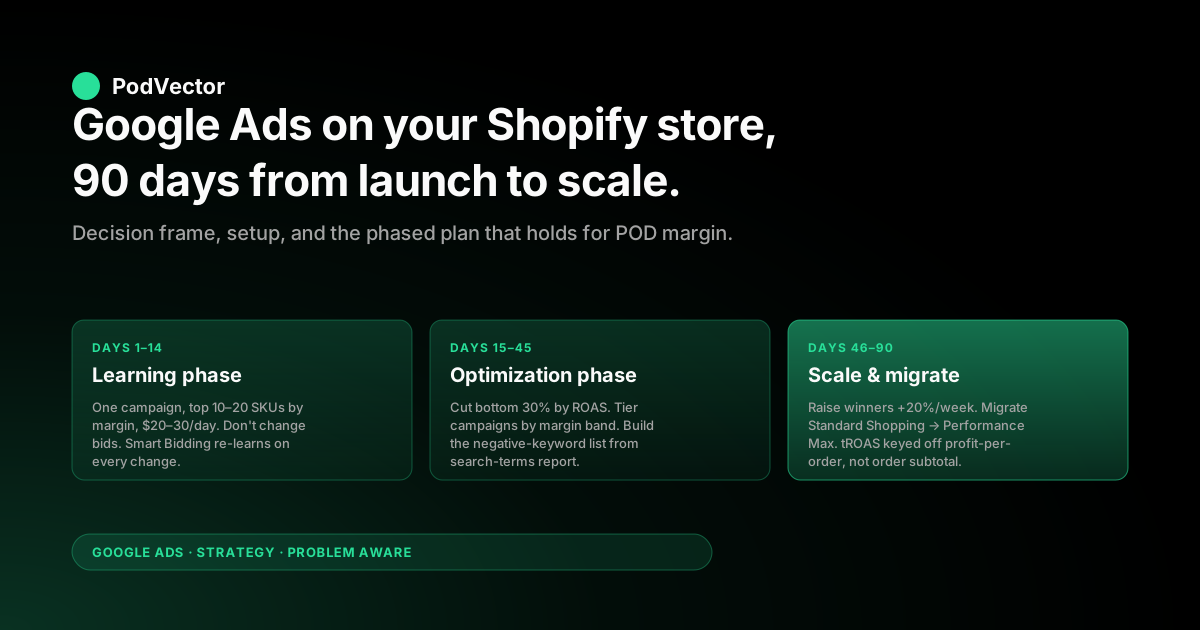
Days 1–14, days 15–45, days 46–90. The temptation to run all three phases in parallel is the most common reason POD stores burn $5,000+ on Google Ads with nothing measurable to show for it.
Days 1–14 — Learning phase. One campaign, one ad group, top 10–20 SKUs by margin, $20–30/day budget. Standard Shopping if you're a new store; Performance Max if you have 60+ days of organic conversion data.
Goal: clean conversion tracking, feed approved, learning phase exited. Do not change bids, budget, or campaign structure during this window. Smart Bidding interprets every change as a re-learn signal and resets the clock.
Days 15–45 — Optimization phase. Cut the bottom 30% of SKUs from the campaign by ROAS. Add a high-performing-products campaign at +50% budget for the top 20% of SKUs.
Layer a Branded Search campaign at $5/day if organic brand searches exist. Add the negative-keyword list from your search-terms report (start with the obvious junk: "free", "cheap", competitor names, irrelevant categories). Do not migrate from Standard Shopping to Performance Max yet; you don't have enough conversion data.
Days 46–90 — Scale and migrate phase. If ROAS is profitable on the high-performers campaign, raise its budget by 20% per week (Smart Bidding tolerates ~20% per change without re-learning). Migrate from Standard Shopping to Performance Max if you've hit 30+ conversions in 30 days; keep Branded Search separate. Add a tROAS bid strategy with a target 20% above your break-even ROAS — calculated from gross-profit-per-order, not order-subtotal. The full math is in our break-even ROAS in POD piece.
Day 91 onward is no longer a launch — it's an operating rhythm. Weekly spend review, biweekly negative-keyword refresh, monthly margin re-check.
The four metrics that actually decide pause-or-scale
The Google Ads dashboard surfaces 30+ metrics. Four of them tell the truth about a POD store; the rest are noise once you've looked at the four.
- Profit-ROAS (revenue × gross margin) ÷ ad spend. The honest version of ROAS. If your blended Google Ads ROAS reads 4.0x but your weighted gross margin across the SKUs that converted is 22%, your profit-ROAS is 0.88 — you're losing money on every order. This is why the conversion value sent to Google Ads must be gross-profit-per-order, not order-subtotal.
- CAC vs. max CAC by SKU price band. Compute customer acquisition cost (ad spend ÷ new orders) per price band, not at the campaign level. A campaign that has acceptable blended CAC but is bleeding on hoodies and minting on mugs is a pause-the-hoodies signal, not a pause-the-campaign signal.
- Returns-adjusted contribution margin per ad-driven order. Google Ads default reporting does not subtract refunds. Pull refund rate by SKU from Shopify, multiply through, and the ad-driven contribution margin per order drops 10–15% from what the dashboard shows.
- Search-term query relevance, weekly. The search-terms report is where the first-month optimization happens. POD apparel ad spend leaks heavily on irrelevant queries (color names, generic graphics terms, broad-match cousins) until the negative-keyword list catches up. Twenty minutes a week reviewing search terms beats any algorithmic optimization.
For the operator-level rhythm of pulling these four numbers without a spreadsheet stack, this is exactly the workflow Victor was built for — see the CTA at the bottom.
Five POD-specific mistakes to skip
- Sending order subtotal instead of gross-profit-per-order as the conversion value. Smart Bidding optimizes against whatever number you send. If subtotal is the value, the algorithm scales the lowest-margin SKUs because they have the highest subtotals. Profit-per-order as the conversion value flips the optimization to align with the bank account.
- Running one campaign for the whole catalog. A unified campaign blends a 60% gross-margin mug catalog with a 18% gross-margin hoodie catalog into one bid signal. Tier campaigns by margin band — high (mugs, posters), mid (sweatshirts, blankets), low (premium hoodies, all-overs) — with separate target ROAS settings each.
- Skipping the GTIN exemption flag. POD products without GTINs need
identifier_exists: noset in the feed, by category. Without it, Merchant Center quietly disapproves apparel SKUs and approves others, and the catalog impressions look healthy on aggregate while half the SKUs are silently invisible. - Not posting refunds as conversion adjustments. POD apparel returns at 4–8% — Smart Bidding never sees those reversals unless you upload them via the conversion-adjustments API or the Google Ads / Shopify integration that supports it. Without this, the algorithm overbids for the audiences that return the most.
- Mistaking a learning-phase result for a pause signal. The first 7–14 days of any new campaign are not a verdict — they're a learning window. Pausing during the learning phase is the most expensive mistake new advertisers make, because the campaign was never given a chance to exit learning. Wait the full 14 days even when the ROAS is bad on day 5.
When Google Ads will not work for your store
The honest list of POD scenarios where Google Ads is the wrong channel:
- Catalog under 20 SKUs. The feed is too thin for Shopping or PMax to find pockets of demand. Build the catalog first.
- Product photography that is render-only or template mockups across the entire catalog. Google Shopping is a visual-first auction; mockups lose to lifestyle photography in the click-through rate fight. The product gets impressions and not clicks, and the algorithm interprets that as low quality and reduces serving. Photograph at least the top 20% of the catalog with humans wearing the products.
- Average order value under $20. POD CPCs run $0.60–0.90 and conversion rates run 1.5–2.5%. That's $24–60 per converted order in click cost alone, before margin. Sub-$20 AOV stores cannot fund the auction.
- Niche too small for paid search demand. If your niche is "dog dad mugs for German shepherd owners with names that start with K", organic SEO and email do better than paid search because the long-tail demand is too thin to fund daily-budget thresholds.
- No pricing power against Amazon or Etsy. If your $35 t-shirt is competing against an identical-design $14 t-shirt on Amazon Prime, Google Shopping will surface both and the click goes to the cheaper option. Either differentiate (limited-run, brand story, custom-print speed) or skip the auction.
FAQs
How much should I budget for Google Ads on my Shopify POD store?
$600–900 per month minimum for the first 60 days, scaling to $1,200–2,500 once profitable. Below $600/month, the campaign cannot exit the Smart Bidding learning phase reliably and the data you collect is statistically meaningless.
How long until Google Ads works for my Shopify store?
14 days for the algorithm to exit the initial learning phase, 30–45 days to know whether the campaign is on a path to profitable, 60–90 days before scaling. Anyone promising results in week one is selling something — Smart Bidding's learning curve is mathematical and does not negotiate.
Should I run Performance Max or Standard Shopping first?
Standard Shopping if you have under 30 conversions in the trailing 60 days. Performance Max if you have a conversion baseline and $20+/day budget. The migration from Standard to PMax is straightforward at day 60–90 once you have signal.
Do I need GTINs for my Printify or Printful products?
No, but you must explicitly mark them as exempt by setting identifier_exists: no at the feed level for affected categories. Without this flag, Merchant Center disapproves a fraction of your apparel SKUs and your campaign serves an incomplete catalog.
Why is my ROAS reading 4.0x but my bank account is shrinking?
Because Google Ads ROAS uses order subtotal by default, and your weighted gross margin across the SKUs that converted is probably 18–25%. Profit-ROAS — revenue × gross margin ÷ ad spend — is the honest number. A 4.0x revenue-ROAS at 22% gross margin is a 0.88x profit-ROAS, which means you're losing $0.12 on every dollar spent.
Can I run Google Ads on a Shopify store with only Printify or only Printful products?
Yes; the integration path is identical. The differentiation matters at the cost-tracking layer (Printify and Printful have different base-cost schedules, shipping rates, and provider variability), not at the Google Ads layer. The Google Ads / Shopify connection treats POD products like any other Shopify product.
How do I track Google Ads conversions correctly on Shopify?
The Google & YouTube app handles the basic Purchase conversion action automatically. The two configurations that need manual fixes for POD are setting Count to "One per click" (not "Every"), and replacing the order-subtotal conversion value with gross-profit-per-order. The full setup is in the Set Up Google Ads conversions on Shopify piece and the Shopify Google Ads tracking piece.
The fastest way to know if your Google Ads are actually profitable
Profit-ROAS, returns-adjusted contribution margin, and CAC-by-price-band are the four numbers that decide pause-or-scale on any POD Shopify Google Ads campaign. Spreadsheet-stacking them weekly is what most operators give up on by month two — which is where Victor comes in. Victor is the AI employee built specifically for POD sellers: it queries your live Shopify, Printify or Printful, and Google Ads data in a warehouse and answers "which campaigns are profitable, net of base cost, fees, shipping, and refunds, broken down by SKU and price band" in seconds. Victor answers your questions and acts on them — with your approval. And see your real Google Ads profitability in under five minutes.
Try Victor free