
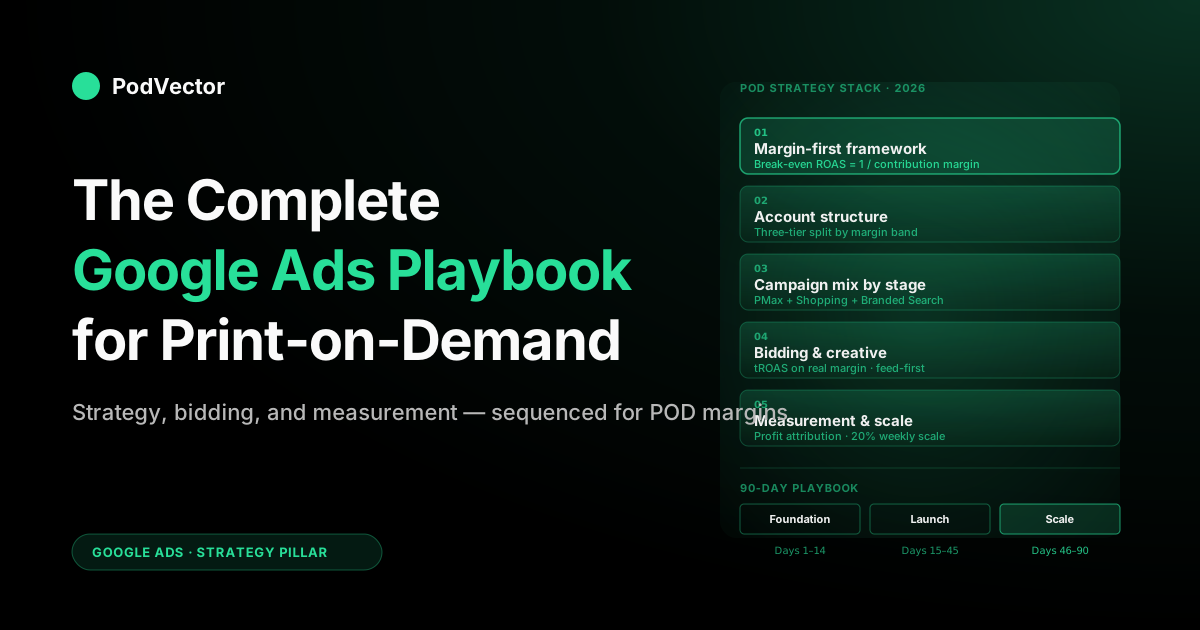
Quick Answer: Google Ads strategy for print-on-demand in 2026 comes down to five decisions: account structure, campaign mix, bidding target, creative and feed hygiene, and measurement. Sequence them for POD specifically — where supplier costs are itemized per order, margins vary sharply by product type, and Google's reported ROAS routinely overstates your true return. Skip generic ecommerce advice; it assumes fixed COGS and warehoused inventory, neither of which is true for you. The playbook below walks each decision in order.
Why POD needs its own Google Ads strategy
Most "Google Ads strategy" articles online assume two things that aren't true for print-on-demand: fixed cost of goods, and inventory you already own. A brand selling a $30 candle with a known COGS has predictable margin — they can set a tROAS target and trust it. A POD seller running the same ad spend on a $40 hoodie has Printify paying the supplier, ongoing fulfillment costs, variable shipping by destination, Shopify fees, and an order-by-order margin that can flip from profitable to negative based on which supplier gets picked and where the order ships.
That shifts what "strategy" even means. For the fixed-COGS brand, strategy is mostly about targeting, creative, and bid optimization.
For a POD seller, strategy is first about making sure the ad platform optimizes toward decisions that reflect your actual margin — and only second about everything else. Get that sequencing wrong and the rest of the playbook is noise. Get it right and the rest is leverage.
This guide is the strategic hub for POD sellers on Google Ads. It pairs with our deeper campaign-type, attribution, and integration guides — linked throughout — but its job is to answer the higher-order question: given POD's cost structure and Google's 2026 platform, what should a seller actually do, and in what order?
The margin-first framework
Every strategic decision that follows rests on a single number: your true contribution margin per order, after Printify or Printful supplier cost, shipping, platform fees, refunds and chargebacks, and any fixed labor allocation. Call that number CM. If you don't know your CM within a few points of accuracy by SKU and supplier, you can't run Google Ads strategically — you can only run them optimistically. See our guide on how to get contribution margin for the exact calculation.
Why Google's reported ROAS is the wrong target
Google Ads reports ROAS as gross revenue divided by ad spend. That's workable for a brand where COGS is a separate line item in your own P&L.
For POD, supplier cost is embedded in every order and scales linearly with revenue — meaning a campaign running at a high reported ROAS on a low-margin product (say, a premium hoodie where supplier cost consumes most of the sale price) is a very different business than the same reported ROAS on a high-margin product like a mug or poster. Google's interface shows both as the same green number.
The fix is to reframe everything around break-even ROAS, a number derived from your CM. Our break-even ROAS guide walks the math, but the two-line version is: break-even ROAS = 1 / contribution margin rate. If CM is 30%, break-even ROAS is 3.33x. Anything below that is subsidizing the customer. Every bid target, every "is this scaling" judgment, every campaign-off decision routes through that single number.
Three benchmarks POD sellers actually need
- Break-even ROAS — 1 / CM. Below this, you're losing money on that order even before overhead.
- Healthy-scaling ROAS — typically around 1.5× your break-even ROAS, giving you enough margin above costs to fund overhead and reinvest in growth.
- Brand-defense ROAS floor — for branded-search defense or existing-customer retargeting, you can accept a lower threshold because those conversions would largely have happened anyway; you're protecting share, not acquiring it.
These three benchmarks become your strategic compass. Every campaign you run should sit in one of those three bands with a clear justification. Campaigns that can't be categorized usually shouldn't exist.
Account structure for POD
Account structure is where most POD sellers quietly sabotage themselves. The default Google setup encourages everything in one campaign; the POD-appropriate setup segments by margin tier and intent, because those are the dimensions that actually change how you should bid.
The three-tier account blueprint
- High-margin tier — mugs, posters, stickers, tote bags, digital products. These products typically carry the highest contribution margins in a POD catalog. Bid aggressively; these campaigns can absorb higher CPCs because break-even ROAS is lower.
- Standard-margin tier — tees, sweatshirts, standard apparel. Moderate margins; bid conservatively and keep a close eye on your break-even ROAS, which will sit meaningfully higher than the high-margin tier.
- Low-margin or loss-leader tier — all-over-print apparel, premium hoodies, oversized prints. These SKUs often have the thinnest margins in a POD catalog. Either exclude from acquisition campaigns entirely or cap spend at a tight tROAS; these products drag down any averaged campaign they live in.
Segmenting this way means you don't need to invent custom budgeting logic — you let Google's algorithms optimize within each tier's realistic margin reality. One averaged campaign across all three tiers sends Google signals that optimize toward whichever SKUs have the highest revenue per click, which for POD is typically your worst-margin products. For a breakdown of actual cost and margin by product, see our Printify t-shirt cost and profit breakdown.
Campaign naming conventions that save your sanity at scale
Use a disciplined naming scheme from day one: [CampaignType]_[Tier]_[Intent]_[Geo]. Example: PMax_HighMargin_Acquisition_US or Search_StandardMargin_Branded_US+CA. When you're auditing many campaigns in month six, the naming convention is the difference between surgical reallocations and clicking through each one from scratch. It costs nothing to set up and compounds for years.
Conversion tracking before campaign launch
A Google Ads account without properly configured conversion tracking is a casino. Before launching any campaign: set up enhanced conversions, ensure purchase events fire correctly, mark purchase as the primary conversion, and — critically for POD — send the product's true supplier cost alongside the revenue so Google's algorithms can optimize on a profit-like signal rather than gross revenue.
Shopify's default pixel doesn't do this out of the box; you'll need either a dedicated app or a custom GTM implementation. The Shopify Google Ads conversion tracking setup guide covers the exact flow. As SearchPod's 2026 Google Ads playbook notes, "fix measurement before touching campaigns" — enhanced conversions on, consent mode where required, and conversion actions that represent value rather than activity.
Campaign mix by seller stage
The correct campaign mix depends more on your data volume than on your ambition. Google's algorithms need conversion signal to learn; throwing four campaigns at a store doing 40 orders a month starves all of them. The progression below sequences campaigns in the order that actually compounds.
Pre-Google stage: under 50 orders/month
Don't run Google Ads yet. You don't have enough conversion signal for Google's algorithms to learn, and you almost certainly don't have margin visibility to know whether any given campaign would work.
Focus on organic acquisition and product validation. When any single SKU hits consistent organic sales per month, that's the first design worth testing paid traffic on.
Operator stage: 200–2,000 orders/month
The baseline operator stack:
- Performance Max for the standard-margin tier — your primary acquisition engine. Configure with brand exclusions on, tROAS based on real margin, and asset groups split by product category. Per groas.com's 2026 ecommerce strategy guide, PMax now offers campaign-level negative keywords (up to 10,000), expanded search themes, and asset-level performance data — use all three.
- Standard Shopping at a fraction of PMax budget — primarily for query visibility (PMax hides search terms; Shopping shows them). This is your instrument for detecting what PMax is actually buying.
- Branded Search — small budget, defending your brand name from competitors bidding on it.
- Skip everything else. No Display, no Demand Gen, no Video at this stage. As SearchPod's playbook puts it, add Demand Gen "only once the foundation is profitable."
For a deeper breakdown of when each campaign type makes sense, see our pillar on the complete guide to Google ad types for POD sellers.
Scaling stage: $100K+ monthly revenue
- PMax split into multiple campaigns by margin tier (high / standard; low-margin excluded or tightly tROAS-capped).
- Standard Shopping maintained for query visibility and for product-feed experiments.
- Search expanded into themed ad groups for your top niches, including dynamic search ads if your category pages are well-written.
- Demand Gen for visually-driven niches. As BigFlare's July 2026 ecommerce rules article notes, "Demand Gen is now genuinely working as a top-of-funnel and mid-funnel ad type for ecommerce." Run it as a prospecting layer that feeds your Shopping and PMax campaigns, targeting lookalike audiences based on high-value purchasers.
- Display retargeting — note that as of June 2026, Google began migrating eligible Display Network campaigns into Demand Gen. According to Common Thread Collective, Google expects the full transition to complete by 2027, so plan your retargeting inside Demand Gen going forward.
Keyword and audience strategy
POD's structural advantage on Google is design specificity — and that advantage only materializes if your keyword and audience signals are specific. Generic keyword strategy ("t-shirts," "hoodies") puts you in a fistfight with brands that have far larger budgets. Long-tail niche-design queries let you compete in corners of the market where you're effectively alone.
The POD keyword taxonomy
Organize keywords in four layers, each with its own bidding logic:
- Brand keywords — your store name and variations. Cheap, high-converting, defend them.
- Design-specific keywords — "anatomical heart hoodie cardiologist," "1923 typewriter enthusiast mug," "left-handed knitting sweatshirt." Long-tail, intent-rich, typically lower CPCs. This is where POD wins.
- Niche keywords — "cardiologist gifts," "typewriter gifts," "knitting gifts." Higher volume, moderate competition, still accessible.
- Category keywords — "men's hoodies," "coffee mugs." Expensive, competitive, mostly a losing fight for a POD store. Skip or only via PMax.
Budget and bid aggressively on layers 1 and 2; test carefully on layer 3; avoid layer 4 except inside PMax. Layer 2 is the payoff lane — the seller who systematically mines design-specific queries from their Shopify site-search and customer-service emails typically builds a moat in their niche within 90 days. Our forthcoming Google Ads keyword research guide walks the research workflow step-by-step.
Negative keyword discipline
Negative keywords are where POD sellers either save themselves or bleed budget. The canonical negative list for POD:
- Free — "free t-shirts," "free hoodie," "free printable." These searchers rarely convert.
- DIY / tutorial — "how to print on demand," "make your own mug," "start a POD business." These are your competitors' customers, not yours.
- Wholesale / bulk — unless you genuinely do bulk, these drive low-margin volume.
- Job-search terms — "print on demand jobs," "POD designer jobs." Common false matches.
- Trademark-adjacent terms that aren't your designs — prevents Google from matching you to queries that will get your products disapproved.
Add these before launch, then add more each week based on actual search-term reports for your first two months. Stores that do this routinely see meaningful lift in conversion rate purely from filtering junk traffic.
Audience signals vs. audience targeting
In PMax, "audience signals" are hints — Google uses them as a starting point then expands. In Display and Demand Gen, audiences are targets. Most POD sellers conflate the two and either over-restrict (missing reach) or under-specify (spending on broad audiences). The POD-appropriate defaults:
- Customer list upload — segment by high-LTV buyers and feed that as a PMax audience signal plus a Demand Gen lookalike target. Per groas.com's Demand Gen guide, "target lookalike audiences based on high-value purchasers."
- Site visitors — 30, 60, 180-day retargeting lists.
- Interest categories — mostly too broad for POD; skip for Display, acceptable as PMax signals.
- Custom segments from competitor URLs — effective in Display and Demand Gen for visually-led niches.
Note that in 2026 Google introduced new audience expansion controls and lookalike segment refinements in Demand Gen. According to groas.ai, these updates "give advertisers more precision over who sees their ads."
Bidding strategy
Bid strategy is the lever POD sellers most often pull in the wrong direction. The biggest mistakes are using Maximize Conversion Value without sending true-margin conversion data (so Google optimizes toward your highest-priced products, which are often your worst-margin ones) or setting tROAS based on Google's reported number instead of your break-even number.
The bid strategy decision tree
- Under 30 conversions/month per campaign: manual CPC with conservative max bids. Google's algorithms can't learn without data; forcing smart bidding here means Google spends your budget exploring rather than converting.
- 30–100 conversions/month: Maximize Conversions (without tCPA). Let Google find the conversion patterns before you constrain it.
- 100+ conversions/month, consistent margin: Target ROAS based on your healthy-scaling number (approximately 1.5× break-even). Expect volume to contract initially as Google tightens toward the target.
- 100+ conversions/month, variable margin by SKU: Maximize Conversion Value only if you've implemented margin-adjusted conversion values in your pixel. Otherwise stick with tROAS.
For Demand Gen specifically, groas.com recommends "start with Maximize Conversions if you are launching a new Demand Gen campaign" and accumulate enough conversions before switching to a target-based strategy.
The value-based bidding trap
Maximize Conversion Value (or tROAS) optimizes toward the revenue value you report. If your pixel reports gross order value, Google optimizes toward the highest-priced SKUs in your catalog — which for POD are almost always your low-margin products (premium hoodies, oversized canvas, all-over-print apparel). The effect is subtle but brutal: months in you're scaling the products that lose you money, and the campaigns look "healthy" the entire time.
The fix is one of two approaches. Either report a margin-adjusted conversion value (revenue minus supplier cost minus shipping, sent dynamically per order), or report a fixed-value conversion signal per SKU category so Google can't over-weight expensive low-margin items. Our complete guide to Google Ads ROAS and attribution for POD walks both configurations in detail.
Budget pacing for POD seasonality
POD demand is seasonal almost universally — Q4 gifting spikes, Father's Day/Mother's Day/Valentine's Day micropeaks, niche-specific seasonality (graduation for academic niches, fishing opener for outdoor niches). Google's smart bidding doesn't know your seasonality in advance; it only reacts. The operator-level fix:
- Increase budgets well before known seasonal peaks, not the day-of. Google needs elevated spend time to re-pace.
- Use seasonality adjustments (in Tools → Bidding) to hint at expected conversion-rate changes during compressed peaks (flash sales, day-of promotions).
- Cut spend aggressively after Q4 through January — conversion rates drop significantly post-holiday, and Google's algorithms will keep spending at December CPCs into a market that no longer converts at the same rate.
Creative and feed strategy
Creative strategy in 2026 Google Ads is largely feed strategy for ecommerce — especially for POD. Your product feed is the creative for Shopping and PMax; your ad copy is the creative for Search; your image/video assets feed Demand Gen and Display.
Feed-as-creative: the POD leverage point
As BigFlare's 2026 ecommerce rules put it, "in 2026, your product feed IS your account" — strong keyword-rich product titles, high-quality images, accurate product types and categories, GTINs filled out correctly, custom labels for segmentation, and descriptions that match how customers actually search. Two rules do most of the work:
- Front-load titles with the buyer's actual query. "Anatomical Heart Hoodie — Cardiology Gift, Unisex Fleece" beats "Hoodie — Anatomy Print" every time. Google's title relevance score weights the first 40 characters heavily; waste them on brand naming and you're invisible.
- Use custom labels for margin tiers. custom_label_0 tagged by margin (high / medium / low / new) lets you filter campaigns by margin tier without duplicating product feeds. Bid up high-margin SKUs, exclude low-margin from acquisition campaigns, give new products a burn-in budget.
Secondary feed levers: detailed product type hierarchy (three levels deep minimum), accurate GTINs or correctly-flagged "no GTIN" for POD, and product descriptions that describe the design (not the blank). Most POD sellers run feed templates their supplier generated, and those templates are optimized for the supplier's catalog, not for Google Shopping performance.
Search ad copy that sells niche POD
Responsive search ads in 2026 accept 15 headlines and 4 descriptions. For POD, the operator-grade template:
- Headlines featuring the design/niche explicitly ("Custom Anatomical Heart Hoodie").
- Headlines featuring the gift/use-case angle ("Cardiology Grad Gift She'll Actually Wear").
- Headlines featuring social proof / reassurance ("Thousands of 5-Star Reviews", "Free US Shipping Over $50").
- Headlines featuring urgency / CTA ("Shop the Collection", "Ships in 3–5 Days").
- Headlines with the brand + category ("YourBrand Unisex Hoodies").
Pin headline 1 to a niche-specific variant; let Google rotate the rest. Descriptions should include the niche, a reassurance, and a clear CTA. Extensions (sitelinks, callouts, structured snippets, image extensions, promotion extensions) are free impression real estate — use every applicable type.
Visual creative for PMax, Demand Gen, Display
The creative volume Google asks for in PMax (up to 20 images, 5 videos, 5 logos) is real, and most POD sellers provide the minimum and wonder why PMax underperforms. The practical path in 2026: lifestyle mockups from your POD supplier (Printify's mockup generator is a starting point; Placeit or third-party mockup sets are better), short vertical videos produced from your static mockups via Canva or similar, and lifestyle AI-generated shots if your niche tolerates synthetic imagery. Budget focused creative prep time per asset group; it's cheaper than letting PMax spend into the void with minimal assets.
For Demand Gen specifically, groas.com recommends a "layered approach: separate ad groups for lookalike prospecting, custom intent segments, and remarketing" so you can see clear performance data for each audience tier.
Testing strategy
Most POD sellers either don't test at all (launch campaigns and pray) or test too much (new campaigns every week, none with enough data to draw conclusions). The middle path is a disciplined testing cadence with clear decision rules.
The core/test budget split
Allocate the majority of your ad budget to "known good" campaigns — those with proven ROAS above your healthy-scaling threshold. Allocate a small, fixed slice to tests: one test at a time, with pre-specified success criteria and a defined duration (typically 14–21 days or 30+ conversions, whichever comes first).
At the end of the test window, you keep it, kill it, or scale it. No middle ground.
What to test
Tests that typically pay back for POD, in priority order:
- Feed experiments — Google Merchant Center's feed rules and Shopping campaign experiments let you A/B title formats, image variations, or price points without building separate campaigns.
- tROAS target increments — raise tROAS modestly and see what happens to volume and profit. Often volume drops a little and profit rises a lot.
- Asset group splits — break a single asset group into two based on margin tier or niche, compare performance.
- Creative rotation — new headline patterns, new lifestyle mockups, new video variants.
- Audience signal changes — add/remove customer list uploads, lookalikes, custom segments.
What not to test repeatedly: bid strategy flips (each flip resets Google's learning), campaign-type swaps, or foundational changes mid-test.
Measurement and attribution
This is where most POD seller strategies break down, even for operators who get everything else right. Google's default attribution model (data-driven attribution in 2026, after the sunset of last-click) is reasonable for brands with fixed COGS. For POD, where supplier cost varies per order, attribution is necessary but not sufficient — you also need cost allocation.
The three attribution layers POD sellers need
- Google's attribution — tells you which campaigns touched the conversion.
- Cross-channel attribution — tells you what role Google played vs. Meta, organic, and other channels. Google Analytics 4 is the baseline; third-party tools extend this.
- Profit attribution — tells you how much you actually made on the orders Google drove, after Printify/Printful costs, shipping, platform fees. This is the layer almost no off-the-shelf tool does correctly for POD.
Without layer 3, layers 1 and 2 are revenue-optimized, not profit-optimized. You'll scale campaigns that look great in the ROAS column and terrible in your bank account. Understanding your true contribution margin per channel is what separates operators from optimists.
iOS privacy changes, consent mode, and the measurement reality of 2026
Post-iOS privacy changes and with Consent Mode v2 required in the EU/UK, measurement is fuzzier than it was a few years ago. Enhanced conversions, server-side tagging, and data-driven attribution help Google close the gap. As SearchPod's 2026 playbook notes, the priority is: "enhanced conversions on, consent mode where required" before you touch anything else.
The practical implication for POD sellers: don't chase pixel-perfect attribution — chase directional accuracy. What matters more is knowing your real numbers. Victor can show you, at the end of each week, what your Google Ads spend actually earned you after all your costs. You don't need perfect tracking from Google. You need the true profit picture, and that's what counts.
The deep dive on the profit-attribution layer — including how to reconcile Printify/Printful cost reports against Google-attributed orders — lives in our Google Ads ROAS and attribution guide for POD. For most operators, automating that reconciliation is the single highest-leverage investment they can make in 2026.
Google AI Overviews and the new shopping surface
One measurement shift specific to 2026: per groas.com's ecommerce strategy guide, "Google's AI Overviews are creating entirely new shopping surfaces where users can compare products and buy without ever reaching a traditional search results page." This means some conversion paths now bypass your Shopify store entirely, creating gaps that your pixel can't capture. Until Google's own attribution tools fully account for this surface, trust your real Shopify orders — not just Google's reported conversions — as your source of truth. Victor tracks this for you and can show you the true profit on every order, ad spend included.
Scaling strategy
"Scaling" in Google Ads is mostly a question of how much additional budget you can deploy before incremental ROAS tips below your profitable threshold. There's no universal answer — it depends on your niche's total addressable search demand, your creative bench, and your account's learning status. There is, however, a repeatable framework.
The gradual weekly scale cadence
Once a campaign is profitably scaling (ROAS above healthy-scaling threshold for two or more weeks), increase its daily budget by a modest increment per week — large jumps trigger Google's algorithms to re-enter learning mode, burning days of inefficient spend before they restabilize. The gradual cadence compounds fast without disrupting the learning algorithm. For checkout conversion issues that show up as you scale into higher traffic, see our ecommerce checkout conversion rate optimization guide.
Diagnosing ad fatigue as you scale
As budgets rise and the same audiences see your ads repeatedly, performance can deteriorate from creative exhaustion rather than market saturation. Know how to avoid ad fatigue and monitor ad frequency across your campaigns — especially in Demand Gen, where your ads run on high-reach placements like YouTube and Discover where frequency can build quickly.
When to add campaigns vs. raise budgets
If an existing campaign is profitably scaling and not hitting impression-share limits, raise its budget. If it's hitting impression-share limits (Google reports "lost impression share due to budget" above a material threshold), raise budget first — if you're already maxed and still margin-positive, split into a second campaign with different targeting.
Common scaling paths:
- Geographic expansion — a campaign profitable in the US often works in Canada, UK, and Australia with minor currency and shipping adjustments. Test one geo at a time, not all four at once.
- Niche expansion within account structure — a profitable niche-design campaign (say, cardiology gifts) suggests related niches (nursing, EMT, pharmacy) worth testing at small budget.
- Campaign-type expansion — operator-stage PMax + Shopping can add Search for long-tail niche queries once PMax is learned, then Demand Gen once the foundation is profitable.
When scaling signals to stop
Three red flags worth killing scale into:
- Reported ROAS drops significantly for a week or more. Google found less-efficient placements; pause or roll back budget to the last working level.
- Profit attribution shows a widening gap between reported ROAS and true ROAS. Usually means the scaled campaign is pulling increasingly into low-margin SKUs.
- Return rate spikes. A common pattern when PMax scales into demographics that look like converters but churn post-purchase. Monitor 30-day return rates alongside ROAS.
The 90-day POD Google Ads playbook
For a POD seller ready to commit to Google Ads, the concrete 90-day sequence:
Days 1–14: foundation
- Compute true contribution margin per SKU (hand-calculation is fine to start; automate once you're over 100 orders/month). Use our contribution margin guide for the exact methodology.
- Set up Google Ads + Merchant Center. Connect Shopify via the Google & YouTube channel or a feed app. See our complete guide to Google Ads + Shopify integration for POD for the exact setup.
- Configure enhanced conversions with margin-adjusted conversion values.
- Clean up product feed: front-load titles, add custom labels for margin tier, fix any obvious policy risks.
- Upload customer lists for audience signals.
- Add the baseline negative keyword list.
Days 15–45: launch
- Launch Performance Max for your standard-margin tier with asset groups split by product category. Budget: minimum of enough monthly spend to reach 30 conversions based on your store's current conversion rate and average order value.
- Launch Standard Shopping at a fraction of PMax budget, filtered to your highest-margin SKUs.
- Launch Branded Search with a modest budget cap, bidding only on your brand name and common misspellings.
- Review search-term reports weekly. Add negatives per week for the first four weeks.
- Do not optimize bid strategy yet. Let the algorithms learn.
Days 46–75: optimize
- After 30+ conversions per campaign, transition bid strategies: PMax → tROAS based on your healthy-scaling threshold; Shopping → Target ROAS; Search → Maximize Conversions.
- Audit by margin tier, not just by campaign. Look at asset-group-level performance in PMax; segment Shopping by custom_label_0.
- Pause low-margin SKUs showing sub-break-even ROAS.
- Run your first feed experiment (title format A/B).
Days 76–90: scale or stop
- If ROAS is above your healthy-scaling threshold for two or more weeks, begin gradual weekly budget increases on the winning campaigns.
- If ROAS is stuck below the healthy-scaling threshold, the problem is almost never "more budget." Audit feed, audit conversion tracking, audit margin signals — most stuck POD accounts have a tracking problem, not a traffic problem.
- Review whether to add a second niche PMax, a themed Search campaign, or a geographic expansion test. Pick one, not three.
Strategy mistakes POD sellers repeat
Optimizing toward Google's reported ROAS
Reported ROAS counts revenue, not profit. For POD, they diverge dramatically. Every strategic decision — bid target, campaign-kill decision, scale-or-stop call — needs to route through true margin, not Google's green number.
Launching too many campaign types too early
PMax + Shopping + Search + Display + Demand Gen on a store doing a few hundred orders a month starves every campaign of learning data. The operator stack (PMax + Shopping + branded Search) is enough for the majority of POD stores until they've proven scale. As SearchPod's 2026 playbook recommends, "concentrate structure, fewer campaigns with enough volume for Smart Bidding to learn."
Bidding on category keywords instead of niche queries
Broad category keywords cost multiples more per click and convert at a fraction of the rate of niche design queries. The niche query is where POD's structural advantage lives; most sellers abandon it because volume per query is small. That's the point — you assemble many of them, not chase a handful of category terms.
Treating PMax as set-and-forget
Google markets PMax as automated and that's partly true. The strategic work shifts from daily bid management to audience signal tuning, asset group segmentation, creative refresh, and tROAS calibration — still meaningful operator work, just on a weekly cadence instead of daily. Use PMax's new campaign-level negative keywords and asset-level performance data (both now available per groas.com's 2026 update) to keep it sharp.
Ignoring the measurement layer
Investing months into campaigns, bidding, and creative without investing days into conversion tracking and profit attribution is the most common pattern we see. The campaigns you optimize are only as good as the signal you send Google and the profit lens you read them through.
Skipping seasonal prep
Q4 starts in October, not December. Stores that maximize Q4 revenue almost always started budget increases well ahead and had creative ready before the season. Starting in mid-November is starting late.
Paying an agency without a margin brief
Ecommerce agencies default to optimizing reported ROAS. For POD, that's the wrong target. If you engage an agency, the first meeting should be teaching them your margin structure and agreeing on the ROAS floor they'll bid to — not letting them set it based on generic benchmarks. Our Google Ads services for POD buyer's guide walks how to evaluate agencies on this specific dimension.
Missing Shopify store-side automation that affects margin
Your Google Ads performance is also shaped by your Shopify store operations — pricing, discount structure, free-shipping thresholds. If those aren't optimized for margin, even a great campaign structure leaks profit. See our guide on Shopify store modifications and automation for the operational levers that affect ad-driven contribution margin.
FAQs
What's the minimum Google Ads budget for a POD store?
Google's algorithms need roughly 30 conversions per month per campaign to leave the learning phase. Calculate that threshold by taking 30 conversions divided by your store's conversion rate to get required monthly sessions, then multiply by your average CPC. For most POD stores, this works out to a meaningful monthly minimum for PMax alone. Below that, you'll spend without enough data for the algorithm to optimize, and you're better off in organic channels until you've proven product-market fit on winning designs.
Should POD sellers start with Performance Max or Standard Shopping?
For most operators in 2026, start with PMax and add Standard Shopping at a fraction of PMax budget after 30 days. PMax delivers better aggregate ROAS out of the gate; Shopping gives you the query-level visibility PMax hides. Per groas.com's 2026 ecommerce guide, "Standard Shopping campaigns remain essential for granular product control."
Run them in parallel. PMax-only makes sense only if you have very high SKU volume and can't manage Shopping at the keyword level; Shopping-only makes sense only if severe trademark/policy sensitivity demands tighter manual control.
How do I know if my Google Ads are actually profitable?
Calculate true contribution margin per order (revenue minus Printify/Printful supplier cost minus shipping minus platform fees). Divide 1 by that margin rate to get your break-even ROAS. Compare Google's reported ROAS to that number. If reported ROAS is below break-even ROAS, the campaign is losing money. Most POD sellers discover this only after many months of unprofitable scaling; the sellers who set this up in month one scale profitably or kill unprofitable campaigns fast. For the full calculation walkthrough, see our contribution margin guide.
How often should I check my Google Ads campaigns?
For mature campaigns: weekly for metrics review, monthly for strategy review. Daily interference with a learning-phase campaign is the fastest way to reset the learning phase. For new campaigns (first 30 days): check search-term reports multiple times per week for negative keyword harvesting; don't touch bid strategy.
How do I scale a winning PMax campaign without breaking it?
Increase budget gradually — large jumps trigger learning resets. Keep tROAS steady during scale-up. If impression share is well below saturation, you have headroom; if you're near saturation, further budget increases won't scale linearly — consider splitting into a second campaign with different targeting or a geographic expansion.
Do I need separate campaigns for different countries?
Yes, for all but the smallest stores. Currency reporting, shipping cost variation, seasonality differences, and local language/creative all argue for geo-specific campaigns. A common setup is US-only as the primary, then UK/CA/AU as secondary campaigns with their own budgets and creative variations. Running a single multi-geo campaign averages performance across markets and hides which are actually working.
How long before Google Ads becomes profitable for a POD store?
Realistic timeline: 60–90 days from launch to profitable scaling, assuming clean conversion tracking, reasonable margin visibility, and a budget above the 30-conversions-per-month threshold. The first 30 days are learning; the second 30 days are optimization; the third 30 days are where sustainable ROAS typically stabilizes. Sellers who hit profitability faster usually had prior paid-media experience or brought in a competent operator from day one.
What's different about Google Ads strategy in 2026 vs. prior years?
Three big shifts. First, Performance Max has added brand exclusions, campaign-level negative keywords, and channel-level reporting — strategically mandatory settings most sellers still don't enable. Second, Demand Gen has matured significantly. As BigFlare noted in July 2026, "Demand Gen is now genuinely working as a top-of-funnel and mid-funnel ad type for ecommerce" — and starting in June 2026, Google began migrating eligible Display campaigns into Demand Gen, with the full transition expected by 2027 per Common Thread Collective. Third, consent mode and server-side tagging are effectively required for EU traffic and strongly recommended for US, meaning the measurement foundation work is more involved now than it was two years ago.
Can AI run my Google Ads strategy for me?
Google's AI runs the campaign — smart bidding, Performance Max, responsive search ads — and increasingly well. The strategic layer (campaign mix, margin targets, scale decisions, when to kill and when to double down) is still a human operator call, informed by margin-accurate data.
The AI gap for POD sellers isn't in Google's platform; it's in the post-campaign profit analysis — knowing which asset group, which niche, which SKU is actually making money after Printify/Printful costs. That's the layer Victor, PodVector AI's AI employee, works in: you ask, in plain English, "which PMax asset group made money on hoodies last week?" and Victor answers against your live warehouse-backed store and supplier data, with itemized costs already reconciled — then proposes and executes approved actions on the Shopify side to act on what the data shows.
How does Google Ads strategy compare to Meta Ads strategy for POD?
Different jobs, different strategies. Google captures intent (people searching for the product or category); Meta creates demand (putting visually-led creative in front of people who weren't looking). Google strategy revolves around keyword/audience signal and margin-aware bidding; Meta strategy revolves around creative volume and iteration. Most successful POD stores run both. For the equivalent breakdown on the Meta side, see our forthcoming complete Meta Ads playbook for print-on-demand sellers.
Should I use Shopify Capital to fund Google Ads spend?
It depends on your margin structure. Shopify Capital can be a useful bridge when a campaign is demonstrably profitable but you're cash-flow constrained by supplier payouts. See our guides on whether Shopify Capital checks credit and how to get Shopify Capital before deciding — the advance cost needs to fit inside your contribution margin, not come out of profit you haven't yet earned.
Run Google Ads strategy on your real margins, not Google's reported ROAS
Every strategic decision in this playbook — what to bid, what to scale, what to kill — depends on knowing your true margin per order. Most POD sellers don't, and Google's reported ROAS is a poor substitute. PodVector AI's AI employee, Victor, reconciles itemized Printify and Printful supplier costs against each ad-attributed order, so you can ask plain-English questions like "which PMax campaign was actually profitable on hoodies last month?" and get a real answer from live data. Victor then proposes approved Shopify-side actions to act on what he finds. And start making Google Ads decisions on the number that matters.
Try Victor free