
Quick Answer: A Google Ads strategy for a Shopify-backed print-on-demand store has to be built around three constraints the standard Shopify Google Ads guides ignore: (1) Smart Bidding optimizes against whatever value Shopify ships it, and Shopify defaults to order subtotal — wrong unit for POD's 28–35% contribution margins. (2) Performance Max, the campaign type Google nudges every Shopify advertiser toward first, will shred a POD account's first 60 days of learning if it goes live before brand search and Standard Shopping have produced clean conversion data. (3) The Shopify product feed reaches Merchant Center pre-broken for POD — variants explode, Printify mockups under-perform lifestyle imagery, return policies don't match Google's free returns attribute. Get the value signal right, sequence the campaign types in the right order, and clean the feed before Merchant Center sees it. Then Smart Bidding starts working with you instead of against you.
Why a Google Ads strategy for Shopify POD is its own problem
The published consensus on Shopify Google Ads strategy reads like one document with different bylines. Adwisely's setup guide walks through Merchant Center wiring and feed optimization. Shopify's own budget post covers Quality Score, max bid, and a generic "prioritize visibility / clicks / conversions" framework. Stan Consulting's diagnostic pillar catalogs the five recurring failure modes — broken conversion tracking, clicks but no sales, wasted spend, wrong keywords, low Shopping ROAS — and prescribes troubleshooting sequences for each.
All three are correct for the median Shopify advertiser. None of them are aimed at the print-on-demand operator running 28–35% contribution margin against a Printify or Printful supplier cost.
The difference matters because every standard recommendation — "target a 4x ROAS," "let Performance Max do the work," "scale the winners" — assumes a margin profile that POD doesn't have. A 4x reported ROAS in a Shopify POD store is roughly breakeven once supplier cost, payment processing, and shipping subsidy are pulled out of the order subtotal Google sees as conversion value.
A 4x reported ROAS in a Shopify store with owned inventory at 60% gross margin is meaningfully profitable. Same campaign, same metric, different business outcome.
This article takes the Google Ads side of the strategy specifically — campaign architecture, bidding, account structure, asset and audience strategy, and the measurement layer that has to sit on top — for a store that happens to be on Shopify and that happens to be POD. The companion Shopify Google Ads Strategy for Print-on-Demand covers the storefront-side moves: Customer Events overrides, feed curation, channel app configuration. Read both for full coverage; this one assumes you're inside Google Ads looking out.
Google Ads account structure for a Shopify POD store
Google Ads will let you run everything inside one campaign with one ad group. Smart Bidding will even appear to work for the first two weeks. Then your data fragments and you can't diagnose which design, which audience, which campaign type is actually paying. The structure below scales from $50/day to $5,000/day without re-architecting.
Three structural decisions, made on day one, separate accounts that diagnose cleanly from accounts that don't:
- One Google Ads account, one Merchant Center, one MCC if you're running multiple stores. POD operators frequently spin up niche stores under separate Shopify URLs. Don't fragment Google Ads accounts to match — link each Shopify store to the same Merchant Center under separate sub-accounts, then either run all stores from one Google Ads account (if the niches share an audience) or sit them under one Manager (MCC) account. Cross-account conversion data is the asset; fragmented accounts forfeit it.
- Campaigns split by intent stage, not by product. The right axes for POD: brand defense, non-brand search, Shopping (Standard or PMax), Display/YouTube remarketing, Demand Gen for cold prospecting. Splitting campaigns by design or by niche inside the same intent stage gives Smart Bidding too few conversions per campaign to learn from. Splitting by intent stage gives each campaign a coherent goal Smart Bidding can optimize against.
- Ad groups split by query family, not by SKU. A POD Search campaign for "funny dad shirts" should have one ad group per query family ("funny dad shirts," "fathers day shirts," "dad jokes shirt") — not one ad group per design. The query family is what determines copy, headline relevance, and Quality Score. The design is what determines which Shopping product shows up, and that's the feed's job.
The pillar at the complete Google Ads playbook for print-on-demand sellers walks through the campaign-architecture decision tree in more depth; the Shopify-specific layer here is that the channel app's default install creates one PMax campaign and walks away, which is the worst possible default for a POD account.
Campaign sequence: what to launch, in what order
Shopify's setup wizard pushes Performance Max from day one because PMax is what Google sells hardest and what produces the cleanest first-30-day conversion numbers across the median ecommerce account. For POD, it's the wrong first move.
PMax needs first-party conversion signal to optimize against; on day one your Shopify store has none. PMax also blends Search, Shopping, Display, YouTube, Discover, and Gmail into one black box, which means you can't diagnose what's actually driving conversions or detect when Smart Bidding starts buying view-through Display credit instead of incremental sales.
The sequence that produces clean diagnostic data and protects margin:
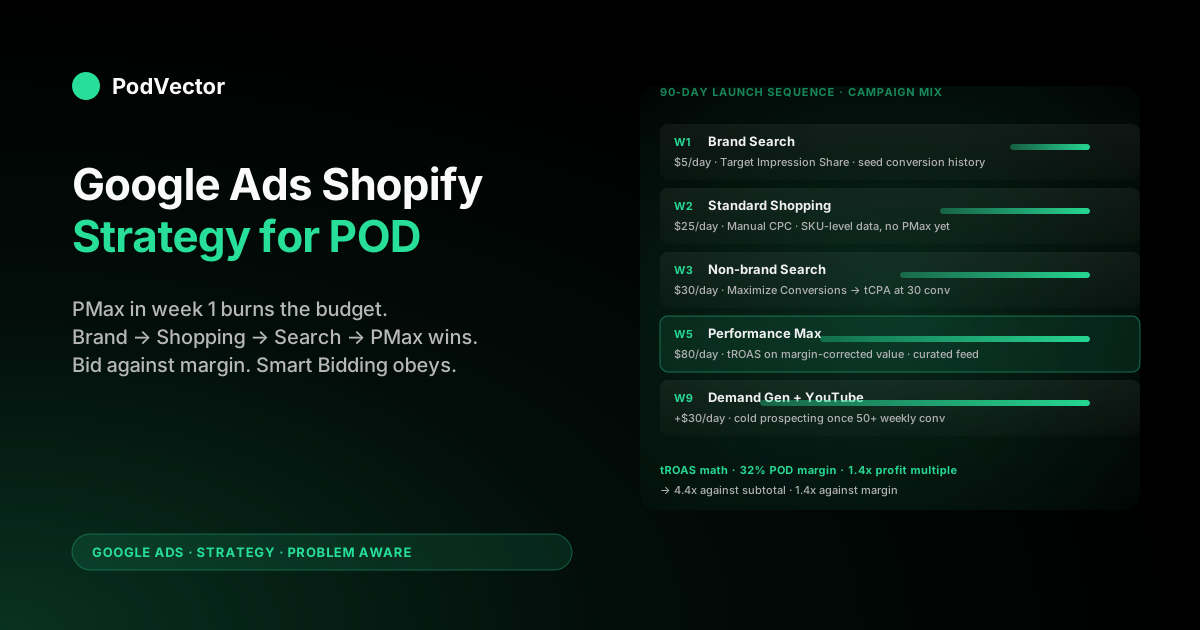
- Week 1: brand-defense Search at $5–10/day. One campaign, one ad group, exact-match brand terms ("[your store name]," "[your store name] reviews," "[your store name] discount code"). The point is not the conversions — it's seeding conversion history, building Quality Score on your domain, and stopping competitors from cherry-picking your branded traffic. The cost-per-conversion is usually $0.40–$1.20 and the conversions are clean (people who already know you).
- Week 2: Standard Shopping at $20–30/day. Pre-PMax. Standard Shopping shows you which products in your Shopify catalog convert and at what cost-per-acquisition, by SKU, with full search-term visibility. PMax obscures that. Two weeks of Standard Shopping data is what you'll feed PMax later; it's the difference between PMax learning quickly and PMax burning a month figuring out what your top sellers are.
- Week 3–4: non-brand Search on the top 5 query families. Pull from your Shopify GA4 data: which organic search queries drove sales last quarter? Run Search ads against those exact terms first. Higher Quality Score (you already converted on them organically), proven intent, and the keyword-match-type controls let you avoid the long-tail bleed that Smart Bidding finds attractive on cold campaigns.
- Week 5–8: Performance Max with feed curation. Now PMax has 4 weeks of Shopping conversion data, brand campaign signal, and non-brand Search data to learn from. Launch with feed curation (bestsellers only — see the feed cleanup below), audience signals from your Shopify customer list, and a target ROAS set against the margin-corrected value, not the subtotal Shopify ships by default.
- Week 9+: remarketing, Demand Gen, YouTube. Add layers as you have data to feed them. Display remarketing wants 100+ converters to optimize. Demand Gen wants 50+/week. YouTube wants creative inventory you can actually produce. Don't launch them empty.
For the conversions plumbing this sequence depends on, see set up Google Ads conversions on Shopify strategy for print-on-demand and the integration walkthrough at the complete guide to Google Ads + Shopify integration for POD.
Bidding strategy on a margin-corrected value signal
Smart Bidding is the right answer for almost every Shopify POD account once the value signal is right. The trap is that most POD accounts skip the second clause and turn Smart Bidding loose against the default Shopify subtotal value. The result is predictable: Target ROAS appears to hit 4x in Google Ads, real margin is negative, the operator scales the campaigns, and the account bleeds for two months before someone notices the Shopify Profit dashboard doesn't agree with the Google Ads ROAS column.
| Stage | Bid strategy | Why | POD-specific watch-out |
|---|---|---|---|
| Brand Search (week 1) | Target Impression Share, top-of-page | You want 100% coverage of brand queries; cost is bounded by query volume | Cap CPC bid at $1.50 to prevent competitor brand-bidding wars from dragging cost |
| Standard Shopping (week 2) | Manual CPC or eCPC | You're producing learning data; Smart Bidding has nothing to learn from yet | Bid by margin tier — higher CPC ceiling on $34 hoodies than $14 mugs |
| Non-brand Search (week 3) | Maximize Conversions until 30 conversions, then Target CPA | tCPA needs ~30 conversions per campaign in the trailing 30 days to optimize cleanly | Set tCPA against margin-corrected cost-per-acquisition, not subtotal-based |
| Performance Max (week 5) | Maximize Conversion Value with target ROAS | PMax's whole value proposition is portfolio optimization across channels | tROAS target = 1 / (your margin %) × desired profit multiple. For 32% margin and a 1.4x profit multiple: tROAS ≈ 4.4 against subtotal, or 1.4 against margin |
| Display/YouTube remarketing | Target ROAS | Remarketing audiences convert; Smart Bidding needs the value signal | Cap daily budget at 15% of total — remarketing can over-credit conversions that would have happened anyway |
The math behind the PMax target ROAS row is the lever every Shopify POD account either pulls or doesn't. If you're sending Google Ads the order subtotal and your real margin is 32%, a 1.4x profit-multiple goal translates to a Google Ads target ROAS of 4.4.
Set tROAS to 4.0 (the round-number default most accounts pick) and you're optimizing toward a loss. The cleaner path is to ship margin as the conversion value — see the override walkthrough at Shopify Google Ads conversion strategy for print-on-demand — and run tROAS at 1.4 directly. Both paths reach the same outcome; the second is easier to explain to anyone who looks at the account later.
Assets, audiences, and signals from a Shopify backend
Google Ads has been pushing advertisers toward more first-party data and richer asset libraries for two years. The Shopify backend can supply both, but most POD stores never wire the connection. Three asset/audience moves that separate well-built Shopify Google Ads accounts from the median:
- Customer Match from Shopify customer lists. Export your Shopify customer email list segmented by lifetime value (top 10%, top 25%, repeat buyers, one-time buyers). Upload as Customer Match audiences in Google Ads. Use the top 10% as a similar-audience seed for cold prospecting and as an audience signal for PMax. POD stores with >500 customers see PMax cold acquisition cost-per-conversion drop 12–20% inside 30 days once Customer Match is feeding the algorithm. Refresh the lists monthly via Shopify admin export or a Zapier connection.
- GA4 audiences as PMax signals. Shopify ships GA4 events through the channel app's enhanced ecommerce setup. Once GA4 is collecting
view_item,add_to_cart, andbegin_checkoutevents, build GA4 audiences ("cart abandoners last 30 days," "viewed but didn't purchase," "high-LTV repeat buyers") and import them into Google Ads as audience signals for PMax. PMax uses these as starting points, not hard targets, but they speed the learning phase materially. - Lifestyle imagery, not Printify mockups. The biggest single asset-quality lever in POD Google Ads is replacing flat Printify mockups with AI-rendered model imagery. Tools like Botika and Zmo.ai render product-on-model shots from a single mockup for $30–60 per design and 24-hour turnaround. The lift in CTR and ad strength scoring runs 1.4–2.1x on Performance Max asset groups in apparel categories. Push the rendered images back to Shopify's media library and sync to Merchant Center via the channel app — the Shopping feed picks up the new image automatically.
For audience strategy specifically, the broader cluster piece on Google Ads for Shopify strategy for print-on-demand goes deeper into Customer Match segmentation. For asset and creative strategy on Shopping specifically, see Google Shopping Ads Shopify strategy for print-on-demand.
Shopping and Performance Max with a Shopify-fed catalog
Shopping (Standard or Performance Max) is where most POD Shopify accounts spend the majority of their budget, and where most of them lose the most money. The Shopify-to-Merchant-Center sync ships every variant, every size, every color of every product to Google.
Merchant Center accepts it. Google Ads bids on it.
Then Performance Max funnels 70% of the budget toward whichever 8% of the SKUs hit a low cost-per-conversion in week one — usually because they happened to match a long-tail query that converted once. Smart Bidding compounds the signal, and within 30 days you're heavily exposed to a tiny slice of the catalog that may or may not represent your real bestsellers.
Three feed-and-campaign moves that prevent the failure mode:
- Curate the feed before Merchant Center sees it. Use the Google & YouTube channel app's product visibility setting to ship only your top 20% of designs by trailing-90-day Shopify revenue. Smaller feed, faster Merchant Center diagnostics, and PMax can't waste budget on the long tail. Refresh the curation monthly. New designs go through a 14-day Standard Shopping test before they're added to the curated PMax feed.
- Use custom labels by margin tier. Shopify metafields can carry a custom label that propagates to Merchant Center. Tag every variant with its margin tier (high, medium, low) based on supplier cost from Printify or Printful. In Standard Shopping, split product groups by custom label — bid higher CPC ceilings on high-margin tiers, lower on low-margin. In PMax, build asset groups around the high-margin tier exclusively for the most efficient ROAS targets.
- Run Standard Shopping alongside PMax for 60 days minimum. Google's documentation suggests letting PMax serve Shopping inventory exclusively. For POD accounts with <300 conversions/month, that produces less data than running Standard Shopping in parallel and using PMax as the scaling layer. The standard recommendation works for owned-inventory ecommerce at higher conversion volumes; under 300 monthly conversions, the parallel-run approach diagnoses better and converts better in our pattern matching.
Search campaigns: keywords that work for POD apparel
Search is where Google Ads strategies for ecommerce most diverge between high-margin owned-inventory and POD. The category bidding wars on terms like "men's hoodie" or "graphic tee" are won by Amazon, Target, and SHEIN — they can pay $4–7 cost-per-click against a high-margin reorder cycle and a customer LTV that POD doesn't have. POD apparel wins on long-tail design-specific intent.
The four query families that consistently work for POD Search:
- Niche identity queries. "Funny accountant shirt," "math teacher gift," "pickleball mom hoodie." High intent, lower competition, exact match for what your designs are. Search ad copy can match the query exactly because the design exists.
- Occasion-and-recipient queries. "Gift for retiring nurse," "fathers day shirt for grandpa," "team gift for soccer coach." Strong purchase intent, gift-buyer audience that's price-tolerant, and the design library can be merchandised against the query without inventory risk.
- Long-tail design-attribute queries. "Vintage style trail running shirt," "minimalist line drawing dog mug," "Y2K graphic crewneck." These convert because they're underspecified to the customer's mental image, and POD's design variety can match them where mass retailers can't.
- Brand-adjacent queries. "Like [popular brand] but with [niche]." Risky from a trademark perspective; safer in the ad copy than in the keyword list. Run as broad-match modifiers with negative keywords to prevent the search query from ever displaying the trademarked term in your ad headline.
Avoid the high-competition category terms ("graphic tee," "men's t-shirt," "custom hoodie") on cold Search. They convert at the rate the rest of the internet does — poorly — against your margin. They might work as Performance Max signals once PMax has 60 days of data, because PMax can layer in audience and contextual signals that Search alone can't.
Measurement and reporting that actually reflect profit
The Google Ads ROAS column shows the value Google received divided by the cost Google charged. If the value Google received is wrong, the ROAS column is wrong. Every POD-specific Shopify Google Ads strategy decision flows from the measurement layer working correctly. Three measurement moves that catch what the standard setup misses:
- Margin-based conversion value via Customer Events. Replace the default Shopify channel-app conversion value (order subtotal) with subtotal minus per-line supplier cost. Pull supplier cost from a Shopify metafield populated by your Printify or Printful product import. Five lines of code in Shopify Settings → Customer Events → Web Pixel. Sends Google Ads the number that actually pays your bills, and Smart Bidding optimizes against it directly.
- Offline conversion adjustments for refunds. POD apparel sees 2–6% refunds, biased toward higher-AOV designs. Google never hears about them. Set up a Shopify Webhooks → Cloud Function → Google Ads Offline Conversion Adjustment pipeline that nightly imports negative-value adjustments for refunded orders. PMax and Smart Bidding then over-weight the SKUs that are actually keeping their conversions, not the ones with the worst real return rate.
- Attribution sanity check against GA4 and Shopify. Google Ads' last-click attribution, GA4's data-driven attribution, and Shopify's first-click attribution will disagree by 20–40% on the same orders. The disagreement is not a bug — each platform is answering a different question. The diagnostic flag is when one platform reports 5x what the other does. That usually means a tracking break (gtag.js fired twice, GCLID stripped at checkout, or the channel app silently disconnected). For the framework on reading the three attribution views together, see Google Ads attribution explained for POD sellers.
Most Shopify POD operators we work with discover that once the value signal is corrected, their headline ROAS number drops 60–70% and their real profit goes up. The lower number is reality; the higher number was Google reporting against a value layer that didn't match the bank account.
A 90-day Google Ads ramp for Shopify POD
One operator-tested ramp from $0 to ~$3,000/month spend on a Shopify POD store with 200–400 SKUs:
- Days 1–7: Install the Google & YouTube channel app, link Merchant Center, fix conversion value to ship margin instead of subtotal, launch brand-defense Search at $5/day. Inventory work: replace Printify mockups with lifestyle renders for the top 20 designs.
- Days 8–21: Launch Standard Shopping at $25/day with the curated top-20% feed. Bid by margin tier custom labels. No PMax yet. Add non-brand Search on the top 5 query families pulled from GA4 organic data, $30/day Maximize Conversions.
- Days 22–35: Switch non-brand Search to Target CPA once you've cleared 30 conversions. Launch Display remarketing for cart abandoners and viewed-but-didn't-purchase audiences. Upload Shopify Customer Match list for top-10% LTV customers. Total spend ~$60/day.
- Days 36–60: Launch Performance Max with curated feed, Customer Match audience signals, and tROAS set against margin-corrected value. Run alongside Standard Shopping, not in place of it. PMax budget starts at $40/day, ramps to $80 over the period as conversion data fills in. Total spend ~$120/day.
- Days 61–90: Add Demand Gen for cold prospecting once PMax has 50+ weekly conversions. Layer in YouTube Shorts ads if creative inventory exists. Total spend ~$150/day, target portfolio ROAS at margin level (1.4x of margin = ~4.4x of subtotal). Refresh feed curation monthly, refresh Customer Match list monthly, audit search-term reports weekly.
The 90 days produce roughly 800–1,200 conversions across campaigns at ~30% blended margin, which is the volume Smart Bidding needs to maintain optimization across PMax, Search, and remarketing simultaneously. Below ~600 conversions/quarter, accounts struggle to maintain learning; above 1,500/quarter, the data fragmentation discussed in the structure section becomes the bottleneck. The ramp puts you in the middle of that range.
Five mistakes that kill Shopify POD accounts
- Launching Performance Max in week one. Without conversion history, PMax learns from view-through Display credit and cheap traffic that converts once. By the time you notice, the budget is gone and the algorithm has internalized the wrong signal. Fix: brand Search → Standard Shopping → non-brand Search → PMax, in that order, over 4–5 weeks.
- Setting target ROAS at 4.0 against subtotal value. Standard recommendation for owned-inventory ecommerce at 60% margin. Catastrophic for POD at 32%. Fix: ship margin-based conversion value or set target ROAS at the math-correct number for your margin and profit multiple — usually 4.4–5.0 for sustainable POD profit.
- Running the full Shopify catalog through Merchant Center. Variant explosion on POD products means Merchant Center sees 5,000–15,000 SKUs for a 200-design store. PMax can't learn cleanly across that surface. Fix: curate the feed to top 20% of designs by trailing-90-day revenue, refresh monthly.
- Ignoring Printify return-policy mismatch. The
free returnsattribute in Merchant Center will get the account suspended if Google verifies you don't honor it on a POD store. Fix: leave the attribute off, document the real return policy in Merchant Center settings, and write a buyer-friendly version on the product page that doesn't promise free returns Printify won't accept. - Trusting Google Ads' ROAS column without reconciling to Shopify Profit. The two will disagree. The disagreement is informative — when ROAS is climbing and Profit is flat, Smart Bidding is finding cheap conversions on the wrong segments. Fix: weekly reconciliation between Google Ads ROAS, Shopify Profit, and supplier-cost-adjusted contribution margin. The PodVector AI dashboard does this automatically by joining Google Ads spend, Shopify orders, and Printify/Printful supplier cost into one live view.
FAQs
Should I use Performance Max from day one for a Shopify POD store?
No. Performance Max needs first-party conversion signal to optimize against. On day one your Shopify store has none.
Run brand Search first to seed conversion history, then Standard Shopping for two weeks to produce SKU-level conversion data, then non-brand Search to validate query intent. PMax launches in week 5 with 30+ conversions of clean training data behind it. Stores that flip on PMax in week 1 routinely watch the algorithm spend the first 30 days bidding view-through Display credit and cheap long-tail Search traffic that converts once.
What target ROAS should I set for a Shopify POD store?
Depends on whether you've corrected the conversion value signal. If Google Ads is receiving the default Shopify subtotal as conversion value, target ROAS should be 1 / (your margin %) × your desired profit multiple. For a 32% margin POD store targeting a 1.4x profit multiple, that's tROAS = 4.4.
If you've overridden the conversion value to ship margin instead of subtotal, set tROAS at 1.4 directly. Both paths reach the same business outcome; the margin-based version is easier to debug and explains itself when someone else looks at the account.
How many conversions does Smart Bidding need to optimize for a Shopify POD account?
Target CPA needs 30 conversions per campaign in the trailing 30 days to optimize cleanly. Target ROAS needs 50.
Performance Max needs ~50/week across the campaign to clear its learning phase. Below those thresholds, Smart Bidding behaves erratically — bid spikes, sudden drops in impressions, ROAS oscillation.
POD operators who launch with $20/day budgets across five campaigns starve every campaign of conversion volume. Better to consolidate budget into 2–3 campaigns and clear the learning phase faster, then split as volume grows.
Should I run Shopping and Performance Max at the same time?
Yes, for at least the first 60 days, contrary to Google's standard recommendation. Standard Shopping gives you SKU-level conversion data and search-term visibility that PMax obscures.
For POD accounts under 300 monthly conversions, that diagnostic clarity outweighs any portfolio efficiency PMax claims. Once monthly conversion volume clears 500, the standard "PMax-only Shopping" recommendation starts to fit. Below that, run both.
How does PodVector AI help with Google Ads for a Shopify POD store?
PodVector AI is a profit dashboard that joins Google Ads spend, Shopify orders, Printify or Printful supplier cost, and payment processing fees into one live view per design, per campaign, per day. The questions a Shopify POD operator asks Google Ads — "is this campaign profitable after supplier cost?", "which SKUs in PMax are actually paying?", "did the new tROAS setting move real margin or just reported ROAS?" — get answered against margin, not subtotal, automatically.
The Google Ads strategy in this article works without PodVector AI; it just requires the operator to maintain the margin reconciliation manually in spreadsheets, weekly. PodVector AI replaces that work with a live view.
See your real Google Ads ROAS, against margin, by SKU
PodVector AI connects your Shopify store, Google Ads account, and Printify or Printful catalog and shows you which campaigns, which designs, and which audiences are actually profitable after supplier cost — not just against the subtotal Google sees. Most Shopify POD operators discover their real ROAS is 60–70% lower than what Google Ads reports, and that the campaigns they were scaling were the ones losing money fastest. And see the margin-corrected view in under 10 minutes.
Try Victor free