
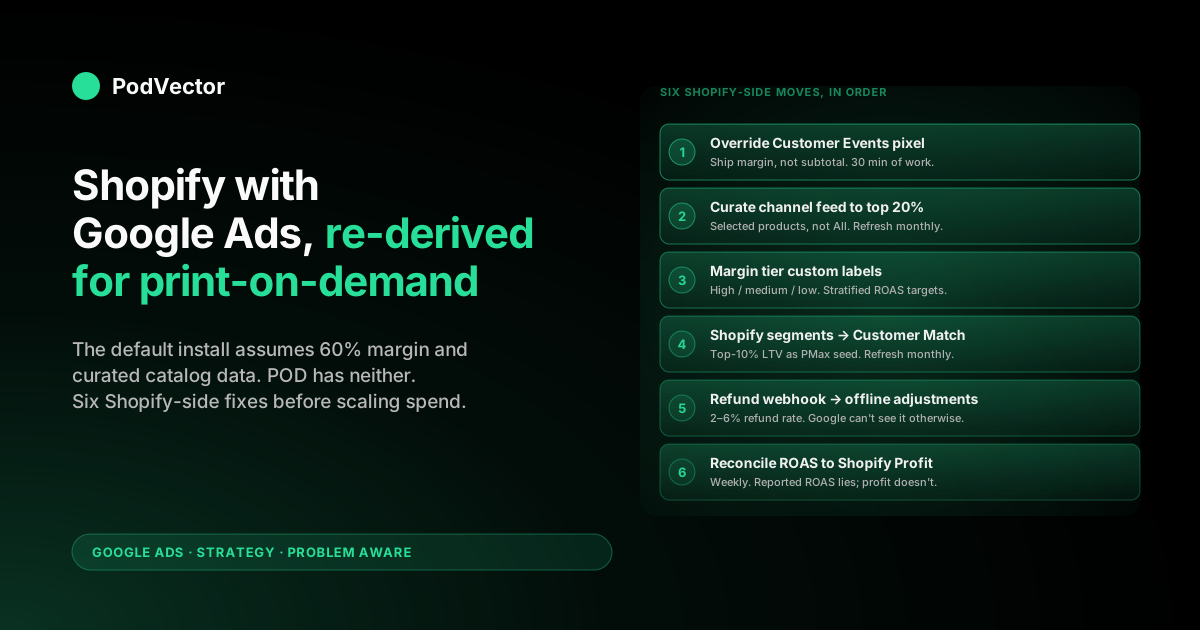
Quick Answer: A Shopify-with-Google-Ads strategy for print-on-demand isn't the same workflow owned-inventory stores run, even though the install steps look identical. The Google & YouTube channel app, default Customer Events pixel, and Merchant Center variant feed all assume 55–65% gross margin and curated catalog data — the POD reality is 28–35% margin against Printify or Printful supplier cost, design SKU explosion, and refund rates Google never sees. The strategy stack that actually works: override the Shopify Customer Events pixel to ship margin-corrected conversion value, curate the Google sales channel feed to top-20% designs by trailing revenue, structure campaigns by margin tier (not revenue tier), use Shopify customer segments as Customer Match seed audiences, wire a refund-event webhook to Google Ads offline conversion adjustments, and reconcile reported ROAS against real Shopify Profit weekly. Six Shopify-side moves, in that order, before scaling Google Ads spend past $50/day.
Why Shopify-with-Google-Ads needs a POD-specific strategy
The Shopify-with-Google-Ads happy path is well-documented: install the Google & YouTube channel app, link Merchant Center, claim and verify the domain, push the product feed, launch a Performance Max campaign at a 4x Target ROAS. For an owned-inventory store with a 60% gross margin, 200 cataloged SKUs, and a 1–3% refund rate, that path is fine. Smart Bidding hits the target, the operator pockets ~20% net, and the next quarter's optimization is incremental.
Print-on-demand inverts the assumptions. Margin against Printify or Printful supplier cost runs 28–35% blended on apparel; a 200-design store ships 1,600–3,000 variants to Merchant Center if no one curates; refund rates run 2–6% concentrated on higher-AOV designs; the Customer Events pixel reports order subtotal as conversion value while real margin per order is roughly a third of that.
Run Performance Max at a 4x Target ROAS in this configuration and the campaign reports green at exactly the breakeven margin line. Google's algorithm is doing what you asked; you asked for the wrong thing.
The fix isn't a Google Ads tactic — it's a Shopify-side strategy that gives Google Ads the right inputs. Six things at the Shopify seam: the conversion value the pixel ships, the catalog the channel app syncs, the customer segments uploaded as Customer Match audiences, the refund webhook that feeds offline conversion adjustments, the supplier-cost metafield that drives margin-tier custom labels, and the weekly reconciliation that compares reported ROAS to real Shopify Profit.
Get those six right and the standard Google Ads playbook works the way the owned-inventory blogs say it does. Skip them and no amount of bid tuning saves the account.
For the broader strategic frame, The Complete Google Ads Playbook for Print-on-Demand Sellers is the cluster pillar and covers the Google-Ads-side architecture in depth. This guide stays on the Shopify side of the seam — what your Shopify admin needs to do before a single dollar of ad budget is well-spent.
The Shopify data layer Smart Bidding actually optimizes against
Google's Smart Bidding doesn't have a special model for print-on-demand. It optimizes whatever value signal the Customer Events pixel ships, against whatever conversion taxonomy the account has configured, weighted by whatever audience and feed signals the channel app and Merchant Center pass through. Five inputs from the Shopify side determine the quality of every Smart Bidding decision the campaign makes:
- The conversion value field on the Purchase event. Default is order subtotal. POD-correct is order subtotal minus Printify or Printful supplier cost (margin). Smart Bidding treats this number as truth — getting it wrong miscalibrates every bid for the life of the account.
- The product feed delivered to Merchant Center. Default is every published variant. POD-correct is curated to top-20% of designs by trailing-90-day Shopify revenue, with margin-tier custom labels populated from supplier cost data, lifestyle imagery replacing flat mockups on the top 20, and feed attribute hygiene (no fabricated GTINs, no aspirational free-shipping flags, no free-returns claim if the policy excludes personalized items).
- The customer segments exported as Customer Match audiences. Top-10% LTV, top-25% LTV, repeat buyers, one-time buyers, churned 90+ days. Refresh monthly. PMax weights audience signals more aggressively than feed signals when both are present, which means the Customer Match feed quality is a direct lever on cost-per-conversion.
- The refund event stream wired to Google Ads offline conversion adjustments. POD apparel sees 2–6% refund rates. Without the adjustment loop, Smart Bidding over-credits refunded GCLIDs and systematically over-bids on the design lines with the worst real return rates.
- The supplier cost metafield populated on every product. Drives the margin-tier custom label, the conversion-value override math, and the weekly reconciliation. If this field is empty or stale, every layer above breaks silently.
Smart Bidding can only be as good as the signal stack it's reading. POD operators who set up Google Ads through the Shopify channel app's default flow are giving Smart Bidding a wrong-unit value signal, an over-stuffed feed, and zero audience priors. The competitive moat in 2026 isn't Google Ads expertise — it's Shopify data hygiene that produces a sharper signal than the operators who skipped these steps. Shopify Google Ads strategy for print-on-demand covers the Google-Ads-side flip of the same problem.
Channel app or custom GMC sync: pick the right seam
Two ways to get Shopify product data into Merchant Center. The Google & YouTube channel app handles the round trip natively — install, authenticate, click sync.
The custom path is a Merchant Center direct feed (XML or scheduled fetch) wired to a custom Shopify export. For most POD operators, the channel app is the right answer; it auto-pushes the custom_label_0 through custom_label_4 fields, syncs inventory and price changes within 24 hours, and routes Customer Events conversions back to Google Ads without a tag manager.
The exception is operators with extreme catalog scale (5,000+ SKUs), aggressive feed segmentation needs (per-niche or per-design landing pages requiring ad URL templates the channel app doesn't expose), or multi-region tax/shipping handling the channel app's defaults don't cover. In those cases the custom GMC feed is worth the engineering — the channel app's abstraction layer becomes the bottleneck. For sub-1,000-SKU POD storefronts (which is the vast majority), the channel app does what's needed and the strategy work is at the Shopify product level, not at the feed transport layer. The Complete Guide to Google Ads + Shopify Integration for POD walks the integration mechanics in depth.
One non-obvious choice within the channel app: the "All products" vs "Selected products" sync mode. Default is All.
POD-correct is Selected, with the selection scoped to the curated top-20% design list and refreshed monthly. Switching mode is a Shopify admin click, not a Google Ads change. The Smart Bidding lift from a leaner feed shows up within two weeks. Shopify Google Merchant Center strategy for print-on-demand details the curation cadence.
The Customer Events override: highest-leverage 30 minutes in your account
If a POD operator with a Shopify storefront and a live Google Ads account has 30 minutes to fix one thing, it's the Customer Events conversion-value override. The Shopify-side change is small. The downstream impact on Smart Bidding is permanent.
What the default does: when an order is placed, Shopify's Customer Events pixel fires the Google Ads Purchase conversion with value set to the order subtotal. Google receives, say, $42 for a hoodie order. Smart Bidding treats that $42 as 100% margin and bids accordingly. The real margin on that order — after Printify's $14 supplier cost, $5.50 shipping, $1.40 payment processing — is $21.10, which is 50% of what Google thinks it is.
What the POD-correct override does: read each line item's supplier cost from a Shopify product metafield (call it custom.supplier_cost), subtract it from each line item's price, sum to a margin number, ship that to Google as value instead of subtotal. Five lines of pixel JavaScript inside the Shopify Customer Events editor. Once it's live, every Purchase conversion fires with margin-corrected value, and Smart Bidding's training data is in the right unit from that point forward.
One important sequencing rule: do this before launching any Smart Bidding strategy. Smart Bidding's first 30 conversions train against whatever value signal arrives during the learning period.
If the override goes live after 30 conversions of subtotal-valued data, Smart Bidding's calibration is anchored to the wrong unit and the only fix is to flush conversion history and start the learning period over. Most accounts where Smart Bidding "doesn't work" are accounts where this calibration step was skipped.
Two implementation notes. First, populate the supplier cost metafield on every product before flipping the override on — empty metafields produce zero-margin orders that look like spam to Smart Bidding and corrupt the training data faster than no override at all. Second, keep the original subtotal as a secondary conversion event (call it "Purchase — Subtotal Reference") so the weekly reconciliation has both numbers. Shopify Google Ads conversion strategy for print-on-demand details the override pixel and the metafield setup.
Shopify-first campaign architecture
The campaign architecture below mirrors the Google Ads-side recommendation in the cluster pillar but is rephrased from a Shopify operator's vantage point — what each campaign needs from your Shopify storefront before it can produce profitable conversions, in launch order:
- Brand-defense Search ($5–10/day, week one). Needs nothing from Shopify beyond the live storefront. Cheapest conversions in the account, seeds clean Smart Bidding history, blocks competitor brand-bidding. Run regardless of other campaigns.
- Standard Shopping with curated feed ($20–30/day, weeks 2–4). Needs: top-20% design curation in the Google sales channel app (Selected products mode), margin-tier custom labels populated, Customer Events override live, lifestyle imagery uploaded on the top 10 designs. Bid by product groups segmented on margin tier. Maximize Conversion Value during the learning period.
- Non-brand Search on top 5 query families (weeks 4–6). Needs: a GA4 export of which organic queries already convert on the storefront, Search ads built against those exact phrases, Shopify product pages that match query intent (not generic collection pages). Maximize Conversions until 30 conversions; then Target CPA. Google Ads keyword research for ecommerce strategy for print-on-demand covers query-family extraction in depth.
- Performance Max with audience signals (week 5+). Needs: the curated feed from #2, Customer Match top-10% LTV uploaded as audience signal, GA4 audiences for cart abandoners and high-intent product viewers, Target ROAS calibrated against margin-corrected value. Run alongside Standard Shopping, not in place of it. Two PMax campaigns split by margin tier, not one campaign across the catalog. Shopify Performance Max campaigns explained for print-on-demand goes into the segmentation in detail.
- Display remarketing and Demand Gen (week 10+). Needs: 100+ unique Customer Match converters built up, refund-adjustment loop already running so the audience exclusion lists are accurate, lifestyle creative ready in the Shopify product image library. Cart-abandoner remarketing is highest ROI; Demand Gen on YouTube Shorts is prospecting and needs steady creative cadence.
The launch order matters because each campaign depends on data the previous campaign generated. Standard Shopping produces SKU-level diagnostic data that informs which products belong in PMax.
PMax produces audience priors that make remarketing efficient. Brand-defense Search produces baseline cost-per-conversion data that calibrates every other ROAS target. Skipping a step doesn't break the next campaign immediately — it just means the next campaign launches without diagnostic ground truth, runs hot for 4–6 weeks, and burns budget that the operator could have saved by waiting two weeks. Google Ads Shopify strategy for print-on-demand covers the Google-Ads-side launch sequence.
Bidding calibrated to Shopify gross margin, not subtotal
Once the Customer Events override is shipping margin-corrected value, the bidding strategy choices reset. Standard ecommerce advice — Target ROAS at 4x — is wrong in unit, not just in number. The right bidding sequence for a margin-valued POD account:
- Maximize Conversion Value, no target, first 30 conversions per campaign. Smart Bidding is in learning mode; let it spend daily budget chasing the highest-margin orders the budget can win without a constraint. Constraining Target ROAS during the learning period traps the algorithm in a narrow bid range and slows convergence.
- Target ROAS at 1.4–1.7x of margin from conversion 31 onward. Crucially, the target is calibrated against margin-corrected value. A 1.5x ROAS on margin equals roughly 4.5x on subtotal in the old unit — which is the equivalent of Target ROAS at 4.5x in an owned-inventory account at 60% margin. The reported number will look unfamiliar; that's because it's now in the right unit.
- Stratified ROAS targets by margin tier. High-margin PMax campaign: 1.4x of margin (tolerates lower efficiency because absolute margin per conversion is bigger). Medium-margin PMax campaign: 1.7x of margin (needs tighter discipline). Standard Shopping inherits the same logic via product groups bid on margin tier.
- Avoid Target CPA on storefront-side campaigns. Target CPA optimizes against conversion count, not value, which means a $14 mug conversion gets the same weight as a $58 hoodie conversion. POD's design tier mix means CPA-optimized campaigns systematically over-bid for low-AOV conversions. Use Target CPA only for non-brand Search at the bottom of the funnel.
- Portfolio bid strategies once 5+ campaigns are mature. Group Standard Shopping + PMax + non-brand Search into a portfolio targeting 1.5x of margin. Smart Bidding rebalances spend across campaigns daily based on which is converting best at the target ROAS. Account-level efficiency improves 8–12% over per-campaign targets in mature accounts.
The bidding sophistication available in 2026 — portfolio bid strategies, seasonality adjustments, conversion adjustments — is the same toolkit owned-inventory advertisers have. The POD operator's leverage is that almost no one in the category is using these tools on margin-corrected value, so accounts that do are bidding against accounts still optimizing on subtotal. The competitive moat is the value-signal correction, not the bid strategy choice. Shopify Google Ads tracking strategy for print-on-demand covers the offline-conversion adjustment plumbing.
Shopify customer segments → Customer Match seed audiences
Shopify ships native customer segmentation that maps directly onto Customer Match audience signal needs. Most POD operators never use it. The work is exporting Shopify customer segments and uploading them to Google Ads as Customer Match lists, then configuring PMax to weight them as audience signals. Five POD-specific segment plays Shopify supports natively:
- Top-10% LTV — PMax cold prospecting seed. Build the segment in Shopify customers (filter: total spent in top decile, last order within 365 days). Export emails monthly. Upload to Customer Match. Add as audience signal on every PMax campaign. PMax optimizes against lookalikes of your highest-value customers, not lookalikes of every converter — cold acquisition cost-per-conversion drops 12–20% within 30 days.
- One-time buyers — second-purchase remarketing only. Filter: number of orders = 1, last order within 90 days. Suppress in cold campaigns; target in remarketing with new-design content. POD repeat purchase rates run 18–28% over 12 months — nudging this cohort is the cheapest revenue line in the account.
- Repeat buyers — upsell remarketing seed. Filter: number of orders ≥ 2. Different creative angle: featured new releases, premium-tier products, gift-bundle messaging. Higher AOV ceiling here than the cold or one-time cohorts.
- Churned 90+ days — winback campaigns. Filter: last order >90 days ago, number of orders ≥ 1. Discount-led remarketing excluding active buyers. The "we miss you" angle works for POD because niche-affinity is real — fans of a specific design house come back for new drops if reminded.
- Cart abandoners — high-intent prospecting feed. Pulled from GA4 audiences (added to cart, no purchase, 30-day window) rather than Shopify customers, but lives in the same Customer Match upload pipeline. Single biggest lift on remarketing efficiency in any POD account.
The maintenance discipline most operators skip is the monthly refresh. POD customer lists turn over fast — last quarter's top-10% is half-stale today.
Static Customer Match audiences degrade as a PMax signal within 60–90 days. Schedule a recurring monthly export from Shopify customer reports, manual upload (or Zapier-automated), audience age tracked in Google Ads. Operators with disciplined Customer Match feeding outperform operators with the same feed and the same budgets because the signal layer is doing more of the targeting work. Google Ads for ecommerce strategy for print-on-demand covers the customer-data architecture more broadly.
Refunds and the offline conversion adjustment loop
POD apparel sees 2–6% refund rates concentrated on higher-AOV designs. Google Ads doesn't see refunds unless an offline conversion adjustment is wired.
Reported ROAS over-credits the refunded GCLIDs; real Shopify Profit absorbs the loss. Smart Bidding then over-bids on the design lines that have the worst real return rates because the algorithm can't tell the difference between a kept order and a refunded one.
The fix is a Shopify webhook → cloud function or Zapier → Google Ads Offline Conversion Adjustment pipeline. The shape:
- Subscribe to Shopify's
refunds/createwebhook. Each refund event payload includes the originating order ID, refunded line items, and refund amount. - Look up the GCLID stored on the originating order. Shopify can stash GCLIDs from URL parameters into a customer or order metafield via a small Customer Events snippet — same pixel layer as the conversion-value override. Without GCLID stored at order time, the offline adjustment has nothing to match against.
- Compute the margin adjustment. Refunded line item × supplier-cost metafield → margin loss. Send the negative adjustment to Google Ads' Offline Conversion Adjustments endpoint with the original GCLID and adjustment timestamp.
- Run nightly. Refund events from the previous 24 hours, batched. Google Ads accepts adjustments up to 90 days after the original conversion — daily cadence keeps Smart Bidding's training data current.
The full pipeline is 50–80 lines of code (Cloud Run function, Zapier zap, or Shopify Functions handler). The lift on Smart Bidding accuracy shows up within two weeks: PMax stops over-bidding on the design lines with chronic returns, cost-per-conversion on tier-A campaigns drops 6–10%, and the gap between reported ROAS and real Shopify Profit narrows materially. Shopify Google Ads tracking issues strategy for print-on-demand walks through the specific webhook implementation. Google Ads attribution explained for POD sellers covers the attribution layer that determines which GCLID gets credited.
Reconciling Google Ads ROAS against Shopify Profit weekly
The override pixel ships margin-corrected conversion value. The refund adjustment pipeline corrects for returns. Smart Bidding's signal stack is good. None of that proves the account is profitable. Google Ads' reported ROAS — even after both fixes — diverges from real Shopify Profit in three remaining ways the standard playbook doesn't address:
First, fixed costs Google never sees. Shopify subscription, app stack, payment processing, returns shipping. These don't appear anywhere in the Google Ads reporting layer; they appear on the Shopify side and only when reconciled.
Second, attribution model mismatch. Google Ads credits conversions to its last-click GCLID by default; Shopify's analytics show the full multi-touch journey. The same conversion can show 1.5x ROAS in Google Ads (last click, with assist credit elsewhere) and 1.1x in a multi-touch model. The "right" number depends on which question you're asking.
Third, supplier cost variance over time. Printify or Printful occasionally adjusts supplier costs on specific products; if the metafield isn't updated, the margin-corrected conversion value is using a stale cost basis. Smart Bidding optimizes against last-month's margin reality; this month's reality is different.
The weekly reconciliation that catches all three: pull Google Ads spend by campaign + Shopify orders by GCLID + Printify or Printful supplier cost by SKU + refund events by order. Calculate true profit per campaign, per design tier.
Compare to Google Ads' reported ROAS. The disagreement is the diagnostic.
Climbing reported ROAS with flat real profit means Smart Bidding is finding cheap conversions on the wrong margin tier. Declining reported ROAS with steady profit usually means a refund spike on a specific design line. Stable both means the account is healthy.
Most POD operators run this reconciliation in a spreadsheet weekly and burn 4–6 hours pulling it together. The PodVector AI dashboard joins Google Ads spend, Shopify orders, Printify or Printful supplier cost, and refund events live in a warehouse so the reconciliation is the default view.
Victor — the AI employee layer on top of that join — answers questions like "which campaigns should I scale and which should I pause based on real profit, not reported ROAS?" without anyone touching a spreadsheet. Victor answers your questions and acts (pause underperforming PMax asset groups, lift bids on margin-tier-A SKUs scaling profitably, pause campaigns on a refund-spike design family) once the operator approves a level of autonomy. The operator stays in control of the margin math; Victor does the joining and the surfacing.
Eight Shopify+Google Ads strategy mistakes that bleed margin
- Launching Smart Bidding before the Customer Events override is live. First 30 conversions train against subtotal; that calibration is permanent until conversion history is flushed. Override Customer Events first, launch second.
- Sync mode set to "All products" in the Google sales channel. Default is All; POD-correct is Selected, scoped to the curated top-20% design list. 1,800-SKU feeds dilute every Smart Bidding signal.
- Empty supplier-cost metafield on new products. Margin-corrected value math depends on the metafield. Empty metafield = zero-margin order = corrupted training data. Populate at product creation, not when the operator remembers.
- No GCLID storage on Shopify orders. Without GCLIDs stashed at order time, the offline conversion adjustment pipeline has nothing to match refunds against. Add GCLID capture in the same Customer Events snippet that handles the value override.
- Static Customer Match audiences. POD customer lists turn over fast; last quarter's top-10% is half-stale today. Schedule a monthly Shopify export → Customer Match upload, not a one-time setup.
- Default Printify mockups as Shopping ad imagery. Lifestyle product-on-model imagery converts 40–80% better. AI rendering tools cost $30–60 per design and the lift compounds for the life of the design. Push rendered images back to Shopify; the channel app syncs them.
- Performance Max from day one across the entire catalog. Skips the Standard Shopping diagnostic period and gives the black box 100% of budget control. Run Standard Shopping for 60+ days first, then layer PMax with margin-tier segmentation.
- Reading Google Ads' reported ROAS without weekly Shopify Profit reconciliation. Reported ROAS over-credits in three structural ways even after the override and refund fixes. Without the reconciliation, the operator never sees which campaigns are climbing reported ROAS while bleeding real profit.
FAQs
Do I need to choose between Shopify's Google & YouTube channel app and a custom Merchant Center sync?
For most POD operators the channel app is the right answer. It auto-syncs custom labels, handles Customer Events conversion routing, refreshes inventory and price within 24 hours, and doesn't require a tag manager.
The custom GMC feed is only worth the engineering cost for storefronts with extreme catalog scale (5,000+ SKUs), aggressive per-niche feed segmentation, or multi-region tax/shipping handling the channel app can't express. Sub-1,000-SKU POD storefronts get more leverage from data hygiene at the Shopify product level than from feed transport sophistication. The Complete Guide to Google Ads + Shopify Integration for POD covers the integration mechanics in depth.
Will overriding the Customer Events conversion value void my Shopify analytics?
No — Shopify's native analytics keep using the full subtotal regardless of what the Google Ads pixel ships. The override only changes the value field on the Google Ads Purchase event, not Shopify's order records, Shopify's reports, or any other downstream system. Keep the original subtotal as a secondary "Purchase — Subtotal Reference" conversion event in Google Ads if you want both numbers visible in the dashboard for reconciliation.
How long until Smart Bidding adapts after I switch to margin-corrected conversion value?
Roughly 7–14 days. Smart Bidding's relearning period kicks in whenever the conversion-value distribution shifts materially.
The shift from subtotal to margin is a ~3x downward distribution change — Smart Bidding notices, recalibrates bids, and the reported ROAS number lands in a new range within two weeks. During the relearning window, lower the daily budget by 20–30% and don't make other structural changes; let the bidding strategy converge before adding new variables.
What's the minimum Shopify order volume needed to make Customer Match audiences worthwhile?
Google requires a minimum of 1,000 matched users per Customer Match list to activate it as a PMax audience signal. For a POD store, that translates to roughly 2,000–3,000 unique customer email addresses (match rates are 40–60% on hashed email lists). Below that volume, focus on cart-abandoner GA4 audiences instead — those build faster and don't have the minimum-list-size constraint. Above 3,000 customers, the Customer Match seed strategy becomes the highest-leverage targeting move available.
Can I run Performance Max for POD on Shopify without doing all of this?
Yes — and you'll lose money slowly. Default-configured Performance Max on a default Shopify channel app installation, with subtotal-valued conversions and an over-stuffed feed, will report a 4x ROAS that's roughly 1.3x against margin.
That's breakeven before refunds and processing fees. Operators in this configuration usually scale spend for 60–90 days, watch reported ROAS hold up, and only catch the divergence when they reconcile against the bank account at quarter end. The Shopify-side strategy work above is what turns "Performance Max doesn't work for POD" into "Performance Max works for POD when the inputs are right." Both statements are true depending on which configuration is meant.
What's the highest-ROI single change I can make today?
The Customer Events conversion-value override. Five lines of pixel JavaScript inside the Shopify Customer Events editor, 30 minutes of work including the supplier-cost metafield population, immediate effect on every Smart Bidding decision the account makes from that point forward.
Until the override is live, every other optimization — bid adjustment, audience signal, feed curation — is being applied on top of a wrong value signal. Most POD accounts pay for two months of misdirected optimization before realizing the value signal was the problem. For external context on the standard ecommerce flow this guide diverges from, the Shopify blog's How To Set Up a Google Ads Campaign walks through the default install — useful as a reference for the steps this guide assumes are already complete.
See which Shopify+Google Ads campaigns are actually profitable
The reconciliation work in this guide — joining Google Ads spend, Shopify orders, Printify or Printful supplier cost, and refund events into one margin-corrected view — is what PodVector AI does live in a warehouse so you don't have to maintain the spreadsheet. Victor answers "which campaigns should I scale and which should I pause based on real profit?" from the joined data.
Try Victor free