
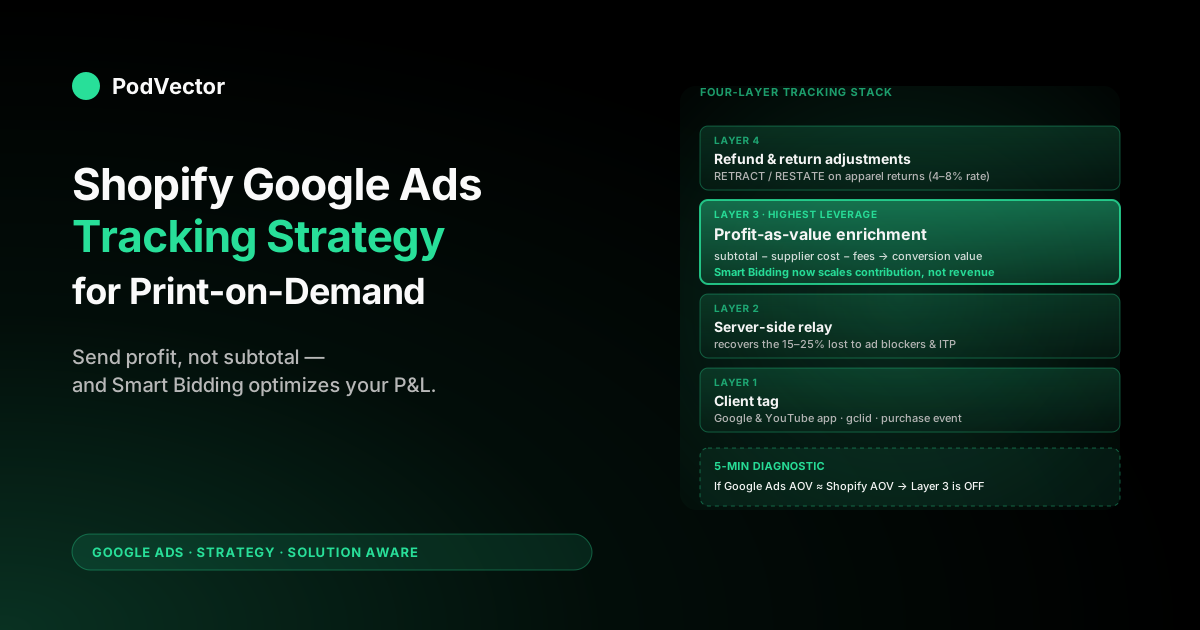
Quick Answer: Most Shopify Google Ads tracking guides walk you through installing a pixel, enabling enhanced conversions, and verifying the tag. Those mechanics are necessary but not the strategy. For print-on-demand stores the strategy is what value you send Smart Bidding — and the right answer is gross profit per order, not subtotal. This playbook lays out the four-layer tracking stack a POD store needs in 2026 (client tag, server-side relay, profit-as-value enrichment, refund and return adjustments), the order to build it in, and the diagnostic test that tells you whether your current setup is good enough or quietly bleeding budget.
Why tracking is a strategy decision, not a setup task
The standard Shopify Google Ads tracking guides — Shopify's own, the Stape walkthrough, the wetracked.io setup — all answer the same question: how do I get a number into Google Ads when somebody buys? That question is mechanical. It has a known answer.
Install the Google & YouTube app, or push events through Google Tag Manager, or wire up a server-side container. Done.
Tracking is a strategic decision because Smart Bidding does not optimize for sales. It optimizes for whatever number you tell it the conversion was worth.
Send subtotal and Smart Bidding will scale revenue. Send profit and it will scale contribution.
For a furniture store with a fixed 60% margin those two outcomes are the same campaign. For a print-on-demand store where one t-shirt design pulls a $14 Printify cost and a near-identical one pulls $22, those are different campaigns producing different P&L outcomes from the same ad spend.
The 2026 best-practice posts have correctly noticed that server-side tracking, enhanced conversions, and first-party data matter more in a privacy-restricted web. They are right. They are also incomplete. Server-side delivery of a wrong conversion value is just a cleaner pipe carrying the wrong signal. The strategy comes first, then the plumbing.
For the broader frame this sits inside, see the complete Google Ads playbook for print-on-demand sellers and the Google Ads strategy cluster hub. The 1,000-foot topic context lives at the Google Ads for POD topic hub.
The four-layer POD tracking stack
The tracking architecture a POD store should run in 2026 has four layers. Each layer answers a specific question, and getting them in the right order matters because the upper layers depend on the lower ones being correct.
- Client tag. Fires the purchase event from the browser. Captures gclid and basic order metadata. Default Shopify Google & YouTube app handles this.
- Server-side relay. Re-fires the same event from your server (or a server container) so it survives ad blockers, ITP, and dropped third-party cookies. Adds enhanced conversion identifiers (hashed email, phone) for match-back.
- Profit-as-value enrichment. Replaces the order subtotal with gross profit (selling price minus supplier cost minus processing fees) before the conversion ping reaches Google Ads. This is the layer almost nobody runs and the one that does the most strategic work.
- Refund and return adjustments. Posts negative conversion adjustments back to Google Ads for refunded and returned orders, so Smart Bidding sees the real net contribution. Critical for apparel-heavy POD catalogs where return rates run 4–8%.
If you skip layer 1, you have no signal. If you skip layer 2, the signal is unreliable. If you skip layer 3, the signal is misleading.
If you skip layer 4, the signal slowly rots over the quarter as returns accumulate. Most POD stores are running layers 1 and 2 cleanly and doing nothing about layers 3 and 4. That gap is where the strategy lives.
Layer 1: The client tag (and why it is not enough)
The client tag is the easy part. Install the Google & YouTube app from the Shopify App Store, link your Google Ads account, define the purchase event as your primary conversion. Google's own setup guide walks the mechanics. For most stores under $5K/month in spend this is functionally fine on day one.
The client tag has three structural problems that grow with spend:
- It can be blocked. Roughly 15–25% of paid traffic in 2026 hits a browser with an ad blocker, ITP-style cookie restrictions, or a privacy-extension setting that prevents the tag from firing. Smart Bidding sees a blank where the conversion should be and bids less aggressively into channels that are actually working.
- It can be dropped at checkout. Shopify's checkout occasionally loses the gclid on third-party app redirects — loyalty apps, post-purchase upsell apps, fraud-screening apps. We see this most often in stores running three or more checkout-stage apps. The order completes and converts, but the conversion never matches back to the click that drove it.
- It can only ever know what the browser knows. The browser knows order subtotal at checkout. It does not know your supplier cost. So a client-only setup cannot send profit as value, no matter how cleanly it is configured. This is the architectural ceiling.
The mechanical setup is covered in detail in our Set Up Google Ads Conversions on Shopify strategy piece and the Shopify Google Ads conversion strategy piece. The point of this article is what to do after the client tag is in place.
Layer 2: Server-side relay
Server-side tracking in 2026 is not a sophistication signal anymore. It is table stakes for any POD store spending more than a few thousand a month on Google Ads.
The pitch is simple: instead of relying on the browser to call Google Ads, your server (or a server-side GTM container) makes the call directly using a webhook from Shopify's order-creation event. The conversion fires whether or not the browser is reachable.
The practical 2026 options for a Shopify POD store are:
- Server-side GTM via Stape, Addingwell, or your own GCP container. Most flexible. Requires a tag manager habit. Stape's Shopify-specific hosted setup is the lowest-friction path here.
- A Shopify-native server-side tracking app. wetracked, Elevar, Littledata, AdTrack, AnyTrack — most of them now offer one-click installs that handle the relay without you touching GTM. We compare the merits in our Shopify Google Ads apps strategy piece.
- Direct Conversions API (CAPI) integration. If you have engineering time, a custom relay using Shopify webhooks and the Google Ads Offline Conversion Imports API gives you maximum control. Most POD operators do not have this time and should not insist on it.
What Layer 2 buys you, regardless of which tool you pick:
- Recovery of the 15–25% of conversions the client tag misses to ad blockers and tracking restrictions.
- Enhanced conversions — hashed email and phone — that let Google Ads match the conversion back to the user even when the click cookie has expired.
- A controlled extension point. If you want to send profit as value (Layer 3) or post refund adjustments (Layer 4), the server-side relay is the place to do it. The client tag has nowhere to put that logic.
Picking between GTM-based and app-based server-side tracking for POD: the apps are easier to install, but they assume conversion value = order subtotal and are awkward to extend. If you know you will run Layer 3 and Layer 4 at some point, GTM-based or a CAPI-friendly app saves you a future migration. If you are not yet sure, install whichever is fastest now and revisit when monthly Google Ads spend crosses $5K.
Layer 3: Profit-as-value enrichment
Layer 3 is the layer that distinguishes a POD tracking strategy from a generic Shopify one. Instead of telling Google Ads "this order was worth $42" (the subtotal), you tell it "this order was worth $11.80" (the gross profit after supplier cost and processing fee).
Smart Bidding now optimizes against your actual unit economics. Performance Max stops scaling the high-revenue, low-margin SKUs that look great in the dashboard but lose money. Target ROAS becomes a profit target, not a revenue target.
The mechanics in plain language:
- Pull the line items from each Shopify order.
- For each line item, look up the supplier cost — Printify and Printful both expose this through their order APIs, and most multi-supplier apps tag the SKU with the supplier of record.
- Sum:
profit = subtotal − supplier_cost − processing_fee − shipping_pass_through. - Send
profitas the conversion value to Google Ads, instead of subtotal. The order ID and click ID stay the same; only the value field changes.
Three things make this harder than it sounds:
- Supplier cost is not always in Shopify. Printify and Printful both push order cost back to Shopify after fulfillment, but the timing varies and the field is non-standard. A Layer 3 implementation usually needs to either pull from the supplier API directly or accept a 24–48 hour reporting lag and use the Offline Conversion Imports endpoint.
- The conversion value math has edge cases. Multi-design orders, variant-level cost differences, multi-supplier orders, and discounted promo orders all need handling. The cleanest approach is a per-line-item cost rollup, not an order-level estimate.
- Smart Bidding needs to relearn. When you switch from subtotal to profit, target ROAS values change dramatically. A campaign that was running at 3.5x revenue ROAS might land at 1.4x profit ROAS for the same P&L outcome. Plan a 14-day relearning window and do not make other campaign changes during it.
This is exactly the kind of problem Victor — PodVector AI's AI employee that connects Shopify, Printify, Printful, Google Ads, and Meta into one live data warehouse view — is built around. Asking Victor "which campaigns make money on profit ROAS, not revenue ROAS?" is a one-line conversation; rebuilding the same view in spreadsheets is several days of work that goes stale the day after you finish it.
Layer 4: Refund and return adjustments
POD apparel return rates run 4–8% in our customer cohort, considerably above the 2–3% ecommerce average. The return-rate cost compounds because POD usually does not resell the returned unit. The return is essentially a full reversal of the order's contribution.
If you do not post refund events back to Google Ads, Smart Bidding believes those refunded orders converted at full value and bids more aggressively for the SKUs and audiences with the highest return rate. The exact opposite of what you want. The fix is mechanically straightforward: when Shopify fires the refund/created webhook, send an offline conversion adjustment to Google Ads using the same gclid as the original order, with a negative or revised value.
What to send:
- Adjustment type:
RETRACTfor full refunds,RESTATEfor partial. - Adjusted value: revised profit. For a full refund, that is typically a small negative (the supplier still bills you for the produced unit even after a refund) — send 0 or a small negative depending on your supplier policy.
- Adjustment time: the refund timestamp from Shopify, not the original order time.
Most POD stores skip this layer because it does not show in any dashboard until a quarter goes by. Then a Performance Max campaign that looks like a 3.5x ROAS winner turns out to be running at 1.1x net of returns. By the time the operator notices, three months of budget have followed Smart Bidding into the bad pocket.
The interaction with Layer 3 is important: if you are sending profit as value (Layer 3), your refund adjustments need to send adjusted profit, not adjusted revenue. The math is the same, just on the smaller number. For more on how attribution and adjustment fit together for POD, see the complete guide to Google Ads ROAS and attribution for POD.
The five-minute diagnostic: is my tracking good enough?
Run these four checks against your account. Each takes about a minute. Failing any of them tells you which layer to fix first.
- Compare Google Ads conversions to Shopify orders for the last 30 days. Pull total Google-Ads-attributed orders from your Shopify reports (filter by UTM source = google, medium = cpc) and compare to the conversion count in Google Ads. They should be within ~5%. If Google Ads is showing 15%+ fewer, your client tag is being blocked or the gclid is dropping at checkout. Fix Layer 1 / 2.
- Pull average conversion value from Google Ads and compare to AOV from Shopify. If they are roughly equal, you are sending subtotal as value. That is Layer 3 not running. Almost every POD store fails this check.
- Check refund adjustments in Google Ads (Tools → Conversions → Adjustments). Should show non-zero adjustments matching your Shopify refund volume. If it is empty, Layer 4 is missing and Smart Bidding is blind to your returns.
- Verify enhanced conversions are accepted. In Google Ads, conversion action settings should show "Recording active" for enhanced conversions, with a fairly high match rate (60%+). Lower than that means hashed email or phone is missing in the payload.
The right order to fix is bottom-up. Get the client tag and server-side relay clean first (Layers 1 and 2), then add profit-as-value (Layer 3), then add refund adjustments (Layer 4). Trying to ship Layer 3 on top of a leaky Layer 2 produces inconsistent profit numbers that erode trust in the whole system.
Common Shopify Google Ads tracking issues for POD stores
From the support threads we see, the recurring tracking failures for POD operators cluster into four buckets.
Issue 1: Conversions reported in Google Ads are far below Shopify orders. Almost always a gclid drop at checkout, usually caused by a third-party app redirecting through its own domain. Test by placing a real ad-click order monthly and inspecting the order timeline in Shopify. If a fix is not obvious, switching from the Google & YouTube app's client tag to a server-side relay almost always closes the gap.
Issue 2: Average order value in Google Ads matches AOV in Shopify almost exactly. Means subtotal is being sent as value. Strategically: Smart Bidding cannot tell the high-margin orders from the low-margin ones. The fix is the Layer 3 work above. This is the highest-leverage fix in the four-layer stack.
Issue 3: Performance Max ROAS looks great in Google Ads but the bank balance does not. Usually a combination of Issue 2 (sending revenue, not profit) and missing refund adjustments (Layer 4). Smart Bidding has a clean signal that does not match your P&L. The dashboard ROAS is honest given the value column it was fed; the value column is the wrong one.
Issue 4: New designs never accumulate enough conversion data to learn. Often a campaign-structure problem rather than a tracking problem — new designs share a campaign with proven ones and get starved. The tracking fix is to wire custom_label_2 = launch_age_band through the feed (covered in our Shopify Google Merchant Center strategy piece) so you can isolate new designs into their own campaign with their own target ROAS.
Measurement cadence: weekly, monthly, quarterly
Tracking is not a one-time setup. The data the tracking stack produces is what feeds the operator decisions every week. A working cadence:
- Weekly: profit ROAS by campaign, plus delta vs. prior week. Look for campaigns drifting below your hurdle rate.
- Weekly: tracking pulse — Google Ads conversion count vs. Shopify ad-attributed orders, looking for sudden drift that signals a tag breakage.
- Monthly: contribution-margin reconciliation — does the profit Google Ads sees match the profit your accounting sees on those orders, after returns and chargebacks?
- Quarterly: custom-label audit — are supplier IDs, margin tiers, launch-age bands, and design families still accurate? POD catalogs drift quickly.
Shopify, Printify, Printful, and Google Ads each give you part of this picture. None of them give you all of it in one place. The pulled-together view is where most POD operators lose hours every week — and where having Victor running on a live warehouse sync of all four sources moves the work from "Sunday morning spreadsheet" to "Monday morning two-line query."
When to bring in an agency or a Victor
The four-layer stack is not hard, but it is fiddly and POD-specific enough that most general Shopify Google Ads agencies will not build it for you out of the box. Three patterns we see:
- Under $5K/month spend, generalist Shopify operator. Run Layers 1 and 2 with a Shopify app. Skip Layer 3 and Layer 4 for now and revisit at $5K. The complexity does not pay back yet. Use the diagnostic above quarterly so you know where you stand.
- $5K–$30K/month, scaling. All four layers matter. If your in-house engineering capacity is light, a POD-aware agency or a tool that handles profit-as-value out of the box is the move. Generic Shopify ads agencies will not build Layer 3. Vet on whether they have shipped supplier-cost-aware tracking before. Our Shopify Google Ads agency guide walks the questions to ask.
- $30K+/month, scaling fast. All four layers, plus your own analytics layer reading directly from Shopify, Printify, Printful, and Google Ads. This is where Victor's live-data architecture pulls ahead — the alternative is hiring a part-time analyst and a dashboarding stack, and the analyst still does not run the four-layer tracking strategy without operator input.
The AI employee now sits between the data and the merchant — answering questions and acting on those answers with approval.
Victor (or an agent) acts with your approval — pausing the campaign that has drifted under hurdle, promoting the new design that just hit a profit ROAS threshold. The tracking strategy in this piece is what makes that future possible. Without profit-aware data flowing into Smart Bidding and into the analyst's view, automation has nothing reliable to act on.
FAQs
What is the difference between conversion tracking and conversion attribution for Shopify Google Ads?
Conversion tracking is the act of recording that a paid click resulted in a sale. Conversion attribution is the model Google Ads uses to assign credit across the touchpoints in the path before that sale (last click, data-driven, position-based, etc.).
Tracking is the input. Attribution is what Google Ads does with the input. You need tracking right before attribution choices matter.
Can I use Google Tag Manager instead of the Shopify Google & YouTube app?
Yes, and at scale you should. The Google & YouTube app is the fastest setup but is harder to extend with custom logic — for example, sending profit instead of subtotal. GTM, especially with a server-side container, gives you the extension points the four-layer stack needs. For stores under $5K/month spend, the Google & YouTube app is fine.
Do I need server-side tracking if I am only spending $1K/month on Google Ads?
Strictly, no — the client tag will give you usable signal. But the cost-benefit shifts fast. By $3K/month, the 15–25% of conversions you are missing to ad blockers and ITP is enough budget that the price of a server-side tracking app pays back. Most apps charge $20–$80/month for the relay alone.
How do I send gross profit instead of subtotal as the conversion value?
You replace the value field in the conversion ping after computing profit on your server. The mechanics differ by tool — most server-side tracking apps now have a "use profit as conversion value" setting if you provide them with supplier cost data; with custom GTM you build the calculation in a server tag using a webhook from Shopify's order/create event. The hard part is getting supplier cost into the conversion event payload reliably, not the calculation itself.
How does Shopify checkout extension affect Google Ads tracking?
The 2024 migration to Shopify's checkout extensions changed how custom scripts run at checkout. Older third-party tracking apps that injected into the checkout via legacy scripts stopped working and had to switch to the new Web Pixels API.
If your tracking app has not been updated for checkout extensions, you may have a silent gclid drop. Most tracking apps have shipped the update — confirm with your provider.
What is the right Target ROAS for a POD store after switching to profit-as-value?
It depends on your fixed costs, but as a starting point: 1.2–1.6x profit ROAS in Performance Max for proven SKUs, 0.8–1.1x profit ROAS in your new-design exploration campaign for the first 30 days. Note that these numbers will look alarming next to old guides that quote 3.5–4.5x, but those are revenue ROAS targets and are not comparable.
Will Smart Bidding work correctly with refund adjustments enabled?
Yes, and better than without. Smart Bidding is designed to handle adjustment events. The relearning window after enabling adjustments is typically 7–14 days, during which you may see CPA fluctuate. The end state is a Smart Bidding signal that matches your P&L, so the relearning is worth doing.
How do I pick between Stape, Elevar, Littledata, and the other server-side tracking apps for POD?
The shortlist for POD comes down to whether the app supports profit-as-value (custom value calculation per order) and whether it handles refund adjustments natively. Most apps will do server-side relay for Google Ads.
Fewer support the layer 3 and layer 4 work cleanly without engineering. Test by asking the support team directly: "Can your app send gross profit as the Google Ads conversion value, computed from per-line-item supplier cost pulled from Printify or Printful?" The answer separates the candidates fast.
Tracking strategy is half the work. Reading the data is the other half.
Once your four-layer tracking stack is feeding Google Ads gross profit instead of subtotal, the next question is which campaigns are actually winning on profit ROAS this week. Victor connects Shopify, Printify, Printful, and Google Ads into one live data warehouse view and answers that question in seconds — no spreadsheet, no dashboard build, no Sunday-morning reconciliation.
Try Victor free