
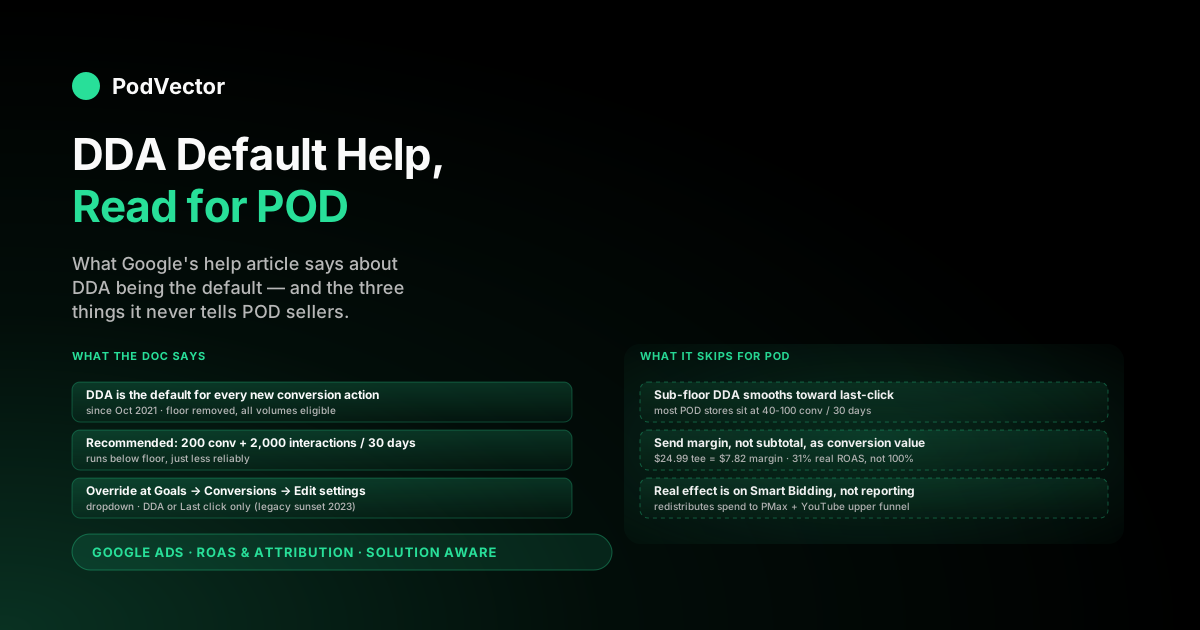
Quick Answer: Google's "default help" for data-driven attribution (DDA) consists of one help article telling you DDA is the default model for every new conversion action, plus a brief setup walkthrough — and that's almost all the official guidance you get. The help doc says DDA is on by default, that the recommended floor is 200 conversions and 2,000 ad interactions in 30 days, and that you can override it from Goals → Attribution.
What it doesn't say: most print-on-demand stores sit far below that floor, sub-floor DDA reporting is heavily smoothed toward last-click, and the "default" only optimises correctly when you send margin (not subtotal) as conversion value. This guide reads the default-help docs alongside what they leave out for POD operators.
What "default" actually means in 2026
"Data-driven attribution is the default attribution model for most conversion actions." That single sentence — pulled verbatim from Google's "About data-driven attribution" help article — is the one most operators search for when they type "google ads data-driven attribution default help" into Google. It's also the sentence that does the most work and gets unpacked the least.
"Default" in 2026 means three concrete things, none of which the help doc spells out together:
- Every new conversion action is created with DDA assigned. If you set up a Purchase action today in a fresh account, the Attribution model dropdown defaults to "Data-driven" without you touching it. You'd have to actively pick "Last click" to get anything else.
- Every legacy rule-based action that's still active was migrated to DDA. The 2023 sunset of first-click, linear, time decay, and position-based meant Google moved every conversion action that previously used those models to DDA. The "default" isn't just for new actions — it's the only model still being assigned by Google itself.
- The default applies regardless of your conversion volume. The October 2021 update removed the 600-conversion eligibility floor that used to gate DDA. A brand-new POD store with five sales a month gets DDA assigned by default, same as a million-order enterprise account.
The help doc states the first point clearly. The second is documented in the parent "About attribution models" article rather than the DDA-specific one.
The third is documented in a 2021 blog post on blog.google. Reading all three gives you the full picture; reading one gives you the headline. For the upstream framing of where attribution sits inside POD measurement, see the complete guide to Google Ads ROAS and attribution for POD.
Anatomy of the default-help article
The "About data-driven attribution" help article — the one most search results for "default help" point to — is shorter than its reputation suggests. It runs roughly 1,200 words split across five sections:
- Benefits. Three bullets: identify high-impact keywords and campaigns, optimise bids using account-specific data, remove guesswork from model selection. Each is one sentence.
- How it works. A single paragraph describing DDA as a model that "uses your conversion data to calculate the actual contribution of each ad interaction across the conversion path." This is the entire technical explanation; there's no math, no Shapley-value reference, no description of how the ML actually distributes credit.
- Example. A bike-tour company scenario where DDA recognises that "Bike tour New York" generic searches preceding "Bike tour Brooklyn waterfront" branded searches contribute to conversion. Useful for visualising upper-funnel credit, less useful for POD where most purchases are single-ad-to-single-purchase.
- Data requirements. Two numbers: 200 conversions and 2,000 ad interactions in supported networks within 30 days. The doc says these are "recommended for the model to accurately analyse your data" but that DDA "still runs" below the floor.
- How to set up DDA for your conversions. A six-step click path: Goals → Conversions → Summary → click action → Edit settings → Attribution model dropdown → Data-driven → Save.
That's the entirety of Google's primary "default help" for DDA. There's no troubleshooting section, no diagnostic flow, no comparison to last-click outcomes, no guidance on what conversion value to send.
The article assumes you've already decided to use DDA and just need to find the toggle. For the section-by-section critique of this article applied to POD specifics, see Google Ads data-driven attribution help explained for POD sellers.
Why Google made DDA the default
The "default" framing originated in October 2021. Before that update, DDA was an opt-in feature for accounts with at least 600 conversions in 30 days. Google's launch announcement ("The future of attribution is data-driven") removed the eligibility floor, made DDA the default for new conversion actions, and quoted an aggregate "6% conversion lift after switching to DDA" across Google's customer base.
The decision was driven by three things, only one of which the help doc references:
- Privacy-driven measurement. Cross-domain cookies and third-party tracking degraded across 2020-2021 (Safari ITP, Firefox ETP, the slow Chrome cookie roadmap). Last-click attribution depends on intact click-path data; DDA's machine learning can extrapolate from a noisier signal. Google framed the default switch as future-proofing measurement against the cookie deprecation Google itself was driving.
- Smart Bidding adoption. Tactics like tROAS and Maximize Conversions perform better when the credit signal feeding the bidder reflects the real funnel. Last-click systematically underweights upper-funnel touches; DDA spreads credit, which lets Smart Bidding learn that YouTube-then-Search paths convert. The default change is, in part, an enablement step for Smart Bidding.
- Sunset path for the legacy rule-based models. Making DDA the default in October 2021 set up the April 2023 sunset of first-click, linear, time decay, and position-based. By the time those models were removed, every account that had been on them was already auto-migrating to a model Google had been recommending for two years.
For POD operators, the practical implication of the "why" is that Google's recommendation system is now a coherent stack: DDA-by-default → margin-as-value → Smart Bidding → Performance Max. The default is the first link in that chain; if you opt out of DDA, the rest of the stack starts to misfire because it was tuned assuming DDA's credit distribution. For the bid-signal pathway specifically, see Google Ads attribution explained for POD sellers.
How the default applies to your account today
Whether DDA is the active model on a given conversion action depends on three things:
- When the action was created. Anything created after October 2021 was DDA-by-default at creation. Anything older was on whatever model you (or Google) selected at the time.
- Whether your account was auto-switched. Between late 2023 and mid-2024, Google ran the "Switch to DDA" auto-migration program, moving eligible legacy actions from rule-based models to DDA with 30-day email notice. Most older accounts had every active conversion action auto-switched during this window. The state per action is visible at Goals → Attribution → "Switch to DDA" tab.
- Whether you opted out. The override toggle exists, and operators sometimes flip an action to last-click for reporting reasons or because they don't trust DDA on low volume. If anyone on your team did this, the default never applied.
To check the current state for any action: Goals → Conversions → click the action → Edit settings → Attribution model. The dropdown shows the active model. If it says "Data-driven," the default is in effect; if it says "Last click," someone overrode it. For the auto-switch dynamics specifically, see about data-driven attribution Google Ads help explained for POD sellers.
One subtlety: the API can return states the UI smooths out. A conversion action in transition (recently migrated, recently re-enabled) may show as "Data-driven" in the UI but return UNKNOWN or a transitional enum value via the Google Ads API.
This matters if you're piping conversion-action state into a warehouse. For the full enum and how Victor reads it, see Google Ads data-driven attribution documentation explained for POD sellers.
Overriding the default: the help-doc path
The help doc's setup section assumes you're enabling DDA. The override — switching an action off DDA back to last-click — uses the same path:
- Goals (left nav) → Conversions → Summary.
- Click the conversion action you want to change.
- Click "Edit settings."
- Scroll to "Attribution model."
- Change the dropdown from "Data-driven" to "Last click."
- Click "Save."
The dropdown only shows two options now: Data-driven and Last click. The legacy rule-based models (first click, linear, time decay, position-based) are no longer assignable to new or existing actions. If you remember those options being there, your memory is correct — they were sunset in April 2023.
The help doc warns that switching attribution models will affect your Smart Bidding strategies' performance during the relearning period (typically 1-2 weeks). What it doesn't quantify is the magnitude.
In our observation across POD accounts, a switch from DDA to last-click during a relearning period typically shows a 15-30% drop in reported conversions during week one as the bidder reconfigures. The drop usually reverses by week three, but the noise window is real and worth budgeting for if you're testing the switch. For the model-comparison angle, see Google Ads attribution models explained for POD sellers.
The POD floor problem the help skips
The help doc's Data Requirements section says 200 conversions and 2,000 ad interactions in 30 days are recommended. It doesn't say what happens below that floor. Operationally, sub-floor DDA reporting is heavily smoothed toward last-click priors — the model has too little data to learn account-specific patterns, so it falls back to a credit distribution that looks 70-80% similar to what last-click would produce.
The implication for POD: most stores spending $500-$1,500 per month on Google Ads sit at 40-100 conversions per 30 days. They're below the floor by a factor of 2-5x.
DDA is technically running on their account (it's the default), but the credit splits it produces don't differ meaningfully from last-click for the first 6-12 months of operation. The "default help" presents DDA as a substantively different model regardless of volume; in practice, sub-floor accounts get last-click-shaped reporting wearing a DDA label.
This isn't a bug — Google is doing the conservative thing by smoothing toward a stable prior when training data is thin. But it does mean that:
- Switching from DDA to last-click for a sub-floor account often shows almost no reporting difference, which can falsely confirm "DDA isn't doing anything for me."
- The benefits the help doc lists (better upper-funnel credit, smarter bid signals) only start materialising as you scale through the floor.
- Below the floor, the practical value of DDA-as-default is mostly future-proofing: when you do scale, the model has been collecting account-specific data the whole time and won't need a cold start.
For the default-behaviour analysis specifically, see data-driven attribution default Google Ads help explained for POD sellers.
The margin gap the default never closes
The help doc treats conversion value as an input parameter — something you set, not something you compute. For POD, this is the largest single gap between what the documentation says and what operators need.
A worked example. You sell a $24.99 graphic tee. The numbers underneath:
- Order subtotal: $24.99 (what your store reports as the purchase value).
- Printify base cost: $11.20 (what Printify charges you for the print + product).
- Fulfilment / shipping: $4.95.
- Payment processing fees: $1.02 (Shopify Payments at ~2.9% + 30¢).
- Contribution margin: $7.82, or 31% of the order subtotal.
If you let the Shopify → Google Ads conversion send the default $24.99 as conversion value, here's what happens. DDA splits credit across the ad-click path correctly (it's doing what the docs describe).
Smart Bidding then trains on the resulting $24.99-shaped reward signal. The bidder learns to spend up to roughly 33¢ of CPA per dollar of subtotal to hit a 3.0 tROAS — a number that looks fine in the reporting columns and is in fact catastrophically over-spend on a 31% margin product. A reported 3.0 ROAS on subtotal is roughly a 0.93 ROAS on contribution margin. You're losing money on every order while the dashboard shows you winning.
None of the official help docs address this. The fix is to send margin as the conversion value — either via offline conversion adjustments uploaded daily, a server-side tag that subtracts COGS and fulfilment before firing the conversion event, or an external tool that automates the cost reconciliation.
Whichever path, the upstream work is to know the per-order margin in the first place, which means joining your Shopify orders to your Printify or Printful cost feeds. For the integrations side of this, see Shopify Google Ads ROAS reporting integration explained for POD sellers.
What the default does to Smart Bidding
The reason DDA-as-default matters less for reporting and more for bidding is that Smart Bidding strategies (tROAS, Maximize Conversions, Maximize Conversion Value) train on the credit distribution the attribution model produces. Switch the model, and you change the training signal.
Concretely, on a POD account running a mix of branded Search, generic Search, Performance Max, and YouTube remarketing:
- Under last-click: branded Search and remarketing get full credit for purchases. PMax and YouTube look anaemic. tROAS bidders concentrate budget on branded and remarketing, starving the upper funnel that fed those conversions in the first place.
- Under DDA: fractional credit flows to PMax and YouTube touches that preceded the eventual purchase. The bidder learns those touches correlate with downstream sales and redistributes spend upward. Branded and remarketing show lower nominal ROAS in the report but the same total revenue at the account level.
This is the operational reason DDA-as-default is a meaningful change, even when the per-action reporting numbers look similar. The model isn't primarily a reporting upgrade — it's a bid-signal upgrade.
Operators who switch to DDA "to see better numbers" and don't observe a reporting difference often miss that the better Smart Bidding behaviour is happening underneath the dashboard. For the model's role inside the bidding pipeline, see Google Ads data-driven attribution explained for POD sellers.
A POD operator's default-help checklist
The official "default help" gets you about 60% of the way to using DDA correctly. Here's the residual 40%, in checklist form:
- Confirm DDA is actually the active model on every Purchase action. Goals → Conversions → click each action → Edit settings → Attribution model. Should say "Data-driven." If it says "Last click," check whether someone overrode it deliberately or whether it predates the auto-switch and was missed.
- Note your 30-day conversion volume. If it's below 200, DDA is running but the credit splits are heavily smoothed. Don't make model-comparison decisions on sub-floor data.
- Audit your conversion value. Does the value Google Ads receives match the order subtotal, or does it match contribution margin? If it's subtotal, every Smart Bidding decision is being made against the wrong number.
- If you can't yet send margin-as-value, set tROAS targets that compensate. A 3.0 tROAS on subtotal-as-value is roughly a 1.0 tROAS on margin for a 31%-margin POD product. To hit profitable spend on subtotal-based reporting, your tROAS target needs to be above (1 / margin_percent), so above 3.2 for a 31% margin product. Most POD operators target 2.5-3.0 and lose money.
- Check the Switch to DDA tab once. Goals → Attribution → Switch to DDA. Confirms which actions were auto-switched, which are eligible-not-yet-switched, and which are not eligible. Useful as a one-time audit; not something you need to re-check monthly.
- Don't override DDA without a specific reason. The default exists because it's the model the rest of Google's recommendation stack assumes. Override only if you've established a measurement reason that outweighs the Smart Bidding benefit.
For the broader Smart Bidding playbook this checklist plugs into, see the complete Google Ads playbook for print-on-demand sellers. For an external operator-facing walkthrough that frames DDA as a workflow rather than a definition, the WordStream guide to DDA as the new default has the cleanest summary of what the 2021 update actually changed.
FAQs
Is data-driven attribution really the default in Google Ads now?
Yes. Since October 2021, every new conversion action created in Google Ads is assigned DDA by default. The April 2023 sunset of first-click, linear, time decay, and position-based models means DDA and last-click are now the only two options in the dropdown. The official help confirms this at support.google.com/google-ads/answer/6394265.
What does "default" mean if I have low conversion volume?
DDA is assigned by default regardless of volume — Google removed the 600-conversion eligibility floor in October 2021. But below the recommended 200-conversions / 2,000-interactions threshold over 30 days, DDA's credit splits are heavily smoothed toward last-click priors. The model is "on" but isn't producing meaningfully different numbers from last-click for sub-floor accounts.
Can I switch off the default and use last-click instead?
Yes. Goals → Conversions → click the action → Edit settings → Attribution model dropdown → Last click → Save. Note that switching mid-flight will trigger a 1-2 week relearning period for any Smart Bidding strategies tied to that action, during which reported conversions typically dip 15-30% before stabilising.
Does the default-help article explain how to set conversion value?
No. The help article describes DDA as a model that distributes credit across the conversion path, treating the conversion value as a parameter you've already configured. It never recommends sending margin instead of subtotal — which for POD is the single biggest gap between the documented setup and a profitable setup.
How do I know if my account was auto-switched to DDA?
Goals → Attribution → "Switch to DDA" tab. Lists every conversion action and its eligibility state (Auto-switched, Eligible-not-yet-switched, Not eligible). For most POD accounts older than 6 months, every active Purchase action shows as Auto-switched.
Does DDA work the same for Performance Max as for Search?
The model itself is the same, but the credit it produces is more visibly different from last-click for PMax and YouTube than for Search-only accounts. PMax includes upper-funnel touches that last-click systematically ignored; DDA spreads credit to those touches, which is where the "6% lift" Google quotes mostly comes from. Search-only accounts see less DDA-vs-last-click delta because the click paths are shorter.
Where is the official "default help" article?
The primary one is support.google.com/google-ads/answer/6394265 ("About data-driven attribution"). The parent doc at answer/6259715 ("About attribution models") explains where DDA sits versus the legacy models. The migration doc at answer/10762625 documents the auto-switch program.
What about the attribution window — is that part of the default?
The attribution window is set per conversion action, separately from the model. Default click window is 30 days. Changing the model from DDA to last-click doesn't change the window, and vice versa. For the window mechanics specifically, see Google Ads attribution window explained for POD sellers.
The default is on. The hard part is what you feed it.
Google's "default help" tells you DDA is on, where the toggle lives, and what data thresholds matter. It doesn't tell you that sending order subtotal as conversion value lets DDA optimise toward gross revenue while you pay 30-40% in COGS, fulfilment, and fees the bidder never sees. For a POD store, that's the difference between a dashboard 3.0 ROAS and a real 1.0 ROAS. Victor pulls live data from your Shopify orders, Printify and Printful cost feeds, and Google Ads spend, computes per-order contribution margin, and posts margin-as-value back to Google Ads via offline conversion adjustments. So when DDA does the math the docs describe, it's doing it on the dollar that actually lands in your bank account. Ask Victor "What's my true ROAS after COGS by campaign?" and he'll answer from your live data instead of a spreadsheet.
Try Victor free