
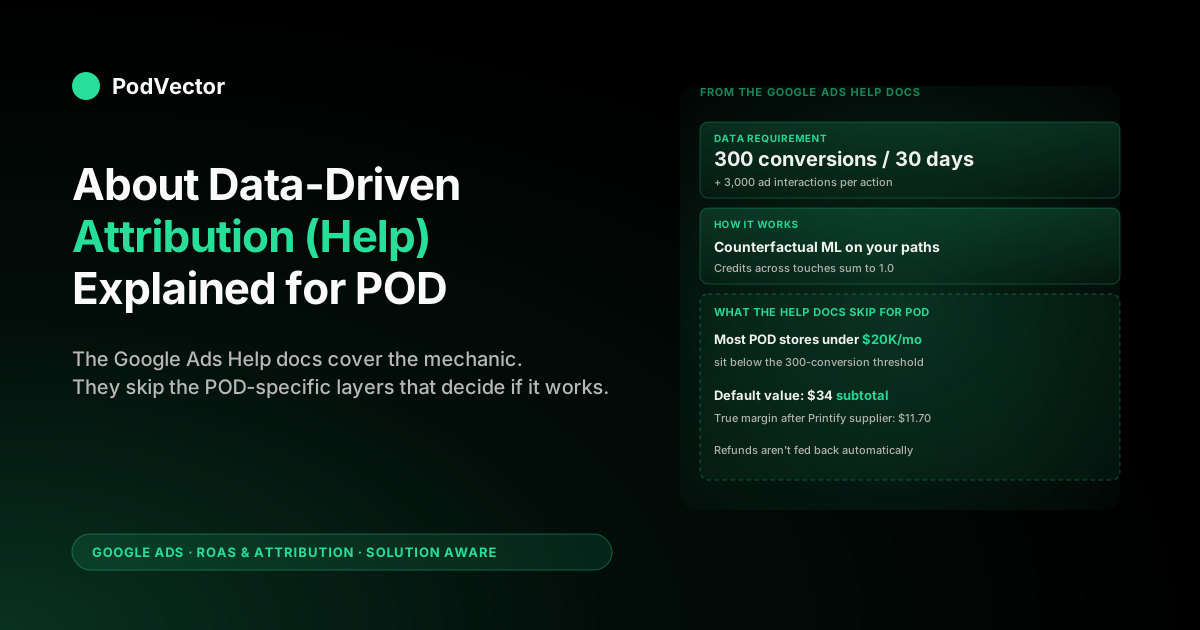
Quick Answer: Google Ads Help defines data-driven attribution (DDA) as a machine-learning model that distributes conversion credit across the ad interactions that actually changed the probability of a sale, trained on your account's own data. As of 2026, Google's documentation confirms DDA is the default for all new conversion actions and the old minimum-conversion threshold has been removed — so every POD store, regardless of volume, now runs DDA. The help docs still leave out three things that decide whether DDA helps you: the fact that below roughly 300 conversions per month the model relies more heavily on Google's broader vertical data than on your own paths (according to Whitead), the fact that DDA optimises against whatever conversion value you send (raw subtotal misleads it), and the absence of any refund feedback by default. Read the help page for the mechanic, then add these three POD-specific layers before relying on the model for budget decisions.
What Google Ads Help actually says about DDA
The official Google Ads Help page on data-driven attribution is short — covering benefits, how it works, an example, data requirements, and setup steps. Google's documentation describes DDA as a model that "uses your conversion data to calculate the actual contribution of each ad interaction across the conversion path." It looks at clicks and engaged views on Search (including Shopping), YouTube, Display, and Demand Gen ads, then assigns fractional credit based on the observed contribution of each touch.
Three claims from the help page are worth noting because they shape every POD-relevant decision downstream:
- DDA is the default attribution model for most conversion actions. Google's help center states this directly. Every new POD store creating conversion actions in 2026 lands on DDA without choosing it. The choice is now whether to leave it on or switch to last-click — and the help docs don't make that POD-aware.
- The minimum data threshold has been removed. According to MB Advertising's 2026 guide, Google removed the previous requirement of 3,000 ad interactions and 300 conversions within 30 days, so DDA is now available for all conversion actions regardless of volume. Model accuracy still improves with more data, but the hard eligibility floor is gone.
- DDA is the most-used attribution model for conversions used in automated bidding. Google considers DDA the prerequisite for Smart Bidding to work properly. Pair the model and the bid strategy or you're under-using both.
For the broader strategic context — how DDA fits with attribution windows, Smart Bidding, and value tracking inside one POD account — see the complete guide to ROAS and attribution for POD and the Facebook Ads vs Google Ads comparison for POD sellers. This article focuses on what the Google Ads Help page says, what it skips, and what changes when "the advertiser" is a POD seller.
How DDA works mechanically (the part the help skims)
The help page says DDA "evaluates the entire customer journey from the first click to the final conversion, and assigns credit to each touchpoint based on its observed impact on conversions." That's directionally accurate. The mechanic underneath is a counterfactual model: for each ad interaction in a path, Google calculates how much the probability of conversion changed because that interaction happened.
An example. A shopper sees a Performance Max ad on Monday (no click), clicks a Shopping ad on Tuesday, watches a YouTube ad to engagement on Wednesday, then clicks a branded Search ad on Thursday and completes an order.
DDA looks at all the converting paths in your account that share interactions with this one and asks: among shoppers who saw the PMax impression, how many converted? Among those who didn't? The gap is the PMax touch's marginal contribution.
The credits assigned across the four touches always sum to 1.0. They are not equal — last-click would give all credit to the branded Search click; DDA splits fractional credit across all four. The branded Search click still typically gets the largest share because it's nearest the conversion, but the upstream touches get visible, non-zero credit.
Two practical implications:
- The model is account-specific. Google's help page emphasises this. Your DDA is trained on your conversion paths, not a generic vertical model — with accuracy improving as your own volume grows. Two POD stores running similar campaigns can get different DDA credit distributions because their actual paths differ.
- The model retrains continuously. Add YouTube spend, change conversion windows, modify your conversion-action definition — DDA recalibrates over the next 14–30 days. This is why mid-quarter attribution changes destabilise Smart Bidding: the bidder is reading credit weights that are themselves moving.
Data requirements: what changed and what it means for POD
An important update since earlier versions of this article: MB Advertising's 2026 conversion tracking guide confirms that Google has removed the previous data requirements — the old threshold of 3,000 ad interactions and 300 conversions within 30 days no longer applies, and DDA is now available for all conversion actions regardless of volume.
What this means in practice for POD:
- Every POD store runs DDA now, whether they know it or not. PPC Live's attribution guide notes that even low-volume accounts default to this model.
- Model accuracy still scales with your data. According to MB Advertising, Google's practical guidance recommends around 200–300 conversions per month for the model to produce its most accurate weighting. Below that, DDA still runs but draws more from broader aggregated Google data.
- For lower-volume stores, the practical workaround hasn't changed. Promote a higher-volume micro-conversion like Begin Checkout as a co-primary conversion action. Because checkout initiations are more frequent than completed purchases, this gives DDA richer path data to train on — reducing its reliance on Google's generic vertical pool.
The 3,000 ad-interactions dimension rarely constrained POD in the old regime either. What limited accounts was purchase volume. Now that the hard floor is gone, the question shifts from "am I eligible?" to "is my DDA model accurate enough to trust for budget decisions?" — and that's answered by looking at your own monthly conversion counts.
What the help docs leave out for POD sellers
Google's documentation is written for a generic advertiser. Four omissions matter when you read the help page through a POD lens:
- The conversion value Google receives is wrong by default for POD. The help page assumes conversion value reflects the value to your business. The default Shopify pixel sends
checkout.subtotal_price— order subtotal, not contribution margin. For a typical POD apparel order, that subtotal masks Printify or Printful supplier cost, payment processor fees, and any shipping subsidy. DDA distributes credit accurately across the touches, but against a revenue number that bears no relationship to profit. - Refunds aren't fed back unless you wire them up. POD apparel carries non-trivial return rates. Google Ads receives the conversion when checkout completes; it never hears about the refund unless you connect offline conversion adjustments via the API. DDA assigns credit to interactions that led to refunded orders the same as fulfilled ones.
- The "6% average uplift" from Google's own announcement applies to a broad advertiser mix. Google's original DDA launch post quoted a "6% conversion lift after switching to DDA" across its customer base — a figure covering all sizes and verticals. Pure-Search POD accounts often see a smaller shift; PMax-heavy POD accounts with significant YouTube spend often see more. The figure is real but doesn't predict your account.
- Cross-device path stitching is privacy-degraded. POD shoppers research-then-buy across phone and desktop more than many other verticals. ALM Corp's 2026 attribution guide notes that the ecosystem is increasingly moving toward first-party data and modeled conversions as third-party signals weaken — meaning the stitched paths DDA sees may represent fewer of the real paths your customers walked. The help page doesn't acknowledge this.
None of these issues are specific to DDA. They affect every attribution model. But because DDA is the model Google promotes and defaults to, the omissions in the DDA help docs are the ones POD sellers act on first.
Setting up DDA: the help's six steps, with POD-specific notes
The setup flow Google documents is straightforward — Tools → Conversions → select the action → Edit settings → Attribution model → Data-driven → Save. Six clicks. Worth following exactly. The POD-specific notes come around the edges:
- Apply DDA per conversion action, not account-wide. If you have separate Purchase, Begin checkout, and Add to cart conversion actions, you can run DDA on Purchase and last-click on the others, or any combination. For Smart Bidding to work cleanly, the action you bid toward needs DDA.
- Set the conversion-action category correctly. Purchase action → category "Purchase." Add to cart → "Add to cart." This affects which Google internal pools your data trains alongside when your own volume is low.
- Set the conversion value source to "Use the value from the variable." This pulls the value sent in the gtag event (which you'll override to be margin-based — see the value-layer section below). Don't pick "Use the same value" unless your AOV genuinely doesn't vary, which is rarely true for POD with mixed apparel and accessories.
- Set the click-through window to 30 days for impulse apparel, 60 days for higher-AOV custom products. The help page lets you choose 1–90 days; it defaults to 30. For sub-$50 impulse POD apparel, 30 days comfortably covers most paths. Adjust upward for custom or personalised orders with longer consideration cycles.
- Leave engaged-view at 3 days and view-through at 1 day (or off). View-through Display credits look like cheap conversions but rarely correspond to incremental revenue for POD.
- Save and wait. Google retrains DDA over 14–30 days. Don't make a second structural change to attribution during the retraining window or you can't read which change drove what.
For the focused setup walkthrough including the Shopify code edit that wires margin-based value, see Printful features and pricing full breakdown for context on supplier cost inputs, and refer to Google's tagging documentation for the technical conversion-tracking implementation.
Why DDA only matters once Smart Bidding is involved
If you're running manual CPC bids on a Search-only account with no Performance Max, DDA's effect on your business is small. Manual bids don't react to credit weights; they react to your bid amounts, which you set. DDA changes the columns in your reports but not the auctions you win.
The leverage shows up the moment you enable Smart Bidding — Maximize Conversion Value, Target ROAS, Maximize Conversions, Target CPA. MB Advertising's 2026 guide confirms that Smart Bidding algorithms train directly on the attribution model's credited conversion signals, so DDA provides more accurate per-keyword and per-touchpoint signal to the bidder than last-click.
Those totals are computed by multiplying conversion value (subtotal or margin, depending on what you send) by each touch's DDA credit fraction. Change the model, and Smart Bidding sees a different value distribution and bids differently.
Two specific consequences for POD:
- If you're running Performance Max — which most POD apparel sellers are in 2026 — DDA materially redistributes credit toward upper-funnel discovery touches that PMax generates. The bidder then bids more aggressively for those touches because they're now visibly contributing. Switching from last-click to DDA on a PMax account often shifts meaningful credit upstream and changes whether PMax looks profitable in your reports.
- If you're running Target ROAS, the bidder calibrates against the credited conversion value per click. If credit shifts upstream under DDA, the per-click value on lower-funnel keywords falls (because they no longer receive all of the conversion credit), and Target ROAS bids on those keywords adjust downward. This is correct behaviour — you were over-bidding before — but it can look like a slowdown in the first two weeks.
For the comparison between Google Ads and Meta Ads as platforms for POD, including how each handles attribution differently, see Facebook Ads vs Google Ads performance for POD sellers.
Fixing the value layer first (the prerequisite the help omits)
The Google Ads Help page treats conversion value as an input you've already configured correctly. For POD, this is rarely true. The default Shopify-to-Google-Ads pipe sends order subtotal, which means DDA is distributing credit beautifully across the touches that generated a number that doesn't reflect profit.
Three ways to fix it, in increasing accuracy:
- Static margin assumption. Pick one margin percentage and multiply
checkout.subtotal_priceby that fraction in the Shopify Additional Scripts field. Cheap and fast; wrong on outlier orders. - Per-SKU margin lookup. Maintain a SKU-to-margin map and have the conversion event look up margin per line item. Right for stores with stable supplier pricing and a manageable SKU count.
- Live margin computation. Pull Printify/Printful supplier cost via the order data per order, subtract from Shopify order data, send the result. Right for large-catalogue stores or multi-supplier setups. Victor does this automatically: live data joins of Shopify orders, Printify/Printful supplier invoices, and Google Ads spend, surfaced as per-campaign true ROAS without you maintaining a margin table.
The point isn't which method you choose. The point is that the value Google Ads receives needs to approximate contribution margin before DDA's credit distribution has anything useful to optimise against. Fix value first, then enable DDA, then enable Smart Bidding. Reverse the order and each step builds on a wrong number. For a deeper look at how supplier costs flow through to your margins, see Printful features and pricing full breakdown for POD sellers and the Printify integration guide.
Refunds, returns, and offline conversion adjustments
Google's help docs on DDA do not discuss refunds. They live in a separate help page on offline conversion adjustments, which most POD sellers never read. The omission is consequential: without adjustment hooks, DDA assigns credit to interactions that led to refunded orders identically to fulfilled ones. Over a quarter, that meaningfully shifts budget toward higher-return SKUs.
POD-specific refund context:
- Apparel return rates are non-trivial. Sizing returns dominate apparel; print-quality complaints dominate mugs and posters.
- Most POD stores reflect refunds in Shopify (so revenue reports are accurate) but never feed them back to Google Ads. The result is a per-campaign profitability picture that overstates winners with high return rates.
- As of June 2025, Google requires that all offline conversion imports include the
conversion_environmentparameter to avoid delayed or rejected imports — a technical detail that matters if you build this pipeline yourself.
The fix is the offline conversion adjustment API: when a refund is processed in Shopify, send Google Ads a negative-value adjustment for the originally tracked conversion. This rebalances DDA's credit, removes the refunded value from Smart Bidding's optimisation target, and produces a profitability picture that reflects fulfilled orders, not all orders.
For broader context on attribution mistakes POD sellers make beyond refunds, and how to compare analytics tools that handle this wiring, see the Lifetimely vs PodVector comparison for POD sellers and the Polar Analytics vs PodVector comparison.
Switching to DDA on an existing campaign
If you're moving from last-click to DDA on a campaign that's been running for months, the help page implies a clean handoff. Practically, three things happen:
- Reported conversions shift. Total volume often rises because DDA assigns fractional credit to interactions last-click ignored. The "rise" isn't new conversions — it's the same conversions distributed across more touches.
- Per-campaign credit redistributes. Upper-funnel campaigns (PMax, YouTube, Display) gain credit; bottom-funnel campaigns (branded Search) lose credit. If you compare month-over-month performance without controlling for the model change, the conclusions will be wrong.
- Smart Bidding resets its learning. Target ROAS and Maximize Conversion Value treat the model change as a structural reset and take 7–14 days to recalibrate. CPCs jitter during the window. Don't read campaign performance during the first two weeks post-switch as steady-state.
The right time to switch is during a quiet sales period, with a 30-day no-other-changes commitment afterward. Don't switch during peak season, don't switch the week you launch a new campaign, and don't switch the same week you change conversion windows or value sources. For a comparison of how attribution interacts with platform choice, see Facebook Ads vs Google Ads performance for POD sellers.
FAQs
Is there still a minimum data requirement for DDA in 2026?
No. MB Advertising's 2026 guide confirms that Google removed the previous threshold of 3,000 ad interactions and 300 conversions within 30 days. DDA is now available for all conversion actions regardless of volume. Model accuracy still improves with higher conversion counts — practical guidance suggests around 200–300 conversions per month for the most accurate weighting — but the hard eligibility floor is gone.
Does DDA work for low-volume POD stores?
Yes, it runs on every account now. For lower-volume stores, PPC Live notes that DDA still functions by drawing from broader aggregated models when account-specific data is thin. The practical workaround: promote a higher-volume micro-conversion like Begin Checkout as a co-primary conversion action to give DDA richer path data from your own account. Monitor Purchase ROAS as the operational metric, not the headline conversion column.
What's the typical conversion uplift from switching to DDA?
Google's original DDA launch post quoted a "6% conversion lift after switching to DDA" as an aggregate across its customer base — covering all advertiser sizes and verticals. That figure doesn't predict your account. Pure-Search POD accounts with short, single-touch paths tend to see a smaller shift; PMax-heavy POD accounts with meaningful YouTube or Display spend tend to see more pronounced redistribution.
Is DDA the default for new conversion actions?
Yes. Google's help center confirms DDA is "the default attribution model for most conversion actions." Last-click is the only other selectable option for new actions; the four legacy rule-based models (Linear, Time Decay, Position-based, First Click) were deprecated in 2023 and can no longer be assigned, per PodVector's default attribution model guide.
How long does DDA take to train after a setup change?
14–30 days. Major changes — switching from last-click, modifying conversion-value formulas, adjusting attribution windows — all force DDA to retrain. Don't make multiple structural changes in the same week if you want to isolate which change drove which outcome.
Why doesn't the Google Ads Help page mention POD or Shopify?
Because the help docs are written for a generic advertiser. The DDA mechanic is the same regardless of vertical, but the value layer (subtotal vs margin), refund feedback (apparel returns), and model accuracy at lower volumes are POD-specific concerns Google's docs don't address. That's the gap this article fills.
Can I run DDA on some conversion actions and last-click on others?
Yes. Attribution model is set per conversion action, not account-wide. A common POD setup: DDA on Purchase (where Smart Bidding optimises), last-click on Add to cart and Begin checkout (used as diagnostic micro-conversions, not bid targets). The mix doesn't break Smart Bidding as long as the action you bid toward uses a single, stable model.
How does DDA compare to last-click for a POD account?
If you run only branded Search, DDA and last-click produce nearly identical credit distributions and the choice barely matters. If you run Performance Max, YouTube, or Display alongside Search — which most POD apparel accounts do — DDA shifts credit upstream into discovery channels and changes which campaigns look profitable. For multi-channel POD, DDA is the right default; for single-channel Search, simplicity favours last-click. See the Facebook Ads vs Google Ads performance comparison for how platform choice interacts with attribution model decisions.
How does Enhanced Conversions affect DDA accuracy?
Enhanced Conversions recovers conversion signal that client-side pixels miss — improving the completeness of the path data DDA trains on. MB Advertising's guide cites a median lift of +5% on Search and +17% on YouTube (per Google Ads Help 2025 figures) from Enhanced Conversions, with the signal gap being unrecoverable without EC or server-side tracking. For POD stores on Shopify, enabling Enhanced Conversions is a high-leverage, low-effort change that makes DDA's underlying data more accurate before you touch anything else.
Want DDA to optimise against actual profit, not subtotal?
Google Ads Help walks you through the data-driven attribution mechanic. It doesn't tell you that DDA distributes credit against whatever conversion value you send — and the default Shopify pixel sends order subtotal, which masks Printify and Printful supplier cost. Victor joins your Shopify orders, supplier invoices, and ad spend in a live data warehouse the moment the data lands, so the value DDA optimises against approximates contribution margin instead of inflated subtotal. Ask in plain English ("which campaign actually made money last week after supplier cost?") and get the answer from live data.
Try Victor free