
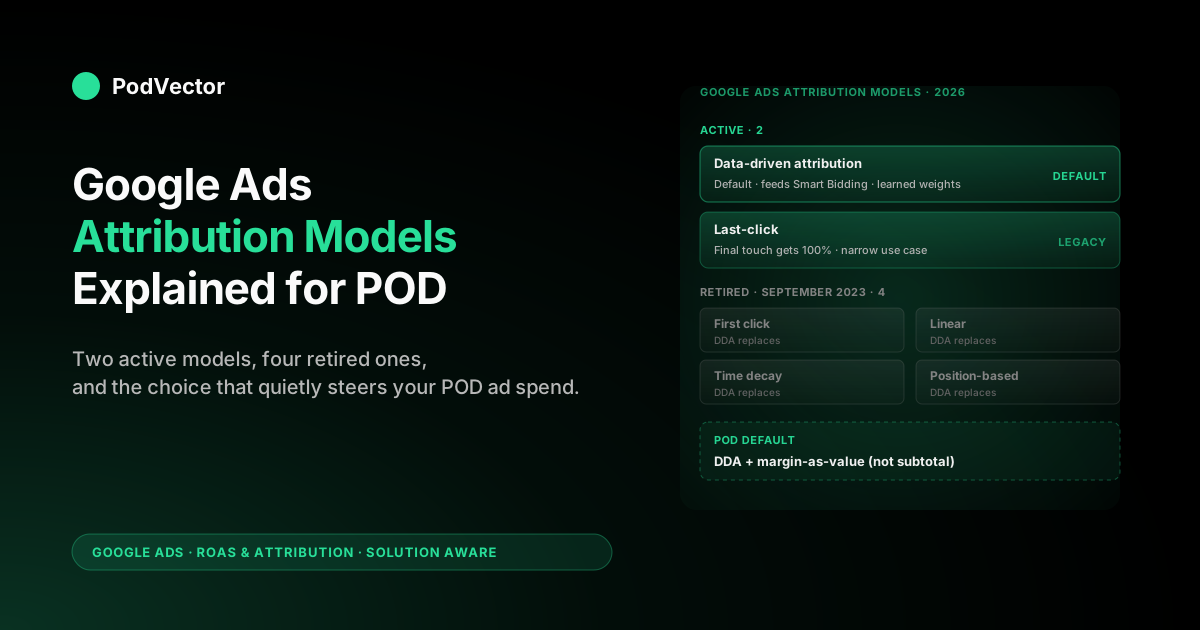
Quick Answer: Google Ads now offers exactly two attribution models: data-driven attribution (DDA) and last-click. The other four — first click, linear, time decay, and position-based — were retired in September 2023 and removed from new accounts entirely.
For a print-on-demand seller, the model choice quietly steers Smart Bidding across PMax, Search, and Demand Gen, which is where most POD budgets live. The right default is DDA paired with margin-as-conversion-value (revenue minus Printify or Printful supplier cost). Last-click still has a narrow place — branded-Search-only accounts under 300 conversions per month — but for everyone else, DDA is doing the work the deprecated models used to do, more accurately, with no manual rules to maintain.
What Google Ads attribution models are and why POD sellers should care
An attribution model is the rule Google Ads uses to assign credit for a conversion across the ad interactions that preceded it. If a buyer clicked a generic Shopping ad on Tuesday, watched a YouTube video ad on Wednesday, then clicked a branded Search ad on Friday and bought a $34 hoodie, the attribution model decides whether the Shopping click, the YouTube view, the branded click, or some combination "earned" that $34. It is a reporting choice and an optimisation choice at the same time, because the same model that produces the report also feeds Smart Bidding's predictions.
For most B2B SaaS marketers, this is mildly interesting. For a POD seller, it is operationally critical for one reason: your margin per order is highly variable and your gross margin is usually under 35%.
A misallocation of credit that moves spend from a profitable touchpoint to an unprofitable one isn't a 5% reporting wobble — it can be the difference between break-even and loss on a $4 average order profit. POD's tight unit economics make every attribution decision a real-money decision.
Three things sit downstream of the model choice and you should know all three before you change anything:
- Reported ROAS by campaign. The headline number you look at in the Campaigns view depends on which model is active. Switch models and the same campaign's ROAS can move 20% in either direction overnight, with no actual performance change.
- Smart Bidding's behaviour. tROAS, Maximize Conversion Value, and Maximize Conversions all consume the conversions the model credits. Change the model, and within roughly 14 days the bidder reweights the entire account.
- Where your budget lands across PMax, Search, and Demand Gen. Last-click systematically over-credits closing channels (branded Search) and under-credits discovery channels (Demand Gen, YouTube). DDA is more even-handed. The shift can be 15–30% of campaign spend over a quarter.
None of this matters if you're spending $200 a month on Google Ads. Above $2,000 a month, it starts to matter. Above $10,000, the wrong model choice quietly funds the wrong campaigns. For broader strategic context on how attribution sits alongside conversion windows, value tracking, and ROAS targets, see Google Ads attribution explained for POD sellers.
The two models that exist in 2026
As of September 2023, Google Ads supports exactly two attribution models for new accounts:
Data-driven attribution (DDA)
DDA is the default. It uses a machine-learning model trained on your account's historical conversion paths to assign credit across touchpoints.
The model is account-specific if you have at least 300 conversions and 3,000 ad interactions per conversion action over a rolling 30 days; below that, Google falls back to a "modeled" DDA trained on broader cross-account data, which is directionally correct but less personalised. DDA includes engaged YouTube views (10+ seconds followed by a conversion) as touchpoints, which last-click ignores entirely.
For most POD accounts, DDA is the right default — even below the 300-conversion threshold, modeled DDA is generally more accurate than last-click for any account that mixes Search, Shopping, PMax, and YouTube. The exception is below.
Last-click
Last-click gives 100% of the credit to the last-clicked Google Ads ad and its keyword in the path. It ignores all earlier interactions, including paid ones. It is simple, deterministic, and matches what most other ad platforms (Meta, TikTok) historically did, which makes cross-platform comparisons easier.
Last-click is appropriate for a POD account in three narrow cases: (1) the path is genuinely one click long — a small brand selling almost entirely off branded Search with no upper-funnel spend, (2) you are spending below $1,000 a month and don't want to deal with a 14-day stabilisation window when DDA reweights, or (3) you are debugging an attribution discrepancy and need a deterministic baseline to compare against. Outside those, last-click systematically misleads. For a deeper diagnostic on whether your account is in one of those cases, see about data-driven attribution Google Ads help explained for POD sellers.
The four deprecated models and what replaced them
POD sellers researching attribution still encounter the four retired models in older guides, agency decks, and Google Analytics 4 (which retains some of them). Knowing what they were, why they were retired, and what now plays their role is the difference between reading 2022 advice and 2026 advice.
First-click
Gave 100% of credit to the first ad interaction in the path. The intuition was upper-funnel measurement: which campaigns were the discovery vector.
The problem was that first-click systematically over-credited generic Search and YouTube even when those touches didn't actually move the conversion — DDA does the same job better by giving partial credit weighted by demonstrable contribution. If you previously used first-click for upper-funnel measurement, DDA replaces it. There is nothing to do.
Linear
Distributed credit equally across every ad interaction in the path. Three touches in the path?
Each gets 33.3%. The model assumed all touches contribute equally, which is empirically false — a one-second display impression and a deliberate Search click are not equally important. Linear was popular because it was easy to explain. DDA produces the same shape of multi-touch report (credit spread across multiple touches) but with weights based on actual incremental contribution.
Time decay
Gave more credit to interactions closer to the conversion in time, with an exponential half-life of seven days. Conceptually, the assumption was that recent touches were more responsible for the close than distant ones. This held up for short-cycle B2C purchases (POD's actual cycle) and held up poorly for longer paths. DDA implicitly captures time decay where it's real and ignores it where it's not, instead of forcing a fixed half-life across all conversions.
Position-based
Gave 40% to the first touch, 40% to the last, and 20% distributed across the middle touches. Sometimes called U-shaped attribution.
The intuition was that discovery and closing both deserve outsized credit. POD paths tend to be 1–3 touches, which made position-based behave very similarly to last-click for short paths and very similarly to linear for long paths — a model that mostly approximated other models. Replaced by DDA, which doesn't need a fixed weighting rule.
The retirement was not a software cost-cutting move. The four rule-based models all encode the same flaw: they assume a fixed credit weighting that ignores the specifics of the conversion path.
DDA learns the weights from your account. There is no version of the rule-based models that beats a properly trained DDA on the same data, which is why Google removed them rather than continuing to maintain four models that produced worse reports than the fifth.
How data-driven attribution actually works
The conceptual one-liner: DDA looks at converters and non-converters, finds the touchpoints whose presence vs. absence most predicts a conversion, and assigns credit proportional to that predicted contribution. Operationally, three things matter for a POD seller.
It is path-level, not user-level. DDA examines the sequence of ad touches in a converting path against the sequence in similar non-converting paths and infers which touches mattered. It does not require user identification across devices to do this — it just needs the path. (Cross-device identity helps but isn't required.)
It includes engaged YouTube views. A YouTube ad that someone watches for 10 seconds without clicking is treated as a touchpoint. Last-click can't see this. If you run YouTube and your DDA report shows a non-zero "engaged view conversion" column, the model is doing its job.
It is retrained continuously. The model updates as your account accumulates more data. This means your DDA credit distribution today is not the same as it was 30 days ago, even with no campaign changes.
Most POD sellers don't notice because they don't compare across time. The implication: do not screenshot a DDA report and treat it as a stable spec.
It is only as good as the data it can see. Since iOS privacy changes and cookie loss, Google estimates 18–32% of conversion paths are no longer directly observable — Google models those gaps, but the modelling is better when you feed it first-party signal. Turn on Enhanced Conversions for web (Goals → Settings → Enhanced conversions): it hashes the email a buyer enters at Shopify checkout and matches it back to the ad click, recovering paths DDA would otherwise miss. For a POD store with a lot of mobile-discovery-to-desktop-purchase journeys, this is the single cheapest accuracy upgrade available, and it improves both the report and the Smart Bidding signal that rides on it.
For the deeper mechanics — counterfactual modelling, Shapley value approximations, and how DDA handles path order — see data-driven attribution Google Ads help explained for POD sellers.
How to choose the right model for a POD account
The choice in 2026 is binary: DDA or last-click. Most POD sellers should pick DDA. Use this decision tree to confirm.
Step 1: How much do you spend per month on Google Ads? Below $1,000, the model choice barely matters because there isn't enough budget for credit redistribution to move real money. Default to DDA but don't worry about it. Above $1,000, the choice starts to matter. Above $10,000, it matters a lot.
Step 2: What is your channel mix? If you run only branded Search and your conversion paths are genuinely one click long, last-click is fine — DDA will produce nearly identical credit because there's only one touch to credit. If you run any of {PMax, Demand Gen, YouTube, generic Search, Shopping}, DDA is the better choice because those channels produce multi-touch paths.
Step 3: Are you using Smart Bidding? If yes (tROAS, Maximize Conversion Value, eCPC, or Maximize Conversions), use DDA. The bidder is tuned to consume DDA credit; pairing Smart Bidding with last-click leaves quality signal on the table. If you are running manual CPC bidding and have no plans to change, the choice is a reporting decision only and DDA is still slightly more accurate.
Step 4: Are you sending margin or revenue as your conversion value? This is the question that decides whether DDA's output is actually useful. DDA distributes credit across the conversion value you send.
If that value is order subtotal — say $34 — DDA distributes $34 across touches. But your real margin on a $34 hoodie is closer to $4–6 after Printify or Printful supplier cost, fulfillment, and Shopify fees.
The credit distribution is correct; the value is wrong. The model can't fix what you don't tell it. For how to fix the value layer, see break-even ROAS in POD: how to calculate it and why it matters.
The honest answer for nearly every POD account: DDA, with margin as conversion value. Anything else is either a small-account simplification or a debugging step.
Attribution and Smart Bidding: the connection nobody explains clearly
The attribution model is not just a reporting choice. It is the input to the optimisation algorithm Google Ads uses to allocate your budget. Most POD sellers don't think about this connection until they switch models and watch their bids recalibrate for two weeks.
Here's the chain. Smart Bidding strategies (tROAS, Maximize Conversion Value, etc.) make a prediction at every auction: "If I show this ad to this user, what is the expected value of the resulting conversion path?" That prediction is trained on your account's historical conversion data, with the credit allocated by the active attribution model. So:
- If your model is last-click, Smart Bidding learns "branded Search closes; bid hard on branded Search." Generic Search and YouTube get under-bid because they don't appear as closers.
- If your model is DDA, Smart Bidding learns "branded Search closes 50%, generic Search opens 30%, YouTube assists 20%; bid them in those proportions." Spend redistributes upstream.
For a POD account that has been on last-click for years and switches to DDA, the bidder spends roughly 10–14 days reweighting before the new spend distribution stabilises. During that window, daily ROAS is noisy and budget pacing can swing. The fix is not to babysit it — the fix is to let the bidder finish recalibrating before reading the report.
This is also why mid-quarter model switches are rarely worth it. The information cost of two weeks of noisy data usually exceeds the information gain from the new model.
Switch at quarter boundaries, or when starting a new conversion action, or when migrating to a new bidding strategy. Otherwise, leave it. For broader Smart Bidding context, see the complete guide to Google Ads ROAS and attribution for POD.
How to change the attribution model in Google Ads
The path in the 2026 interface: Tools → Conversions → click the conversion action you want to change → click "Edit settings" → scroll to "Attribution model" → choose Data-driven or Last click → Save. The change applies prospectively to new conversions; historical data in old reports does not retroactively re-attribute.
Three notes specific to POD accounts:
- Change one conversion action at a time. If you have separate Purchase, Add-to-Cart, and Initiate-Checkout actions, change them one at a time and observe the bidder's response. Changing all three simultaneously makes it hard to attribute the change in performance to the model switch.
- Make the change at the start of a clean reporting week. Monday morning is ideal. The 14-day stabilisation window will then map cleanly to two reporting weeks.
- Don't change the model and the bidding strategy in the same week. Pick one. Two simultaneous changes confound your read on what's driving any subsequent performance shift.
If you are setting up Google Ads conversion tracking from scratch — creating the conversion action whose attribution model you'll choose — the setup guide is at add Google Ads conversion tracking to Shopify: setup guide for POD sellers.
Reading the Model Comparison report for a POD store
The Model Comparison report sits under Goals → Conversions → click a conversion action → Model Comparison tab. It shows the same date range under two models side by side, so you can see exactly how a switch would change credit distribution before you commit. It is the single most useful tool for understanding attribution in your specific account, and most POD sellers never open it.
For a POD account, four filtered views matter:
- By campaign type. Compare PMax under DDA vs last-click. Expect DDA to credit PMax 15–30% more — PMax mixes upper-funnel placements last-click can't credit. Branded Search will show the opposite: DDA credits it less because brand was a closer, not an opener.
- By keyword (Search only). Generic keywords ("custom hoodie," "personalized mug") will show higher DDA credit; brand keywords lower. Don't pause generic terms because their last-click conversions look thin — DDA is telling you they did discovery work.
- By device. POD paths often start on mobile (discovery) and finish on desktop (deliberate purchase). Last-click credits whichever device closed; DDA spreads it. If your mobile DDA value is much higher than mobile last-click, your mobile bids are too low.
- By PMax asset group. If your PMax has multiple asset groups (e.g., one per product category), DDA distributes credit unevenly in ways last-click hides. The asset group whose YouTube placement seeded the conversion will get more credit.
If your conversion value column is identical between DDA and last-click, that's correct — DDA redistributes credit, not value. The total reported value across the account is the same under both models.
DDA cannot make a $34 order worth more than $34. What it can do is move credit away from the campaign that closed and toward the campaign that opened.
Five attribution mistakes POD sellers make
These are the patterns we see when POD operators send screenshots asking what's wrong. Almost always nothing is wrong with the platform — the model is doing its job and the operator is reading it through 2020 assumptions.
- Assuming DDA "finds" extra revenue. It doesn't. DDA redistributes credit across touches that already exist; the total revenue figure is identical to last-click. If you expected a 6% revenue lift from switching, you misread the help docs. The 6% is a conversion-count lift, weighted toward larger accounts, and partly comes from including engaged YouTube views as touchpoints.
- Pausing branded Search after switching to DDA because its credit dropped. Don't. DDA dropped the credit because the branded click was a closer. The conversions are still happening; they're now credited upstream. Pause branded Search and your absolute conversions fall.
- Sending order subtotal as conversion value. The single most common mistake. DDA produces a beautifully attributed report on the wrong number. Send margin (revenue − supplier cost − fulfillment − Shopify fees) and the report becomes actionable. For the math, see what is ROAS (return on ad spend) in print on demand.
- Reading the report inside the 14-day stabilisation window after a model switch. The first two weeks of data after switching are noisy because Smart Bidding is reweighting. Daily ROAS swings 20–30%. Don't make budget decisions based on those numbers; wait for the stabilisation to finish.
- Using Google Ads attribution and GA4 attribution interchangeably. They use different models, different conversion windows, and different data sources. Numbers will not match. Pick one as the source of truth for budget decisions (we recommend Google Ads for in-platform optimisation, GA4 for cross-channel reporting) and stop trying to reconcile them at the campaign level. For the cross-platform comparison, see the complete guide to Meta Ads ROAS and attribution for POD.
How Victor reads attribution against live POD margin
Most POD operators don't read the Model Comparison report often because the workflow is heavy: open Google Ads, navigate to Goals, find the right conversion action, click into the report, filter by campaign or keyword, then mentally cross-reference the conversion-value numbers against your real per-product margin to know whether the credit redistribution actually means budget should move. Three or four clicks to get the data, then unbounded mental work to interpret it, repeated weekly.
Victor is the AI agent we built for POD sellers to collapse that loop. Victor connects to your Google Ads, Shopify, and Printify or Printful accounts and answers attribution questions from a live data warehouse margin model. You ask things like "show me last week's PMax campaigns where the DDA credit shifted more than 15% from last-click and the affected campaigns sell products with margin under 25%" and Victor returns the answer in a paragraph, with the underlying numbers, and a flag on which campaigns are now over- or under-bid based on real margin rather than reported subtotal.
Victor answers. The roadmap is for Victor to act — adjusting bid strategies and reweighting budgets across PMax asset groups based on margin-aware attribution reads, so the operator approves changes rather than makes them. Either way, the goal is the same: make attribution decisions based on the margin number that determines profit, not the subtotal number that determines reporting tidiness.
FAQs
What attribution models does Google Ads support in 2026?
Two: data-driven attribution (DDA) and last-click. The other four — first click, linear, time decay, and position-based — were retired in September 2023 and removed from new accounts.
Which attribution model should a POD seller use?
DDA, in nearly all cases. The exception is a tiny account (under $1,000/month) running only branded Search with one-touch conversion paths, where last-click is simpler and produces nearly identical credit.
What's the difference between data-driven and last-click attribution?
Last-click gives 100% of credit to the final clicked ad. DDA distributes credit across all ad touches in the path, weighted by their predicted contribution to the conversion, learned from your account's actual data. For multi-touch paths (PMax, Demand Gen, multi-keyword Search), DDA produces meaningfully different credit and changes how Smart Bidding allocates spend.
How long does it take for a model switch to stabilise?
About 14 days. The Smart Bidding algorithm reweights based on the new credit distribution, and during that window daily ROAS is noisy. Don't make budget decisions in the first two reporting weeks after switching.
Does DDA require a minimum number of conversions?
For an account-specific DDA model, you need at least 300 conversions and 3,000 ad interactions per conversion action, plus roughly 28 days of historical conversion data, over a rolling 30 days. Below that, DDA still runs but uses a "modeled" version trained on broader Google data — directionally accurate but less personalised. If an account drops under the threshold for a sustained period, Google can revert that conversion action to last-click automatically, so check the model is still DDA after slow months.
Why did Google retire first-click, linear, time decay, and position-based?
All four encoded fixed credit-weighting rules that ignored the actual conversion path. DDA learns weights from data, which produces more accurate attribution than any rule-based approximation. Maintaining four worse models alongside the better one wasn't worth the complexity.
Will my reported revenue change when I switch models?
No. The total conversion value across the account is the same under both models. What changes is how that value is credited across campaigns, ad groups, keywords, and devices. The campaigns that closed lose credit; the campaigns that opened gain credit. Total ROAS at the account level barely moves; ROAS by campaign moves a lot.
Should the conversion value I send to Google Ads be revenue or margin?
Margin. Sending order subtotal means DDA correctly distributes credit across a number that's wrong by 50–70% for a typical POD order. Send revenue minus supplier cost minus Shopify fees, and the credit distribution starts to map to real profit. Setting this up requires a conversion-value adjustment in your tracking layer.
Can I use a different attribution model in Google Ads vs GA4?
Yes, and they will report different numbers. Google Ads attribution is for in-platform optimisation; GA4 attribution is for cross-channel measurement. Pick one per use case rather than trying to reconcile them at the campaign level.
Stop reading attribution reports in subtotals
Victor reads your Google Ads attribution against live Printify and Printful margin and tells you which campaigns are over- or under-bid in real-money terms — not subtotal terms. Connect your accounts and ask questions like "which DDA-credited campaigns sell sub-25%-margin products" without opening the Model Comparison report.
Try Victor free