
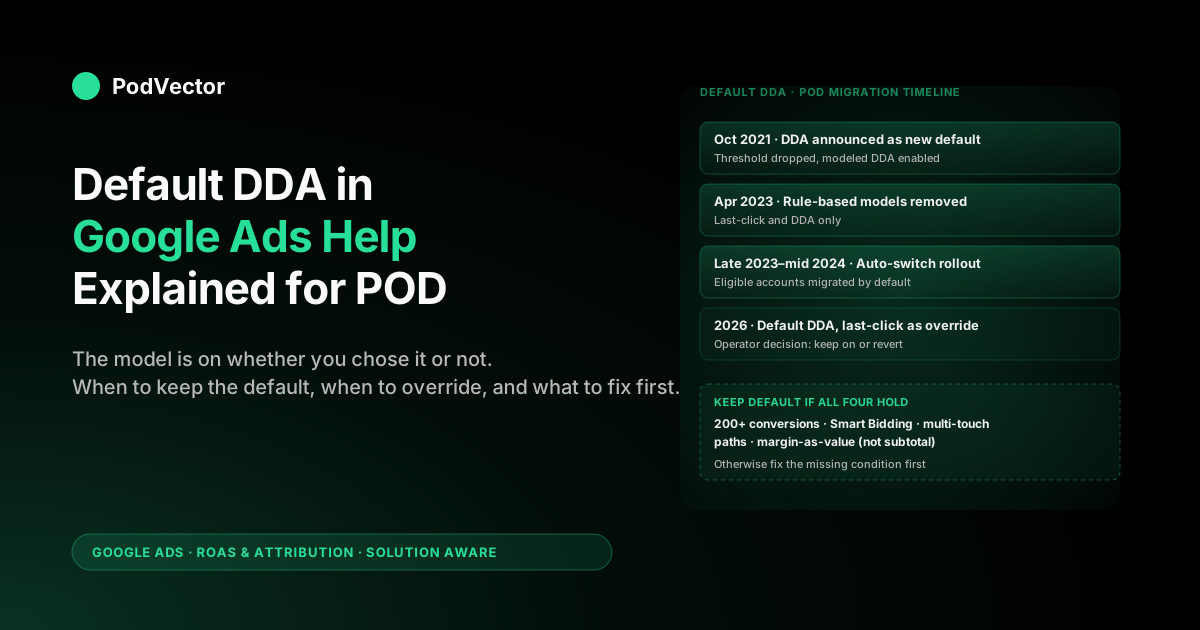
Quick Answer: Google Ads Help confirms that data-driven attribution (DDA) is now the default attribution model for all new conversion actions, and existing eligible accounts have been auto-migrated from last-click since late 2023. For a print-on-demand seller, "default" is not the same as "right" — it means the model is on whether you chose it or not, and Smart Bidding is already reading its credit weights.
The operator decisions are: verify your account actually switched, confirm the conversion value you're sending isn't raw subtotal, and decide whether to leave the default in place (the answer for most POD stores above 300 conversions per month) or revert to last-click (the answer for sub-$10K stores still in calibration). This article walks through the help docs section by section, then adds the POD-specific decisions Google's documentation skips.
What Google Ads Help means by "DDA is the default"
Open the Google Ads Help page on data-driven attribution and you'll find the line: "Data-driven attribution is the default attribution model for most conversion actions." That single sentence carries two distinct claims that POD sellers should not collapse into one.
The first claim is about new conversion actions. Any conversion action you create in Google Ads from late 2021 onward — a Purchase tag added in 2024, a Begin checkout action set up last week — lands on DDA without a model selection step.
The picker that used to ask "Last click vs Linear vs Position-based vs Data-driven" has been retired. There is no choice to make at creation time; you get DDA whether you wanted it or not.
The second claim is about existing conversion actions, the ones created in 2019, 2020, or early 2021 when last-click was still the documented default. These were migrated rather than created on DDA.
Google's help page on "Switch to DDA" describes the two paths: a manual switch you initiate and an "auto-switch" that Google triggered for eligible accounts during 2022–2024. If your POD account ran Search or PMax through that window and you never clicked anything, the model under your Purchase action almost certainly changed without you touching it.
The distinction matters because the failure modes are different. New-conversion-action POD sellers never lived under last-click, so DDA's credit redistribution looks like normal life — they have no reference point to compare.
Migrated sellers saw their PMax-credited conversions jump 20–35% literally overnight when the auto-switch ran, then watched Smart Bidding rebalance budgets across the next four weeks. Knowing which camp you're in tells you whether to read this article as background or as an autopsy.
For the broader strategic frame — DDA's place alongside attribution windows, conversion-value tracking, and ROAS — start at the cluster pillar, the complete guide to Google Ads ROAS and attribution for POD, or the topic hub at Google Ads for POD. This article focuses specifically on what changes when DDA is applied as a default rather than chosen.
Timeline: how DDA became the default for everyone
The timeline is worth knowing because it determines what your historical data looks like. Google's 2021 blog announcement is the formal record; the operational rollout took two more years.
- October 2021. Google announces DDA will become the default for new conversion actions. The 3,000-interactions / 300-conversions per 30-day threshold is removed for eligibility — DDA can run on smaller datasets using a "modeled" version trained on broader Google data.
- 2022. New conversion actions across Google Ads default to DDA. The four rule-based models (first-click, linear, time-decay, position-based) start showing deprecation warnings.
- April 2023. The four rule-based models are removed entirely from Google Ads. Last-click and DDA are the only models left for web/app conversions. Existing actions on rule-based models are auto-migrated.
- Late 2023 to mid-2024. The "auto-switch to DDA" feature rolls out for eligible last-click conversion actions. Google notifies advertisers in-product, then runs the switch on accounts that don't actively opt out. By the end of 2024, the dominant attribution state across Google Ads is DDA-as-default.
- 2025–2026. Last-click remains available as an explicit override but is positioned in the help docs as a fallback, not a recommendation.
For a POD seller, the practical takeaway is that any data older than mid-2023 in your account is on a model that no longer exists. ROAS comparisons across that boundary need to control for the model change — comparing Q1 2023 last-click ROAS to Q3 2024 DDA ROAS without an asterisk overstates whatever campaign-level change you think you're measuring.
The auto-switch mechanic, in plain English
The Google Ads Help page on "Switch to DDA" describes the eligibility check but skips what actually happens to your account. Here's the mechanic, end to end.
Eligibility. A conversion action is eligible for auto-switch if it has at least 200 ad interactions and 20 conversions in the last 30 days, and DDA's modeled version assesses that the action has enough signal to run. The eligibility numbers are lower than the 3,000 / 300 threshold the help page lists for "fully account-specific" DDA; the auto-switch runs on the relaxed bar because Google would rather have everyone on modeled DDA than on last-click.
Notification. Eligible accounts see an in-product notification under Goals → Conversions and a banner on the Attribution tab. The notification offers a one-click "Switch now" button and a smaller "I'll do it later" link. If you do nothing for the notification window (typically 30–45 days), the switch runs automatically.
Execution. On switch day, Google rebuilds attribution for the previous lookback window (default 30 days for clicks, the conversion window you set for engaged-views) using DDA. Conversion counts and conversion values for already-recorded conversions are recalculated. Smart Bidding immediately starts reading the new credit weights.
Aftermath. For the next 14–30 days, Smart Bidding rebalances budgets in response to the new credit distribution. The most common pattern is more budget flowing to upper-funnel touches that were previously under-credited (PMax shopping listings, YouTube engaged views), and less to bottom-funnel branded Search that no longer captures 100% of credit. Day-over-day ROAS noise increases during this window — the bidder is recalibrating, not breaking.
If you missed the in-product notification, the switch still happened. Google Ads doesn't store a prominent "this action was auto-switched on date X" flag; you'd find it only by digging into the change history. Most POD sellers we talk to are surprised to learn their primary conversion action migrated automatically a year or more ago.
Did your account auto-switch? A 60-second check
Three places confirm whether your conversion actions are currently on DDA, last-click, or something Google's UI is still labeling but no longer running.
1. The Conversions table. Google Ads → Goals → Conversions.
The "Attribution model" column shows the active model per action. Anything labeled "Data-driven" is currently running DDA.
Anything labeled "Last click" was either explicitly chosen or kept as override. The four rule-based labels (Linear, Time decay, Position-based, First click) should not appear; if they do on an old account, the action is in a migration limbo and reporting is unreliable until you fix it.
2. The change history. Tools → Change history → filter by "Conversion settings." Auto-switches show up as system-initiated changes labeled "Attribution model changed from Last click to Data-driven" with the date stamp.
This is the single best place to date your migration. If you're trying to explain a step-change in PMax-attributed conversions in your historical data, the dated entry here is usually the cause.
3. The Attribution → Model Comparison report. Goals → Conversions → Attribution → Model Comparison.
Set the comparison to DDA vs Last click for the past 90 days. The percentage delta on conversions and conversion value tells you how different the two models would be reading on your current paths.
If the delta is below 5%, last-click and DDA agree on your account and the model choice barely matters. If the delta is 15% or more, the choice has real budget consequences and you should not leave it as a default someone else decided.
For POD sellers running Performance Max, the DDA-vs-last-click delta is almost always positive (DDA shows more conversions) and almost always concentrated on PMax. Search-only POD accounts see smaller deltas. If you've never opened the Model Comparison report, that's the highest-leverage fifteen minutes you can spend on attribution this quarter.
What "default DDA" actually means for a POD store
The Google Ads Help docs are written for an undifferentiated advertiser. For a print-on-demand seller, "DDA is the default" lands differently than it does for a SaaS company or a furniture retailer because three POD-specific conditions interact with how DDA distributes credit.
Lower order values. POD AOV is typically $25–$50, against ecommerce-wide averages closer to $80–$120. Lower AOV means more conversions per dollar of revenue, which helps you clear the modeled-DDA threshold faster — but it also means your conversion value column is dominated by raw subtotal, and DDA optimises against whatever number you send. A precise, account-specific credit distribution applied to a value that's 60% wrong (because supplier cost isn't subtracted) doesn't produce good budget decisions.
PMax-heavy account structure. Most POD stores running paid Google traffic since 2022 have Performance Max as either the primary or sole campaign type. PMax produces broader attribution paths than Search-only — Display impressions, YouTube views, and Demand Gen touches all enter the conversion path.
DDA redistributes credit across those touches; last-click ignored them. The default-DDA migration moved 20–35% of credit to upper-funnel PMax touches in typical POD accounts. That's not a reporting artifact; that's the model giving you a more honest read of what PMax is actually doing.
Refunds and supplier-side fulfillment timing. POD orders carry a return rate of 4–8% and Printify or Printful supplier costs that vary by SKU and region. Default DDA gives you accurate credit distribution; it doesn't give you accurate margin.
The model never sees that the $34 conversion value it allocated across four touches is actually $11.70 of margin once Printify's $22.30 supplier cost is paid. For a deeper walkthrough of DDA mechanics for POD, see Google Ads data-driven attribution explained for POD sellers and data-driven attribution Google Ads explained for POD sellers.
When to leave the default DDA in place
For most POD sellers, the right operator decision is to leave the default alone. Specifically, leave DDA on if all four of the following hold:
- Your primary conversion action has 200+ conversions in the last 30 days. Above this floor, DDA's credit weights are at least partially trained on your account's actual paths rather than entirely on Google's modeled fallback. The 300-conversions threshold the help page mentions is for "fully account-specific" DDA; below 300 but above 200, the model is partially-modeled but still better than last-click.
- You're running Smart Bidding (tROAS, Maximize Conversion Value, or eCPC). Smart Bidding's predictions consume DDA credit weights directly. Pairing tROAS with last-click leaves the bidder reading a model that under-credits upper-funnel touches and over-credits the last branded Search click. This is the single biggest reason to keep DDA on.
- You have at least one campaign that touches more than just bottom-funnel branded Search. If your entire account is one branded Search campaign, last-click and DDA produce nearly identical credit distributions because the path has only one touch worth crediting. DDA's value comes from accurately splitting credit across multi-touch paths — Performance Max, generic Search, YouTube, Demand Gen.
- Your conversion value sent to Google is at least directionally tied to margin. Even an approximation — order subtotal minus a fixed 65% to represent average Printify cost, or a Shopify pixel that sends margin instead of revenue — keeps DDA's credit distribution and your business reality pointing the same direction. Raw subtotal is the failure mode that breaks default DDA's value.
Hit all four and the default is the right answer; you don't need to override. The mistake POD sellers make is reading agency posts that argue to switch back to last-click for "control" and acting on that without checking which of the four conditions they're actually missing.
When to override the default back to last-click
There are two narrow cases where overriding default DDA back to last-click is the right call for a POD account.
You're running below 200 conversions per month and you suspect the modeled DDA is misreading your paths. Modeled DDA is trained on Google's broader apparel-ecommerce signal — not on POD specifically. If your buyers convert through patterns that are unusual for the vertical (heavy email-to-PMax-to-Search paths, for instance), the modeled credit distribution can over-credit upper-funnel touches that aren't actually contributing in your account.
Last-click is a worse model in theory but a more predictable one in practice for sub-200-conversion stores. The trade is: less accurate credit, but credit you can reason about.
For most POD sellers in this bracket, the right move is to fix volume — promote Begin checkout to a co-primary action to clear the threshold — rather than override the model. But if that's not possible inside this quarter, last-click is a defensible interim.
You're running a single-touch attribution audit and need a stable baseline. If you're trying to measure incrementality of a specific campaign — a new YouTube test, a lookalike Demand Gen campaign — DDA's redistributing credit makes the analysis harder because the baseline keeps shifting. Switching one conversion action to last-click for the audit window gives you a fixed reference point.
This is a temporary diagnostic move, not a permanent state. Switch back to DDA after the audit closes.
Outside these two cases, overriding default DDA back to last-click is usually a mistake. The "I want control" instinct doesn't survive contact with the math: last-click systematically over-credits the bottom of the funnel, which leads Smart Bidding to over-bid branded Search and under-bid PMax. POD accounts that did this in 2023 and didn't switch back saw their PMax efficiency degrade quietly across two to three quarters before someone noticed.
The value-input layer: where the default goes wrong for POD
The Google Ads Help page on DDA treats "conversion value" as a fixed input and never engages with what value you should send. For ecommerce broadly, that omission is fine — most stores send order subtotal and that's directionally OK because COGS is usually low and stable. For POD it's the central problem.
POD supplier costs from Printify and Printful run 50–70% of order subtotal depending on the product type. A $34 hoodie order has roughly $22.30 of supplier cost (mug-equivalent products run lower, all-over-print apparel runs higher).
The value Google sees and the value your bank account sees differ by a factor of three. DDA distributes its credit across that wrong number with the same precision it would across margin — the model isn't broken, the input is.
The fix is straightforward but the help docs don't mention it. There are two implementation paths.
Path 1: send margin as conversion value at the pixel. Modify your Shopify or BigCommerce conversion pixel to compute (order_subtotal - estimated_supplier_cost) and pass that to Google Ads as the conversion value. Most POD pixel implementations use a simple lookup: hoodies = 35% margin rate, t-shirts = 40%, mugs = 55%, etc. The lookup doesn't need to be perfect; even a coarse rate per product category gets you 80% of the accuracy improvement.
Path 2: use enhanced conversions with offline value adjustments. Send order subtotal at the pixel, then post-back the actual margin via Google Ads' offline conversion adjustments API once Printify confirms supplier cost on fulfillment. This is more work but produces fully accurate per-order margin in your DDA report. For POD stores running Shopify with the Printify-Shopify integration, the supplier-cost data is already available; the missing piece is the API call back to Google.
Either path beats raw subtotal. Default DDA on margin-as-value is meaningfully better than default DDA on subtotal-as-value, which is itself meaningfully better than default last-click on either. The order of operations is: fix the value input first, then trust the default model.
Default DDA + Smart Bidding: why the pairing matters
The Google Ads Help docs note in passing that DDA is the most-used attribution model for accounts running Smart Bidding. That's understated. Smart Bidding's prediction engine is built to consume DDA credit weights — pairing it with last-click downgrades the bidder's accuracy on every multi-touch path.
The mechanic: tROAS and Maximize Conversion Value bidders predict the probability that a given auction will produce a conversion (or a conversion of a given value), and they make that prediction by weighting historical signals according to how much credit each touch type received. If the model says PMax shopping listing impressions get 35% of credit on converting paths, the bidder is willing to pay more for those impressions. If the model says they get 0% (last-click), the bidder treats them as worthless.
For POD accounts running PMax + tROAS, the default DDA pairing is doing real work in the background. (For the broader Performance Max context inside POD account structure, see the cross-cluster pillar the complete Google Ads playbook for print-on-demand sellers.) Reverting to last-click while keeping tROAS active doesn't make Smart Bidding "less aggressive" — it makes it systematically worse at finding the multi-touch paths that produce most POD conversions. The right intervention if tROAS feels off isn't to change the attribution model; it's to fix the value input or adjust the target ROAS.
The exception is manual CPC. If you're running manual bidding, the bidder doesn't read credit weights at all, so the model choice affects only your reports, not your bids. Most POD accounts moved off manual CPC by 2023 and the exception is mostly historical.
How Victor reads default-DDA reports against live POD margin
Victor is PodVector AI's AI agent for POD sellers. It connects to your Google Ads account, your Printify or Printful supplier feed, and your Shopify orders, then computes ROAS the way the help docs don't: against margin, not subtotal, with default DDA's credit distribution preserved.
Three things Victor does that the Google Ads UI doesn't:
- Reconciles DDA-credited conversions to actual margin. Victor pulls the per-order Printify supplier cost, subtracts it from the conversion value Google reported, and recomputes ROAS at the campaign and ad-group level using DDA's credit weights but margin-based value. The credit distribution stays exactly as Google calculated it; the value gets fixed.
- Surfaces the auto-switch date in your account history. When you ask "did my PMax efficiency change in 2023?" Victor checks your Google Ads change history for the auto-switch date and tells you whether the step-change you're seeing is a model change or a real performance change.
- Flags conversion actions where the value sent doesn't match margin. If your Shopify pixel is sending raw subtotal and your Printify margin is 35%, Victor flags it as a value-layer issue and quotes the corrected ROAS as a counterfactual: "your Search campaign reports 4.2x ROAS on subtotal; corrected for margin it's 1.5x — at break-even."
The agent doesn't change Google Ads settings. It reads your live data, applies the POD-specific corrections the help docs leave out, and answers margin questions in seconds. For the design of how Victor's live-data reads work across attribution and supplier feeds, see the cluster pillar.
FAQs
Is data-driven attribution always the default in Google Ads now?
For new conversion actions created from late 2021 onward, yes — DDA is the default and there is no model selection step at creation. For existing conversion actions created earlier, most have been auto-migrated to DDA during the 2023–2024 rollout; the rest can be manually switched or kept on last-click as an explicit override.
Did my Google Ads account auto-switch to DDA without me knowing?
Probably yes if your account was running through 2023–2024 and you didn't actively opt out. Confirm by checking Tools → Change history → filter by "Conversion settings" and looking for a system-initiated entry labeled "Attribution model changed from Last click to Data-driven." That entry's date is your migration date.
Can I switch back to last-click as an override?
Yes. Goals → Conversions → click the action → Edit settings → Attribution model.
The four rule-based models (linear, time-decay, position-based, first-click) are no longer available, but last-click remains as an explicit option. For most POD sellers running Smart Bidding, switching back is the wrong move; see the override section above for the two cases where it's defensible.
Does default DDA work for sub-$10K-per-month POD stores?
It runs, but on a modeled fallback rather than fully account-specific data. The 300-conversions-per-30-days threshold the help page lists is for "fully account-specific" DDA; below it, Google blends your account data with broader vertical signal. For POD stores in this bracket, fix volume by promoting Begin checkout to a co-primary action before relying on DDA's credit distribution at the campaign level.
What conversion value should I send to Google Ads as a POD seller?
Margin after Printify or Printful supplier cost — not raw order subtotal. POD supplier costs run 50–70% of subtotal depending on product type, so subtotal-based ROAS systematically overstates performance by 2–3x. Either modify your Shopify pixel to compute margin or use enhanced conversions with offline value adjustments to post-back actual margin per order.
How long does Smart Bidding take to rebalance after the DDA auto-switch?
Typically 14–30 days. Day-over-day ROAS noise increases during this window as the bidder recalibrates against the new credit weights.
The most common pattern in POD accounts is more budget flowing to upper-funnel PMax touches and less to branded Search. If you see efficiency degrade past 30 days post-switch, the cause is usually the value-input layer, not the model itself.
Can I keep default DDA on for some conversion actions and last-click on others?
Yes. Google Ads applies attribution per conversion action, not per account. A common POD setup is DDA on Purchase (the default), DDA on Begin checkout, and last-click on a custom Newsletter signup action used only for reporting. Mixing models within an account doesn't break Smart Bidding as long as the primary value-driving action stays on DDA.
Does the default-DDA migration affect historical data?
It re-attributes the lookback window's already-recorded conversions on switch day, so the conversions and conversion values you see in your reports for the post-switch period reflect DDA. Older data — anything before your auto-switch date — was recorded under the previous model and stays that way. Year-over-year comparisons that span the switch need an asterisk.
Stop guessing whether the default model is right for your store
Default DDA is the right answer for most POD accounts — but only if your conversion value is sent as margin and you've cleared the 200-conversion floor. Victor connects to Google Ads and your Printify or Printful supplier feed, recomputes ROAS against actual per-order margin while keeping Google's DDA credit distribution intact, and flags the conversion actions where the value layer is breaking your reports. And see your true post-supplier-cost ROAS on the model Google already chose for you.
Try Victor free