
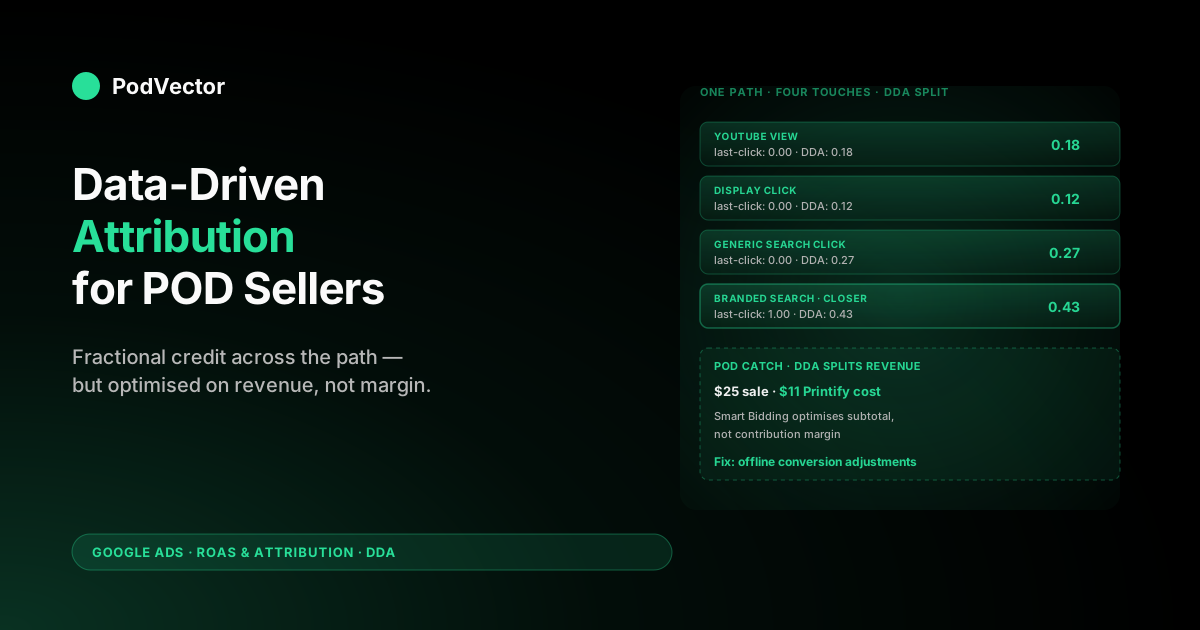
Quick Answer: Data-driven attribution (DDA) is Google Ads' machine-learning model that splits conversion credit across the clicks, video engagements, and other interactions in a customer's path, rather than awarding 100% to the last click. It's now the default for almost every Google Ads conversion action and typically lifts reported conversions 5-7% versus last click — but for POD sellers, the lift comes with a catch.
DDA optimises Smart Bidding toward subtotal-level revenue, which on a $25 t-shirt with $11 of Printify cost is not the same as profit. The real work for a POD store is layering contribution-margin values on top of DDA via offline conversion adjustments, so the model learns from what's actually making money, not just what's selling.
What data-driven attribution actually is
Data-driven attribution is a machine-learning model inside Google Ads that gives each ad interaction in a converting path some fraction of the credit, instead of awarding 100% to one touch. The model looks at every Search, Shopping, YouTube, Display, and Demand Gen interaction across users who converted and users who didn't, and learns which interactions actually shift the probability of a sale. Touches that consistently appear before conversions get more credit; touches that don't, get less.
The crucial thing to understand about DDA is that it's account-specific. Google's model isn't a global last-click-but-smarter heuristic — it's a per-account model trained on your data, using Shapley value-style logic from cooperative game theory to estimate each touch's marginal contribution. Two POD stores selling the same niche will get different DDA credit splits, because their funnels, audiences, and creative mixes are different.
Google made DDA the default for almost every conversion action in October 2021, and as of 2026 it's the only attribution model that doesn't require a minimum conversion threshold to enable (you can pick it from day one — it just takes data to actually train). The legacy rule-based models — first click, linear, time decay, position-based — were sunset in September 2023 (Google noted they accounted for under 3% of conversions), leaving DDA, last click, and imported/external attribution as the only options. For the broader picture of how this fits into the Google Ads measurement stack, see the complete guide to Google Ads ROAS and attribution for POD.
How DDA assigns credit (the mechanics)
The simplified version: DDA compares conversion paths to non-conversion paths, identifies which interactions correlate with conversions even after controlling for other touches, and apportions credit accordingly.
A practical example for a POD store. Imagine three customer paths over a 30-day window:
- Path A: YouTube view → Branded Search click → Purchase
- Path B: Display impression → Shopping click → Purchase
- Path C: YouTube view → Display click → Branded Search click → Purchase
Under last-click attribution, the Branded Search click in Path A and Path C gets 100% of the credit, and the Shopping click in Path B gets 100%. The YouTube views and Display interactions look like they did nothing, even though they appeared in the paths.
Under DDA, the model looks at hundreds of similar paths in your account, estimates how much the YouTube view increases the probability that someone reaches the branded search and converts, and assigns a fractional credit (say, 0.18 conversions instead of 0.0). The Branded Search click might end up with 0.65 instead of 1.0 — same ad, different reported number, because it now reflects partial rather than total ownership of the path.
This is why DDA tends to increase reported conversions for upper-funnel campaigns (YouTube, Display, Demand Gen) and decrease them for branded search and remarketing. Google's published average is a 6% conversion lift after switching to DDA, but the real story is the redistribution: total conversions don't change much, the credit just spreads more evenly across the path. That redistribution matters more now that the typical buyer touches a brand many times before purchasing — research consistently puts the path at 7-13+ interactions, and last click throws away everything but the final one.
Google's attribution reports describe these touches by their role in the path — initiator (the first interaction that introduces the customer), assist (the middle touches that move them along), and closer (the last interaction before the sale). Last click only ever pays the closer. DDA is the only model in Google Ads today that pays initiators and assisters something proportional to what they actually contributed.
Data requirements and the small-POD-store problem
Google's recommended data thresholds for DDA to perform well are at least 200 conversions and 2,000 ad interactions in supported networks within a 30-day period. Below that, the model still runs, but its credit splits get noisier and less reliable.
For a POD store, that 200-conversion threshold is the number that matters. Run the math: at a $25 average order value, 200 conversions is $5,000/month in revenue from Google Ads.
At a 3x ROAS target, that's about $1,650 in monthly Google Ads spend. Many POD sellers in the early scaling phase are running $500-1,200 per month, which puts them in the data-sparse regime where DDA exists but is not yet trained well on their account.
What this means practically:
- If you're under ~150 conversions/month, DDA's redistribution is real but noisy. The directional signal — "YouTube and Display touches matter more than last-click would suggest" — is correct, but the specific credit numbers per campaign will fluctuate.
- Google still runs DDA in this regime by default. You'll see "Data-driven (eligible)" status in your conversion action settings — that's the model running, just on thin data.
- The fix isn't to switch to last click; it's to consolidate conversions. If you have separate conversion actions for "Purchase," "Begin Checkout," "Add to Cart," and "Sign Up," only one of them is feeding bidding. Make sure your primary bidding conversion (typically Purchase) gets the maximum signal density possible.
For a deeper read on the data thresholds and what they mean for POD specifically, see About data-driven attribution Google Ads Help explained for POD sellers.
DDA vs last-click for a POD account
The core difference: last click is a fixed rule (last clicked Google Ads interaction gets 100% credit), DDA is a learned model. Both only redistribute credit among Google Ads interactions — neither sees email, organic, or direct traffic. For that broader view, you need GA4's "Paid and organic channels" setting layered on top, which is covered in Google Ads attribution email organic integration explained for POD sellers.
For a POD store specifically, three practical differences:
- Smart Bidding behavior. Under last click, Target ROAS bids hardest on the keywords and audiences that close conversions — typically branded search and remarketing. Under DDA, the same bidding strategy gives more weight to upper-funnel signals (YouTube, generic search, prospecting Display), because those touches now carry fractional credit. Spend will tilt earlier in the funnel.
- Cross-device behavior. DDA handles cross-device conversion paths better, because it uses signed-in Google account data to stitch interactions. Last click can over-credit the device the conversion happened on.
- Reported ROAS. Total ROAS shouldn't shift much (the conversions are the same orders), but per-campaign ROAS will change. Branded search ROAS usually falls under DDA; YouTube ROAS usually rises. This isn't a real performance change — it's a redistribution.
The right question isn't "DDA or last click?" — it's "is DDA running on enough data to be reliable, and am I feeding it the right conversion value?" The answer to the second half of that question is where POD sellers usually leave money on the table.
DDA vs the legacy rule-based models
The four legacy rule-based models that Google sunset are still worth understanding because they show up in older guides and you may see them referenced in your account history:
- First click: 100% to the first ad interaction. Useful for prospecting analysis, never used for bidding.
- Linear: Equal credit to every touch. A flat fairness rule that doesn't reflect how funnels actually work.
- Time decay: More credit to touches closer to conversion. Reasonable heuristic but ignores actual user behavior.
- Position-based: 40% to first, 40% to last, 20% split among middle touches. The most defensible heuristic, but still a fixed rule.
DDA is mathematically a generalization of all four — it can produce something that looks like first-click, time-decay, or position-based weighting depending on what your data actually shows. That's the case for using it: instead of guessing which fixed rule fits your customers, you let the model learn the rule from your conversions. For a side-by-side comparison of all the models in their POD context, see Google Ads attribution models explained for POD sellers.
How to verify and set DDA on your conversion actions
DDA is the default for new conversion actions in 2026, but if you have older actions in your account, they may still be set to last click. Verify in five clicks:
- Google Ads → Tools → Conversions → Summary.
- Click into your primary purchase conversion action.
- Look for the "Attribution model" field. If it shows "Data-driven," you're set. If it shows "Last click," edit the action.
- Change attribution model to "Data-driven" — Google may show a status of "Eligible" or "Eligible after model training" depending on your conversion volume.
- Save. Existing conversions in reports will be re-attributed retroactively for the lookback window.
Repeat this for every conversion action that's marked "Primary" or used for bidding. Secondary conversion actions (Add to Cart, Begin Checkout) can be left as-is — they don't drive bidding signals.
One thing to watch: changing the attribution model on an active conversion action will cause your reported conversion numbers to shift the next day, sometimes by 5-10%. This is the redistribution playing out in your historical data. Don't compare DDA-day-one to last-click-day-zero and panic; expect 1-2 weeks of noise as Smart Bidding adjusts.
The step almost everyone skips: adjust your bid targets by the same percentage your conversions moved. If switching to DDA lifts reported conversions ~6%, a Target ROAS or Target CPA strategy is suddenly seeing 6% more conversion value (or volume) for the same spend, so it will under-bid relative to your real goal until you re-baseline. If conversions rose 6%, loosen Target CPA by ~6% (or tighten Target ROAS by the inverse) so Smart Bidding keeps spending to the same true target instead of pulling back. Skip this and the model quietly recalibrates on its own over a couple of weeks — costing you volume in the meantime. Note your DDA conversion windows here too. There are three: click-through (defaults to 30 days, configurable 1-90), view-through for Display/YouTube impressions (defaults to 1 day, configurable 1-30), and engaged-view for video views of 10+ seconds. A window that's shorter than your real POD buying cycle starves DDA of paths to learn from — if your customers mull a $30 hoodie for two weeks before buying, a 7-day click window throws away the YouTube and Display touches that started the path. See Google Ads attribution window explained for POD sellers.
What DDA changes for Smart Bidding (tROAS, Maximize Conversions)
The reason Google is so bullish on DDA is that Smart Bidding gets meaningfully better with it. Under last click, tROAS strategies optimize toward "what closed the click" — which is fine for harvesting demand but blind to demand creation. Under DDA, tROAS sees fractional credit on the upper-funnel touches and bids for them accordingly.
For a POD store, this changes a few things:
- YouTube and Demand Gen become more biddable. Where last click made YouTube look like a money pit (low last-click conversions, high cost), DDA gives it 0.1-0.3 fractional conversion credit per view-through interaction. Smart Bidding can now justify bids on these placements.
- Performance Max gets more efficient. PMax bids across Search, Shopping, Display, YouTube, Discover, and Gmail simultaneously. DDA is what lets PMax's bidding model see credit flowing across those channels rather than concentrating it on the closing click.
- Branded search bids may drop. If your branded search loses credit under DDA (because YouTube and Display warmed the customer first), tROAS may bid less aggressively there. This is usually correct — branded search is harvest, not lift.
The catch: Smart Bidding is optimizing toward whatever conversion value you send it. If you're sending Shopify subtotal — the order value before any costs — Smart Bidding is maximizing revenue, not profit. For POD, that's a meaningful gap.
The POD margin layer DDA ignores
Here's the part nobody else writes about. DDA distributes credit beautifully across your funnel. What it can't do is tell you whether the conversions it's crediting are profitable.
A POD store sells, say, three product types: a $20 t-shirt with $9 Printify cost, a $35 hoodie with $19 Printify cost, and a $45 sweatshirt with $24 Printify cost. The sale prices vary, the Printify base costs vary, and shipping costs vary by destination. Contribution margin per order ranges from $5 to $14 depending on what was bought and where it shipped.
Now imagine your Smart Bidding sees a $35 hoodie purchase from a Demand Gen campaign with DDA giving the campaign 0.6 fractional credit, and a $20 t-shirt purchase from branded search with DDA giving it 0.95 credit. To Smart Bidding, the hoodie generated $21 of weighted revenue and the t-shirt generated $19 — close to a wash, slight edge to Demand Gen.
The actual contribution-margin reality:
- Hoodie: $35 sale - $19 Printify - $1.50 transaction fee = $14.50 contribution × 0.6 credit = $8.70 weighted profit
- T-shirt: $20 sale - $9 Printify - $0.88 transaction fee = $10.12 contribution × 0.95 credit = $9.61 weighted profit
The t-shirt order is actually more profitable, even though Smart Bidding sees them as roughly equal on revenue. Over a year of bidding decisions, this gap compounds.
You bid up to Demand Gen because revenue says you should, when contribution margin says you shouldn't. DDA is doing its job on credit distribution; it's just being fed the wrong unit.
This is the structural problem with running DDA on a POD store using out-of-the-box Shopify conversion values. It's not DDA's fault — it's a mismatch between what Smart Bidding optimizes (the value you tell it) and what your business actually cares about (what's left after Printify, shipping, and fees).
Closing the loop with offline conversion adjustments
The fix is offline conversion adjustments — sending Google Ads a corrected conversion value after the order has settled and you know the actual contribution margin. Two ways to do this:
- Adjustment by gclid/wbraid/gbraid: When the Shopify order completes, capture the click ID stored on the customer (from the URL parameters at click time). When the Printify order ships and you know actual costs, send Google Ads an "adjustment" via the Google Ads API or a tool like Hyros/Cometly: "for this gclid, the conversion value is actually $14.50, not $35." Note that as of June 30, 2025 Google requires a
conversion_environmentfield (web vs app) on click-ID uploads and adjustments, so make sure whatever you build or buy stamps that on each adjustment or the upload silently fails. - Adjustment for refunds: When an order is refunded (Shopify webhook fires), send a negative adjustment to remove that conversion's value from Google Ads' reported numbers.
Once these adjustments are flowing, Smart Bidding starts optimizing on contribution margin per order rather than gross revenue per order, and DDA's credit distribution gets meaningful in profit terms rather than just revenue terms.
This is a non-trivial integration — you need order-level Printify cost data, Shopify webhooks, and a Google Ads API connection. Most POD stores never set it up, which is why so many DDA-enabled accounts still bid in ways that look "fine" on revenue ROAS and quietly lose money on actual margin. For more on the offline conversions piece specifically, see Google Ads attribution window explained for POD sellers.
Common mistakes POD sellers make with DDA
- Switching to DDA and panicking when ROAS shifts. The redistribution is supposed to happen. Total conversions barely change; per-campaign ROAS does. Wait two weeks before judging.
- Running DDA with multiple primary conversion actions. Smart Bidding optimizes on whatever you mark "Primary." Splitting the signal across Purchase + Begin Checkout halves DDA's effective sample size. Pick one primary, demote the rest.
- Sending Shopify subtotal as the conversion value. Subtotal includes the Printify cost, shipping subsidy, and processing fees you'll pay later. DDA optimizes toward this number, which isn't profit.
- Ignoring conversion volume. If you're under 50 conversions per month, DDA is technically running but isn't trained on enough data to redistribute credit reliably. Either consolidate conversion actions to boost signal density or accept that your DDA splits are directional, not precise.
- Treating DDA as a cross-channel solution. DDA only sees Google Ads. Email and organic are still invisible. For real cross-channel attribution you need GA4 or a tool like Triple Whale on top.
FAQs
Is data-driven attribution better than last click for a POD store?
For a POD store with at least 100-150 monthly conversions, yes — DDA's credit redistribution is more accurate than last click for guiding bidding decisions, especially if you run YouTube, Display, or Demand Gen alongside Search. Below 50 monthly conversions, DDA still runs but the credit splits are noisy. The bigger lift for any POD store, though, comes from sending contribution-margin values rather than from picking between attribution models.
How long does DDA take to start working after I enable it?
DDA can be enabled instantly with no minimum threshold as of 2024+. The model uses your historical conversion data, so credit redistribution shows up in reports the same day. Smart Bidding takes 1-2 weeks to fully adjust to the new credit signal, during which CPCs and reported ROAS will be noisier than usual.
Why is my Branded Search ROAS lower under DDA?
Because DDA reassigns some of branded search's credit to upper-funnel touches that warmed the customer (YouTube, Display, generic search). Total revenue is the same; reported branded ROAS is lower. This is mathematically correct, not a performance regression — it just makes branded search look less heroic, because in reality it usually was just closing demand other touches created.
Does DDA work with Performance Max?
Yes — DDA is the default for PMax conversion actions and is a meaningful part of why PMax bidding is more sophisticated than legacy Shopping campaigns. PMax bids across multiple Google channels simultaneously and uses DDA to allocate credit across them, which is what lets it justify spend on YouTube and Display placements that wouldn't pencil under last click.
Should I send subtotal, total, or contribution margin as conversion value?
For POD specifically, contribution margin (subtotal minus Printify cost, shipping subsidy, and processing fees) is the right signal. Subtotal is what most stores send by default, but it makes high-Printify-cost SKUs (sweatshirts, hoodies) look more profitable than they are. If contribution margin is too hard to pipe live, gross profit (subtotal minus Printify cost only) is the next best signal.
What's the relationship between DDA and Enhanced Conversions?
They're complementary. DDA decides how to split conversion credit across touches; Enhanced Conversions improves the data Google Ads has about which users converted (by sending hashed first-party data like email/phone). Enabling both increases the accuracy of DDA's path stitching, especially across browsers and devices — Google reports Enhanced Conversions typically improves measurement accuracy by roughly 15-30%. With third-party cookie deprecation now off the table (Google cancelled the Chrome cookie-removal plan in 2025 and wound down its Privacy Sandbox initiative in October 2025) but signal loss from privacy settings and cross-device gaps still real, first-party data from Enhanced Conversions is what keeps DDA's model well-fed. For a POD store, it's a near-mandatory pairing.
Can I see the actual credit splits DDA is assigning?
Yes — Google Ads → Reports → Predefined Reports → Attribution → Model Comparison shows you side-by-side credit under DDA versus other models, broken out by campaign. This is the report worth bookmarking when you switch attribution, because it answers "what did DDA actually change?" in a way the main UI doesn't.
Does DDA help with signal loss from iOS and browser privacy settings?
Indirectly. DDA itself doesn't recover lost conversion data, but Google's modeled conversions feature (which fills gaps left by tracking signal loss) is more accurate when combined with DDA, because the model has more conversion paths to learn from. With the once-planned Chrome third-party cookie deprecation now cancelled and Privacy Sandbox shut down in late 2025, the live signal-loss sources for a POD store are iOS/ATT limits, browser privacy modes, and cross-device gaps — and the answer to all three is the same stack: DDA plus modeled conversions plus Enhanced Conversions' first-party data, enabled together.
How does Victor fit into data-driven attribution?
Victor is an AI employee that works your live data — Google Ads spend, Shopify orders, Printify costs — and closes the loop DDA leaves open. It computes contribution margin per order after Printify base costs, shipping, and fees, then feeds that corrected value back into Google Ads so Smart Bidding optimises on profit instead of subtotal — exactly the offline-conversion-adjustment work most POD stores never set up by hand. Google Ads' UI can't do this because it doesn't know your Printify costs; Victor was built specifically to close that gap for POD sellers.
Want DDA optimised on actual POD profit, not gross revenue?
Victor reads your live Shopify, Printify, and Google Ads data, computes contribution margin per order after Printify base costs and shipping, and feeds that profit-level value back to Google Ads so data-driven attribution and Smart Bidding work on real margin instead of gross revenue — surfacing which campaigns DDA is shifting credit toward and whether those orders actually make money. And see your real DDA-weighted ROAS in under five minutes.
Try Victor free