
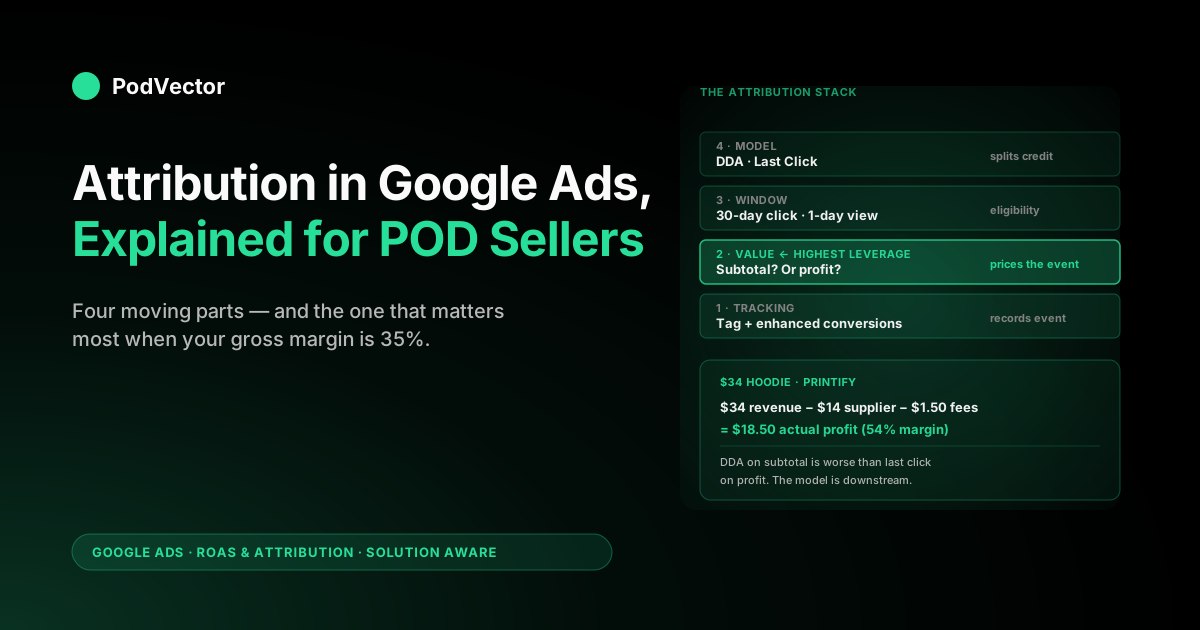
Quick Answer: Attribution in Google Ads is the system that decides which ad interaction gets credit for a conversion and how much credit it gets. It is not one setting — it is four moving parts working together: the conversion tracking that records the event, the conversion value that prices it, the attribution window that decides which earlier ad interactions are eligible, and the attribution model that splits the credit among them.
As of June 2026 only two models remain selectable on a new conversion action: data-driven attribution (DDA), which Google now applies by default to most conversion actions, and last click. DDA no longer sits behind a hard data gate — Google dropped the old 300-conversion / 3,000-interaction eligibility requirement, so it is available on every account; that volume (Google now cites roughly 200 conversions and 2,000 ad interactions in 30 days) is just the level at which DDA's machine learning starts producing reliable credit splits.
For a print-on-demand operator the highest-leverage decision in this stack is rarely the model — it is the conversion value, because Shopify subtotal is gross revenue, not profit after Printify or Printful supplier cost and fees. The rest of this guide walks the four parts in the order they actually matter for a POD account.
What Google Ads attribution actually does
Attribution in Google Ads is the layer that decides — for every conversion that happens on your store — which of the ad interactions that touched the buyer should get credit, in what proportion, and for what dollar amount. The output of that decision is what you see in your reporting columns and, more importantly, what Smart Bidding optimises against on the next auction. Attribution is not a passive reporting choice; it is the signal that shapes every bid Google's auctions make on your behalf going forward.
To make that decision Google needs to answer four questions in sequence. Did a conversion happen? That is the conversion tracking question — answered by your tags, your enhanced conversions setup, and the integrity of the order-confirmation page. What was it worth? That is the conversion value question — answered by whatever number Shopify or your custom integration pushes into the conversion event. Which ad interactions are eligible to share the credit? That is the attribution window question — answered by your click-through and engaged-view window settings. How is the credit split among the eligible interactions? That is the attribution model question — answered by your choice between data-driven attribution and last click.
The order of those four questions matters. Get tracking wrong and the rest does not run.
Get value wrong and the model optimises a misleading number. Get the window wrong and you exclude valid touchpoints or include irrelevant ones. The model decision sits on top of the previous three; switching it without fixing what is underneath is a common reason attribution work fails to move the bottom line on a POD account.
The four moving parts (tracking, value, window, model)
Most articles on Google Ads attribution conflate the four parts into one — usually the model — and leave POD operators thinking the model choice is the entire game. It is not. The four parts decide independently and interact tightly. A clean mental model:
- Tracking decides whether the event is recorded at all. Without a firing tag or a working server-side conversion endpoint, the conversion does not exist for Google. Tracking is binary; either it works or it doesn't.
- Value decides what dollar number is associated with the recorded event. Shopify subtotal, profit after COGS, line-item gross margin — all are valid choices Google will accept. The choice is yours and Google will faithfully optimise toward whichever number you send.
- Window decides the lookback period during which a prior ad interaction is eligible for credit. The default is a 30-day click-through window plus a 1-day engaged-view window. Outside the window, an interaction is invisible to attribution even if it was the first touch.
- Model decides how credit is split among the eligible interactions. With a single touchpoint the model decision is moot. With multiple touchpoints, last click gives 100% to the final one and DDA distributes fractionally based on the counterfactual contribution of each.
For a POD account walking through this stack from the bottom, the order of attention should be: fix tracking, fix value, then sanity-check the window, then choose the model. Most operators reverse the order and burn weeks tuning the model on top of broken value or windowed-out paths. The cluster hub Google Ads ROAS and attribution for POD walks the full stack as one project; the pieces below go deep on each part in turn.
Conversion tracking — the prerequisite
Before any model can attribute anything, the conversion has to be recorded. The tracking layer is two things stacked: the Google Ads conversion tag (or the Shopify Google Ads channel app firing the equivalent event), and enhanced conversions, which sends hashed customer data alongside the event so Google can match conversions to ad interactions even when third-party cookies are blocked. Both layers are required for modern attribution to work properly.
Three checks decide whether tracking is healthy enough for attribution to be meaningful:
Check 1 — does conversion count match Shopify orders? Pull conversion count for last 30 days from Google Ads (Tools → Conversions). Pull order count for the same period from Shopify.
Divide. If the ratio is between 0.95 and 1.05 you are fine. If it is below 0.85 or above 1.15 your tracking is misfiring — usually a duplicate tag from a stale GTM container, a checkout that bypasses the order-confirmation page (Shop Pay express paths are a common culprit), or an enhanced conversions configuration that is dropping data.
Check 2 — is enhanced conversions active and reporting health? Tools → Conversions → click into the action → Settings → Enhanced conversions section. Status should be "Recording data" and the diagnostics tab should show no critical errors. Enhanced conversions is the difference between attribution that survives the cookie-deprecation regime of 2024–2026 and attribution that quietly degrades to last-touch-only as more interactions become invisible.
Check 3 — do you have one conversion action per intent, not one per pixel? Common POD account smell: ten Shopify add-to-cart actions, three purchase actions, and a "view content" action all firing into Google Ads, with bidding pointed at an aggregate "all conversions" column. Attribution is per-conversion-action; a soup of overlapping actions makes the attribution signal incoherent and usually means Smart Bidding is double-counting events. The cluster article Google Ads conversions attribution explained for POD sellers walks through cleaning up the conversion-action inventory.
Tracking is binary and unsexy and usually worth a half-day of work. After it is healthy, the rest of the attribution stack starts producing meaningful signal.
Conversion value — the POD trap
The conversion value is the single highest-leverage decision in the attribution stack for a POD seller, and it is almost universally wrong by default. Most Shopify–Google Ads integrations pass checkout.subtotal_price or order.total_price as the conversion value.
Both are revenue numbers. Neither is profit.
For a SaaS business at 80% gross margin the difference between revenue and profit is small enough to ignore. For a POD seller at 30–55% gross margin after Printify or Printful supplier cost, Shopify fees, and shipping, the difference is the entire game.
Concrete example. A $34 hoodie sold on Shopify with Printify fulfilment.
Supplier cost is $14 (blank shirt + print + Printify markup). Shopify payment processing on a $34 order is roughly $1.50 (2.9% + 30¢ for Shopify Payments at the Basic plan).
Shipping is included in the customer-facing price but absorbed against the supplier cost. Actual gross profit is $34 − $14 − $1.50 = $18.50, a 54% gross margin.
Send Shopify subtotal as your conversion value and Smart Bidding sees $34. Send profit-aware value and Smart Bidding sees $18.50. Both numbers are real; only the second one is a number you would willingly scale on.
The problem compounds when product mix is uneven. The same $34 conversion value paid to a $19 t-shirt sale (gross profit ~$5.50, 29% margin) and a $48 hoodie sale (gross profit ~$24, 50% margin) means Smart Bidding cannot tell the two products apart from a margin perspective.
It will scale whichever produces more revenue per click, which is often the lower-margin product. DDA on subtotal distributes the wrong number perfectly across multiple interactions; last click on subtotal gets the same answer wrong more bluntly. Either way, the model is innocent — the input is the problem.
Two patterns work for sending profit-aware values to Google Ads:
- Static line-item profit map. Maintain a Shopify metafield on each product that stores supplier cost. A Liquid template at checkout calculates
line_total - supplier_cost - estimated_feesand passes it as the conversion value. Cheap to set up, accurate to within a few dollars per order, stable across the catalogue. Right pattern for POD accounts spending under $20k a month. - Live profit calculation via offline conversion adjustments. A Shopify webhook fires on order paid; a backend job calls the Printify or Printful order API to fetch actual fulfilment cost (which can differ from the standard markup when promo prices apply), computes true margin per order, and pushes it back to Google Ads as an offline conversion adjustment within 24 hours. More accurate, more operational, and the right pattern for accounts where the accuracy gain pays for the engineering effort.
The integration article complete guide to Google Ads + Shopify integration for POD walks through both setups end to end. The point worth absorbing here: the model decision is downstream of the value decision. DDA on subtotal is worse than last click on profit. Always.
The attribution window
The attribution window decides which earlier ad interactions are eligible to share credit when a conversion happens. The window is two numbers stacked: the click-through window (default 30 days, configurable from 1 to 90) and the engaged-view window for video (default 1 day, configurable from 1 to 30 for Smart Bidding eligibility, longer for reporting only). Outside the window, the interaction is invisible to the model even if it actually started the buying journey.
For a POD account the window decision matters more than most operators realise. Print-on-demand purchase cycles are short for impulse-driven product categories (apparel and gift-style merch frequently convert within 1–3 days of first ad exposure) and longer for considered purchases (custom or premium-priced product lines that convert across 2–3 weeks).
A 30-day window captures both cleanly. Shorter windows — 7 or 14 days — exclude the slow-converting paths and concentrate credit on the bottom of the funnel, which usually means brand search and remarketing get over-credited and your prospecting Shopping campaigns look weaker than they are.
The mechanical interaction with the model: window decides eligibility, model decides distribution among the eligible. A 30-day click-through window with last click means "the most recent click in the 30 days before conversion gets 100% of the credit." A 30-day window with DDA means "interactions in the 30 days before conversion are eligible, and DDA distributes credit among them based on the counterfactual contribution of each." The two settings are independent — you can change the window without changing the model and vice versa, and each change triggers its own Smart Bidding relearn.
For a POD seller running Performance Max (the default for most newer accounts), the recommended window is the default 30-day click-through and 1-day engaged-view. Going shorter starves the multi-touch paths PMax is designed to optimise; going longer adds noise from interactions that are unlikely to have meaningfully influenced a conversion that took 60+ days to close. Window-sizing edge cases are covered in Google Ads attribution window explained for POD sellers.
The two models that still exist in 2026
Through 2023 the Google Ads attribution menu offered six models. As of May 2026 only two remain selectable on new conversion actions: data-driven attribution and last click. The other four — First Click, Linear, Time Decay, and Position-based — were deprecated across 2023–2024 and migrated to DDA on existing accounts. Google's documentation still mentions them in historical context but they cannot be selected on new actions.
Data-driven attribution (DDA). Now the default for most conversion actions on most accounts. Google removed the old hard eligibility gate (the much-quoted 300 conversions and 3,000 ad interactions over the trailing 30 days), so DDA is available regardless of volume; that figure — Google now cites roughly 200 conversions and 2,000 ad interactions in 30 days — is the recommended level for the model to produce reliable credit, not a switch that turns it on.
DDA distributes credit using a counterfactual machine-learning model trained on your account's own conversion paths — it asks, in effect, "if I removed this interaction from the path, how much would the probability of conversion drop?" and assigns credit proportionally. Because DDA trains per-account, the same model produces different credit distributions on different accounts depending on what the buyer paths actually look like.
Last click. Assigns 100% of the credit — the full conversion count and the full conversion value — to the final eligible ad interaction inside the attribution window. Simple, deterministic, and the model operators fall back to when their conversion volume is too thin for DDA to learn anything useful. On a low-volume POD account in its first months of paid traffic, DDA is technically available but has little path data to work with, so its output behaves much like last click until volume builds.
Both models are available on every account. Both can be set per conversion action — meaning the same account can run DDA on a high-volume action like add-to-cart (where it has plenty of paths to learn from) and last click on a thinner action like purchase (where you may prefer the simpler, deterministic split until volume builds). The standalone explainer what is attribution model in Google Ads goes deep on the per-action mechanics; the comparison article Google Ads attribution models explained for POD sellers walks through the deprecated models and why they died.
The third-party guides you will land on while researching attribution — AdExpert's models explainer and WordStream's attribution-models guide among them — frequently still describe all six models in detail. The mechanics they describe are real; the models just are not selectable any more. Treat them as historical context, not current configuration advice.
Conversion paths and where you see them
The attribution model is operating on something concrete: the actual sequence of ad interactions that a converting buyer touched on the way to a purchase. You can see those paths in Google Ads under Tools → Measurement → Attribution → Paths. The view shows the most common conversion paths on your account, the proportion of conversions that followed each path, and the credit each touchpoint received under your current model.
For a POD account the paths report is usually more diagnostic than predictive. A few patterns that recur:
- Single-touchpoint paths dominate. 60–80% of conversions on most POD accounts come from a single click. The model decision is moot for those conversions — DDA and last click produce identical credit assignments because there is only one interaction to credit. The model matters only for the remaining 20–40% of multi-touch paths.
- Brand search closes a lot. A common path is "Shopping click on product keyword → branded search click on brand name → conversion." Last click sends 100% of credit to brand. DDA usually sends 30–50% to brand and 50–70% to the product keyword Shopping click that originated demand. The DDA distribution is closer to economic reality.
- Performance Max paths look like a black box. PMax does not break out the individual placements that contributed inside its envelope, so a path that crossed YouTube, Display, and Discover all under one PMax campaign appears as a single "Performance Max" touchpoint. This is a Google reporting limitation, not an attribution-model limitation.
If you have never opened the paths report on your account, doing so once a month for ten minutes is one of the higher-leverage habits in Google Ads attribution work. It tells you what the model is being asked to do.
The Model Comparison report
Before switching attribution models, run the Model Comparison report. Tools → Measurement → Attribution → Model Comparison. The report previews what credit distribution your trailing 30 days of conversion data would look like under the alternative model — without changing the live setting. It shows reported conversions and conversion value per campaign under both models side by side.
What to look for in the comparison:
- Campaigns where credit shifts more than 30%. These are the campaigns whose Smart Bidding will most aggressively rebalance after a model swap. Expect 2–4 weeks of bid relearn and 10–30% reported ROAS volatility on those campaigns specifically.
- Branded search campaigns shifting downward under DDA. Common and usually correct — last click systematically over-credits the bottom-of-funnel brand click. DDA reallocates that credit upstream to whichever interaction originated the demand.
- Shopping or Performance Max campaigns shifting upward under DDA. Also common — these campaigns are usually doing the demand-generation work that last click does not credit. The shift is the model rewarding work that was already happening but unmeasured.
If the comparison report shows almost no shift between last click and DDA, your account either has predominantly single-touch paths (in which case the model choice does not matter) or has too little conversion volume for DDA to have learned a meaningful per-account distribution yet (in which case the comparison is not informative until volume builds). Read the report as a diagnostic for whether the model swap will move the needle, not as a predictor of post-swap performance. The deep-dive on attribution reporting is in Google Ads attribution report explained for POD sellers.
How attribution feeds Smart Bidding
The attribution model is upstream of Smart Bidding. The model produces a credit-and-value signal per interaction; Smart Bidding consumes that signal and decides how aggressively to bid in the next auction. Switching the model changes what Smart Bidding sees and therefore how it bids — which is why model changes trigger a 14–28 day relearn period during which campaign performance is volatile.
Concrete example for a POD account. Performance Max with target ROAS 4.0, running on Shopify subtotal as the conversion value, last click model.
Reported tROAS sits at 5.1 — overshooting the target — because last click is over-crediting branded search clicks at the bottom of the funnel that would have converted regardless. Account switches to DDA.
Branded clicks now receive ~30% of credit instead of 100%, and the Shopping touchpoints earlier in the path receive ~70%. Reported tROAS on the Shopping side rises; reported tROAS on the brand-adjacent placements falls.
PMax rebalances bids over the relearn window. End state: total tROAS hits closer to the 4.0 target as Google's bidding now matches actual contribution rather than over-rewarding the bottom-funnel touch.
This rebalancing is usually good for a POD account because it corrects the systematic bias of last click. It is bad if your tracking is broken, because DDA amplifies tracking errors that last click would partially mask through its winner-takes-all credit assignment. The strategy article complete Google Ads playbook for print-on-demand sellers covers how to set tROAS targets that absorb post-switch volatility on a POD account.
Cross-device, cross-account, and view-through
Three additional flavours of attribution sit alongside the four-part model and tend to confuse POD operators looking at conversion reports for the first time.
Cross-device attribution credits a conversion that happens on one device (say, a desktop checkout) to an ad interaction that happened on a different device (say, a mobile YouTube view). Cross-device matching uses signed-in Google identity and enhanced conversions data; it works automatically if both layers are configured. For POD the typical cross-device path is mobile-discovery → desktop-checkout, and turning enhanced conversions off can drop 5–15% of conversions that would otherwise be matched cross-device.
Cross-account conversion tracking applies when you run multiple Google Ads accounts under one MCC (manager account) — common for agencies and for POD operators with multiple brand sub-accounts. A cross-account conversion action defined at the MCC level fires consistently across all sub-accounts and avoids double-counting. Most single-account POD sellers can ignore this.
View-through conversions credit a conversion to an ad that was seen but not clicked, within the engaged-view window. By default the engaged-view window is 1 day for Smart Bidding eligibility (longer for reporting only).
View-through credit is real but weaker than click-through credit; DDA factors it in as one signal among many, while last click ignores view-throughs entirely unless they were the only ad interaction in the window. For a POD account running YouTube as part of Performance Max, view-throughs are part of how PMax learns which placements to keep buying.
Reading attribution against true POD margin
The hardest part of attribution work for a POD operator is not picking the right model, the right window, or the right value. It is reconciling the number Google reports against the number your bank account reports, every week, for every campaign.
Google says tROAS is 4.5. Stripe and Printify together say true ROAS — after supplier cost, fulfilment fees, payment processing, and reprint or refund cost amortised across the cohort — is 1.7.
Both are correct. Different definitions of return, both real.
The reconciliation is a per-order calculation. For every Shopify order in a period, you need: gross revenue (the number Google sees), Printify or Printful supplier cost from the supplier's order API, Shopify payment processing, refund or reprint cost amortised across the cohort, and the Google Ads click cost attributed to that order under whichever model is active.
Subtract the cost stack from revenue, divide by ad spend for the same orders, and you have true ROAS. Compare to Google's reported number and you have an attribution-truth gap you can manage and act on.
Most POD operators do this reconciliation monthly in a spreadsheet. The spreadsheet is too slow to act on, breaks every time a new product is added or a fee structure changes, and tends to get abandoned within the first quarter. Victor is an AI employee that closes this gap and then does something about it. He joins your Shopify, Printify or Printful, and Google Ads accounts on a live data warehouse, computes true ROAS by campaign after supplier cost and fees, and flags the campaigns where Google's reported number is overstating return because last click is over-crediting branded clicks.
From there Victor acts, with your approval on each material move. He patches profit-aware conversion values, pushes offline conversion adjustments back to Google Ads so Smart Bidding optimises on margin instead of revenue, and reallocates spend away from the campaigns whose true ROAS has quietly fallen below target. The complete Google Ads playbook for print-on-demand sellers walks through how he runs this loop end to end. Attribution that ends in your bank account, not in a Google reporting column.
FAQs
What is attribution in Google Ads in plain English?
It is the system that decides which ad interaction gets credit for a conversion and how much credit it gets. The system has four parts: the tracking that records the conversion, the value that prices it, the window that decides which earlier interactions are eligible for credit, and the model that splits the credit among them.
What attribution model is the default in Google Ads in 2026?
Data-driven attribution (DDA) is the default for most conversion actions. Google removed the old eligibility gate, so DDA no longer requires 300 conversions and 3,000 ad interactions to switch on — that volume (Google now cites roughly 200 conversions and 2,000 ad interactions in 30 days) is the level at which it produces reliable credit, not a requirement. Both DDA and last click are selectable manually per conversion action.
Why does conversion value matter more than the attribution model for POD?
Because POD margins are thin (30–55% gross). If you send Shopify subtotal as the conversion value, you are optimising for revenue, not profit.
The model can split credit perfectly across interactions but it cannot fix the fact that the underlying number is gross revenue rather than profit after supplier cost, payment processing, and fulfilment fees. Get value right first, then pick a model.
What is the default attribution window in Google Ads?
30 days for click-through and 1 day for engaged-view (the engaged-view window is configurable up to 30 days for Smart Bidding eligibility). Configurable per conversion action between 1 and 90 days for clicks.
How is attribution different from conversion tracking?
Conversion tracking is whether the event is recorded at all (binary — either the tag fires or it doesn't). Attribution is what happens after the event is recorded — which earlier interactions get credit for it. Tracking is the prerequisite; attribution is the next layer up.
Does attribution affect Smart Bidding?
Yes, directly. Smart Bidding optimises against whatever signal the attribution model produces. Switching models changes what Smart Bidding sees and triggers a 2–4 week relearn during which reported ROAS swings 10–30% even when underlying performance is unchanged.
Can I see what credit DDA assigns before switching from last click?
Yes. The Model Comparison report (Tools → Measurement → Attribution → Model Comparison) previews credit distribution under both models side by side using your trailing 30 days of conversion data. Run it before flipping any model on a live conversion action.
Does the attribution model affect total conversion count?
No, only the per-campaign distribution. The same conversion is counted once regardless of model. Total conversions across all campaigns sum to the same number under both models; what differs is which campaigns get credit for which fractions.
Why is enhanced conversions important for attribution?
Because third-party cookies are increasingly blocked. Enhanced conversions sends hashed customer data alongside the conversion event, which lets Google match conversions to ad interactions even when cookie-based tracking would have failed. Without enhanced conversions, attribution quietly degrades to last-touch-only as more interactions become invisible to the model.
Get attribution that ends in your bank account, not a reporting column
Picking the model is the easy part. Reconciling Google's reported ROAS against true ROAS after Printify or Printful supplier cost, Shopify fees, refunds, and reprints — every week, every campaign — is the work. to ask "what's my true ROAS by campaign last week?" or "which campaign is overstating its return?" in plain English, against live joined data from your store and ad accounts.
Try Victor free