
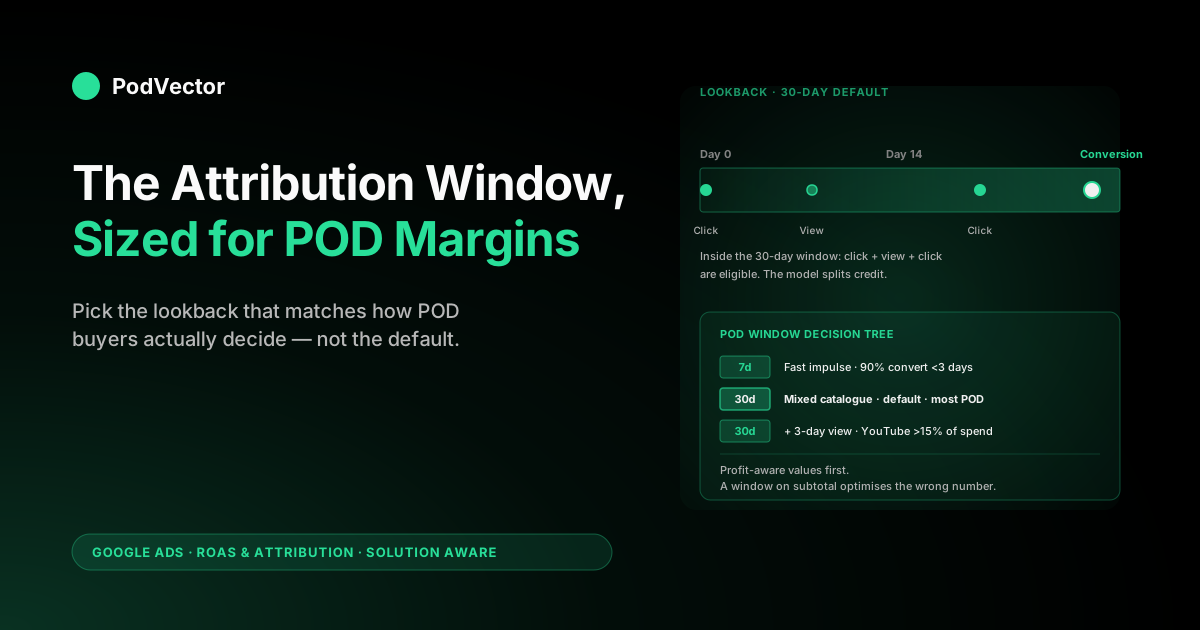
Quick Answer: The attribution window in Google Ads is the lookback period during which an ad click or engaged view is still eligible to share credit for a conversion. The 2026 defaults are 30 days for clicks and 3 days for engaged views (pure view-through impressions are a separate window that defaults to 1 day); all are configurable per conversion action.
For a print-on-demand seller, the window decision is the second-most expensive setting in the attribution stack after conversion value — too long and you over-credit early YouTube and Demand Gen touches that weren't really decision drivers; too short and you starve Performance Max of the multi-touch paths it was designed to optimise. The default 30-day click is right for most POD accounts running PMax, but only after you have profit-aware conversion values flowing in and only if you can read the window's output against true margin (price minus Printify or Printful supplier cost minus Shopify fees) rather than against Shopify subtotal. This guide walks the diagnostics, the decision tree, and the three patterns POD operators actually run.
What an attribution window actually does
The attribution window is the maximum amount of time that can pass between an ad interaction (a click or an engaged view) and a conversion before Google Ads stops counting that interaction as eligible for credit. If your click-through window is 30 days and a buyer clicks a Shopping ad on day zero and purchases on day 31, Google does not attribute that purchase to the click. If the same purchase happens on day 28, it does — and the attribution model then decides what fraction of credit that click receives versus any other eligible interactions inside the same window. Google's own documentation calls this setting the conversion window; the broader marketing community uses "attribution window" interchangeably, and we use the latter throughout this guide.
Two distinctions trip up most operators. The window is not the attribution model — the model decides how credit is distributed among eligible interactions, the window decides which interactions are eligible at all.
The window is also not the GA4 lookback period; GA4 has a separate conversion lookback configured in its own admin, and the two settings are tuned independently. It is normal for Google Ads and GA4 to disagree on conversion counts by 5–15% on the same account on the same week, and the window mismatch is one of the three most common reasons.
The window matters operationally because it determines which dollars of ad spend get credited to which dollars of revenue, which feeds Smart Bidding's optimisation signal, which determines how Google allocates your budget tomorrow. Most POD operators treat the window as a set-it-and-forget-it default. It is one of the highest-leverage 30-second decisions in the account.
Why the window matters more than most operators realise
The Google Ads attribution conversation is dominated by attribution model debates — DDA versus last click, the deprecation of First Click and Linear, the relearn cost of switching. The model gets the attention because the choice is visible (a dropdown in the UI) and emotionally loaded (DDA is a black box). The window gets less attention because it looks like a number that should match the buyer cycle and that's that.
That framing under-sells the window. On a POD account with thin margins and short impulse-purchase cycles, the window decides three things the model cannot:
- Which campaigns get blamed for unprofitable spend. A 90-day click-through window credits Shopping clicks from two months ago for purchases that were really driven by a $5 brand-search click last week. A 7-day window does the inverse and starves Shopping of credit it earned. The model splits credit among eligible touches; the window decides whether they are eligible at all.
- How much YouTube and Demand Gen credit your account absorbs. Engaged-view credit is a tighter signal than the older view-through definition, but on accounts with thin POD margins it can still over-credit upper-funnel video because POD buyers often see a brand ad weeks before they buy something unrelated. The engaged-view window controls how far back that scoop reaches.
- How much data Smart Bidding has to learn from. Performance Max optimises across the full eligible path. A 7-day window on a category with a 3-week consideration cycle leaves PMax blind to the upper-funnel touches that actually drove the conversion, and PMax responds by under-allocating spend to those touches and over-allocating to the bottom-funnel ones it can see. Reported ROAS goes up; incremental ROAS goes down.
The window decision and the model decision interact, but they are independent settings. You can change the window without changing the model and vice versa.
Both trigger their own Smart Bidding relearn (usually 2–4 weeks of unstable performance during which reported ROAS swings 10–30% even when underlying performance is unchanged). The full anatomy of how the window sits inside the broader attribution stack is in Google Ads attribution window explained for POD sellers; this guide goes deeper on the diagnostics and decision tree.
The two-window stack in 2026
Google Ads exposes two separate attribution windows on every conversion action, and the defaults differ by campaign type.
Click-through window. The time between a click on your ad and the conversion. Configurable to 1, 7, 14, 30, 60, or 90 days.
Search, Shopping, and Performance Max default to 30 days. This is the window that matters most for POD because click-driven conversions dominate Shopping and branded Search, which are typically the largest spend buckets in a POD account. Google's current documentation describes the click-through window as configurable to any value from 1 to 30 days, plus 60 or 90 — so you are not limited to the old discrete 7/14/30 presets.
Engaged-view window. The time between a counted engaged view of your video ad and the conversion. Engaged view in Google Ads means the user watched at least 10 seconds of a skippable in-stream ad or the entire ad if shorter.
It is configurable from 1 to 30 days, and YouTube and Demand Gen campaigns default to 3 days — not the 1 day many older guides still cite. That 3-day default matters: it reaches further back into the buyer path than most POD operators expect, which is exactly the upper-funnel over-crediting a thin-margin POD account can least afford.
Don't confuse engaged view with pure view-through. View-through credit (an impression in the viewport for at least a second, no interaction) is a separate and weaker window that defaults to just 1 day. Engaged view is the tighter behavioural signal Google has pushed advertisers toward across 2024–2026 — but at a 3-day default it still scoops weakly on POD margins.
The two windows are configured per conversion action — meaning the same account can run a 30-day click on Purchase and a 7-day click on Add to Cart, or a 1-day engaged view on Purchase and a 3-day engaged view on Lead. Most POD accounts only have one or two conversion actions worth tuning (Purchase, sometimes Add to Cart), so the per-action flexibility doesn't add complexity in practice; it just means you size the window for the conversion that drives the bidding signal.
Where the defaults come from and why they bias toward longer
The 30-day click-through default exists because it is what works for the median Google Ads advertiser, which historically has been a B2B SaaS or considered-purchase ecommerce account with multi-week consideration cycles. The 30-day window captures roughly 95% of converting paths on those accounts and gives Smart Bidding enough multi-touch data to learn from. It is a deliberately generous default biased toward not-missing-credit rather than tight-causal-attribution.
For a POD seller, the median advertiser is not you. Print-on-demand sits at one of the shorter ends of the ecommerce purchase cycle. GrowMyAds' lookback window guide notes that 30 days is appropriate for "businesses with longer sales cycles" and that ecommerce with shorter cycles benefits from tighter windows.
POD apparel and gift merch frequently convert within 1–3 days of first ad exposure; custom or premium-priced product lines stretch to 2–3 weeks; very few real POD purchase paths live beyond 21 days. A 30-day window is not catastrophic on a POD account — most paths fit inside it — but it does over-include the tail of weakly-correlated touches and bias credit toward upper-funnel campaigns that are less causally responsible for the conversion than the data suggests.
The default also biases toward longer because Google's incentives lean that way. A longer window scoops more conversions into Google Ads' reported totals, makes Google Ads look more effective relative to organic and email, and produces higher reported ROAS that nobody complains about.
None of that is malicious — the default is reasonable for the median advertiser — but it is worth knowing the structural pressure when you are deciding whether to override it. The sibling article Google Ads default attribution window explained for POD sellers goes deeper on why the default lands where it does.
Four diagnostics that flag a window mismatch
Before changing the window, run four diagnostics. A wrong window has a fingerprint; the fingerprint tells you which direction to move.
Diagnostic 1 — the Time Lag report. Tools → Measurement → Attribution → Paths → Time Lag tab. The view shows the distribution of time between first ad interaction and conversion across your account.
Read the percentile column. If 90% of your conversions happen within 7 days of the first interaction, your 30-day window is mostly empty above day 7 — you are not losing much by tightening to 7 or 14, and you are gaining tighter Smart Bidding signal. If 90% of conversions happen within 21 days, you are right at the edge of where the 30-day default is appropriate.
If 90% happens within 3 days, you almost certainly want to tighten to 7 days for purchase. The Time Lag report is the single most useful number in the attribution UI for window sizing, and most POD operators have never opened it.
Diagnostic 2 — the Top Paths report. Same path: Tools → Measurement → Attribution → Paths → Top Paths tab. Look at the distribution of path length (1 interaction, 2 interactions, 3+).
On a POD account with a working 30-day window you typically see 60–75% single-interaction paths (one click, one purchase, no upper-funnel touch), 15–25% two-interaction paths (usually a Shopping click followed by a branded search click), and 5–10% three-or-more-interaction paths. If your account skews dramatically more multi-interaction (50%+ of paths have 3+ touches), either you are running a lot of remarketing into the same buyer multiple times or your window is over-scooping touches that didn't really drive the conversion.
Diagnostic 3 — Google Ads vs Shopify conversion count reconciliation. Pull conversion count from Google Ads for the last 30 days. Pull order count from Shopify for the same period.
Divide. A healthy ratio sits between 0.85 and 1.10 (Google Ads should report slightly fewer conversions than Shopify because not every Shopify order has an attributable click within window).
If Google Ads is reporting 25%+ more conversions than Shopify has orders, your window is over-scooping and counting weak touches as causal. If Google Ads is reporting 30%+ fewer, either tracking is broken (check enhanced conversions first) or your window is too tight to capture the real path. The setup walkthrough at conversion tracking Google Ads + Shopify setup guide for POD covers the reconciliation in detail.
Diagnostic 4 — Model Comparison vs current model. Tools → Measurement → Attribution → Model Comparison. Run the report with your current model selected on one side and last click on the other, holding the window constant.
If credit redistribution is dramatic (more than ±25% on any campaign), it means you have a lot of multi-touch paths and the model is doing real work. If redistribution is small (less than ±10%), most of your paths are single-click anyway and the window matters more than the model. POD accounts skew toward the second case — the window is the lever, the model is mostly cosmetic.
The 90-second POD decision tree
Once the diagnostics are run, picking a window is a short tree. Walk it in order.
- Is your conversion value profit-aware? If you are still passing Shopify subtotal as the conversion value, fix that first. The window optimisation below assumes Smart Bidding is seeing a number that approximates true profit. If the input is gross revenue, no window choice fixes the root problem. The walk-through is in attribution Google Ads explained for POD sellers, and the integration setup is in the complete guide to Google Ads + Shopify integration for POD.
- What does the Time Lag report say? Open it before doing anything else. The 90th-percentile time-to-conversion is your guide.
- ≤ 3 days: your buyers decide fast. Tighten click-through to 7 days. Tighten engaged view to 1 day (down from the 3-day default). Most apparel-only POD stores running impulse merch land here.
- 3–7 days: a 14-day click-through window is the sweet spot. 7 days is too tight and starves PMax; 30 is too generous. Tighten engaged view to 1 day.
- 7–21 days: keep the 30-day click default. Most POD stores with mixed product lines (apparel + premium hoodies + custom) sit here. Still tighten engaged view to 1 day — the 3-day default over-credits video on thin margins.
- 21+ days: keep 30-day click. Leave engaged view at the 3-day default only if YouTube spend is meaningful (15%+ of total) and you have profit-aware values flowing; otherwise tighten it to 1 day.
- How much do you spend on YouTube or Demand Gen? If the answer is "less than 5% of total" or "nothing," turn engaged-view credit off entirely on the purchase action. The credit signal is too weak to be useful at low spend levels and it confuses Smart Bidding. If YouTube spend is 5–15% of total, tighten engaged view to 1 day from the 3-day default. If it is 15%+, leaving the 3-day default in place can be justified — but only after profit-aware values are in place.
- Are you on Performance Max as your primary campaign? If yes, do not go shorter than 7 days on click-through. PMax needs multi-touch path data to optimise; a 1-day window starves it. If you are running Search and Shopping separately without PMax, 1-day click-through can work for branded Search where the path is genuinely single-click, but keep Shopping at 7+ days minimum.
Most POD accounts run through this tree to one of three outcomes — those three outcomes map to the three patterns below.
The three patterns POD operators actually run
Pattern A — Tight (7-day click, 1-day engaged view). The right pattern for POD stores running fast-impulse apparel and gift merch where the Time Lag report shows 90% of conversions happen within 3 days. Tightens Smart Bidding's signal to the buyers who actually decide quickly, removes the long tail of weakly-correlated upper-funnel credit, and produces a reported ROAS number that tracks closer to incremental ROAS.
There is now public evidence this works. A 2026 Search Engine Land teardown of a DTC retailer with a 2.2-day average conversion lag found that switching from a 30-day to a 7-day click window lifted reported ROAS 62% and exposed how much credit Google Ads and Meta had been double-counting — Meta's in-platform ROAS had been inflated while Google's true incremental ROAS rose to 1.82.
That double-count is the quiet tax on POD accounts running both channels: the same buyer gets claimed twice, and your budget split is built on the overlap. The trade-off: you lose visibility on the 5–10% of buyers who genuinely take 1–4 weeks to decide, and PMax has slightly less multi-touch data to learn from. Acceptable for fast-cycle accounts; not acceptable for mixed catalogues.
Pattern B — Recommended (30-day click, 1-day engaged view). The right pattern for the majority of POD stores running mixed catalogues (apparel + hoodies + premium merch + custom). The 30-day click captures both the impulse cycle and the slower considered cycle without much over-scooping, and tightening the engaged-view window to 1 day — down from Google's 3-day default — keeps YouTube credit honest.
The default works because POD as a category sits in the middle of the ecommerce purchase-cycle distribution, not at the impulse extreme. The trade-off: reported ROAS will run 10–20% higher than incremental ROAS due to mild upper-funnel over-credit, and Smart Bidding will allocate slightly more budget to brand search and remarketing than a tighter window would. Most operators accept that as the cost of capturing the slower-cycle paths.
Pattern C — Default-video (30-day click, 3-day engaged view). Leaves the engaged-view window at Google's 3-day default. The right pattern only for POD stores running 15%+ of spend through YouTube or Demand Gen as a deliberate brand-building channel, with profit-aware conversion values fully in place. Keeping the default lets video credit reach further down the path so YouTube doesn't get systematically under-credited relative to its actual contribution.
The trade-off: more upper-funnel credit absorption, more reported-vs-incremental ROAS gap, and Smart Bidding will scale YouTube spend in response to the higher credited ROAS — which is the point if you want to scale brand video, and a problem if you don't. This pattern is rare on POD accounts; most POD operators don't spend enough on video to justify it.
How the window feeds Smart Bidding (and the relearn cost)
Every Smart Bidding strategy — Target ROAS, Maximise Conversion Value, Maximise Conversions — uses the conversion data shaped by the attribution window as its primary training signal. When you change the window, you change the training data, and Smart Bidding has to re-learn from the new shape. The relearn period typically runs 2–4 weeks during which reported performance is unstable.
What "unstable" means concretely: reported ROAS swings 10–30% week-over-week, CPA fluctuates similarly, and budget allocation across campaigns shifts as Smart Bidding figures out which campaigns produce profitable conversions under the new credit assignment. None of that movement reflects a real change in your store's performance — it reflects Smart Bidding catching up with the new attribution shape. The only useful response during a relearn is to leave bid strategy parameters alone and let it stabilise.
Three operational implications follow from this:
- Don't change the window during a campaign launch or a seasonal push. Relearn instability stacks on top of launch instability and produces a fortnight of meaningless data. Change windows during a steady-state period (post-Q1, mid-summer) when you can absorb a relearn without budget pressure.
- Don't change the window and the model in the same week. Each change triggers its own relearn. Stack them and you get 4–6 weeks of compounding instability with no way to attribute performance change to either lever. Make one change, wait for it to stabilise (Smart Bidding's "Bid strategy status" reports return to "Learning complete"), then make the next.
- Don't judge a window change in the first 14 days. The relearn signal dominates the real signal during that window. Wait at least 21 days before reading reported ROAS as evidence of whether the window change worked. If it still looks worse at day 28, then revert.
Configuring the window in Google Ads
The configuration path in 2026 has moved relative to older guides — it is no longer at the campaign level but per-conversion-action.
- Tools (top right gear icon, but in the new nav it's Tools → Measurement) → Conversions.
- Click into the conversion action you want to tune (usually "Purchase" for ecommerce; if you have separate Shopify, GA4, and offline conversion actions, you tune them independently).
- Settings → Conversion window section.
- Click-through window: any value from 1 to 30 days, plus 60 or 90.
- Engaged-view window (visible only on conversion actions that include video-eligible interactions): 1 to 30 days, defaulting to 3.
- Save.
Two configuration gotchas worth flagging. First, the change applies forward-only — historical conversion data is not retroactively re-windowed when you change the setting.
The Time Lag report and the Top Paths report continue to show the old window's data for the trailing 30 days, then transition to the new window's data once the trailing window covers post-change conversions. Second, if you have multiple conversion actions feeding into the same Smart Bidding strategy, the window applies per action, not at the strategy level — meaning you can have inconsistent windows across actions in the same strategy, which is usually a mistake. Audit all active conversion actions when you change one.
Window mistakes that cost POD accounts money
Five window-related mistakes show up repeatedly in POD account audits. Each is fixable in under an hour once you know to look for it.
Mistake 1 — running 90-day click-through "to capture more credit." Common on accounts that started on Display Network campaigns or that hired an agency that defaulted to maximum-window for reporting purposes. The window scoops weeks of weakly-correlated touches and credits them to upper-funnel campaigns that didn't really drive purchases inside the actual decision cycle.
Smart Bidding then over-allocates to those campaigns. Reverting to 30-day click usually reduces reported ROAS by 8–15% and reduces actual unprofitable spend by a similar amount.
Mistake 2 — 1-day click-through on Performance Max. Sometimes set deliberately to "get clean attribution," sometimes inherited from a Search-only account that migrated to PMax. Starves PMax of multi-touch path data and produces single-touch attribution that PMax cannot optimise against. Reported ROAS often looks fine because the conversions that do attribute are bottom-funnel, but campaign performance plateaus and PMax under-spends.
Mistake 3 — leaving engaged view at the 3-day default on a thin-margin account. Because the engaged-view default is 3 days (not 1, as many guides still claim), most POD accounts are already over-crediting YouTube without having touched a setting. Engaged view at 3+ days credits buyers who saw brand video days before they bought something they were going to buy anyway, the absorption inflates YouTube's reported ROAS, Smart Bidding scales YouTube spend, and incremental return drops. Setting engaged view to 1 day fixes the symptom and keeps video honest.
Mistake 4 — changing the window mid-relearn. Operator changes window from 30 to 14 days, sees reported ROAS drop in week one, panics, changes back to 30. Both changes triggered relearns; the account spent 6 weeks unstable for no net change. Make a window decision and commit to 21 days before reading the result.
Mistake 5 — different windows on Purchase and Add to Cart pointing at the same Smart Bidding strategy. Account has Purchase on 30-day click and Add to Cart on 7-day click, both feeding Maximise Conversion Value with revenue from both summed. Smart Bidding sees inconsistent credit assignment and produces inconsistent bidding. Either tune the windows to match or stop sending Add to Cart as a value-bearing conversion (it usually shouldn't be).
Reading the window against true POD margin
Every diagnostic and decision in this guide assumes you can read the window's output against true profit, not against Shopify subtotal. If the window data is correct but the conversion value is gross revenue, the window optimisation is operating on a misleading number — Smart Bidding is still optimising for revenue, the window just controls which revenue gets credited where.
For a POD seller, "true profit" means price minus Printify or Printful supplier cost minus Shopify payment processing minus any per-order fees, computed per order. A $34 hoodie sold via Printify with a $14 supplier cost and roughly $1.50 in Shopify payment fees has $18.50 of gross profit, a 54% margin.
A $19 t-shirt with a $13 supplier cost and $0.85 in fees has $5.15 of gross profit, a 27% margin. The same $34 conversion value sent to Google Ads on both orders means Smart Bidding cannot tell them apart, and any window decision optimises against an undifferentiated revenue signal.
Two patterns get profit-aware values into Google Ads: a Shopify metafield-based supplier-cost map at checkout that sends line_total - supplier_cost - estimated_fees as the conversion value, or a webhook-driven offline conversion adjustment that fires on order-paid, fetches actual fulfilment cost from the Printify or Printful API, computes true margin per order, and pushes it back to Google Ads within 24 hours. The complete walkthrough is in the complete guide to Google Ads + Shopify integration for POD and the cluster hub at Google Ads ROAS and attribution for POD ties window decisions to ROAS measurement against true margin.
Once profit-aware values are flowing and the window is sized correctly, the reported ROAS column in Google Ads becomes a number you can trust enough to make scaling decisions on. Until then, the window is an interesting setting, but it is not the bottleneck — the conversion value is.
FAQs
What is the default attribution window in Google Ads in 2026?
30 days for click-through and 3 days for engaged-view, applied per conversion action. Click-through is configurable to any value from 1 to 30 days, plus 60 or 90. Engaged-view is configurable from 1 to 30 days.
Pure view-through credit (an impression with no interaction) is a separate, weaker window that defaults to 1 day. Many older guides still quote a 1-day engaged-view default — that is the view-through default, not the engaged-view one.
Is the attribution window the same as the conversion window?
Yes. Google's official UI label is "conversion window"; the broader marketing community uses "attribution window." Both terms refer to the same setting — the lookback period during which an ad interaction is eligible for credit on a conversion.
Should POD sellers use a shorter attribution window than the default?
Sometimes. If your Time Lag report shows 90% of conversions happen within 3 days, tightening click-through to 7 days produces a tighter Smart Bidding signal and reduces upper-funnel over-credit.
If your Time Lag distribution is broader (90th percentile at 7+ days), the 30-day default is usually right. Always run the Time Lag report before changing the window.
How long does Smart Bidding take to relearn after a window change?
2–4 weeks of unstable performance during which reported ROAS swings 10–30% even when underlying performance is unchanged. Don't read window-change results until at least 21 days have passed.
Does the window affect total conversions or just attribution?
It affects both. A shorter window can exclude conversions where the only ad touch happened earlier than the window allows — those conversions still occur in your store but are not counted in Google Ads.
A longer window includes more touches and can scoop more conversions into the count. The model only redistributes credit among already-counted conversions; the window decides which conversions get counted at all.
Can I see how my account would perform under a different window before switching?
Indirectly. The Time Lag report tells you how many of your historical conversions happened inside any candidate window — if 95% of conversions happened within 14 days, switching to a 14-day window only loses 5% of historical credit. The Model Comparison report does not preview window changes (it previews model changes), so the Time Lag report is the closest thing to a pre-flight check.
Does the attribution window need to match between Google Ads and GA4?
No. They are separate settings tuned independently and rarely match by default. GA4 has its own conversion lookback in the GA4 admin; Google Ads has the conversion window described in this guide. The two will usually report 5–15% different conversion totals on the same account.
Why does YouTube show inflated ROAS on a POD account?
Often the engaged-view default itself. Google's engaged-view window defaults to 3 days — longer than the 1 day many guides claim — and on a thin-margin POD account that reaches further back into the buyer path than it should, scooping touches that were not really decision drivers. Tightening engaged view to 1 day (or off entirely on accounts with low video spend) usually corrects the inflation.
Read your attribution window against true POD margin, in plain English
Picking the right window matters; reading the window's output against actual profit after Printify or Printful supplier cost, Shopify fees, and refunds — every week, for every campaign — is what makes scaling decisions defensible. to ask "what's my true ROAS by window-eligible campaign last week?" or "did the window change pay for itself?" in plain English, against live joined data from your store and ad accounts.
Try Victor free