
Quick Answer: ROAS (Return on Ad Spend) is revenue divided by ad cost; attribution is the rule that decides which click gets credit for that revenue. For print-on-demand stores, ROAS is the metric Google shows you, but it is not the metric that pays your rent.
A 4x ROAS — the figure most ecommerce playbooks call "good" — can still lose you money on a POD store because Printful, Printify, and Gelato eat 40–70% of revenue before you see a dollar. The number that matters is profit-on-ad-spend: ROAS adjusted for actual cost of goods on the specific SKU that sold.
Below: the model definitions, the POD-specific benchmarks, the conversion-window pitfalls unique to gift-season buyer journeys, and how to turn Google Ads attribution into a number your bookkeeper recognises.
What ROAS and attribution actually mean for a POD store
ROAS is the simplest ad metric in existence: revenue divided by ad spend. Spend $100 on Google Ads, get $400 of sales, your ROAS is 4 (or 400%, same thing). It tells you whether your ads pulled their weight on the top line.
Attribution is the rulebook that decides which click in a customer's journey gets the sale recorded against it. A buyer might click your Search ad on Monday, return via organic on Wednesday, and convert on Friday from an email. Attribution decides who gets the credit — Search, organic, email, or some split between them.
Those two concepts are knotted together. Your ROAS number is only as honest as the attribution model behind it. Change the model, the ROAS changes — same ads, same revenue, different math.
For a print-on-demand store the stakes are higher than for a typical ecommerce shop. A boutique brand selling its own inventory keeps ~70% of revenue after cost of goods. A POD store running Printful or Printify keeps 20–40%. Every percentage point of attribution error matters more when your margin is thinner.
The POD ROAS problem: why 4x can still lose money
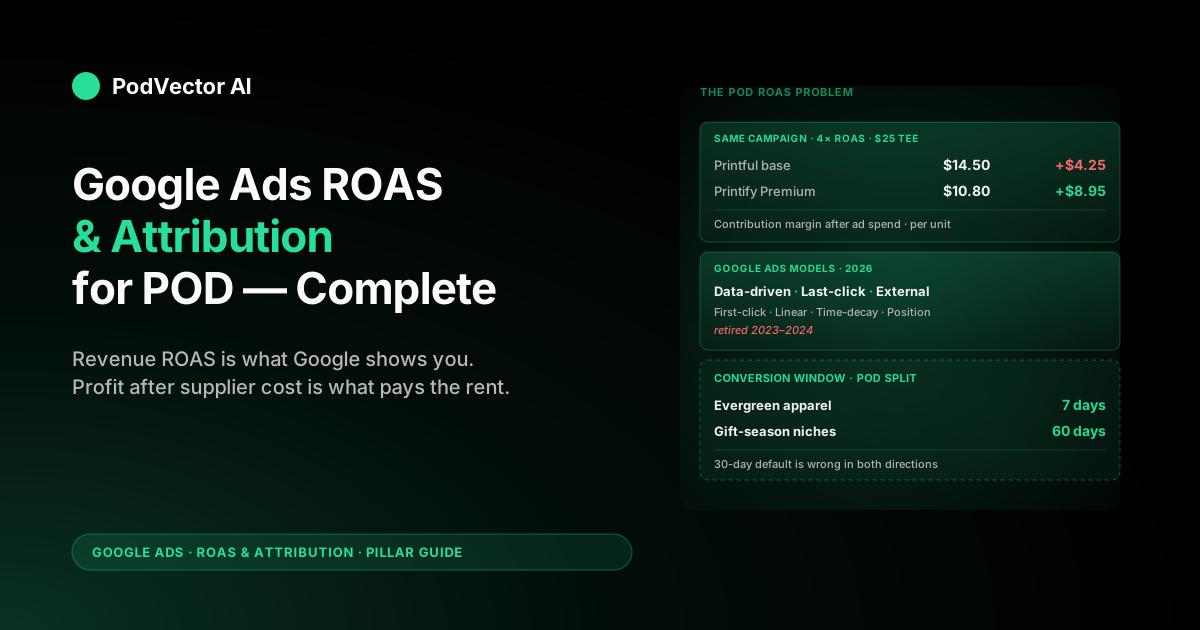
Run a quick calculation. You sell a T-shirt for $25. Your Printful base cost is $14.50 with shipping. Your gross margin per shirt is $10.50 — 42% of revenue.
At a 4x ROAS, you spent $6.25 in ads to make a $25 sale. That leaves $10.50 − $6.25 = $4.25 of contribution margin per unit before any other costs (Shopify fees, transaction fees, refunds, your time).
That is barely profitable, and the standard ecommerce playbook would call it a healthy ROAS. The same math at Printify with a Premium plan ($14.99/month) and a cheaper base of $10.80 leaves you $8.95 of contribution margin at the same ROAS — more than double.
Two stores. Same ad performance. Different profit. Google Ads cannot tell you this, because Google Ads does not know what you pay your supplier. ROAS treats every dollar of revenue as identical, and for POD that is wrong by design.
The fix is not to abandon ROAS. The fix is to pair it with a profit-aware metric — POAS (Profit on Ad Spend), or just contribution-margin ROAS if you want to stay in plain English. Calculate it per SKU, then aggregate to the campaign level.
Google Ads attribution models in 2026
Google has shrunk the model list. Four older models — first click, linear, time decay, and position-based — were retired in 2023 and 2024. What remains in Google Ads today:
Data-driven attribution (DDA). The default and Google's recommended choice. Machine learning distributes credit across the clicks in each user's path, based on the patterns Google sees in your account. No minimum conversion threshold any more — DDA works on small accounts too, as of the 2023 rollout.
Last-click attribution. 100% of the credit goes to the final ad click before conversion. Still available, still useful as a sanity check, but no longer the default for new conversion actions.
External attribution (imported attribution). You feed Google a credit split calculated outside the platform — typically from a third-party tool or your own warehouse. Google uses your numbers for bidding signals, not its own.
That's the entire menu. If a tutorial still mentions linear or time-decay as Google Ads options, it is out of date.
How data-driven attribution actually works
DDA is not a transparent model. Google does not publish the exact algorithm, and the credit splits it produces are not reproducible from outside. What we know:
It uses click-level conversion paths across your account. Every conversion has a sequence of touchpoints (Search click, YouTube view, Display click, etc.). DDA compares paths that converted with paths that did not, then assigns each touchpoint a fractional credit based on how much it appeared to move the needle.
For a deeper look at the mechanics Google publishes — and what the help docs leave out — read our data-driven attribution explainer for POD sellers, which translates Google's official documentation into operator-level guidance.
For POD stores, two DDA properties are worth knowing. First, it tends to give more credit to upper-funnel touchpoints than last-click does — which usually inflates the apparent ROAS of YouTube, Display, and brand-Search campaigns. Second, it adjusts continuously as your data grows, so a ROAS comparison across months can shift even when nothing about your campaigns changed.
Practical implication: when you switch from last-click to DDA, expect your top-of-funnel campaigns to look better and your branded campaigns to look slightly worse. Do not interpret that as the ads suddenly performing differently — only the bookkeeping changed.
Conversion windows and POD's gift-season buyer journey
The conversion window is the maximum number of days between a click and a conversion for that click to get attributed at all. Default is 30 days. You can configure 1, 7, 14, 30, 60, or 90 days.
For most POD stores, 30 days is wrong in both directions.
It is too long for impulse-purchase apparel — a $25 birthday-themed shirt usually converts within 3 days or never. A 30-day window lets late-cycle ads claim credit for sales that were locked in earlier.
It is too short for gift-season niches — Christmas, Father's Day, anniversary designs. A buyer scrolling in early November may not pull the trigger until late December. Your November Search clicks get zero credit and your DDA model misreads what is actually working.
The pragmatic fix is two windows. Run a 7-day window for evergreen products and a 60-day window for seasonal collections. Google does not let you set window-per-campaign, but you can split this by conversion action: define a "seasonal purchase" conversion separately and apply the long window there.
Reasonable POD sellers disagree about whether the complexity is worth it. If you run mostly evergreen apparel, 30 days is fine. If gift season is 40%+ of your year, the per-action split pays back.
How attribution drives Smart Bidding (Target ROAS, MaxCV)
This is the part most POD sellers underestimate. Your attribution model is not just a reporting setting — it is the input signal for every automated bid Google places.
When you use Target ROAS, Maximize Conversion Value, Maximize Conversions, or Target CPA, Google's bidder reads conversions according to your attribution model. Last-click attribution tells the bidder "the final click was everything." DDA tells the bidder "spread credit across the path." Same campaign, same auction, different bids.
For Target ROAS specifically: if you set tROAS = 400% under last-click, you are asking Google to bid only as high as the auctions where the final click reliably produces $4 of revenue per $1 spent. The same 400% target under DDA produces meaningfully different bids because Google now believes the upper-funnel touches deserve credit and will bid more aggressively on those.
The mistake is switching attribution models without re-checking tROAS targets. A 400% target that worked under last-click often becomes too aggressive under DDA, because DDA spreads revenue across more touches and inflates the apparent ROAS of campaigns that previously looked marginal.
Re-baseline tROAS targets when you change attribution. The simplest method is to leave Smart Bidding on the new model for two weeks, observe the actual delivered ROAS, then set tROAS slightly above that floor.
POD ROAS benchmarks by funnel stage and supplier
Generic ecommerce benchmarks set the "good ROAS" floor at 4x. For POD that is too high for top-of-funnel and too low for bottom-of-funnel branded Search. Some honest numbers from POD operators running Printful, Printify, and Gelato:
Branded Search (your store name). 8x–15x is normal. These are people already searching for you. If your branded ROAS is below 6x, something is broken — usually a competitor bidding on your name or weak landing pages.
Shopping (PMax or standard Shopping). 3x–6x is typical. PMax tends to deliver the high end and the low end of the same range — its automation rewards consistent feed quality and product reviews more than clever bid tuning.
Non-branded Search. 2x–4x. Higher cost-per-click, less commercial intent than branded. This is usually the channel where the cost-of-goods blindspot bites hardest, because a 2.5x ROAS looks fine on the Google interface and unprofitable in your bank account.
YouTube / Display (top of funnel). 1x–2x last-click, often 3x–5x under DDA. Read these numbers with extra skepticism. If you cannot tie YouTube spend to a clean lift in branded Search or direct, you are probably overpaying.
Supplier choice shifts every benchmark. A Printify Premium store typically operates 1.5x–2x higher gross margin than a Printful store at the same retail price. The Printify store can tolerate a lower ROAS and still be more profitable. Our breakdown of Printify vs Printful across pricing, quality, and features goes deeper on the cost trade-off if you are choosing.
The cost-of-goods blindspot
Google Ads has no native field for cost of goods sold. You can put a static profit margin on each product in your feed, but for POD that number is wrong on day one — Printful raises base prices, Printify shifts which print provider fulfils your SKU, Gelato changes regional pricing. Your "profit" feed goes stale within weeks.
Three workarounds, in increasing order of effort:
Approximate at the catalog level. Average gross margin across your catalog, apply it to every conversion as a multiplier. Crude, but better than ignoring COGS. POAS = ROAS × average gross margin.
SKU-level offline conversion uploads. When a sale closes, upload the actual profit (revenue minus actual supplier cost for that fulfilment) as the conversion value via Google's offline conversion API. Smart Bidding then optimises for profit, not revenue. This is the right answer technically but it requires either a tool or engineering.
Victor matches your ad spend to your supplier costs automatically. He pulls your Printful or Printify costs and lines them up with your Google Ads spend, order by order, so you can see true profit (POAS) by product and campaign. This is what most serious POD operations end up doing — either themselves or via a tool that does it for them. We cover how this works in our guide to the Google Ads / Shopify integration for POD.
Enhanced conversions and offline conversion tracking
Enhanced conversions sends Google a hashed copy of the customer's email or phone number alongside the conversion event, lets Google match it back to a signed-in user where possible, and recovers attribution that cookies alone would have missed. Setup is one of two flavours:
Enhanced conversions for web. A snippet (or a Google Tag Manager template) that reads the hashed identifier from your checkout confirmation page. Quick to deploy. Recovers most of the iOS/Safari cookie loss.
Enhanced conversions for leads. For accounts where the conversion happens off-site — quote forms, deposits, anything that lands in a CRM. Less relevant for typical POD stores, but useful if you are running a custom-design service line.
Offline conversion tracking is the bigger lever for POD. It is how you tell Google "this Shopify order was actually worth $X of profit, not $Y of revenue," and the foundation for cost-of-goods-aware bidding. The flow:
- A click on your ad fires GCLID into your URL.
- Shopify captures the GCLID at checkout.
- When the order ships and you know the real supplier cost, you upload (GCLID, profit) back to Google.
- Smart Bidding now bids toward profit, not gross revenue.
The flow exists; the connector usually doesn't. Off-the-shelf Shopify apps tend to upload revenue, not profit. That gap is where most POD stores leak optimisation budget.
Common attribution mistakes POD sellers make
1. Trusting Google Ads ROAS as a profit metric. Already covered. Cost of goods is not in the platform.
2. Keeping last-click "for safety" while running Smart Bidding. Last-click starves upper-funnel campaigns of the bidding signal they need. If you run any Performance Max or YouTube, you should be on DDA.
3. Comparing pre- and post-attribution-change ROAS as if they're the same metric. They're not. Re-baseline at the model change.
4. Trusting one third-party tool over Google Ads without auditing both. Hyros, Triple Whale, Northbeam, and similar tools each have a perspective. They are not gospel. Compare their output against Google Ads' last-click numbers and your bank statement; the truth is usually somewhere between. Our honest breakdown of Hyros for Google Ads walks through where these tools agree and where they don't.
5. Ignoring cross-platform overlap. If you also run Meta or TikTok Ads, Google Ads will claim credit for sales those platforms also claim. The sum of every platform's reported revenue will be higher than your actual revenue — sometimes 130–150% higher. The fix is a stitched view across platforms; see how Amazon Attribution interacts with Google Ads for the same problem applied to Amazon traffic.
6. Running a single conversion window across seasonal and evergreen campaigns. Already covered. Split if your seasonal share is large.
From reporting to action: what an AI employee does with this data
The honest summary of everything above: Google Ads gives you ROAS, but POAS is what you actually want, and calculating it requires joining ad spend with supplier costs and order data. That join is a data engineering problem, not a marketing problem.
Most POD operators we talk to know this. The blocker is not understanding — it's doing it. Matching ad spend to supplier costs by hand means either learning enough tech skill to build the matching yourself, paying for a stack of tools that each handle one piece of the puzzle, or hiring someone just to do this job.
Victor — PodVector AI's AI employee for POD sellers — already has your Shopify orders, Printful or Printify fulfilment costs, and Google Ads spend matched up together. You ask, in plain English: "Which Google Ads campaigns are profitable after Printful fulfilment costs over the last 14 days?" Victor works it out and gives you the answer, with the products underneath.
You can do the same investigation with a BI tool and a few hours of dashboard work. The difference is the iteration speed. POD margin questions tend to be ad hoc: "is this design line worth scaling?", "did the Printful price hike on this SKU kill my Search ROAS?", "what's the real profit on the gift-season top performers?" An AI employee answers in seconds, not after a dashboard rebuild.
For the broader case for working with experts vs. building in-house, see our buyer's guide to Google Ads services for POD.
External reference for the attribution-model mechanics covered above: Google Ads Help — About attribution models.
For the full cluster on ROAS and attribution, see the ROAS & Attribution hub and the Google Ads topic hub.
FAQs
What is a good ROAS for a POD store on Google Ads?
It depends on your supplier and product. A rough floor: 3x for Shopping/PMax, 6x for branded Search, 2x for non-branded Search. But these are revenue ROAS numbers — translate them into POAS (using your gross margin per SKU) before deciding whether a campaign is actually paying for itself.
Should I use data-driven attribution or last-click?
Use DDA. It is the default for new conversion actions, it works on small accounts now, and Smart Bidding performs better with it than with last-click. Keep a saved last-click report as a sanity check, especially for branded campaigns, but make your bidding decisions on DDA numbers.
How do I see the real profit my Google Ads campaigns produce?
Google Ads alone can't show it — the platform has no field for cost of goods. You need to either upload profit (not revenue) as your conversion value via offline conversion tracking, or match your ad spend to your order data and supplier costs yourself, or use a tool like Victor that does this matching for you.
Why is my Google Ads revenue higher than my Shopify revenue?
Cross-platform double-counting. If you run Meta or TikTok alongside Google Ads, multiple platforms will each claim credit for the same sale. Add the conversion values together and you exceed your actual revenue. The fix is a stitched cross-platform view, not trusting any single platform's number in isolation.
What's the right conversion window for POD?
30 days is the default and the safest single answer. Split it if your seasonal share is large: 7 days for evergreen products, 60 days for gift-season collections. Configure this by creating separate conversion actions and applying different windows to each.
Does Performance Max use a different attribution model?
No. PMax respects whatever attribution model is set on the underlying conversion action. The setting that matters more for PMax is the conversion value rule and whether you have set asset-group-level optimisation goals.
How does enhanced conversions affect my ROAS?
Enhanced conversions usually raise reported ROAS by 5–15% because it recovers conversions that cookies alone missed. The underlying ad performance hasn't changed — the reporting just sees more of it. Don't confuse the bump with a real improvement; re-baseline tROAS targets if you turn it on.
Should I trust Hyros, Triple Whale, or Google Ads for my ROAS number?
None of them in isolation. Each uses a different attribution model and conversion window. Compare all three against your bank statement (revenue ÷ spend at the account level), then pick the one closest to ground truth as your operational metric. Our Hyros review walks through that audit.
Stop guessing whether your campaigns are actually profitable
Google Ads shows you ROAS. Your supplier invoice shows you the truth. Victor — PodVector AI's AI employee — brings both together, plus your Shopify orders, so you always have the full picture. Ask in plain English which campaigns are profitable after Printful or Printify costs and get the answer in seconds.
Try Victor free