
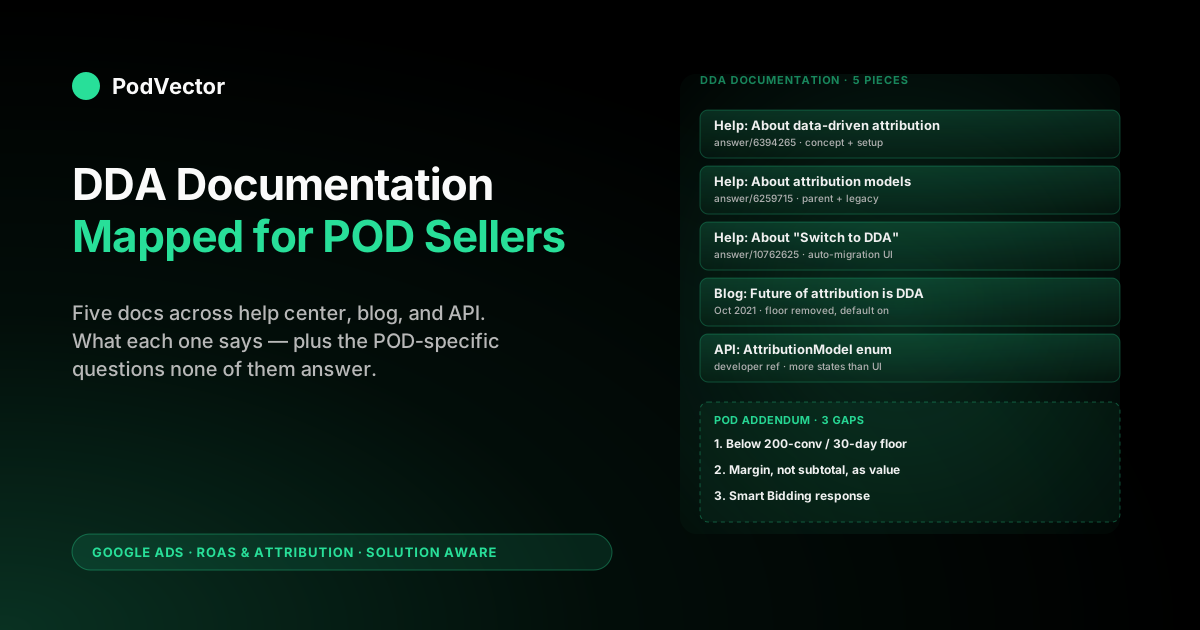
Quick Answer: Google's data-driven attribution (DDA) "documentation" isn't one page — it's a small constellation: the conceptual help article, the parent "About attribution models" article, the "Switch to DDA" auto-migration help doc, the 2021 launch blog post, and the Google Ads API reference for the AttributionModel enum. Each piece says something different, and none of them say what a print-on-demand seller actually needs to know: that the recommended 200 conversions / 30-day data threshold rules out most POD stores, that the documented "conversion value" parameter has to be margin (not subtotal) or Smart Bidding scales toward gross revenue while you pay 30-40% in COGS, and that the API enum exposes more model states than the UI hints at. This guide maps the full official documentation footprint and adds the POD-specific addendum each doc skips.
The full DDA documentation map
Search "Google Ads data-driven attribution documentation" and the first result is one help article. That's misleading.
The official documentation for DDA is spread across at least five distinct pieces of Google-owned content, each authoritative for a different question. If you're trying to learn the model, you read one.
If you're trying to debug a tracking bug, you read another. If you're trying to write code against the Google Ads API, you read a third.
Here's the map a POD operator should know:
- Help center, conceptual — "About data-driven attribution". The model definition, benefits, data thresholds, and setup steps.
- Help center, parent doc — "About attribution models". Where DDA sits among the legacy rule-based models and what was sunset in 2023.
- Help center, migration — "About 'Switch to DDA'". The auto-migration program, eligibility states, and the UI that shows your account's status.
- Google Ads blog post — "The future of attribution is data-driven" (October 2021). The product announcement that removed the eligibility floor and made DDA the default.
- Developer reference — Google Ads API documentation for the AttributionModel enum. The machine-readable list of every model the API recognises, including states the UI doesn't surface.
Treat them as a reference set, not a single page. The conceptual doc tells you what DDA is; the migration doc tells you whether it's on; the API doc tells you what the system thinks about your conversion action programmatically. For the upstream framing of where attribution sits inside the broader POD measurement stack, see the complete guide to Google Ads ROAS and attribution for POD.
Help center: About data-driven attribution
The conceptual article (answer/6394265) is what most operators mean when they say "the DDA documentation." It runs about 1,100 words across five sections: an introduction, Benefits, How it works, Data requirements, and How to set up DDA for your conversions.
The substantive content is condensed. DDA is described as a model that "uses your conversion data to calculate the actual contribution of each ad interaction across the conversion path" — a one-line summary of a Shapley-value-style calculation.
The benefits section enumerates three outcomes: identifying high-impact keywords and campaigns, optimising bids using account-specific data, and removing guesswork from model selection. The data requirements section gives the recommended floor — 200 conversions and 2,000 ad interactions in supported networks within 30 days — and notes that the model still runs below that threshold but with degraded accuracy. The setup section is a six-click path through Goals → Conversions → Summary → click action → Edit settings → Attribution model dropdown → Data-driven → Save.
The article uses one extended example: a tour company where DDA recognises that "Bike tour New York" generic searches preceding "Bike tour Brooklyn waterfront" branded searches increase conversion likelihood. That example is operationally fine but doesn't transfer to a POD store, where the cross-product equivalent would be a generic apparel search preceding a brand-specific design search — a path that's much rarer in POD because most POD purchases are impulse-driven from a single ad-to-purchase session.
The doc never adjusts for that difference. For the POD-specific section-by-section walkthrough of this article and the migration article side-by-side, see Google Ads data-driven attribution help explained for POD sellers.
Help center: About attribution models (the parent doc)
The parent help article (answer/6259715) is "About attribution models." It's the doc that lists every model Google Ads supports and links out to the per-model deep dives. For DDA documentation, this is the doc you read to understand the legacy context.
What the parent doc records:
- Last-click — gives 100% of credit to the final ad-click conversion path. Still supported.
- Data-driven — the default for new conversion actions; uses ML to distribute credit across the path.
- First click, linear, time decay, position-based — sunset for new conversion actions in April 2023 and for all conversion actions later that year. The doc lists them mostly as historical reference now.
The parent doc is short — under 800 words — but it's the only place in Google's documentation that puts the legacy models and DDA into a single comparison table. If you're trying to understand why first-click attribution disappeared from the dropdown in your account during 2023, this is the doc that records the decision. For the per-model breakdown of what changed and what survived, see Google Ads attribution models explained for POD sellers.
Help center: About "Switch to DDA"
The migration article (answer/10762625) is operational, not conceptual. It documents the "Switch to DDA" tab inside Goals → Attribution and the auto-migration program Google ran from late 2023 through mid-2024 to move every eligible conversion action from a rule-based model to DDA.
The article documents three eligibility states for any given conversion action:
- Auto-switched. Google migrated the action from last-click (or another rule-based model) to DDA, with at least 30 days advance notice via email.
- Eligible, not yet switched. The action meets the data threshold but Google hasn't migrated it — usually because the operator opted out, or the account is in a wave that hasn't run yet.
- Not eligible. The action is below the data floor, paused, or inactive.
The article also documents the 3,000 ad interactions / 300 conversions over 30 days as the threshold for auto-switch eligibility — which is higher than the 200/2,000 threshold the conceptual doc gives for "trustworthy DDA reporting." That's not a contradiction; it reflects two different decisions Google has to make. The 200/2,000 number is when the model is confident enough to publish credit splits at all.
The 3,000/300 number is when Google is confident enough to migrate you without asking. POD operators frequently sit between the two: above the publishing floor, below the auto-migration floor — meaning DDA is technically available on your action but Google never moved you.
The doc doesn't flag this gap. For the auto-switch dynamics specifically, see about data-driven attribution Google Ads help explained for POD sellers.
Google Ads blog: "The future of attribution is data-driven"
The October 2021 blog post on blog.google is the product announcement that converted DDA from an opt-in feature with a 600-conversions/30-day floor into the default with no minimum. It's not strictly documentation in the help-center sense, but it's the canonical reference for the policy decision and is cited internally by the help articles. Three substantive points the blog post records:
- The eligibility floor was removed. Before October 2021, accounts needed at least 600 conversions in 30 days to use DDA. The blog post announced the removal of that minimum and made DDA available to every conversion action regardless of volume.
- DDA became the default for new conversion actions. Any conversion action created after the October 2021 update was automatically configured to use DDA unless the operator overrode it.
- The 6% lift number originated here. Google's quoted "average 6% conversion lift after switching to DDA" comes from this announcement. It's an aggregate across Google's customer base; the help center repeats the number without recalculating it for any specific advertiser type.
The blog post is the only piece of documentation that explains the timing. Help articles tell you DDA is available; the blog post tells you when it became available and why. For POD, the practical takeaway is that any account created after late 2021 has been on DDA-by-default since day one, while accounts older than that may have been auto-migrated during the 2024 sweep — a state difference that affects how much pre-DDA historical data you have to compare against.
Google Ads API reference: AttributionModel enum
The Google Ads API documentation is the most overlooked piece of DDA's documentation surface. The AttributionModel enum in the API reference lists the full set of attribution-model states the system can hold for a conversion action — and it's longer than the UI dropdown.
The values the enum exposes (paraphrased from the API docs):
EXTERNAL— attribution provided by an external source (e.g. Search Ads 360 for managed accounts).GOOGLE_ADS_LAST_CLICK— last-click within Google Ads.GOOGLE_SEARCH_ATTRIBUTION_FIRST_CLICK,_LINEAR,_TIME_DECAY,_POSITION_BASED— the legacy rule-based models, still listed as enum values for backward compatibility but no longer assignable to new actions.GOOGLE_SEARCH_ATTRIBUTION_DATA_DRIVEN— DDA itself.UNSPECIFIEDandUNKNOWN— system-level states for actions that haven't been configured or where the model can't be determined.
The reason this matters for an operator: when you query your conversion actions via the API (or via a tool that does), the model field can return values the UI doesn't display. A conversion action that the UI shows as "Data-driven" might be returned as UNKNOWN by the API if the action is in a transitional state (recently migrated, recently paused, recently un-paused).
Tools that read conversion-action state programmatically need to handle the transitional values. For most POD operators using the UI directly, this is invisible — but anyone connecting Google Ads data to a warehouse via the API hits the enum directly.
This is also where Victor reads from. The agent's a warehouse integration pulls Google Ads conversion-action state via the API rather than scraping the UI, which means it sees the full enum. For a fuller picture of the conversion-tracking pipeline that sits underneath attribution, see Shopify Google Ads conversion tracking setup guide for POD sellers.
Release notes and product update timeline
The fifth piece of documentation is implicit: Google's release notes and product update emails over the 2021-2024 window. There's no single doc that consolidates them, but the timeline matters when you're trying to reconcile when DDA changed for your account:
- October 2021. Eligibility floor removed; DDA becomes default for new conversion actions.
- April 2023. First-click, linear, time-decay, and position-based attribution sunset for new conversion actions.
- Late 2023. "Switch to DDA" tab launched; auto-migration of eligible rule-based actions begins, with 30-day email notice.
- Mid-2024. Auto-migration completes for the bulk of eligible accounts.
- Ongoing. Last-click remains supported as a manual fallback; rule-based models other than last-click and DDA cannot be assigned to new conversion actions.
If you're auditing an account that was created before October 2021 and still has any rule-based conversion actions, this timeline tells you the windows during which each transition could have happened. The help center doesn't publish a consolidated changelog; you have to reconstruct it from the migration doc, the blog post, and product-update emails. For the default-model behaviour specifically, see data-driven attribution default Google Ads help explained for POD sellers.
What every piece of documentation skips for POD
Every doc above is technically accurate. None of them answer the three questions a POD operator actually has when they sit down with a coffee and the support center open in another tab.
Question 1: What if I'm below the data floor? Most scaling POD stores running $500-1,200 per month on Google Ads sit at 40-100 conversions per 30 days — below both the 200/2,000 publishing threshold and the 3,000/300 auto-migration threshold. The conceptual doc says DDA "still runs" below the floor; what it doesn't say is that below-floor DDA reporting is heavily smoothed toward last-click priors. A sub-floor account on DDA gets credit splits that look 70-80% similar to last-click, meaning the operational difference is muted until volume crosses the threshold.
Question 2: What conversion value should I send? The docs treat conversion value as a parameter you set, never recommending margin-based reporting. For POD, the default order subtotal is the wrong number.
A $24.99 t-shirt with $11.20 Printify base, $4.95 fulfilment, and $1.02 in payment fees lands $7.82 in your bank account — a 31% margin, not a 100% margin. If you send $24.99 to Google Ads as conversion value, DDA splits credit correctly across the path, but Smart Bidding then scales spend toward the $24.99-shaped pile while the bidder never sees the cost-of-goods leak.
A 3x reported ROAS on raw subtotal can easily be 1.0-1.2x on contribution margin, which is break-even at best. The fix is offline conversion adjustments or a server-side tag that subtracts COGS and fulfilment before the conversion event leaves your store. None of the official docs walk this through.
Question 3: What does this all mean for my Smart Bidding strategy? The docs document DDA in isolation — model definition, eligibility, setup. They don't make explicit that DDA's main operational effect for POD is changing what tROAS and Maximize Conversions strategies optimise toward.
Under last-click, branded search and remarketing look outsized; YouTube and Display look anaemic, and Smart Bidding starves the upper funnel. Under DDA, fractional credits flow to upper-funnel touches, the bidder learns those touches correlate with downstream sales, and spend redistributes.
This is the actual reason POD operators care about the model. The reporting columns are a side effect. For the bid-signal pathway, see Google Ads attribution explained for POD sellers.
Using the documentation as an employee reference
A practical workflow for a POD operator who wants to use the documentation rather than skim it:
- Bookmark the conceptual doc and the parent doc. answer/6394265 for definitions; answer/6259715 for the model comparison. These two together cover 90% of definitional questions.
- Open the migration doc when auditing a specific conversion action. answer/10762625 plus your Goals → Attribution → Switch to DDA tab will tell you whether the action was auto-migrated, when, and from what.
- Reference the API enum if you're connecting to a warehouse. The transitional values matter when you're reading conversion-action state programmatically. UI displays smooth them out; the API doesn't.
- Skim the 2021 blog post once for historical context. Useful if you've ever wondered why a 2020-era guide to Google Ads attribution looks nothing like the current UI.
- Don't expect any of them to address POD margin economics. Build the conversion-value layer separately, on top of whatever the docs prescribe.
The documentation is a definition of the system, not a playbook. Treat it as the first 60% of the work — the part that tells you what the buttons do.
The remaining 40% is the value-input layer (margin instead of subtotal), the data-floor strategy (when to trust the credit splits), and the Smart Bidding response (how the bidder reacts when DDA changes its training signal). For the broader Smart Bidding playbook, see the complete Google Ads playbook for print-on-demand sellers. For an external operator-facing walkthrough that treats DDA as a workflow rather than a definition, the Analyzify guide covers the comparison-and-example angle that complements Google's reference style.
FAQs
Where is the official Google Ads data-driven attribution documentation?
It's not one page — it's five. The conceptual help article is at support.google.com/google-ads/answer/6394265. The parent attribution-models doc is at answer/6259715. The migration doc is at answer/10762625. The 2021 launch blog post is on blog.google. The Google Ads API reference covers the AttributionModel enum for programmatic access.
Which doc should I read first if I'm new to DDA?
The conceptual help article (answer/6394265). It's the only one written as a top-down explainer and runs ~1,100 words. The other docs assume you know what DDA is and answer narrower operational questions.
Does the Google Ads API documentation expose more attribution models than the UI?
Yes — it exposes the full enum including UNSPECIFIED and UNKNOWN states the UI doesn't display, plus the legacy rule-based models that are no longer assignable but remain in the enum for backward compatibility. Anything reading conversion-action state programmatically needs to handle the transitional values.
What's the data threshold the documentation actually requires?
There are two thresholds and the docs handle them in different places. The conceptual doc gives 200 conversions and 2,000 ad interactions in 30 days as the recommended floor for trustworthy reporting.
The migration doc gives 3,000 ad interactions and 300 conversions in 30 days as the floor for auto-migration eligibility. The hard eligibility minimum was removed in October 2021 — DDA runs at any volume now, just less reliably below the floors.
Does any of the documentation explain how to send margin instead of subtotal as conversion value?
No. The docs treat conversion value as an input parameter and never recommend computing margin before sending it. For POD operators, this is the single biggest gap in the documentation: sending order subtotal as conversion value lets DDA optimise toward gross revenue while you pay 30-40% of every order in COGS and fulfilment that the bidder doesn't see.
How do I check whether my account was auto-migrated to DDA?
Goals → Attribution → "Switch to DDA" tab. The tab lists every conversion action and its eligibility state (Auto-switched, Eligible-not-yet-switched, or Not eligible). The migration doc (answer/10762625) describes this UI explicitly. For most POD accounts older than 6 months, every eligible Purchase action has already been auto-switched.
Is the 6% conversion lift Google quotes specific to POD?
No. The 6% number originated in Google's October 2021 announcement and is an average across the entire customer base. The help center repeats it without recalculating for any specific advertiser type. POD-specific lift varies widely depending on how many non-Search campaigns are in the mix — single-channel Search-only accounts see less, multi-channel accounts running PMax and YouTube see more.
How long is the attribution window in the documentation?
The documentation describes the conversion-window setting as a per-conversion-action parameter, not part of the attribution model itself. Default is 30 days for clicks. For the conversion-window mechanics specifically, see Google Ads attribution window explained for POD sellers.
Read the docs, then fix what they don't say
The Google Ads documentation tells you how DDA distributes credit across a conversion path. It doesn't tell you how to make sure the conversion value the model is splitting is the dollar that actually lands in your bank account. For a POD store, that gap is 30-40% of every order — the cost of goods, fulfilment, and payment fees the documentation never mentions. Victor pulls live data from your Shopify orders, Printify and Printful cost feeds, and Google Ads spend, computes per-order contribution margin, and posts margin-as-value back to Google Ads via offline conversion adjustments. So when DDA does the math the docs describe, it's doing it on the number that actually matters. Ask Victor "What's my true ROAS after COGS by campaign?" and he'll answer from your live data instead of a spreadsheet.
Try Victor free