
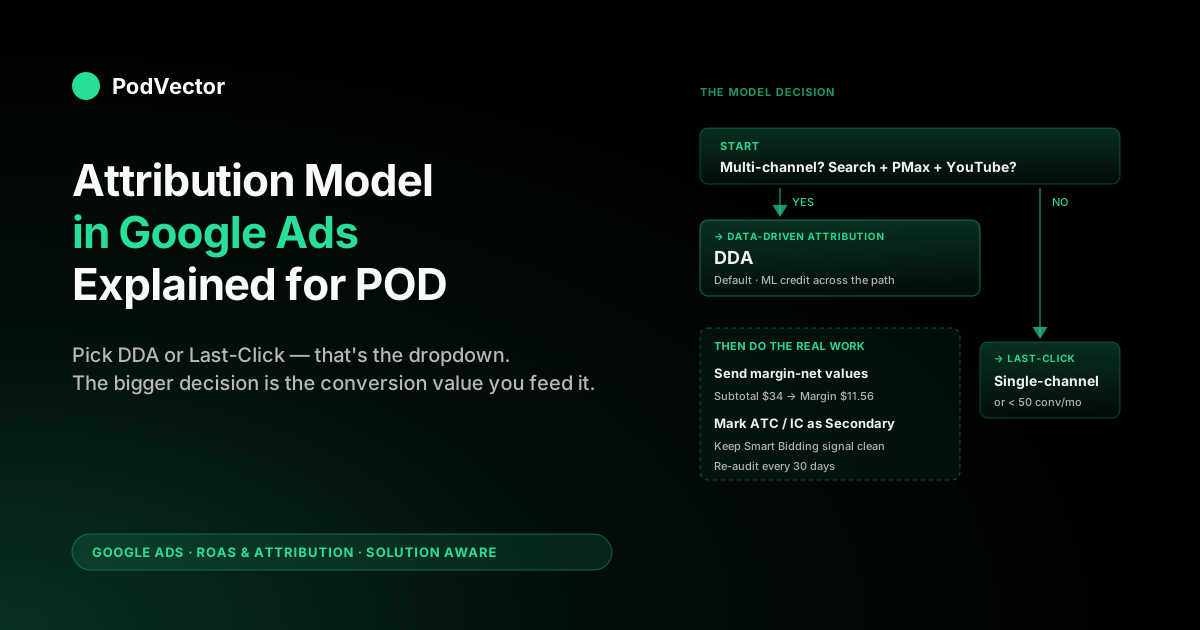
Quick Answer: The attribution model in Google Ads is a single per-conversion-action setting that decides how credit gets split across the ad clicks a shopper made before buying. In 2026 you have exactly two choices — Data-Driven Attribution (the default, machine-learned credit) and Last-Click (100% to the final paid click) — and the choice flows straight into Smart Bidding's bid math, not just your reports. For POD sellers the model decision matters less than the conversion-value decision underneath it: every model in Google Ads will burn margin if the value you send is the order subtotal instead of the subtotal net of Printify or Printful supplier cost.
What "the attribution model in Google Ads" actually means
An attribution model is a rule. The rule answers a single question: when a shopper interacted with multiple Google Ads before converting, who gets credit for the sale?
It is set at the conversion-action level — your Purchase action has one model, your Lead action has another if you want — and it determines two things at once:
- How conversions and conversion value are distributed across campaigns, ad groups, and keywords in your reports.
- What numbers Smart Bidding sees when it decides what to bid in the next auction.
That second part is what most operators miss. Picking an attribution model isn't a reporting preference.
It rewires your bidding system. A campaign that earned a 4.2 reported ROAS under Last-Click can show 2.8 the next morning under Data-Driven Attribution, not because anything changed in the real world but because the credit redistribution made the assist-heavy campaigns look more important. Smart Bidding then spends accordingly.
For a higher-level overview of how attribution shows up across your account, see Google Ads Attribution Explained for POD Sellers. This article is the tactical "which one model do I pick and how do I configure it" companion.
The two options in 2026 (and the four that are gone)
The Google Ads attribution model dropdown has exactly two options as of 2026:
- Data-Driven Attribution (DDA) — the default. Uses your account's own conversion paths to assign fractional credit to every interaction along the path.
- Last-Click — assigns 100% of the credit to the last paid Google Ads click before the conversion.
Until late 2023, four other rule-based models were available: First-Click, Linear, Time Decay, and Position-Based. Google retired all four.
If you remember those models from older blog posts or from your own pre-2023 setup, they no longer exist as choices — Google migrated affected conversion actions to DDA automatically. We covered the deprecation arc in Attribution Model Google Ads Explained for POD Sellers; the short version is that Google wanted Smart Bidding to optimize against a single ML signal rather than six competing heuristics.
The "External" option you may see in third-party guides isn't a model — it's a path for importing attribution credit from tools like Northbeam, Triple Whale, or Hyros via offline conversion uploads. Practically speaking, in-account, you choose between DDA and Last-Click.
How Data-Driven Attribution decides credit, in plain English
DDA is a counterfactual model. It asks the question "how much would the conversion probability change if this interaction hadn't happened?" and assigns credit in proportion to the answer.
Walk through a real POD path:
- A shopper sees a YouTube ad for your retro band hoodie design (interaction 1).
- Three days later they click a Performance Max Search ad and browse for two minutes (interaction 2).
- Four days after that they click a Brand Search ad for "yourstore band hoodie" and complete a $34 purchase (interaction 3).
Under Last-Click: Brand Search gets 1.0 conversions and $34 of value. YouTube and Performance Max get nothing. Smart Bidding sees Brand Search as the only campaign worth bidding on.
Under DDA: Google compares this path to the paths of shoppers who saw similar interactions but did not convert. If removing the YouTube view from comparable paths drops conversion probability by, say, 18%, the YouTube interaction earns 0.18 conversions and $6.12 of value.
Performance Max might earn 0.42 and $14.28. Brand Search earns 0.40 and $13.60.
Total still sums to 1.0 and $34. Smart Bidding now sees three campaigns worth bidding on, and the bid weights reflect each campaign's measured contribution.
Two technical details that matter:
- The fractions sum to 1.0 per conversion. DDA never inflates total conversion volume — it just redistributes the credit.
- The model is account-specific. Your DDA isn't a generic Google formula; it's trained on your own conversion paths over the past 30 days. Two POD stores selling identical products to identical audiences can get different DDA distributions because their funnel mix differs.
For a deeper walkthrough of the DDA mechanics including the eligibility threshold, see Data Driven Attribution Google Ads Explained for POD Sellers and the official Google Ads attribution models help center page.
When Last-Click is still the right call
DDA is the default and the long-term direction Google is pushing accounts toward. That doesn't mean Last-Click is wrong for every account. Three scenarios where Last-Click is still defensible:
- You only run one campaign type. If your entire Google Ads account is branded Search — no Performance Max, no YouTube, no Display, no Discovery — then by definition every conversion path has one Google Ads touch. The last click is also the only click. DDA and Last-Click produce identical numbers, but Last-Click is simpler to explain and audit.
- You are running a clean A/B test or campaign experiment. Test results read more cleanly under Last-Click because credit doesn't drift across the path during the test window. Use Last-Click for the experiment, then switch back.
- Your conversion volume is deeply below the DDA threshold. If you're doing 20 conversions per month per action, DDA's "machine learning" has effectively no data to learn from. The reports will say "data-driven" but the underlying allocation is essentially random for assist credit. Last-Click at least gives you a deterministic rule you can interpret. (See Data Driven Attribution Model Google Ads Explained for POD Sellers for the volume thresholds.)
For most POD stores running Performance Max alongside Search, none of the three apply. DDA is the right pick. But "DDA is always best" is too strong a claim to make blindly.
A POD-specific decision framework
Three questions, in order. Stop at the first "yes."
- Is your account single-channel and branded-Search-only? → Last-Click. Model choice is cosmetic; pick the simpler one.
- Are you running fewer than 50 conversions per month per action? → Last-Click for cleaner reports. Operate as if attribution doesn't matter and focus on traffic mix and creative.
- Are you running Performance Max + Search + remarketing or YouTube? → DDA. Last-Click would systematically underrate the assist channels Performance Max creates.
If none of the above apply (you're between 50 and 200 conversions per month per action — Google's recommended DDA training volume — and running a couple of campaign types), default to DDA but read the model-comparison report monthly. The point of the comparison report is to show you how badly Last-Click would underrate your top-of-funnel — if the difference is small for your account, Last-Click's simplicity may win.
A quick sanity check before any model change: open Tools → Measurement → Attribution → Top Paths. If 80%+ of your conversions are single-touch (one click → conversion), the model decision changes almost nothing. Spend the time you'd have spent tweaking attribution on creative testing instead.
How to set or change the attribution model
The setting lives at the conversion-action level, not the campaign level. To change it:
- Open Google Ads. Click Goals → Conversions → Summary.
- Click the conversion action you want to edit (typically Purchase).
- Click Edit settings.
- Scroll to Attribution model and select Data-driven or Last-click.
- Click Save.
Three things to know about what happens next:
- The change is retroactive. Historical conversion data gets re-credited under the new model. A campaign that looked profitable yesterday under Last-Click can look unprofitable today under DDA. Don't panic — nothing in the real world changed.
- Smart Bidding takes 1–2 weeks to relearn. If the changed action is one that Smart Bidding optimizes against (Target ROAS, Maximize Conversion Value), the bidder rebuilds its internal model from the new attributed values. The first week is noisy. Don't pause campaigns based on day-3 numbers.
- You can revert. The reverse change is also retroactive. If DDA tanks a previously stable campaign, switch back to Last-Click and the historical credits flip again.
For step-by-step screenshots of the attribution settings page, see Google Ads Attribution Settings Explained for POD Sellers.
Attribution model vs. attribution window (different settings, often confused)
The model decides how credit splits. The window decides how far back Google Ads will look for clicks to credit. They're separate dropdowns; changing one doesn't touch the other.
Defaults in 2026:
- Click window: 30 days for Search, Shopping, and Display. Configurable to 1, 7, 14, 30, 60, or 90.
- View-through window: 1 day for Display and YouTube. Mostly leave alone.
POD-specific window guidance:
- Evergreen niche stores (gifts, family humor, hobbies) — keep 30 days. Shoppers research, screenshot, and come back.
- Trend-driven stores (current events, drops, viral designs) — shorten to 7 or 14 days. Late-attributed clicks credit campaigns that are no longer relevant.
- Holiday cycles (Q4, Mother's/Father's Day, Valentine's) — 30 days catches the planning-to-purchase arc. Don't shorten during these cycles.
For the full window decision, see Google Ads Attribution Window Explained for POD Sellers.
What changing the model does to Smart Bidding
Smart Bidding strategies — Target ROAS (tROAS), Maximize Conversion Value, Maximize Conversions, Target CPA — read the attributed conversion values per auction. The attribution model decides which past clicks even count, and the model's distribution decides how much value sits in each campaign.
Concretely, for a POD store running Performance Max + Brand Search + a YouTube remarketing layer:
- Under Last-Click: YouTube and Performance Max upper-funnel placements get near-zero credit. Smart Bidding learns to bid almost nothing on them. Spend concentrates in Brand Search, where the last click usually lands.
- Under DDA: YouTube and Performance Max get fractional credit when they assist. Smart Bidding raises its bid floor on those campaigns, expands reach, and the conversion path widens. New customer acquisition through upper-funnel improves; reported ROAS on Brand Search alone drops because some credit flows away from it.
This is why the model decision is consequential precisely when you have multiple campaign types. Single-channel accounts will see almost identical bidding behavior under both models. Multi-channel accounts will see materially different budget allocation, sometimes within the first week.
The conversion-value problem nobody warns POD sellers about
Here's the thing the top-ranking attribution guides skip entirely: every attribution model in Google Ads operates on the conversion value you choose to send. None of the models know what your supplier cost is.
The typical POD scenario: you sell a $34 unisex hoodie. Printify charges your card $22.30 for the blank, the print, and shipping. Your true gross margin per order is $11.70 — about 34%. Now you set Smart Bidding to Target ROAS = 3.0, optimized against the order subtotal you reported to Google Ads.
Google Ads will happily bid hard on any auction where it predicts ROAS above 3.0. On a $34 sale that means it's comfortable spending up to $11.33 per acquired conversion.
Your supplier cost alone is $22.30. You are losing money on every "winning" auction by design — and DDA, by being smarter about credit assignment, will only make Google bid more confidently into the same losing setup.
The model decision matters. The conversion-value decision matters more. Two ways to fix the latter:
- Quick fix: in your conversion script (Shopify, GTM, etc.), multiply the order subtotal by your average gross margin percentage before sending it to Google Ads. A 34% margin store sends $34 × 0.34 = $11.56 as the conversion value. Your reported ROAS will look smaller, but Smart Bidding will optimize against contribution margin instead of inflated revenue.
- Real fix: compute and send actual itemized margin per order, accounting for product variant cost, shipping zone, refunds, and Shopify/Stripe fees. This is what platforms built for POD margin tracking do — and it's how you get a Target ROAS setting that actually corresponds to "I want to make money."
For the deeper margin math and how supplier costs propagate through Google Ads reports, see the ROAS & Attribution cluster hub and The Complete Google Ads Playbook for Print-on-Demand Sellers.
Picking a different model per conversion action
You don't have to use the same model for every conversion action. The setting is per-action, and there's a strong case for treating different actions differently:
- Purchase action — DDA. This is the action Smart Bidding optimizes against, so you want the richest credit signal feeding the bidder.
- Add-to-Cart action — Last-Click and mark it as Secondary so it doesn't drive bidding. ATC has notoriously high abandonment in POD, and counting it as a primary conversion pollutes Smart Bidding with intent signal that doesn't translate to revenue.
- Lead / email signup — Last-Click is fine. These are typically reporting-only actions, not bidding targets.
- Initiate Checkout — Last-Click and mark Secondary. Same logic as ATC.
The reason this matters: every "primary" conversion action under DDA gets fractional credit attributed across the path. If you have four primary actions tracking the funnel (View Item, ATC, IC, Purchase), Smart Bidding is reading four different attributed-value streams, and the assist credit gets multiplied across them. Designating only Purchase as primary keeps the bidding signal clean.
For more on which conversion actions to track and which to mark secondary, see Google Ads Conversions Attribution Explained for POD Sellers.
A 10-minute attribution audit for your POD store
Run this monthly. Catches the most common attribution problems before they cost you a quarter of bad bid decisions.
- Open Goals → Conversions → Summary. Confirm the Purchase action's model is set correctly (DDA for multi-channel, Last-Click for single-channel branded). Confirm only Purchase is marked Primary; ATC, IC, and Lead should be Secondary.
- Open Tools → Measurement → Attribution → Overview. Note your average path length and time to conversion. If average path length is < 1.3, attribution model choice barely matters for you and you should focus on traffic and creative instead of attribution settings.
- Open the Model Comparison report. Compare Last-Click vs. DDA conversion volume by campaign. The biggest gainers under DDA are your assist channels. The biggest losers are your branded Search keywords. If the ratios shock you, that's a signal that you've been over-investing in branded under Last-Click.
- Check the conversion value math. Pull a sample of last week's purchases and verify the conversion value Google Ads received matches what you'd consider "real margin," not the order subtotal.
- Check the attribution window. 30 days for evergreen, 7–14 for trend-driven, 30 for Q4. Adjust if you've migrated product categories.
For a longer attribution-reading walkthrough including which metrics are signal vs. noise at sub-$20K/month volume, see Google Ads Attribution Reports Explained for POD Sellers. For where attribution sits inside the broader Google Ads strategy for POD, the Google Ads topic hub indexes everything by funnel stage.
FAQs
What's the default attribution model in Google Ads in 2026?
Data-Driven Attribution. DDA has been the default for new conversion actions since Google's 2023 model consolidation. Existing actions on retired models (First-Click, Linear, Time Decay, Position-Based) were migrated to DDA automatically.
Is the attribution model the same as the attribution window?
No. The model decides how credit splits across multiple touches; the window decides how many days back Google Ads will look for clicks to credit. They're separate settings on the conversion-action edit screen.
How many conversions do I need for DDA to work properly?
As of 2026, DDA is technically eligible for every conversion action regardless of volume — Google removed the old hard minimum. But for the model to actually learn meaningful credit, Google recommends at least 200 conversions and 2,000 ad interactions across supported networks in a 30-day window. (The old threshold many guides still cite was 300 conversions / 3,000 interactions; Google lowered it.) Below the recommended volume, DDA still operates in the UI but with limited training data — credit distribution behaves more like Last-Click in practice. Most POD stores under $20K/month don't hit the recommended volume cleanly per action, which is fine; just don't read too much into report-level allocation shifts.
Will changing the attribution model affect my historical reports?
Yes. Model changes are retroactive. Switching from Last-Click to DDA re-credits historical conversions under the new rules, so a campaign's historical ROAS can shift overnight without any new sales happening.
Does the attribution model affect Smart Bidding?
Yes — directly. Smart Bidding strategies (Target ROAS, Maximize Conversion Value, Target CPA) read the attributed conversion values per auction. Changing the model changes those values, which changes the bids. Plan for 1–2 weeks of relearning after a model change.
Should I use the same attribution model for every conversion action?
Not necessarily. Use DDA for the Purchase action (the one Smart Bidding optimizes against). Last-Click is fine — and often simpler — for secondary actions like Add-to-Cart, Initiate Checkout, and Lead. Make sure those secondaries are marked as Secondary so they don't drive bidding regardless.
Can I still use First-Click, Linear, Time Decay, or Position-Based attribution?
Not in Google Ads. All four were retired in late 2023. The closest substitute is exporting your conversion paths and modeling them in a warehouse or a third-party attribution tool, then importing the resulting credit back via offline conversion uploads.
Does the attribution model affect Performance Max?
Yes. Performance Max relies on DDA for credit distribution across its inventory (Search, Shopping, Display, YouTube, Demand Gen, Gmail, Maps). Performance Max is one of the strongest cases for keeping DDA on, because the multi-channel paths it generates are exactly what Last-Click underrates.
What happens if I switch to DDA but don't have enough conversions?
Google Ads still applies the setting, but the credit distribution falls back toward Last-Click-like behavior because the model has insufficient training data. Your reports will say "data-driven" — the underlying math may not match. Check the model comparison report to see the actual distribution.
Does the attribution model affect what conversion value I send to Google Ads?
No. The model splits whatever value you send. If you send $34 (order subtotal), DDA splits $34 across the path. If you send $11.56 (margin-net value), DDA splits $11.56. The model decision and the value-reporting decision are separate, and the value decision matters more for POD profitability.
How does Google Ads attribution differ from GA4 attribution?
Google Ads attribution credits only paid Google Ads interactions. GA4 attribution credits all channels, including organic search, direct, email, and other paid platforms. They use similar DDA mechanics on different data scopes. For more on how the two interact, see the ALM Corp 2026 attribution modeling guide.
Pick the right model — then make sure the value you're optimizing against is real
Choosing DDA vs. Last-Click matters. Sending the right conversion value matters more. If you're optimizing Smart Bidding against the order subtotal, every model decision is being applied to a number that ignores Printify or Printful supplier cost, refunds, and Shopify fees — and the smarter your attribution gets, the faster Google bids you into unprofitable auctions. Victor connects to your store, your supplier accounts, and your Google Ads in minutes, then reports true ROAS net of every itemized cost so the bids you're paying for actually produce margin. Ask Victor "what's my real ROAS by campaign this week?" in plain English; the answer comes from a live data warehouse, not a snapshot.
Try Victor free