
Quick Answer: The Google Ads attribution window is the lookback period during which a click or engaged view can still be credited as the cause of a conversion. In 2026, Search and Shopping campaigns default to a 30-day click-through window with no view-through credit; Display, Demand Gen, and YouTube default to a 30-day click and a 3-day engaged-view window (Google raised the engaged-view default from 1 day, and now lets you set any value from 1 to 30 days).
For print-on-demand sellers, the default 30-day click is too long for a $34 hoodie that buyers usually decide on within 1–3 days, and the engaged-view defaults systematically over-credit YouTube on accounts with thin POD margins. The right move for most POD operators is a 7-day click-through window with view-through off for purchase, evaluated against actual margin (price minus Printify or Printful supplier cost minus Shopify fees) rather than reported subtotal — that combination feeds Smart Bidding the credit signal that matches how POD buyers actually decide.
What the Google Ads attribution window actually is
The Google Ads attribution window — Google's official term is conversion window, but the broader marketing community uses "attribution window" interchangeably — is the maximum amount of time that can pass between a user's interaction with your ad and a conversion before Google stops counting that interaction as a possible cause of the conversion. If a window is set to 30 days and someone clicks a Shopping ad on day zero and buys on day 31, Google does not attribute that purchase to the click. If the same purchase happens on day 28, it does.
Two things commonly confuse the window with adjacent concepts. First, the window is not the attribution model.
The model decides how credit is split across multiple eligible touchpoints inside the window — last-click hands all credit to the final ad interaction, data-driven attribution distributes credit using a counterfactual model. The window decides which touchpoints are eligible at all.
Second, the window is not the same as the GA4 lookback period. GA4 has its own conversion lookback configured separately in the GA4 admin; Google Ads has its own; they are tuned independently and rarely match by default. For the broader anatomy of how the window sits inside attribution, the Google Ads attribution explained for POD sellers guide covers the full model-window-bidding triangle, and the cluster hub at Google Ads ROAS and attribution for POD ties window choice to actual ROAS measurement.
The window matters operationally because it determines which dollars of ad spend get credit for which dollars of revenue, which then feeds Smart Bidding's optimization signal, which then determines how Google allocates your budget tomorrow. A window that is too long over-credits early-funnel touches and lets Smart Bidding chase impressions that don't lead to purchases inside the real decision cycle.
A window that is too short under-credits real assists and starves Smart Bidding of the data it needs to learn. Both errors are common; both are expensive on a POD account where margin is thin.
The two windows: click-through and engaged-view
Google Ads exposes two separate windows on every conversion action, and the defaults differ.
Click-through window. The maximum time between a click on your ad and the conversion. Google now lets you set any value from 1 to 30 days, plus 60 or 90 — it's no longer the old fixed 1/7/14/30/60/90 dropdown, so a 7-day or even a 3-day click window is a first-class option rather than something you have to approximate.
Search, Shopping, and Performance Max default to 30 days. This is the window that matters most for POD because click-driven conversions are the dominant path on Shopping and branded Search, which are typically the largest spend buckets in a POD account.
Engaged-view window. The maximum time between a counted engaged view of your video ad and the conversion. Engaged view in Google Ads means the user watched at least 10 seconds of a skippable in-stream ad or the entire ad if shorter.
Configurable from 1 to 30 days, with a 3-day default (Google's help docs raised the engaged-view default from 1 day to 3 days, and now allow custom day values inside that range rather than the old fixed 1/3/7 choices). Pure view-through windows — for Display impressions that weren't engaged views — are exposed separately in some account configurations and default to 1 day when present, though Google has been steadily phasing out pure view-through credit in favor of engaged view.
The conventional wisdom that "view-through credit is overcounted" was true under the older view-through definition (an impression in the viewport for at least one second). Under the engaged-view definition, the credit signal is tighter — the user actually watched.
But on a POD account, even tight engaged-view credit can over-attribute to YouTube and Demand Gen, because POD buyers often see a brand ad weeks before they actually buy something unrelated, and the engaged-view window can still scoop in those weak associations on the longer 7-day setting. For most POD operators, leaving engaged view at the 1-day default — or turning it off entirely on the purchase conversion if YouTube spend is small — keeps the credit signal cleaner than the conventional advice would suggest.
2026 defaults by campaign type
Google has not changed the headline window defaults in the 2025–2026 update cycle, but the surrounding context — data-driven attribution becoming the default model for every new conversion action, enhanced conversions consolidating on 1 June 2026, cookieless modeling now baked into reported conversions — has shifted what those defaults actually do. The current defaults:
- Search and Shopping: 30-day click, no engaged-view credit on the purchase conversion.
- Performance Max: 30-day click, 3-day engaged view.
- Display: 30-day click, 3-day engaged view, plus a 1-day pure view-through window in accounts where it's still configured.
- YouTube and Demand Gen: 30-day click, 3-day engaged view (Google raised the engaged-view default from 1 to 3 days, so accounts that never touched the setting are now crediting a day longer than they were).
- App campaigns: 30-day click for installs; in 2026, the conversion is now attributed to install date rather than click date, which compresses the effective window without changing the configured value (covered in our Google Ads attribution news explained for POD sellers piece).
The 30-day click default exists because Google's machine-learning bidder needs a sufficient credit-signal volume to train; shorter windows produce fewer credited conversions per unit of spend, which can starve learning on small accounts. That justification was written for accounts spending tens of thousands per month with multi-week consideration cycles. It applies awkwardly to a POD account spending a few thousand per month on impulse-purchase apparel.
Why the POD purchase cycle breaks the default 30-day window
The strongest argument for tuning the window away from the default on a POD account is that the actual decision cycle for the products POD sellers ship is unusually short. A $34 hoodie or a $24 mug is not a considered B2B SaaS purchase.
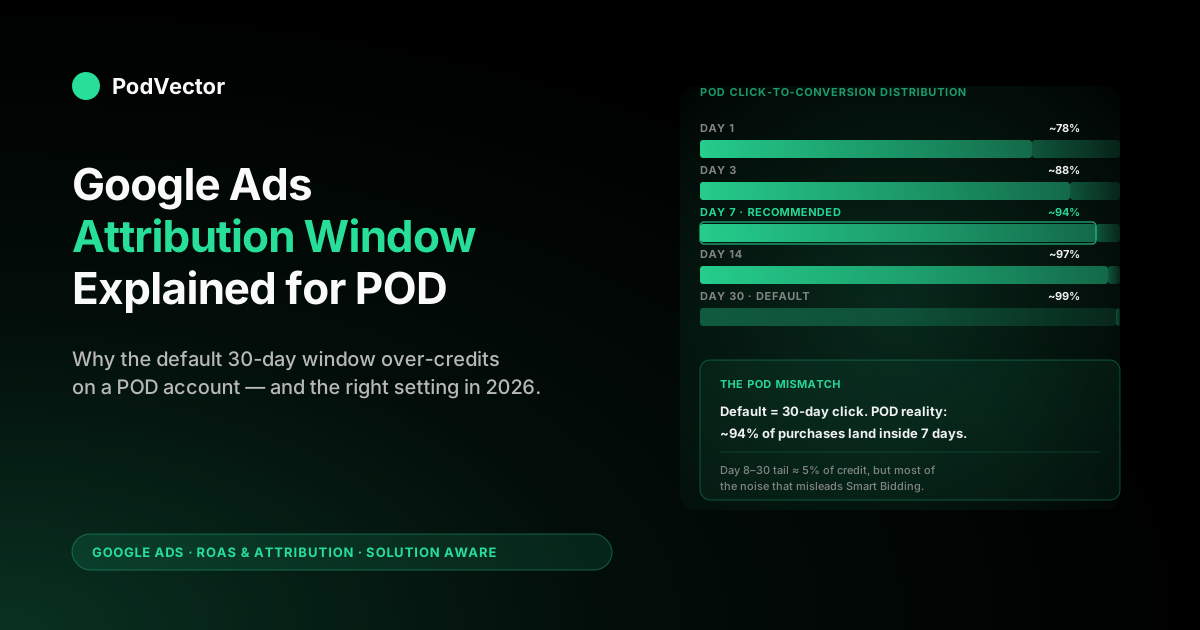
The data inside any POD operator's own account — accessible through the Google Ads time-lag report, covered below — typically shows 70–85% of conversions occurring within 1–3 days of the first ad click, and 92–96% within 7 days. The remaining tail of 30-day-window conversions is real but small, and on close inspection often mixes branded search clicks with view-through credit from much earlier ads, which is exactly the kind of weak association that over-credits.
Three structural features of POD make the default window misfit worse than for other ecommerce verticals:
Impulse-purchase intent dominates the funnel. POD products are usually bought on emotional response to a design — a fan shirt, a holiday-themed mug, a pet-portrait hoodie. The buyer is usually shopping on a phone, sees the design, decides within minutes whether to buy. The classic considered-purchase logic that justifies a 30-day window — the user clicks, thinks about it for two weeks, comes back via branded search, completes the purchase — describes maybe 5–10% of POD purchases.
Margin is thin. A 30-day window over-credits early touches, which means Smart Bidding sees campaigns that produced an early click as more valuable than they actually are, which means the bidder leans into them. On a 60% gross margin business, this misallocation costs a few percent of profit.
On a POD account where the gross margin on a $34 hoodie after Printify supplier cost ($14) and Shopify fees ($1.50) is closer to $9 — about 26% — the same misallocation can flip a campaign from profitable to unprofitable. The maths are unforgiving when the cushion is small.
Multi-channel mix is short and shallow. Most POD conversions involve 1–3 ad touchpoints, often all within the same week. The tail of 30-day-window conversions is mostly accounts where the user clicked something irrelevant 25 days ago and bought via a separate path today. Capturing that tail trains Smart Bidding on noise.
The cleanest test is to pull the time-lag report on your own purchase conversion (Tools → Measurement → Attribution → Time lag, then segment by conversion action). If your distribution looks like the 70–85% / 92–96% split described above — and most POD accounts do — the default 30-day window is over-fitted to a sales cycle you don't have. For a deeper read on how this interacts with attribution model choice, see attribution model Google Ads explained for POD sellers.
How to choose the right window for a POD account
The choice is rarely "stay at default" or "go aggressive" — it's a deliberate trade-off between credit-signal volume and credit-signal accuracy. Three reference settings cover most POD configurations:
Setting A — Default conservative (30-day click, engaged view at the 3-day default or dialed to 1 day). Stay here if your POD account spends under $750 a month, runs only one or two campaigns, and does not yet have enough conversion volume for Smart Bidding to learn quickly. The 30-day window over-credits some early touches but gives the bidder more credit-signal density per dollar of spend, which matters more than precision when total volume is small. Note that "default" now means a 3-day engaged-view window, not the 1-day it used to be — if you run any YouTube or Demand Gen spend, dial engaged view down to 1 day even at this conservative setting.
Setting B — POD-tuned (7-day click, 1-day engaged view). The right default for most POD accounts spending between $750 and $15,000 a month. Captures 92–96% of true purchase conversions based on typical POD time-lag distributions, while excluding the over-credited 30-day tail.
Smart Bidding still has enough credit signal to train, and the credit it receives more accurately reflects the real causal path. This is the setting we'd recommend in unattended judgement for a POD account at growth stage.
Setting C — POD-aggressive (1-day click, view-through off). Worth testing on accounts where the time-lag report shows 80%+ of conversions in day zero or day one. Strips the window down to the actual decision cycle.
Risks under-crediting weekend-funnel paths where a Friday click becomes a Sunday purchase. Use with caution and only after running setting B for at least 30 days as a baseline.
The configuration is per-conversion-action, not per-campaign or per-account. You can change it for the purchase conversion without touching whatever your add-to-cart or view-product secondary conversions are configured to. That separation matters because the credit-signal needs of "did this user buy" and "did this user start a cart" are different — the buy signal needs accuracy, the cart signal can tolerate broader windows.
For a step-by-step on the supporting attribution-model decisions that pair with window choice, our data-driven attribution Google Ads help explained for POD sellers guide covers how DDA distributes credit across the touchpoints the window accepts.
Configuring the window in Google Ads
The window lives on the conversion action, not on the campaign. The path:
- Tools → Measurement → Conversions.
- Click into your purchase conversion action (often called Purchase or Shopify Purchase, depending on how your tracking was set up).
- Edit settings → expand Click-through conversion window. Set any value from 1 to 30 days, or choose 60 or 90.
- Expand Engaged-view conversion window. Choose any value from 1 to 30 days (the default is now 3), or set it to none to drop engaged-view credit entirely.
- Save. The change takes effect immediately for new conversions; historical conversions continue to be reported under the window in effect at the time they occurred.
One subtlety worth flagging for POD operators using Performance Max: the conversion-window setting on the purchase action propagates to all PMax campaigns optimising toward that action, but PMax also exposes its own asset-level reporting that uses a different aggregation. The bidder uses the configured window; the reporting can show slightly different numbers in different views. Don't waste time reconciling these — focus on the bidder's signal.
Expect 14–21 days of reporting noise after any window change. Smart Bidding has to retrain its model on the new credit distribution, and during that retraining period daily ROAS can swing 20–30% in either direction without indicating any actual change in business performance. The validating measurement window for a window change is at minimum 30 days, ideally 45.
Don't flip the primary conversion cold — test the shorter window as a secondary conversion first. The safest rollout, and the one most case studies of successful window shortening describe, is to create a second purchase conversion action set to the shorter window (say 7-day click) and leave it as a secondary conversion — tracked and reported but not feeding Smart Bidding — while your existing 30-day action stays primary. Run both side by side for 30 days, compare the conversion counts and time-lag profiles, and only promote the shorter-window action to primary once you can see exactly how much volume the change strips and confirm it's the over-credited tail rather than real conversions. A January 2026 Search Engine Land breakdown of a 30-day-to-7-day switch on a DTC retailer with a 2.2-day average click-to-conversion lag ran exactly this secondary-first phased rollout: across the 30-day comparison period reported cost fell 6.3%, reported conversions rose 42.9%, reported conversion value rose 52.1%, reported ROAS jumped 62.3%, and — the numbers that actually matter — total sales rose 20% and business-level net profit climbed 30% once the bidder stopped chasing the late, weakly-causal tail. POD accounts with similarly short decision cycles are exactly the profile that gains from the switch; the secondary-first rollout is what lets you confirm that before you commit the primary signal.
How the window feeds Smart Bidding (and why it matters more in 2026)
Every Smart Bidding strategy — Maximize Conversions, Maximize Conversion Value, Target CPA, Target ROAS — consumes the same upstream signal: a set of (impression, click, conversion-or-not, conversion-value) tuples filtered by the conversion window. The bidder learns which auction features (search query, audience signal, time of day, device, geography) are predictive of conversion, then bids accordingly. If the conversion window is too long, the bidder learns from associations that aren't really causal; if it's too short, the bidder doesn't get enough signal to learn at all.
In 2026, three concurrent shifts make the window choice more consequential than it was even two years ago:
DDA is now default. Data-driven attribution distributes credit across touchpoints inside the window using a counterfactual model. With DDA on, every touchpoint inside the window receives a fractional credit, which means the window's boundary now affects not just whether credit is awarded but how much partial credit each touchpoint receives. A 30-day window with DDA splits credit across more touchpoints than a 7-day window with DDA, so the same campaign can show meaningfully different credit-per-conversion under the two windows.
Cookieless modeling is baked in. Modeled conversions — Google's statistical estimate of conversions it can't directly observe due to ITP, third-party cookie restrictions, or non-consenting users — are now 10–30% of reported conversions on a typical POD account. The modeling is calibrated against the configured window, which means a window change shifts not just the directly-observed conversions but the modeled-conversion estimates too.
Privacy Sandbox introduces lag. Some attribution-reporting paths now have a 24–48 hour delay before reporting back to Google Ads. This means windows shorter than 7 days lose a small amount of signal to the reporting lag itself. The PantoSource explainer at Google Ads Attribution Windows in 2026: Why 40% of Your Conversions Are Invisible walks the privacy mechanics in detail; the practical takeaway for POD is that 1-day click is more sensitive to the lag than 7-day click.
The window also drives cross-channel double-counting — which matters because most POD sellers run Google and Meta together. A 30-day window doesn't just over-credit early Google touches; it lets Google claim credit for purchases that Meta (or organic, or email) actually drove, because the longer the lookback, the more likely some stray Google click sits inside it. When the Search Engine Land case study above ran marketing-mix modeling against the 30-day-to-7-day switch, the platform-reported numbers and the true incremental contribution diverged sharply: Google's incremental ROAS was 1.82 while Meta's was 0.59, and the shorter window cut the overlap that had been inflating both platforms' in-app ROAS. For a POD operator splitting a few thousand a month across Google and Meta, a 30-day window on each platform means both dashboards confidently claim the same sale — and you over-fund whichever one reports the louder number. Shortening Google's window to 7 days won't give you a clean incrementality read on its own, but it shrinks the window of overlap that makes the two platforms' reported ROAS sum to more than 100% of your actual revenue.
The compound effect is that the right POD window in 2026 is shorter than the default but longer than the most aggressive setting — 7 days is the sweet spot for most accounts because it captures the real decision cycle while staying clear of the privacy-related reporting lag at the 1-day boundary. For how the model and window combine to drive Smart Bidding, the cross-cluster complete Google Ads playbook for print-on-demand sellers covers bidding strategy in context.
Diagnosing a window mismatch on a POD account
Two diagnostic reports inside Google Ads tell you whether your current window is mismatched to your actual conversion behaviour.
The time-lag report. Tools → Measurement → Attribution → Time lag. This report shows the distribution of click-to-conversion latencies for your purchase action over a configurable lookback.
Look at the cumulative percentage at 1 day, 3 days, 7 days, 14 days, and 30 days. A healthy POD distribution shows ~70%+ at 1 day, ~85%+ at 3 days, ~92%+ at 7 days. If your distribution is significantly flatter than that — say, only 60% at 7 days — you have either a longer-than-typical consideration cycle (possible on higher-ticket POD products like custom-printed canvases) or a tracking issue (more likely; the bottom-funnel conversion isn't firing reliably).
The path-length report. Same menu, Path length sub-tab. Shows how many ad touches preceded each conversion.
Healthy POD: 60%+ are 1-touch paths, 85%+ are 1–3 touch paths. If you see a high 4+ touch path rate, the account either has unusual brand strength or — again, more likely — it's misattributing organic-followed-by-paid sequences to paid alone, often because of attribution-eligible touchpoints that shouldn't be eligible.
Three remediation paths follow from the diagnosis:
- If time lag is concentrated at day 0–1 and path length is mostly 1-touch: tighten the click window to 7 days and turn engaged view off. Your data is telling you the buyer's decision is fast and single-channel; a longer window adds noise without value.
- If time lag has a meaningful tail at 14–30 days and path length skews 2–3 touches: stay at 30-day click but turn engaged view off if YouTube or Demand Gen are over-attributing. Your data shows real consideration; preserve the credit signal for click but remove the weakest view-through credit.
- If path length is dominated by 4+ touches: investigate before changing window. Either you have a B2B-bulk component to your POD revenue (some operators do — wholesale custom-printing for events) or there's a tracking error letting non-causal touches into the eligible set.
For a wider tour of the model side of the same triangle, the Google Ads attribution models explained for POD sellers guide covers how DDA, last-click, and first-click each interact with the configured window.
Five window-related mistakes POD sellers make
The window is one of the cheapest attribution levers to pull and one of the most commonly misused. The recurring mistakes:
Mistake 1: Treating the window as a "more is more" setting. The intuition that a longer window captures more conversions and is therefore better is wrong. A longer window captures more credit attribution, much of which is non-causal. On a POD account, the noise that gets in past day 7 typically degrades Smart Bidding more than the small volume of legitimate late conversions adds.
Mistake 2: Changing the window mid-campaign-test. Window changes invalidate Smart Bidding's training and cause 14–21 days of noise. If you're in the middle of testing a new asset rotation, a campaign restructure, or a budget increase, don't change the window simultaneously. Wait until the test stabilises, then change the window, then re-evaluate.
Mistake 3: Setting different windows on different conversion actions arbitrarily. The window should reflect the decision cycle for that specific conversion. Purchase: 7 days for most POD.
Add-to-cart: 1 day (the cart abandonment cycle is much shorter than the purchase cycle). Newsletter signup: 14 days (lower-intent action with longer-tail decision behaviour). A window difference makes sense per-action; setting wildly different windows for arbitrary reasons is just inconsistent measurement.
Mistake 4: Forgetting that view-through credit still exists in 2026. Google has been deprecating pure view-through, but the engaged-view window is still active on Display and YouTube/Demand Gen by default. Many POD operators believe view-through credit is dead and don't realise they're still attributing some Demand Gen view credit to purchases. Check the engaged-view setting explicitly; don't assume it's off.
Mistake 5: Reading the window's reported conversions as ground truth. The numbers in the dashboard are the configured-window-filtered, DDA-credited, partly-modeled conversions. They are an estimate, not a count.
For decisions on small slices (single keywords, single ad groups), the noise floor is high enough that you should not act on small differences. For larger account-level changes, the numbers are reasonably trustworthy but still smaller than your actual revenue impact if you're sending subtotal as conversion value rather than margin. The deeper read on the broader 2026 attribution news is in Google Ads attribution news explained for POD sellers.
Reading the window against live POD margin
The window decides which spend gets credit for which revenue. It does not tell you whether the credited revenue made you any actual money.
A 7-day-window-credited Shopping conversion that sold a $34 hoodie with a $14 Printify supplier cost on a Performance Max campaign that cost $22 in CPC is reported as a 1.55x ROAS by Google Ads. After supplier cost it is a $7 cost on a $20 net margin — a 2.86x margin-on-spend, but only on the orders where margin actually happened, which is typically 65–80% of the orders the bidder is optimising toward.
The gap between Google Ads' reported ROAS and the actual margin-on-spend grows as the SKU mix shifts. A campaign that sold mostly $24 mugs with $9 supplier cost looks healthier in Google Ads than one that sold mostly $40 sweatshirts with $24 supplier cost — but the dollars-of-margin-per-dollar-of-spend can be reversed when the second campaign's higher AOV does the heavy lifting. The window choice doesn't fix this gap; only sending margin-as-conversion-value, or reading window-credited spend against live margin data outside Google Ads, does.
That second path is what Victor does. Victor sits across Google Ads campaign spend, the DDA-credited and window-filtered conversion data, Shopify orders, and Printify or Printful line-item supplier costs, and answers questions like "which window-credited campaigns sold sub-25%-margin SKUs last week" or "is my new 7-day click window producing more or less actual margin per dollar than the 30-day default did" — the kind of question that doesn't fit any single dashboard but fits the live data when it's read together. The employee capability: Victor answers the questions and adjusts the window-and-bidding combination against actual margin — with your approval rather than reported subtotal.
FAQs
What is the default Google Ads attribution window in 2026?
30 days for click-through on Search, Shopping, and Performance Max; 3 days for engaged view on Performance Max, Display, YouTube, and Demand Gen (Google raised this default from 1 day, and now lets you set any custom value from 1 to 30 days). Search and Shopping have no engaged-view credit by default. Click-through is configurable to any value from 1 to 30 days, plus 60 or 90, and Google's own guidance is to keep click windows at 7 days or longer for a richer conversion-data set.
What attribution window should a POD seller use?
Most POD accounts spending $750–$15,000 per month should use a 7-day click-through window with 1-day engaged view (or engaged view off if YouTube spend is small). The 7-day setting captures 92–96% of true POD purchase conversions based on typical time-lag distributions while excluding the noisier 30-day tail.
How do I change the attribution window in Google Ads?
Tools → Measurement → Conversions → click into your purchase conversion action → Edit settings → adjust the click-through and engaged-view windows. The change takes effect immediately for new conversions and propagates to all campaigns optimising toward that action.
Should I test a shorter window before making it my primary conversion?
Yes — it's the lowest-risk way to shorten. Create a second purchase conversion action set to the shorter window (e.g. 7-day click), leave it as a secondary conversion so it's reported but not feeding Smart Bidding, and run it alongside your existing 30-day primary for 30 days. Compare the conversion counts and time-lag profiles, confirm the shorter window is only stripping the over-credited late tail, then promote it to primary. Retailers with short (~2-day) decision cycles who ran this 30-day-to-7-day switch have reported double-digit gains in business-level net profit once the bidder stopped chasing weakly-causal late conversions.
How long does Smart Bidding take to stabilise after a window change?
14–21 days of reporting noise, with 30–45 days needed for the new credit distribution to fully validate against your actual business performance. Don't change the window mid-test; the noise will mask whatever else you're trying to measure.
Is the engaged-view window the same as view-through?
No. Engaged view requires the user watch at least 10 seconds of a skippable in-stream ad (or the entire ad if shorter); pure view-through counted any in-viewport impression. Engaged view is the tighter signal that has progressively replaced pure view-through in 2024–2026.
Does the attribution window affect data-driven attribution?
Yes — DDA distributes credit across all touchpoints inside the configured window, so a longer window means credit is split across more touchpoints. The window's boundary changes both whether credit is awarded and how much partial credit each touchpoint receives.
Should I use the same window for purchase and add-to-cart conversions?
No. The decision cycles are different. Purchase: 7-day click for most POD. Add-to-cart: 1-day click — cart abandonment timing is much shorter than the considered purchase cycle.
How does the 2026 cookieless modeling affect window choice?
Modeled conversions are calibrated against the configured window, so a window change shifts both observed and modeled conversions. Privacy Sandbox introduces a 24–48 hour reporting lag that makes 1-day click windows lose a small amount of signal; 7-day click stays clear of that lag while still tightening the credit signal versus the 30-day default.
What's the time-lag report and where do I find it?
Tools → Measurement → Attribution → Time lag. It shows the distribution of click-to-conversion latencies for your purchase action. A healthy POD distribution: 70%+ at 1 day, 85%+ at 3 days, 92%+ at 7 days. Use it to validate that a window change won't strip out a meaningful tail of legitimate conversions.
Does Google Ads use the same attribution window as GA4?
No. They are configured separately and rarely match by default. Don't try to reconcile Google Ads and GA4 conversion counts at the campaign level — they are answering different questions with different inputs and different windows.
Does a long attribution window make Google and Meta double-count the same sale?
Yes, and it's a real cost for POD sellers running both. A 30-day window on each platform means a stray Google click and a Meta view can both sit inside their respective lookbacks for the same purchase, so both dashboards claim the same sale and their reported ROAS sums to more than your actual revenue. Marketing-mix modeling on one documented 30-day-to-7-day switch put Google's true incremental ROAS at 1.82 and Meta's at 0.59 — far apart from what either platform reported. Shortening Google's window to 7 days shrinks the overlap, though only an incrementality test or margin-level read across both platforms removes the double-count entirely.
If I shorten the window, will Smart Bidding under-spend?
Possibly, for the first 14–21 days while the bidder retrains on a leaner credit signal. After stabilisation, the bid pacing typically returns to a similar level but with more accurate signal-per-dollar. If spend stays meaningfully below target after 30 days, the window change may have been too aggressive — revert to 7 days from a 1-day setting.
Does the window matter for Performance Max?
Yes. PMax consumes the configured window on the purchase action and uses it to credit conversions across Search, Shopping, Display, and YouTube placements. Window changes have cross-placement effects on PMax credit distribution that are larger than on single-channel campaigns.
Tune your attribution window against actual POD margin
The right Google Ads attribution window for your account is the one that matches how POD buyers actually decide and how much margin each campaign actually produces. Victor reads window-credited Google Ads spend against live Shopify orders and Printify or Printful line-item supplier costs, then reallocates bids and budget toward the campaigns that produce real margin — pausing or trimming the over-credited ones with your approval before each change. Connect your accounts and hand off the window-and-bidding work instead of reconciling five dashboards.
Try Victor free