
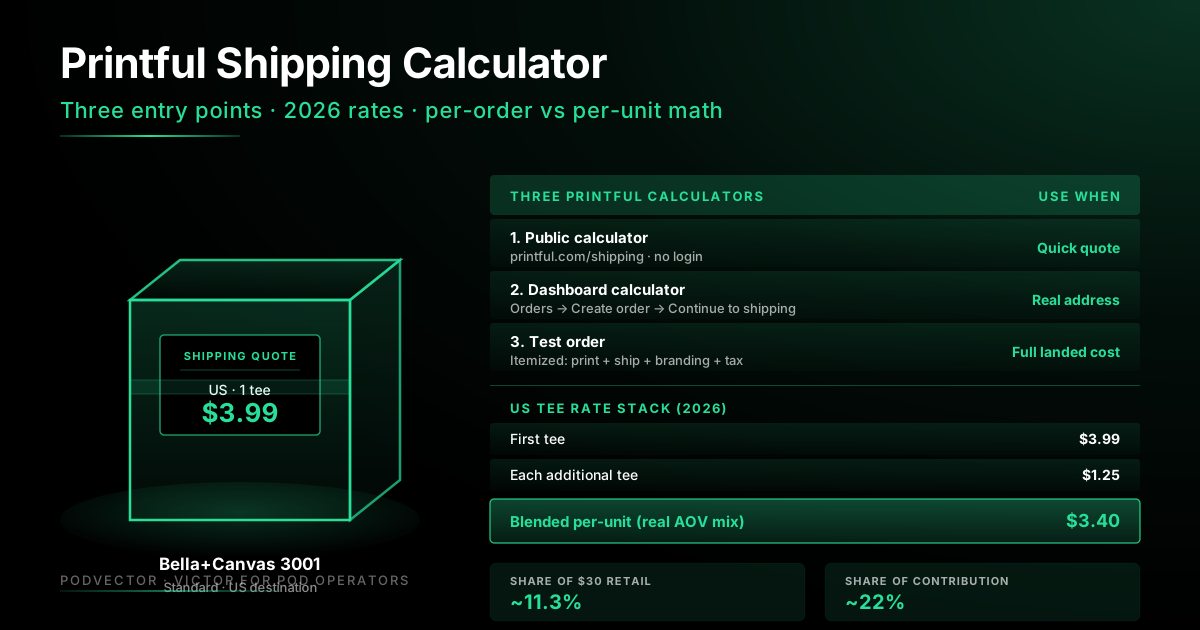
Quick Answer: Printful has three shipping calculators. The public one at printful.com/shipping shows category-level rates by region. The dashboard calculator (Orders → Create order → Continue to shipping) gives the exact cost for one real address. A test order in your account itemizes shipping alongside print, branding, and tax for the full landed cost.
The fastest method: open the public calculator, pick "Ordering for myself," choose the product, enter quantity, and click Calculate. You'll see a first-item rate plus an additional-item rate by region — for a US tee in 2026, that's $3.99 first + $1.25 each additional.
This walkthrough covers all three calculator entry points step-by-step, 2026 rate tables by region, worked examples for tees, hoodies, and mugs, and the calculator's biggest blind spot: it shows the quote, not what shipping actually does to your margin once it stacks up across hundreds of orders.
Why the shipping calculator matters for POD margin
Shipping is the second-largest line on most Printful invoices, right behind the blank itself. On a $30 tee, US shipping is $3.99 — roughly 13% of retail before you've seen a payment fee or an ad cost.
Get the quote wrong before you set retail, and shipping silently eats half your contribution margin. Get it right and the rest of the pricing math holds together.
The shipping calculator is also the only Printful tool that shows additional-item rates clearly. That number is the difference between a profitable bundle promo and one that costs you money — and almost nobody runs the math before launching one.
Three Printful shipping calculators (which to use when)
Printful exposes three different ways to calculate shipping. Each is built for a different question.
| Calculator | Best for | Time to result |
|---|---|---|
| Public calculator (printful.com/shipping) | Quick category-level quote before signup or pricing | ~30 seconds |
| Dashboard calculator (logged-in) | Exact cost for a real address and real cart | ~2 minutes |
| Test order | Full itemized landed cost (print + ship + tax + branding) | ~5 minutes |
For pricing a brand-new SKU, the public calculator is enough. For setting bundle promos or running a price audit on existing SKUs, you want the dashboard or test-order numbers — they include branding fees and tax, which the public calculator skips.
Calculator 1: Public shipping calculator — step by step
This is the calculator Printful shows on its shipping page. No login required, fastest path to a rate.
Step 1. Go to printful.com/shipping. Scroll past the hero to the "Are you ordering for yourself or selling online?" section.
Step 2. Click "Ordering for myself" if you want a single-customer quote. Click "Selling online" if you want the merchant-side rate sheet that you'll set into your store. The two paths show the same numbers — the framing differs.
Step 3. Scroll to the "Get Shipping rates" block. Pick the product category — Shirts, Hoodies & Sweatshirts, Hats, Bags, Mugs, Stickers, and so on. Each category has its own rate stack.
Step 4. Enter the quantity of items. The calculator applies the first-item rate to one and the additional-item rate to the rest.
Step 5. Click Calculate. You'll see a per-region table: US, Canada, Europe (general), UK, Australia & New Zealand, Japan, Brazil, and a Worldwide fallback rate.
What you won't see here: branding fees, customs (DDP vs DDU), or the difference between Standard and Express. Those live in the dashboard.
Calculator 2: Dashboard calculator — step by step
This is the most accurate calculator for a single real order. It pulls the actual carrier rate for the destination ZIP, including any live-rate adjustments.
Step 1. Log in to your Printful dashboard. If you don't have an account, you can create one free at app.printful.com — the calculator is part of the free plan.
Step 2. Go to Orders → Create new order → Manual order.
Step 3. Add the products you want to quote. Pick the exact variant — brand, color, and size — because shipping weight changes by size on apparel (2XL+ adds a few cents on most international zones).
Step 4. Click Continue to shipping. Enter a real shipping address. The ZIP matters — US East Coast and West Coast can differ by 30–80 cents on Standard, and rural addresses can pull a slight surcharge.
Step 5. Click Calculate shipping. You'll see Standard, Express, and (if available) DDP options with per-method costs and estimated delivery windows.
Step 6. Don't submit the order — back out at this point if you only wanted a quote. The cart isn't billed until you confirm.
This is the calculator to use when you're pricing a bundle or testing how shipping changes for international customers. The public calculator can be off by $1–$3 on international orders because it uses zone averages, not the specific destination.
Calculator 3: Test order — step by step
A test order is how you see the full landed cost — shipping plus print plus branding plus tax — in one itemized view. Printful runs the same fulfillment flow but at your discounted internal cost, and you can cancel before it ships if you only need the breakdown.
Step 1. Log in to your store-connected Printful dashboard.
Step 2. Go to Stores → [your store] → Products. Click the product you want to test.
Step 3. Click Order sample. Sample orders are billed at the discounted sample rate (typically 20% off retail base) on the first 1–3 orders per quarter, depending on your plan.
Step 4. Enter shipping address. Choose Standard or Express. The order summary itemizes:
- Product cost (with print included)
- Branding line items (inside tag, packing slip, etc.)
- Shipping (with method)
- Estimated tax (US destinations)
- Total
Step 5. Confirm to place the order, or back out if you only needed the numbers. The itemized view persists in your draft cart until you clear it.
This is the calculator to use when you want to verify your pricing spreadsheet against reality on a hero SKU before scaling promo spend behind it.
Live shipping rates vs flat rates in the calculator
Printful supports two shipping pricing models on the merchant side. The calculator shows different numbers depending on which one you're set up for.
Flat rates are Printful's published per-region table. The public calculator always shows flat rates. They're predictable — you charge the same shipping no matter which carrier ends up fulfilling.
Live shipping rates pull the actual carrier quote (USPS, FedEx, DHL, etc.) at checkout, in real time, and pass it through to your customer. Merchants enable this in their store integration settings. The dashboard calculator will show live rates if your account is configured for them.
| Mode | What customer pays | Calculator shows | Best for |
|---|---|---|---|
| Flat rates (default) | Printful's published per-region rate | Public + dashboard | Predictable margin, simple pricing |
| Live shipping rates | Carrier quote at checkout | Dashboard only | International shops, multi-item carts |
For deeper coverage of live rate setup and platform-specific quirks, see how live shipping rates work.
2026 rate tables by product and region
These are the calculator outputs for the four highest-volume Printful product categories. Use these as a reference when you don't have time to run the calculator for every SKU.
T-shirts
| Region | First tee | Each additional |
|---|---|---|
| US | $3.99 | $1.25 |
| Canada | $5.99 | $2.10 |
| Europe | $4.79 | $1.55 |
| UK | $5.20 | $1.80 |
| Australia / NZ | $9.99 | $3.25 |
| Japan | $8.99 | $2.95 |
| Worldwide | $11.99 | $3.99 |
Hoodies and sweatshirts
| Region | First hoodie | Each additional |
|---|---|---|
| US | $6.50 | $2.49 |
| Canada | $8.99 | $3.45 |
| Europe | $7.95 | $2.95 |
| UK | $8.50 | $3.20 |
| Australia / NZ | $14.99 | $4.95 |
| Worldwide | $16.99 | $5.95 |
Mugs (11 oz)
| Region | First mug | Each additional |
|---|---|---|
| US | $4.99 | $2.50 |
| Canada | $6.95 | $3.20 |
| Europe | $5.95 | $2.85 |
| UK | $6.20 | $2.99 |
| Australia / NZ | $11.99 | $4.50 |
Hats
| Region | First hat | Each additional |
|---|---|---|
| US | $4.29 | $1.95 |
| Canada | $6.50 | $2.45 |
| Europe | $5.25 | $2.10 |
| UK | $5.50 | $2.20 |
| Australia / NZ | $10.50 | $3.50 |
Rates above are 2026 published Standard shipping. Express adds roughly $4–$12 per order on most regions and shaves 5–10 business days off delivery. For the full country list and zone breakdown, see Printful shipping countries list.
Worked examples: tee, hoodie, mug
Three quick calculator runs that mirror how real POD operators use these numbers.
Example 1: Single Bella+Canvas 3001 tee, US customer
Calculator input: Shirts category, qty 1, US destination.
Calculator output: $3.99.
Pricing impact: at a $29 retail, shipping is 13.8% of revenue. If you absorb shipping in retail, your effective retail is $25.01. If you charge separately at $4.99, you make 25¢ margin on the shipping line.
Example 2: Two-tee bundle, US customer
Calculator input: Shirts category, qty 2, US destination.
Calculator output: $3.99 + $1.25 = $5.24, or $2.62 per tee.
Pricing impact: the per-unit shipping share drops 34% on the bundle. If you priced as if shipping were $3.99 per unit on a "buy 2 tees" promo, you'd quietly over-collect on shipping — fine for margin, but the pricing logic is wrong and the customer sees a higher total than they should.
Example 3: One hoodie + one mug, EU customer
Calculator input: Hoodies (qty 1) + Mugs (qty 1), Europe destination.
Calculator output: this is where Printful's combined-category pricing matters. Each category charges its first-item rate; there is no cross-category bundle discount. So $7.95 (hoodie first) + $5.95 (mug first) = $13.90.
Pricing impact: a hoodie+mug bundle to the EU costs nearly as much in shipping as the mug itself in retail. Most operators don't run this calculation and silently lose money on cross-category bundle promos.
Per-order vs per-unit shipping math
The biggest calculator mistake is using the single-item rate as your shipping cost when your average order quantity isn't one.
If 60% of your orders are one tee and 40% are two tees, your blended per-unit shipping cost is not $3.99. It's roughly $3.34 per unit. Use that number in your pricing worksheet, not the single-item default.
The formula:
Blended per-unit shipping = (% single orders × first rate) + (% multi-order × ((first rate + (avg extra units × additional rate)) ÷ avg total units))
For a store with 60% qty-1, 30% qty-2, and 10% qty-3 orders on US tees:
- 60% × $3.99 = $2.39
- 30% × ($5.24 ÷ 2) = $0.79
- 10% × ($6.49 ÷ 3) = $0.22
- Blended = $3.40 per unit
That's 60¢ less per unit than the single-item rate. Across 1,000 shirts, it's $600 of margin you'd have missed if you priced from the single-item number alone.
For how shipping plugs into the full pricing stack, see the six-step Printful pricing calculator. For the standalone shipping cost reference, see Printful shipping costs: full breakdown.
What the shipping calculator does not tell you
The calculator gives you a quote. It does not give you a margin view. Four things it will never surface on its own:
1. Actual shipping cost per SKU over time. The calculator shows today's rate for a hypothetical order. It doesn't show what shipping has cost on your real orders for SKU X over the last 90 days, blended across destinations and bundle sizes.
2. Shipping's share of contribution margin per order. A $3.99 shipping line on a $30 tee is 13% of retail and roughly 25% of contribution margin. On a $14 mug, that same $4.99 shipping is 36% of retail and 60–70% of contribution. The calculator quotes the dollar number, not the margin bite.
3. Where shipping has crept up since last quarter. Printful adjusts rates 2–3 times a year. The calculator shows the current rate. It doesn't tell you that Canada Standard went up 40¢ on hoodies in March, which is silently eating $200/month on your top-selling Canadian SKU.
4. Whether your bundle promos still make money at the blended shipping rate. A "Buy 2, get free shipping" promo that worked last year may have flipped negative after a rate increase plus a shift in your fulfillment region mix. The calculator doesn't know about your promos.
These are the questions that determine whether your shipping math actually works. The calculator was never built to answer them.
From quote to margin: tracking shipping over time
The calculator is a launch tool. Tracking shipping's real impact on margin is an ongoing operations task — and it's where most POD shops lose the most margin silently.
Inputs drift in ways no calculator notifies you about. Printful nudges a Canada rate up 40¢. Your average order quantity shifts as you push bundles. Your destination mix tilts toward more EU customers after a paid social push. Each of those is a 1–3% margin event that compounds across every order you ship for months.
Most operators run the calculator at SKU launch, again at the quarterly P&L review, and never in between. By Q3 of the year, half their SKUs have shipping cost assumptions that no longer match reality.
This is where Victor — PodVector AI's AI business employee for POD stores — closes the gap. Victor reads itemized Printful invoices and your storefront orders into a unified data warehouse, runs the full margin math on every shipped order (with the actual shipping that hit that order, not catalog defaults), and surfaces shipping cost trends as they move. He answers questions like "which SKUs had shipping eat more than 20% of contribution margin this month?" or "did the new Canada rate change my hoodie margin?" — then proposes a specific fix you can approve in one click.
The shipping calculator tells you the quote on day one. Live margin tracking tells you whether your assumptions still hold on day 180. POD operators need both.
The calculator runs once. Shipping costs change every week.
Printful raises a rate. Your AOV shifts. Customers move toward international destinations. Your hoodie SKU quietly slips from 45% margin to 32% because shipping crept up — and you don't notice for two quarters.
Victor reads your Printful and storefront data live, tracks shipping's real impact on every order, and tells you which SKUs flipped below margin — then proposes the price or bundle change to fix it.
Try Victor freeFAQs
Does Printful have a shipping calculator?
Yes — three of them. The public calculator at printful.com/shipping gives category-level rates by region without a login. The logged-in dashboard calculator (Orders → Create order → Continue to shipping) gives the exact rate for a real address. A test order in your dashboard shows the full landed cost itemized.
How accurate is Printful's shipping calculator?
The dashboard calculator is highly accurate for US orders — it pulls the actual rate that will be charged. The public calculator uses regional averages, so international quotes can be off by $1–$3 versus what you'll actually pay on a specific destination. For pricing decisions, use the dashboard calculator if accuracy matters.
Does the calculator include customs and import fees?
Not by default. The public calculator shows shipping only. The dashboard calculator can show DDP (Delivered Duty Paid) options on supported routes — DDP bundles import duty into the shipping line. For DDU (Delivered Duty Unpaid) routes, the customer pays customs on delivery, and that cost isn't in the calculator.
Why is Printful shipping so expensive?
Printful uses on-demand fulfillment, which prints and ships one item at a time. There's no bulk discount the way a wholesaler gets. Shipping is also priced to recover the carrier rate plus a small platform margin. The biggest savings lever is bundling: the additional-item rate is typically 30–35% of the first-item rate. See the full shipping cost breakdown for more.
How do I calculate shipping for multiple items in one order?
Use the first-item rate once and the additional-item rate for each extra unit. For 3 US tees: $3.99 + $1.25 + $1.25 = $6.49. If items are from different product categories, each category charges its own first-item rate — there's no cross-category discount.
Does Printful offer free shipping?
Not as a default, but Printful runs free shipping promotions on specific products and on orders above certain thresholds. These show up on your dashboard and storefront integration when active. For details on how Printful's free shipping promos work, see Printful free shipping: full breakdown.
Where else should I look for shipping cost reference?
For shipping rates and times to specific destinations, the per-country deep dives are most useful: US shipping times and costs, USA-specific shipping deep dive, and India shipping times and costs. For how shipping fits into total Printful spend, see Printful pricing full breakdown and Printful free plan breakdown. The full Printful shipping cluster and Printful topic hub have the complete reference set.