
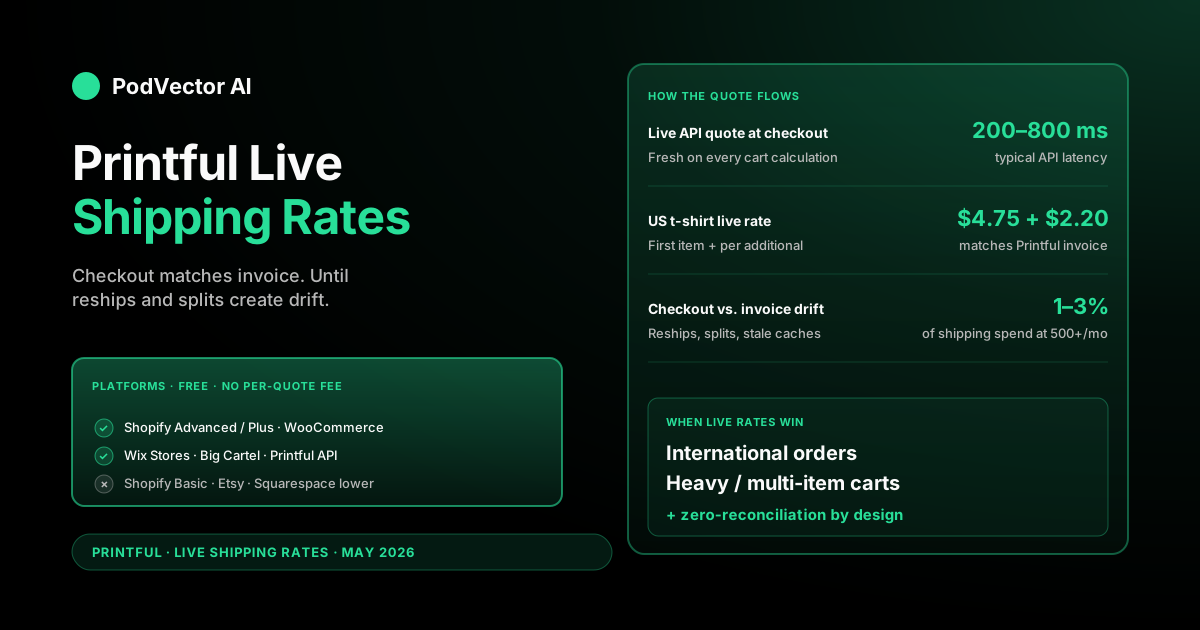
Quick Answer: Printful live shipping rates pull a real-time quote from Printful at checkout, so the customer pays the exact shipping cost Printful will charge you on the invoice. No spread, no markup, no flat-rate guesswork.
They're free to enable on Shopify (Advanced or Plus plan), WooCommerce, Wix, Big Cartel, and any store using Printful's API. Setup takes 10–20 minutes per platform.
The catch operators miss: live rates fix the checkout, not the P&L. Address corrections, multi-package splits, and stale caches still create a 1–3% drift between what you collected and what Printful invoiced.
What Printful live shipping rates are
Live shipping rates are real-time quotes pulled from Printful's API at the moment of checkout. The customer enters their address, the store calls Printful, and Printful returns the exact shipping price for that order.
That price is what Printful will charge you on the invoice when the order goes to production. By design, the checkout-collected shipping and the Printful-invoiced shipping are the same number.
Compare that to flat rates, where you pick one shipping price per zone and hope it averages out across orders. Flat rates are simpler but they always over-collect from light orders or under-collect from heavy ones — usually a mix of both.
Live rates remove the guesswork at checkout. They don't remove the work of reconciling what shipped versus what was invoiced — that part still belongs to the operator.
For the full picture on Printful's shipping operations, our Printful shipping policy breakdown and Printful shipping time guide cover the carrier and timeline side. The Printful shipping cluster hub indexes the rest.
How the live-rate quote works
The quote flow is the same on every platform that supports it:
Step 1. Customer adds a synced Printful product to the cart.
Step 2. Customer enters a shipping address at checkout.
Step 3. The store sends Printful's API the cart contents (product IDs and quantities) plus the destination address.
Step 4. Printful's API returns a list of available shipping methods — typically Standard, Express, and Overnight where supported — each with a price and a delivery-time estimate.
Step 5. The store displays those options to the customer. They pick one. The rate locks into the order total.
Step 6. When the order moves to production, Printful invoices you the exact rate that was quoted at checkout. The customer's shipping payment and your shipping cost match.
The whole API round-trip usually takes 200–800 milliseconds on a healthy connection. Customers see a brief spinner on the cart page, then the rate appears. Worth knowing for high-conversion stores where every extra second of checkout latency costs sales.
Printful's own official shipping rates page publishes the flat-rate equivalents, which usually land in the same ballpark as live rates for US orders.
Which platforms support live rates
Live rates aren't a universal feature. Each platform handles them differently, and some plans hide them behind a paywall.
Shopify. Live rates run through Shopify's carrier-calculated shipping (CCS) feature. The Advanced and Plus plans include CCS by default. The Grow plan (formerly Standard Shopify) requires you to contact Shopify Support and pay an extra $20/month to enable it. The Basic plan and older lower tiers don't support CCS at all — you're locked into flat rates.
WooCommerce. The free Printful for WooCommerce plugin handles live rates natively. No Shopify-equivalent gating. Configuration is under WooCommerce → Settings → Shipping after the plugin is connected to your Printful account. Our Printful live shipping rates for WooCommerce walkthrough covers the full setup.
Wix. Wix Stores supports Printful live rates through the official Printful app integration. Enable it under Wix Dashboard → Settings → Shipping & Delivery, then add Printful as a shipping provider for each zone you want it active in.
Big Cartel. Live rates are supported through Big Cartel's Printful integration. Enable under Store → Shipping after connecting your Printful account. Big Cartel is the simplest setup of the four — fewer settings, fewer collisions.
Squarespace, Etsy, eBay. No native live-rate integration. These platforms either don't expose carrier-calculated shipping at all (Squarespace lower tiers), or they have their own non-Printful shipping engines (Etsy, eBay). On these platforms, you build product prices with shipping included or charge a flat rate and absorb the variance.
Printful's API direct. If you've built a custom storefront or use a headless commerce stack, you call Printful's /shipping/rates endpoint directly. Same quote, same accuracy, you write the integration code yourself.
What live rates actually cost the seller
The live-rate feature itself is free on every Printful-integrated platform. There's no per-quote fee, no monthly add-on, no API tier.
The only platform-level fee is Shopify's $20/month carrier-calculated shipping surcharge on the Grow plan. Advanced, Plus, and the older non-Grow Standard plans don't pay it.
What the customer pays at checkout is the actual Printful rate for that product + destination + speed. Typical 2026 US rates for common products:
- T-shirt: $4.75 first item + $2.20 each additional
- Hoodie: $7.95 first + $2.20 each additional
- Mug: $4.95 first + $2.20 each additional
- Phone case: $3.95 first + $0.99 each additional
- Poster (rolled): $5.75 first + $1.45 each additional
Live rates start to diverge from published flat rates when:
- Multi-item orders. Live rates use Printful's exact per-additional-item math. Flat rates round, so a 4-shirt order quoted by flat rate may be $0.50–$2.00 off from what Printful actually invoices.
- International destinations. Worldwide shipping varies sharply by destination country. Flat-rate zones lump countries together and miss by a lot. Live rates quote each country specifically.
- Express upgrades. Express rates change per carrier and per route. Flat-rate setups usually don't expose Express at all. Live rates surface it as a checkout upsell.
- Mixed product carts. Different products have different per-additional-item math. Flat rates collapse the difference; live rates compute it correctly.
For the per-product cost math behind these rates, see our Printful phone case base cost breakdown and phone case pricing breakdown for an example of how shipping fits into the total fulfillment line.
Live rates vs. flat rates — which to pick
The honest answer: most US-only stores with a narrow product range break even between live and flat. Either works. The decision matters more for international and multi-product stores.
Pick live rates if:
- You ship internationally to more than two or three countries.
- You sell heavy or bulky products (hoodies, backpacks, multi-mug orders).
- You want to offer Express shipping as an upsell.
- You want zero shipping reconciliation work at month-end.
- Your platform makes live rates easy (WooCommerce, Wix, Big Cartel, Shopify Advanced/Plus).
Pick flat rates if:
- You ship US-only and 90% of orders are single-item.
- You want to run "free shipping over $X" promotions — flat rates make that math predictable.
- You bundle shipping into product price and want a single visible total at checkout.
- You're running A/B tests on shipping price as a conversion lever.
- You're on a Shopify plan that would charge you extra for carrier-calculated shipping.
Plenty of stores run both, just in different zones. Live rates inside the US for accuracy, flat international rate to keep the checkout simple for the long tail of countries that order once a quarter. The same trade-off shows up in our Printful shipping rates for US t-shirts in 2025 and USA t-shirt shipping rates guide.
What customers see at checkout
From the customer's side, live rates feel like any other carrier-quoted shipping option. They enter their address, the page recalculates, and Printful's rates appear in the shipping method list.
Typical display for a one-shirt US order:
- Standard: $4.75 — 3–8 business days
- Express: $14.99 — 1–3 business days (where enabled)
The customer picks one, the rate locks into the order total, and the checkout proceeds. Behind the scenes, the store stored the exact rate Printful quoted at that moment.
What customers don't see — and what catches sellers off guard — is that the rate is only as fresh as the API call. Most stores cache the quote for the session. If the customer lingers on the cart page for 20 minutes and then changes the address, the page calls the API again and the rate refreshes. Usually fine, occasionally jarring if Printful's rate changed mid-session.
One UX detail worth knowing: live-rate quotes show a brief spinner while the API call resolves. On slow connections, that adds 1–3 seconds to cart page render time. For most stores it's invisible. For high-conversion checkouts under 2-second budgets, it's a number to monitor.
Delivery times under live rates
Live rates don't change Printful's delivery timelines. They surface them more accurately.
Printful's typical delivery time has two components: production time and shipping time. Production is usually 2–7 business days depending on product. Shipping is what live rates quote.
For a US Standard order, expect 3–8 business days of shipping on top of production. So a t-shirt ordered Monday production-starts Wednesday, ships Friday, arrives the following Wednesday or Thursday in most US zones.
Express live rates compress shipping to 1–3 business days but don't change production. The "1-day express" tier is shipping-only — total order time is still 3–8 business days end-to-end.
International live rates quote longer windows — 7–20 business days for Standard, 3–7 for Express where available. For the full timeline detail, see our Printful shipping time deep-dive.
The common gotchas across platforms
Live rates work cleanly when nothing else is competing for the checkout. They get messy when other plugins, apps, or settings overlap with them.
Caching breaks freshness. Page-cache plugins (WP Rocket, W3 Total Cache on WooCommerce) or aggressive CDN caching can serve a stale checkout. Every customer in the same cache window sees the same wrong rate. Exclude cart and checkout pages from cache.
Other shipping methods double-quote. If a Table Rate Shipping app or third-party rate plugin runs on the same zone as Printful, both quote and the customer sees an overlapping list. Disable conflicting methods on every zone where Printful is active.
Mixed-vendor carts. Most platforms let one store sell Printful products alongside non-Printful products. Live rates cover only the Printful items. Non-Printful items need a separate shipping method on the same zone, or they show up at checkout with no rate at all.
Address validation differences. Printful's API rejects shipping quotes for clearly invalid addresses (missing state, malformed ZIP). Stores that don't validate before quoting show "no shipping options available" — confusing for the customer who thinks the site is broken. Add address-validation copy to the checkout if you see this in support tickets.
Currency conversion. Printful's API quotes in USD. If your store sells in EUR, GBP, or another currency, the platform's integration handles the conversion. But a third-party currency-switcher plugin can convert twice and inflate the rate. Test orders in each currency you support.
Subscription products. Subscription engines (Recharge on Shopify, WooCommerce Subscriptions) and Printful live rates don't always share a clean path for renewals. The first order quotes correctly. Renewal orders may fall back to a default rate or fail outright. Test renewal shipping specifically before launch.
Multi-warehouse fulfillment. Printful fulfills from multiple facilities (US, EU, Mexico, Australia, Japan). Live rates pick the cheapest valid facility, but if a product is only available in one facility, the rate locks to that origin. Customers in Europe ordering a US-only product see a higher international rate than they'd expect.
Reconciling checkout charges vs. Printful invoices
Live rates promise that checkout-charged shipping equals Printful-invoiced shipping. In normal operation, they do match — that's the design.
Where they drift:
- Address corrections after checkout. Customer enters a typo, the carrier returns the package, you reship to a corrected address. The reship is invoiced separately. The customer was only charged once.
- Multi-package splits. A 6-item cart can fulfill from two facilities, generating two invoice line items with two shipping charges. The customer paid one bundled rate at checkout.
- Service-tier downgrades. Printful occasionally downgrades an Express order to Standard silently if capacity is tight. Customer paid for Express, the order shipped Standard, you got billed Standard. Net to you is positive, but it's a customer-experience issue if they complain.
- Stale cached rates. A page-cache plugin survived a Printful rate-card update. Customer paid yesterday's rate, you get billed today's rate.
- Refunds and partial cancellations. When a partial order ships, the shipping line on the invoice doesn't always proportionally match the customer's checkout charge.
At small volume — under 50 orders a month — these gaps are noise. At 500+ orders a month, the reconciliation gap can be 1–3% of total shipping spend. On a $20,000-monthly shipping line, that's $200–$600 you're either over-collecting or quietly eating.
The fix isn't to abandon live rates. It's to audit them. Match every Printful invoice line back to the original order's checkout-collected shipping. The gap is your shipping P&L line — knowing the number is the difference between a managed business and a hopeful one.
The operator view: tracking shipping drift
Live rates solve the at-checkout accuracy problem. They don't solve the at-month-end visibility problem.
Three drift patterns to watch even with live rates running clean:
Effective per-order shipping rises. Live rates track exactly what Printful charges, which is good. But if Printful raises the rate card 8% in Q3, your blended per-order shipping moves 8% and your retail price didn't move. Live rates make the drift invisible — the system is "working correctly," your margin is just shrinking.
Region mix shifts. A viral post brings in worldwide orders. Live rates collect the correct shipping per order, so the customer pays. But your store's blended shipping-as-percent-of-revenue moves because international shipping is a bigger slice. If you model channel profitability without itemized shipping, you'll miss the shift.
Mixed-cart bundles. When non-Printful products ride on Printful orders, the shipping math gets messy. Reconciliation needs to attribute shipping correctly across product lines, or the gross margin per product number stops being trustworthy.
The pattern is consistent: live rates give you correct at-checkout numbers, but the P&L view requires pulling Printful's itemized shipping data alongside your storefront's revenue and product cost into one place. Otherwise the margin number on your dashboard is yesterday's reality.
FAQs
Are Printful live shipping rates free?
Yes on every Printful-integrated platform. The only platform-level fee is Shopify's $20/month carrier-calculated shipping surcharge on the Grow plan. Advanced, Plus, WooCommerce, Wix, and Big Cartel charge nothing extra.
How accurate are live rates compared to Printful's actual invoice?
The rate quoted at checkout is the rate Printful charges on the invoice — same number by design. Drift happens at the edges: address corrections, multi-package splits, service-tier downgrades, stale caches. Audit drift at month-end if your shipping spend is above a few thousand dollars.
Why does my customer see "no shipping options available"?
Three common reasons: the product isn't synced to Printful, the shipping zone doesn't have Printful Shipping enabled, or a caching plugin is serving stale checkout output. Flush cache, verify sync status, and confirm zone configuration.
Can I offer Express shipping with live rates?
Yes, where Printful supports it for the product and destination. Enable Express in your platform's Printful settings. The customer sees Standard and Express side-by-side at checkout with their respective rates and delivery times.
Do live rates work for international orders?
Yes — that's where they matter most. Live rates quote each country specifically. Flat-rate "Everywhere else" zones almost always under- or over-collect by 20–40% on international orders. Live rates are the cleaner choice for any store with non-US customers.
Can I run live rates and flat rates at the same time?
Yes — different shipping zones can use different methods. Many stores use live rates inside the US and a single flat international rate elsewhere. Within a single zone, run one or the other, not both.
How long does the live-rate API call take at checkout?
Typically 200–800 milliseconds when Printful's API is responsive. On slow connections or with caching plugins competing for resources, it can stretch to 2–3 seconds. If you see consistent 5+ second delays, check your platform's plugin logs for API failures.
What happens if Printful's API is down during checkout?
Most integrations fall back to a configurable default rate so customers can still complete checkout. You'll see the fallback rate in the order metadata. Compare the fallback rate to your typical live rate weekly so you're not silently under-collecting during outages.
Do live rates update automatically when Printful changes pricing?
Yes. Every checkout fetches a fresh quote. The day Printful raises rates, your checkout starts charging the new rates — no plugin update needed. Caching plugins are the only exception; flush cache after any known rate-card update.
Are live rates available on Shopify Basic?
No. Shopify's carrier-calculated shipping (which Printful live rates depend on) is locked to Advanced and Plus plans by default. The Grow plan can enable it for an extra $20/month. Basic stores are stuck on flat rates until they upgrade.
Do live rates handle international VAT and duties?
Live rates quote shipping only — not duties, VAT, or customs fees. For EU orders under €150, Printful's integrated IOSS flow handles VAT at checkout when configured. Above €150 or outside the EU, duties land on the buyer at delivery. See our shipping policy breakdown for the international rules.
Live rates fix the checkout. They don't fix the P&L.
Printful's live shipping rates land exactly what they should at checkout. The harder question is what happens after the order ships — the address corrections, the multi-package splits, the rate-card increases that quietly compress your margin while the system runs "correctly."
Victor connects to your Printful account, pulls every itemized shipping line into a unified data warehouse alongside your storefront revenue, and answers questions like "how is shipping eating my margin this week?" against live order data. No spreadsheet. No quarterly P&L surprise.
Try Victor free