
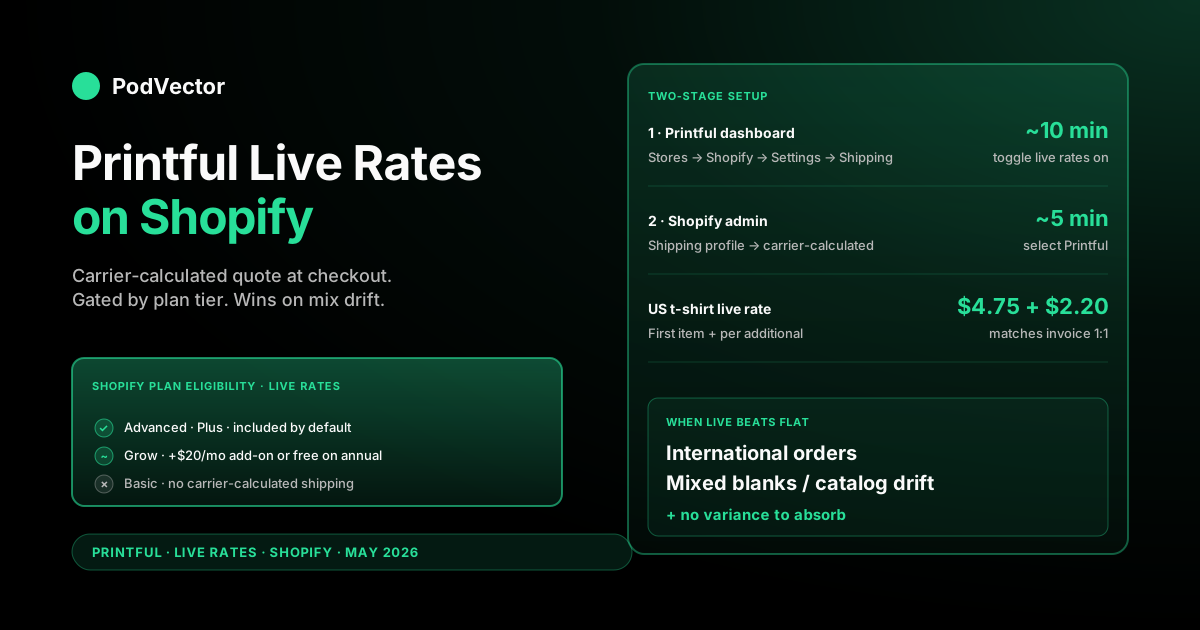
Quick Answer: Printful live shipping rates on Shopify pull Printful's real-time carrier-calculated quote into your checkout based on the customer's address, the order weight, and the fulfillment facility that would print the order. The customer sees and pays the same number Printful will bill you — no spread, no shortfall, no surprise variance on the shipping line of your P&L.
You enable live rates in two places: inside Printful (Settings → Stores → your Shopify store → Shipping → toggle live rates on) and inside Shopify (Settings → Shipping and delivery → your shipping profile → Add rate → Use carrier or app → Printful). Live rates require a Shopify plan that supports carrier-calculated shipping — Advanced and Plus by default, Grow with a paid add-on, and Basic not at all.
Once live rates are running, the work shifts from "what does Printful charge" to "what's my blended shipping cost across the order mix this week." That blended number drifts every time your bestseller changes blanks, your international order share moves, or Printful adjusts its rate card — which is why tracking the shipping cost line over time matters as much as the setup itself.
What live shipping rates actually do
A live shipping rate is a real-time quote calculated by Printful at the moment the customer reaches your Shopify checkout. The quote uses three inputs: the destination address, the weight of the cart contents, and the fulfillment facility that would print the order.
The number the customer sees is the same number Printful will bill you when the order ships. No spread, no markup baked in, no shortfall if the customer's address is in a more expensive zone than you guessed.
This matters because Printful's rate card is not flat by destination. A Bella Canvas 3001 to Florida quotes differently from the same shirt to Alaska or Hawaii. International quotes vary even more — a UK address pulls a Standard DDP option that includes duties; a Brazilian address pulls a different carrier and a different transit window entirely.
Without live rates, you'd set a single flat number per zone in Shopify and absorb the variance. With live rates, the variance disappears from your P&L and shows up as a rate change at checkout. The customer pays exactly what fulfillment costs — and your shipping cost line becomes a clean pass-through rather than a margin leak.
Understanding how this interacts with your overall cost structure matters. For a breakdown of how contribution margin behaves when shipping is a pass-through vs a flat-rate spread, see our guide on how to calculate contribution margin for ecommerce.
Shopify plan requirements (the trap)
The biggest gotcha with live rates on Shopify is the plan tier. Shopify gates carrier-calculated shipping behind specific plans, and Printful's live rates ride on that gating.
The current breakdown:
- Basic plan: Live shipping rates are not available. You're locked to flat rates only. New Basic accounts cannot enable carrier-calculated shipping at any price.
- Grow plan (formerly Shopify Standard): Live rates are available, but you have to contact Shopify Support and ask them to enable carrier-calculated shipping. It's a paid add-on billed monthly, or it's included free if you commit to annual billing. Either way, it's a manual step — the feature is not on by default.
- Advanced plan: Live rates are included by default. No extra fee, no support ticket needed.
- Plus plan: Live rates included by default, same as Advanced.
If you're on Basic and you want live rates, the cheapest path is upgrading to Grow and enabling the carrier-calculated shipping add-on, or switching to annual billing on Grow where it's included. The plan cost difference between Basic and Grow is real money on a small POD store, so run the math against your current shipping variance before upgrading.
The Basic-plan workaround most operators use: flat rates with a small markup. Set a round number for US shipping and absorb the rare variance. We cover the math in the flat vs live decision section below.
Setup in Printful (10 minutes)
Assuming your Shopify plan supports live rates, the Printful-side setup is the first half of the configuration.
Step 1. Make sure your store is connected. In your Printful dashboard, go to Stores. Your Shopify store should appear in the list with a green "Connected" badge. If not, click "Add store" and pick Shopify from the platform list — the OAuth flow takes about 30 seconds.
Step 2. Open the store's settings. Click the Shopify store name in your Stores list. Go to Settings or Shipping (the menu label has shifted over the years; look for the Shipping tab).
Step 3. Toggle live shipping rates on. You'll see an option labeled "Enable Printful's live shipping rates for your storefront" with a toggle. Flip it on. Printful will display a confirmation that live rates are now active.
Step 4. Confirm your fulfillment region. Printful auto-routes orders to the closest fulfillment facility, but if you sell heavily to a specific region, confirm the right facility is set as primary. Rates are quoted from the printing facility, not from a central hub, so the facility location directly affects the rate your customer sees.
That's the Printful side. The toggle pushes a "Printful" shipping carrier into your Shopify shipping configuration as a callable carrier rate service. Shopify will see it as an external rate provider the next time the checkout fires.
Setup in Shopify (5 minutes)
Shopify needs one configuration change to actually use the rate Printful is now exposing.
Step 1. In your Shopify admin, go to Settings → Shipping and delivery.
Step 2. Find the shipping profile that covers your Printful products. If you only sell Printful products, this is your default General shipping profile. If you sell a mixed catalog (some Printful, some self-fulfilled), create a separate profile for Printful products so the rates don't collide.
Step 3. Inside the profile, find the shipping zone (e.g. United States, International). Click "Add rate."
Step 4. Pick "Use carrier or app to calculate rates." Select "Printful" from the carrier list.
Step 5. Choose which Printful shipping speeds to expose at checkout: Standard, Express, and where applicable Standard DDP. Most stores enable Standard plus Express and let the customer pick.
Save. The next time a customer reaches checkout with a Printful product in cart, Shopify will call out to Printful, get a live quote, and display it as a shipping option. The call is invisible to the customer.
For a broader look at how Shopify admin configurations interact with Printful fulfillment, see our guide on Shopify admin API store modifications and automation.
Flat rate vs live rate: when to pick which
For a US-only single-product store, the choice is mostly cosmetic. For everyone else, the answer changes with the order mix.
Pick flat rates when: you sell one or two products in one region, the Printful rate card is tight in that region (US t-shirts sit in a relatively narrow band), and you want to mark up shipping to capture spread. A flat rate above your typical cost pockets margin on every order. At meaningful order volume, that per-order spread adds up to real monthly revenue.
Pick live rates when: you sell internationally (rate variance is wide), you sell mixed product categories (mugs, posters, and shirts all ship differently), your bestseller mix shifts often, or your AOV is high enough that customers expect a precise shipping quote rather than a round number.
The mistake operators make is sticking with flat rates after the catalog expands. A store that launched with US-only t-shirts on a flat rate adds Comfort Colors (heavier blank, more shipping), then adds hoodies (different base rate entirely), then opens international. Months later the flat rate is undercollecting on half the orders, but no one notices until the quarterly P&L review.
For a deeper look at how flat-rate shipping math behaves as the product mix shifts, see our Printify t-shirt cost and profit breakdown for a parallel view of how shipping interacts with blank cost and margin.
Handling fees and shipping markup
Live rates pass through Printful's exact quote, but Shopify lets you add a handling fee on top. This is useful for two reasons.
First, you can recover the small operational costs of fulfilling an order: support time, any packaging tweaks if you ship anything yourself, the overhead per order. A modest handling fee usually doesn't move conversion noticeably.
Second, you can effectively mark up shipping while keeping the live-rate guarantee that the customer never pays less than your actual cost. A handling fee is additive — Printful's quote stays accurate as a cost line, and your handling fee is pure margin.
Setup is in the same Shipping and delivery screen in Shopify. Inside the carrier-rate configuration for Printful, scroll to "Handling fee" and set either a flat amount per order or a percentage of the quoted rate. Most operators use a flat dollar amount per order. Percentages work but produce non-round numbers at checkout that can look odd to customers.
Test your handling fee math by placing a test order in your live store and watching what the customer sees vs what Printful charges you. Mismatches between the two are usually a stale shipping profile rather than a Printful issue.
Shipping protection as an AOV lever
A subtopic that now ranks prominently alongside live-rate content: shipping protection upsells at checkout. This is distinct from your live-rate setup but directly connected to the same checkout moment.
Shipping protection apps (such as Shipcheck on the Shopify App Store) let you offer customers the option to pay a small fee — typically in the low single digits — to protect their order against loss, damage, or theft. The customer opts in at cart or checkout, you collect the fee, and you cover claims out of pocket or through the app's coverage pool.
The margin logic is straightforward: the protection fee is pure revenue on orders where nothing goes wrong, and it offsets your cost on orders where something does. For POD stores where Printful handles the reprint or refund process, shipping protection revenue can materially offset those exception costs.
It also increases AOV without discounting your core product — which matters for POD stores where margin is already thin. According to centousapps.com, if a meaningful share of customers opt in to a per-order protection fee, the monthly revenue lift can compound significantly at scale without any new SKUs or marketing spend.
If you're optimizing checkout to capture this kind of incremental revenue, the same session where a customer sees your shipping options is one of the highest-leverage conversion moments in the funnel. See our guide on ecommerce checkout conversion rate optimization for the broader checkout strategy.
Shopify's own shipping insurance is a separate, narrower product. If you purchase Shopify shipping labels from the United States, you're eligible for shipping insurance coverage up to $5,000 for loss, damage, or theft. However, Printful generates its own labels through its carrier accounts, so Shopify's label-based insurance generally does not apply to Printful-fulfilled orders. Third-party shipping protection apps are the relevant option for most POD sellers.
Mixed carts with non-Printful products
If your Shopify store sells anything besides Printful products — your own stock, dropship items from a different supplier, digital downloads — your shipping setup gets more complicated.
The cleanest pattern: separate shipping profiles per fulfillment source. Move every Printful product into a "Printful" shipping profile. Move every self-fulfilled product into a "Self-fulfilled" profile. Move dropship items into their own profile. Each profile uses the rate logic that fits — live rates for Printful, flat rates for self-fulfilled, the dropship vendor's rates for their items.
What Shopify does when a cart contains products across two profiles: it sums the rates. A Printful t-shirt (live rate) plus a self-fulfilled accessory (flat rate) shows up as a combined total at checkout. The customer doesn't see two line items — just one shipping total.
This is generally fine, but it can produce odd outcomes when the customer expects a single shipment and you're actually shipping from two places. Set product-page expectations clearly: "ships from our partner" vs "ships from our warehouse" prevents WISMO support tickets when one half arrives before the other.
What customers see at checkout: times and costs
The Shopify checkout, with Printful live rates enabled, shows a customer a menu like this for a US t-shirt order:
- Standard shipping: carrier-calculated rate, estimated 3–8 business days
- Express shipping: carrier-calculated rate, estimated 1–3 business days
For an international order — say a customer in the UK — the menu adds options:
- Standard shipping: carrier-calculated rate, estimated 5–10 business days
- Standard DDP: higher carrier-calculated rate, estimated 5–10 business days (duties and taxes prepaid)
- Express shipping: carrier-calculated rate, estimated 1–3 business days
The transit-time estimates Shopify displays come from Printful's carrier data, not Shopify's own logic. Standard transit covers the carrier leg only — the customer's full delivery experience is Printful's fulfillment time (typically 2–5 business days to print and pack) plus the transit window shown at checkout.
This is the number-one source of customer-support tickets in POD: the customer reads "3–8 business days" at checkout, expects delivery in that window, and complains when fulfillment adds more days on the front end. Post-purchase emails that explain fulfillment time plus transit time prevents most of these. Check Printful's current shipping speeds and pricing page for up-to-date transit estimates by region.
The margin math: live rates against blended cost
The point of live rates is not simply "the customer pays the exact rate." It's that your shipping cost line in the P&L becomes 1:1 with revenue collected on shipping — no variance, no bleed.
Consider a US-only store where the mix shifts from mostly single-item orders to a higher share of multi-item orders over a quarter. Average shipping cost per order rises with the mix shift because multi-item orders are heavier and cost more to ship. Under live rates, shipping revenue rises in lockstep — the customer paid the actual quote. Under flat rates set at a fixed number, shipping revenue stays flat while shipping cost climbs. The gap between the two is a silent drain on margin that rarely gets noticed until a quarterly review.
Live rates protect you from this kind of drift. Flat rates pay you a small markup in stable periods and bleed you in shifting periods. The decision is essentially "do I trust my catalog and order mix to stay stable," and for most operators who are actively running ads and scaling, the honest answer is no.
For the underlying product cost math that drives these margin calculations, see our Printify t-shirt cost and profit breakdown. And if you're using Shopify Capital to fund inventory or ad spend on top of a scaling POD operation, the how to get Shopify Capital guide covers what Shopify looks at and how your P&L affects eligibility.
Common errors and how to fix them
Three live-rate failures show up repeatedly in support threads and operator forums.
"No shipping rates available at checkout." The most common cause is a Shopify shipping profile that doesn't include the cart's products. Check Settings → Shipping and delivery, find the profile that owns the product, and make sure the carrier-calculated rate is configured for the destination zone the customer is in.
"Rate at checkout doesn't match what Printful bills me." Usually means your shipping profile has an old flat rate alongside the live rate, and Shopify is using the flat rate because it's cheaper. Delete the flat rate or move it to a separate profile.
"Carrier-calculated shipping isn't available for my account." You're on the Basic plan, or on Grow without the carrier-calculated add-on enabled. Contact Shopify Support to confirm your plan status and enable the add-on if you're on Grow paying monthly. Switching to annual on Grow includes it.
Beyond those three: stale Printful-Shopify connections sometimes need a reconnect. If your live rates worked yesterday and don't today, disconnect and reconnect the store from your Printful dashboard. Takes about 60 seconds and resolves a meaningful share of "live rates suddenly broken" tickets.
For the full reference on how Printful's shipping behaves end to end across the catalog, see the Printful shipping speeds and pricing page — the authoritative source for current rates and transit estimates by region and product type.
FAQs
Do I need to be on a paid Shopify plan to use Printful live shipping rates?
Yes. Basic doesn't support carrier-calculated shipping. Grow supports it with a paid add-on (free on annual billing). Advanced and Plus include it by default.
How do I enable Printful live shipping rates on Shopify?
Two steps. First, in your Printful dashboard go to Stores → your Shopify store → Settings → Shipping, and toggle "Enable Printful's live shipping rates for your storefront." Second, in your Shopify admin go to Settings → Shipping and delivery → your shipping profile → Add rate → Use carrier or app, and select Printful.
What shipping speeds do customers see at checkout with live rates?
Standard is always available. Express is available for most destinations. Standard DDP (duties and taxes prepaid) is available for UK and Canada. The exact options depend on the destination country.
Can I add a markup or handling fee on top of Printful's live rate?
Yes. Shopify lets you configure a handling fee on the carrier-rate profile — a flat amount per order or a percentage. The customer pays the live rate plus your handling fee. Printful charges you only the live rate, so the handling fee is pure margin.
Why don't I see Printful as a carrier option in my Shopify shipping settings?
Two possibilities. Either your Shopify plan doesn't support carrier-calculated shipping (Basic and Grow without the add-on), or the Printful-Shopify connection isn't pushing the carrier registration through. Disconnect and reconnect the store from your Printful dashboard if the latter.
What happens if a customer's cart has both Printful and non-Printful products?
Shopify sums the rates from each product's shipping profile. The customer sees a single combined shipping total. Set up separate profiles per fulfillment source for clean rate logic.
Do Printful live rates include duties and taxes for international orders?
Standard DDP rates for UK and Canada include duties and taxes — that's what DDP means (Delivered Duty Paid). All other international shipping is DAP (Delivered At Place) by default, meaning the customer may pay import duties on arrival.
Why is the rate at my checkout different from Printful's published rate?
Published rates on Printful's website are sample rates for common products and regions. The live rate pulls the actual quote for the specific blank, weight, fulfillment facility, and destination in the customer's cart. Small variance is normal; large variance usually means a heavier blank or an edge-zone destination.
How often does Printful change its live shipping rates?
Carrier rate updates typically happen once or twice a year, often aligned with USPS and FedEx annual rate increases. Printful absorbs minor changes and passes through major ones to live rates within a few weeks of the carrier change.
Can I disable Printful live shipping rates and switch back to flat rates later?
Yes. Toggle live rates off in your Printful dashboard, then delete the carrier-rate entry in your Shopify shipping profile and replace it with a flat-rate entry. Takes about two minutes. The customer-side rate switches on the next checkout that loads.
What is shipping protection, and should POD stores offer it?
Shipping protection is an optional fee customers pay at checkout to cover their order against loss, damage, or theft. For POD stores, it's primarily an AOV lever — the fee is collected on every opted-in order, and claims (which Printful typically handles through reprints or refunds) are offset by the revenue pool. Third-party apps on the Shopify App Store handle the implementation. It's worth testing if your exception rate is meaningful or if you want to add checkout revenue without discounting.
Live rates handle the quote. Victor handles the margin.
Live rates make sure the customer pays the right shipping number on each order. They don't tell you what your average shipping cost per order was last week, what percent of orders shifted from single-item to multi-item, whether your shipping-as-a-percent-of-revenue moved when the catalog mix changed, or which SKUs are dragging your blended margin down.
Victor is PodVector's AI employee for print-on-demand sellers on Shopify. He connects to your Shopify store and your Printful account, reads every itemized order and shipping line into a live data warehouse, and surfaces the next profit move in plain English — then executes approved actions directly in Shopify. "What's my blended shipping cost this week vs last quarter?" gets you a number, a trend, and the SKU mix shift that caused it. No spreadsheet, no quarterly surprise.
Try Victor free