
Quick Answer: A Google Ads guide for ecommerce written for owned-inventory stores doesn't survive contact with print-on-demand. The defaults — track order subtotal as conversion value, push every variant to Merchant Center, optimize Performance Max for ROAS — assume 55–65% gross margin and clean catalog data.
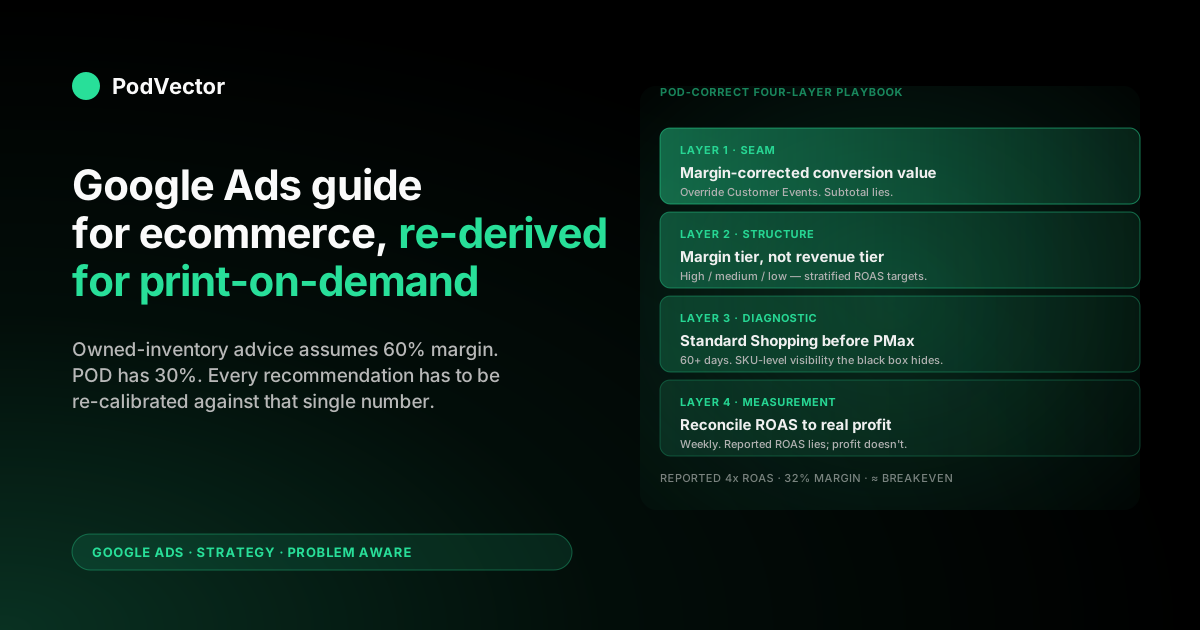
POD has 28–35% gross margin against Printify or Printful supplier cost, design SKU explosion, refund rates Google can't see, and lifestyle imagery problems flat mockups create. The POD-correct adaptation is a four-layer playbook: feed the right value signal at the seam, structure campaigns for margin tier instead of revenue, run Standard Shopping before Performance Max long enough to get clean diagnostic data, and reconcile Google Ads ROAS against real Shopify Profit weekly. This guide is the standard ecommerce Google Ads framework, rewritten for the POD economics that actually fund the ad spend.
Why ecommerce Google Ads guides break for POD
Most "Google Ads guide for ecommerce" content — and three of the top-ranking guides at the time of writing — assume an owned-inventory or wholesale storefront. That model has 55–65% gross margin, 50–500 well-cataloged SKUs, refunds in the 1–3% band, and pricing flexibility on the supplier side. Performance Max set to a 4x target ROAS produces real profit because 4x revenue against 60% margin clears all the unit costs and leaves ~20% for the operator.
Print-on-demand inverts every one of those assumptions. Margin against Printify or Printful supplier cost is 28–35% blended, not 60%.
SKU count balloons because every design becomes 8–15 size and color variants — a 200-design store ships 1,600–3,000 SKUs to Merchant Center if no one curates. Refund rates run 2–6% on apparel, biased toward higher-AOV designs, and Google never hears about them.
Pricing flexibility is asymmetric: the operator can raise retail price but can't negotiate Printify's base cost. A 4x ROAS Performance Max campaign in this economy is breakeven at the margin line and unprofitable once you account for refunds, payment processing, and the apps stack.
The three best-known ecommerce Google Ads guides cover account structure, Performance Max strategy, feed optimization, bidding, and first-party data accurately for owned-inventory stores. None of them cover POD-specific economics — the conversion value override, design-tier curation, lifestyle imagery vs flat mockup, supplier-cost reconciliation, refund adjustments — because their audience isn't building on a Printify or Printful base.
This guide takes the same framework structure those guides use, then re-derives every recommendation against POD's gross-margin reality. The companion piece Google Ads for Ecommerce Strategy for Print-on-Demand walks through the strategic framing in more depth; The Complete Google Ads Playbook for Print-on-Demand Sellers is the cluster pillar.
For external context on the standard framework, the Store Growers Ultimate Guide to Google Ads for Ecommerce is the most exhaustive owned-inventory reference; we cite it where relevant and explicitly mark where POD diverges.
Campaign architecture: Shopping, PMax, Search, Demand Gen
Most ecommerce Google Ads guides settle the Shopping vs Performance Max debate by recommending both — Standard Shopping for tier-one products where ROAS control matters, Performance Max for prospecting and demand capture across surfaces. The split is correct in principle for POD. The implementation differs because POD design tiers are not the same as ecommerce product tiers and the Performance Max black box punishes design SKU explosion harder than it punishes wholesale catalog SKU count.
The POD-correct campaign architecture, in launch order:
- Brand-defense Search ($5–10/day). Exact-match brand terms, one campaign. Cheapest conversions in the account ($0.40–$1.20 cost-per-conversion typically), seeds clean Smart Bidding history, blocks competitor brand-bidding. Run from week one regardless of other campaigns.
- Standard Shopping with curated feed ($20–30/day). Top 20% of designs by trailing-90-day Shopify revenue, segmented into product groups by margin tier. This is the diagnostic layer Performance Max obscures: Standard Shopping shows search-term reports, lets you bid by SKU, and gives you 14–21 days of clean SKU-level data before any black-box campaign starts allocating budget.
- Non-brand Search on top 5 query families ($25–40/day). Pull from GA4 organic data — which queries already convert on the storefront? Run Search ads against those exact phrases. Maximize Conversions until 30 conversions accumulate, then switch to Target CPA. Google Ads strategy for ecommerce strategy for print-on-demand details the query-family segmentation.
- Performance Max with audience signals (week 5+). Curated feed from Standard Shopping, Customer Match top-10% LTV as audience signal, GA4 audiences for cart abandoners and high-intent viewers, Target ROAS calibrated against margin-corrected conversion value (not subtotal). Run alongside Standard Shopping, not in place of it, until the account clears 500 monthly conversions.
- Demand Gen / Display remarketing (week 10+). After Performance Max has 50+ weekly conversions and Customer Match audiences contain 100+ unique converters. Demand Gen for prospecting on YouTube Shorts and Discover; Display remarketing for cart abandoners with a 30-day lookback. Creative inventory matters here — flat mockups underperform; lifestyle product-on-model imagery is the lever.
Two structural choices that diverge from owned-inventory advice. First, run Standard Shopping for longer than the standard guide recommends.
The 2026 Performance Max consensus says "graduate to PMax at 30 days" — for POD, hold Standard Shopping for 60+ days because you need the SKU-level diagnostic data to see which designs are actually carrying their weight. PMax will hide that view forever once it takes over budget.
Second, never run a single Performance Max campaign across the entire catalog. Split into two PMax campaigns — high-margin tier and medium-margin tier — fed by a single curated feed but bid against different ROAS targets. Low-margin SKUs stay out of PMax entirely; if they ship at all, they ship through Standard Shopping with manual CPC. Shopify Performance Max campaigns explained for print-on-demand goes deeper on PMax structuring.
Product feed: the highest-leverage layer in POD Google Ads
Every ecommerce Google Ads guide treats the feed as the foundation, and they're right. For POD it's even more load-bearing because the Printify or Printful import generates feed-hostile data by default — variant explosion, generic mockup imagery, missing GTINs, free-shipping attributes that don't reflect reality, return policies that don't match what Customer Service actually honors. Five feed-side moves that produce more lift than any campaign-side optimization can:
- Curate to top 20% of designs. Hide the long tail from the Google sales channel until designs earn their way in. A 200-design Shopify store usually has 30–40 designs producing 70%+ of trailing-90-day revenue. Ship those to Merchant Center; hide the rest. Smaller feed, cleaner Smart Bidding training data, no Performance Max budget burned learning that 80% of your designs convert twice a quarter.
- Variant titles must include design name, color, and size. Default Printify imports produce titles like "Unisex T-Shirt — Black — L". The correct format is "[Design Name] T-Shirt — Black — Large" so search queries including the design name match. Edit at the Shopify product level; the Google & YouTube channel app syncs to Merchant Center within 24 hours.
- Custom labels for margin tier. Add a
margin_tiermetafield (high/medium/low) on each product, populated from the Printify or Printful supplier cost data on import. The channel app passes it ascustom_label_0automatically. Standard Shopping and Performance Max can then bid by margin tier directly — a $34 hoodie at 38% margin gets a different bid than a $14 mug at 24% margin, even though they look equivalent on revenue. - Replace flat mockups with lifestyle imagery on the top 20. The single biggest CTR lever in POD Shopping ads. Default Printify mockups (flat product on white) underperform product-on-model lifestyle shots by 40–80% in click-through rate, and Performance Max picks up CTR-strong creative as ranking signal. AI rendering tools (Botika, Zmo.ai, Pebblely) produce product-on-model shots from a Printify mockup for $30–60 per design. Push the rendered images back to Shopify; the channel app syncs them to Merchant Center.
- Feed attribute hygiene. Free-shipping off unless the storefront actually offers it (Printify shipping is metered; promising free shipping in the feed and not at checkout gets the account suspended). Free-returns off if the real return policy is "no returns on personalized items," which most POD policies are.
identifier_existsset tonofor variants without GTINs — don't fabricate. Material and pattern attributes filled in from the Printify product description (cotton/blend, solid/printed/striped). Shopify Google Merchant Center strategy for print-on-demand has the full attribute checklist.
The compounding effect: a curated 40-SKU feed with margin tier labels and lifestyle imagery converts 2–3x better than the default 1,800-SKU feed even before any campaign-side change. Every ecommerce guide that says "the feed is everything" is correct; the POD-specific work is what "everything" means in practice when the upstream data layer is Printify or Printful instead of an owned-inventory PIM. Shopify structured data Google Merchant Center strategy for print-on-demand covers the structured-data piece in depth.
Bidding strategies for a 30%-margin economy
Standard ecommerce Google Ads advice on bidding settles around two players: Maximize Conversion Value when the account has limited data, Target ROAS once 30+ conversions have accumulated. Both are correct; neither solves the POD-specific problem, which is that the value signal Smart Bidding optimizes against is wrong before the bidding strategy choice is even made.
The default Google & YouTube channel app sends order subtotal as conversion value. Smart Bidding receives that number and treats it as 100% margin — every dollar of subtotal looks equally profitable.
Set Target ROAS at 4x in this configuration and the account hits 4x reported ROAS at exactly the breakeven margin line. The bid is calibrated, the campaign reports green, and the bank account is flat. Shopify Google Ads conversion strategy for print-on-demand walks through the conversion-value override pixel.
The POD-correct bidding sequence:
- Override Customer Events to ship margin-corrected value before launching any bidding strategy. The pixel reads supplier cost from a Shopify metafield, subtracts it from each line item, sums to a margin number, ships that to Google instead of subtotal. Five lines of pixel JavaScript. The override has to be live before the first conversion fires, otherwise Smart Bidding's training data is permanently miscalibrated.
- Maximize Conversion Value for the first 30 conversions. With margin-corrected value, this strategy will spend daily budget chasing the highest-margin orders the account can win at the budget level. Don't constrain it with a target until you have signal — you're collecting training data, not optimizing yet.
- Target ROAS at 1.5x of margin from conversion 31 onward. Crucially, the ROAS target is calibrated against margin-corrected conversion value, not subtotal. A 1.5x target on margin equals roughly 4.5x on subtotal — which is the equivalent of Target ROAS at 4.5x in an owned-inventory account at 60% margin. The reported ROAS number will look unfamiliar; that's because it's now in the right unit.
- Stratified ROAS targets by margin tier. High-margin PMax campaign: 1.4x of margin. Medium-margin PMax campaign: 1.7x of margin. The high-margin campaign tolerates lower efficiency because the absolute margin dollars per conversion are larger; the medium-margin campaign needs tighter discipline to clear unit economics. Standard Shopping inherits the same logic via product groups.
- Avoid Target CPA on the storefront side entirely. Target CPA optimizes against conversion count, not value, which means a $14 mug conversion gets the same weight as a $58 hoodie conversion. POD's design tier mix means CPA-optimized campaigns systematically over-bid for low-AOV conversions. Use Target CPA only for non-brand Search at the bottom of the funnel after Maximize Conversions has accumulated history.
The bidding sophistication available in 2026 — portfolio bid strategies, seasonality adjustments, conversion adjustments — is the same set of tools owned-inventory advertisers have. The POD operator's leverage is that almost no one in the category is actually using them on margin-corrected value, so the accounts that do are bidding against accounts that are still optimizing on subtotal. The competitive moat is the value-signal correction, not the bid strategy choice. Shopify Google Ads tracking strategy for print-on-demand covers the offline-conversion adjustment plumbing for refund corrections.
A POD full-funnel sequence (and what owned-inventory advice gets wrong)
Every ecommerce Google Ads guide eventually frames a full-funnel approach: top-of-funnel awareness via Display or YouTube, middle-of-funnel consideration via Search and Discovery, bottom-of-funnel conversion via Shopping and brand Search. The framework is sound. The POD-specific calibration is which funnel stages actually produce profit at POD margin levels, and which stages are vanity spend that doesn't survive a margin-corrected reconciliation.
Bottom of funnel — Shopping, brand Search, dynamic remarketing — is where 70–80% of a POD account's profitable spend lives. These campaigns intercept demand that already exists, convert at high rates, and produce conversion values Smart Bidding can act on quickly.
The owned-inventory advice that says "don't over-index on bottom of funnel because you're capping growth" assumes the operator can profitably advertise upstream. POD margin doesn't always support that.
Middle of funnel — non-brand Search, Performance Max prospecting, Discovery — works for POD when the audience signals are right and the creative is lifestyle, not mockup. The Customer Match top-10% LTV signal is the difference-maker: PMax cold prospecting without a high-value seed audience burns 30–40% of budget on non-converting clicks; with the Customer Match seed it concentrates on lookalikes of your actual repeat buyers and cost-per-conversion drops 12–20% within 30 days.
Top of funnel — Demand Gen on YouTube Shorts, Display awareness, brand-building — is generally vanity for POD stores under $250K annual revenue. The unit economics don't support paying for awareness at margin levels of 30%. The exception is seasonal apparel niches where a 4–6 week creative push before peak season measurably improves Customer Match seed quality for the rest of the year — Halloween costumes, holiday-themed apparel, niche-fandom designs around event releases. Google Ads for Ecommerce Seasonal Campaigns Strategy for Print-on-Demand covers the seasonality piece in detail.
The right POD funnel sequence: bottom of funnel first, milk the demand-capture surface until cost-per-conversion plateaus, then introduce middle-of-funnel prospecting with Customer Match seed audiences. Top of funnel only when Customer Match has 5,000+ unique converters and the account is producing $50K+ monthly revenue. Owned-inventory advice that says "build awareness from day one" is correct for 60%-margin businesses and incorrect for 30%-margin POD operators.
First-party data: the Customer Match advantage POD operators leave on the table
The 2026 ecommerce Google Ads consensus is that first-party data is the single most valuable targeting asset, especially with third-party cookie deprecation and tracking signal degradation. The standard guide's recommendation is to build Customer Match audiences from email lists, segment by RFM (recency-frequency-monetary), and feed them into Performance Max as audience signals.
POD operators have the same opportunity and almost universally underuse it. Shopify already segments customers — top-10% LTV, top-25% LTV, repeat buyers, one-time buyers, churned 90+ days — through native customer reports. The work is exporting those segments and uploading to Google Ads as Customer Match audiences. Five POD-specific Customer Match plays:
- Top-10% LTV as PMax cold prospecting seed. The seed audience for Performance Max audience signals. Performance Max optimizes against lookalikes of your highest-value customers, not lookalikes of every converter. The lift is 12–20% on cold acquisition cost-per-conversion within 30 days of the seed being live.
- One-time buyers as remarketing-only audience. Suppress in cold campaigns; target with second-purchase remarketing. POD repeat purchase rates are 18–28% over 12 months; nudging the one-time-buyer cohort with new-design remarketing is the cheapest revenue line in the account.
- Repeat buyers as upsell remarketing seed. Different creative — featured new releases, premium tier products, gift-bundle messaging. Higher AOV ceiling here than the cold-acquisition or one-time-buyer audiences.
- Churned 90+ days as winback. Discount remarketing campaigns excluding active buyers. The "we miss you" angle works in POD because the niche-affinity element is real — fans of a specific design house come back for new drops if reminded.
- Monthly refresh from Shopify customer exports. POD customer lists turn over fast. Static Customer Match audiences degrade as a PMax signal within 60–90 days. Monthly exports from Shopify customer reports → Customer Match upload (manual or via Zapier). This is the maintenance discipline most POD operators skip and pay for in PMax efficiency loss.
The Customer Match advantage compounds because Performance Max is increasingly audience-signal-driven in 2026 — Smart Bidding weights audience signals more aggressively than feed signals when both are present. POD operators with disciplined Customer Match feeding outperform operators with the same feed and the same budgets because the signal layer is doing more of the targeting work.
Measurement: ROAS lies, profit doesn't
Every owned-inventory ecommerce Google Ads guide ends in a measurement chapter that says "track ROAS, set targets, scale what works." For POD that advice is necessary but not sufficient because Google Ads' reported ROAS and the operator's actual profit diverge in three structural ways the standard guide doesn't address.
First, conversion value defaults. Until the Customer Events override is live, Google Ads ROAS is computed against subtotal — which is roughly 3x the real margin number. Reported 4x ROAS is real 1.3x against margin, which is breakeven before refunds and processing fees. Fix at the seam, not in the dashboard.
Second, refund invisibility. POD apparel runs 2–6% refund rates concentrated on higher-AOV designs.
Google Ads doesn't see refunds unless an offline conversion adjustment is wired. Reported ROAS over-credits the refunded GCLIDs; real profit absorbs the loss. The fix is a Shopify webhooks → cloud function or Zapier → Google Ads Offline Conversion Adjustment pipeline, running nightly. Shopify Google Ads tracking issues strategy for print-on-demand walks through the adjustment plumbing.
Third, Printify or Printful supplier cost variability. Different products in the catalog have different supplier cost as a percentage of retail; mixing them in a single PMax campaign means Smart Bidding chases conversions against the campaign-average margin, not the SKU-specific margin. The fix is the margin tier custom label feeding stratified ROAS targets — already covered in the bidding section above.
The measurement loop that ties all three together is weekly margin-corrected reconciliation: pull Google Ads spend by campaign, Shopify orders by GCLID (or UTM_source = google + utm_medium = cpc), Printify or Printful supplier cost by SKU, and refund events by order. Calculate true profit per campaign.
Compare to Google Ads' reported ROAS. The disagreement is informative — climbing reported ROAS with flat real profit means Smart Bidding is finding cheap conversions on the wrong margin tier; declining reported ROAS with steady profit usually means a refund spike on a specific design line.
Most POD operators run this reconciliation in a spreadsheet weekly and burn 4–6 hours pulling it together. The PodVector AI dashboard joins Google Ads spend, Shopify orders, Printify or Printful supplier cost, and refund events live in a warehouse so the reconciliation is the default view.
Victor — the AI employee layer on top of that join — answers questions like "which campaigns should I scale and which should I pause based on real profit, not reported ROAS?" without anyone touching a spreadsheet. Victor answers your questions and acts (pause underperforming PMax asset groups, lift bids on margin-tier-A SKUs that are scaling profitably, pause campaigns on a refund-spike design family) once the operator approves a level of autonomy. The operator stays in control of the margin math; Victor does the joining and the surfacing.
A 90-day POD ecommerce Google Ads ramp
One operator-tested ramp from "Shopify POD store with no ads" to "$3,000–4,000/month profitable spend":
- Week 1 — seam setup, no ad spend. Install Google & YouTube channel app. Verify Merchant Center sync. Override Customer Events for margin-corrected conversion value. Populate margin tier metafields on every product. Curate product visibility to top 20% of designs. Replace flat mockups with lifestyle imagery on the top 10–15 designs.
- Week 2 — brand-defense Search. Launch at $5/day, exact-match brand terms. Verify conversions fire and value matches margin (use the Google Ads diagnostic tool plus a manual reconciliation against Shopify Profit). Confirm the unit is correct.
- Weeks 3–4 — Standard Shopping. $25/day, curated feed, product groups by margin tier, Maximize Conversion Value. Watch SKU-level performance daily. Pause variants where cost-per-conversion exceeds 1.5x of margin.
- Weeks 5–6 — non-brand Search. Top 5 query families from GA4 organic data. $30/day Maximize Conversions. Switch to Target CPA at 30 conversions.
- Weeks 7–10 — Performance Max launch. Curated feed, Customer Match top-10% LTV signal seeded, GA4 audiences as additional signals, Target ROAS at 1.4x of margin (high-tier campaign). Run alongside Standard Shopping. PMax budget starts $40/day, ramps to $80 by week 10.
- Weeks 11–12 — remarketing and feedback loops. Display remarketing for cart abandoners and high-LTV viewers. Wire Shopify webhook → Google Ads offline conversion adjustment for refunds. First margin-corrected reconciliation report. Total spend ~$150/day, target portfolio ROAS 1.4x of margin.
By day 90: 800–1,200 conversions monthly across campaigns at 30%+ blended margin, value signal calibrated to bank reality, refund adjustments running, Customer Match refresh on a monthly cadence. Below this volume the joint-stack discipline still pays — it shows up as cleaner data and faster decisions rather than top-line scale. Google Ads Shopify Strategy for Print-on-Demand details the Google-Ads-side architecture for the same ramp.
Eight mistakes that kill POD Google Ads accounts
- Launching before the conversion value override is live. Smart Bidding's first 30 conversions train against subtotal; you can't unlearn that without flushing history. Override Customer Events first, launch second.
- Pushing every variant to Merchant Center. 1,800-SKU feeds dilute every signal Smart Bidding has. Curate to top 20% of designs by trailing-90-day Shopify revenue. Refresh monthly.
- Performance Max from day one. Skips the Standard Shopping diagnostic period and gives the black box 100% of budget control. Run Standard Shopping for 60+ days first, then layer PMax.
- Single PMax across the entire catalog. Mixes high-margin and low-margin SKUs into one Smart Bidding optimization. Split into margin-tier-A and margin-tier-B campaigns with stratified ROAS targets.
- Default Printify mockups as Shopping ad imagery. Lifestyle product-on-model imagery converts 40–80% better. AI rendering tools cost $30–60 per design and the lift compounds for the life of the design.
- Ignoring refunds in the conversion data. POD apparel sees 2–6% refund rates. Google never hears unless you wire offline conversion adjustments. Smart Bidding over-weights designs with worst real return rates.
- Static Customer Match audiences. POD customer lists turn over fast; last quarter's top-10% is half-stale today. Monthly refresh from Shopify exports keeps the PMax signal sharp.
- Reading reported ROAS without reconciling to Shopify Profit. Climbing ROAS with flat profit means Smart Bidding is finding cheap conversions on the wrong margin tier. Weekly margin-corrected reconciliation catches the disagreement before six figures of spend gets miscalibrated.
FAQs
Does the standard ecommerce Google Ads playbook work for print-on-demand at all?
The framework works — the calibration changes. Account structure (Shopping → PMax → Search → Demand Gen), feed quality discipline, Customer Match seeding, full-funnel sequencing — all of those structural choices are correct for POD.
What changes is the conversion value the system optimizes against (margin, not subtotal), the SKU curation policy (top 20%, not full catalog), and the bidding targets (1.4–1.7x of margin, not 4x of subtotal). Operators who run the standard playbook on the standard inputs lose money slowly; operators who run the standard playbook on POD-corrected inputs run profitable accounts at scale.
Can I skip Standard Shopping and go straight to Performance Max?
Possible, expensive. Performance Max is a black box optimizer; it doesn't show you which specific SKUs or queries are carrying the campaign.
For a POD account where 30% of designs do 70% of revenue, the SKU-level visibility Standard Shopping provides during weeks 3–8 is what tells you which designs to expand, which to retire, and which the supplier cost is killing. Skipping that diagnostic period costs more in misallocated PMax budget over the following 60 days than the Standard Shopping budget would have spent. The exception is operators who already have 6+ months of clean Shopify analytics on which designs convert and can short-cut the diagnosis externally — that's rare.
How much should a POD store budget for Google Ads in the first 90 days?
$50–80/day blended through week 6, $120–180/day through week 12 if the unit economics hold. Below that floor there isn't enough conversion volume for Smart Bidding to learn within 30 days; above that ceiling for an account just starting out, you're spending faster than the diagnostic feedback can keep up. The right metric isn't budget — it's the cost-per-conversion against margin, kept under 0.7x of margin during the learning phase and under 0.5x of margin once the account is in steady state.
Performance Max for POD: yes or no in 2026?
Yes, with margin-tier campaign segmentation, Customer Match seed audiences, lifestyle imagery, and margin-corrected ROAS targets. PMax is too dominant in the Google Ads inventory mix to opt out — it accesses YouTube, Discover, Gmail, Maps inventory that Standard Shopping can't touch. The POD-correct configuration is what makes it work; the default configuration is what makes operators say "PMax doesn't work for POD." Both are true depending on which version you mean. Shopify Performance Max campaigns explained for print-on-demand goes into the configuration in detail.
How do I track which designs are losing money on Google Ads even though ROAS looks fine?
Weekly margin-corrected reconciliation: Google Ads spend by campaign + Shopify orders by GCLID + Printify or Printful supplier cost by SKU + refund events. Calculate true profit per design.
The disagreement between reported ROAS and real profit is the diagnostic. Spreadsheet-based, this is a 4–6 hour weekly task. The PodVector AI dashboard joins those data sources live in a warehouse and Victor (the AI employee layer) answers "which designs are losing money even though ROAS looks fine?" directly — the same question the spreadsheet answers, without the spreadsheet.
What's the highest-ROI single change I can make to a POD Google Ads account today?
The Customer Events conversion-value override. Five lines of pixel JavaScript, 30 minutes of work, immediate effect on every Smart Bidding decision the account makes from that point forward.
Until the override is live, every other optimization — bid adjustment, audience signal, feed curation — is being applied on top of a wrong value signal. After the override, the standard playbook works. Most POD accounts pay for two months of misdirected optimization before realizing the value signal was the problem.
See which POD designs are actually profitable on Google Ads
The reconciliation work in this guide — joining Google Ads spend, Shopify orders, Printify or Printful supplier cost, and refund events into one margin-corrected view — is what PodVector AI does live in a warehouse so you don't have to maintain the spreadsheet. Victor answers "which campaigns should I scale and which should I pause based on real profit?" from the joined data.
Try Victor free