
Quick Answer: Standard ecommerce seasonal-campaign advice — pre-season warm-up 6–8 weeks ahead, ramp budgets 20% per week into peak, Performance Max with seasonality adjustments, post-season remarketing — was written for inventory brands carrying 50–65% gross margin and owning physical stock they can hold across the calendar. A print-on-demand store has neither.
Printify and Printful production turnaround blows from 3–5 business days to 10–14 in mid-November, supplier cost stays locked while every competitor on the SERP discounts, design themes (Christmas tees, Halloween mugs) carry the season rather than evergreen product lines, and the entire holiday revenue dies on December 26 with nothing to remarket against. The fix is a seasonal playbook configured for POD's actual mechanics: a design-launch calendar that walks 90 days ahead of each season so organic signals seed the paid campaign, a holiday cutoff date built backwards from supplier production+ship-time rather than from December 25, separate seasonal Performance Max campaigns with their own tROAS scoped to that season's design collection, and a profit-ROAS measurement loop that reads margin per design per day rather than revenue per campaign per week. This guide walks the calendar, design pipeline, campaign structure, bidding adjustments, cutoff logic, and post-season retention playbook tuned for a POD catalog.
Why ecommerce seasonal campaigns work differently for POD
The standard ecommerce seasonal playbook on Google Ads — captured well in the consultative guides at Benly, GROAS, and Ryze — assumes the operating reality of an inventory ecommerce brand. That brand stocks SKUs months in advance, runs the same product line year after year with seasonal collections layered on top, owns its margin floor through purchasing decisions made in summer, and treats Q4 as a budget-pacing problem against a known catalog.
A Printify or Printful operator running a Shopify POD store is not that brand. Four structural facts force a different playbook:
- Production lead time blows out during peak season. Printify's published 3–5 business day production window for blank apparel becomes 7–10 in early November and 10–14 by mid-month, with Printful trending similarly as their fulfillment network saturates. A campaign that keeps converting on December 18 ships orders that arrive December 30 — too late, refund-eligible, and the customer leaves a one-star review citing "didn't arrive in time for Christmas." Inventory brands with stock on a shelf in a warehouse don't have this problem. The seasonal campaign for POD has to stop selling before the supplier's cutoff, not before the holiday.
- Designs are the seasonal SKUs, not products. A POD catalog is mostly evergreen at the product level — the same Bella+Canvas 3001 tee, the same 11oz mug, the same canvas tote runs all year. What changes seasonally is the design printed on it. A Christmas tree design on a tee carries the November-December campaign; a pumpkin design on a mug carries October; a heart design carries early February. Inventory brands plan their season around new product drops; POD operators plan their season around design launches against a static product line. This changes the entire pre-season build.
- Supplier cost is uniform across competitors and locked. Every POD operator on the Shopify SERP for "Christmas hoodie" is paying Printify or Printful approximately the same $26 fulfillment cost on the same Gildan or Bella+Canvas blank. There is no inventory-purchasing edge to exploit, no warehouse-deal pricing to discount against. When a competitor drops to $35 retail during a BFCM week, a 25% off promo on top compresses margin to single digits for everyone and the auction becomes a profit-destruction race. The seasonal playbook has to compete on design, audience, and timing — not on price.
- The seasonal asset dies on a calendar date. A Christmas design has economic life from October through December 24 and is worth approximately zero on December 26. A Halloween design dies on November 1. An inventory brand can mark down unsold stock and clear it across the next quarter; a POD operator's Christmas design simply stops selling. The post-season playbook for POD is not "remarket the leftover inventory" because there is no inventory — it is "convert the seasonal traffic into evergreen audience signals that fuel year-round campaigns."
None of that means seasonal campaigns are wrong for POD — Q4 is still 35–45% of annual revenue for most well-run POD stores, and Halloween, BFCM, Christmas, and Valentine's are the four peaks the calendar lives around. But the configuration that wins for an inventory fashion brand misconfigures for a POD design catalog and will quietly miss the cutoff, eat the margin, or burn the budget on a design that is no longer seasonally relevant.
The rest of this guide walks the configuration that holds. For the broader frame, the cluster hub is the Google Ads strategy cluster and the topic hub is at Google Ads for POD; the pillar is the complete Google Ads playbook for print-on-demand sellers.
The POD seasonal calendar runs on designs, not products
An inventory ecommerce calendar reads as a sequence of product drops layered on a steady catalog. A POD seasonal calendar reads as a sequence of design windows opening and closing against a static product line. The four anchor windows that matter for a North-America-facing POD store, with the design-launch dates that should sit on the calendar:
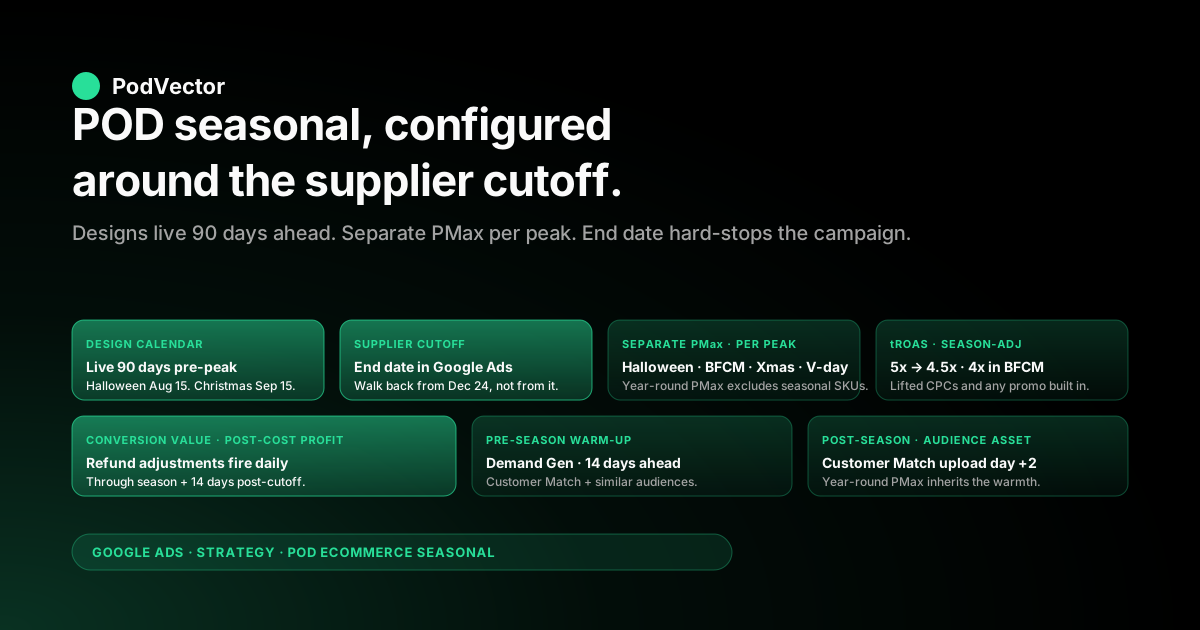
- Halloween design window — October 1 to October 28. Designs need to be live in Shopify by August 15 so 6 weeks of organic indexing accrues before the paid push. The paid campaign launches October 1, peaks October 14–22, and stops accepting orders October 23 (Printify standard production+shipping). The Halloween revenue tail is short — November 1 brings collapse — so cleanup happens fast.
- Black Friday / Cyber Monday window — November 22 to December 1. Designs need to be live by October 1, with the seasonal Performance Max campaign pre-built and paused in early November. The five-day BFCM peak (Black Friday through Cyber Monday) sees 4–6x daily revenue at 1.5–2x normal CPCs. Production is still healthy at this point — Printify can usually ship by December 5 for an order placed November 28. Cutoff is December 1 for Christmas-themed designs that need to land before December 24.
- Christmas design window — November 1 to December 12. Designs live by September 15, paid push launches November 1 and runs through the cutoff calculated from supplier production time. The peak shifts earlier each year as cutoff anxiety grows — December 5–10 has overtaken December 15–20 as the peak ordering window for Christmas-themed POD apparel. Cutoff for standard shipping is typically December 12 with Printify, December 14 with Printful U.S. fulfillment.
- Valentine's window — January 25 to February 11. The shortest peak on the calendar but also the highest-margin: heart-print mugs and tees sell at full retail with no discount expected, supplier production is back to normal turnaround, and Tier-A margin holds. Designs live by December 15. Paid push runs January 25 through February 9; February 14 itself is too late to ship.
Notice what is not on this list: the standard Q4 calendar that an inventory brand plans around (Memorial Day, July 4, Labor Day, Thanksgiving). Those are sale dates for inventory brands clearing stock; for POD, they are paid-traffic windows where the SERP is competitive and your supplier-locked margin can't sustain a 20%+ promotional discount profitably.
Skip them, or run only Tier-A-only promotions if forced to participate. The promotional mechanics for those windows are walked separately in the Google Ads for ecommerce promotions strategy piece.
Pre-season build: 90 days before peak, not six weeks
The standard ecommerce advice — start seasonal campaign preparation 6–8 weeks before peak — was written for brands with established product lines that need a budget ramp and audience warm-up, not a brand-new design that has zero historical performance data. POD seasonal campaigns need 90 days, not six weeks, because the design itself has to accumulate organic signals before it can support paid scale. The build looks like this:
Day 90 to day 60 before peak: design launch and organic seeding. The seasonal design (Christmas tree art on a black tee, pumpkin script on a cream mug) goes live in Shopify with a dedicated collection page, optimized product titles ("Christmas Tree Tee — Soft Cotton Holiday Gift" not "Christmas Tee"), structured product descriptions with the keyword variants the SERP rewards, and high-quality lifestyle mockups generated either through Printify's mockup generator or Printful's. The Google & YouTube app pushes the SKU to Merchant Center the same day.
No paid traffic yet. The 30-day window establishes a Merchant Center price history (so promotional sale_price annotations qualify later), allows Google to crawl the PDP, and lets organic Shopping impressions accumulate at zero cost.
Day 60 to day 30: low-budget Standard Shopping at $5–10/day. A trickle of paid traffic to confirm the design converts at all before the seasonal Performance Max launch. Standard Shopping with manual CPC bids of $0.30–0.50 keeps spend bounded and produces 15–40 sessions per day on the seasonal collection.
The diagnostic question this answers: does this design convert at any rate, or did the audience not exist? A Halloween design that converts at 0.4% in mid-September is a green light for the October push; one that converts at 0.05% is a signal to swap the design before scaling.
Day 30 to day 14: Performance Max build, paused. The seasonal Performance Max campaign is built end-to-end in mid-September (for a Halloween push) or mid-October (for a Christmas push) but paused. Asset groups, audience signals, listing groups scoped to the seasonal collection, headlines and descriptions, video assets — all configured in advance.
The pre-build matters because Performance Max needs 5–7 days of learning before its bidding stabilizes; if you build it on October 1 for an October 1 launch, the first week of the peak window is wasted on learning-phase mis-spend. Build by October 18, launch paused, then unpause on November 1.
Day 14 to day 0: audience warm-up via Demand Gen. A Demand Gen campaign with the seasonal video creative ("Holiday gifts your friends will actually wear" — 30 seconds, the design hero in the first 3 seconds) runs against Customer Match (your existing buyers, opted-in), similar audiences, and broad in-market segments for the relevant gift category. Budget $20–40/day for two weeks.
The job here is not conversion — it is impression accumulation against the audience pools that the seasonal Performance Max will draw from when it launches. By the time PMax goes live, those audiences have seen the design 2–4 times.
Day 0 to peak: seasonal Performance Max unpause and scale. Daily budget at 2–3x the steady-state campaign's daily budget, tROAS set 0.5–1.0x below the steady-state target (a 4.5x or 5x tROAS that runs at 6x in March compresses to 4x or 4.5x in November as competition lifts CPCs and Smart Bidding spends to maintain volume). Refund adjustments configured to fire daily through the season and 14 days post-peak. Conversion value uses post-discount gross profit, not order subtotal — covered in the measurement section below.
The 90-day build looks heavy compared to the six-week guidance circulating in inventory-brand articles. It is not.
The economics: a Christmas design that earns $40K in November-December revenue at 32% gross margin and 4.5x profit ROAS contributes roughly $4,500 in net profit. A six-week build that mis-launches into a learning-phase Performance Max during the peak week loses 30–50% of that contribution to wasted spend and missed conversions. The 90 days are the moat; the design plus the audience signals plus the pre-built campaign together are what you are paid for.
Campaign structure: a separate seasonal PMax per peak window
The campaign-structure decision that matters for POD seasonality is whether to run the seasonal traffic through the existing year-round Performance Max or to build a dedicated seasonal Performance Max scoped to the seasonal collection. Almost always: dedicated. The reasons trace back to how Performance Max's bidding works and how POD's seasonal economics differ from steady-state.
The existing PMax has the wrong learning data for the season. A year-round Performance Max trained on March-through-September conversion data is calibrated against a CPC environment 30–50% cheaper than November's, audience pools that don't include holiday-gift in-market segments, and creative that doesn't carry seasonal signals. Adding seasonal SKUs as an asset group inside that campaign forces the bidder to integrate two very different economic profiles into one tROAS target, which it does badly — the seasonal SKUs underbid (the bidder thinks they're more expensive than the campaign average) or overbid (the bidder thinks they're more profitable than the November reality), and the campaign's overall performance degrades.
The seasonal PMax can run on a separate tROAS, separate budget, separate creative. A "Christmas Tee Collection — November 2026" campaign with its own 4x tROAS, $200/day budget, and Christmas-themed video and image creative is straightforwardly evaluable: did this campaign earn its tROAS? Should it scale or pause?
The decisions are clean. A seasonal asset group inside a year-round campaign is much harder to read because its performance gets averaged into the campaign roll-up.
The campaign is disposable. The seasonal PMax is built for a specific peak window and paused on December 13 (or whenever the supplier cutoff lands). It does not need to live forever; it does not need to evolve gracefully into the next quarter.
Build it, run it, pause it, archive the learnings, build the next one for the next peak. This is the opposite of how a year-round PMax should be treated (where you preserve learnings carefully) and one of the genuine advantages POD operators have — the seasonal economics restart each window, so there is no penalty for tearing down the campaign.
The structure looks like this for a calendar year:
- Steady-state PMax (year-round). Excludes seasonal SKUs from listing groups during their peak windows. Carries the evergreen catalog (basic tees, mugs, totes with non-seasonal designs) at a 5–6x tROAS year-round.
- Halloween PMax (October). Built September 25, paused. Unpaused October 1. Paused October 23. Listing groups scoped to the Halloween collection only. tROAS 4.5x.
- BFCM PMax (Black Friday week). Built early November, paused. Unpaused November 22. Paused December 1. Includes promotional pricing on the Tier-A-only sale collection if running a BFCM promo. tROAS 4x (lifted CPCs, deeper promo).
- Christmas PMax (November-December). Built October 18, paused. Unpaused November 1. Paused at supplier cutoff (December 12 for Printify standard, December 14 for Printful U.S.). Listing groups scoped to the Christmas collection only. tROAS 4.5x.
- Valentine's PMax (late January). Built January 12, paused. Unpaused January 25. Paused February 9. Listing groups scoped to the Valentine's collection. tROAS 5x (no promotional pressure on this window).
The seasonal Performance Max architecture extends naturally to other Performance Max patterns documented in the Shopify Performance Max campaigns explained piece. The seasonal-specific configuration is the listing-group scoping (one collection only) and the time-bounded launch and pause.
Bidding for the season: tROAS, seasonality adjustments, conversion value
Smart Bidding's seasonality adjustments and tROAS handling carry most of the bidding load if configured correctly, but POD has a few specific configurations that matter beyond the inventory-brand defaults.
Lower tROAS during the peak by the discount percentage plus a margin buffer. If the steady-state campaign runs a 5x tROAS, a Christmas push with no promotional discount can hold that 5x. A BFCM push with a 20% sitewide promo on the Tier-A collection compresses the unit economics — the same sale that earned $7 net profit at full price now earns $5 — so the tROAS target needs to drop to roughly 4x to keep Smart Bidding spending against the actual margin reality.
The math: target ROAS = (target gross profit per $1 ad spend) / (gross margin %). If you want $1 of net profit per $1 of ad spend at 32% gross margin, your tROAS needs to be ~5x at full price; at 25% effective margin (post-20%-promo), it needs to drop to 4x. Setting the campaign at 5x with a 20% promo applied is asking Smart Bidding to find conversions at half the margin reality, which it does by underbidding the campaign into invisibility.
Seasonality adjustments for short events (1–7 days), not for the whole season. Google's seasonality adjustment feature in Smart Bidding is designed for short-term conversion-rate shifts (a 3-day flash sale, a 24-hour BFCM push) — the bidder temporarily increases bids on the assumption that conversion rates will spike during that window. Configure +20% to +30% for the BFCM 5-day window, +15% for Cyber Monday alone, +25% for the December 5–10 Christmas peak. Don't configure seasonality adjustments for the entire two-month November-December window — that's not a "short event," that's the new baseline, and Smart Bidding handles it through learning-phase recalibration instead.
Conversion value uses post-discount gross profit, not order subtotal. The same configuration that matters for promotions matters for seasonality: if the conversion event reports order subtotal ($35 for a Tier-A tee at full price), Smart Bidding optimizes for revenue ROAS rather than profit ROAS, which scales the wrong campaigns during a peak. Configure the conversion event to report gross profit (retail minus supplier cost, minus shipping, minus payment processing) — if Shopify's Google & YouTube app or your conversion tag fires "purchase" with a custom value of post-cost profit rather than order subtotal, Smart Bidding's tROAS optimization aligns to actual margin contribution. The full configuration walkthrough is in Shopify Google Merchant Center strategy.
Refund adjustments fire daily through the peak and 14 days post. The standard refund adjustment in Google Ads posts a negative conversion value when an order is refunded, so Smart Bidding's tROAS calculation reflects net-of-returns revenue rather than gross. POD seasonal returns spike post-Christmas because of arrived-late, wrong-size, and gift-recipient-doesn't-want orders — a 6–12% refund rate on December 18–25 orders shows up in the refund stream December 28 through January 10.
If refund adjustments only fire weekly, the bidder spends through December 12 against a clean conversion stream that quietly turns ugly on January 5. Configure daily refund posts and let the campaign learn within the window.
Holiday cutoff math: when to stop selling each design
The single most damaging seasonal mistake POD operators make is letting the Christmas campaign keep converting through December 18–22 because the budget is still pacing well, then watching the customer-service queue fill with "where is my order" emails December 27. The campaign needs to stop accepting orders before the supplier can no longer deliver by Christmas Eve. The math runs backwards from December 24 through three lead-time components:
- Production time (Printify or Printful in-network). Standard 3–5 business days in Q1–Q3, blowing out to 7–10 business days in early-mid November and 10–14 business days from November 20 through December 5. Both suppliers publish updated turnaround windows in their dashboards in early November; check those rather than relying on annual guidance.
- Shipping time (USPS / UPS Ground). 3–5 business days for U.S. continental ground shipping in Q1–Q3, 5–7 in mid-December. Carriers don't publish blow-out warnings the way suppliers do; assume 5–7 days in the week leading to Christmas.
- Buffer for the unexpected. One business day for "the print partner had a printer issue, your order is rerouted to a backup facility" or "a USPS sort-facility delay added a day." Add this — the cost of being one day late is a refund and a one-star review; the cost of being one day early is the customer is mildly delighted.
Worked example for Printify standard apparel shipping in 2026: production 12 business days in early December, ground shipping 6 business days, buffer 1 day, total 19 business days backwards from December 24 = November 27. A Christmas tee sold November 28 is at high risk of arriving December 28. The campaign cutoff for that SKU should be November 27, not December 12.
Practical execution: configure the seasonal Performance Max with an end date in Google Ads (not just a manual pause reminder). The end date hard-stops the campaign at midnight on the cutoff.
For Printify standard apparel in 2026, that end date is December 12 (early-December cutoff) for slower-production SKUs and December 14 (mid-December cutoff) for faster-production accessories like mugs and posters. Printful U.S. fulfillment runs 1–2 days faster on average; their cutoff lands December 14–16 depending on the SKU. Re-derive the date in the first week of November based on the actual published turnaround in the supplier dashboard — these cutoffs shift year over year as supplier capacity and carrier capacity change.
One nuance: the cutoff is per-SKU, not per-campaign. If the Christmas collection includes mugs (faster production, smaller package, 5-day shipping) and hoodies (slower production, larger package, 6-day shipping), the mug cutoff is December 16 and the hoodie cutoff is December 12.
The clean way to handle this is two separate seasonal Performance Max campaigns scoped to the two SKU groups, each with its own end date. The lazy way is one campaign with the conservative end date applied across both — costs you 4 days of mug sales but eliminates the ship-late risk on hoodies. Choose by what your customer-service throughput can handle.
Surviving the CPC spike: what to bid against, what to skip
Q4 CPCs run 30–60% above Q1 averages on the high-intent ecommerce keywords, with mid-November through Cyber Monday the worst of it. Inventory brands absorb this with budget; POD operators with thinner margins need to be selective about which auctions to participate in.
Bid through the spike on high-intent design-specific terms. "Custom Christmas hoodie", "personalized Halloween mug", "funny Thanksgiving t-shirt design" are high-intent terms with low SKU competition (most inventory brands don't carry POD-specific custom designs) and the auction is mostly other POD operators competing on creative and design quality. The CPCs lift but the conversion rates lift too — this is profitable scale.
Skip the generic category terms during the peak. "Christmas gifts", "holiday hoodies", "best Halloween costume" are competitive against inventory brands with $50/order at 60% margin and venture-backed CPC budgets. A POD operator at 32% margin cannot win a CPC auction against an inventory brand willing to bid $4 per click for the same conversion that earns it $30 in profit. Bid out, or set a low max CPC cap on these terms and let Smart Bidding skip the auctions where the cost exceeds the cap.
Lean into Customer Match and similar audiences. The CPCs lift on cold-audience keyword auctions; they lift much less on warm-audience targeting. Customer Match (your existing buyers) and the similar-audience expansions Google generates from those lists run at 40–60% lower CPCs than cold keyword traffic, with conversion rates 2–3x higher. The pre-season Demand Gen warm-up (covered in the pre-season section) feeds this — the audience pools that Demand Gen warmed up in late October are the cheapest, highest-converting traffic the November-December campaign sees.
Consider Demand Gen for top-of-funnel during the peak instead of Search. If the Search CPCs on generic terms are too high, Demand Gen on YouTube and Discover at $0.40–0.80 per click against in-market gift-shopping audiences can backfill the awareness layer at a fraction of the cost. The conversion attribution gets murkier (Demand Gen drives later conversions through retargeting), but the cost-per-acquisition holds together better than a Search-on-cold-generic-terms campaign during peak.
Post-season: the audience is the asset, not the inventory
Inventory brands have a clear post-Christmas playbook: discount the unsold seasonal stock to clear it, run "after-Christmas sale" remarketing against the past-30-day site visitors who didn't convert, push gift-card promotions to capture returners. None of that maps to POD.
There is no unsold inventory to discount; the seasonal designs are dead retail; the customer who bought a Christmas hoodie December 18 isn't going to buy another Christmas hoodie December 27. The post-season playbook is different — it is about converting the seasonal audience into year-round assets.
Customer Match list update on December 27. The list of buyers from the November-December seasonal push gets uploaded to Customer Match within 48 hours of the season ending. These customers are now warm audience for the year-round PMax targeting evergreen designs (basic tees, classic mugs, year-round sentiment art) and for the next seasonal window (Valentine's in late January). The lift in conversion rate against this audience versus cold targeting is typically 2–3x.
Similar-audience generation off the seasonal list. Within Google's audience interface, the similar-audience expansion off the December seasonal-buyer list produces an audience pool 10–50x larger than the seed list, with engagement signals correlated to gift-buying behavior. This audience feeds the year-round PMax through the off-season, contributing 15–25% of conversions during Q1.
Email capture sequences for non-converters. Site visitors who hit the seasonal collection but didn't convert get a one-email "thanks for visiting, here are designs we think you'll like" sequence in early January, with the year-round catalog featured. The conversion rate on this sequence is low (1–3%) but the cost-per-acquisition is approximately zero, and the audience signals from the email opens feed back into the Google Ads remarketing pool.
Performance Max audience signal updates. The year-round PMax campaigns get their audience signals refreshed on January 1 with the seasonal-buyer Customer Match list and the December similar-audience expansions added as positive signals. Smart Bidding's targeting weight shifts toward these new audiences over the first 3–5 days of the new year and the off-season campaign performance lifts measurably from Q4 momentum carrying into Q1.
The point: the seasonal campaign produced an asset (the audience) and revenue (the orders); the post-season work converts the asset into year-round campaign performance. Inventory brands work the unsold-inventory side of post-season; POD operators work the audience side. Both are real, both compound, and the audience side is more durable because it doesn't depreciate when the warehouse clears.
Measurement: profit per design per day, not revenue per campaign per week
The reporting cadence that supports a seasonal POD push is daily and per-design, not weekly and per-campaign. The reasons trace to the speed of the season — five-day BFCM peaks, two-week Christmas peaks, ten-day Halloween peaks.
A weekly campaign-level report tells you on Monday morning that the Halloween campaign lost money the week of October 14, after the peak is over and the budget is already spent. A daily per-design report tells you Tuesday morning that the pumpkin-mug design is profitable but the witch-tee design is not, and you can adjust listing-group bids for the remaining peak days.
The four metrics that matter, in priority order:
- Profit ROAS per design per day. Revenue minus supplier cost minus shipping minus payment processing, divided by ad spend, for each design across the seasonal collection. The diagnostic question this answers: which designs in the seasonal collection are profitable and which are not? The actionable response is to lift listing-group bids on the profitable designs and lower (or exclude) the unprofitable ones, mid-season.
- New-customer share of orders. The percentage of orders coming from first-time buyers versus repeat. A seasonal push that runs at 80% new customers is building the audience asset; one that runs at 30% new is largely cannibalizing existing demand and the LTV calculation is uglier than the immediate-revenue numbers suggest. Inventory brands monitor this for similar reasons; POD operators have an additional reason (the year-round Customer Match list grows from the seasonal new-customer share specifically).
- Refund-adjusted profit ROAS, lagged. The same profit ROAS metric, but recalculated 14 days after the season ends with the refund stream incorporated. Often shifts the apparent "winners" by 0.5–1.0x — a campaign that looked like 4.5x at season-end recalculates to 3.8x after late-arriving order refunds post.
- CPC trend versus the steady-state baseline. CPCs lifting 30% above steady-state on a Halloween campaign is normal; CPCs lifting 80% above is a signal that competition has unexpectedly intensified or that the bidder is mis-calibrated. Catching the latter early lets you pause and rebuild before the budget is spent.
The reporting infrastructure to support this is unreasonable to build on weekly Looker exports — the data is across Shopify (orders, refunds), Printify and Printful (supplier costs per order), and Google Ads (spend, conversions, CPCs by campaign and product), and reconciling them by design by day requires a live data warehouse that updates daily, not a Sunday-night spreadsheet pull. Most well-run POD operators end up either building this in a warehouse and Looker (an engineering project of meaningful scope) or accepting the latency penalty and optimizing on weekly data with the understanding that mid-season corrections aren't possible. The conversion-tracking foundations the seasonal campaign depends on — including how to make refund-adjusted gross profit the conversion value Smart Bidding optimizes for — are walked in add Google Ads conversion tracking to Shopify.
Five POD-specific seasonal mistakes that drain the budget
Letting the campaign run past supplier cutoff. The single most expensive mistake. A Christmas campaign converting at 4.5x profit ROAS through December 18 looks like it should keep running — until the customer-service queue fills with "where is my order" December 27 and the refund rate on those orders runs 40–60%.
Net profit goes deeply negative on the post-cutoff window. Configure the campaign end date in Google Ads, not as a calendar reminder.
Using the existing year-round PMax as the seasonal campaign. Folding seasonal SKUs as an asset group inside the year-round Performance Max corrupts the bidder's learning data with seasonal economics that don't reflect the year-round reality. Both the seasonal performance and the year-round performance degrade. Build a separate seasonal campaign and exclude the seasonal SKUs from the year-round campaign during the peak window.
Skipping the 60–90 day organic seeding window. Launching a Halloween design on October 1 with a paid campaign on the same day misses 6 weeks of organic Shopping impressions, Merchant Center price-history accumulation, and PDP indexing. The campaign starts in a worse position than the same campaign launched against a design that was live in late August. The 90-day calendar is not optional.
Optimizing on revenue ROAS during the season. Smart Bidding optimizes for whatever conversion value you report. A seasonal campaign that reports order subtotal scales the SKUs with the highest revenue regardless of margin — which during a 20% BFCM promo on supplier-locked margin is the SKUs losing the most money. Configure the conversion event to report post-cost profit before the season starts; the configuration takes a day; the cost of skipping it is a season's worth of mis-optimized spend.
Treating the post-season as cleanup rather than asset capture. The seasonal-buyer audience is a higher-value asset than most operators recognize. Uploading them to Customer Match within 48 hours of the season ending, generating similar audiences off that list, and updating year-round PMax audience signals lifts Q1 performance materially. Skipping it costs roughly 15–25% of January-February conversions versus the run-rate that includes the seasonal audience signals.
FAQs
How early should I really start preparing for Q4 if I'm running POD?
Designs need to be live in Shopify 60–90 days before the peak window. For Halloween (October 14–22 peak), designs live by August 15.
For Christmas (December 5–10 peak), designs live by September 15. The pre-season organic seeding window matters because it accumulates Merchant Center price history and PDP impressions before the paid push, which improves the launch-week performance of the seasonal Performance Max measurably.
Should I run one seasonal Performance Max for all of Q4 or separate campaigns for Halloween, BFCM, and Christmas?
Separate campaigns. The economics are different (Halloween peak is short and high-margin, BFCM has promotional pressure, Christmas runs longer and has cutoff anxiety driving conversion behavior), the SKU sets are different, and the bidder learns better against a well-defined campaign scope than against a season-long blend. Build three separate seasonal Performance Max campaigns; pause each at its respective cutoff.
What's the right tROAS for a Q4 seasonal POD campaign?
Anchor to your steady-state tROAS minus a buffer for the season's CPC lift and any promotional discount. Steady-state at 5–6x typically becomes 4–4.5x for Halloween and Christmas (no promotional discount, but lifted CPCs), and 3.5–4x for BFCM (promotional discount layered on top of lifted CPCs).
Setting the tROAS too high during the peak forces Smart Bidding to underbid the campaign into invisibility; too low and it overspends on conversions that don't earn the margin. The buffer math is in the bidding section above.
How do I handle the situation where Printify or Printful's production turnaround changes mid-season?
Recheck the supplier dashboard turnaround weekly through November and twice-weekly through December 1–15. If turnaround extends from 7 to 10 business days mid-November, the cutoff date moves earlier — December 14 becomes December 11.
Update the campaign end date in Google Ads accordingly. The cost of being late on cutoff (refunds plus reviews) is much larger than the cost of stopping early, so err toward the earlier date when the supplier's published turnaround is volatile.
Should I run promotional discounts on my Christmas designs or sell at full price?
Full price for Christmas-themed designs in November and the first week of December — the customer is buying for a hard deadline (Christmas) and is price-insensitive within reason. Promotional pressure for those designs is mostly internal cannibalization, not competitive necessity. Reserve the promotional discount for the BFCM 5-day window if you choose to participate at all, and apply it to a Tier-A-only collection per the Google Ads for ecommerce promotions strategy guide rather than sitewide.
How long does it take Performance Max to "learn" before I should evaluate the seasonal campaign?
5–7 days of consistent budget and tROAS settings before Smart Bidding's bidding stabilizes. This is why the pre-season build matters — if you launch on October 1 for an October 1 peak, the first week of the peak is wasted on learning-phase mis-spend.
Build the campaign by mid-September, launch paused, unpause October 1, and the campaign is past learning by October 8 with two full weeks of peak performance ahead. For Christmas, build by October 18 and unpause November 1.
What should I do with the seasonal designs after the season ends — leave them in the catalog or hide them?
Hide them from the year-round Performance Max listing groups (set them as excluded SKUs) but leave the PDPs live in Shopify. The PDPs continue to accumulate organic Shopping impressions through the off-season at zero ad cost, and when the next year's seasonal window opens the PDP has another 10 months of indexing accumulated. The PDPs that have been continuously live for 2–3 years through multiple seasonal cycles consistently outperform freshly-launched PDPs in their fourth or fifth season — the organic signal compounds.
How do I measure whether a seasonal push was profitable when refunds keep posting after the season ends?
Refund-adjusted profit ROAS calculated 14 days after the season ends. Configure refund adjustments to fire daily through the season and through the 14-day window post-cutoff (Printify and Printful both surface refund webhooks; route them to your conversion-tracking pipeline so the negative conversion value posts the day the refund is issued).
The 14-day post-season window captures essentially all of the late-arrival refunds and gift-recipient-doesn't-want returns. The recalculated profit ROAS at day 14 post-season is the actual answer to "did this campaign make money."
Reading whether your Halloween, BFCM, and Christmas pushes earned profit by design and by day, in time to act on it.
Once your POD seasonal calendar is configured the way this guide walks — separate Performance Max per peak, supplier-cutoff end dates, post-cost profit on the conversion event, refund adjustments daily — the question every morning during the peak is which designs are profitable today, which to scale into the remaining cutoff days, which to pause. Victor connects Shopify, Printify, Printful, and Google Ads into one live data warehouse view and answers in seconds. Profit ROAS by design by day, refund-adjusted, new-customer share, supplier turnaround tracked against your cutoff math. No spreadsheet, no Looker build, no Sunday-night reconciliation while the season is closing. Victor answers your questions and acts on them — with your approval.
Try Victor free