
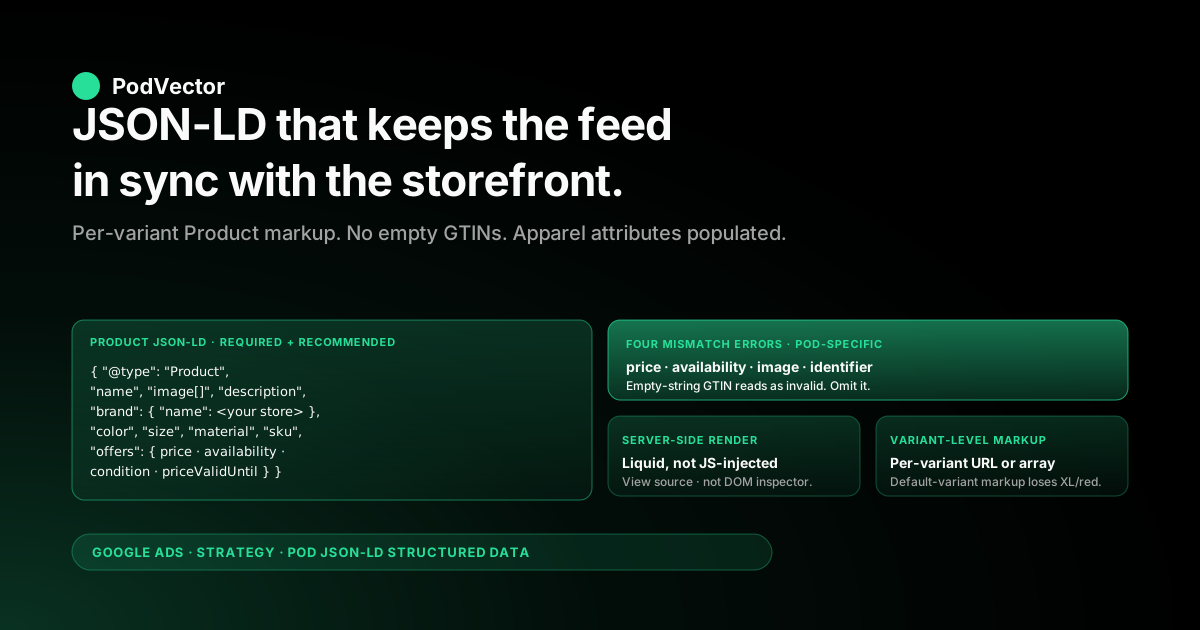
Quick Answer: Structured data (JSON-LD Product markup) is what Google Merchant Center reads off your Shopify product pages to verify the price, availability, condition, and identifiers your feed claims — and to keep them fresh between feed pushes via Automatic Item Updates. The standard advice ("install JSON-LD for SEO, validate with Rich Results Test, watch for warnings") is correct mechanics but written for an inventory-holding store with manufacturer GTINs, stable pricing, and one warehouse.
A Printify or Printful Shopify store fails that template on every axis: custom-printed designs have no GTIN so the default identifier_exists markup triggers bulk disapprovals, supplier-cost-driven price changes happen weekly so cached structured data goes stale and mismatches the feed, mockup-only image markup fails the "must match what shoppers see" requirement when designs render differently on actual blanks, and the variant-level JSON-LD that Shopify themes ship by default doesn't enumerate the size/color/material that Merchant Center demands for apparel. This guide walks the JSON-LD schema POD operators actually need on Shopify product pages: required and recommended Product properties, the Shopify-side implementation paths (theme edit vs JSON-LD for SEO app vs custom Liquid), the four mismatch errors that disapprove POD catalogs, and the validation loop that catches structured-data drift before Merchant Center does.
Why structured data is a profit problem for POD, not just a markup problem
The standard guides to Shopify structured data for Google Merchant Center — Ilana Davis on JSON-LD validation errors, Shopify's Merchant Center primer, Google's canonical structured data setup doc — frame the problem as "install the markup, validate it with Rich Results Test, fix any warnings." That framing is correct for an inventory-holding store whose products have manufacturer GTINs, stable supplier-priced inventory, and one warehouse. It misses what makes POD structured data fragile in production.
Three things turn structured data from a one-time setup task into an ongoing profit problem for Printify and Printful Shopify stores:
- Automatic Item Updates rely on structured data accuracy, not feed accuracy. Merchant Center crawls your storefront and uses the JSON-LD
Productmarkup to overwrite stale feed values for price and availability. If the JSON-LD is wrong — wrong price because a Shopify discount didn't propagate into the markup, wrong availability because the variant disabled but the markup still saysInStock— Merchant Center trusts the markup over the feed and disapproves the SKU. The "Mismatch between price in landing page and feed" disapproval is a structured-data problem disguised as a feed problem. - POD identifiers don't fit the schema.org template. Schema.org's
Producttype assumesgtinormpnas the canonical identifier. Custom-printed POD products have neither — the GTIN belongs to the blank garment (Bella+Canvas 3001), not to your printed design. Theidentifier_existsequivalent in JSON-LD is the absence ofgtinandmpnproperties, but most Shopify theme JSON-LD templates emit empty-string GTIN values that read as "GTIN claimed but invalid" rather than "GTIN doesn't exist." Subtle distinction, bulk-disapproval consequence. - Supplier-cost-driven price changes happen weekly. A Printify provider raises the wholesale on a Bella+Canvas 3001 from $7.20 to $7.45; the operator updates the Shopify retail price from $19.99 to $20.99 to hold margin. The feed picks up the new price within minutes. The page-level JSON-LD picks it up too — but Merchant Center's crawl cache may serve the old markup for hours, generating a temporary mismatch that flips the SKU to Limited until the next crawl. Inventory-holding stores rarely change prices weekly; POD stores do, and the structured data layer has to absorb the churn.
The fix is to treat structured data as the layer that makes the feed match the storefront under POD's volatility — explicit JSON-LD on every product page, generated from the same Shopify variant data that drives the feed, with no empty-string identifiers and no inherited blank-garment GTINs. The remainder of this guide walks that implementation. For the broader Shopify-Merchant-Center architecture, the sibling piece Shopify and Google Merchant Center strategy for POD covers the feed and supplemental-feed layer; the topic hub is Google Ads for POD; the cluster hub is the Google Ads strategy cluster; the pillar is the complete Google Ads playbook for print-on-demand sellers.
What Merchant Center actually reads off the page (and why)
Merchant Center's web crawler fetches your product landing page on a schedule — typically every 1–7 days for active SKUs, faster when traffic is high or when feed disapprovals are pending. It parses the HTML returned from the server and extracts structured data in three formats, in priority order: JSON-LD, Microdata, RDFa. JSON-LD is the format Google explicitly recommends because it lives in a single <script type="application/ld+json"> block that's easy to validate and doesn't entangle with theme HTML.
What the crawler uses the markup for, in practical terms:
- Automatic Item Updates. When the markup's
price,availability, orconditionvalues diverge from the feed, Merchant Center can either correct the feed (Automatic Item Updates enabled) or disapprove the SKU (Automatic Item Updates disabled). Most POD operators want this enabled — it's what keeps the feed in sync between scheduled feed pushes — but it depends entirely on the markup being correct. - Free product listings (organic Shopping) eligibility. Free listings have stricter quality thresholds than paid Shopping. Missing or invalid structured data is one of the top three reasons SKUs that approve for paid Shopping fail to appear in free listings. Free listings produce 30–50% of total Shopping clicks for a healthy POD catalog and cost nothing per click — losing them to structured-data gaps is pure margin loss.
- Rich product results in Google Search. The price, availability, rating, and review-count snippets that appear under organic search results for product pages come from the
ProductJSON-LD. They lift CTR by 15–30% versus plain blue-link results in Google's own data. A POD store ignoring this is leaving organic conversion on the table even if the paid Shopping side is fine. - Knowledge graph deduplication. When Google encounters the same product across multiple sellers, it groups them. POD designs don't usually collide with other sellers (each design is unique), but the JSON-LD
brandproperty is what attaches your design to your store's knowledge graph identity. Setting brand to your store name (not to "Bella+Canvas" or the blank manufacturer) builds your store's brand SERP presence over time.
The crawler does not run JavaScript before parsing structured data. This catches Shopify operators using JSON-LD-injection apps that render markup client-side rather than server-side — the markup is invisible to the crawler, even though it appears in the rendered DOM and validates in Rich Results Test (which does run JavaScript). The Merchant Center help doc is explicit: "Structured data markup must be present in the HTML returned from the web server and cannot be generated with JavaScript after the page has loaded." Most Shopify theme implementations and most paid JSON-LD apps render server-side via Liquid; verify yours does by viewing page source (Cmd-U / Ctrl-U) rather than inspecting the DOM.
Required and recommended Product properties for POD
Schema.org's Product type has 50+ properties; Merchant Center uses about 15. For POD product pages on Shopify, the required and recommended set is:
Required for any product to be eligible for Automatic Item Updates and rich results:
@type:"Product"name: product title (matches Shopify product title)image: array of image URLs, absolute paths, minimum 800×800 px, JPEG or PNGdescription: plain-text product description (HTML stripped)brand: nested{"@type": "Brand", "name": "Your Store Name"}offers: nestedOfferobject containing price, priceCurrency, availability, condition, url, priceValidUntil
Recommended for POD apparel and accessories:
color,size,material,pattern— standard schema.org Product properties; required by Merchant Center for the apparel taxonomy regardless of whether they're in the feedsku: variant-level SKU matching the Merchant Center feedidaggregateRatingandreview: if the store has product reviews via Shopify Reviews, Yotpo, Judge.me, or similar — these power the star-rating snippet in SERPsshippingDetails: nestedOfferShippingDetailswith shippingRate, shippingDestination, deliveryTime — became more important after Google's 2023 emphasis on shipping markup as a ranking factor in free listingshasMerchantReturnPolicy: nestedMerchantReturnPolicywith returnPolicyCategory, merchantReturnDays, returnMethod, returnFees — required for free listings in some Google product categories as of 2024
The Offer nested object is where most POD-specific configuration lives:
price: must match the displayed retail price exactly, including any active automatic discountpriceCurrency: 3-letter ISO code (USD, GBP, EUR, etc.); must match the storefront currency for the page being crawledavailability: schema.org URL —https://schema.org/InStockfor available variants,https://schema.org/OutOfStockfor disabled variants,https://schema.org/PreOrderfor upcoming launchescondition:https://schema.org/NewConditionfor all POD product (POD is always new; never set toUsedCondition)url: canonical product URL (with variant query parameter if the JSON-LD is per-variant)priceValidUntil: ISO 8601 date in the future; required for the rich-results snippet to render with a sale-price indicator. Set to one year out and re-roll annually.
The properties Merchant Center does not need but Schema.org allows — productID, weight, depth, width, height, productionDate, award, slogan — can be omitted without consequence. Adding them doesn't hurt; not adding them doesn't trigger any disapproval.
The identifier_exists question in JSON-LD vs in the feed
The single most-misunderstood structured-data field for POD is the identifier (GTIN, MPN, ISBN). The feed-side answer — set identifier_exists to no via metafield or feed rule — is well documented. The JSON-LD-side equivalent is rarely covered.
The rule for POD JSON-LD is: do not emit empty-string identifier properties. If you don't have a real GTIN, the gtin property should be absent from the JSON-LD entirely, not present with an empty string or a placeholder value. The same applies to mpn, gtin8, gtin12, gtin13, gtin14, and isbn.
The reason: Merchant Center's parser distinguishes between "property absent" (interpreted as "no identifier of this type exists for this product") and "property present with invalid value" (interpreted as "identifier claimed but invalid, please fix"). The second triggers a per-SKU validation error; the first does not. Most Shopify theme JSON-LD templates default to emitting "gtin": "" when the variant's barcode field is empty, which generates the second case unintentionally.
Two ways to fix this on Shopify:
Theme code conditional. In the theme's product structured data Liquid (typically snippets/structured-data-product.liquid or inside templates/product.json), wrap the GTIN emission in a conditional:
{% if variant.barcode != blank and variant.barcode != "" %}
  "gtin13": {{ variant.barcode | json }},
{% endif %}
This emits the GTIN property only when a real barcode value exists. For POD stores using the variant barcode field for an internal SKU rather than a true GTIN, leave the barcode field empty for POD products and use the SKU field instead — the barcode field maps to GTIN downstream and a non-GTIN value there causes problems beyond just the JSON-LD layer.
JSON-LD for SEO app or similar. Apps like JSON-LD for SEO (Ilana Davis's), Schema App, or Smart SEO render structured data via their own templates that handle the empty-identifier case correctly by default. The tradeoff is monthly subscription ($15–35/month for most plans) versus theme code maintenance. For a POD store doing 100% custom-printed product, the theme conditional approach is sufficient and free; for a mixed catalog (some real-GTIN merchandise, some POD designs), an app's per-product control may be worth the cost.
The companion piece on Shopify Google Merchant Center strategy covers the feed-side identifier configuration; the JSON-LD side and the feed side need to match — both should declare "no GTIN exists" rather than "GTIN exists but is empty."
Three implementation paths on Shopify (theme edit, JSON-LD for SEO app, custom Liquid)
Shopify themes ship some structured data by default, but the quality varies wildly. Free themes (Dawn, Refresh, Studio) emit basic Product JSON-LD that covers name, image, description, and offers but skips identifiers, brand-as-store-name, and the apparel-specific properties.
Premium themes (most paid Shopify themes) often include richer markup but introduce theme-specific quirks (variant ID handling, image array formatting). Auditing what your theme already emits is the first step before deciding which path to add to it.
To audit: open any product page in your storefront, right-click → View Page Source, search for application/ld+json, and inspect the JSON block(s). You typically see one to three blocks: an Organization or LocalBusiness block at site level (from theme.liquid), a BreadcrumbList block (from collection or product templates), and the Product block (from the product template). Validate the Product block by copying its content into the Rich Results Test and checking which Merchant Center properties are present and which are missing.
Path 1: Edit the theme directly. In Shopify Admin → Online Store → Themes → Edit code, find the snippet that renders the Product JSON-LD (usually snippets/product-structured-data.liquid or inline in sections/main-product.liquid). Modify it to add missing properties: brand, identifier conditional, color/size/material from variant options, shippingDetails, hasMerchantReturnPolicy.
Effort: 2–4 hours for a Liquid-comfortable operator; 0 ongoing cost. Risk: theme updates from the developer can overwrite your edits unless you've duplicated the theme first.
Path 2: Install JSON-LD for SEO or equivalent app. The app injects its own structured data (and typically disables the theme's, to avoid duplicate JSON-LD blocks). Effort: 30 minutes to install and configure; $15–35/month ongoing cost. Risk: app-level customization is limited — what the app supports is what you get; what it doesn't support requires theme edits anyway.
Path 3: Custom Liquid in theme via metafields. Define product-level and variant-level metafields for the data Merchant Center needs (color, size, material, age_group, gender, custom_product flag, brand override) and write a single comprehensive structured data snippet that consumes them. Effort: 4–8 hours to build, 30 minutes per new product to populate metafields (or bulk import via the metafields CSV). Risk: requires Liquid familiarity and metafield-management discipline.
The decision rule: under 50 products and a Liquid-comfortable operator → Path 1. Over 200 products or no Liquid familiarity → Path 2.
Want full control and willing to invest the build time → Path 3. Most growing POD operators settle on Path 2 as the operationally simplest path, then migrate to Path 3 once the catalog grows past 1,000 SKUs and the per-month app cost approaches the build-it-once cost.
Whichever path you pick, the JSON-LD has to match the feed exactly. The supplemental-feed-side configuration covered in Google Merchant Center Shopify strategy needs to align with the per-page JSON-LD; if the feed claims the SKU is in stock and the JSON-LD claims it's out of stock, Merchant Center disapproves the SKU pending reconciliation.
Variant-level JSON-LD: the part most Shopify themes get wrong
POD apparel multiplies fast: one design × five sizes × four colors = 20 variants. Each variant has its own SKU, potentially its own price (size XXL upcharge), its own availability status (color blocked while design royalty pending), and its own image (front-mockup with the chosen color). Merchant Center expects per-variant JSON-LD treatment because each variant is a separate offerable SKU in the feed.
Most Shopify themes emit a single Product JSON-LD block with the parent product's data and a single Offer reflecting the currently-selected variant. This is technically valid schema but it leaks two problems for POD:
- Wrong variant gets attributed. When Merchant Center crawls the page (with no variant query parameter), the JSON-LD reflects the default variant (typically size M / first color). If the SKU being checked in the diagnostics is size XL / red, the JSON-LD doesn't reflect that variant's price or availability and the SKU disapproves on a mismatch that's actually a variant-attribution problem.
- Variant attributes don't propagate. The default Shopify JSON-LD doesn't enumerate the size/color/material per variant, so Merchant Center can't validate that the apparel attributes match the feed.
The right pattern is one of two approaches:
A: Per-variant URL with variant-specific JSON-LD. When Shopify renders /products/vintage-typography-tee?variant=12345, the JSON-LD reflects variant 12345's price, availability, image, color, size, material. The feed's link attribute for each SKU includes the variant query parameter. Merchant Center's crawler hits the variant-specific URL and reads variant-specific markup. This is the pattern Shopify's Dawn theme implements correctly when configured for variant-specific URLs.
B: Single product page with array of Offer objects in JSON-LD. The Product block contains an offers array with one Offer per variant, each with its own SKU, price, availability, image, color, size. Merchant Center crawls once, parses the array, and matches each feed SKU to its corresponding Offer. Lower request volume but higher markup complexity; some apps (JSON-LD for SEO with the variant-array option) handle this cleanly.
Pattern A is simpler and matches what most Shopify themes already do for variant URLs; the fix is making sure the JSON-LD respects the variant query parameter rather than always reflecting the default variant. Pattern B is more efficient but requires either app support or custom Liquid that builds the offers array. Pick A if you're editing the theme; pick B if you're using an app that supports it.
For high-variant catalogs (10+ variants per product), Pattern B reduces crawl budget consumption substantially. Google's crawler has a finite per-domain crawl rate; one URL per variant × 200 products × 20 variants = 4,000 product URLs to crawl, which can take days for the first full crawl.
Pattern B with array-of-Offers brings that to 200 URLs and one crawl pass per product. The companion piece on Shopify Google Ads performance 2025 covers the broader crawl-budget question.
Image markup, mockups, and the "must match what shoppers see" rule
Google's Merchant Center policy: structured data must match what shoppers see on the page. For most ecommerce, that's straightforward — the photo of the product is the product. For POD, it's not — the image is a mockup rendered by Printify or Printful's mockup engine, not a photograph of the printed garment. Three image-markup pitfalls follow:
1. Mockup-only image array. If the JSON-LD image property contains only mockup images (digital renderings of the design on a flat-laid blank), Merchant Center's image quality validator may flag the catalog with "Promotional overlay on image" or "Generic product image" warnings.
Mockups have characteristic visual signatures (perfect lighting, no fabric texture detail, identical white backgrounds) that Google's image classifier recognizes. The fix is to mix at least one lifestyle photo (model wearing the printed garment, or printed garment on a textured surface) into the image array per variant. Printify and Printful both offer lifestyle mockup options that pass image quality validation more reliably than studio mockups.
2. Image URL not absolute. Merchant Center requires absolute URLs for image properties — https://yourstore.com/cdn/shop/products/design-front.jpg, not /cdn/shop/products/design-front.jpg. Most Shopify theme JSON-LD emits absolute URLs by default, but variant-specific image overrides via metafields sometimes get emitted as relative paths. Validate by checking the page source.
3. Image dimensions below 800×800 minimum. Shopify's responsive image transformations can shrink images for mobile delivery.
The JSON-LD image property should reference the original (or a known-large) variant of the image, not a thumbnail. Use Shopify's img_url filter with an explicit size argument: {{ product.featured_image | img_url: '1024x1024' }}. Below 800×800, Merchant Center disapproves the SKU under the image quality policy.
The "must match what shoppers see" rule has a subtler POD-specific application: design overlays. Some POD operators use Shopify product images that include marketing overlays — "BESTSELLER" badges, "LIMITED EDITION" banners, sale price stickers — added in their image editor before upload.
Merchant Center's "Promotional overlay on image" policy disapproves these. Strip overlays from product images; put marketing badges in the page HTML rendered around the image, not on the image itself.
The four mismatch errors that disapprove POD structured data
Merchant Center surfaces structured-data problems as four specific disapproval reasons. Each has a deterministic POD-specific cause and fix.
1. "Mismatch between price in landing page and feed." The JSON-LD's offers.price doesn't match the feed's price. POD-specific cause: the operator updated the Shopify retail price (covering a supplier cost increase) and the feed picked up the change within minutes via the Google & YouTube channel's near-real-time sync, but Merchant Center's storefront crawl cache served the old JSON-LD for several hours, generating a temporary mismatch.
Fix: confirm the JSON-LD reflects the new price by reloading the product page in incognito and viewing source; the disapproval typically clears within 24 hours of the next successful crawl. To minimize the window, request a manual re-crawl in Merchant Center → Diagnostics → Item issues → Recrawl this URL.
2. "Mismatch between availability in landing page and feed." JSON-LD says InStock, feed says OutOfStock (or vice versa). POD-specific cause: variant disabled in Shopify but the JSON-LD template doesn't check variant.available per variant, defaulting to the parent product's availability.
Or the inverse: variant enabled in Shopify but the design's print provider is temporarily unavailable (printer maintenance, print file rejected, royalty hold) and the operator marked the SKU OutOfStock in the feed via supplemental but didn't update the variant-level availability in Shopify. Fix: align the variant-level variant.available with the variant-level JSON-LD availability property, or use Shopify metafields to express the override and reflect it in both feed and markup.
3. "Image not crawlable" or "Image quality issue." Image URL in JSON-LD returns a 4xx, redirects, or fails Google's image quality validation (too small, mockup signature, promotional overlay). POD-specific cause: a Shopify theme update changed the image URL pattern; or a designer cropped a featured image below 800×800 to "make the product page look cleaner"; or the mockup is a flat studio render that triggers the "Generic product image" classifier. Fix: validate every image URL in the JSON-LD returns a 200 with dimensions ≥ 800×800; replace flat-studio mockups with lifestyle variants from Printify or Printful.
4. "Missing or invalid value for [identifier]." The JSON-LD claims a GTIN, MPN, or other identifier with an empty or invalid value. POD-specific cause: theme's default JSON-LD emits "gtin": "" when the variant barcode is empty, instead of omitting the property. Fix: wrap identifier emission in a conditional (covered in the identifier-exists section above) so empty values don't get emitted as properties at all.
All four are silent failures in the sense that the storefront looks fine, the feed looks fine, and only Merchant Center's diagnostics tab reveals the disapproval. The companion piece on Shopify Google Ads tracking issues covers the broader category of silent failures that look like they're working but quietly degrade campaign performance.
Validation loop: Rich Results Test, Schema Markup Validator, Merchant Center diagnostics
Three tools cover the structured-data validation surface, each catching a different class of problem.
1. Google's Rich Results Test. Paste a product URL or raw JSON-LD and the tool tells you which rich result types the markup qualifies for and what's missing.
Use it when first implementing markup or when adding properties. Catches: missing required properties for the targeted rich result, syntax errors, undefined schema types. Doesn't catch: feed-vs-page mismatches (it only sees the page); identifier-property emptiness as a problem (it accepts empty strings as valid).
2. Schema.org's Schema Markup Validator. Pure schema.org validation without the rich-results overlay.
More liberal than the Rich Results Test; surfaces every schema.org property and notes deprecated or non-standard ones. Use it to audit comprehensiveness — what properties exist on the markup that Rich Results Test doesn't surface. Catches: deprecated property usage, type mismatches, missing recommended (not required) properties.
3. Merchant Center → Products → Diagnostics → Item issues. The only tool that reflects what Merchant Center actually does with your markup.
Filter by issue type (Disapproved, Limited, Pending) and click into specific SKUs to see which structured-data values Merchant Center read versus what the feed declared. Catches: every real disapproval, including the four mismatch errors above. The lag between fixing the markup and the disapproval clearing is 24–72 hours depending on crawl frequency.
The operating cadence for a POD store: Rich Results Test on every theme edit or app upgrade (catches regressions before they propagate); Schema Markup Validator on a quarterly audit (surfaces drift in property coverage); Merchant Center Diagnostics weekly as part of the operating loop covered in Shopify Google Ads tracking strategy.
Tying structured data to the profit loop
Structured data is plumbing. It doesn't make ad campaigns more profitable on its own; it makes the upstream systems (Merchant Center feed, Performance Max product groups, Smart Bidding) trustworthy enough that profit-aware decisions stop falling apart. The chain looks like this:
JSON-LD on the page → Merchant Center reads it → feed values validated and Automatic Item Updates applied → product approved for paid Shopping and free listings → Performance Max product groups reflect the right SKUs at the right prices → Smart Bidding allocates spend → conversion event fires when a sale happens → bidder learns whether the spend produced gross profit or revenue.
Break any link and downstream profit decisions degrade. Wrong JSON-LD price → SKU disapproved → Performance Max can't bid on it → revenue and profit lost on a SKU that should be bidding.
Wrong JSON-LD availability → SKU shows as in-stock when it isn't → ad spend on impressions that don't convert → wasted spend. Missing apparel attributes in JSON-LD → SKU approved for paid but not for free listings → 30–50% of organic Shopping clicks lost. Each is a structured-data problem with a profit-line consequence.
The check that confirms structured data is doing its job: Merchant Center's diagnostics show zero structured-data disapprovals across the catalog; free product listing click share holds 30–50% of total Shopping clicks; the Performance Max insights tab segments clean by custom_label_0 (which depends on the supplemental feed merging cleanly with the primary feed, which depends on the JSON-LD not contradicting the primary feed). When all three hold, the structured data layer is invisible — which is what working plumbing looks like. The pillar piece the complete Google Ads playbook for print-on-demand sellers walks how the broader Performance Max and Smart Bidding layer consumes the data this guide configures.
FAQs
Does Shopify automatically add structured data to product pages?
Most Shopify themes — including the free Dawn, Refresh, and Studio themes — emit basic Product JSON-LD with name, image, description, and a single Offer reflecting the currently-selected variant. The markup covers what's needed for a generic ecommerce product but skips POD-relevant pieces: identifier conditional, brand-as-store-name, variant-level apparel attributes, shipping and return policy markup. Audit your theme's output in page source before assuming you're covered; most themes need additions.
Do I need a paid app for Shopify structured data, or can I do it in the theme?
Either works. For a Liquid-comfortable operator with a single theme, editing the theme directly is free and gives full control.
For an operator without Liquid skills or with frequent theme changes, a paid app like JSON-LD for SEO ($15–25/month), Schema App, or Smart SEO handles the markup as a service. The decision is operator skill and time horizon: theme edits cost time once; apps cost money monthly. Most stores start with apps and migrate to theme edits as catalog scale makes the per-month cost less attractive.
What's the difference between JSON-LD and Microdata structured data, and which should I use?
JSON-LD lives in a <script type="application/ld+json"> block separate from the visible HTML; Microdata embeds schema attributes inside the visible HTML elements. Google explicitly recommends JSON-LD because it's easier to maintain (one block, not scattered through the template), easier to validate, and faster for crawlers to parse.
Microdata is valid but legacy; use JSON-LD unless you have a specific reason not to. All three implementation paths covered above use JSON-LD.
How long does it take Merchant Center to recognize structured data changes after I update them?
Crawl frequency varies from hours (high-traffic SKUs) to days (low-traffic SKUs). Median is 24–48 hours for a structured data fix to be reflected in Merchant Center's diagnostics. To accelerate: in Merchant Center → Products → Diagnostics, find the affected SKU and click "Recrawl this URL" to request a priority crawl, which typically processes within 1–4 hours.
Should I add structured data to collection pages and homepage too, not just product pages?
Yes, but different schema types. Product pages get Product JSON-LD.
Collection pages benefit from BreadcrumbList and optionally ItemList referencing the products in the collection. Homepage benefits from Organization or OnlineStore at site level (typically rendered in theme.liquid rather than per-page). Merchant Center primarily reads product pages, but Search uses the broader markup for site-level rich results.
Does enabling Automatic Item Updates require me to do anything in Merchant Center, or does it just work?
It's enabled by default for new Merchant Center accounts but can be confirmed in Merchant Center → Settings → Account-level → Automatic improvements → Automatic item updates. The toggle controls whether Merchant Center silently corrects feed-vs-page divergences (price, availability) using the page's structured data, versus disapproving the SKU pending operator action. For POD stores with weekly price churn, leaving it enabled is the right default — disabling it shifts every minor mismatch into manual triage.
What structured data do I need for free listings (organic Shopping) versus paid Shopping ads?
Same Product JSON-LD covers both, but free listings have stricter quality bars on a few specific properties: shippingDetails with explicit shipping rates and times is more important for free listings than for paid; hasMerchantReturnPolicy with explicit return terms is required for free listings in some Google product categories (US apparel, electronics) as of 2024; the brand property must reference a known brand entity (your store name registered as a brand consistently across markup, feed, and storefront). Paid Shopping is more forgiving on those properties — you can run paid ads with weaker shipping markup, but you'll lose the free listings traffic.
Can I have JSON-LD that covers products my POD provider stops offering, and Merchant Center will just disapprove those SKUs gracefully?
Yes — set the variant's JSON-LD availability to https://schema.org/OutOfStock or https://schema.org/Discontinued when the underlying print provider drops the blank or the design is retired. Merchant Center reads the markup, marks the SKU unavailable, and excludes it from active Shopping ads without disapproving the rest of the catalog. This is preferable to deleting the product entirely (which loses any organic ranking the page accumulated) — keep the product page live with OutOfStock or Discontinued markup, optionally redirect to a successor design once available.
Reading whether your structured-data plumbing is making profit possible, by SKU.
Once your JSON-LD is correctly emitting per-variant Product markup with the right identifiers, brand, apparel attributes, and shipping details, Merchant Center stops being noisy and the feed stops disapproving SKUs faster than you can fix them. The next question is whether the SKUs that are now correctly approved and bidding are actually making money — which Tier-A SKUs scaled in the last 7 days, which Tier-C SKUs are bleeding spend, which design family's profit ROAS is collapsing as the supplier raised costs. Victor connects Shopify, Printify, Printful, and Google Ads into one live data warehouse view and answers in seconds. Live margin per SKU, profit ROAS by campaign by day, refund-adjusted, supplier-cost current. No spreadsheet, no Looker build, no Sunday-night reconciliation. Victor answers your questions and acts on them — with your approval.
Try Victor free