
Quick Answer: Generic ecommerce Google Ads strategies assume a 50–60% gross margin and a roughly stable catalog. Print-on-demand stores have neither — contribution margin lives at 28–35% after Printify or Printful base, shipping, Shopify, and processor fees, and the catalog is thousands of variants spread across a handful of designs.
The strategy that works on POD reverses the usual order: lock down profit-truth tracking and feed engineering first, set tROAS targets calibrated to actual contribution margin (not the generic 3x rule), launch campaigns sequentially in margin-tier order, and treat Performance Max as a controlled tool rather than a default. Sellers who run that sequence — covered in this guide — protect 8–12 percentage points of margin that would otherwise leak to over-broad targeting and under-attributed conversion data.
Why generic ecommerce Google Ads strategy underperforms on POD
Most "Google Ads strategy for ecommerce" guides — including the ones that rank for that exact query — are technically correct and economically wrong for print-on-demand. They're correct in that they describe a workable campaign structure, feed strategy, and bidding approach.
They're wrong because every benchmark they cite (3x ROAS, 8–12% blended ad spend ratio, $1.50–$2.50 average CPC profitability) assumes a 50–60% product gross margin. POD stores don't have that.
The math, plainly. A POD hoodie retailing at $34 with a $14 Printify base, $5 shipping, $1.50 Shopify processing fee, and a 3% return reserve produces $11.30 of contribution margin per order, or 33%.
A POD t-shirt retailing at $24 with a $9 base, $4 shipping, $1.10 processing fee, and the same return reserve produces $9.18 per order, or 38%. Those numbers shift up or down a few points depending on supplier choice and shipping promotions, but the central fact stays: POD margins are roughly half of generic-ecommerce margins, and Google Ads strategy has to compensate.
The compensation isn't a single trick. It's a different set of priorities running through every layer of the account:
- Tracking is non-optional and has to be reconciled monthly. A 25% attribution error on a 60%-margin DTC store costs that store some misallocated budget. The same 25% error on a POD store decides whether a campaign that looks like a 2.8x ROAS winner is actually a 2.1x ROAS loser.
- Feed engineering matters more than campaign tweaking. A cleaner feed lifts tROAS efficiency more than any bid strategy change, and POD feeds are messier by default than the average DTC feed because variant proliferation is structural.
- tROAS targets must come from contribution margin, not from a benchmark blog post. A target ROAS that ignores the supplier base cost is a target ROAS calibrated to revenue, and revenue is the wrong number on a POD store.
- Performance Max is high-leverage and high-risk. The same algorithmic blending that scales DTC stores efficiently can torch a POD store in two weeks if it's allowed to bid against branded search or chase low-margin variants.
The rest of this article works through each layer of the strategy in the order it should be implemented, with the POD-specific calibrations applied. For the canonical reference covering every adjacent topic in this cluster, see the complete Google Ads playbook for print-on-demand sellers.
Campaign architecture: what to run and in what order
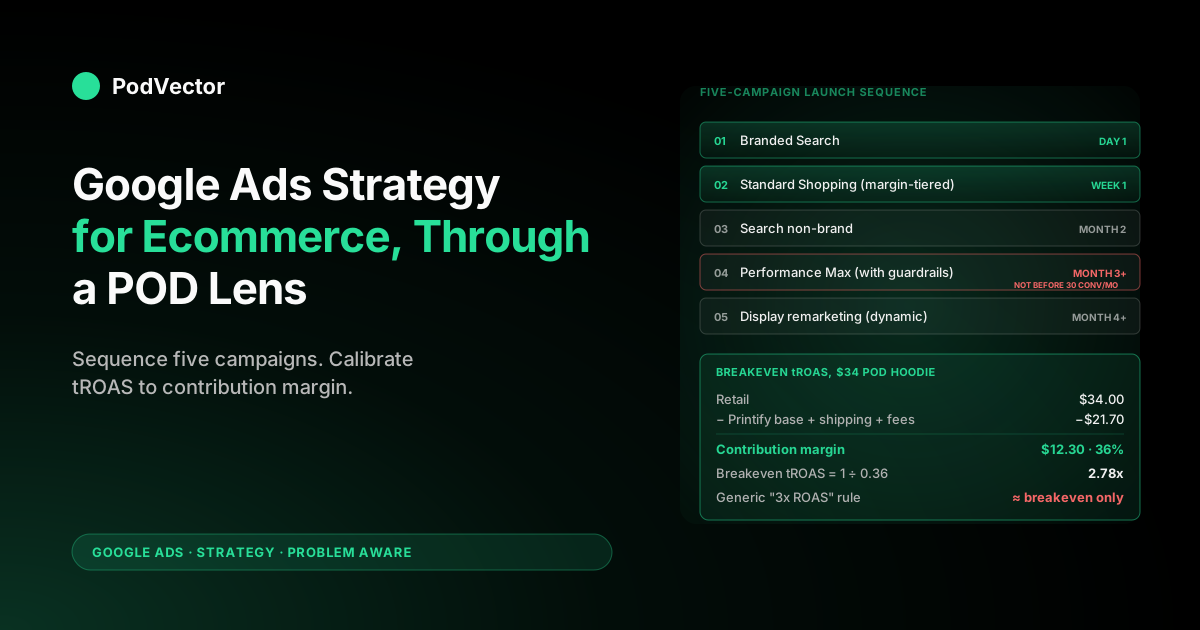
The campaign mix for a POD ecommerce account looks similar to a generic-ecommerce mix on the surface — Branded Search, Standard Shopping, Search non-brand, Performance Max, Display remarketing — but the launch order, budget split, and the threshold for adding each campaign type are different. Sequence is the strategy.
The five-campaign stack, in launch order
- Branded Search. The first campaign live, regardless of store size. $5–$10/day, exact-match brand variants, manual CPC. Branded protects against competitor bidding on the brand term and produces the cheapest, highest-margin conversions in the account. Stores that "don't need branded because we already rank organically" lose 8–15% of branded traffic to a competitor's PMax that decided to bid on the brand. Run it.
- Standard Shopping (margin-tier segmented). The volume engine for POD. Two or three campaigns split by margin tier — typically "premium" (40%+ margin SKUs), "core" (28–40%), and "low margin" (under 28%, often suppressed entirely from ads). Maximize Conversion Value bid strategy with no tROAS for the first 30 days to accumulate signal, then switch to Target ROAS at the contribution-margin breakeven calculated below.
- Search non-brand. Added once Standard Shopping has produced 30+ conversions, no earlier. Tightly scoped to high-intent commercial queries (e.g. "graphic hoodies for [niche]", not "best gift for dad"). Manual CPC or tCPA. The job of Search non-brand on a POD store is to capture buyer-intent search where Shopping doesn't show, not to drive top-of-funnel traffic.
- Performance Max. Added once the account has 30+ Shopping conversions per month and 60+ days of conversion history. PMax launched earlier on a POD store has nothing to optimize against and the algorithm spends aggressively on top-of-funnel placements that don't convert at the store's margin. With brand exclusions on, asset-group segmentation by margin tier, and a starting tROAS at the campaign breakeven, it works. Without those guardrails, it is the single most expensive mistake a POD account can make.
- Display remarketing (dynamic). Last campaign live. Cheap, useful for cart-abandoners and visitors who clicked a Shopping ad but didn't convert, but completely uncompetitive with the first four campaigns for budget when the budget is tight. Run it at $5–$10/day on its own remarketing list and let it tick.
The launch sequence matters because each layer feeds signal to the next. Branded protects the brand impression share.
Standard Shopping accumulates conversion data on the actual catalog. Search non-brand expands into adjacent commercial queries once Shopping has demonstrated which products convert. PMax enters the account already trained by the data the first three campaigns produced, instead of guessing from cold-start.
For the deep-dive on launch sequencing for a Shopify-specific account, see Shopify Google Ads strategy for print-on-demand. For the campaign-type comparison and when each one earns its budget on a POD catalog, the cross-cluster reference is the complete guide to Google ad types for POD sellers.
Product feed engineering for POD catalogs
If the campaign architecture is the skeleton, the Merchant Center product feed is the bloodstream. It carries the data that every Shopping ad and every Performance Max asset group runs on, and it's the area where POD economics violate the generic-ecommerce playbook the most.
A typical DTC store has 50–500 SKUs in Merchant Center, and each SKU is a real, distinct product with its own price, margin, and demand signal. A typical POD store has 50 designs across 5 product types, 4 colors, and 6 sizes — 6,000 variants — and roughly 70–80% of those variants shouldn't be eligible for paid ads. They're size extremes (4XL, 5XL) priced the same as smaller sizes despite higher base cost; they're near-duplicate color mockups that trigger Google's image-similarity penalty; they're size combinations that have never sold and never will.
The five feed-engineering moves that matter for ecommerce strategy on POD:
- Variant grouping with
item_group_id. Every size of every color of every design should share anitem_group_idattribute. This tells Google to treat the cluster as one product, surface one canonical Shopping listing per design+color, and let the customer pick a size on the product page rather than seeing 24 listings for the same hoodie. Without it, the same product cannibalizes its own impression share. - GTIN coverage. Printify and Printful's Merchant Center integrations populate
gtinfor most listings automatically; some configurations don't. Listings without a GTIN lose 15–30% of impressions to manufacturer-identity ranking signals. Audit the feed in Merchant Center → Products → All products, sort by GTIN status, and fix. - Margin-band suppression via custom labels. Add a custom label to every product that encodes its margin tier (
margin_premium,margin_core,margin_low). Use that label to segment Standard Shopping campaigns and to exclude low-margin variants from Performance Max asset groups. The single highest-leverage feed move on a POD store, because it lets every downstream bidding decision know whether a given click is worth more or less than another. - Mockup curation. Multiple chest-print angles of the same color hoodie don't compound visibility — they trigger duplication penalties. Pick the strongest mockup per color and exclude the rest from the feed via
excluded_destination. - Diagnostics page review weekly. POD feeds routinely accumulate 200–800 items in "Limited performance" because of low-traffic variants. Either fix the underlying issue (price, image, GTIN) or remove the item. A bloated low-performance bucket drags the overall account quality score and biases Smart Bidding toward the few items that are working at the expense of the long tail that could.
The full implementation walkthrough — including the Shopify-side feed configuration that prevents most of these problems at the source — is in Shopify Google Merchant Center strategy for print-on-demand. For the integration-level setup that gets the feed flowing in the first place, see the complete guide to Google Ads + Shopify integration for POD.
Bid strategy and tROAS calibration on thin POD margins
Bid strategy is where most POD accounts hand their margin to Google. The defaults are calibrated for higher-margin DTC, and applying a generic 3x or 4x tROAS target to a 33% contribution-margin store produces a campaign that looks profitable in Google's reporting and unprofitable in the bank account.
Calculating breakeven tROAS from contribution margin
The math is simple once the inputs are right. Breakeven tROAS = 1 ÷ contribution margin %. A store with 33% contribution margin breaks even on a campaign that produces 3.03x ROAS. Anything below that is a loss; anything above is gross profit before fixed costs.
A worked example on the $34 hoodie, line by line:
| Line item | Amount | Notes |
|---|---|---|
| Retail price | $34.00 | Sticker price, before tax |
| Printify base | −$14.00 | Bella+Canvas hoodie, mid-tier |
| Shipping | −$5.00 | Domestic standard, blended |
| Shopify + processor fees | −$1.50 | 2.9% + $0.30, Shopify Basic |
| Returns/disputes reserve | −$1.20 | 3% of retail |
| Contribution margin | $12.30 | 36% of retail |
| Breakeven tROAS | 2.78x | 1 ÷ 0.36 |
| Target tROAS for 15% net margin | 3.75x | 1 ÷ (0.36 − 0.09) |
A store running a generic 3x tROAS on this product is making, on average, $0.66 per order before any fixed cost — not a viable business. A store running 3.75x tROAS is making $4.59 per order, which after rough fixed-cost allocation produces a sustainable margin. The two-and-a-half x and three x tROAS recommendations that show up in most ecommerce strategy blogs are simply wrong for POD; they're calibrated to higher-margin businesses and never qualified.
Choosing the right bid strategy at each campaign stage
- Branded Search: Manual CPC. Branded volume is too small for Smart Bidding to optimize meaningfully, and manual gives full control over the cap.
- Standard Shopping, first 30 days: Maximize Conversion Value, no tROAS. Smart Bidding needs conversion data to learn; capping it with tROAS during the learning phase starves it of the signal it needs.
- Standard Shopping, day 30+: Target ROAS at the per-margin-tier breakeven calculated above. Premium tier gets a lower tROAS (more aggressive bidding allowed); core gets a tROAS at breakeven plus the desired net margin; low margin tier either gets a high tROAS (defensive bidding) or gets dropped from ads entirely.
- Search non-brand: Target CPA initially, switching to Target ROAS once 30 conversions accumulate. Search non-brand on POD is more about intent capture than scale, and CPA control prevents Smart Bidding from chasing high-cost branded queries from competitors.
- Performance Max: Target ROAS, never Maximize Conversion Value uncapped. PMax without a tROAS will spend aggressively on low-margin asset placements; with a tROAS calibrated to contribution margin, it stays within the margin envelope.
- Display remarketing: Maximize Conversions with a CPA cap. Volume is small and the conversion is recovered, not new.
The most common mistake in POD bid strategy isn't picking the wrong bid type — it's picking a tROAS target by copying a number off a generic benchmark blog. The deep dive on the math behind ROAS calculation and the distinction between revenue ROAS and profit-true ROAS is in the complete guide to Google Ads ROAS and attribution for POD.
Performance Max guardrails for POD stores
Performance Max is the most-discussed campaign type in 2026 ecommerce strategy guides for a reason: it's powerful, it's where Google is investing most of its product roadmap, and it can produce excellent results on the right account. It can also burn through a POD store's monthly ad budget in two weeks if it's launched without guardrails. The difference is the configuration.
The four guardrails that have to be in place before PMax goes live
- Brand exclusions enabled. Tools → Account-level brand exclusions → add the store's brand and any close variants. Without this, PMax bids on branded search queries that should go to the dedicated Branded campaign at 1/5th the CPC. The exclusion list is the single highest-leverage PMax setting on a POD store.
- Asset groups segmented by margin tier. One asset group per margin tier, mirroring the Standard Shopping segmentation. Premium asset group with the higher tROAS allowance, core asset group at breakeven-plus-margin, low-margin asset group either at a defensive tROAS or omitted entirely. PMax with one undifferentiated asset group spreads spend evenly across margins, which on a POD catalog means subsidizing low-margin variants with premium-margin profit.
- Audience signals fed in, not relied on. Customer match lists from Shopify (high-LTV customers, recent purchasers, cart abandoners) given to PMax as audience signals. These are signals, not targeting — PMax will still go beyond them — but they shift the algorithm's exploration toward the patterns that match the store's actual converters.
- Final URL expansion controlled. Either turned off (most conservative) or restricted to specific URL patterns. PMax with unrestricted final URL expansion will route traffic to any indexed page, including blog posts and policy pages, which on a POD store often means sending paid clicks to the store's free SEO content instead of a product page.
The PMax → Search-Term Insights reconciliation is the weekly review that catches what the guardrails miss. PMax surfaces some of its search terms in the "Insights" tab; pull them weekly, identify any that aren't aligned with the catalog, and add them as account-level negatives. Without this review, PMax will eventually find a low-quality search term that converts at low ROAS and double down on it.
Search-term hygiene and the negative keyword discipline
Negative keywords are the operational discipline that keeps a Google Ads account from quietly hemorrhaging margin. On a POD store, where margin is thin and irrelevant clicks compound fast, the weekly negative keyword review is the single most reliably profitable hour in the account.
The three negative keyword lists to maintain
- Account-level "always exclude" list. Free, cheap, wholesale, bulk, jobs, supplier, wholesale, manufacturer, distributor. Any term that signals a search for something other than retail purchase intent. Once compiled (usually 50–150 terms), it's stable and applies to every campaign in the account.
- Campaign-level "branded" list, applied to non-brand campaigns. The store's brand name and variants, applied as exact and phrase negatives to Standard Shopping non-brand, Search non-brand, and PMax. Without this, non-brand campaigns waste budget on traffic that the cheaper Branded campaign would have caught.
- Rolling search-term review list. Pulled from the Search Terms report weekly. Any search term that produced 5+ clicks with no conversion gets reviewed; if it's irrelevant, it goes negative; if it's borderline, it gets a campaign-specific watch.
The 5-clicks-no-conversion threshold is conservative for higher-margin DTC and approximately right for POD. A search term that's burned $7–$15 of ad spend without converting on a 33%-margin store has already cost more than a successful conversion would earn back. Negate fast, negate often.
The weekly hour to do this work is non-negotiable for any POD account spending more than $30/day. Smart Bidding does not handle this discipline on its own; it learns from the conversions it gets and continues bidding on the queries that almost converted, even if those queries are systematically wrong. Negatives are how the operator overrides that drift.
Full-funnel sequencing for POD: awareness, consideration, conversion
Most generic ecommerce Google Ads strategy guides recommend running awareness, consideration, and conversion campaigns in parallel from day one. On a POD store with limited budget and thin margin, that's the wrong order. The right sequence is conversion-first, then consideration, then awareness — each layer added only after the layer below it has proven profitable.
Conversion (months 0–3)
Branded Search and Standard Shopping. Both run at high purchase intent, both convert at margin-positive ROAS from week one, and both produce the conversion signal that every later layer depends on. A POD store at this stage has no reason to spend on awareness — it doesn't have a Smart Bidding model with enough conversion data to know what awareness traffic to chase, and its margin can't absorb the slower payback period of top-of-funnel.
Consideration (months 3–6)
Search non-brand and Performance Max. Both add scope beyond the immediate purchase-intent layer.
Search non-brand captures intent the store's Shopping campaign isn't matching (because of feed coverage gaps or because the query is non-product-specific). PMax expands into placements Standard Shopping doesn't reach: YouTube, Discover, Gmail, Display. Both should be added with strict tROAS guardrails and benchmarked against the conversion-tier campaigns to confirm the incremental traffic is also incremental profit.
Awareness (months 6+)
Demand Gen, Display, and YouTube prospecting. Optional even in month 6.
A POD store with $50K+/month in revenue and a stable PMax + Standard Shopping foundation can extend into awareness profitably; a store still optimizing the conversion layer cannot. The mistake is treating awareness as table stakes; on a POD margin profile, awareness is a luxury that earns its place only after the bottom three campaigns are saturating their addressable demand.
This sequence is the opposite of what most "full-funnel" content recommends. The reason it works on POD is that the conversion-first sequence accumulates the data Smart Bidding needs to make the consideration and awareness layers efficient when they do enter. Launching all three in parallel forces every campaign to learn from cold-start, which on thin margin is unaffordable.
First-party data, Enhanced Conversions, and Consent Mode
The 2026 baseline for any ecommerce Google Ads account is first-party data. Third-party cookies are gone in Chrome's stable channel as of late 2025, ITP and Brave have been blocking them for years, and any strategy that relies on third-party signal is operating on a shrinking sample. The two layers that matter on a POD store:
- Enhanced Conversions for Web. Tools → Conversions → your purchase conversion → Turn on enhanced conversions. Hashes the customer's email and other identifiers at conversion time and sends them to Google for first-party matching. Recovers 12–25% of conversion volume on a typical Shopify POD store. Free to enable, takes 15 minutes if conversion tracking is already in place.
- Customer Match lists. Upload Shopify customer email lists segmented by behavior — high-LTV, recent purchasers, cart-abandoners, lapsed customers. Used as audience signals on PMax and as targeting layers on Search non-brand. Refresh monthly.
Consent Mode v2 is a related compliance layer: it lets Google Ads continue to model conversions for users who decline cookies, using aggregate signal from users who consent. For POD stores selling into the EU/UK, it's mandatory; for US-only stores, it's optional but recommended because it future-proofs the account against expanding state-level privacy laws. Implementation is via the Google & YouTube Shopify channel app or via Google Tag Manager.
The combined effect of these three layers — Enhanced Conversions, Customer Match, Consent Mode — is roughly a 20–35% recovery in measurable conversion volume, which translates directly into Smart Bidding efficiency. A campaign with 30% more conversion data trains tighter, bids smarter, and produces better tROAS at the same target. For the deeper attribution-model walkthrough, see the cross-cluster reference at the complete guide to Google Ads ROAS and attribution for POD.
The reporting layer that determines whether the rest of the strategy works
Every layer above this one assumes the operator can answer one question: which campaigns and which products are actually profitable, after Printify or Printful unit cost, Shopify fees, and ad spend? Google Ads cannot answer that question. Shopify cannot answer it alone. The reporting layer that joins them is what turns the strategy from a set of inputs into a feedback loop.
The minimum viable reporting stack for a POD store running this strategy:
- Google Ads spend and revenue, by campaign and by SKU, exported daily or pulled via the API.
- Shopify orders, by SKU, with the line-item supplier (Printify or Printful) and the unit cost attached.
- A join layer that produces contribution margin per campaign, per SKU, and per ad-source — refreshed at least weekly.
Most POD stores don't have this layer. They look at Google Ads' "Conv. value / cost" column, see a 3.2x ROAS, and conclude the campaign is profitable.
The 3.2x ROAS is on revenue, not on contribution margin, and the campaign that produced it could be losing money on every order if it's pushing low-margin variants. The reporting layer is the difference between operating the account on Google's reported numbers and operating it on the actual P&L.
This is the work Victor automates. Victor sits on top of Shopify, Printify, Printful, and Google Ads via live data warehouse, and answers questions like "which campaigns should I scale this week, and which should I pause?" and "what's my contribution margin by ad source for the last 30 days?" in plain English. The architecture is profit-first by design — every answer reconciles ad spend against supplier cost rather than reporting Google's revenue number at face value. For the broader services-layer comparison, see Google Ads services for ecommerce strategy for print-on-demand.
A 12-month strategy roadmap for a POD store running Google Ads
Stitching the layers together into a sequence:
- Month 0 (pre-launch): Conversion tracking installed and reconciled to Shopify. Merchant Center feed cleaned (variant grouping, GTIN, custom labels). Branded Search live at $5/day. Contribution margin per product type calculated and documented.
- Month 1: Standard Shopping live, segmented by margin tier, on Maximize Conversion Value. Daily budget at $30–$50 if the store has prior conversion data, $20–$30 if cold-start. Weekly negative keyword review begins.
- Month 2: Standard Shopping switched to Target ROAS at calculated breakeven plus desired net margin. Enhanced Conversions enabled. Customer Match lists uploaded for the first time.
- Month 3: Search non-brand added, scoped tightly to commercial-intent queries. tCPA initially. PMax brand exclusion list prepared (not yet launched).
- Months 4–6: PMax launched once 30+ Shopping conversions/month and 60+ days of conversion history exist. Asset groups segmented by margin tier. Brand exclusions on. Final URL expansion off.
- Months 7–9: Display remarketing live on dynamic feed. PMax tROAS targets tightened as conversion data accumulates. Reporting layer formalized — weekly contribution-margin-by-campaign review becomes a standing ritual.
- Months 10–12: Demand Gen tested cautiously if the conversion layer is saturated. International expansion via separate campaigns if margin and shipping economics allow. Quarterly tROAS recalibration based on actual contribution margin (which shifts as supplier prices and shipping rates change).
The roadmap above assumes a store starting from a clean account. Stores that already have campaigns running can map their current state to the relevant month and resume from there. The principle that holds regardless of starting point: the strategy works because it's sequenced, and any attempt to compress the sequence — to launch PMax in month 1, or to skip the negative keyword discipline, or to set tROAS by benchmark instead of by margin — undoes the leverage that makes each layer profitable.
FAQs
What's the right ROAS target for a POD store on Google Ads?
Calculate it from contribution margin. Breakeven tROAS = 1 ÷ contribution margin %, where contribution margin is retail minus Printify or Printful base, minus shipping, minus Shopify and processor fees, minus a returns reserve.
Most POD stores land between 2.7x and 3.2x breakeven, with target tROAS for sustainable net margin between 3.5x and 4.2x. The "3x ROAS" rule from generic ecommerce blogs is calibrated to higher-margin DTC and is breakeven or worse on POD.
Should a POD store run Performance Max from the start?
No. PMax needs conversion data to optimize against, and a cold-start PMax on a POD margin profile spends aggressively on top-of-funnel placements that don't convert at the store's breakeven. Wait until Standard Shopping has produced 30+ conversions/month and 60+ days of history. Then launch PMax with brand exclusions, asset-group segmentation by margin tier, and a tROAS at the campaign breakeven.
How much should a POD store spend on Google Ads to start?
$30–$50/day on Standard Shopping plus $5–$10/day on Branded Search is a reasonable starting envelope for a store with prior conversion data. $20–$30/day on Standard Shopping for a cold-start account, scaling as conversion volume accumulates. Budget below $20/day on Shopping rarely produces enough conversion signal for Smart Bidding to optimize meaningfully and will plateau at random-walk performance.
Is Google Ads or Facebook Ads better for print-on-demand?
Different jobs. Google Ads (specifically Standard Shopping and Branded Search) captures purchase-intent demand and is the more efficient channel for POD stores under $50K/month in revenue.
Facebook Ads (Meta) is better for top-of-funnel demand creation on novel designs that customers aren't searching for yet. Most established POD stores run both; most starting POD stores should run Google first because the payback period is shorter and the conversion data is cleaner.
What's the difference between Performance Max and Standard Shopping for POD?
Standard Shopping shows product listings on Google Search and Google Shopping with the operator controlling exactly what runs. Performance Max blends Search, Shopping, YouTube, Discover, Gmail, and Display under a single algorithmic asset pool and gives the operator less control.
Standard Shopping is the predictable workhorse for POD; PMax is the scaling layer added once the foundation is solid. Most well-run POD accounts run both, with Standard Shopping doing most of the converting and PMax extending reach.
How often should the strategy be reviewed and recalibrated?
Negative keywords weekly. Bid strategy and tROAS targets monthly.
Campaign architecture quarterly. Full strategy review (including supplier cost recalibration, contribution margin update, channel mix re-evaluation) annually. The most common recalibration trigger between scheduled reviews is supplier pricing — Printify and Printful adjust base costs once or twice a year, and a 5–8% base cost change shifts contribution margin enough that tROAS targets need to be reset.
Where does first-party data fit into a POD Google Ads strategy?
Three layers. Enhanced Conversions for Web (recovers 12–25% of conversion volume lost to attribution gaps).
Customer Match lists from Shopify (used as audience signals on PMax and targeting on Search non-brand). Consent Mode v2 (preserves modeled conversions for users who decline cookies). Combined effect is roughly 20–35% more measurable conversion volume, which translates directly into Smart Bidding efficiency.
Do I need an agency to run this strategy?
Not for the strategy itself — every layer in this guide is implementable in-house with documented playbooks. The operational work that earns an agency fee is server-side conversion tracking setup, weekly negative keyword review, and PMax governance, not strategy.
Stores spending under $5K/month on Google Ads usually can't justify an agency retainer; stores spending over $10K/month often can. The build-vs-buy breakdown is in Google Ads services for ecommerce strategy for print-on-demand.
What are the most common Google Ads strategy mistakes for POD stores?
Five, in order of frequency: (1) running tROAS targets calibrated to revenue instead of contribution margin; (2) launching Performance Max before Standard Shopping has accumulated the conversion history PMax needs; (3) skipping the negative keyword discipline; (4) operating on Google's reported revenue number without reconciling to Shopify and to supplier unit cost; (5) launching all five campaign types in parallel from day one rather than sequencing them. The first four cost margin slowly; the fifth costs cash quickly.
Does this strategy work for POD stores selling on Etsy or Amazon, not Shopify?
Partially. The campaign architecture, bid strategy, and feed engineering principles transfer.
The reporting layer doesn't — Etsy and Amazon don't expose order-level cost data the same way Shopify does, which makes contribution-margin reporting harder to build. Stores running POD on Amazon usually rely on Amazon Ads instead of Google Ads anyway; Etsy stores can run Google Ads via Etsy's manual feed setup but with thinner attribution. The reference architecture in this guide assumes Shopify; non-Shopify variants need additional integration work.
Run the strategy on profit-truth data, not Google's reported numbers
Every layer of a Google Ads strategy for ecommerce on POD depends on one input: knowing actual contribution margin per campaign, per SKU, and per ad-source — not just Google's revenue ROAS. to ask "which campaigns should I scale this week and which should I pause?" and get answers reconciled against Printify and Printful unit cost, Shopify confirmed revenue, and live Google Ads spend. The strategy is only as good as the data feeding the recalibration loop. Victor closes the loop.
Try Victor free