
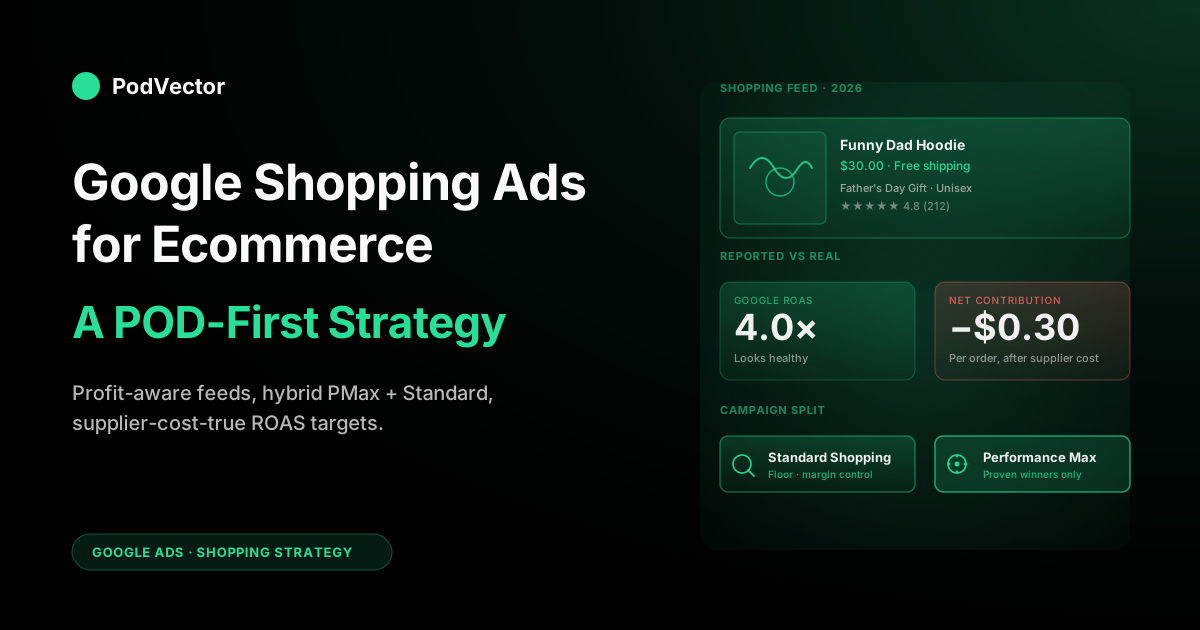
Quick Answer: Google Shopping Ads still drive the majority of paid retail clicks in 2026, but the standard ecommerce playbook — push the whole catalog into Performance Max and trust tROAS — quietly bankrupts print-on-demand stores. POD's variant explosion (one design × six colors × five sizes = 30 SKUs), Printify and Printful's per-order supplier costs, and mockup-only product imagery all break Google's default optimization assumptions. The strategy that works is a hybrid: a curated PMax for proven winners, a Standard Shopping campaign for control over thin-margin SKUs, a feed engineered for design intent (not generic apparel keywords), and a bidding floor based on net contribution after supplier cost — not the inflated ROAS Google reports back.
Why POD breaks generic Google Shopping advice
Most "Google Shopping Ads for ecommerce" guides are written for one mental model: a brand with fixed COGS shipping from its own warehouse, a few dozen SKUs, and unique product photography. None of those assumptions hold for print-on-demand.
Your costs are itemized per order and vary by product type, supplier, print method, and destination. Your catalog might list 40 designs but contain 1,200 SKUs once you fan out colors and sizes.
Your imagery is mockup renders — pixel-identical to whatever every other Printify store using the same blank is showing. The optimization advice that works for a sneaker brand will lose you money for predictable, structural reasons.
The concrete version: Google reports ROAS as revenue divided by ad spend. For a Shopify brand with $8 COGS on a $30 product, a 4× ROAS leaves roughly $14.50 of contribution per $7.50 of ad spend.
Healthy. For a POD seller running the same campaign on a Printify hoodie, the supplier cost is $18, shipping is $5.50, and platform fees are another $2 — leaving $4.50 of contribution per $7.50 of ad spend.
The Google Ads dashboard shows the same 4× ROAS in both cases. One business is profitable; the other is paying Google to lose money slowly. This article is built around that reality.
How Google Shopping Ads work in 2026
Shopping Ads are product-listing units that surface on Google Search, the Shopping tab, Images, YouTube, Gmail, the Display network, and increasingly inside AI Mode and Gemini results. They're triggered by user queries that Google's models judge to be commercial intent — anything from "men's birthday hoodie" to "funny dad mug" — and matched against your product catalog rather than against keywords you bid on directly.
The mechanics in 2026:
- Merchant Center is the catalog. You either upload a feed file, push from Shopify via the Google & YouTube app, or sync via a Printify/Printful storefront integration. Every product gets attributes: title, description, price, image, GTIN, brand, condition, custom labels, and around 30 other fields.
- Google Ads is the bidding layer. Campaigns reference Merchant Center products and decide which queries to compete on, what to bid, and what creative to assemble (in PMax's case).
- The auction resolves on a per-query, per-user basis using a blend of bid, expected click-through rate, landing-page experience, and feed quality signals. Higher feed quality lowers your effective cost per click; that's the single biggest lever and it's almost free to pull.
The 2026 wrinkle is checkout-on-Google: US shoppers can complete a purchase on participating retailers (Etsy, Wayfair, and a growing list) directly inside AI Mode without leaving the Google surface. Most POD sellers won't be on the eligibility list yet, but the trend matters: the feed is increasingly the storefront, and feed quality is starting to compound the way SEO did in 2014.
The product feed is the campaign
Every guide says feed quality matters. For POD, it matters more than for almost any other ecommerce category, for two reasons: (1) you don't have unique imagery to compensate for a thin description, and (2) your product titles, if you let Printify or Printful auto-generate them, look identical to those of every other store selling the same blank.
The four feed elements that move impressions and CTR for a POD store, in order of leverage:
- Title. Front-load the design intent and the recipient. Generic — "Unisex Heavyweight Cotton Hoodie." POD-optimized — "Funny Dad Joke Hoodie | Father's Day Gift | Unisex Heavyweight." Google's models index the first 70 characters most heavily.
- Image. The platform default is a flat-lay mockup on a white background. Google's algorithms prefer in-context lifestyle imagery; even a free Placeit lifestyle render beats the supplier's blank-render every time. We get into this in the mockup section.
- Description. 500–1,000 characters. Don't repeat the title; describe the design, the fit, the use case, and the gift occasion. The algorithm reads this for query matching even though shoppers rarely click into it.
- Custom labels. Underused. Use the five custom_label fields to tag SKUs by margin tier, design theme, supplier, profit per unit, and seasonality. These become your filtering dimensions when you carve campaigns later.
The fastest way to lift Shopping performance for a POD store is to spend a weekend rewriting the auto-generated titles for your top 30 products by impression volume. Most stores see CTR move 30–60% from this alone, because the baseline is a near-duplicate title. For the broader feed-engineering pattern, see the guide to Google Ads + Shopify integration for POD.
The POD variant problem
Generic ecommerce guides treat variants as a footnote. For POD, variants are the campaign. A single design listed across 6 colors and 5 sizes generates 30 SKUs in your feed, and Google treats each one as an independent product in the auction. Three failure modes show up immediately:
- Internal cannibalization. Your six color variants of the same hoodie compete against each other in the auction, driving up your effective CPC for the same conversion.
- Image duplication penalties. If all six colors use the same design mockup recolored, Google's models can't tell them apart as visual signals. Impressions concentrate on a single variant Google decides is "the canonical one."
- Out-of-stock noise. POD doesn't really have out-of-stock, but Printful's seasonal blank rotations, Printify supplier swaps, and size-availability gaps all surface as feed warnings that throttle impressions silently.
The fix is an item_group_id on every variant of the same design plus a strict canonical color choice. Set the item_group_id to the design SKU (not the variant SKU).
Pick the highest-converting color as the "canonical" — usually black for apparel, white for mugs and posters — and serve only that one in Shopping by suppressing the others with a excluded_destination: Shopping_ads attribute on the secondary colors. You'll lose some long-tail color matches but reclaim 30–50% of impression budget that was being wasted on internal duplication.
For a deeper look at how variant strategy interacts with Shopify's product structure, our Google Shopping Ads Shopify strategy for print-on-demand guide walks the integration mechanics.
Standard Shopping vs Performance Max for POD
This is the question every Shopping guide spends 2,000 words on, and the right answer for POD is usually "both, in specific roles." Here's the version that fits POD economics:
Performance Max in 2026
PMax bundles Shopping, Display, YouTube, Gmail, Search partner placements, and Discover into one AI-driven campaign. You hand Google a feed, an asset group (images, video, headlines, descriptions), a budget, and a tROAS target.
Google decides everything else — which channel, which audience, which creative permutation. For brands with strong fixed COGS and unique creative, this is genuinely the strongest tool in the platform.
For POD, PMax has three specific failure modes:
- It optimizes to revenue, not contribution. Google's bidder doesn't know your Printify supplier cost. It will happily push your $18-COGS hoodie to scale at a 3× ROAS that's cash-flow-negative for you.
- It pulls ad spend toward your worst margins. Lower-priced items with higher conversion rates (mugs, stickers) get disproportionate spend, which masks the truth that they're often loss leaders for a POD seller after supplier cost.
- It's a black box. You can't see which queries triggered which placements, which audiences converted, or why one asset combination outperformed another. The "insights" tab gives you summaries, not source data.
Standard Shopping in 2026
Standard Shopping still exists in 2026, despite Google's persistent nudges to migrate. It's narrower (Shopping placements only, no Display/YouTube/Discover) but gives you back the things PMax takes away: query-level reporting, negative keywords, manual or constrained automated bidding, and the ability to segment campaigns by product subset. For a POD seller, that control is worth giving up some scale.
The hybrid that actually works
Run Standard Shopping for your low-margin products and any new designs you're testing. Set tCPA or manual CPC to enforce a profitability floor that Google doesn't know about.
Reserve PMax for proven, high-margin winners — designs with consistent positive contribution after supplier cost — and let PMax scale them across surfaces. The signal from Standard Shopping (which queries actually convert profitably) becomes the input to PMax asset groups (which themes to amplify).
For the broader campaign-mix picture, see the complete guide to Google ad types for POD sellers, or browse the full Ad Types cluster for sibling guides on Search, Demand Gen, and PMax. For an external 2026 ecosystem view, Store Growers' annual Shopping Ads guide covers the cross-vertical patterns this article deliberately doesn't.
Bidding strategy on thin POD margins
Default Google advice in 2026 is "set a tROAS target and let Smart Bidding figure it out." For a POD store, that advice is wrong by default and right after one specific adjustment: you have to translate your true breakeven ROAS into the Google interface, which means working backwards from supplier cost.
The math, for a $30 Printify hoodie:
- Sale price: $30
- Supplier cost (blank + print): $14
- Shipping cost charged to you: $5.50
- Shopify + payment fees (~5%): $1.50
- Contribution before ad spend: $9
- Breakeven ROAS = $30 / $9 = 3.33×
If you set Google's tROAS to 3.0×, you are explicitly telling Google's bidder to lose you money. The minimum profitable target on this product is 3.5×, and a healthy target — leaving real margin for working capital and customer acquisition cost — is 4.5–5×. The standard ecommerce advice ("aim for 4× to 6× ROAS") sounds high but is actually below breakeven for a lot of POD products.
Two practical adjustments:
- Set tROAS per product tier. Use custom_label_0 to bucket SKUs by gross margin (high / medium / low) and split each tier into its own campaign with the tROAS that matches the breakeven math above. One global tROAS averages your worst products' losses with your best products' wins.
- Feed Google the right conversion value. If your conversion event reports the gross sale price, Google's ROAS optimization assumes that value is what you keep. Several POD stores instead pass contribution-after-supplier-cost as the conversion value via Enhanced Conversions or a server-side wrapper. Now Google's "4× ROAS" actually means 4× contribution, and the bidder's incentives align with yours.
A campaign architecture that fits POD
Here's a concrete starter blueprint for a POD store doing $20K–$200K/month in revenue:
- Campaign 1: Standard Shopping — Test & Validate. All new designs land here. Manual CPC or tCPA, tight bidding, daily budget capped at $20–50. Goal: prove profitable contribution at the SKU level before any product graduates.
- Campaign 2: Standard Shopping — Margin Floor. All low-margin products (custom_label_0 = "low"). Strict tROAS per the breakeven math. This campaign exists specifically because you don't trust PMax to enforce a floor on these.
- Campaign 3: PMax — Proven Winners. Only SKUs with a 30-day contribution history that clears your floor. Asset groups built around the design themes that perform — "Father's Day funny," "engineer humor," "dog-mom apparel," not a single bucket of "all apparel." Daily budget proportional to demonstrated contribution.
- Campaign 4: Standard Shopping — Brand Defense. Optional. If your brand has any organic search demand, run a tiny Shopping or Search campaign on your brand terms to keep dropshippers and resellers from hijacking your brand SERP.
This structure costs you some absolute scale versus a one-PMax-to-rule-them-all setup. It earns back what scale costs: the ability to know, per SKU per day, whether your ad spend is making money. Variations of this stack appear in our complete Google Ads playbook for print-on-demand sellers if you want the broader operator view, and the Google Ads topic hub indexes every related guide we've published.
Mockup images and the click-through tax
Google's image quality requirements have hardened in 2026: white-background flat-lay product images are still permitted but actively de-prioritized in the auction relative to lifestyle imagery. For a custom apparel brand with a real photographer, this isn't a problem. For a Printify or Printful seller using the supplier's default mockups, it's a structural CTR ceiling.
What works:
- Lifestyle mockups beat flat-lay. Even a $9/month Placeit subscription generating model-on-mockup shots will outperform supplier defaults by 20–40% on CTR.
- One additional image is enough. Google uses the primary image; the additional_image_link feed field surfaces secondary images in the gallery view that 2026 Shopping placements increasingly show. Add at least one in-context shot per top-tier SKU.
- Avoid the visible Printify watermark. If your store-app sync is pulling the supplier's preview mockup directly, the watermark that sometimes leaks through (especially on Printify Generic) is a manual review trigger. Use the clean mockups Printify exports for storefronts, not the design-tool previews.
The profit measurement problem
Generic ecommerce Shopping guides end on a measurement pep-talk: "watch ROAS, optimize toward conversions." For POD, that's the trap. Google's ROAS reflects revenue. Your bank balance reflects revenue minus supplier cost minus shipping minus fees. Those numbers diverge by 40–70% on most POD products, and the gap is exactly where unprofitable scale lives.
The honest measurement loop looks like:
- Pull ad spend per product per day from Google Ads (Shopping report, segmented by item ID).
- Pull orders per product per day from Shopify or your storefront.
- Pull supplier cost per order from Printify/Printful — base cost, print cost, shipping, taxes, returns.
- Reconcile: net contribution per product per day = revenue − supplier cost − shipping − fees − ad spend.
- Feed that number back into bidding decisions, not Google's reported ROAS.
Most POD stores skip steps 3 and 4 entirely because the data sits in three different vendor portals and a CSV export. The result is a slow, undetected drift: products that look like winners in Google's interface quietly lose $0.30 per order for six months before anyone notices. Victor fixes this by reading your Printify, Printful, Shopify, and Google Ads data together, so he can answer "which campaigns lost money this week?" in plain English — today he tells you, and the next iteration acts on the answer by adjusting bids and excluding losing SKUs from Shopping automatically.
Common pitfalls and fast fixes
- Auto-generated titles from Printify/Printful. Fix: rewrite top 30 SKU titles with design intent and gift-occasion language. Single biggest CTR lever.
- One global tROAS across the catalog. Fix: bucket products by margin tier with custom_label_0, set tROAS per tier.
- All variants competing in Shopping. Fix: item_group_id + canonical color, exclude secondary colors via
excluded_destination. - PMax running on day one with no proven winners. Fix: Standard Shopping first, graduate SKUs into PMax after 30 days of clean contribution data.
- Reporting revenue as conversion value. Fix: pass net contribution as the conversion value via Enhanced Conversions or a server-side wrapper.
- Default supplier mockups. Fix: lifestyle mockup on the primary image for top-tier SKUs.
- Ignoring Merchant Center diagnostics. Fix: check the Diagnostics tab weekly; "limited" or "disapproved" items don't bid at all.
- Mixing brand and prospecting in one campaign. Fix: separate brand defense from prospecting so brand traffic doesn't inflate average ROAS and mask weak prospecting performance.
FAQs
What's the minimum monthly budget to test Google Shopping for a POD store?
Realistically $1,000–1,500/month for Standard Shopping. Below that, you don't generate enough conversion data per SKU to learn anything statistically meaningful, and Smart Bidding's machine-learning phase doesn't exit. PMax needs more — Google's own guidance is at least 50 conversions per month before the algorithm stabilizes, which translates to roughly $2,500–3,500/month for a typical POD price point.
Should I use Performance Max or Standard Shopping if I'm just starting?
Start with Standard Shopping. You need to learn which of your designs convert at what cost before handing optimization to a black box. Once you have 30+ days of clean contribution data, graduate winners into PMax. Going PMax-first burns capital while you're still figuring out which products even belong in the catalog.
Do I need a GTIN for POD products?
POD products don't have GTINs because they're not retail-standardized. Set identifier_exists: no in the feed and supply brand + mpn instead (your store name as brand, your SKU as MPN). This is fully supported and not a performance penalty as long as the rest of the feed is high quality.
How does Google Shopping handle Printify or Printful's auto-generated mockups?
It accepts them but rewards lifestyle imagery more. Supplier flat-lay mockups will get impressions; they just won't get CTR. The structural fix is to replace the primary image on your top SKUs with a lifestyle render — Placeit, Smartmockups, or a one-time Fiverr photographer all work.
Should POD products go into a Shopping feed, a PMax feed, or both?
Both, but not the same products. Standard Shopping is the right home for new designs and low-margin products where you need a hard profitability floor. PMax is the right home for proven, high-margin winners where you want Google to scale across surfaces. Run them in parallel; don't make Google choose.
How do I know my Google Shopping campaigns are actually profitable?
You don't, until you reconcile ad spend per product against Printify/Printful supplier cost per order outside of Google's interface. Google's reported ROAS uses revenue, not net contribution.
Most POD stores discover six months in that their "winning" Shopping campaign was losing $0.50–$1.50 per order the whole time. Build the reconciliation, or use a tool that does it for you, before you scale spend.
Will checkout-on-Google replace my Shopify store?
Not in the next 12 months for most POD stores. Eligibility for the AI Mode and Gemini in-line checkout is currently limited to retailers Google has explicitly partnered with. The trend matters — feed quality is becoming the storefront — but operationally, Shopify remains your checkout and your data source for the foreseeable future.
Stop trusting Google's ROAS
Victor reads your Printify, Printful, Shopify, and Google Ads data into one place and tells you exactly which campaigns and which SKUs are making money once supplier cost is subtracted — the number Google's dashboard never shows you. Connect once, see the truth in minutes.
Try Victor free