
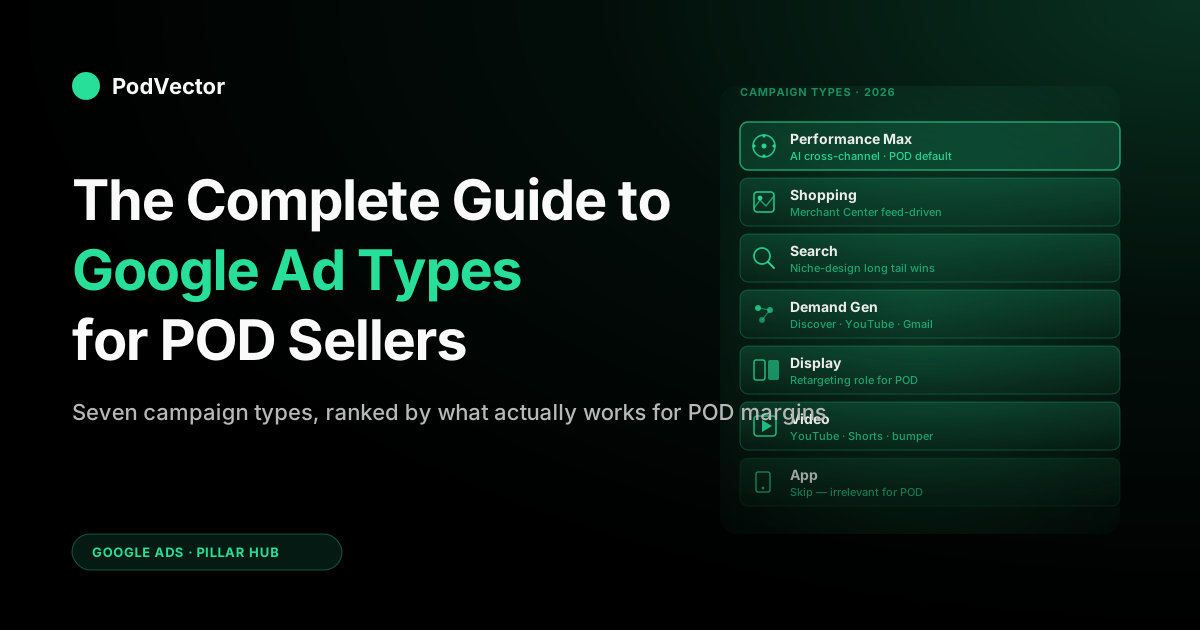
Quick Answer: Google Ads in 2026 has seven campaign types: Search, Performance Max, Shopping, Display, Video, Demand Gen, and App. For print-on-demand sellers, only three matter on day one — Performance Max, Shopping, and Search.
Display, Video, and Demand Gen are scaling tools you reach for after you have a profitable PMax baseline; App is irrelevant unless you ship an app. The bigger trap isn't picking the wrong type — it's running PMax against POD margins without itemized supplier-cost visibility, which makes Google's reported ROAS a number that has nothing to do with whether you actually made money.
Why POD breaks generic Google Ads advice
Most "complete guide to Google Ads" articles are written for one of two audiences: brands with fixed COGS that ship from a warehouse, or service businesses optimizing for leads. Print-on-demand fits neither model.
Your costs are itemized per order, vary by product type, supplier, print method, and destination, and never appear in Google's interface. That mismatch is the single biggest reason POD sellers blow money on Google Ads while their dashboard says everything is fine.
Here's the concrete version. Google Ads reports ROAS as revenue divided by ad spend.
For a Shopify brand with $8 COGS on a $30 product, a 4x ROAS means roughly $22 of contribution per $7.50 of ad spend — call it $14.50 net of COGS. Healthy.
For a POD seller running the same campaign on a Printify hoodie, the supplier cost is $18, the shipping is $5.50, and the platform fee on top is another $2 — leaving $4.50 of contribution per $7.50 of ad spend. The Google interface shows 4x ROAS in both cases. One business is profitable; the other is paying Google to lose money slowly.
The campaign-type decisions in this guide are framed around that reality. The right choice for a POD seller is not always the one a generic Google Ads tutorial recommends, and the floor for "this campaign is working" is much higher than ad-platform dashboards suggest.
The 7 Google Ads campaign types in 2026
Google's seven active campaign types in 2026, ranked by relevance to a typical POD seller:
- Performance Max — AI-driven cross-channel campaigns. The default Google pushes for ecommerce; for POD, the highest-leverage and highest-risk type.
- Shopping — product-listing ads pulled from your Merchant Center feed. The classic ecommerce workhorse; still valid alongside or instead of PMax.
- Search — text ads on the SERP. Underrated for POD when your designs target specific niche queries with intent.
- Demand Gen — image and video ads on Discover, YouTube feed, Gmail. The "midfunnel" type for awareness and consideration.
- Display — banner ads on the Google Display Network. Mostly retargeting for POD; not a primary acquisition channel.
- Video — YouTube video ads. Useful for established brands with creative to burn; rarely a starting point for POD.
- App — for promoting mobile apps. Irrelevant for POD unless you ship an app.
The rest of this guide walks each one — what it is, what Google's defaults look like in 2026, and the specific POD considerations that the generic guides miss. If you only have time for the first three sections, you'll cover 95% of what matters for a POD store.
Search campaigns
Search campaigns serve text ads on the Google search results page when someone types a query that matches your keywords. The format in 2026 is responsive search ads — you provide up to 15 headlines and 4 descriptions, and Google's machine learning tests combinations and serves the best-performing variant per query.
Why Search still matters for POD
The conventional wisdom is that Search is for high-intent, low-volume queries — and that's true. The non-obvious part for POD sellers is that niche design queries often have high intent and almost no advertiser competition. "Anatomical heart cardiology gift," "obscure Civil War regiment t-shirt," "first-edition typewriter mechanic mug" — these long-tail queries cost pennies, convert at 5–10%, and generic ecommerce competitors don't bid on them because the volume is too small to interest them. For a POD seller with a deep design catalog, that's a structural advantage.
The trick is that you can't bid on those queries individually at scale. The two workable approaches:
- Dynamic Search Ads (DSA): Google generates the ad headline from your landing-page content and matches to relevant queries automatically. Works well for stores with detailed product copy and category structure. Risky for stores with thin or template-generated listings.
- Themed responsive search ads grouped by collection, with broad-match keywords and tight negative keyword lists. Higher manual lift, more control, better for niches where the wrong-query problem is expensive (e.g., trademark-adjacent terms).
Bidding for POD
Default to Maximize Conversions with a tCPA target once you have at least 30 conversions in 30 days. Below that, manual CPC with conservative max bids ($0.30–$0.80 for most POD niches) gives Google's algorithm time to learn without overspending.
Avoid Maximize Conversion Value as your starting bid strategy — Google's "value" comes from your conversion tracking, which for POD typically reports gross revenue. Optimizing toward gross revenue means optimizing toward your highest-priced products regardless of margin, which for a POD seller often means optimizing into your worst-margin products. (More on this in our complete guide to Google Ads ROAS and attribution for POD.)
Search keyword research for POD
Generic keyword tools (Keyword Planner, Ahrefs, Semrush) miss the niche-design opportunities that make Search profitable for POD. The high-leverage research workflow: use marketplace data — Etsy search volumes via EverBee or Alura, Amazon Merch top-seller lists, your own Shopify search-bar data — to identify queries with proven buyer intent, then validate volume in Google's tools. For deeper coverage of this workflow, see our forthcoming guide on Google Ads keyword research for ecommerce.
Shopping campaigns
Shopping ads display product listings — image, title, price, store name — directly in Google search results and on the Shopping tab. The campaign pulls from a product feed you maintain in Google Merchant Center, which for Shopify stores is typically synced via the Google & YouTube channel app or a feed app like Feedonomics or DataFeedWatch.
Why Shopping is still relevant alongside PMax
Performance Max absorbed most Shopping inventory in 2023–2024, and Google now defaults new ecommerce advertisers into PMax. But standard Shopping campaigns still exist, and for POD sellers they have one critical advantage: transparency.
In a standard Shopping campaign, you can see which queries drove which clicks, which products got served, and which terms to negative-list. PMax gives you almost none of that. For a POD store with thousands of designs across dozens of niches, query-level visibility is sometimes worth the lower automation ceiling.
The Merchant Center policy gauntlet for POD
This is the section every generic Shopping guide skips and every POD seller learns the hard way. Google Merchant Center has tightened enforcement on:
- Trademark and copyright concerns — character names, sports team references, song lyrics, university mascots. POD designs that lean on cultural references are particularly vulnerable.
- Misleading product imagery — your mockup must match what the customer receives. Lifestyle mockups with props that look like included items get flagged.
- Pricing inconsistency — the price in the feed must match the price on the landing page within tight tolerances.
- Editorial content rules — political content, controversial wording, anything that touches restricted categories triggers manual review.
The practical implication: budget two weeks of Merchant Center back-and-forth before your first Shopping campaign actually serves. Most POD sellers underestimate this and miss launch windows. For Shopify-specific setup, see our Connect Google Merchant Center to Shopify guide.
Feed quality is the campaign
For Shopping, your feed is your campaign. Google's algorithm decides which queries to match based on title, description, product type, GTIN, and image. Two POD-specific feed levers that punch above their weight:
- Front-load titles with the buyer's actual query. "Custom anatomical heart hoodie — cardiologist gift" beats "Hoodie - Anatomy Print" every time.
- Custom labels for margin tiers. Use custom_label_0 through custom_label_4 to tag products by margin tier (high / medium / low / new) so you can bid up the high-margin SKUs and exclude the margin-negative ones. This requires knowing your real per-SKU margin, which generic Shopify analytics doesn't compute for POD.
Performance Max
Performance Max is Google's flagship AI-driven campaign type, launched in 2021 and now the default Google recommends for almost every new ecommerce advertiser. One PMax campaign serves ads across Search, Shopping, Display, YouTube, Discover, Gmail, and Maps from a single asset group, with Google's algorithm deciding budget allocation, audience targeting, and creative selection in real time.
Why Google pushes PMax
The pitch: you provide a goal (typically conversions or conversion value), a budget, an asset group (headlines, descriptions, images, videos), and optional audience signals; Google handles everything else. In aggregate, Google's case studies show 18% ROAS improvement vs. legacy campaign types. Those numbers are real at aggregate. The catch is that the aggregate hides ugly variance.
Why PMax is high-leverage and high-risk for POD
The leverage: PMax can find buyers across surfaces a small POD seller would never reach manually — YouTube preroll, Gmail promotions tab, Discover feeds — and serve them dynamically generated creative tested against thousands of variants. For a solo POD operator, PMax is genuinely the closest thing to having a media-buying team.
The risk is twofold:
- Brand-search cannibalization. PMax aggressively absorbs branded search queries because they have the highest conversion rate. You end up paying Google for clicks from people who would have searched your brand and converted anyway. The 2024 PMax update added "brand exclusions" — use them.
- The black-box ROAS problem. PMax reports campaign-level ROAS without showing which placements, audiences, or queries drove it. That's tolerable when COGS is predictable. For POD, where supplier costs vary by SKU and destination, a reported 4x ROAS can hide a basket of margin-negative orders. You don't know it's losing money until your bank account tells you. This is the core problem PodVector AI's Victor was built to surface — itemized Printify and Printful costs reconciled against each ad-attributed order, exposing PMax's true profitability per asset group.
How POD sellers should configure PMax
Five settings worth changing from the defaults:
- Enable brand exclusions on day one to prevent PMax from harvesting your branded search.
- Use audience signals, not generic targeting. Upload your customer email list, your high-LTV cohort, and 1% lookalikes. Skip the "interest" signals — too generic for niche POD audiences.
- Set a tROAS floor based on real margin, not Google's reported margin. If your true contribution margin (after Printify, shipping, platform fees, and a labor allocation) is 28%, a 4x reported ROAS is roughly break-even. Aim for 6x+ on a tROAS target.
- Segment asset groups by margin tier. One asset group for high-margin products (mugs, posters, stickers) with aggressive bidding; a separate group for low-margin (hoodies, all-over-print apparel) with conservative bidding. Don't let PMax average across them.
- Run a Shopping or Search campaign in parallel for the first 60 days so you have query-level visibility while PMax learns. The cost is real but cheaper than discovering after 90 days that PMax was scaling a money-losing keyword cluster.
For a deeper PMax-only walkthrough, see our forthcoming Shopify Performance Max campaigns explained guide.
Display campaigns
Display campaigns serve banner and image ads across the Google Display Network — millions of websites, apps, and Google-owned properties (YouTube, Gmail, Maps). The campaign type splits into Standard Display, Smart Display, and the legacy Display & Video 360 (enterprise).
Display's actual role for POD
Display is a poor primary acquisition channel for POD sellers. CPMs are low, but so is intent — most Display impressions reach people who aren't shopping for anything, and the click-to-conversion rate reflects that. Where Display earns its place in a POD stack is retargeting: serving image ads to visitors who viewed a product page but didn't buy, and to past customers for repeat purchases.
For most POD sellers in 2026, Display retargeting has been absorbed into Performance Max anyway — PMax's display surface handles it more efficiently because it can blend Display with other surfaces dynamically. Standalone Display campaigns make sense in two niches:
- You have a strong custom audience (large email list, high-LTV cohort) and want display retargeting with tighter creative control than PMax allows.
- You have a brand-awareness budget (rare for solo POD operators) and want cheap top-of-funnel impressions in your visual category.
The skip-it case for Display in POD
If you're under $10K monthly ad spend and not yet at a profitable PMax baseline, skip standalone Display. The branding-via-Display story is real but requires creative volume and budget patience that most POD sellers can't sustain. You'll get more leverage from spending the same budget on better Search keyword research or feed optimization for Shopping.
Video campaigns
Video campaigns deliver video ads on YouTube and the Google video network. Formats include skippable in-stream, non-skippable in-stream, in-feed (formerly Discovery), bumper (6-second non-skippable), and YouTube Shorts. Video accounts for an estimated 35% of digital advertising budgets in 2026, with average CPM around $3.53.
POD's video creative problem
Video ads only work if you have video creative that doesn't look like a 2018 product spin. For a POD seller without an in-house creative team, the bar to clear is real: 15–30 second videos that show product use in context, multiple variants for testing, vertical formats for Shorts, captions for sound-off viewing. AI tools (RunwayML, Synthesia, even Canva's video editor) have collapsed the cost of producing this — but the time investment is still significant.
When Video is worth it for POD
Three scenarios where Video earns its budget:
- Demonstrable product — all-over-print apparel, sublimation drinkware, anything where the visual surprise of seeing the product worn or used is the conversion driver. Static imagery underdelivers for these categories.
- Niche audiences with clear YouTube content patterns — fishing apparel served against fishing channels, gaming merch served against gaming streams. The audience targeting is tight enough that CPMs stay low.
- Established brand with budget to commit to a 3–6 month video presence for awareness. Most solo POD operators won't be here; brands at $5M+ revenue should consider it.
Bidding default: Target CPA for direct-response objectives once you have video creative; Maximum CPV if your goal is cheap views for awareness rather than conversions.
Demand Gen campaigns
Demand Gen campaigns (rebranded from Discovery in 2023) serve image, carousel, and short video creative across Discover, YouTube feed, Shorts, and Gmail. The pitch: reach people in browsing-not-buying mode, optimized for awareness and consideration.
Demand Gen's place in a POD stack
Demand Gen is mid-funnel — between Display's broad reach and Search's high intent. For POD sellers, that's a tough niche to defend.
The categories where Demand Gen has worked best in 2025–2026 are visually-driven verticals where browsing leads to discovery: home decor, apparel with strong aesthetic identity, lifestyle accessories. For purely utility-driven POD products (mugs, basic t-shirts), Demand Gen rarely outperforms PMax for the same budget.
The strongest Demand Gen use case for POD is a lookalike of your high-LTV customer list served against carousel creative showing your top-converting designs. This works because Discover and YouTube feed surfaces favor visually distinctive creative — and POD's design-led products have a structural advantage there over generic dropshipped goods.
When to test Demand Gen
After you have:
- A profitable PMax baseline running for 60+ days.
- A customer list of 5,000+ for lookalike modeling.
- Three or more visually distinctive design lines you'd want to surface to browsing audiences.
Below those thresholds, the budget is better spent on optimizing what's already working.
App campaigns
App campaigns promote mobile applications across Google Search, Play Store, YouTube, and the Display Network. Google automatically optimizes targeting based on user behavior and app performance data — the advertiser provides assets and a goal (installs or in-app actions); Google handles the rest.
For POD sellers selling physical products, App campaigns are not relevant. The exception is the rare POD operator who has built a mobile companion app for their store (loyalty, custom design, AR try-on). For those few, App campaigns optimize for installs of that app and aren't directly comparable to the other types covered here.
Skip this section unless you're shipping an app.
How POD sellers should pick campaign types
The recommended decision flow, distilled:
Step 1: Start with one type, not three
Most POD sellers should launch with Performance Max only, configured per the rules above (brand exclusions, tROAS floor based on true margin, asset groups segmented by margin tier). Resist the urge to launch PMax + Search + Shopping simultaneously — you'll burn through your learning budget and won't be able to attribute what's working.
Step 2: Add Standard Shopping for query visibility
Once PMax has 30+ days of data, add a Standard Shopping campaign at 20% of your PMax budget. The point isn't to replace PMax — it's to surface the search queries PMax is hiding from you. Use those queries to refine your feed, identify negative keywords, and spot trademark issues before they become disapprovals.
Step 3: Layer Search for niche-design queries
If your design catalog targets specific intent-rich queries (named occupations, hobbies, localities, fandoms), add a Search campaign with themed ad groups for your top design clusters. This is where POD's structural advantage on long-tail queries pays back — and the spend stays small because the queries are.
Step 4: Test Demand Gen or Video only after profitable baseline
Don't add a fourth type until your first three are profitably scaling. Demand Gen and Video are scaling tools, not foundation tools. Most POD sellers never need them and shouldn't add them.
The cost-tracking prerequisite
Every step above assumes you can see true margin per order — Printify or Printful supplier cost, shipping, platform fees, ad spend attributed correctly — within a day of the order, not at month-end. Without that, you're making campaign-type decisions on Google's reported ROAS, which for POD is a number that has nothing to do with whether you made money. This is the single most common mistake we see, and it's the reason Victor (PodVector AI's AI agent) exists: ask "which Performance Max asset group is actually profitable on hoodies this month" and get an answer from your live store and supplier data, with itemized costs already reconciled.
Recommended stack by seller stage
Beginner — under 50 orders/month
- Skip Google Ads entirely. Below 50 orders/month, you don't have enough conversion data for Google's algorithms to learn, and you don't have margin visibility to know what's working. Use organic Etsy, TikTok, or Pinterest until you've validated which designs sell.
Operator — 200–2,000 orders/month
- Performance Max as the primary campaign, configured with brand exclusions, margin-tier asset groups, tROAS based on true margin.
- Standard Shopping at 20% of PMax budget for query visibility.
- Skip Search, Display, Video, Demand Gen until you have a profitable PMax baseline.
- Conversion tracking with cost-of-goods enabled — non-negotiable. See our Shopify Google Ads conversion tracking setup guide.
Scaled — $1M+ revenue, multi-channel
- PMax + Standard Shopping + Search as the foundation, segmented by product line.
- Demand Gen or Video for awareness in visually-driven categories.
- Display retargeting if you have creative-team capacity, otherwise let PMax handle it.
- Itemized profit tracking by design, supplier, and channel — at this scale, the difference between "growing profitably" and "growing into bankruptcy" lives in the per-SKU cost data.
Common mistakes POD sellers make with Google Ads
Optimizing toward Google's reported ROAS
Google's ROAS = revenue / ad spend. POD's actual ROAS = (revenue − COGS − shipping − fees) / ad spend. Until those two converge in your reporting, every PMax tROAS target you set is aimed at the wrong number. Most POD sellers discover this six months in and realize they've been scaling unprofitable products.
Letting PMax cannibalize branded search
The 2024 PMax update added brand exclusions, but they're off by default. Without them, PMax aggressively bids on your own brand name — paying Google for traffic that would have converted organically. Turn brand exclusions on day one.
Launching Shopping without feed cleanup
Most POD sellers' product feeds out of the box have generic titles ("Hoodie - Black"), missing GTINs, and inconsistent product types. Google's algorithm matches based on feed quality. Two hours of feed work — front-loading titles with buyer queries, adding margin-tier custom labels, normalizing product types — typically delivers more lift than any bidding-strategy change.
Ignoring Merchant Center disapprovals
POD-design Merchant Center disapprovals are common (trademark concerns, mockup issues, pricing mismatches). Sellers often appeal once, fail, and stop trying. The realistic path is iterative: rewrite the listing, replace the mockup, resubmit. Most disapprovals can be cleared with two or three iterations; the sellers who clear them get to advertise products their competitors can't.
Treating Search as legacy
The conventional wisdom that "PMax replaced everything" is wrong for POD. Long-tail niche-design queries are still cheap on Search and convert well. The seller who runs a small Search campaign alongside PMax routinely finds queries with 8x+ ROAS that PMax never surfaced.
Not auditing campaigns by margin tier
A single PMax campaign reporting 4x ROAS can hide three asset groups: one at 7x on mugs (great), one at 3x on hoodies (break-even after costs), one at 2x on all-over-print joggers (bleeding money). Audit by asset group, not just by campaign. For a deeper view of how this plays out in agency-managed accounts, see Google Ads agency for ecommerce: what POD operators should know.
FAQs
Which Google Ads campaign type should a POD seller start with?
Performance Max, configured with brand exclusions and a tROAS target based on true margin (not Google's reported ROAS). For most POD sellers under $50K monthly revenue, that's the only campaign type worth running until you have a profitable baseline. Add Standard Shopping at 20% of PMax budget once PMax has 30+ days of data.
Is Performance Max better than Standard Shopping for POD?
For most sellers, PMax delivers better aggregate ROAS but worse query visibility. Run them in parallel for the first 60 days — PMax for performance, Shopping for the search-term visibility PMax hides.
After that, decide based on whether your business benefits more from PMax's automation or Shopping's transparency. POD stores with high SKU diversity and trademark sensitivity often benefit from keeping Shopping in the mix permanently.
How much should a POD seller spend on Google Ads to start?
Minimum viable budget for PMax to learn is roughly 30 conversions per month, which at typical POD AOVs and conversion rates is $1,500–$3,000/month. Below that, you'll spend without enough data for the algorithm to optimize. If you can't budget that, focus on organic channels until you can.
Why is my PMax ROAS good but my bank account empty?
Google's ROAS counts gross revenue against ad spend. It excludes Printify or Printful supplier cost, shipping cost, platform fees, and refunds.
For POD, those costs eat 50–70% of revenue. A 4x reported ROAS is often a 1.2x true ROAS — barely break-even or slightly negative depending on the SKU.
The fix is itemized cost tracking that reconciles supplier costs against each ad-attributed order. Generic Shopify analytics doesn't do this for POD.
Should POD sellers use Google Shopping or Performance Max?
Both, in most cases. Performance Max as the primary acquisition channel; Standard Shopping as a parallel campaign to maintain query-level visibility and feed-iteration data.
Standalone Shopping (without PMax) makes sense if you have severe trademark or policy sensitivity that benefits from tighter manual control. PMax-only makes sense if you have very high SKU volume and don't have time to manage Shopping at the keyword level.
What's the difference between Demand Gen and Display for POD?
Demand Gen is the modern replacement for Discovery campaigns and emphasizes Discover feed, YouTube feed, Shorts, and Gmail — surfaces with engaged browsing audiences. Display covers the broader Google Display Network of third-party sites and apps.
For POD, neither is a primary acquisition channel; both are best as supplements after you have a profitable PMax baseline. If you have to pick one, Demand Gen has stronger creative-format options and slightly better intent than Display for visually-driven POD niches.
Are Google Ads worth it for a small POD store on Shopify?
Below ~$5K MRR, usually no — your data volume is too small for the algorithms, your margin visibility is usually too thin, and your time is better spent on organic acquisition and product validation. Above $5K MRR with confirmed unit economics, yes.
The deciding factor is rarely the campaign type; it's whether you can see real margin per order. For broader analysis on agency vs. self-serve at this scale, see our Google Ads services for POD buyer's guide.
How does Google Ads compare to Meta Ads for POD?
Different jobs. Google Ads (especially PMax and Shopping) capture demand — people already searching for the product or category.
Meta Ads create demand — putting visually-led creative in front of people who weren't looking but might be interested. Most successful POD stores use both: Google for capture, Meta for discovery. For the equivalent breakdown on the Meta side, see the complete guide to Meta ad types for POD sellers.
Do I need a Google Ads agency for my POD store?
Most POD sellers under $30K MRR shouldn't pay for an agency — retainers ($2K–$8K/month) eat the margin a small POD account can support, and the work involved (PMax configuration, feed cleanup, conversion tracking) is well-documented and within a careful operator's reach. Above $30K MRR, the calculus changes; an agency that understands POD's cost structure can pay for itself.
The catch is finding one. Most ecommerce agencies optimize for reported ROAS, which for POD is the wrong target. See our best Google Ads agency for ecommerce comparison for the operator's perspective.
What's the role of AI in Google Ads for POD in 2026?
Google's AI runs the campaign — Performance Max, Smart Bidding, responsive search ads — and that's mostly working as advertised. The AI gap for POD sellers isn't on the Google side; it's on the post-campaign analysis side.
Knowing which PMax asset group, which Search query, which Shopping product is actually profitable after itemized supplier costs is where AI delivers the highest leverage for POD specifically. That's what PodVector AI does: Victor connects your store, ad accounts and supplier costs so you can see which products, queries and ads are actually making you money; for the broader landscape, see the complete guide to AI agents for ecommerce analytics.
What happens if my PMax campaign gets disapproved for trademark issues?
The campaign stops serving the affected products. The fix is to either remove the disputed designs from your feed (cleanest) or rewrite titles, descriptions, and product imagery to remove trademark proximity (slower).
Don't appeal the same listing twice without changes — Google's reviewers track repeat appeals and the second rejection often triggers broader account scrutiny. For external context on PMax campaign mechanics, the Wizard Creative Labs 2026 guide has a useful overview of how PMax handles asset disapprovals at the campaign level.
See your real Google Ads ROAS — after Printify costs, not before
Google's ROAS report counts revenue. For POD sellers, that number says almost nothing about whether the campaign made money. PodVector AI's AI agent, Victor, reconciles itemized Printify and Printful costs against each ad-attributed order, then answers plain-English questions like "which PMax asset group is actually profitable this month" — live, against your real store data. And stop optimizing toward a number that doesn't pay your bills.
Try Victor free