
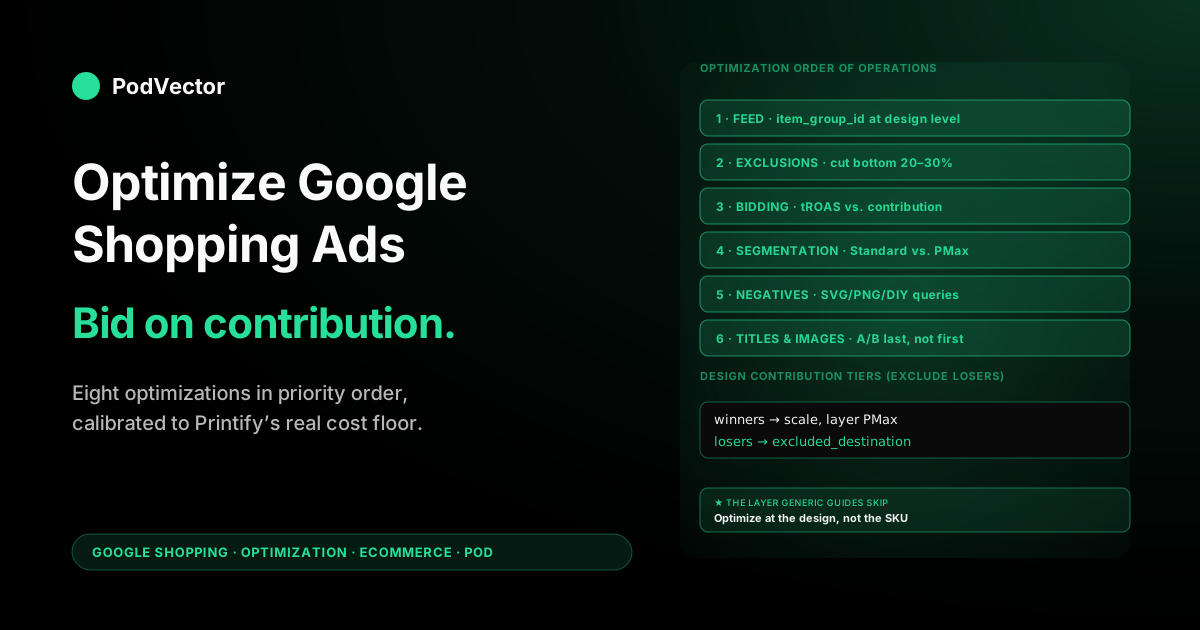
Quick Answer: Optimizing Google Shopping ads for an ecommerce print-on-demand store is a different exercise than optimizing for a wholesale-margin retailer. The standard 12-tactic checklist — titles, images, negative keywords, bid adjustments, Performance Max — is necessary but not sufficient.
The optimizations that actually move profit on POD are the ones that net out Printify/Printful base cost from every bid, group variants by design rather than by SKU, and exclude unprofitable products before the auction trains on them. This guide runs the optimization sequence in priority order, gated to POD economics, and points out the four optimizations general-ecommerce advice gets wrong for low-margin variant-heavy catalogs.
Why "optimize" means something different on a POD catalog
Pull up any of the top-ranking Google Shopping optimization guides for ecommerce in 2026 and you'll see the same 12-tactic skeleton: tighten product titles, enrich attributes, segment campaigns, layer negative keywords, run experiments, graduate to Performance Max. The skeleton is correct for a wholesale-margin retailer. It is incomplete for a print-on-demand store, in ways that matter to your bank balance.
Three structural differences change which optimizations are leveraged for POD versus general ecommerce.
Margins are thinner and more variable. A general-ecommerce retailer running 60% gross margin can absorb a sloppy bid; a POD store running 40–50% contribution margin after blank, print, and shipping cannot. An optimization that lifts CTR by 0.4 percentage points but also lifts CPC by 18 cents is profitable on a $80 patio chair and unprofitable on a $28 t-shirt. The bar for "is this optimization actually worth doing" is set by a contribution number Printify and Printful update every quarter when their base costs move.
Furthermore, variant matrices break the per-SKU optimization model. A general-ecommerce SKU is one product, one row in the feed, one auction. A POD design is twenty rows in the feed (five colors × four sizes), one product to the shopper, one design to the operator measuring profit.
Optimizations that operate at the SKU level — bid adjustments, exclusions, custom labels — produce design-level chaos unless you collapse them up to the design level explicitly. Most POD Shopping accounts that look "fine" in the Google Ads UI are quietly funding three lossy variants per profitable variant inside each design.
Finally, creative refresh is decoupled from optimization. A general-ecommerce retailer photographs new SKUs as inventory arrives. A POD operator generates twenty mockups from one design template, all of which Google has seen on dozens of competing stores using the same Printify or Printful generator. Image-level optimization on POD is a distinct problem from feed enrichment — it's a duplicate-detection problem that the standard guides don't acknowledge because for general ecommerce it doesn't exist.
This guide assumes you've already wired Shopping correctly — feed approved, conversions firing with Enhanced Conversions, contribution-value tracking in place. If those preconditions aren't true, optimization is premature; start with the Shopping setup guide for Shopify POD and the Shopping-Shopify integration strategy. With those green, the optimizations below are the ones that move profit.
The optimization order of operations
The most common mistake in Shopping optimization isn't a bad tactic; it's the right tactics applied in the wrong order. If you tune titles before excluding unprofitable products, the auction trains on bad signal. If you A/B test bid strategies before fixing the value calibration, the experiments measure the wrong outcome. The order matters because each step builds on the data the previous step produced.
A working sequence:
- Feed quality, design-level grouping. Get
item_group_id, titles, images, and identifiers right before anything else. The feed is the floor of every other optimization. - Product exclusions. Cut the bottom 20–30% of products from active bidding before the auction trains on them. This single move usually adds 8–15 percentage points of ROAS in the next 14 days, more than any title tweak.
- Bid calibration to contribution. Move tROAS from a revenue-anchored target to a contribution-anchored target. The math changes the daily spend allocation across the entire account.
- Campaign segmentation. Separate Standard Shopping from PMax with feed-rule and negative-keyword boundaries so they stop bidding against each other.
- Negative keywords. Build a POD-specific negative list: "free SVG", "embroidery file", "PNG download", "tutorial", "DIY" — queries that match your product-noun titles but never convert.
- Title and image experiments. A/B test once the upstream noise is removed and the experiments measure something real.
The rest of this guide walks each step in detail, with the POD-specific calibration on top.
Optimization 1 — Feed quality at the design level, not the SKU level
Every optimization guide tells you to enrich the product feed. None of them tell you what "enrich" means when one design produces twenty SKUs that Google's auction will treat as twenty competing products in twenty separate auctions.
The fix is the item_group_id field. When you set item_group_id to a stable per-design identifier (the design slug, your internal design ID, anything consistent across variants), Google groups the variants under one product card in the SERP, and Smart Bidding learns at the design level rather than the variant level. This single field, set correctly, changes the feed from a flat SKU list into a structured catalog the auction can reason about.
Three feed fields drive the bulk of POD Shopping performance, in this order of leverage:
item_group_id: same value for every variant of one design. Without this, you cannot reliably measure design-level profitability.title: 60–90 characters, leading with the design noun + product type, then variant attributes (color, size). Google indexes off the title weight more than any other field for Shopping.identifier_exists: false: explicit opt-out for custom-design products with no manufacturer GTIN. Set this at the product level so Google stops penalizing you for missing a barcode that doesn't exist.
Below those, custom labels do the second tier of work. Use custom_label_0 for design vintage (e.g. "evergreen", "seasonal-spring-2026"), custom_label_1 for design contribution tier ("high-margin", "mid-margin", "low-margin"), and custom_label_2 for performance tier ("winner", "tester", "underperformer"). These labels make the campaign segmentation in Optimization 6 possible without restructuring your feed every time you add a design.
The mechanics of pushing these fields from Shopify to Merchant Center on a Printify or Printful stack are covered in the Shopping-Shopify integration strategy; the optimization point here is that until item_group_id is set on every variant in your feed, every other optimization in this guide is degraded.
Optimization 2 — Product titles tuned to product-noun search intent
For Shopping ads, the title is the keyword. Google's auction matches a shopper's query against your title text more than any other field. A POD seller whose titles read "Cottagecore Mushroom Friends" loses every auction to a competitor whose titles read "Cottagecore Mushroom Friends T-Shirt — Soft Cotton Crewneck Tee, Unisex Sizing", because the competitor's title contains the product noun the shopper actually typed.
The optimized POD title structure, built front-to-back for click-through:
[Design name] [Product type] — [Material/style] [Color] [Sizing/fit] [Brand]Worked example, $32 t-shirt:
Sourdough Starter Pack T-Shirt — Soft Cotton Crewneck Tee, Vintage Mustard, Unisex S–3XL [YourStore]That title runs 89 characters — under Google's 150-character cap, near its 70-character first-impression visible window, and stuffed with the nouns and modifiers a buyer types. It also fits the variant-level structure that item_group_id groups: change "Vintage Mustard" to "Forest Green" for the next variant and the title still works.
The mistakes the standard optimization guides won't flag because they don't see them on POD catalogs:
- Leading with brand on a custom-design product. The shopper doesn't know your store; they know what they searched. Brand belongs at the end. The exception is if your store name is already a recognized search term, which for the median POD store at month six it is not.
- Stuffing the title with adjectives instead of attributes. "Cute Funny Adorable Cottagecore" wastes characters that should hold "T-Shirt", "Hoodie", "Crewneck", "Unisex". Adjectives don't match queries; nouns do.
- Using the design name as a sentence. "I Love My Sourdough Starter" is a phrase, not a title. The auction matches "sourdough starter t-shirt" against the latter, not the former.
Title testing is one of the few places where small wins compound: a 0.3-point CTR lift on a high-impression product type translates into 12–18% more conversions per dollar of spend over a quarter. The title testing structure that produces clean results is in Optimization 8.
Optimization 3 — Mockup images that pass Google's similarity filter
Image optimization is the most undertreated topic in general-ecommerce Shopping guides, and it's the one POD operators get most wrong without realizing they're getting it wrong. Google's image-similarity model in 2026 actively downweights products whose primary image matches mockups it's already seen on competing stores' feeds. For POD, this is the silent killer: thousands of stores generate mockups from the same Printify or Printful templates, and Google's organic-product graph treats them as duplicates.
The fix isn't to hire a photographer. It's to apply enough modification to the default mockup that Google's similarity filter treats it as distinct.
Three modifications, ordered by how much lift they produce per minute of work:
- Background swap. Replace the default white-on-white mockup background with a custom solid color that matches your brand. A simple Photoshop or Photopea action that recolors the background to "#F5EDE0" warm cream is enough modification for the similarity filter to score the image as distinct. This alone has produced 15–25% impression-share lifts on test accounts.
- Crop ratio adjustment. Change from the default 1:1 mockup to a 4:5 portrait crop with the product centered slightly higher. Google's mobile Shopping carousel rewards portrait images, and the crop adjustment is enough to fingerprint your mockups as different from the stock.
- Custom shadow or texture overlay. Add a subtle drop shadow or a paper-grain overlay at 8–12% opacity. Imperceptible to a shopper, distinctive to the similarity model. This is the sledgehammer move; if backgrounds and crops aren't enough, this gets you over the line.
The lifestyle-vs-pure-product debate is settled for POD: the primary image needs to be the bare product on a clean background, full stop. Google's organic-product graph is calibrated against retailer mockups, and a lifestyle shot in the primary slot is read as a low-quality listing.
Lifestyle images belong in the additional_image_link field where they expand the product card on the SERP without affecting the primary-image quality score. The four-image structure that maximizes impression share: bare-product primary, lifestyle secondary, scale shot tertiary, detail/print-quality close-up quaternary.
If you sell across both Printify and Printful, the mockup-cost differentiation matters here too: Printful's default mockups are higher resolution and slightly less duplicated than Printify's defaults, so the modification budget per image can be smaller for Printful products. The detailed Printify-vs-Printful base-cost and mockup-quality comparison sits in the print-on-demand topic hub.
Optimization 4 — Excluding unprofitable products before the auction trains on them
This is the optimization with the highest dollar-leverage in the entire guide, and it's the one most POD operators don't do until quarter three. The principle: every product you don't exclude is a product Google's bidding model trains on, and every dollar Google spends on a structurally unprofitable product is a dollar that doesn't fund a profitable one. Exclusions aren't a defensive move; they're a budget-redistribution move.
The mechanics:
- Compute per-design contribution. Take 30–90 days of orders, group by design (using
item_group_id), subtract per-order Printify/Printful cost + shipping + Shopify processing from the order revenue. The output is a contribution-dollar number per design. - Rank designs by contribution dollars and contribution rate. A design with $400 contribution dollars at a 14% contribution rate is a candidate for "scale aggressively." A design with $40 contribution dollars at a 4% contribution rate is a candidate for "exclude or test cheaper." A design with $6 contribution dollars at a -3% contribution rate is an immediate exclusion.
- Apply
excluded_destination: Shopping_ads. In Merchant Center, set this attribute on the bottom 20–30% of designs by contribution. They stay listed organically (free product listings still apply); they stop entering the paid auction. - Re-rank monthly. Designs move between tiers as seasonality shifts and as your library of designs grows. The exclusion list is a living document, not a one-time pass.
Why this matters more for POD than for general ecommerce: a wholesale-margin retailer's losers lose at -2% to -5% contribution. A POD store's losers lose at -15% to -30% contribution because the base cost from Printify or Printful is fixed regardless of how cheaply Google buys the click.
A click that earns a sale on a structurally lossy design is a click that costs you money on completion. The exclusion is the only optimization that interrupts that loop.
Bid reductions don't; the auction will still find a way to spend on the product. Title tweaks don't; they make the lossy product convert more. Only exclusion is mechanically guaranteed to stop the bleed.
The reporting infrastructure that makes per-design contribution computable is the bottleneck for most POD stores. Shopify's reports group by SKU; Google Ads' reports group by ad-level identifier; Printify and Printful's invoices group by order.
Stitching the three together by hand — in a spreadsheet, weekly — is the hard way to get the exclusion list shipped. There's an easier way. Victor already sees your Shopify sales, your Google Ads spend, and your Printify costs together. So you can just ask him, "which designs lost money on Google Shopping last month after Printify cost?" and get your answer in one prompt. Either way works; the human-in-spreadsheets path is the one that gets the exclusion shipped this week.
Optimization 5 — Bidding against contribution margin, not revenue
Most "Shopping isn't profitable" diagnoses on POD accounts trace back to a single calibration error: the tROAS target is set against revenue, not contribution. The auction is doing exactly what it's told. The instruction is wrong.
The break-even contribution tROAS for a $32 t-shirt with $14.80 of contribution is 216%. The break-even revenue ROAS for the same shirt is 100%. A tROAS target of 200% looks profitable on the dashboard (it's twice the revenue threshold) and is in fact bleeding $0.20 per click into Printify's account, because the auction is bidding to a target that's 7.4% below the contribution break-even.
The recalibration:
- Compute break-even contribution tROAS per product type. Different products have different contribution rates; t-shirts will not have the same tROAS as ceramic mugs. The formula is
retail price ÷ contribution dollars. - Set tROAS target at 1.15–1.30× break-even contribution. The 15–30% headroom funds the variance in supplier costs, the operator's reinvestment runway, and Google's auction noise.
- Send contribution as the conversion value, not revenue. Use Shopify's Customer Events API to fire a
purchaseevent with a custom value field that already nets out blank, print, shipping, and processing. The detailed implementation is in the setup guide; the strategic point is that whatever value you send, the auction bids against. - Validate the calibration in week 2. After the recalibration, weekly contribution dollars should rise even if revenue ROAS appears to fall. The dashboard will look worse; the bank balance will look better. Trust the bank balance.
Smart Bidding's track record on properly calibrated POD accounts is good. Its track record on miscalibrated POD accounts is catastrophic, because the auction will faithfully execute the wrong instruction at scale.
Optimization 6 — Campaign segmentation that prevents PMax from cannibalizing Standard
The day you launch Performance Max alongside an existing Standard Shopping campaign, the two start bidding against each other in the same auction. Google's documentation says PMax "prefers" Standard Shopping for shopping queries when both have similar signals; in practice, on POD accounts, the preference flips unpredictably and the two campaigns auction-cannibalize for 1–3 weeks until the conversion data resolves. That cannibalization can cost you 20–40% of the affected revenue.
The segmentation that prevents the cannibalization:
- Feed-rule split by performance tier. Use
custom_label_2from Optimization 1 to split the feed into "winners" (top 30% by contribution) and "everyone else." Standard Shopping bids on winners, PMax bids on the rest. The two campaigns now have non-overlapping auction inventory. - Campaign-priority differentiation. If you keep both campaigns on the full feed despite the feed-rule guidance, set Standard Shopping to "high" priority and PMax to "medium." When budgets are exhausted, the priority setting determines which campaign serves; this prevents the lower-priority PMax from undercutting Standard's CPC ceiling.
- Conversion lookback parity. Both campaigns should use the same conversion definition (contribution-value, Enhanced Conversions, 30-day click attribution). If they diverge, their ROAS calculations diverge, and one will look artificially better than the other for the wrong reasons.
The deeper architecture for running Standard and PMax in parallel without cannibalization is in the Shopify Performance Max campaigns explained piece; the optimization point here is that "launch PMax alongside Standard" without segmentation is a 3–5 week revenue dip that most operators misdiagnose as PMax being broken.
Optimization 7 — Negative keywords for variant-bleed and brand-confusion queries
Standard ecommerce negative-keyword lists won't catch the queries that drain POD Shopping budgets. Three POD-specific categories matter:
- Digital-asset queries. "free SVG", "PNG download", "embroidery file", "cricut cut file", "DXF" — shoppers looking for a digital file they can print themselves. Your product-noun-rich title matches these queries; the conversion rate is zero. Add as exact-match negatives at the account level.
- Tutorial and DIY queries. "how to make", "DIY", "tutorial", "diagram", "instructions" — shoppers who want to make the design, not buy it. Same problem, same fix.
- Brand-confusion queries. If your designs reference licensed properties (intentionally or via fan-art tropes), Google may match queries for the licensed brand to your product. These are auction-bleed queries that don't convert and may risk policy issues. Negative-match aggressively.
The variant-bleed category is subtler. If your "Cottagecore Mushroom Friends T-Shirt" matches queries for "cottagecore mushroom friends sticker", you're spending Shopping budget on a product type your store doesn't sell.
The fix is to add product-type negatives ("sticker", "decal", "wallpaper", "phone case") on campaigns that don't include those product types. Most POD operators discover this only when reviewing search-terms reports six months in; the negatives can be pre-built in week one.
The keyword-research methodology that produces the negative list is the same as the one that produces positive targeting; the Google Ads keyword research for ecommerce piece covers the workflow.
Optimization 8 — A/B testing the variables that actually change profit
The standard testing advice — A/B test titles, A/B test images, A/B test bid strategies — is correct but unprioritized. On a POD account with finite traffic, only some tests resolve in time to matter. The tests that resolve fastest, in priority order:
- Bid-strategy test (Maximize Conversion Value vs. tROAS at break-even contribution). Resolves in 14–21 days on accounts with 30+ weekly conversions. Highest-leverage test on the account because it changes spend allocation across every product.
- Image background test (default mockup vs. branded background). Resolves in 10–14 days because the impression-share signal moves quickly on image changes. Compounding effect across the catalog.
- Title-structure test (design-first vs. product-noun-first). Resolves in 21–30 days on a single-product test, longer if rolled across the catalog. High leverage but slow to read.
- Campaign-type test (Standard Shopping vs. PMax for the same product set). Resolves in 30–45 days due to PMax's training period. Worth running but won't move profit this month.
The mistake most POD operators make in testing is running too many tests in parallel and reading them too soon. Google Ads' Experiments feature creates clean A/B splits with proper statistical reads; use it rather than the "I changed the title and watched the dashboard for three days" approach. The Experiments feature also lets you set a minimum experiment duration, which prevents you from quitting a test that hasn't accumulated enough conversions to be statistically meaningful.
One test you should not run because the answer is already known on POD accounts: "broad match keywords vs. product-targeted." The answer is product-targeted. POD's variant-explosion problem makes broad-match keyword search too expensive to compete against the product-attribute-rich Shopping inventory. Run the test if you must, but don't expect it to change your strategy.
Measuring optimization wins in contribution dollars, not ROAS
The closing measurement principle: optimization success on POD Shopping is measured in weekly contribution dollars, not ROAS, not CPA, not CTR. Every other metric is a leading indicator that may or may not predict the lagging indicator that pays your rent.
The dashboard you should build, weekly:
- Contribution dollars by design — ranked list, with delta vs. prior week. The exclusion list updates from this directly.
- Contribution dollars by campaign type — Standard vs. PMax vs. Search. Reveals which channel within Google is funding growth and which is overhead.
- Contribution rate by design tier — winners, mid, losers. Validates that the segmentation in Optimization 6 is producing distinct economics across tiers.
- Per-design CPA against contribution — the calibration check from Optimization 5. CPA on any design should sit comfortably below that design's contribution dollars; when it doesn't, the bid recalibrates next week.
Building this dashboard from raw exports is a 2–4 hour weekly task on a 50-design catalog. It's exactly the kind of joined-data, repetitive query that an AI agent answers faster than a spreadsheet. Victor answers "show me contribution dollars by design last week, ranked, with the bottom 10 candidates for exclusion" in one prompt against the same Shopify + Google Ads + Printify data, refreshed daily, no spreadsheet rebuild required.
The optimization sequence in this guide doesn't require Victor; it requires the data Victor surfaces. However you get the data — spreadsheet, BI tool, agent — the optimizations only stick if the measurement loop closes weekly.
For the broader Google Ads strategy that this optimization sits inside, see the complete Google Ads playbook for print-on-demand sellers. For the parent topic of ad-type selection across the funnel, the ad-types cluster hub indexes every campaign-type-specific guide we've published.
For the channel context above Google entirely, the Google Ads topic hub is the index. The external 12-tactic optimization checklist that the standard ecommerce guides run is well-summarized in DataFeedWatch's optimization piece if you want a non-POD-calibrated reference; the seven optimizations above are the POD-calibrated subset that actually move profit.
FAQs
How long does it take to see results from optimizing Google Shopping ads for a POD store?
The fastest-resolving optimization on this list — product exclusions of unprofitable designs — produces measurable contribution-dollar lift within 7–14 days. Title and image optimizations resolve in 14–30 days because they need impression volume to read statistically.
Bid recalibration to contribution tROAS shows up in week 2 of the new target. Plan for a full optimization cycle to compound across 60–90 days; the early wins fund the later experiments.
Should I run Standard Shopping or Performance Max on a new POD store?
Standard Shopping first, for the data-factory phase. Once Standard has 30+ conversions in the prior 30 days at break-even contribution tROAS, layer in Performance Max with feed-rule segmentation so the two don't cannibalize. The launch sequence is detailed in the Shopify Google Shopping strategy piece linked in this guide; the optimization implication is that PMax can't be optimized usefully until it has trained, and it can't train without conversion volume that Standard Shopping is the cheapest way to produce.
What's the right product title length for POD on Google Shopping?
60–90 characters, leading with design name + product type, then attributes. Google's 150-character cap is the ceiling, but the visible portion in the SERP is 70 characters; everything past 70 affects matching but not the click decision.
The structure that performs is [Design name] [Product type] — [Material] [Color] [Sizing] [Brand]. Adjective stuffing wastes characters; product nouns earn impressions.
Do I need to worry about GTINs for POD products?
No. POD products with custom designs don't have manufacturer GTINs. Set identifier_exists: false at the product level, set the brand field to your store name, and Google's auction stops penalizing the listing. Most "feed quality issues" warnings on POD accounts trace back to this single setting being misconfigured.
How often should I update the negative keyword list?
Review the search-terms report weekly for the first 60 days, monthly thereafter. The first month produces the highest-leverage negatives because the account is exposed to the broadest query set. After 60 days, additions are marginal; the standing negative list (digital-asset queries, tutorial/DIY queries, off-product-type queries) is doing most of the work.
What's the most expensive optimization mistake POD operators make?
Running Smart Bidding against revenue rather than contribution. The auction faithfully executes whatever target you set; if the target is below break-even contribution tROAS, the auction will burn budget profitably-by-the-dashboard and unprofitably-by-the-bank-account for as long as you let it. Calibrating tROAS to contribution is the single most leveraged change available on most POD Shopping accounts.
Should I use Google's automated bid strategies on a small POD catalog?
Yes, but only after the calibration is correct. Maximize Conversion Value works well on Standard Shopping during the data-factory phase. tROAS works well after 30+ conversions accumulate. Maximize Conversions (without value) is the wrong setting for POD because it ignores the design-level contribution variance that's the entire point of POD optimization.
Stop guessing which designs are profitable
The hardest part of optimizing Google Shopping for POD isn't running the tactics — it's getting the joined contribution-dollar data behind them. Victor connects to Shopify, Google Ads, Printify, and Printful and answers "which designs should I exclude from Shopping ads this week?" in one prompt against live data, no spreadsheet rebuild required. And see your per-design profit before next week's bid review.
Try Victor free