
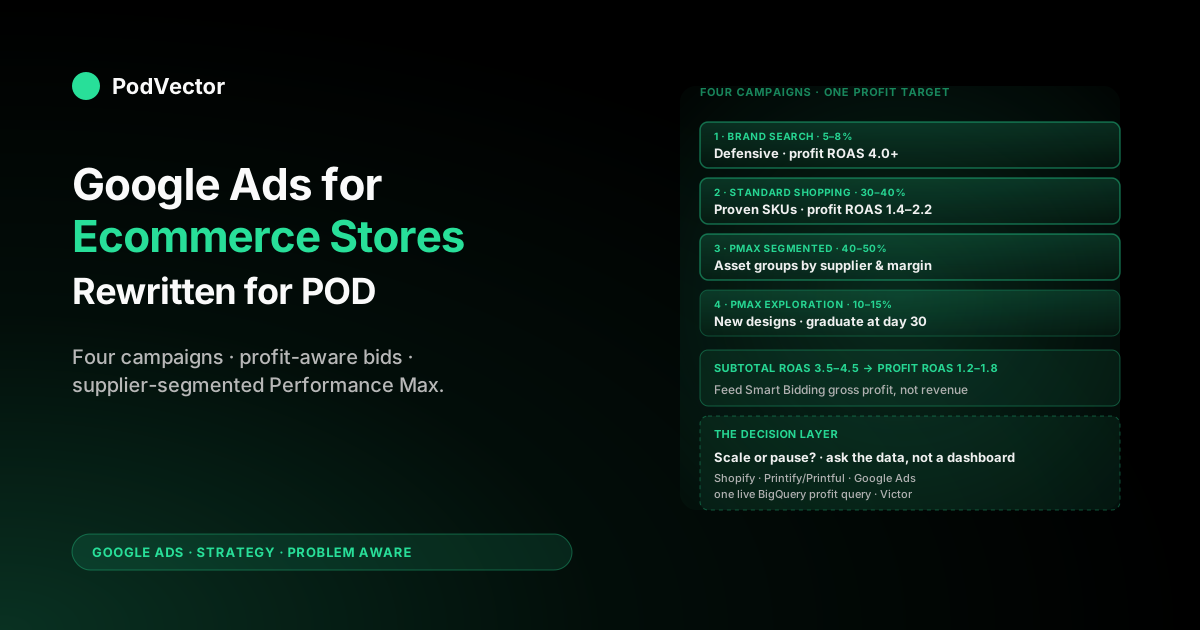
Quick Answer: Most Google Ads guides for ecommerce stores are written for stores with fixed margins, one supplier, and a slow-moving catalog. None of those assumptions hold for print-on-demand.
This guide rewrites the standard ecommerce Google Ads playbook for POD economics: campaign architecture that respects design-level catalog velocity, feeds segmented by Printify or Printful supplier and margin tier, Smart Bidding fed gross-profit-as-value instead of subtotal, and refund-aware feedback loops that stop you scaling apparel SKUs Google thinks are winners but your bank account does not. The output is a playbook where every campaign decision lines up with contribution margin, not revenue.
Why POD breaks the standard ecommerce Google Ads playbook
If you read the three top-ranking ecommerce Google Ads guides on the SERP today — and we read them while researching this piece — you will find a consistent picture. Build a foundation in Merchant Center.
Run Standard Shopping plus Performance Max. Optimise the feed.
Use Smart Bidding with target ROAS. Layer first-party data through Customer Match and enhanced conversions.
The advice is correct in the abstract. It is also written for a store that has a $42 product with a known $20 cost of goods sold, ships from one warehouse, restocks predictably, and accepts returns the way a normal apparel retailer does. Your POD store is none of those things.
Three POD-specific economics break the standard playbook:
- Per-SKU cost is variable across suppliers. A $42 hoodie published from a single Shopify product can cost $14 from one Printify supplier, $19 from another, and $22 from Printful — even when the customer-facing SKU is identical. Your gross margin on what looks like one product is actually three different margins. A target ROAS of 3.5 that looks fine on revenue can be break-even, marginally profitable, or unprofitable depending on which supplier picked up the order. Standard ecommerce Google Ads guides treat this as edge-case noise. For POD it is the central problem.
- Catalog velocity is high. A normal ecommerce store launches one or two SKUs a month and merchandises around evergreens. A POD store launches dozens — sometimes hundreds — of new designs in a month. Each design is effectively a campaign-level variable: new image, new title, new search-intent profile. The standard guide's "set up your Shopping campaign and let Smart Bidding learn" advice runs into a learning-phase wall when half your catalog is less than 30 days old.
- Returns are bimodal and apparel-driven. POD apparel returns spike on sizing for new product types and stay flat for proven SKUs. If your conversion data does not adjust for refunds, Smart Bidding cheerfully bids more aggressively for the SKUs with the highest gross return rate, because they look like high-revenue conversions. Standard guides cover refund handling as a hygiene step. For POD it is what stops you bidding into a loss.
The rest of this guide is the standard ecommerce Google Ads playbook, rewritten end-to-end so each layer respects supplier-cost variance, design velocity, and refund-aware bidding. The strategic frame this sits inside is covered in the complete Google Ads playbook for print-on-demand sellers; the broader topic hub is Google Ads for POD.
The campaign architecture that actually works for a POD store
Standard ecommerce guidance for 2026 lands on roughly this architecture: Brand Search, Standard Shopping (or Performance Max), and a layered AI campaign such as Performance Max Plus or AI Max for prospecting. That is the right starting frame. The POD-specific overlay is how you segment within it.
The four-campaign minimum for a POD ecommerce store:
- Brand Search. A small, defensive Search campaign on your store name and any owned brand keywords. Keeps competitors out of your branded SERPs and feeds Smart Bidding clean conversion signal at very low CPA. Allocate 5–10% of total spend; cap budget so it does not eat broader prospecting.
- Standard Shopping — proven SKUs only. A Shopping campaign that pulls from a feed segment containing only your designs that have at least 30 days of sales history and a positive contribution margin. This is your scaling lane. Smart Bidding works well here because the conversion volume is dense and the unit economics are known.
- Performance Max — supplier and margin segmented asset groups. Performance Max accesses Search, Shopping, Display, YouTube, Discover, Gmail, and Maps from one campaign. The lever you have inside it is asset groups. Build asset groups segmented by supplier and margin tier — for example, "Printify supplier A, margin tier 1 ($18+ profit per unit)" and "Printful, margin tier 2 ($10–$18 profit per unit)" — using custom labels in the feed. Set different target ROAS values per asset group based on the actual contribution margin of those products. This is the single biggest unlock most POD stores miss.
- Performance Max — new-design exploration. A separate Performance Max campaign with a tighter budget cap, pulling from the feed segment containing designs less than 30 days old. Lower target ROAS (often Maximise Conversion Value with no target, or a target 30–40% below your scaling campaign) so the AI can buy enough impressions to learn. Promote winners into the proven-SKU Shopping campaign on a weekly cadence.
This architecture trades complexity for the right thing: a feedback loop where new designs get learning budget, proven designs get scaling budget, and unprofitable suppliers do not get cross-subsidised by profitable ones. The standard one-Shopping-plus-one-PMax architecture cannot do this because it does not have the segmentation hook.
If you also run Demand Gen for top-of-funnel design-led discovery, treat it as a fifth campaign with its own budget and its own measurement window — its conversion path is longer and the last-click ROAS will look worse even when contribution is positive. We cover the Performance Max specifics for Shopify-POD in Shopify Performance Max campaigns explained for POD, and the broader ad-type comparison in the complete guide to Google ad types for POD sellers.
The product feed: foundation of POD Shopping performance
Every standard ecommerce Google Ads guide tells you the feed is the foundation. They are right. They just do not tell you what a POD feed needs that a normal ecommerce feed does not.
Feed essentials, the standard layer:
- Title structure: Brand + Product Type + Design Description + Key Attributes (color, fit, size). For a POD hoodie example: "Acme Apparel Heavyweight Hoodie — Mountain Sunset Print — Unisex Pullover, Black." Optimised titles can lift Shopping impressions 15–30% versus vendor-default titles.
- Description: Lead with the first 160 characters of substance — material, fit, what makes it unique. Google indexes these for query matching.
- GTIN: Most POD products do not have manufacturer GTINs. Set
identifier_existstonofor these items rather than fabricating a number that fails verification. - Images: White-background hero plus at least one in-context lifestyle shot. POD mockup tools default to the white-background hero; the lifestyle shot is on you.
The POD-specific feed layer most stores skip:
custom_label_0= supplier. Tag every item with the Printify supplier ID or Printful as a literal value. This lets you build asset groups and filter Performance Max by who is actually fulfilling.custom_label_1= margin tier. Calculate each SKU's gross margin (selling price minus average supplier cost minus payment-processing fees) and bucket it: tier 1 (high margin, 35%+), tier 2 (mid, 20–35%), tier 3 (low, <20%). Bid higher on tier 1; bid defensively or exclude tier 3.custom_label_2= design family. A grouping label for designs that share an aesthetic or seasonal theme — "summer-mountains," "halloween-2026," "minimalist-typography." Lets you launch and learn on a design family as a unit, then promote the winners.custom_label_3= launch age band. 0–30 days, 31–90 days, 90+ days. Drives the new-vs-proven campaign segmentation described in the architecture section.custom_label_4= return-rate band. If your refund data is reliable, bucket SKUs by 30-day return rate: under 3%, 3–8%, 8%+. Down-weight or exclude the high-return band from scaling campaigns.
These five custom labels turn a flat feed into a strategic lever. Without them, Performance Max sees "1,200 hoodies" and bids the same on all of them.
With them, Performance Max sees five segments with five different target ROAS values and bids accordingly. The mechanics of pushing this from Shopify into Merchant Center are covered in Shopify Google Merchant Center strategy for POD and the broader integration in the complete guide to Google Ads Shopify integration for POD.
Note for 2026: the Merchant API is now generally available and replaces the Content API, with a hard cut-off in August 2026. If your feed app or custom integration still pushes via the Content API, the migration is no longer optional. See the official Merchant API documentation for the migration path.
Bidding strategies translated into POD economics
The standard Google Ads bidding playbook for ecommerce is: start on Maximise Conversion Value while the campaign learns, switch to Target ROAS once you have 30+ conversions in 30 days, and tune the target up or down based on observed performance. Translating that into POD economics requires changing one variable that no standard guide changes: the conversion value Google Ads sees.
If your conversion value is order subtotal (the default), then:
- A $42 hoodie order looks the same to Smart Bidding regardless of whether it cost $14 or $22 to fulfil.
- A campaign hitting 3.5 ROAS looks the same regardless of whether contribution margin is 25% or 5%.
- Smart Bidding scales the campaigns with the highest revenue, not the highest contribution.
If your conversion value is gross profit — selling price minus supplier cost minus processing fees — then Smart Bidding scales contribution. The math from there is straightforward: a profit-aware target ROAS of 1.0 is break-even, 1.3 is healthy, 1.5+ is what sustainable growth looks like. The numbers feel small because they are; you are no longer multiplying revenue against a hidden cost stack.
The translation table for POD:
- If conversion value = subtotal: target ROAS 3.5–4.5 to clear typical POD costs. Vulnerable to supplier-cost drift. The standard guidance.
- If conversion value = gross profit: target ROAS 1.2–1.8. Smart Bidding is now optimising for the right thing. The recommended state.
The implementation work — getting Printify or Printful supplier cost into Shopify orders, then sending the right value to Google Ads either through enhanced conversions with order-level data or via the Conversions API server-side — is covered step by step in our Shopify Google Ads conversion strategy guide. It is the highest-leverage single change a POD store can make to its Google Ads account.
Conversion tracking that respects supplier cost and refunds
The standard ecommerce tracking checklist is: install the Google Ads pixel, fire purchase events with order ID and value, enable enhanced conversions, ideally move to server-side tracking via GA4 or the Conversions API. POD adds two specific upgrades.
Refund adjustments. Google Ads accepts refund and partial-refund events through the same Conversions API or the offline conversion adjustments interface. If your apparel return rate is 5%+ and you are not sending these adjustments, Smart Bidding believes those orders converted at full value.
The fix is configurable in most Shopify tracking apps and explicit in any server-side setup. We walk through the conversion-tracking install in the Shopify Google Ads conversion tracking setup guide for POD; the foundational adjustment behaviour is documented in about data-driven attribution Google Ads help, explained for POD sellers.
Profit-as-value. Cover this once at the architecture level rather than at the campaign level. There are two paths:
- Order-level metafield. Write supplier cost into a Shopify order metafield at order-creation time (most Printify and Printful integrations expose the line-item cost; some require a webhook). Configure your tracking app or pixel to read the metafield and fire the conversion event with
value = subtotal − supplier_cost − processing_fees. - Server-side via the Conversions API. Run a small server-side process that joins the Shopify order, the supplier cost, and the Google Ads click ID (gclid), then posts the conversion to Google Ads with the correct profit value. Higher engineering bar; more resilient to ad blockers and pixel drift.
Most POD stores under $30K monthly spend can ship path 1 with an off-the-shelf Shopify app. Above that, path 2 starts paying back its complexity in attribution accuracy.
Enhanced conversions are not optional in 2026. Hashed first-party data passed alongside the conversion event materially improves Smart Bidding for stores with 1,000+ conversions a year. Enabling it is a configuration toggle in most tracking apps and a small code change in custom setups.
The cost is roughly zero; the lift is measurable. The standard guides agree on this; we agree.
Budget allocation across campaigns at POD margins
Standard ecommerce guidance gives you ratios — "60% Performance Max, 25% Standard Shopping, 10% Search, 5% Brand" — that come from non-POD verticals where margins and learning velocity are different. The right POD allocation for a four-campaign architecture, at $5K–$30K monthly spend:
- Brand Search: 5–8% of total. Very low CPA, defensive. Cap it; do not let it grow into broader Search.
- Standard Shopping (proven SKUs): 30–40% of total. This is where you are scaling the known winners. Use Target ROAS with profit-aware values.
- Performance Max (supplier-and-margin segmented): 40–50% of total. The largest engine, with budget split across asset groups in proportion to historical contribution margin per supplier.
- Performance Max (new-design exploration): 10–15% of total. The learning lane. Capped, with a clear rule for promoting winners (e.g., "after 30 days and 30 conversions, if contribution ROAS > 1.3, move to Standard Shopping").
The mistake to avoid: letting Performance Max consume your full budget because it has the highest reported ROAS. Performance Max often picks up branded queries that would have converted anyway and reports them as PMax conversions.
If you do not have a Brand Search campaign separating that traffic, your PMax ROAS is overstated. The fix is having both campaigns and looking at incremental ROAS at the campaign level, not absolute reported ROAS. The strategic mechanics of this allocation are covered in our Google Ads strategy for ecommerce guide for POD.
Seasonal cadence and design-launch rhythm
POD has two cadences a normal ecommerce store does not: weekly design launches and seasonal design refreshes. Both interact with Google Ads in specific ways.
Weekly cadence — design launches:
- Day 0: Push new designs to Shopify with custom labels set (supplier, margin tier, design family, launch-age 0–30, return-rate band initialised). New designs flow into the new-design exploration Performance Max campaign automatically because of the launch-age label.
- Day 7: First check-in. Discard designs with zero engagement (clicks but no add-to-carts, or no clicks at all). Free up budget for the rest.
- Day 30: Promotion review. Designs with 30+ conversions and contribution ROAS > 1.3 graduate to the proven-SKU Standard Shopping campaign. The launch-age label flips to 31–90 days.
- Day 90: Long-tail review. Designs that survived day 30 but plateaued at low volume go into a "long tail" feed segment with a lower target ROAS but lower budget allocation; designs still scaling get more aggressive bids in proven-SKU Shopping.
Seasonal cadence — peak windows:
- Pre-season (T-60 to T-30): Launch seasonal design family. Lower target ROAS during the learning phase; expect break-even or slightly worse for the first two weeks.
- Peak (T-30 to T+0): Raise budget caps; lower target ROAS slightly to capture traffic; rely on the seasonal design family's labels to keep budget on the right SKUs.
- Post-season (T+0 to T+30): Sharply reduce budget on the seasonal design family or exclude it from active campaigns. Move budget back to evergreen designs.
- Year-round: Keep an evergreen feed segment that runs through every season at a stable target ROAS. The evergreens are what funds the seasonal experimentation.
The standard ecommerce guidance acknowledges seasonality at the budget level. POD adds the design-family layer because your inventory is, in effect, infinitely flexible — you decide each cycle which designs to put in front of the AI.
Realistic POD benchmarks for 2026
The benchmarks the standard guides cite — average ecommerce ROAS 2.87, median CPA $23.74, Performance Max ROAS 2.57, Search ROAS 5.17 — are revenue ROAS aggregated across all of ecommerce. POD margins are tighter than the average for two reasons: per-unit cost is high relative to selling price, and refund rates are typically a few points higher than non-apparel retail.
Realistic profit-ROAS benchmarks for a POD store running the architecture above:
- Brand Search profit ROAS: 4.0+. If you are below this on branded terms, recheck your bidding — branded search should be near-CPA-efficient.
- Standard Shopping (proven SKUs) profit ROAS: 1.4–2.2. This is your scaling band. Below 1.2, contribution is borderline; above 2.2, you are likely under-bidding and leaving volume on the table.
- Performance Max (proven, segmented) profit ROAS: 1.2–1.8. Slightly lower than Standard Shopping because PMax buys on more surfaces with longer attribution paths.
- Performance Max (new-design exploration) profit ROAS: 0.6–1.1 in the first 30 days. Below break-even is acceptable while learning; above 1.1 means a winner is emerging and may be ready to graduate early.
If your dashboard shows revenue ROAS at 4.0+ across all campaigns, the standard reaction is "we're doing well." The POD-specific reaction is: convert it to profit ROAS using your real Printify and Printful costs, then re-decide. Often the high-revenue-ROAS campaigns are not the high-profit-ROAS campaigns; we have seen real audits where the order flipped.
The decision layer: from dashboards to action
Everything above is the playbook a POD operator implements: campaigns, feed labels, bidding values, tracking, budgets, cadence. What the playbook does not solve is the part where, every week, an operator needs to look at the data and decide which campaigns to scale, which asset groups to pause, and which new designs to promote.
Most stores try to do this in a spreadsheet. A few use a profit dashboard like Triple Whale or BeProfit. None of those tools tells you what to do; they tell you what happened.
That is the gap PodVector AI is built to close. Victor is an AI agent that connects your Shopify orders, your Printify and Printful supplier costs, and your Google Ads spend into a single a unified live data warehouse, and answers questions like "which Performance Max asset groups produced positive contribution margin last month after Printify costs and refunds, and how should I reallocate budget for next week" in plain English. Victor answers your questions and acts on those answers — with your approval — adjusting bid strategies, pausing unprofitable asset groups, and reallocating budget on the same data.
The Google Ads architecture in this guide is the right plumbing. The decision layer is what turns the plumbing into compounding margin.
For the broader AI-agent context, see AI agents for Shopify, for POD sellers and the complete buyer's guide to Google Ads services for POD. For the standard ecommerce baseline this guide departs from, the most thorough public reference is Store Growers' Ultimate Guide to Google Ads for Ecommerce.
FAQs
Do I really need four Google Ads campaigns for a POD store, or is one Performance Max enough?
One Performance Max is enough to start, especially if you are spending under $3K/month and have not yet wired up profit-aware conversion values. Above that, the four-campaign architecture (Brand Search, Standard Shopping for proven SKUs, segmented Performance Max, and a new-design exploration Performance Max) earns its complexity by giving you levers PMax-only cannot offer: separating branded from non-branded traffic, segmenting bids by supplier and margin, and protecting learning budget for new designs.
What is the most important conversion-tracking change a POD store can make in Google Ads?
Sending gross profit instead of subtotal as the conversion value. With profit-as-value, Smart Bidding optimises for contribution margin — which is what actually grows the bank account — instead of revenue. Implementing it requires getting Printify or Printful supplier costs into Shopify orders and updating your tracking app or Conversions API setup; the work is well-defined and the lift is the largest single optimisation most POD stores can make.
How does POD seasonality differ from regular ecommerce seasonality for Google Ads?
Regular ecommerce seasonality is mostly a budget question — raise spend during peaks, drop it after. POD adds a design-family question: which seasonal designs to launch, when to start them learning, and when to retire them.
The Google Ads side of this is custom labels for design family, plus campaigns that pull from feed segments by family. Allocate roughly 20–30% of seasonal-window spend to the seasonal family during pre-season learning, scale up at peak, then exclude post-peak.
Should I use Standard Shopping or Performance Max for an ecommerce POD store?
Both, segmented. Standard Shopping is your scaling lane for proven SKUs because it gives you direct campaign-level bid control.
Performance Max is your prospecting and cross-surface lane, segmented into asset groups by supplier and margin tier. Running them together — with PMax excluded from the proven-SKU feed segment by feed filtering — avoids them competing on the same auctions.
How do I handle the fact that the same Shopify product can be fulfilled by different suppliers at different costs?
Two parallel changes. First, in your feed, tag every item with custom_label_0 = supplier and custom_label_1 = margin_tier based on the average cost across the suppliers eligible for that product.
Second, in your conversion tracking, send the actual realised gross profit per order using the actual supplier the order routed to, not the average. The feed label drives bidding; the order-level value corrects for routing variance after the fact.
How many designs should I launch per week into Google Ads?
As many as you can support with at least $50–$100 of weekly learning budget per design over the first 30 days. Below that, Smart Bidding has too little signal per item to learn well. If your launch volume exceeds your learning budget, narrow the new-design feed segment to only your top-prediction designs each week and let the rest sit organic until you have headroom.
Are revenue ROAS benchmarks like 4.0 still useful for POD in 2026?
Useful as a sanity check, not as a target. Revenue ROAS hides supplier-cost variance, which is the largest single source of margin variance in POD. Convert revenue ROAS into profit ROAS using your actual Printify and Printful costs, set targets in profit terms (1.2–1.8 for scaling campaigns, 1.0+ for break-even on new designs), and ignore the cross-industry revenue ROAS benchmarks for any decision more consequential than "is the account directionally healthy."
Run this playbook against real profit data, not subtotal
The architecture in this guide assumes Smart Bidding sees gross profit, not revenue. Victor connects your Shopify orders, Printify and Printful supplier costs, and Google Ads spend into one a unified live data warehouse so you can answer "which campaigns and asset groups should I scale next week" against real contribution margin — and, on the employee roadmap, have Victor act on those decisions for you. Five-minute connect; ask him about your last 30 days of ad spend.
Try Victor free