
Quick Answer: A Google Ads and Shopify strategy for print-on-demand is two strategies coordinated, not one. Google Ads decides which campaign types to run, what to bid, and how to read ROAS.
Shopify decides what conversion value Google receives, which products go to Merchant Center, and how the storefront merchandises the click after it lands. The seam between the two systems — the Google & YouTube channel app, Customer Events, and the product feed — is where most POD accounts quietly leak margin.
Get the handoff right (margin-based conversion value, curated feed, lifestyle imagery, refunds reconciled) and the same Google Ads campaigns produce double the profit on identical spend. This is the joint-stack playbook: what lives where, in what order, and what to fix in each system before the other can do its job.
Why "Google Ads and Shopify" is a joint-stack problem, not two channels
Most POD operators treat Google Ads and Shopify as two separate problems with two separate playbooks. The Google Ads playbook says "run brand Search first, set target ROAS, curate the feed." The Shopify playbook says "install the Google & YouTube channel app, configure Customer Events, fix variant titles." Both playbooks are correct in isolation. Together they leave the most expensive failure mode in POD advertising — the handoff layer between the two systems — completely unaddressed.
The seam is where the value signal Smart Bidding optimizes against actually gets created. Shopify decides what number to send Google.
The Google & YouTube channel app decides which products show up in Merchant Center and how often they refresh. The Customer Events pixel decides whether purchase events fire on every order or just the ones that reach the thank-you page. Refunds, cancellations, partial fulfillments, and supplier cost — none of which Google Ads can see — happen entirely on the Shopify side and quietly distort what Google Ads thinks profitability looks like.
For a print-on-demand store specifically, the joint-stack problem is sharper than for owned-inventory ecommerce. POD margins are 28–35% against supplier cost.
The default Shopify conversion value is the order subtotal, which Smart Bidding treats as 100% margin. Google Ads optimizes a 4x reported ROAS, which is roughly breakeven at 32% real margin.
The campaign is profitable in Google's eyes and unprofitable in the bank account. The fix is not on the Google Ads side or the Shopify side — it's at the seam, in the conversion-value override that ships margin instead of subtotal across the channel app's web pixel. Shopify's own Shopping Ads guide walks through the channel-app install but stops short of the value-signal correction; that's the gap this article fills.
This is the joint-stack approach: treat the two systems as a coordinated whole, identify which work happens on which side, and fix the seam before either side's strategy can compound. The companion piece Google Ads Shopify Strategy for Print-on-Demand goes deeper on the Google-Ads-side architecture; Shopify Google Ads Strategy for Print-on-Demand goes deeper on the Shopify-side configuration. This article is about the connection between them.
What lives in Shopify, what lives in Google Ads
The first source of waste in a POD joint stack is doing the same work in two places. Conversion tracking gets configured in both Google Ads and the channel app, fires twice, and inflates reported conversions by 40–80%.
Custom labels get set in Shopify metafields and re-edited in Merchant Center supplemental feeds, drift apart, and Smart Bidding optimizes against the stale layer. The discipline is to pick one system as the source of truth for each piece of the strategy and never duplicate it.
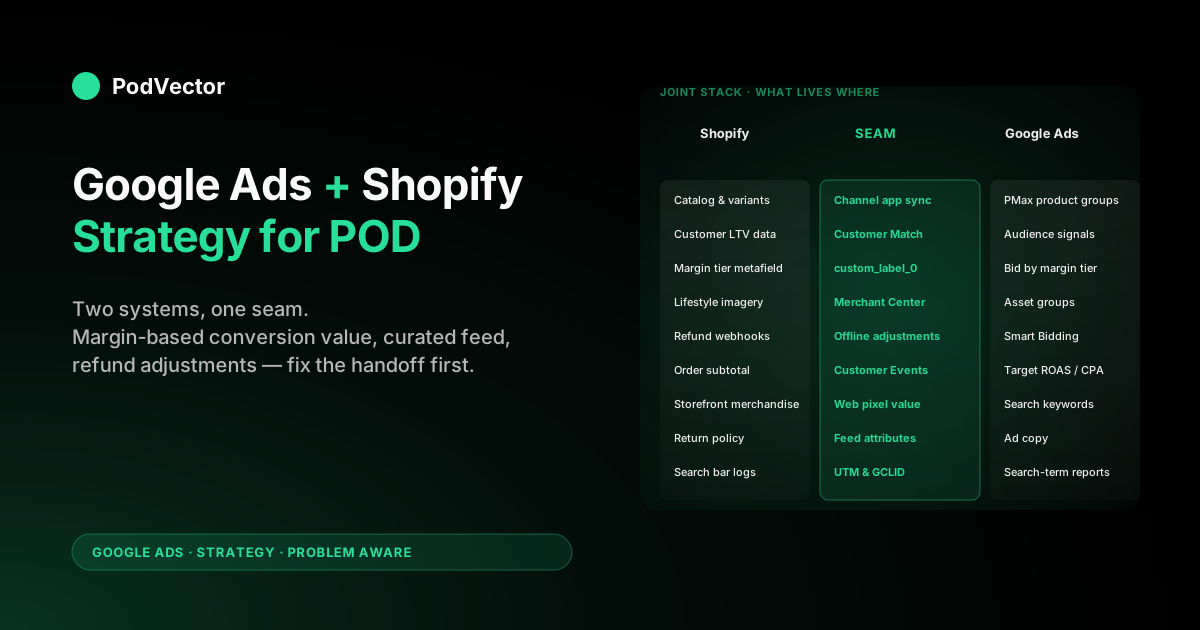
| Piece of the strategy | Lives in Shopify | Lives in Google Ads | Lives at the seam |
|---|---|---|---|
| Product catalog and variants | Yes — single source | No | Channel app syncs to Merchant Center |
| Conversion event firing | No | No | Customer Events web pixel sends to Google tag |
| Conversion value calculation | Source of truth (subtotal, margin, or LTV) | Receives the value Shopify sends | Web pixel script does the math |
| Margin tier custom labels | Source — Shopify metafield | Reads via product groups | Channel app passes the metafield as custom_label_0 |
| Customer audiences (LTV segments) | Source — customer tag exports | Customer Match audiences | Manual upload or Zapier sync, monthly |
| Campaign types and bidding | No | Yes — single source | — |
| Search keywords and ad copy | No | Yes — single source | — |
| Refund adjustments | Source — Shopify order webhook | Receives offline conversion adjustment | Cloud function or Zapier nightly |
| Lifestyle product imagery | Source — Shopify media library | Reads via Merchant Center sync | Channel app refreshes daily |
| Free-shipping and return policy attributes | Source — Shopify settings | Reads in Merchant Center | Channel app — verify they match POD reality |
The pattern: Shopify owns the catalog, the customer relationship, the merchandising, and the inputs to value calculation. Google Ads owns campaign architecture, bidding, audience activation, and creative. The seam owns translation — and the seam is where the POD-specific work concentrates because the defaults assume owned-inventory ecommerce with 60% margin and clean variant data, neither of which a Printify or Printful store has.
For the catalog-side feed work, see Shopify structured data Google Merchant Center strategy for print-on-demand. For the campaign-side architecture, see Google Ads strategy for ecommerce strategy for print-on-demand.
The seam: channel app, Customer Events, product feed
Three components stitch Shopify and Google Ads together. Each one has a default configuration and a POD-correct configuration, and the difference between them is where the joint-stack money lives.
The Google & YouTube channel app
Shopify's channel app installs in three clicks and connects Merchant Center, Google Ads, and the GA4 property. It also installs a Web Pixel that fires purchase conversions to Google.
The default install ships every product variant to Merchant Center and sends order subtotal as conversion value. For a 200-design POD store with 8–15 size/color variants per design, that means 1,600–3,000 SKUs in Merchant Center, all under-segmented, all sending the wrong value.
POD-correct configuration:
- Product visibility scoped to top 20% by trailing-90-day revenue. Set the channel app's product status filter so only your highest-converting designs reach Merchant Center. The long tail of designs that converted twice in nine months is poisoning Smart Bidding's training data.
- Custom label metafields enabled. Add a
margin_tiermetafield (high/medium/low) on each product, populated from the Printify or Printful import that knows the supplier cost. The channel app passes it ascustom_label_0. Standard Shopping and Performance Max can then bid by margin tier instead of treating a $14 mug like a $34 hoodie. - Customer Events override active. The channel app's default Customer Events fires
purchasewith subtotal value. Override the pixel to subtract supplier cost from a Shopify metafield before sending. Five lines of pixel JS, one Settings → Customer Events deploy. The override is the single highest-leverage seam-side change in a POD joint stack.
Customer Events and the value signal
Shopify's Customer Events is the Web Pixel layer that sits between the storefront and any analytics or ad pixel. The Google channel app installs into Customer Events automatically.
What it ships by default — order subtotal as conversion value — is the wrong unit for a POD economy. The override calculates margin per line item from a metafield and sends that to Google instead. Shopify Google Ads conversion strategy for print-on-demand has the full pixel walkthrough; the joint-stack point is that this code lives in Shopify and runs on Shopify's servers, but every Google Ads decision downstream depends on it. A POD operator who starts on the Google Ads side without fixing the Customer Events layer is optimizing against a value signal Shopify is generating incorrectly, and no amount of Google Ads-side tuning compensates.
The Merchant Center product feed
The feed is the third seam component, and the most-fiddled-with for the wrong reasons. Operators try to fix feed problems in Merchant Center supplemental feeds, in Google Ads asset groups, and in Performance Max product exclusions — when the actual fix is upstream, in Shopify.
Variant titles, GTINs, product types, and material attributes are populated by the channel app from Shopify product data. Edit them in Shopify, sync, done. Editing them in Merchant Center as a supplemental feed creates a divergence layer that drifts every time Shopify updates the underlying product, and the supplemental feed silently goes stale.
POD-correct feed practice:
- Variant titles include design name, color, and size (the channel app does this if Shopify's product titles do).
- GTINs left empty if the supplier doesn't provide them — don't fabricate. Merchant Center's
identifier_existsattribute set tono. - Product type matches the apparel hierarchy ("Apparel & Accessories > Clothing > Shirts & Tops").
- Free-shipping attribute off unless your storefront actually offers it (Printify shipping is real and metered; promising free shipping on the Merchant Center feed gets the account suspended).
- Free-returns attribute off unless your real return policy honors it. POD return policies are usually no-returns-for-personalized; reflect that on the product page and in the Merchant Center settings.
For the deeper feed engineering, including how Printify and Printful imports populate variant data, see Shopify Google Merchant Center strategy for print-on-demand.
Shopify-side moves before Google Ads goes live
The launch sequence almost everyone gets wrong is starting Google Ads before the Shopify side is ready. The result is a 30–60 day learning phase where Smart Bidding optimizes against bad data, and you can't unlearn that without flushing the conversion history and restarting. Five Shopify-side moves to complete before the first dollar of ad spend:
- Install the Google & YouTube channel app and verify Merchant Center sync. Confirm products show up in Merchant Center within 24 hours, with prices, images, and availability. Fix any disapprovals before launching campaigns. How to link Google Ads to Shopify (step-by-step) has the install walkthrough.
- Override Customer Events to ship margin-based conversion value. Before any campaign goes live. If the value signal is wrong on day one, every bid Smart Bidding makes is wrong. The override takes 30 minutes; the cost of skipping it is two months of misdirected optimization.
- Populate margin tier custom labels on every product. The Printify or Printful import knows the supplier cost; calculate
(retail - supplier - shipping_subsidy) / retailper variant, bucket into high/medium/low, save as a Shopify metafield, expose to the channel app ascustom_label_0. Standard Shopping and PMax bid against margin tier directly. - Curate the product visibility list. Hide the bottom 80% of designs from the Google sales channel until they earn their way in via a 14-day Standard Shopping test. Smaller feed, cleaner Smart Bidding training data, no PMax budget burned on the long tail.
- Replace Printify mockups with lifestyle imagery on the top 20 designs. The single biggest CTR lever in POD Shopping is product-on-model imagery vs flat mockups. AI rendering tools (Botika, Zmo.ai) produce product-on-model shots from a Printify mockup for $30–60 per design. Push the rendered images back to Shopify's media library; the channel app syncs them to Merchant Center within 24 hours and Performance Max picks them up.
Skipping any of these forces compensating work on the Google Ads side that the Google Ads side can't fully do. PMax can't undo a bad value signal; Smart Bidding can't fix variant explosion; tROAS can't compensate for missing margin tier labels. The joint-stack discipline is to do each piece of work in the system designed to do it.
Google Ads-side moves once Shopify is clean
With the Shopify side and the seam set up, the Google Ads-side strategy is the conventional POD launch sequence — but now the conversion data Smart Bidding sees is reality, and every bid is calibrated against margin instead of subtotal. The sequence:
- Brand-defense Search at $5–10/day. One campaign, exact-match brand terms. Seeds clean conversion history, builds Quality Score, blocks competitor brand-bidding. Cost-per-conversion typically $0.40–$1.20.
- Standard Shopping at $20–30/day with the curated feed. Two weeks minimum. Produces SKU-level conversion data with full search-term visibility — the diagnostic layer Performance Max obscures.
- Non-brand Search on top 5 query families. Pull from GA4 organic data: which search queries already converted on the storefront? Run Search ads against those exact terms. Maximize Conversions until 30 conversions, then Target CPA.
- Performance Max with curated feed and audience signals. Week 5+. Customer Match (top-10% LTV from Shopify), GA4 audience signals (cart abandoners, viewed-but-didn't-purchase), tROAS set against margin-based conversion value. Run alongside Standard Shopping, not in place of it, until monthly conversions clear 500.
- Display remarketing and Demand Gen. After PMax has 50+ weekly conversions and the audience layer has 100+ unique converters to optimize against. Layer YouTube Shorts if creative inventory exists.
The architecture above is identical to the one a non-POD Shopify advertiser would run. The difference is entirely in what the campaigns are optimizing against — margin instead of subtotal — which is decided at the seam, not in Google Ads. The complete Google Ads playbook for print-on-demand sellers walks through the campaign architecture in more depth; this section is what changes when Shopify is the storefront.
Feedback loops: how Shopify data improves Google Ads
The richest joint-stack pattern is using Shopify-side data Google Ads can't see to improve Google Ads campaigns Smart Bidding can't optimize alone. Three feedback loops worth wiring:
- Refund adjustments. POD apparel sees 2–6% refund rate, biased toward higher-AOV designs. Google never hears about refunds. Shopify Webhooks → Cloud Function or Zapier → Google Ads Offline Conversion Adjustment, nightly. Negative-value adjustments get applied to refunded GCLIDs, and Smart Bidding stops over-weighting the SKUs with the worst real return rate. Most POD accounts that wire this loop see PMax shift 8–15% of budget away from problem designs within 30 days.
- LTV-segmented Customer Match refresh. Shopify customer exports broken into top-10%, top-25%, repeat, one-time buyers. Upload monthly to Google Ads as Customer Match audiences. Top-10% LTV becomes the audience signal seed for PMax cold prospecting; one-time buyers become a remarketing-only audience to suppress in cold campaigns. POD stores with >500 customers see PMax cold acquisition cost-per-conversion drop 12–20% inside 30 days once Customer Match is feeding the algorithm.
- Margin-corrected campaign reconciliation. Weekly: pull Google Ads spend by campaign, Shopify orders by GCLID (or UTM), Printify or Printful supplier cost by SKU. Calculate true profit by campaign. Compare to Google Ads' reported ROAS. The disagreement is informative — when ROAS climbs and profit stays flat, Smart Bidding is finding cheap conversions on the wrong margin tier. Adjust tROAS or campaign exclusions accordingly.
None of these loops happen automatically in either system. They're joint-stack work that has to be designed and maintained at the seam — usually weekly, by an operator with spreadsheet discipline, or by a dashboard that joins the data layers live. Shopify Google Ads tracking strategy for print-on-demand goes deeper on the offline-conversion adjustment plumbing.
Diagnostic checks for a healthy joint stack
Five checks any POD operator can run weekly to verify the joint stack hasn't quietly broken:
- Conversion count: Google Ads vs Shopify. Pull weekly Google Ads conversions and weekly Shopify orders attributed to Google Ads (UTM_source = google, utm_medium = cpc). They should agree within 5–10%. Larger gaps indicate a tracking break — duplicate firing (Google Ads counts higher), GCLID stripping (Shopify counts higher), or the channel app silently disconnected.
- Conversion value: Google Ads vs Shopify Profit. Pull Google Ads conversion value by week. Pull Shopify orders for the same week, calculate (subtotal − supplier cost − shipping subsidy) per order, sum. The two numbers should match if the Customer Events override is shipping margin correctly. They should differ by ~3x if the override is off and Google is still receiving subtotal. Anything else is a partial break.
- Merchant Center disapprovals. Disapprovals over 5% of the curated feed mean the feed has drifted from Shopify's reality (image URLs broken, prices stale, items unavailable). Fix in Shopify; let the channel app re-sync.
- Search-term reports vs Shopify search bar logs. Once a quarter, compare the queries paid Search is matching against vs the queries the Shopify storefront search bar is logging. Big divergences flag missing keywords (your customers want X, your campaigns serve Y) or wasted spend on queries the storefront wouldn't naturally rank for organically.
- Returning-customer rate by traffic source. Shopify's customer report broken by acquisition channel. Google Ads acquisition that produces a returning-customer rate < 8% over 90 days is buying one-and-done customers and the LTV math doesn't work. Shift budget toward sources with returning-customer rates > 12%.
The diagnostic discipline is checking weekly, before the spend pattern compounds. Most joint-stack failures are quiet for 30–60 days before they show up as an unexplained drop in Shopify Profit, and by then six figures of ad spend has been miscalibrated. Shopify Google Ads tracking issues strategy for print-on-demand goes into specific failure-mode diagnosis.
A 90-day joint-stack ramp
One operator-tested ramp from "Shopify store with no Google Ads" to "$3,000–4,000/month spend on a coordinated joint stack":
- Week 1 — Shopify-side prep, no ad spend. Install the channel app. Verify Merchant Center sync. Override Customer Events for margin-based conversion value. Populate margin tier metafields. Curate product visibility to top 20%. Replace Printify mockups with lifestyle imagery on the top 20 designs.
- Week 2 — Brand Search and verification. Launch brand-defense Search at $5/day. Verify conversions fire (the Google Ads diagnostic tool, then the Shopify side reconciliation). Confirm conversion value matches margin, not subtotal.
- Weeks 3–4 — Standard Shopping launch. $25/day, curated feed, bid by margin tier custom labels. Watch SKU-level performance. Pause SKUs with cost-per-conversion above 1.5x of margin.
- Weeks 5–6 — Non-brand Search. Top 5 query families from GA4 organic data. $30/day Maximize Conversions. Switch to Target CPA at 30 conversions.
- Weeks 7–10 — Performance Max. Curated feed, Customer Match top-10% LTV signal, GA4 audiences as signals, tROAS set against margin-corrected value. Run alongside Standard Shopping. PMax budget starts $40/day, ramps to $80.
- Weeks 11–12 — Remarketing and feedback loops. Display remarketing for cart abandoners and high-LTV viewers. Wire offline conversion adjustments for refunds. First margin-corrected campaign reconciliation report. Total spend ~$150/day, target portfolio ROAS at 1.4x of margin.
By day 90, the joint stack is producing 800–1,200 conversions across campaigns at 30%+ blended margin, the value signal Smart Bidding is optimizing against matches the bank account, and the feedback loops have been running long enough to show their lift. Below this volume the joint-stack work still pays — it just shows up in cleaner data and faster decisions rather than scale.
Six joint-stack failure modes that kill POD profit
- Launching Google Ads before fixing Shopify-side conversion value. The most common and most expensive. Smart Bidding optimizes against subtotal, target ROAS hits 4x, real margin is negative. Fix: override Customer Events before launching any campaign, not after. The channel app's default behavior is the problem.
- Editing the feed in Merchant Center supplemental files instead of Shopify. Creates a divergence layer that drifts every time Shopify updates the product. Within 60 days the supplemental data is silently stale and Performance Max is bidding on data that doesn't exist on the storefront. Fix: Shopify is the source of truth for the catalog; edits live there, not in Merchant Center.
- Running every product variant through the feed. A 200-design POD store with 8–15 variants per design ships 1,600–3,000 SKUs to Merchant Center. Performance Max funnels 70% of budget toward whichever 8% of SKUs converted once in week one. Fix: curate to top 20% of designs by trailing-90-day Shopify revenue; refresh monthly.
- Ignoring refunds in the conversion data. POD apparel runs 2–6% refund rates concentrated on higher-AOV designs. Google never hears. Smart Bidding over-weights SKUs that look profitable until the refund net hits Shopify Profit. Fix: nightly offline conversion adjustment from Shopify webhooks.
- Treating Customer Match as one-time setup. POD customer lists turn over fast — last quarter's top 10% LTV is half-stale today. Static Customer Match audiences degrade as a PMax signal within 60–90 days. Fix: monthly refresh from Shopify customer exports, manually or via Zapier.
- Reading Google Ads ROAS without reconciling to Shopify Profit. The two will disagree, and the disagreement is the diagnostic. Climbing ROAS with flat Profit means Smart Bidding is finding cheap conversions on the wrong margin tier. Fix: weekly margin-corrected reconciliation; the PodVector AI dashboard does this automatically by joining Google Ads spend, Shopify orders, and Printify or Printful supplier cost into one live view.
FAQs
Should I configure Google Ads conversion tracking in Google Ads or in the Shopify channel app?
The channel app, not the Google Ads native tag. Configuring both fires every purchase event twice and inflates reported conversions 40–80%, which Smart Bidding internalizes as a higher-converting account than reality. The channel app's web pixel through Shopify Customer Events is the supported path; the Google Ads native tag should be uninstalled if it was set up first. Google Ads conversion Shopify strategy for print-on-demand walks through the verification process.
How do I send margin instead of subtotal as conversion value to Google Ads?
Override the Google channel app's Customer Events web pixel. Add a Shopify metafield supplier_cost populated from your Printify or Printful product import.
In Settings → Customer Events → the Google & YouTube pixel, edit the script that fires purchase to compute line_item.price - supplier_cost per item and sum to value. Five lines of JS. Once deployed, every purchase event Google receives is margin, not subtotal — and target ROAS settings can be set against the margin number directly.
Why is my Performance Max campaign spending mostly on a few SKUs?
PMax funnels budget toward whichever SKUs cleared a low cost-per-conversion in the first 7–14 days. For a POD store with the full feed live, that's usually whichever 5–8% of variants happened to match a long-tail query that converted once.
Smart Bidding compounds the signal, and within 30 days the budget is heavily concentrated on a tiny slice of the catalog. Fix at the seam: curate the feed to top 20% of designs by trailing-90-day Shopify revenue, before PMax can train on the long tail.
How often should I refresh the Customer Match list from Shopify?
Monthly. POD customer LTV signal degrades fast — last quarter's top 10% by spend is half-stale today as new customers come in and old cohorts lapse.
A static Customer Match audience that's 90 days old is providing a worse signal to PMax than a freshly synced list with current LTV deciles. Set a Zapier or Shopify Flow trigger that exports the customer segments and uploads to Google Ads on the 1st of each month.
What's the difference between this article and "Google Ads Shopify Strategy" or "Shopify Google Ads Strategy"?
Three articles, three angles. Google Ads Shopify Strategy for Print-on-Demand covers the Google-Ads-side architecture — campaign sequence, bidding, account structure — assuming Shopify is the storefront. Shopify Google Ads Strategy for Print-on-Demand covers the Shopify-side configuration — Customer Events, channel app, feed curation — assuming Google Ads is the demand source. This article (Google Ads and Shopify) covers the seam between them: what to do in which system, in what order, and how the handoff layer leaks margin if either side gets done in isolation. Operators usually need all three; this is the joint-stack one.
How does PodVector AI help with a Google Ads and Shopify joint stack?
PodVector AI joins Google Ads spend, Shopify orders, Printify or Printful supplier cost, and payment processing fees into one live dashboard per design, per campaign, per day. The reconciliation work the joint-stack approach requires — weekly margin-corrected reporting, refund adjustments, Customer Match refresh, Merchant Center disapproval monitoring — gets answered against margin, automatically, without spreadsheet maintenance.
Victor, the AI employee layer, answers the operator-side questions ("which campaigns should I scale, which should I pause, did the Customer Events override actually move profit?") from live data instead of stale exports. The joint-stack strategy in this article works without PodVector AI; it just shifts the reconciliation work onto the operator each week. PodVector AI handles the connecting tissue so the operator can spend time on creative and design.
See your Google Ads and Shopify joint stack in one live view
PodVector AI connects your Shopify store, Google Ads account, and Printify or Printful catalog and shows you which campaigns, which designs, and which audiences are actually profitable after supplier cost — joined live, not in a weekly export. The Customer Events override, refund adjustments, and Customer Match refresh you'd otherwise build yourself in spreadsheets are reconciled automatically. And see your real margin-corrected ROAS by campaign in under 10 minutes.
Try Victor free