
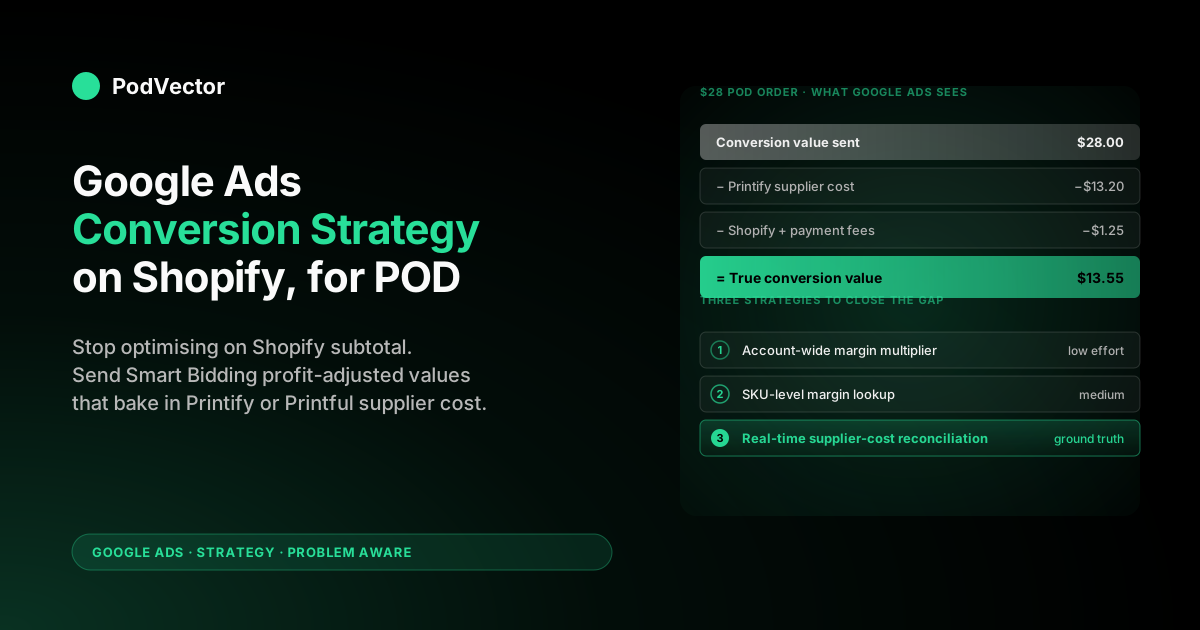
Quick Answer: A Google Ads conversion Shopify strategy for print-on-demand has to answer two questions. The first — how do you wire conversion tracking into Shopify? — is mostly solved by the official Google & YouTube channel app and is now a short setup job. The second — which conversion value should you actually feed Smart Bidding? — is where every POD account quietly leaks margin. Shopify sends Google Ads the order subtotal as the conversion value, but the actual contribution margin on a typical POD hoodie order is a fraction of that subtotal once Printify's blank, print, and shipping costs are subtracted. Smart Bidding optimises against whatever number you give it, so a clean tag firing the wrong value scales unprofitable campaigns faster than a broken tag would. The strategy below covers what you do once tracking works mechanically: pick the right conversion action, pass the right value, adjust on refunds, and reconcile to profit weekly.
The two jobs of a Google Ads conversion strategy on Shopify
Most articles on "Google Ads conversion Shopify" treat the topic as a tagging exercise — install the channel app, fire the tag, watch the dashboard. That gets you to a working setup, not a profitable one. A real conversion strategy on Shopify has two jobs, and POD makes the second one harder than it is for any other Shopify category:
- Job 1 — Mechanical wiring. Fire a Google Ads conversion tag on the right page, with the right event name, with deduplicated user IDs, with consent mode handled. This is largely a solved problem in 2026; the Google & YouTube channel app does it correctly out of the box.
- Job 2 — Signal quality. Decide what value that conversion represents, when it should be adjusted (refunds, partial returns), and which of several conversion actions Smart Bidding should optimise toward. This is where POD operators routinely lose meaningful margin on what looks like a working setup.
If you came here looking for the mechanical-wiring side, the step-by-step guide on how to add Google Ads to Shopify walks the install end-to-end. The rest of this article assumes that's done and focuses entirely on the strategic decisions that determine whether the resulting campaigns make money.
What the default Shopify + Google Ads stack actually does in 2026
Before deciding what to change, it's worth being precise about what the default stack does and doesn't give you. As of 2026 — after Chrome's third-party-cookie deprecation and Apple's Intelligent Tracking Prevention rollouts — the official Google & YouTube channel app on Shopify auto-creates four conversion actions in your Google Ads account:
- Purchase — fires on the Shopify order-confirmation page, includes order subtotal as
valueand currency ascurrency. This is the action Smart Bidding defaults to optimising. - Begin checkout — fires when a visitor enters the checkout flow. Useful as a microconversion for upper-funnel campaigns; see the dedicated section below on microconversion bidding.
- Add to cart — fires on cart additions. High volume but low predictive value for POD, where the gap between add-to-cart and purchase is wide.
- View item — fires on product detail pages. Used by Performance Max for asset learning; not suited as a primary bid signal.
The channel app also wires up Customer Match (so logged-in Shopify customers can be matched to Google's signed-in user graph for enhanced conversions), enables consent mode v2, and propagates the Google click identifier (GCLID) into Shopify orders so server-side adjustments are possible later.
Note: as of June 2026, Google Ads updated how bidding strategies are labelled. According to Google Ads Help, "Maximize conversions with a Target CPA" is now labelled "Target CPA," and "Maximize conversion value with a Target ROAS" is now labelled "Target ROAS." The underlying bidding behaviour is unchanged — if you see unfamiliar labels in your account, this is why.
What the default stack does not do, and what no Shopify app does for you regardless of what its App Store listing claims:
- Subtract Printify or Printful supplier cost from the conversion value before sending it to Google Ads.
- Negative-adjust the conversion value when an order is refunded or returned.
- Differentiate between high-margin and low-margin SKUs in the value Smart Bidding learns from.
- Account for the fact that POD return rates on apparel are concentrated in specific size/colour combinations.
Those four omissions are the strategic surface area of this article.
The POD-specific conversion-value problem
Smart Bidding is a value-maximising algorithm. According to Google Ads Help, it uses Google AI to optimise for conversions or conversion value in every auction. That means it bids whatever it has to bid to acquire the next dollar of conversion_value at or above your target ROAS.
If you tell it that a hoodie order is worth its full retail subtotal, it bids accordingly. If the actual contribution margin on that hoodie is roughly half that subtotal after Printify's blank, print, and shipping costs, you've handed Smart Bidding a badly inflated signal across your entire account.
The core issue for POD is category-specific. A DTC supplement brand sending a conversion value equal to its order subtotal is sending something reasonably close to its true gross profit, because supplier COGS tends to be a modest fraction of subtotal in that category. POD's COGS tends to run as a much larger share of subtotal, and the variance between SKUs — a lower-cost t-shirt versus a higher-cost hoodie — is wider than for most ecommerce categories.
The practical consequence: a campaign can appear to hit a strong revenue ROAS target while running at a much weaker profit ROAS, or even at a loss, because Smart Bidding is optimising toward a value that doesn't reflect what the business actually keeps. Without reconciling revenue ROAS to profit ROAS, you cannot tell which scenario any given campaign is in.
The default conversion-value strategy that works fine for a supplement brand quietly destroys margin for a POD brand running the same playbook. For the broader strategic frame, see our guide on Google Ads vs Facebook Ads for POD sellers, which covers how signal quality affects both channels.
Which conversion action should be your bid signal?
The single biggest strategic decision in your conversion setup is which of the auto-created actions you mark as the primary conversion. According to Google's Smart Bidding guide, Smart Bidding optimises only against primary conversion actions — secondary actions are reported but not bid against.
The default in the Shopify channel app is to mark Purchase as primary and the other three as secondary, which is correct. The interesting question is whether Purchase alone is enough, and what to do when conversion volume is too thin for Smart Bidding to learn effectively.
The four common patterns POD operators use, ranked from "almost always wrong" to "almost always right":
- All four actions marked primary. Almost always wrong. Smart Bidding now treats an add-to-cart as comparable signal to a purchase, despite the much larger gap between add-to-cart and purchase rates for POD apparel. Ad spend flows toward upper-funnel impressions that rarely pay back.
- Purchase + Begin Checkout marked primary. Reasonable for new accounts with low conversion volume — gives Smart Bidding more learning signal at the cost of some bid noise. This is the microconversion bidding approach; see the dedicated section below.
- Purchase only, marked primary, value = order subtotal. The default. Works mechanically, fails strategically for POD because of the value problem above.
- Purchase only, marked primary, value = profit-adjusted order value. The right answer for most POD accounts above the smallest spend tiers. Implementation choices in the next section.
Microconversion bidding: when and how to use it
Microconversion bidding means using a lower-funnel action — Begin Checkout, Add to Cart, or a custom engagement event — as a supporting or temporary primary conversion signal to give Smart Bidding more learning data than purchases alone can provide.
In May 2026, Google updated its Conversion Goals help page to clarify that secondary conversions can also support algorithm learning and campaign performance — meaning even without marking them primary, well-structured secondary actions contribute to the model. That changes the calculus slightly for POD accounts.
How to apply this in a POD context:
- Under ~30 purchases per campaign per month. Mark Begin Checkout as a secondary primary action alongside Purchase. Smart Bidding gets more signal density during the learning phase. Once purchase volume crosses a reliable threshold, demote Begin Checkout back to secondary-only.
- For Performance Max asset learning. View Item and Add to Cart remain useful secondary actions — PMax uses them for asset serving and audience expansion, even though they shouldn't influence bid targets.
- Avoid marking Add to Cart as primary. For POD apparel, the gap between cart additions and completed purchases is wide enough that treating them as equivalent signals corrupts Smart Bidding's value model. Keep it secondary.
- Custom microconversions. Some POD operators create a custom "Viewed size guide" or "Reached shipping estimate" event as a microconversion. These are useful for understanding the funnel but should never be primary bid signals — they correlate with purchase intent but don't map to purchase value.
The key constraint with microconversion bidding is value consistency: if Begin Checkout is a primary action, it needs a defined value (or Smart Bidding treats all checkout events as equal). For most POD stores, leaving checkout value blank and relying on the purchase action's profit-adjusted value for primary optimisation is the cleanest setup.
Three strategies for sending the right conversion value
Once you've decided to optimise on profit-adjusted value rather than subtotal, you need an implementation. There are essentially three paths, in increasing order of accuracy and effort:
Strategy 1 — Account-wide margin multiplier (low effort, decent enough)
Override the conversion value Shopify sends with a flat multiplier representing your account-wide blended margin. If your blended contribution margin across all SKUs is roughly half of subtotal, configure the conversion tag to send value = subtotal × blended_margin_rate.
This is easy to implement — any tracking app (AdNabu, Analyzify, Stape's server-side template) exposes a multiplier setting — and gets you most of the way to truth. The failure mode is that Smart Bidding still treats every SKU as if it had average margin, so it bids equally hard on your lowest-margin and highest-margin products. Acceptable for accounts under roughly $30K/month in spend; outgrown above that.
Strategy 2 — SKU-level margin lookup (medium effort, materially better)
Maintain a margin lookup table — SKU → margin rate — and configure the conversion tag to send value = sum(line_items.price × margin_lookup[sku]). Now Smart Bidding sees each product at its real margin and bids accordingly.
The effort is in keeping the margin table fresh as Printify or Printful adjust supplier costs. Operators typically do this with a Google Sheet synced to a Shopify metafield, a custom backend, or a tracking app that ingests a CSV margin file. For multi-supplier shops the lookup needs to be SKU + supplier, since the same blank from two different print providers can have meaningfully different costs.
Strategy 3 — Real-time supplier-cost reconciliation (high effort, ground truth)
Pull actual Printify or Printful supplier cost per order from the supplier's API at the moment of conversion — or in a daily reconciliation pass — and send that as the conversion value via the Google Ads offline conversions API. This is the most accurate method and the one large POD operators eventually settle on, because it handles supplier-cost changes, regional shipping cost variance, and per-order discount nuances that a static lookup misses.
The trade-off is engineering effort. You're either building this yourself — a pipeline that hits the Printify or Printful API, joins to Shopify orders by line-item ID, computes contribution margin, and posts an offline-conversion adjustment to Google Ads — or using a tool like Victor, PodVector's AI employee, that runs that reconciliation as a managed read across Shopify, Printify, Printful, and Google Ads data. Either way, plan for this from meaningful scale onward; below that, Strategy 2 captures most of the lift at far lower effort.
The deeper attribution mechanics this strategy depends on — data-driven attribution, click-through windows, cross-device matching — are worth understanding before you build. See also our guide on Shopify, GA4, and Meta Ads integration setup for POD sellers for the cross-channel attribution context.
Refund and return adjustments — the missing signal in most POD accounts
POD return rates on apparel are not random. Returns concentrate in the size extremes, in specific colours that render differently on screen than in print, and in specific Printify or Printful providers whose blank quality is inconsistent. Smart Bidding, left to the default stack, never learns any of this.
The Google Ads conversion adjustments API exists exactly for this case: when a refund is processed, fire a negative conversion adjustment that subtracts the refunded value from the original conversion. After enough clean adjustments accumulate, Smart Bidding begins to under-bid on the SKUs and audiences that produce returns — which improves real profit ROAS over time.
The implementation is the mechanical part: any modern tracking app supports refund webhooks from Shopify and posts the adjustment automatically. The strategic part is making sure the adjustment is sent against profit-adjusted value (Strategy 1, 2, or 3 above), not against subtotal — otherwise you're asymmetric, sending profit-adjusted positives and revenue-shaped negatives, which confuses Smart Bidding's model worse than no adjustments at all.
For a broader look at how your Printify sample and cost data factors into this, see our Printify costs breakdown for POD sellers — understanding your true per-unit cost is the prerequisite to accurate refund-adjustment values.
Enhanced conversions in 2026: not optional anymore
In 2024 enhanced conversions were a nice-to-have. In 2026, after the Chrome third-party-cookie sunset and Apple's Intelligent Tracking Prevention, they recover a meaningful share of conversions that would otherwise show as unattributed — by hashing first-party customer data (email, phone, name) and matching against Google's signed-in user graph. For a POD store, the practical implications:
- Turn it on. The official channel app does this with a single toggle in Settings → Tagging. The toggle is opt-in, not default, on stores installed before mid-2024; double-check yours.
- Confirm consent mode v2. EU traffic requires consent before customer-data hashing can fire. Most Shopify themes default to a compliant consent banner, but custom themes occasionally don't. Use the Google Tag Assistant Chrome extension on a test EU IP to verify.
- Don't double-fire from a third-party tracker. If you've layered Stape, Analyzify, or AdNabu on top of the channel app, exactly one of them should be sending enhanced conversions. Both firing inflates reported conversions and corrupts Smart Bidding's signal.
The lift from enhanced conversions compounds with profit-adjusted values: you're feeding Smart Bidding more conversions and values closer to truth. Stacking both is where well-run POD accounts pull ahead of competitors running the default setup.
Smart Bidding label changes in June 2026
As noted above, Google Ads updated its bidding strategy labels starting June 2026. According to Google Ads Help, "Maximize conversions with a Target CPA" is now called "Target CPA," and "Maximize conversion value with a Target ROAS" is now called "Target ROAS." The underlying bidding behaviour is identical — no account changes are required.
What this means practically for POD operators:
- If you see "Target ROAS" in your campaign settings where you previously saw "Maximize conversion value with a Target ROAS," nothing has changed about how the campaign bids.
- The label change does not affect conversion value logic, profit-adjusted values, or refund adjustments — all of those work the same way.
- Enhanced CPC was retired from Search and Display campaigns in March 2025, according to Kick Ads. If any account notes or agency playbooks still recommend eCPC, that advice is out of date.
A weekly review cadence built around profit, not revenue
Google Ads' default reporting view is a revenue ROAS column. The most useful change you can make to your weekly review is replacing it with a profit ROAS column. A 30-minute weekly cadence for POD operators running the strategy above:
- Pull last week's spend by campaign from Google Ads. (5 minutes.)
- Pull last week's orders attributed to each campaign via the GCLID join, either through Shopify reports or your data layer. (5 minutes.)
- Subtract Printify/Printful supplier cost from each order using your margin lookup or supplier API. (10 minutes if it's automated; an hour if it isn't — the latter is the signal it should be automated.)
- Compute profit ROAS per campaign. Pause or restructure any campaign negative for two consecutive weeks. (5 minutes once the data is laid out.)
- Spot-check refund adjustments. Open the Google Ads conversion adjustments report. Confirm last week's refunds posted as negative adjustments. (5 minutes.)
The reason this cadence beats most alternatives is that it surfaces the profit number weekly, before Smart Bidding has already scaled a campaign that looks strong on revenue ROAS but is weak or negative on profit ROAS. Smart Bidding can scale spend quickly once its signal is strong — you don't have a month to notice a profitability problem.
This is exactly the join Victor, PodVector's AI employee, was built to automate. Victor reads live data across Shopify, Printify, Printful, and Google Ads, and can propose Shopify-side actions — such as repricing products to a target margin — with your approval. The weekly review becomes: open the dashboard, review Victor's profit ROAS analysis, approve or reject any proposed actions. For operators who prefer the manual path, the spreadsheet approach described above works well up to a point before the data wrangling becomes the bottleneck. See also the Shopify Admin API automation guide for POD for the technical layer underneath this workflow.
When the strategy should change as you scale
The right Google Ads conversion strategy on Shopify isn't fixed — it changes meaningfully as your account grows. A practical staircase:
- Early stage, low monthly revenue. Default channel app, Purchase conversion, subtotal value. Don't over-engineer; you don't have enough conversion volume for Smart Bidding to learn from value differences anyway. Focus on creative and product-market fit.
- Growing, moderate monthly spend. Add an account-wide margin multiplier (Strategy 1). Turn on enhanced conversions. Add refund adjustments via a tracking app. Consider microconversion bidding if purchase volume per campaign is thin.
- Established, meaningful monthly spend. Move to SKU-level margin lookup (Strategy 2). Add a weekly profit-ROAS review. Begin tracking returns by SKU/colour/size to refine the feedback loop.
- Scale, high monthly spend. Real-time supplier-cost reconciliation (Strategy 3). Campaigns segmented by SKU profit tier, each with its own ROAS target. Daily review cadence on the largest campaigns.
This is a more conservative ladder than most agency advice, which tends to push everyone toward Strategy 3 immediately. The reason: implementation effort scales faster than the lift at lower spend levels. Every hour spent building a real-time supplier-cost pipeline at early-stage spend is an hour not spent on the things that actually move revenue at that stage — creative, audience expansion, feed cleanup. For the broader scale-aware strategy framing, see our overview of AI tools for ecommerce and the strategy hub at /articles/google-ads/strategy.
Anti-patterns specific to POD
- Setting target ROAS based on revenue without subtracting supplier cost. A revenue ROAS target that looks healthy on a high-COGS POD product can be a breakeven or loss-making campaign. Bake supplier cost into your target, or — better — switch to profit-adjusted values and use a profit ROAS target that reflects what you actually keep.
- Trusting the Shopify channel app's reported conversion value at face value. It reports subtotal. That number is correct as revenue and misleading as a Smart Bidding signal. Override it.
- Running both the channel app and a third-party tracking app firing the same purchase event. Conversion counts inflate significantly. Pick one source of truth, disable the other's purchase tag.
- Treating returns as a customer-service problem and not a Smart Bidding problem. Returns are negative signal you have to actively send back to Google Ads via the conversion adjustments API. The mechanism exists; use it.
- Using a single target ROAS across all campaigns when margin varies by category. A phone-case line and an apparel line at different margins should have different ROAS targets. A blended target hides money on the table in both directions.
- Skipping the weekly profit reconciliation because "Smart Bidding handles it." Smart Bidding handles whatever value you give it. Garbage in, garbage out. The reconciliation loop is what closes the system.
- Ignoring the June 2026 Smart Bidding label changes. The labels changed; the behaviour didn't. If your campaigns look unfamiliar in the interface, check the label-change notes from Google before making unnecessary adjustments.
FAQs
Does the Shopify Google & YouTube channel app handle Google Ads conversion tracking properly?
Mechanically, yes — it fires the right event on the right page with the right currency and order ID. The piece it doesn't handle is the conversion value, which it sends as Shopify subtotal rather than POD-aware contribution margin. For POD specifically, you almost always need to override or supplement that value layer, even though the rest of the install works correctly out of the box.
Should I use Purchase or Begin Checkout as my primary conversion action?
Purchase, in almost every case. The exception is newer POD stores or campaigns with very thin monthly purchase volume — Smart Bidding doesn't have enough volume to learn well, and adding Begin Checkout as a secondary primary action (microconversion bidding) gives the algorithm more signal density. Once purchase volume is reliably above a learning threshold per campaign, drop back to Purchase-only as primary. See the dedicated microconversion bidding section above for the full framework.
How big is the difference between optimising on subtotal vs profit-adjusted value?
The lift depends on your catalog's margin variance. Accounts where every SKU has nearly the same margin see a modest difference; accounts with wide spread between their lowest- and highest-margin products — common in POD when you mix apparel, accessories, and home goods — see a more material difference because Smart Bidding shifts spend toward the products that actually return the most profit per ad dollar. The mechanism is the same in both cases: Smart Bidding bids higher on high-value conversions and lower on low-value ones, and giving it accurate margin values makes those bids reflect your real economics.
Do I need a third-party tracking app or is the official channel app enough?
At lower spend levels, the channel app alone is a reasonable starting point. As spend grows, a third-party tracking app (AdNabu, Analyzify, Stape) adds profit-adjusted values, refund adjustments, enhanced conversions edge cases, and server-side firing for iOS traffic — all of which matter more as the account scales. Don't run both apps' purchase tags simultaneously; you'll double-count. For a comparison of channel structures, see our guide on what POD operators should know about Shopify Facebook Ads courses — the channel-selection framing applies to Google as well.
How do I handle conversion tracking for Printify versus Printful orders separately?
Smart Bidding doesn't care which supplier fulfills an order — it only cares about the value. The supplier difference shows up in your margin lookup: the same blank fulfilled by two different providers may have meaningfully different costs, so your margin table should be keyed by SKU + supplier, not just SKU. The campaign-level reporting question — which campaigns drive Printify orders versus Printful orders — is a separate problem your analytics layer needs to solve, since neither Shopify nor Google Ads exposes supplier as a native dimension. Victor reads both Printify and Printful data alongside Shopify orders, which is what makes that join possible without custom engineering.
Will switching from subtotal to profit-adjusted values reset Smart Bidding's learning?
Partially, yes. Smart Bidding takes time to recalibrate after a meaningful conversion-value change. Plan to make the switch during a normal traffic period — not during a major sale or product launch — and budget for a few weeks of slightly noisier performance while it relearns. Most operators who make this transition see profit ROAS dip briefly during the relearn and then exceed prior levels once the model has settled on the new values.
Is it worth the engineering effort to do real-time supplier-cost reconciliation?
At lower spend levels, no — a static SKU-level margin lookup captures most of the lift at a fraction of the effort. At meaningful scale, yes — supplier costs change, regional shipping costs vary, and discount stacking nuances mean the static lookup drifts from reality over time. The middle ground is where the build-vs-buy decision depends on how much engineering capacity you have. Victor exists to remove that decision for POD operators who don't want to maintain the pipeline themselves, reading Printify and Printful order data alongside Shopify and Google Ads into a single live data warehouse. Try Victor free — connecting Shopify, Printify or Printful, and Google Ads takes a few minutes.
What's the difference between "Google Ads conversion Shopify" and "Google Ads conversion tracking Shopify"?
In search-intent terms they overlap heavily, but the difference is real: conversion tracking is the mechanical wiring (tag, event, value transmission), and conversion strategy — what this article covers — is the decision layer on top (which conversion to optimise toward, what value to send, how to handle refunds). Most POD operators get the tracking right and the strategy wrong, which is why this guide focuses on the strategic decisions rather than the install mechanics. For the install side, see our step-by-step guide on how to add Google Ads to Shopify.
How does this strategy interact with offline conversions and Customer Match?
Both are complementary. Offline conversions let you post adjustments after the fact — useful for the refund-adjustment workflow described above. Customer Match lets you use your buyer list as audience targeting and exclusion, which matters for remarketing and for suppressing existing customers from prospecting campaigns. Neither replaces the value-layer strategy in this article; both extend it. For most pure-online POD stores, Customer Match matters more day-to-day than offline conversions, since pure POD has very few true "offline" events — but the offline conversions API is the right mechanism for posting refund adjustments, so understanding both is worthwhile. For the AI tooling layer that supports this kind of cross-platform analysis, see our guide on AI chatbot platforms for ecommerce POD sellers.
Optimise Google Ads on profit, not on Shopify subtotal
The hardest part of a Google Ads conversion strategy on Shopify isn't installing the tag — it's deciding what value to feed Smart Bidding once the tag fires. For POD that means reconciling Shopify revenue, Printify or Printful supplier cost, and Google Ads spend to a single profit ROAS number, every order, every campaign. Victor is PodVector's AI employee: he reads live data across Shopify, Printify, Printful, and Google Ads, proposes actions such as repricing products to a target margin, and executes Shopify-side changes with your approval — so the weekly profit-ROAS reconciliation happens automatically rather than in a spreadsheet. — connects Shopify, Printify or Printful, and Google Ads in minutes, no credit card required.
Try Victor freeFurther reading: Google Ads Smart Bidding help for the platform-side framing on how Smart Bidding uses conversion signals, Google's Smart Bidding guide for the full bidding strategy reference including the June 2026 label changes, and Kick Ads' 2026 bidding strategy guide for a practitioner-level overview of which strategies remain active after eCPC's March 2025 retirement. For the topic-level overview of all PodVector Google Ads guides, see our Google Ads articles for POD sellers.