
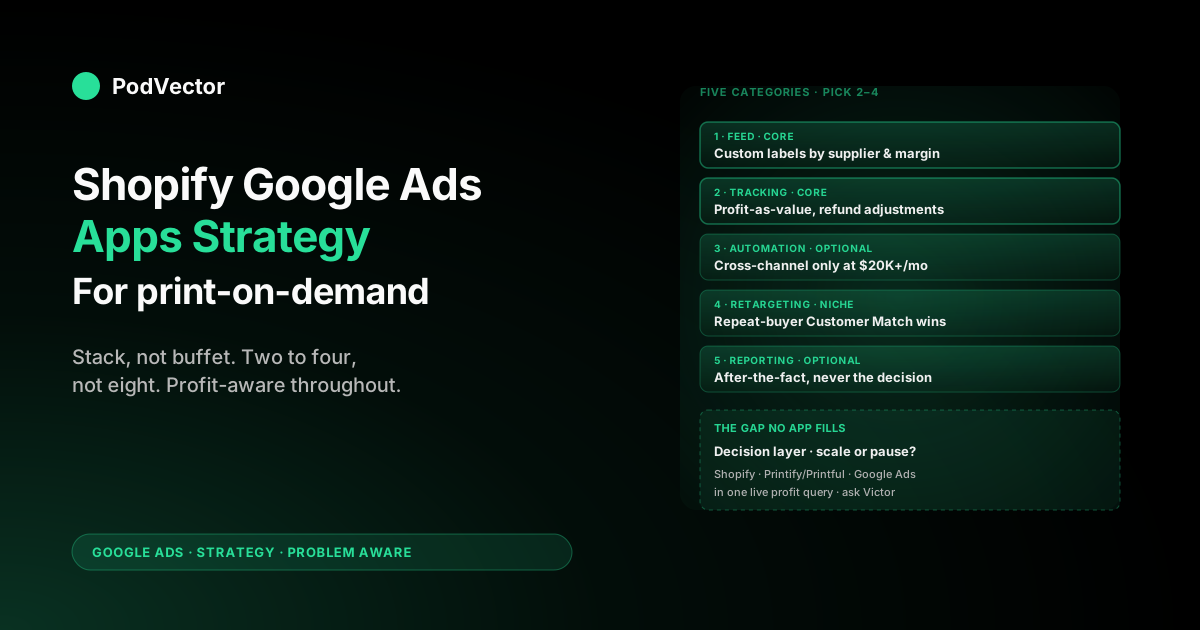
Quick Answer: Most "best Shopify Google Ads apps" lists treat the App Store as a buffet — install five, hope one moves the needle. For POD sellers, the right approach is the opposite: install the minimum viable stack (one feed app, one tracking app, one optional automation app), and put the saved time and money into the only thing that actually compounds margin — connecting Shopify orders, Printify or Printful supplier costs, and Google Ads spend in the same place so you can see profit per campaign instead of revenue per campaign. This guide walks through every category of Shopify Google Ads app worth knowing, the specific ones POD operators actually use, and the strategic gap that no app on the App Store closes.
Why POD changes the Google Ads app math
If you read the standard Shopify Google Ads app roundups — and we read three of them while researching this guide — they treat every Shopify store as the same shape: a catalog of products with a fixed margin, sold to a single market, with a single fulfilment partner. For most ecommerce that approximation is fine. For print-on-demand it is wrong in ways that change which apps matter.
Three POD-specific realities reshape the app conversation:
- Supplier cost is variable per SKU and per partner. A $42 hoodie from a Printify supplier might cost $14 from one print provider and $19 from another, even on the same Printify account. A Printful version of the same SKU might be $22. Your gross margin on what looks like one product is actually three different margins. No standard Google Ads app sees this — they see "subtotal" and assume that is what should be optimised against.
- Catalog turnover is constant. POD stores publish dozens or hundreds of new designs per month. A feed app that takes 24 hours to sync new products into Google Merchant Center is bottlenecking your launch velocity. A feed app that syncs in 15 minutes is letting you A/B-test designs the same day they ship.
- Refund and reorder behaviour is bimodal. POD apparel returns spike around sizing issues for new products and stay flat for proven SKUs. If your conversion tracking app does not negative-adjust returns, Smart Bidding keeps bidding aggressively for product variants that have a 12% return rate. The default channel app does not handle this; specific tracking apps do.
So when you are evaluating Shopify Google Ads apps as a POD seller, the question is not "which app has the best reviews on the App Store." The question is: which apps respect the supplier-cost variance, the launch velocity, and the refund-aware feedback loop my business actually runs on? Most do not. A few do.
The rest of this guide separates the two. For the broader strategic frame this sits inside, see the complete Google Ads playbook for POD sellers.
The minimum viable Shopify Google Ads app stack for POD
Before listing categories, name the destination. The right question is not "how many apps can I install" but "what is the smallest stack that does the job." For a POD store between $5K and $50K monthly Google Ads spend, the minimum viable stack is three apps:
- One product feed app that pushes Shopify products into Google Merchant Center with custom labels for supplier, profit margin, and design family. The default Google & YouTube channel covers the basics; a paid feed app earns its keep when you outgrow the defaults.
- One conversion tracking app that handles the two things the default install does not: refund adjustments and profit-as-value (sending gross profit to Google instead of subtotal). This is the app where the strategic upgrade happens.
- Optional: one automation or reporting app if you have crossed $20K monthly spend and need either AI-driven bid management you cannot build with Smart Bidding alone, or a profit dashboard that ties Shopify, Printify or Printful, and Google Ads together.
Most POD stores we audit are running six to nine Shopify Google Ads apps. Most of those apps are doing some version of the same job, contradicting each other on data attribution, and quietly adding 2–4% to monthly opex through subscription fees. The rest of this guide is structured by category so you can pick one app per category and stop.
Category 1: Product feed apps
What they do: take your Shopify product catalog and push it into Google Merchant Center as a feed of structured data (title, description, price, image, GTIN, supplier-defined attributes). Google Shopping and Performance Max campaigns serve from this feed. The feed quality is the ceiling on your Shopping performance — bad feeds cap good campaigns.
Apps POD operators actually use:
- Google & YouTube (free, by Google). The default channel app. Adequate for stores under 100 SKUs and one fulfilment partner. Syncs every 15–30 minutes. Limitation: no custom labels, no per-supplier segmentation, no GTIN auto-generation. Most POD stores outgrow it within 6 months.
- Simprosys Google Shopping Feed (paid, ~$5–20/mo). The most-installed third-party feed app on the Shopify App Store, with 5,000+ reviews and a 4.9 average. For POD, the value is custom labels — you can label products by Printify supplier ID, design family, profit-margin tier, or seasonal collection, then bid against those labels in Performance Max. This unlocks the "high-margin SKUs only" campaign segmentation that the default app cannot.
- CedCommerce Google Shopping Feed (free–$15/mo). Comparable feature set to Simprosys, with stronger marketplace coverage if you also sell on Buy On Google or expand to additional Google programs. Slightly more complex UI; pick this one if you want one app to cover multiple Google surfaces.
How to choose: if you are below 200 SKUs and one fulfilment partner, the default channel app is fine. If you are above that, or running Printify and Printful side by side, install Simprosys, set up custom labels for supplier and margin tier, and use those labels to segment Performance Max asset groups. The full Shopify-feed mechanics are covered in our Shopify Google Merchant Center guide for POD.
Category 2: Conversion tracking apps
What they do: install or supplement Google Ads conversion tracking on your Shopify store. The default channel app installs basic tracking — pageview, add-to-cart, begin-checkout, purchase — and passes order subtotal as conversion value. Tracking apps fill in what the default does not: refund adjustments, enhanced conversions for stronger attribution, custom conversion values (profit-as-value), offline-conversion imports for post-pixel orders.
Apps POD operators actually use:
- Tracking for Google Ads by AdNabu (paid, ~$10/mo). Specifically built for the gaps in the default channel app. Adds enhanced conversions, dynamic remarketing tags, and per-product conversion attribution. Strong fit for POD stores that need product-level Google Ads reporting.
- Nabu for Google Ads Pixel (free–paid tiers). Pixel installation focus. Good if you want clean install of the GA4 + Google Ads pixel pair without manually editing theme.liquid. Less feature-rich than the AdNabu tracking app on the strategic upgrades.
- Analyzify (paid, ~$25/mo). Cross-platform tracking — Google Ads, GA4, Meta, TikTok — installed and verified by their team. Worth it if your stack is multi-channel and you want one team accountable for the integrity of all of it.
The POD-specific upgrade no tracking app does for you out of the box: sending gross profit instead of subtotal as the Google Ads conversion value. That requires writing supplier cost into a Shopify order metafield (or a separate data store) and either configuring the tracking app to read that metafield or sending the value directly via the Google Ads Conversions API.
We walk through the calculation and the data-flow trade-offs in detail in our Shopify Google Ads conversion strategy guide. A tracking app is necessary infrastructure; a profit-aware conversion value is the strategy that makes the infrastructure worth installing.
Category 3: Campaign automation and AI apps
What they do: take partial or full control of your Google Ads campaigns and automate the bidding, budget allocation, ad creative, or audience targeting using the app's own ML models or rule engines. Some run alongside your manual campaigns; some replace them entirely.
Apps POD operators actually use:
- AdScale (paid, $300+/mo). AI-driven cross-channel ad management for Shopify stores doing $20K+/mo in ad spend. Works across Google Ads, Meta, and Microsoft Ads. The AI optimises budget allocation between channels in near-real-time. For POD stores running both Google Shopping and Meta, this can simplify operations meaningfully — but the value is in the cross-channel coordination, not in beating Google's own Smart Bidding inside Google Ads.
- StoreYa Google Ads & Shopping AI / Traffic Booster (paid, $120+/mo). Hands-off campaign management — they create and run your Google Shopping and Search campaigns with their own optimisation models. Reasonable fit for POD stores that explicitly do not want to learn Google Ads. The reported ROAS numbers in their case studies (6x–30x) are revenue ROAS, not profit ROAS, and on POD margins the difference matters.
- CleverEcommerce / Clever Ads (free–$8/mo). Lighter-weight automation focused on keyword research and basic Search campaign generation. Useful for POD stores in the first 60 days of Google Ads who want guardrails on their initial keyword set. Outgrown quickly.
The honest framing: Google's own Smart Bidding (target ROAS, target CPA, maximise conversions, maximise conversion value) is the most powerful AI in the Google Ads ecosystem because it has access to the auction signals no third-party tool can see. A third-party automation app earns its keep in three specific cases: (1) you are running Google Ads alongside Meta and want one automation layer across both, (2) you are below the conversion-volume threshold where Smart Bidding works well (<30 conversions/mo) and need rule-based help, or (3) you explicitly want to outsource campaign management entirely. Outside those three cases, the better investment is feeding Smart Bidding better signal — profit-aware conversion values, cleaner audience segmentation, refund adjustments — rather than layering another optimisation engine on top of it.
Category 4: Retargeting and audience apps
What they do: build remarketing audiences from your Shopify store visitors and orders, then sync them back into Google Ads as Customer Match lists or remarketing audiences for use in Display, YouTube, Performance Max, and Search campaigns.
Apps POD operators actually use:
- Nabu Retargeting for Google (paid, ~$15/mo). Builds dynamic remarketing audiences from Shopify product views and adds them to Google Ads with the right metadata for dynamic remarketing ad serving. Useful if you want product-specific retargeting ads that show the exact design a visitor viewed.
- Customer List for Google Ads (paid, ~$3/mo). Syncs your Shopify customer list to Google Ads as a Customer Match audience, with automatic updates as new customers are added. The cheap, narrow utility version of this category.
- Native Google Ads Customer Match (free). Worth flagging that you can do most of this without a paid app: export Shopify customers as a CSV, upload to Google Ads as a Customer Match list, refresh monthly. Fine for stores under 5,000 customers; tedious above that.
POD-specific note: the highest-value Customer Match audience for a POD store is not "all customers." It is "customers who placed a second order" — the proven repeat buyers who indicate a design family or product type that resonates. Segmenting the Customer Match upload by reorder behaviour gives Google a much stronger signal than the all-customers list.
Category 5: Profit and reporting apps
What they do: pull data from Shopify, Google Ads, Printify or Printful, and sometimes Meta into one dashboard so you can see net profit per campaign, per product, or per customer. This is the category where most POD stores have the biggest gap and the smallest install base.
Apps POD operators actually use:
- Triple Whale (paid, $129+/mo). The most-known ecommerce profit dashboard. Strong on Meta and Google Ads attribution overlays, weaker on Printify and Printful supplier cost integration — most POD users end up entering supplier costs manually or via custom uploads.
- Lifetimely / Polar Analytics (paid, $99–250/mo). LTV and cohort-focused reporting, useful when you want to make ad spend decisions based on customer lifetime value rather than first-order ROAS. Same Printify/Printful gap as Triple Whale; supplier cost is a custom field.
- BeProfit (paid, $25+/mo). Cheaper option focused specifically on profit reporting, with better Printify integration than the higher-end alternatives. Good fit for POD stores under $30K/mo who want profit visibility without the Triple Whale price tag.
The pattern across all of these: they show you profit after the fact. They are great at end-of-month reconciliation.
They do not make the decision for you about which campaign to scale, which to pause, or which keyword to bid on tomorrow. Profit dashboards are necessary; they are not sufficient. We unpack the broader analytics-tool decision in our Google Ads strategy for ecommerce guide for POD.
How to pick: a decision framework, not a "best of"
Most "best Shopify Google Ads apps" lists you will read elsewhere ranking apps by App Store star ratings. That tells you which apps satisfy the median customer, not which fit your specific stage. Use this decision sequence instead:
- What is your monthly Google Ads spend? Below $5K: stay on the default channel app, focus on getting conversion values right. $5K–$20K: add a feed app and a tracking app. $20K+: add a profit dashboard or an automation app.
- How many fulfilment partners do you use? One: defaults are fine longer. Two or more (Printify and Printful, or multiple Printify providers): you need a feed app with custom labels by supplier, day one.
- What is your refund rate? Under 3%: the missing refund adjustment matters less. Over 3%: a tracking app with refund-flow support is high-priority because Smart Bidding is currently bidding for refunds.
- How fast do you launch new designs? Under 10/month: the default 30-min sync is fine. Over 50/month: feed-app sync speed and bulk operations matter.
- Do you trust your own bid management? Yes: stay with Google Smart Bidding plus profit-aware values. No: an automation app or done-for-you service is honest about what you actually need.
This produces a stack of two or three apps for most POD stores, not eight. The savings from not paying for redundant apps fund the data work that actually moves margin. For app-buying decisions in the broader services category, see Google Ads services for ecommerce for POD and the complete buyer's guide to Google Ads services for POD.
The strategy gap no app fills
Here is what the App Store does not have an app for: an AI employee that looks at your Shopify orders, your Printify or Printful invoices, and your Google Ads spend in the same query and tells you which campaigns to scale tomorrow. Every app in this guide is a piece of plumbing. The decision-making layer — "scale this, pause that, the new design is unprofitable, the old hoodie SKU is your real winner" — is still mostly happening in the operator's head, helped by a profit dashboard.
That is the gap PodVector AI is built to close. Victor is an AI agent that connects your Shopify orders, your Printify and Printful supplier costs, and your Google Ads spend into a single a unified live data warehouse, then answers questions like "which Performance Max campaigns produced positive contribution margin last month after Printify costs and refunds" in plain English. Victor answers your questions and acts on those answers — with your approval — adjusting bid strategies, pausing unprofitable asset groups, and reallocating budget on the same data.
The Shopify Google Ads apps in this guide are the right plumbing. Victor is the AI employee on top of the plumbing. For the AI-agent context, see our AI agents for Shopify for POD sellers overview.
Quarterly review cadence for your app stack
The Shopify App Store changes faster than most operators review what they have installed. A quarterly cadence catches the cruft:
- List every Google Ads-adjacent app. Include feed, tracking, automation, retargeting, and reporting categories. Note monthly cost and last-meaningful-use date.
- Audit for overlap. Two apps doing 80% of the same job is a tell — uninstall the weaker one.
- Audit for stage fit. An automation app you installed at $5K/mo spend may be limiting you at $30K/mo. The opposite is also true: a Triple Whale at $5K/mo is overkill.
- Verify data integrity. Check that refund adjustments are actually flowing back to Google Ads, that supplier costs in your profit dashboard reflect the current Printify or Printful invoice, and that the conversion values inside Google Ads match what your reporting app shows. Drift here is the most common cause of "the dashboard says we're profitable but the bank says otherwise."
- Reconfirm the stack against the decision framework above. Spend stage, supplier count, refund rate, design velocity. If any of those have shifted, the right stack may have shifted with them.
A 30-minute quarterly review usually surfaces $50–$200/mo of subscription savings and at least one data-integrity issue. Both pay back the time several times over.
FAQs
Do I need a Google Ads app at all if I'm using the default Google & YouTube channel?
No, if your store is under 100 SKUs, one fulfilment partner, under $5K monthly Google Ads spend, and under 3% refund rate. The default channel app is genuinely good and free. You start needing extra apps when one of those numbers crosses its threshold — usually feed-app first when the catalog grows past 200 SKUs, then a tracking app when refund-aware feedback becomes material to your margin.
Which is the single best Shopify Google Ads app for a POD store?
There is no single best app because the categories do different jobs. If forced to pick one paid app to add to the default stack, most $10K+/mo POD stores get the most marginal value from a feed app like Simprosys (because of the supplier-and-margin custom labels), followed by a profit-aware tracking configuration via the AdNabu Tracking for Google Ads app or a custom Conversions API setup.
Will an AI ad-management app outperform Google's own Smart Bidding?
Usually no, inside a single channel. Google's Smart Bidding has direct access to auction-time signals that no third-party app can see.
AI ad-management apps earn their keep in cross-channel coordination (Google + Meta) or for stores below the conversion-volume threshold where Smart Bidding does not have enough data to model well. Inside Google Ads alone, feeding Smart Bidding a profit-aware conversion value and cleaner audiences will usually beat a third-party optimisation layer.
How do I pass gross profit instead of subtotal as the Google Ads conversion value?
Two approaches: write Printify or Printful supplier cost into a Shopify order metafield at order-creation time, then configure your tracking app to read that metafield and send order_subtotal − supplier_cost − processing_fees as the conversion value; or send the value via the Google Ads Conversions API from a server-side process that has access to your supplier-cost data. Both are covered in detail in our Shopify Google Ads conversion strategy guide.
Are profit dashboard apps like Triple Whale worth it for POD?
Worth it if your monthly ad spend is $20K+ and you currently have no single source of truth for net profit by campaign. Below that, the cost-to-value ratio gets thin, and a well-structured Google Sheet plus the default Shopify financial reports will get you 80% of the way. The honest gap with Triple Whale and similar tools for POD is supplier-cost integration — most require manual entry or custom uploads of Printify and Printful costs.
How many Shopify Google Ads apps should I have installed?
Two to four for most POD stores. One feed app, one tracking app, optionally one profit dashboard or one automation app, and that is the stack. If you have six or more apps in the Google Ads category, there is almost certainly redundancy worth pruning at your next quarterly review.
The decision layer your app stack is missing
Shopify Google Ads apps are plumbing. Victor is the AI employee on top of the plumbing — connecting your Shopify orders, Printify and Printful supplier costs, and Google Ads spend into one a unified live data warehouse, then answering "which campaigns should I scale, which should I pause" in plain English. Connect your store in five minutes and ask him about your last 30 days of ad spend.
Try Victor free