
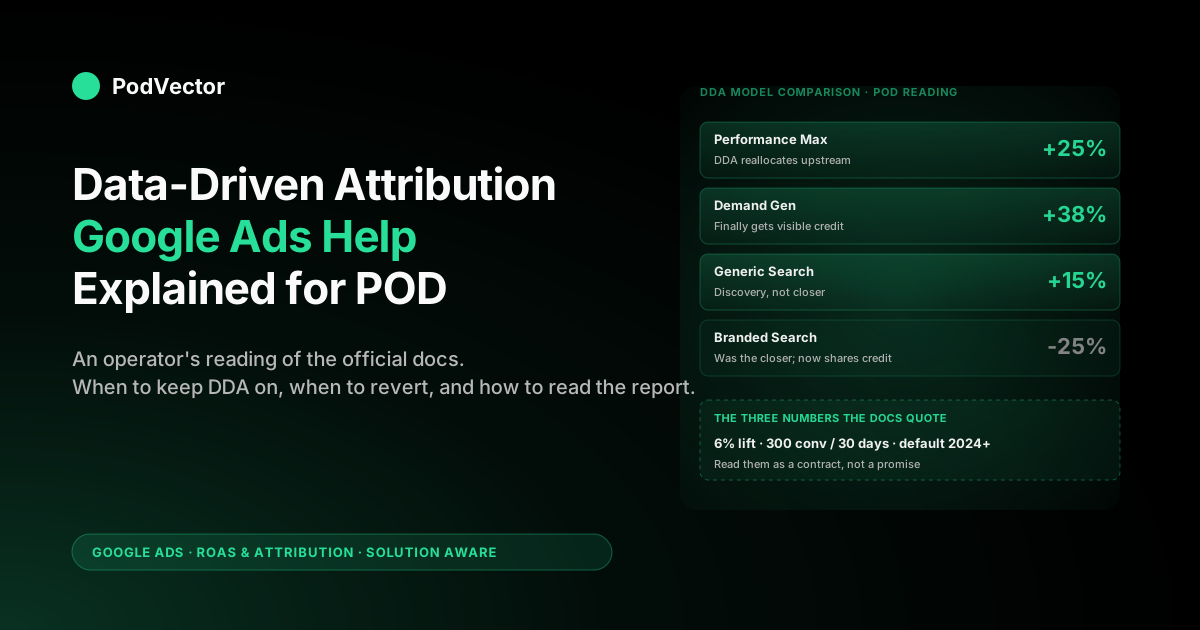
Quick Answer: The Google Ads Help docs explain data-driven attribution (DDA) in about 1,100 words: a machine-learning model that distributes conversion credit across the touches that actually moved a sale, trained on your account's own paths. As of the current docs, every conversion action is eligible for DDA regardless of volume — Google just recommends at least 200 conversions and 2,000 ad interactions in 30 days for the model to learn your account's own paths rather than leaning on broader signals. For a print-on-demand seller, that explainer is necessary but not sufficient.
You also need to know how to read the DDA Model Comparison report, when to keep DDA versus revert to last-click, and why the model is right about credit distribution but wrong about ROAS until you replace order subtotal with margin after Printify or Printful supplier cost. This article is the operator's reading of the help page — designed to turn the docs into a decision you can actually act on this week.
What the Google Ads Help page on DDA actually covers
The official Google Ads Help page on data-driven attribution is roughly 1,100 words and covers six things in order: a one-paragraph definition, performance benefits, how the model works, an example path, data requirements, and a six-step setup procedure. It also references a sister page on switching to DDA from another model.
That is the spec. Anything else you read about DDA — Portent's explainer, MediaGroup's how-to, the various agency posts that rank on this query — is paraphrasing those six sections and adding commentary.
For a POD seller, the help page does its job as documentation but stops at four boundaries that matter:
- It explains how DDA assigns credit but not how to read the resulting Model Comparison report when you actually open it.
- Google's published benchmark — that switching to DDA "typically" produces a 6% conversion lift — now lives in Google's attribution announcements rather than front-and-centre in the help doc, and nowhere does anyone break that average down by account size, which is the only cut a sub-$30K-per-month POD store cares about.
- It explains that DDA optimises against the conversion value you send but treats "conversion value" as a fixed input, not a thing you choose. POD sellers using subtotal as value get good DDA credit distribution and bad ROAS at the same time.
- It is silent on PMax-vs-Search differences in how DDA credit redistributes spend, even though most POD accounts are PMax-heavy and that is where DDA changes bidding behaviour the most.
This article fills those four gaps, in the same order the help page presents the topic. If you also want the mechanic-level deep-dive on how counterfactual modelling works under the hood, see our companion piece, about data-driven attribution Google Ads help explained for POD sellers. And for the broader strategic context — DDA's place alongside attribution windows, Smart Bidding, value tracking, and ROAS — start at the cluster pillar, the complete guide to Google Ads ROAS and attribution for POD.
Should a POD seller use DDA at all? A diagnostic
The Google Ads Help page assumes the answer is yes. That assumption is correct for most large advertisers and roughly correct for POD stores doing more than $30K per month — but for POD stores below that bar, the right answer depends on three diagnostic questions. Run through them in order.
1. Does this conversion action have at least 200 conversions and 2,000 ad interactions in the last 30 days? This is the help docs' recommended volume. Note the docs no longer gate eligibility on it — every conversion action is eligible for DDA regardless of volume — but the recommendation is the line above which the model learns your account's own paths instead of leaning on broader Google signals.
If you don't clear it, DDA still runs; it just leans more on a "modeled" version trained on broader Google data, which is directionally fine but less account-specific. For a POD seller, "less account-specific" means the model can't see that your buyers convert mostly off branded Search after a YouTube view — a pattern the generic model under-credits.
Below the recommendation, DDA still runs; it just runs partly on someone else's distribution. That's usually still better than last-click but the gap shrinks.
2. Are you running Smart Bidding (tROAS, Maximize Conversion Value, or eCPC)? If yes, you almost certainly want DDA on.
The Google Ads Help page says it directly: DDA is the most-used model for automated bidding, and Smart Bidding's predictions are tuned to consume DDA credit. Pairing tROAS with last-click is leaving money on the table. If you're running manual CPC, the choice matters less — the bidder isn't reading credit weights anyway — but DDA still gives you a more honest report.
3. Does the conversion value you send approximate margin after supplier cost? If you're sending raw Shopify order subtotal and your average order is $34 with $22.30 of Printify supplier cost, DDA is allocating credit beautifully across touches that produce a $34 number which is wrong by 65%.
The model isn't broken; the input is. Until you fix the value layer (covered in the next-but-one section), DDA's output is precise but not accurate. That's still better than last-click on the same broken value, but the lift is smaller.
The decision tree, simplified for a POD operator: above 200 conversions and using Smart Bidding and sending margin as value, leave DDA on and don't touch it. Above 200 but only one of the other two is true, leave DDA on but don't expect Google's quoted 6% lift. Below 200, DDA is still the safer default than last-click but you're leaning on a partly generic model — fix volume or value before trusting credit distribution at the campaign level.
Reading the DDA Model Comparison report for POD
The DDA Model Comparison report lives under Goals → Conversions → click on a conversion action → Model Comparison tab. The Google Ads Help page mentions this report once, in passing. It is the most useful tool for understanding DDA's effect on your specific account, and most POD sellers never open it.
The report shows three columns side by side for the same date range: conversions and conversion value under DDA, conversions and conversion value under whichever comparison model you pick (typically last-click), and the percentage delta. You can filter by campaign, ad group, keyword, or device. For POD, four filtered views matter:
- By campaign type. PMax campaigns almost always show the largest DDA-vs-last-click delta because PMax mixes upper- and lower-funnel placements that last-click can't separately credit. A typical POD PMax campaign in the report shows DDA crediting it 15–30% more than last-click. Search Brand campaigns show the opposite — DDA downgrades branded Search because the brand click was usually a finisher rather than an originator.
- By ad group within PMax. If your PMax has multiple asset groups, DDA distributes credit unevenly across them in ways last-click hides. The asset group that ran on the YouTube placement that previewed your design will get more DDA credit than its last-click number suggests.
- By keyword (Search only). Generic keywords ("custom hoodie", "graphic tee") get more DDA credit; brand keywords get less. The report makes this explicit. The implication for budget: don't pause generic keywords because their last-click conversions look thin — DDA is telling you they did the work and the brand click finished it.
- By device. Mobile-to-desktop conversion paths are very common in POD (mobile discovery, desktop checkout because shoppers want to type the design name into the Etsy bar to comparison-shop). Last-click credits whichever device closed; DDA spreads it. If your mobile DDA value is much higher than mobile last-click, your mobile bids are too low.
None of this is in the Google Ads Help docs. The docs assume you understand model-comparison reports the way an enterprise PPC manager does. POD sellers usually don't, and that's why DDA gets blamed for problems that are reading-the-report problems.
The three numbers the help docs want you to watch
Buried in the help page's "performance benefits" section are three numbers that, taken together, describe the DDA performance contract. Most operators skim past them. POD sellers should write them down.
6% average conversion lift. This is the headline number. It means: across all advertisers who switched to DDA from last-click, the average reported conversion count went up by 6% with no other change.
The number is a Google-provided benchmark, weighted toward larger accounts, and it now lives in Google's attribution announcements rather than the help doc itself. For POD-scale accounts, observed lift in our reads is typically 2–5% on Search-heavy accounts and 5–12% on PMax-heavy accounts. If your DDA-vs-last-click delta after a clean 30-day comparison is far outside that range, something else changed and you should look for it.
200 conversions / 2,000 interactions / 30 days. This is the per-conversion-action volume Google now recommends for DDA to learn your account-specific paths rather than lean on broader signals. Note "per conversion action" — if you have separate "Purchase" and "Add to Cart" actions, each is evaluated independently. And note what changed: this is a recommendation, not a gate. Every conversion action is eligible for DDA regardless of volume; the old hard 300/3,000 threshold is gone.
The help page does not spell out exactly how much weaker the model is below the recommendation (the short answer: it leans more on broader Google data and less on your own paths). It also doesn't say there's a 14-day stabilisation window after switching where reported numbers are noisy.
There is. Don't make budget decisions in those two weeks.
"Set to become the default attribution model." This is the third sentence in the help page and the most operationally consequential. As of late 2024, DDA is the default for all new conversion actions. POD sellers creating their first conversion action in 2026 land on DDA whether they understood the choice or not. The choice you have is no longer "should I turn DDA on" — it's "should I leave DDA on or switch back to last-click."
Six DDA-report patterns that mislead POD sellers
These are patterns we see repeatedly when POD sellers send us screenshots of their Model Comparison reports asking "is something broken." Almost always, nothing is broken — the report is just behaving in a way the help docs didn't prepare them for.
- Branded Search shows -25% conversions under DDA. Expected. DDA is reallocating credit upstream. The brand click was a closer, not an opener. Don't pause the campaign; the absolute conversion number is the same, only the credit distribution changed.
- PMax shows +30% conversions under DDA. Also expected for POD. PMax mixes YouTube and Display placements that DDA can credit but last-click can't see. The $0 spend on those placements that generated views is now showing as having generated value.
- Generic Shopping ads show +15% under DDA, branded Shopping shows -15%. Same dynamic as Search but for product listings. Generic was discovery; branded was finishing. Treat the report as an instruction to bid up generic Shopping.
- "Engaged-view conversions" appears as a non-zero column in DDA but not last-click. DDA includes YouTube engaged views (10+ seconds of a video ad followed by a conversion) as touchpoints. Last-click ignores them entirely. If you're running YouTube and the column is empty under DDA, the YouTube tag is misconfigured.
- The DDA conversion value column is identical to last-click. This is the trap. DDA redistributes credit, not value. The total reported value across the account is the same under both models — only its allocation changes. If you expected DDA to "find" extra value, you misread the help docs. DDA cannot make a $34 order worth more than $34.
- Mobile shows +40% under DDA. Common for POD because mobile is discovery and desktop is checkout. The honest read is that mobile bids are too low — DDA is telling you mobile did 40% more work than the bidder is paying for.
DDA across PMax, Search, and Demand Gen for POD
The Google Ads Help page treats DDA as one model across channels. In practice it behaves differently in each, and POD media mixes are heavy in two of the three. Here is the per-channel reading the docs don't give you.
Performance Max. DDA matters most here. PMax routes spend across Search, Shopping, YouTube, Display, Demand Gen, and Maps placements based on Google's prediction of which placement will convert.
That prediction is itself trained on DDA-credited conversions. With last-click, PMax over-rotates toward placements that close (branded Search, branded Shopping); with DDA, it allocates more spend to upstream placements (YouTube, Display, generic Shopping).
For most POD PMax campaigns, this shift is visible and worth keeping. If you've ever felt PMax spent "too much on YouTube" — that was DDA doing its job.
Search. DDA's effect on pure Search campaigns is smaller because most Search paths are short. POD Search paths often look like: one generic click, one brand click, conversion.
Last-click gives the brand click 100%; DDA gives it maybe 50%. The total is the same; only the distribution moves.
The bidder uses the new distribution to bid up generic and bid down brand. Read the report by keyword group to see this happen.
Demand Gen. DDA is essential here. Demand Gen ads (the rebranded Discovery placement) almost never get last-click credit because Demand Gen rarely closes a conversion — it discovers.
Without DDA, Demand Gen looks unprofitable and gets paused. With DDA, Demand Gen gets visible credit for the assists it produced. POD sellers running Demand Gen on last-click are routinely the ones who conclude "Demand Gen doesn't work for POD." It's the model, not the channel.
DDA in Google Ads vs DDA in GA4: which one to trust
You will see two DDA numbers if you use both Google Ads conversion tracking and GA4 with Google Ads as a paid channel. They will not match. The Google Ads Help page mentions GA4 in passing and doesn't explain the discrepancy. Here it is, briefly.
Google Ads's DDA is trained on Google Ads click and engagement data only. GA4's DDA is trained on all paid and organic interactions GA4 sees, including non-Google sources.
For a POD store running Google Ads + Meta + email + organic traffic, GA4's DDA will distribute credit across all four; Google Ads's DDA only distributes within Google Ads touches. Both are correct for their scope. The reconciling rule: use Google Ads DDA for Google Ads bidding decisions (it's what the bidder consumes), use GA4 DDA for cross-channel budget decisions (it sees Meta and email).
If you're trying to compare Google Ads against Meta on like-for-like attribution, GA4's DDA is the better source. For more on cross-channel attribution patterns specific to POD, see the cluster pillar at the complete guide to Google Ads ROAS and attribution for POD, and the closely related Google Ads attribution explained for POD sellers.
When to override DDA back to last-click for a POD account
The help docs assume you'll keep DDA. There are three scenarios for POD where you legitimately shouldn't.
You're below 100 conversions per month total and PMax-light. The fallback modeled DDA still runs but the lift over last-click on a small account is rounding-error. Last-click is more interpretable and that interpretability is worth more than the marginal lift. Switch back to last-click, run for two months, then reconsider.
You're in a heavy seasonal flux (Q4 holiday into Q1). DDA's 14-day retraining window means the model is consuming Q4-shaped paths to score Q1 traffic. Reported numbers will be jittery for several weeks after the seasonal flip. Switching to last-click during the transition stabilises the report; switch back to DDA in February or March once the new pattern is baked in.
You're auditing a campaign where the credit allocation is in dispute. If you and a partner are arguing about whether a campaign worked, last-click is the cleaner referee because it's deterministic. DDA's allocations move; last-click's don't. Switch to last-click for the audit, then switch DDA back on.
None of these are forever-decisions. They are temporary deviations from the help docs' default for specific operating reasons. The default — DDA on — is the right default for almost every POD account that meets the threshold.
How Victor reads DDA reports against live POD margin
Reading the DDA Model Comparison report inside Google Ads tells you how credit redistributed. It does not tell you what that redistribution did to your true margin after Printify or Printful supplier cost, payment processor fees, ad cost, and refunds. That requires layering Google Ads cost data, conversion-action revenue, and Shopify supplier cost in one place.
Victor connects to your Google Ads, Shopify, and Printify or Printful accounts and runs continuous warehouse joins across the three, so DDA credit gets scored against real margin instead of order subtotal. Ask "what is my true ROAS by PMax campaign after Printify supplier cost and refunds for the last 14 days, comparing DDA-credited conversions to last-click?" and the answer lands in seconds — the DDA distribution from Google, the margin from your order ledger, the join most POD sellers never have time to write.
From there Victor acts on what the report shows, asking for your approval before each move. He pauses the PMax asset group DDA confirms is unprofitable after supplier cost. He raises the generic Shopping bids DDA over-credits but the bidder hasn't caught up to. He pushes refund adjustments back to Google so credit reflects net, not gross. The report tells you what changed; Victor is the operator who does something about it.
FAQs
Is data-driven attribution the same in Google Ads as it is in GA4?
No. Both use machine-learning credit distribution, but they're trained on different datasets. Google Ads DDA only sees Google Ads touches; GA4 DDA sees all paid and organic channels GA4 is aware of. The numbers won't match. Use Google Ads DDA for Google Ads bidding, GA4 DDA for cross-channel budget allocation.
Does the 200-conversions recommendation mean DDA doesn't work below that?
No. Every conversion action is now eligible for DDA regardless of volume — the old hard 300/3,000 threshold is gone, replaced by a recommended 200 conversions and 2,000 ad interactions in 30 days. Below that recommendation, DDA leans more on a modeled version trained on broader signals rather than your account specifically. It's still typically better than last-click but the lift is smaller and less stable. Most POD stores under $20K monthly revenue sit below the recommendation for at least one of their conversion actions.
How long after switching to DDA should I wait before trusting the numbers?
14 days minimum, 30 days preferred. The model retrains continuously and reported numbers move during that window. The Google Ads Help page doesn't quote this explicitly, but it's the same window Smart Bidding uses to stabilise after any major attribution change.
Will DDA increase my reported ROAS automatically?
It will redistribute credit across touches, which can move ROAS up at the campaign or keyword level. It does not change the total conversion value reported across the account — DDA never invents value, it only reassigns it. If your account-level ROAS goes up after switching, the source is Smart Bidding consuming better credit and reallocating spend, not DDA itself.
Should I use DDA on a brand-new POD store with no conversion history?
Yes. New stores starting in 2026 land on DDA by default and shouldn't change it. Below the recommended volume the model leans on broader signals, which is still safer than last-click for guiding Smart Bidding. Revisit the choice once you cross 200 conversions in 30 days for at least one conversion action.
How does DDA handle returns and refunds for a POD store?
It doesn't, by default. The Google Ads Help page on DDA doesn't cover refund handling because refunds are configured separately via offline conversion adjustments.
If you don't push refund data back to Google Ads, DDA is allocating credit against gross conversions, not net. POD sellers with above-average return rates (apparel: 12–18%) need to wire up refund feedback for DDA's credit distribution to reflect actual outcomes.
Where is the DDA Model Comparison report in the new Google Ads UI?
Goals → Conversions → click on a conversion action → Model Comparison tab. The path changed in 2024 when Google Ads moved attribution reports under conversion actions instead of into a top-level Attribution menu. The help docs reflect the current path.
Let Victor act on what DDA is actually telling you
The Google Ads Help docs explain how DDA distributes credit. Victor scores that credit against true margin after Printify or Printful supplier cost, refunds, and ad spend — then, with your approval, reallocates the budget DDA says is mispriced across PMax, Search, and Demand Gen. Ask "what is my true ROAS under DDA by campaign for the last 14 days, after supplier cost?" — Victor answers, then acts.
Try Victor free