
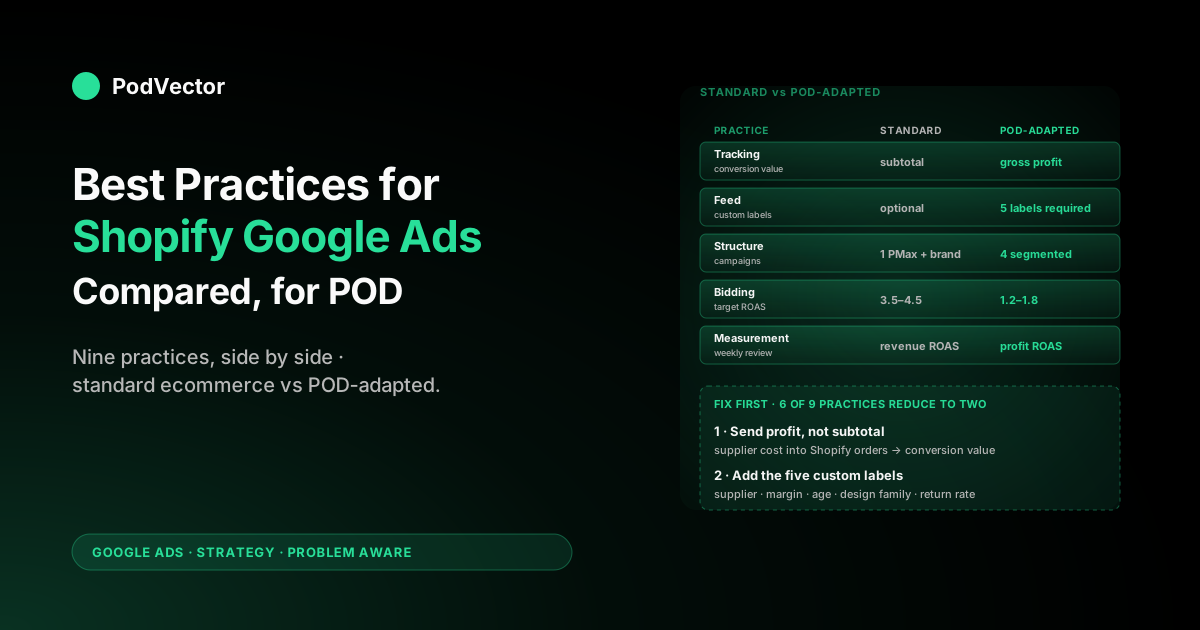
Quick Answer: Most "Shopify Google Ads best practices" guides converge on the same nine moves — Merchant Center setup, Performance Max, Smart Bidding on revenue, enhanced conversions, and so on. They are right for stores with fixed margins and predictable catalogs.
They are wrong, in subtle but expensive ways, for print-on-demand stores where supplier cost varies per SKU and design velocity is high. This guide compares the standard Shopify Google Ads best practices side by side with the POD-adapted version, calls out which ones to follow as written, which ones to modify, and which ones to ignore. The output is a checklist you can run against your own account this week.
How we compared the best-practice playbooks
We pulled the three highest-ranking 2026 guides on "best practices for Shopify Google Ads" — Shopify's own Google Shopping Ads guide, the Stan Consulting diagnostic pillar, and the Blackbelt Commerce best-practices guide — and extracted every concrete recommendation each one made. We collapsed duplicates, sorted them into nine practice areas, and then ran each one through three filters that matter for print-on-demand stores: variable supplier cost per SKU, high catalog velocity from continuous design launches, and apparel-driven return-rate noise.
The standard ecommerce playbook ignores all three. The POD-adapted version cannot.
Some practices survive intact. The Merchant Center hygiene basics, enhanced conversions, and brand search separation are the same advice for any Shopify store regardless of fulfillment model.
Other practices look identical on the surface but mean something completely different when supplier cost varies per order. Bidding is the most consequential of those. The comparison below is structured so you can see, for each practice, what the standard guides recommend, what changes for POD, and a one-line "do this" answer for your account.
For the strategic frame this comparison sits inside, see the complete Google Ads playbook for print-on-demand sellers. The broader topic context lives at the Google Ads for POD topic hub.
Practice 1: Conversion tracking setup
Standard recommendation: Install the Google Ads pixel on your Shopify store, define purchase as the primary conversion, set add-to-cart and begin-checkout as secondary, enable enhanced conversions with hashed first-party data. Verify in Google Tag Assistant. Most guides stop here.
POD-adapted recommendation: Everything above, plus three POD-specific upgrades.
- Send gross profit as conversion value, not subtotal. A $42 hoodie can cost $14 from one Printify supplier and $22 from another. If your conversion value is subtotal, Smart Bidding cannot tell those orders apart. Sending profit (selling price minus supplier cost minus processing fees) as the value field rewires every downstream optimization.
- Wire up refund adjustments. POD apparel return rates often run 4–8%, well above the ecommerce average. If you are not posting refund events back to Google Ads through the offline conversion adjustments interface or the Conversions API, Smart Bidding believes those refunded orders converted at full value and bids more aggressively for the SKUs with the highest return rate. The fix is a configuration toggle in most server-side tracking apps; ignored, it quietly burns budget.
- Validate the gclid is captured at checkout. Shopify's default checkout flow occasionally drops the gclid on third-party app redirects (loyalty apps, post-purchase upsells, fraud-screening apps). Without gclid, the conversion never matches back to the Google Ads click and your account looks under-attributed. Test by placing a real ad-click order monthly.
Do this: If you cannot tell the supplier cost of every order placed in the last 30 days, fix that first. Profit-as-value tracking is the single highest-leverage change a POD store can make to its Google Ads account, and it gates everything else in this guide. The mechanics are walked through in our Shopify Google Ads conversion strategy piece.
Practice 2: Product feed optimization
Standard recommendation: Audit feed quality before tuning bids. Use specific Google product categories. Write titles in the buyer's vocabulary, not your internal catalog's. Mark identifier_exists = no for products without manufacturer GTINs. Include high-quality lifestyle images. The Stan Consulting diagnostic and the Shopify guide agree on this point.
POD-adapted recommendation: The standard hygiene applies. The POD-specific layer is custom labels.
- Title structure for POD: Brand + Product Type + Design Subject + Key Attributes. For a tee: "Acme Apparel Unisex T-Shirt — Vintage Mountain Print — Heavyweight Cotton, Forest Green." Designs are the search subject; product type and brand frame it.
- Custom label 0 = supplier. Tag every item with the Printify supplier ID or "printful" as a literal value. Lets you segment Performance Max asset groups by who is fulfilling.
- Custom label 1 = margin tier. Bucket each SKU as tier 1 (high margin, 35%+), tier 2 (mid, 20–35%), or tier 3 (low, under 20%). Drives bid ceilings.
- Custom label 2 = launch age band. 0–30 days, 31–90 days, 90+ days. Separates new-design exploration from proven-SKU scaling at the campaign level.
- Custom label 3 = design family. "Summer mountains," "Halloween 2026," "minimalist typography." Lets you launch and learn on a family as a unit, then promote winners.
Without these labels, Performance Max sees "1,800 t-shirts" and bids equivalently on all of them. With them, Performance Max sees five segments with five different target ROAS values. The standard guides treat custom labels as optional; for POD they are how the strategic levers exist at all.
Note for 2026: the Merchant API has now replaced the Content API, with a hard cut-off scheduled for August. If your feed app still pushes via the old Content API, the migration is no longer optional. The mechanics of getting your Shopify feed into Merchant Center cleanly are walked through in our Shopify Google Merchant Center strategy.
Practice 3: Campaign structure
Standard recommendation: Run one Performance Max campaign covering the full catalog, plus a small Brand Search campaign. The Shopify guide notes Performance Max accounts for over 80% of ad spend in median enterprise accounts. Some guides add Standard Shopping for catalogs over 1,000 SKUs.
POD-adapted recommendation: A four-campaign structure that respects POD's two failure modes — supplier-cost variance and design-launch velocity.
- Brand Search. Defensive, capped at 5–8% of spend. Keeps competitors off your branded SERPs and feeds Smart Bidding clean low-CPA conversion signal.
- Standard Shopping (proven SKUs only). A Shopping campaign filtered to designs with 30+ days of history and positive contribution margin. Your scaling lane. Use Target ROAS with profit-aware values.
- Performance Max (segmented by supplier and margin). Asset groups split by custom labels — for example, "Printify supplier A, margin tier 1" runs at a different target ROAS than "Printful, margin tier 2." This is the single biggest unlock most POD stores miss.
- Performance Max (new-design exploration). Filtered to launch-age 0–30 days, capped budget, lower target ROAS so the AI can buy enough impressions to learn. Promote winners weekly.
The standard one-PMax architecture cannot do this because it has no segmentation hook. We cover the Performance Max specifics for POD in Shopify Performance Max campaigns explained for POD; the broader ad-type comparison is in the complete guide to Google ad types for POD sellers.
Do this: If you are spending under $3K/month, start with one Performance Max plus Brand Search. Above $3K/month, the four-campaign architecture starts paying back its complexity quickly.
Practice 4: Bidding strategy
Standard recommendation: Begin on Maximize Conversion Value while the campaign learns. Switch to Target ROAS once you have 30+ conversions in a 30-day window. Tune the target up or down based on observed performance. Typical ecommerce target: 3.5–4.5 ROAS.
POD-adapted recommendation: The mechanics are identical. The number is completely different — and so is what Smart Bidding is actually optimizing for.
If your conversion value is order subtotal:
- Target ROAS 3.5–4.5 to clear typical POD costs (50%+ COGS plus payment processing).
- Smart Bidding scales the campaigns with the highest revenue, not the highest contribution.
- Vulnerable to supplier-cost drift. A subtle Printify rate change can flip a campaign from profitable to break-even and the dashboard shows nothing.
If your conversion value is gross profit:
- Target ROAS 1.2–1.8. The numbers feel small because you are no longer multiplying revenue against a hidden cost stack.
- Profit ROAS of 1.0 is break-even by definition. 1.3 is healthy. 1.5+ is sustainable growth.
- Smart Bidding is now optimizing for what actually grows the bank account.
Do this: Refuse to set a target ROAS at all until you know whether your conversion value is subtotal or profit. Setting a "best practice" 4.0 target on a profit-as-value account would tell Smart Bidding to bid for SKUs that print money — and starve out everything else, including campaigns that are actually working.
Practice 5: Landing page and store readiness
Standard recommendation: Page speed under 2.5 seconds. Mobile-friendly checkout. Clear product imagery. Trust badges and reviews above the fold. The Blackbelt Commerce guide is the most explicit about this — they recommend pausing ad spend until the store passes a readiness checklist, on the grounds that improving the store often produces better campaign results than tweaking bids.
POD-adapted recommendation: Same standards apply, plus three POD-specific landing-page details that Google's quality score and your conversion rate both notice.
- Sizing transparency. POD apparel returns spike on sizing. A clear, prominent sizing chart with garment measurements (not just S/M/L/XL labels) reduces returns and lifts conversion. Google's algorithm cannot see your return rate, but Smart Bidding does — and the cleanup of sizing returns becomes your bidding's friend.
- Print quality and material expectations. Photograph or render at least one detail shot of the print on the actual garment. POD shoppers are specifically wary of cheap-looking transfers; an in-context shot answers that objection before checkout.
- Honest fulfillment timeline. POD fulfillment runs 2–7 business days plus shipping. Burying that in the FAQ instead of stating it in the cart costs you cancellations and chargebacks.
The standard reading-level metric — sub-10th-grade product copy, short sentences, scannable bullets — applies as written. POD stores do not get a pass on copy quality just because the product is a t-shirt.
Practice 6: Brand search separation
Standard recommendation: Run a small Brand Search campaign explicitly bidding on your store name. Keeps competitors out of your branded SERPs, claims clicks at very low CPA, and feeds Smart Bidding high-quality conversion signal. Every guide agrees on this.
POD-adapted recommendation: Identical, with one extra reason to take it seriously. Without a separated Brand campaign, Performance Max often picks up branded queries that would have converted anyway and reports them as PMax conversions.
The PMax ROAS line in your dashboard is overstated by however many branded queries leaked into it. For POD stores, where margin is already tight, this overstatement can flip a campaign from "scale it" to "pause it" once you control for the branded leak.
Do this: Create the Brand campaign. Exclude your brand keywords from Performance Max via campaign-level negatives or the brand exclusion list. Compare incremental ROAS at the campaign level rather than absolute reported ROAS.
Practice 7: Audience signals and remarketing
Standard recommendation: Upload your customer email list as a Customer Match audience. Use Similar Audiences and in-market segments as audience signals on Performance Max. Run dynamic remarketing pulling from the merchant feed. The Shopify guide is explicit about all three.
POD-adapted recommendation: The mechanics work the same. The composition of your Customer Match list is different.
- Segment your customer list by repeat-purchase behaviour. POD has higher one-and-done conversion rates than typical ecommerce — design preferences are personal, the customer bought "the dad joke t-shirt" and is unlikely to buy a second one. A Customer Match list that is 80% one-time buyers is less actionable as a similar-audience seed than the 20% who came back. Build two lists; weight the repeat-purchase list as a stronger signal.
- Remarket on design family, not blanket cart abandonment. Dynamic remarketing using your custom-label-segmented feed lets you re-show a shopper the design family they browsed (e.g., minimalist typography), not just the last SKU they viewed. Higher relevance, lower fatigue.
- Be careful with first-party data sensitivity. POD stores often sell political, religious, or otherwise opinion-coded designs. Customer Match for those audiences is fine commercially but check Google's policies for your category before uploading.
Practice 8: AI and automation tools
Standard recommendation: Lean into responsive search ads, asset auto-generation, and Smart Bidding's AI. The Shopify "Google Ads Intelligence" guide and most agency guides agree: in 2026, fighting Google's AI is a losing strategy. The data you feed it is what you control.
POD-adapted recommendation: Same direction, more cautious on auto-generation for two reasons.
- Asset auto-generation can mis-render design subject matter. Google's automated asset generation tries to write headlines from your product titles. For a generic "Heavyweight Cotton T-Shirt" this is fine. For "Vintage Mountain Print" or a humour-driven design, the generated copy is often a bland generalization that loses the specific appeal of the design. Disable auto-generation on PMax campaigns where the design subject is the buyer's reason to click; provide your own assets.
- Final URL expansion behaves unpredictably with high-velocity catalogs. If you launch new designs weekly, Google may route ad clicks to landing pages that are still indexing or have thin content. Disable final URL expansion until your weekly-launched designs reliably have indexed product detail pages.
For Smart Bidding itself, the rule is the same as elsewhere in this guide: feed it profit, not subtotal, and trust it from there. The guidance to lean into AI is correct; the inputs need to be POD-aware.
Practice 9: Measurement cadence
Standard recommendation: Weekly review of campaign-level ROAS and CPA. Monthly review of asset and audience performance. Quarterly account audit. The Blackbelt Commerce guide is the most disciplined about this, with a specific "review cadence after launch" framework.
POD-adapted recommendation: Same outer cadence. Two POD-specific inner loops.
- Weekly design-launch review. Day 0 launches, day 7 first cull (kill zero-engagement designs to free up budget), day 30 promotion review (designs with 30+ conversions and contribution ROAS > 1.3 graduate to the proven-SKU campaign). The Google Ads side of this is the launch-age custom label flipping bands as designs mature.
- Weekly profit reconciliation. Pull supplier costs from Printify and Printful, join them to Shopify orders, then to Google Ads spend at the campaign level. The output is profit-ROAS per campaign for the last seven days. This is the table you should be looking at, not revenue ROAS. We cover the broader ecommerce strategy frame in our Google Ads strategy for ecommerce guide for POD.
The standard ecommerce measurement cadence assumes the source-of-truth data is already in one place. For POD, the source-of-truth data lives in three systems — Shopify, Printify or Printful, and Google Ads — and putting it in one place is most of the work. Without that, you are reviewing a dashboard that lies to you about which campaigns are profitable.
Side-by-side summary table
Compressed comparison across the nine practices. The "do this" column assumes a Shopify POD store spending $3K–$30K monthly on Google Ads.
| Practice | Standard ecommerce | POD-adapted | Do this |
|---|---|---|---|
| Conversion tracking | Pixel + enhanced conversions, send subtotal | Pixel + enhanced + send profit + refund adjustments | Wire profit-as-value first; everything else depends on it |
| Product feed | Title structure, GTINs, categories, lifestyle images | All of that + 5 custom labels (supplier, margin, age, family, return-rate) | Add custom labels 0–4 before launching segmented PMax |
| Campaign structure | One PMax + Brand Search | Brand + Standard Shopping (proven) + segmented PMax + new-design PMax | One PMax under $3K/mo; four campaigns above |
| Bidding | Target ROAS 3.5–4.5 on subtotal | Target ROAS 1.2–1.8 on gross profit | Set target only after you know which value Smart Bidding sees |
| Landing pages | Speed, mobile, trust, reviews | All of that + sizing chart, print detail shot, honest timelines | Treat sizing transparency as a bidding lever, not a UX nicety |
| Brand search | Run a small defensive campaign | Same — and exclude brand keywords from PMax | Always separate; exclusion is what makes the data trustworthy |
| Audiences | Customer Match + similar + dynamic remarketing | Same, segmented by repeat behaviour and design family | Build two Customer Match lists: all buyers, repeat buyers |
| AI / automation | Lean in everywhere | Lean in on bidding; cautious on asset auto-generation | Disable auto-generation on design-led PMax; supply your own copy |
| Measurement | Weekly ROAS, monthly assets, quarterly audit | Same + weekly design-launch loop + weekly profit reconciliation | Build the profit-ROAS table; it is the only one that matters |
Which to fix first if you only have a week
Six of the nine practices reduce to two upstream fixes. If you have one week, work on these two; the rest will follow.
- Get supplier cost into Shopify orders, then send profit as conversion value. This single change makes bidding (Practice 4), measurement (Practice 9), audience prioritization (Practice 7), and even landing-page sizing improvements (Practice 5) measurable in profit terms. Without it, every "best practice" optimization above the line is steering blind. The implementation paths — order metafield versus server-side Conversions API — are walked through in our Shopify Google Ads conversion tracking setup guide for POD.
- Add the five custom labels to your feed. Until your feed has supplier, margin tier, launch age, design family, and return-rate band as custom labels, you cannot run the four-campaign architecture in Practice 3, you cannot segment Performance Max by margin in Practice 4, and your design-launch cadence in Practice 9 has no campaign-level mechanism. The labels themselves are a few lines of feed-app configuration; the strategic levers they unlock are the difference between PMax bidding equivalently on every SKU and PMax bidding accurately by margin.
Fix those two upstream of everything else. The campaign-structure changes, the brand exclusion, and the audience splits all flow from there. The standard guides start with structure and bids; for POD, those are downstream choices that only resolve once profit data and feed labels are in place.
FAQs
Are these "best practices" different from what Google's own Shopify guide recommends?
About 60% of the recommendations are identical — Merchant Center hygiene, enhanced conversions, brand search separation, dynamic remarketing, and the direction of the AI-and-automation guidance all carry over from the standard Shopify guide. The remaining 40% — bidding numbers, conversion value, feed custom labels, campaign structure, measurement cadence — are POD-specific because supplier cost varies per SKU and design velocity is high. Following only the standard Google guide for a POD store gets you a campaign that ranks fine on revenue and quietly burns contribution margin.
I run a small POD store with under $1K monthly Google Ads spend. Do I really need all nine practices?
No. Below $3K monthly spend, the right architecture is one Performance Max campaign plus Brand Search, with profit-as-value conversion tracking and the five feed custom labels in place even if you are not yet using them in segmentation. The labels are cheap to add; they unlock the segmentation later when spend justifies the structure. Skip the audience-list segmentation and the new-design exploration PMax until you have enough conversion volume to learn from them.
How long should I expect a Performance Max campaign to take before it stabilizes?
Standard guidance is 4–6 weeks for the learning phase to settle. For POD with high catalog velocity, you should expect closer to 6–8 weeks before campaign-level ROAS is reliable, and the new-design exploration campaign never stabilizes by design — it is meant to be in continuous learning.
Resist the temptation to make changes inside the first 14 days. Smart Bidding penalizes campaigns that get re-tuned mid-learning.
What about the recent Performance Max updates around brand exclusions and search themes?
Both are useful for POD. Brand exclusions at the campaign level make the brand-vs-PMax separation in Practice 6 enforceable without leaning on negative-keyword lists.
Search themes let you add intent signals when your historical data is thin, which is the chronic problem for new design families. Use search themes to seed new-design exploration campaigns; remove them once the campaign has 50+ conversions and Smart Bidding has its own signal.
Do these best practices change if I sell on Etsy and Shopify both?
The Shopify Google Ads side of the practices does not change. What changes is the conversion value reconciliation: an order placed on Etsy contributes to your overall design's ROI but never appears in your Shopify Google Ads conversion data. Treat Etsy as out-of-platform revenue and avoid the temptation to credit Shopify Google Ads campaigns with halo Etsy sales — Smart Bidding cannot use that data, so attributing it confuses your performance picture.
Should I follow the bid recommendations from Google's reps?
Google reps work from your account's reported ROAS, which is revenue ROAS unless you have changed the conversion value. Their recommended targets — typically 4.0+ for ecommerce — are correct for stores sending subtotal as conversion value and dramatically too high for POD stores sending profit.
Tell your rep what value field you are sending; if you cannot, do not act on their bid recommendations until you can. The bid math is a function of the value field, not a universal best practice.
Where do I go to verify the standard recommendations against the source guides?
The three guides we compared this article against are Shopify's Google Shopping Ads guide, the Stan Consulting Shopify Google Ads diagnostic, and the Blackbelt Commerce best-practices guide. All three are good.
They are written for the typical Shopify store, not for POD; that is the gap this guide is built to close. For the broader cluster overview, see the Google Ads strategy cluster.
Run these best practices against real profit data
Most of the practices above only work if Google Ads sees gross profit, not subtotal. Victor connects your Shopify orders, Printify and Printful supplier costs, and Google Ads spend into one a unified live data warehouse, so the profit-ROAS table you need for weekly reconciliation already exists — and on the employee roadmap, Victor will act on it. Five-minute connect; ask him about your last 30 days of ad spend.
Try Victor free