
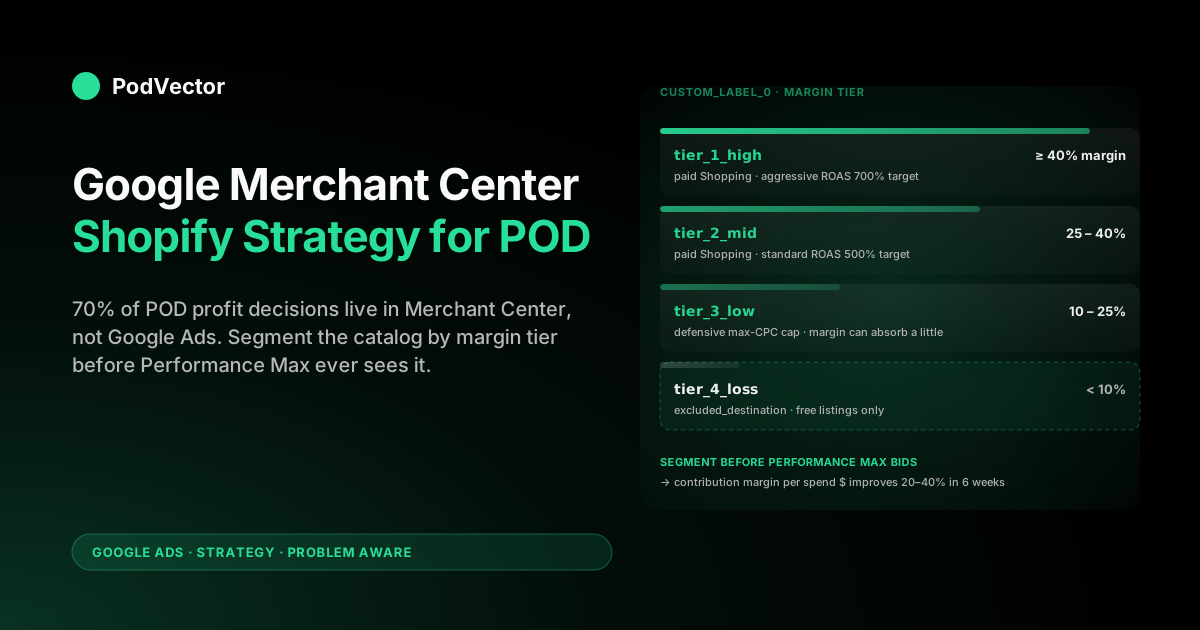
Quick Answer: A Google Merchant Center strategy for a Shopify print-on-demand store is mostly a segmentation and allocation problem, not a connection problem. The Google & YouTube channel app pushes every Shopify product into a single primary feed and sends it to Performance Max with one bid strategy — which works for catalogs of 50 owned-inventory SKUs and breaks for 4,000 POD variants where unit margins range from $1.80 (Printify Express dark hoodie) to $14.40 (Printful all-over-print poster).
The Merchant Center strategy that works for Shopify POD splits the catalog by margin tier into custom labels, separates loss-making variants into a suppressed feed, allocates the bottom margin tier to free Shopping listings only, and bids paid Shopping campaigns against the top two margin tiers with separate ROAS targets. The connection takes an afternoon. The strategy decisions — account architecture, feed division, label scheme, free-vs-paid allocation — are what determines whether 90 days into Shopping spend the account is profitable or burning $200/day on $4-margin mug variants.
Why Merchant Center is where Shopify POD strategy actually plays out
Most Shopify POD sellers treat Merchant Center as plumbing — install the channel app, verify the domain, watch the feed sync, then move attention back to Google Ads where the bidding and budgets live. Shopify's own Merchant Center overview reinforces that framing: a 2,200-word piece covering the four upload methods and five core ad features without a single mention of feed segmentation or custom-label strategy. StoreGrowers' setup guide takes the same shape — connect the channel, choose a feed app, run the campaigns. For owned-inventory Shopify stores with 50–500 stable SKUs and consistent unit margins, that's correct. The decisions Merchant Center forces are minor.
Print-on-demand inverts the math. A Shopify POD catalog routinely runs 1,000–10,000 variants across 30–80 product templates, with unit margins that vary by an order of magnitude depending on the Printify or Printful base product, the partner that actually fulfills, and whether the customer ordered a single mug or a four-piece bundle.
Treating that catalog as one undifferentiated feed and letting Performance Max optimize across it produces a predictable failure mode: the algorithm finds the cheapest products to win the most clicks, and the cheapest products are the lowest-margin variants. Three months in, the account looks busy — high impressions, healthy click volume, dashboard ROAS that hits target — and the bank balance falls because the dashboard ROAS is computed against Shopify revenue, not contribution margin after Printify cost.
Merchant Center is where that gets fixed, because Merchant Center is where the catalog gets segmented before the bidding algorithm sees it. The Google Ads side decides budgets, ROAS targets, and bid strategy.
The Merchant Center side decides which products are eligible to receive that budget in the first place, what labels they carry, and which campaign they're allocated to. For Shopify POD, the Merchant Center side is where 70% of the profit decisions live. The companion complete Google Ads playbook for print-on-demand sellers handles the bidding-and-budget half — this article is the feed-and-segmentation half that has to be in place before bidding strategy means anything.
The four strategic levers Merchant Center gives POD sellers
Inside Merchant Center, four levers determine whether a Shopify POD catalog ramps to profitable Shopping spend or plateaus at break-even. Each one is invisible from the Shopify admin and untouched by the channel app's defaults. Each one is configured once and then governs every Shopping auction the account participates in for the next 12 months.
| Lever | What it controls | POD-specific decision |
|---|---|---|
| Account architecture | How many Merchant Center accounts the business runs and which Shopify storefronts feed into each | One account if all POD niches share suppliers; sub-accounts under MCA if niches differ in policy risk (e.g. licensed designs vs. generic) |
| Feed division | Whether Shopify is the only feed source or whether supplemental feeds layer on top | Shopify primary feed plus Google Sheet supplemental feed for POD-specific attribute overrides — channel app alone cannot deliver compliant apparel attributes |
| Custom labels | Up to five custom segmentation fields per product, used to subdivide Shopping campaigns by any business dimension | Margin tier (gross margin %), supplier (Printify vs Printful vs Gelato), fulfillment region, design category, and seasonality |
| Free vs paid allocation | Which products are eligible for paid Shopping bids vs. surfaced only on free Shopping listings | Bottom margin tier and unfulfillable variants get free-listing-only; top tiers get paid Shopping eligibility |
Three of the four are configured inside Merchant Center directly — the channel app doesn't expose them. The custom-label values can be set at the Shopify product-metafield level if the seller is willing to maintain them there, or pushed via supplemental feed if the segmentation logic is computable from product data. Either path works; what doesn't work is leaving them empty, which is what the channel app's default install does and what 90% of Shopify POD stores currently run.
Account architecture: when one Merchant Center account isn't enough
Most Shopify POD sellers run one Merchant Center account per Shopify storefront. For a single-niche store — say, a dog-breed-themed apparel brand — that's correct. The decisions get harder when the seller runs multiple niches under one storefront, multiple storefronts under one brand, or designs that vary in policy risk.
The Merchant Center policy engine evaluates the entire account when it suspends. A single design flagged for trademark infringement (a generic-looking superhero silhouette, an unauthorized sports-team color combination, a quote from a copyrighted song) can suspend the entire account, freezing every Shopping campaign for 7–14 days while reinstatement processes. For a POD store running 4,000 designs across niches, the probability of one design crossing a policy line in any given quarter is high enough that it should drive architecture decisions.
Three architecture options for Shopify POD:
- Single-account, single-storefront — default. Works for sellers with under 1,000 designs in a single niche where every design has been manually reviewed for IP risk. Lowest operational overhead. Highest blast radius if a single design triggers a policy review.
- Multi-Client Account (MCA) with sub-accounts per risk tier — the standard for POD stores running 2,000+ designs across niches. Designs touching pop culture, sports references, or anything potentially licensed go in a higher-risk sub-account; generic designs (typography, abstract patterns, nature) go in a lower-risk sub-account. A suspension on one sub-account doesn't take down the other. Same Shopify storefront feeds both via separate channel app instances or via a custom feed splitter.
- Multiple Shopify storefronts, multiple Merchant Center accounts — the structure for POD businesses that have grown into separate brands. Each brand has its own Shopify store, its own Merchant Center account, its own domain verification. Cleanest separation; highest operational cost. Right when the business has separately marketable brand identities, wrong when it's just one brand split across niches.
The MCA option is the one most Shopify POD sellers reach earliest and skip longest. It costs nothing to set up, requires no additional Shopify storefronts, and isolates the suspension blast radius that's the single largest non-margin risk to a POD Shopping account. Set it up before the first $50K of Shopping spend, not after the first suspension.
Primary vs supplemental feed: the POD division of labor
The Google & YouTube channel app creates one primary feed for every product in the connected Shopify store. That primary feed pulls product title, description, price, images, variants, and a handful of attributes the channel app knows how to map. For Shopify POD it leaves seven to ten apparel attributes empty per product (covered in detail in the Shopify Google Merchant Center strategy article) and produces a feed that's correct on the Shopify-native fields and silent on everything Merchant Center's apparel ranking depends on.
Supplemental feeds fix that. A supplemental feed is a second feed (most commonly a Google Sheet) that joins to the primary feed on id or item_group_id and adds, overrides, or modifies attributes the primary feed lacks. For Shopify POD the supplemental feed is the right place to set:
identifier_exists: false— applied globally so Merchant Center stops disapproving for missing GTINage_group: adultandgender: unisex— global defaults overridden per-product where designs are explicitly children's or genderedbrand: [storefront name]— applied globally rather than depending on Shopify's vendor fieldcustom_label_0throughcustom_label_4— the segmentation values driving campaign structurecost_of_goods_sold— the Printify or Printful unit cost, fed in so Merchant Center reports surface margin alongside revenueshippingoverrides per supplier region — the channel app's shipping settings inherit Shopify's zones, which don't reflect Printify partner geography
The division of labor is clear: Shopify primary feed for product fundamentals (title, price, image, variant structure); supplemental feed for everything Merchant Center needs that Shopify can't natively produce. The supplemental feed updates daily on a fetch schedule from a Google Sheet that's regenerated nightly from the seller's product database.
Two-person POD operations run this on a 10-line Python script and a Google Sheet. Larger operations move it to your warehouse once the catalog crosses 5,000 SKUs.
Custom labels: the segmentation that drives campaign-level profit
Custom labels are five free-form fields (custom_label_0 through custom_label_4) Merchant Center exposes per product. They have no semantic meaning — Google's algorithm doesn't read them. Their only function is to let Shopping campaigns target subsets of the catalog by criteria the seller defines. For Shopify POD, custom labels are where catalog reality gets translated into bidding reality.
The five labels every POD account should populate:
| Label | Values | Bidding implication |
|---|---|---|
custom_label_0 — margin tier | tier_1_high (≥40% gross margin), tier_2_mid (25–40%), tier_3_low (10–25%), tier_4_loss (<10%) | Tier 1 in aggressive ROAS campaign, tier 2 in standard ROAS campaign, tier 3 in defensive max-CPC campaign, tier 4 in free listings only |
custom_label_1 — supplier | printify, printful, gelato, monster_digital | Lets the seller pause an entire supplier's catalog in 30 seconds when production delays hit a Printify partner |
custom_label_2 — fulfillment region | us_east, us_west, eu, uk, au | Geo-bidding alignment — bid up in regions where the closest production facility delivers in 3 days, bid down where shipping takes 14 |
custom_label_3 — design category | typography, illustration, licensed, seasonal, evergreen | Lets seasonal designs ramp up in their season and pull back outside it without manual SKU lists |
custom_label_4 — performance tier | proven, testing, fading — recomputed monthly from 90-day Shopping performance | Proven SKUs get aggressive bids, testing SKUs get small experimentation budget, fading SKUs get bid floors before pause |
The first label — margin tier — is the one that produces the biggest single profit lift when correctly populated. It requires per-product gross margin computed from Shopify selling price minus Printify or Printful unit cost minus payment processing minus average shipping subsidy.
Most POD operators carry that math in a spreadsheet but never push it into Merchant Center, which means Performance Max bids identically against a $14-margin all-over-print hoodie and a $1.80-margin black mug. Push the margin tier into custom_label_0 and split Shopping campaigns by tier, and the bid strategy can finally reflect the unit economics.
Free listings vs paid Shopping: where to allocate POD designs
Merchant Center surfaces products in two places: paid Shopping ads (the campaigns Google Ads bids on) and free Shopping listings (the organic Shopping tab and surface-across-Google placements). Free listings cost nothing per click and produce roughly 10–25% of paid Shopping volume for the same product, depending on competitiveness. For Shopify POD, the strategic question is which products belong in which channel.
The default is "all products everywhere" — the channel app opts every product into both. For most POD catalogs that's wrong. A useful rule:
- Top two margin tiers — eligible for paid Shopping. The unit economics support paid clicks at competitive CPCs. Bid them aggressively.
- Third margin tier — paid eligibility but capped Max CPC. The margin can absorb some paid clicks at low CPC but not many. Use the cap as a defensive control.
- Bottom margin tier — free listings only. Suppress from paid eligibility via the channel app's product status or via supplemental-feed
excluded_destinationattribute. The traffic still comes through free listings; no paid budget gets burned on a $1.80-margin product. - Loss-making variants — sometimes fulfillable but unprofitable at any price (often outsized shipping cost into a single international zone). Suppress from both via
excluded_destination: Shopping_ads, Free_listings. They stay in Shopify, bookable on direct traffic, off Merchant Center entirely.
This allocation is invisible to Shopify and invisible to Google Ads — both layers see the catalog they were already going to see. The decision happens entirely inside Merchant Center via the supplemental feed's excluded_destination field, takes one column of a Google Sheet to maintain, and prevents the Performance Max algorithm from finding the bottom of the margin pool.
Price benchmarks: the competitive intel POD pricing depends on
Merchant Center exposes a Price Competitiveness report (under Reports → Price competitiveness) that compares each of the seller's product prices to the median price for that product across other Merchant Center advertisers. For owned-inventory products with GTINs, it's a tight comparison. For Shopify POD products without GTINs, Google matches on title and image similarity — looser but still useful.
Why it matters for POD: most Shopify POD sellers price by intuition or by template-marking up the Printify recommended retail. The Price Competitiveness report shows where that intuition is selling money on the table — products priced 30% below market median are leaving margin uncaptured — and where it's pricing the seller out of clicks (products priced 40% above market median get suppressed by Google's "above market" signal in Shopping placements). Reviewing the report quarterly and adjusting Shopify retail prices where the gap is largest typically lifts gross margin 4–8% in the first cycle for POD catalogs that haven't done it before.
The companion report — Best Sellers, under Reports → Best sellers — surfaces the categories and brands selling most in the seller's vertical. For POD niche selection (a separate question from individual SKU pricing), the Best Sellers report is the closest thing to free Google Trends data scoped to actual purchase intent rather than search volume. POD sellers running multi-niche catalogs use it to decide which of their existing niches deserve more design investment and which to wind down.
Promotions feed: the one Merchant Center channel POD margins can tolerate
The Merchant Promotions feed lets sellers attach time-bound discount badges to Shopping listings — "20% off", "Free shipping", "Buy 2 get 1 free" — that appear directly on the ad creative. Google's own data shows promotion-tagged Shopping ads convert at 15–25% higher rates than equivalent ads without promotions.
For most retail categories that's a small margin sacrifice for a click-through lift. For POD, where unit margins on the bottom tier are already 10–15%, a 20% off promotion turns those products immediately unprofitable.
The strategy is to use promotions selectively and only on the top margin tier. A 15% off promotion on a $14-margin hoodie is still a $9 margin sale.
A 15% off promotion on a $4-margin mug is a $1 margin sale that doesn't survive the next refund. The Merchant Promotions feed lets the seller scope which products a promotion applies to via product_applicability and item_id or item_group_id filters — meaning a "Spring Sale" promotion can be technically applied to the entire catalog visually but mechanically only fire on tier-1 products. Set this once at the promotion-feed level and the seller stops accidentally bleeding margin on tier-3 products during sitewide sales.
Two promotion types worth running on Shopify POD continuously, scoped to top tiers only:
- Free shipping above $50 — the Shopify storefront probably runs this anyway. Surfacing it as a Merchant Promotion badge increases Shopping CTR without changing the underlying offer.
- Buy 2 get 10% off — pushes AOV up on a single transaction, shifts the unit economics in POD's favor (the second item subsidizes the first item's shipping, which is the largest fixed cost). Scope to apparel categories where two-item purchases are natural.
A 90-day Merchant Center maturity plan for Shopify POD
The full strategy doesn't get built day one. A 90-day sequence that compounds:
| Days | Action | Outcome |
|---|---|---|
| 1–7 | Install Google & YouTube channel, verify domain, fix the seven empty apparel attributes via Shopify metafields. Launch single supplemental Google Sheet feed with global defaults (identifier_exists: false, age_group: adult, gender: unisex, brand) | Initial review clears at 80%+ approval rate instead of 30% |
| 8–21 | Compute per-product margin in a separate sheet (Shopify price minus Printify/Printful unit cost minus 3% payment processing). Push margin tier into custom_label_0 via supplemental feed. Suppress tier-4 from paid Shopping via excluded_destination | Performance Max stops bidding on loss-making variants |
| 22–45 | Split Shopping campaigns by margin tier — separate campaign per tier, separate ROAS targets (700% for tier 1, 500% for tier 2, max-CPC cap for tier 3). Add supplier label to custom_label_1 for catalog-pause readiness | Bid strategy reflects unit economics; supplier outages can be paused in 30 seconds |
| 46–60 | Set up MCA architecture if catalog has any licensed-adjacent designs. Move higher-risk designs to dedicated sub-account. Verify domain on the second sub-account | Suspension blast radius limited to high-risk sub-account |
| 61–75 | Add Merchant Promotions feed scoped to tier-1 products. Launch free-shipping-above-$50 and buy-2-get-10%-off promotions. Add fulfillment-region label to custom_label_2 | CTR lift on top-margin products without margin damage on lower tiers |
| 76–90 | Pull Price Competitiveness and Best Sellers reports. Adjust Shopify retail prices on items priced >25% below market median. Identify top-3 best-seller categories for next quarter's design investment | Margin uncapture on underpriced items closed; design pipeline aligned to actual market demand |
Day 90, the Merchant Center account looks structurally different from a default-installed one: multiple feeds, multiple custom labels populated, segmented campaigns by tier, suppression on the bottom margin pool, scoped promotions, and a quarterly review cadence on competitive pricing. The Shopify storefront looks identical. The Google Ads account looks identical except for the campaign structure. All the strategic differentiation lives in Merchant Center.
Measuring whether it's working requires tracking contribution margin per Shopping campaign, not Shopify-revenue ROAS. That measurement layer is what Victor handles — pulling Shopify orders, Printify and Printful supplier costs, and Google Ads spend into a single live data warehouse view that reports actual gross profit per campaign in near-real time.
The Merchant Center segmentation is the lever; the contribution-margin reporting is the dial that tells the seller whether the lever is pulling in the right direction. Both pieces have to be in place.
The companion Shopify-to-Merchant-Center connection guide covers the mechanical wiring; the Google Ads strategy hub aggregates the broader strategy library; the Google Ads topic indexes everything across this topic. The ecommerce-strategy companion and the Shopify-Google-Ads strategy article handle the bidding and budget halves of the same architecture.
FAQs
Do POD products need GTINs in Google Merchant Center?
No. POD products legitimately have no GTIN because they're produced on demand without registration in any product database. The correct fix is to set identifier_exists: false globally via supplemental feed, which tells Merchant Center the missing GTIN is intentional and not a feed-completeness failure. Without that attribute, Merchant Center disapproves the products for missing identifier; with it, they approve normally.
How many custom labels should a Shopify POD store populate in Merchant Center?
All five. Each one solves a different segmentation problem (margin tier, supplier, fulfillment region, design category, performance tier) and the cost to populate them is a single supplemental-feed column. The first one — margin tier — produces the largest single profit lift; the others compound on top. Stores running fewer than five labels are leaving segmentation surface area unused.
Should a Shopify POD store run multiple Merchant Center accounts?
If the catalog includes any designs touching pop culture, sports references, parody, or trademarked phrases — yes, set up a Multi-Client Account and segregate the higher-risk designs into a dedicated sub-account. Merchant Center suspends entire accounts when single designs trigger policy reviews, and the 7–14 day reinstatement window is the worst possible outage for paid Shopping. If every design has been manually IP-reviewed and the catalog is purely typography or generic illustration, one account is fine.
How often should the supplemental feed refresh?
Daily fetch from a Google Sheet that regenerates nightly from the product database. Most attribute changes (margin recompute after a Printify price update, performance-tier label refresh, custom-label adjustments) compound over weeks rather than hours, so daily is sufficient. The exception is the excluded_destination field for inventory or supplier outages — those need to push within hours, which the daily fetch on a triggered re-upload handles.
Will Merchant Center work with both Printify and Printful in the same Shopify store?
Yes. Merchant Center doesn't care which fulfillment partner produces an order — it cares about feed accuracy and policy compliance. The two complications are shipping configuration (each supplier has different fulfillment geography, so shipping settings should reflect both) and supplier-label segmentation (use custom_label_1 to mark which products fulfill from which supplier, so the seller can pause one supplier's catalog without touching the other when production delays hit).
How long does it take to see Shopping performance change after restructuring Merchant Center?
Two to four weeks for Performance Max to relearn against the new campaign structure, then another four weeks for the bidding algorithm to settle into the per-tier ROAS targets. Total observable change: 6–8 weeks.
Seller patience matters — the algorithm gets worse before it gets better in week one as it loses the catalog patterns it had memorized. By week six, contribution margin per Shopping spend dollar typically improves 20–40% on accounts that had previously run a single undifferentiated campaign.
Want to see whether your Merchant Center segmentation is actually moving profit?
Margin-tier custom labels and free-vs-paid suppression only produce profit if you can measure contribution margin per Shopping campaign — and Google Ads reports revenue, not margin. Victor pulls live Shopify orders, Printify and Printful supplier cost, and Google Ads spend into a single warehouse-backed view that reports gross profit per campaign in near-real time. Ask "which margin tier earned more after Printify cost last week?" or "which supplier label lost money in May?" and get a numeric answer pulled from your live data — not a dashboard you have to interpret.
Try Victor free