
Quick Answer: An attribution model in Google Ads is the rule that decides how credit for a conversion is split across the ad interactions a buyer touched on the way to that conversion. As of May 2026 only two models are still selectable on a new conversion action: data-driven attribution (DDA), the default, and last click.
Google deprecated First Click, Linear, Time Decay, and Position-based across 2023–2024 because they consistently lost to machine-learned credit in head-to-head measurement. For a print-on-demand operator the model itself is a five-minute decision — DDA once your account clears 300 conversions and 3,000 ad interactions in 30 days, last click below that — but the model is only doing useful work when the conversion value you send it is profit, not Shopify subtotal. Optimise the wrong number with the right model and you still scale unprofitable campaigns; the rest of this guide explains why and what to do about it.
What an attribution model actually is
An attribution model is a credit-distribution rule. When a person converts on your Shopify store, the path to that conversion almost never involves a single ad.
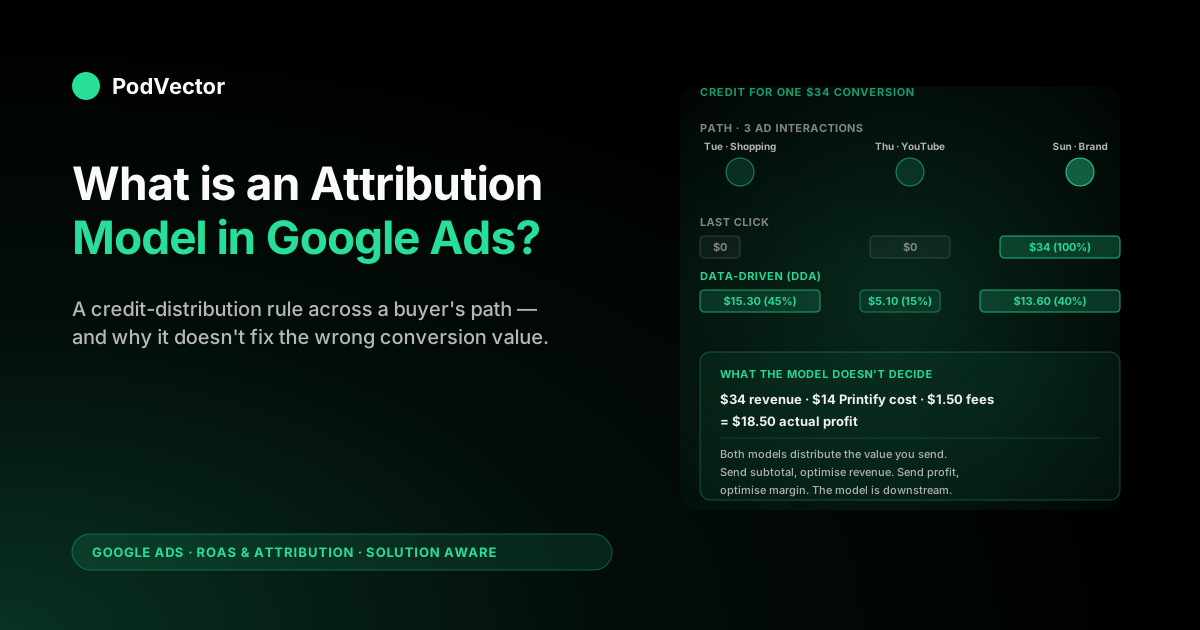
They might have searched a generic term and clicked a Shopping ad on Tuesday, seen a YouTube ad on Thursday, then searched your brand name on Sunday and clicked again before checking out. Three ad interactions, one $34 mug. The attribution model is the rule that decides how much of the credit for that conversion — both the count and the dollar value — gets assigned to each of those three interactions in your reporting and in the signal that goes back to Smart Bidding.
The model does not decide whether a conversion happened, when it happened, or how much it was worth. Three other things make those decisions:
- The conversion tracking setup decides whether the conversion is recorded at all. A misfiring tag, a broken pixel, or a checkout that bypasses the order-confirmation page produces zero conversions to attribute regardless of model.
- The attribution window decides which ad interactions are eligible for credit. The default click-through window of 30 days means an interaction more than 30 days before the conversion is invisible to the model, even if it was the touch that started the buying journey. Window mechanics for POD accounts are covered in Google Ads attribution window explained for POD sellers.
- The conversion value decides what dollar number gets distributed. Most Shopify integrations pass subtotal — gross revenue. The model takes that number as gospel and splits it across interactions.
The model sits in the middle of those three. Get tracking healthy, get the window right, get the value profit-aware, then pick a model. Skip those steps and the model decision is tuning the wrong knob.
Why the model choice matters for a POD account
The model is the signal Smart Bidding learns from. Whatever the model says was responsible for a conversion, Smart Bidding will pour more budget toward.
If the model over-credits the last branded-search click — which last click does by definition — Smart Bidding bids more aggressively on branded keywords that would have converted anyway and starves the upper-funnel campaigns that originated the demand. If the model spreads credit across too many shallow YouTube view-throughs — which the deprecated Linear model did — Smart Bidding scales view-heavy placements that POD margins cannot support.
For print on demand, the financial swing is sharper than for most categories because gross margins are thinner. A SaaS company at 80% margin can absorb a 20% attribution error and still be profitable.
A POD seller at 35% gross margin on a $24 mug cannot. A wrong model that over-attributes brand search will look fine in Google's reported ROAS column and lose money silently in your bank account. The cluster hub at Google Ads ROAS and attribution for POD walks through how attribution decisions translate into actual P&L for a POD operator.
The two models that still exist in 2026
Google's official documentation currently lists two attribution models for new conversion actions:
Data-driven attribution (DDA). The default for any conversion action that clears the data threshold. DDA distributes credit using a counterfactual machine-learning model trained on your account's own conversion paths — it asks, in effect, "given these touchpoints, how much did each one actually shift the probability of conversion?" and assigns credit proportionally.
The threshold is 300 conversions and 3,000 ad interactions in the last 30 days, evaluated per conversion action. Below the threshold, DDA cannot run and Google routes you to last click. Detailed mechanics live in Google Ads data-driven attribution explained for POD sellers.
Last click. Assigns 100% of the credit — the full conversion count and the full conversion value — to the final ad interaction that occurred inside the attribution window. Simple, deterministic, and the model that everyone reverts to when they do not trust their data. Most POD accounts in their first six months of paid traffic run on last click whether they chose to or not, because they are below the DDA threshold.
Both models are available on every account. Both can be set per conversion action, which means the same account can run DDA on add-to-cart and last click on purchase if eligibility differs. The companion piece attribution model Google Ads explained for POD sellers drills into the per-action decision logic.
The four deprecated models and why they died
Through 2023 the Google Ads attribution menu offered six choices. Four are now retired:
- First click. 100% of the credit to the first ad interaction in the path. Useful in theory for understanding which campaigns originate demand, useless in practice for bidding because the first click is rarely the one Smart Bidding can influence on the next purchase.
- Linear. Equal credit across every interaction in the path. Mathematically clean, operationally bad for POD because a $34 hoodie path with one Shopping click and four YouTube view-throughs gives 20% credit to each YouTube touch — which trains Smart Bidding to bid up YouTube on a margin that cannot support it.
- Time decay. Exponentially decreasing credit backward from the conversion, with a seven-day half-life. Closer to last click than to Linear, and arguably the most defensible of the rule-based models for direct-response POD campaigns. Killed alongside the others.
- Position-based (U-shape). 40% to first interaction, 40% to last, 20% split across the middle. Designed for journeys where awareness and conversion both matter and the middle is filler.
Why the consolidation? Google's stated reason was that DDA outperforms the rule-based models in head-to-head measurement on accounts that qualify.
Independent measurement supported that claim — across the average account, DDA produced more accurate credit assignment because it adapted to the account's actual conversion paths instead of imposing a static rule. The unstated reason was that DDA produces better feedback to Smart Bidding, which produces more revenue for Google.
Both reasons were true. Conversion actions that were configured under the deprecated models were migrated to DDA across 2024, with the option for owners to manually switch to last click instead.
You will still see the deprecated models in older third-party guides — the KlientBoost and DataFeedWatch articles you may have landed on while researching this both still describe all six. The models they describe were real; they just are not selectable any more. For historical context on each model the cluster article Google Ads attribution models explained for POD sellers walks through the lineage.
How data-driven attribution actually works
DDA is not a fancier version of Linear or Position-based with smarter weights. It is a fundamentally different approach. The mechanics:
Google's system looks at every conversion path on your account over the trailing window and at every non-conversion path — sequences of touchpoints that did not end in a conversion. It then asks, for each touchpoint, "if I removed this interaction from the path, how much would the probability of conversion drop?" That counterfactual probability shift is the credit.
Touchpoints that consistently appear in converting paths but not in non-converting paths get high credit. Touchpoints that appear in both equally get low credit because their presence does not predict the outcome.
The practical implications for a POD account:
- DDA learns your paths. A POD store that converts mostly on a single Shopping click with a brand search at the end will see DDA give most of the credit to Shopping and modest credit to brand. A store with longer multi-touch paths involving YouTube and Display will see DDA distribute differently. The same model produces different distributions on different accounts because it is trained per account.
- DDA needs paths to learn from. The 300-conversion / 3,000-interaction threshold exists because below that volume, the counterfactual analysis is statistically unreliable — you do not have enough non-converting paths to compare against. Run DDA on too little data and credit assignment becomes random.
- DDA is dynamic. The credit distribution updates roughly weekly as new conversion paths arrive. A campaign that contributed heavily three months ago may receive less credit today if your buyer paths have shifted, which keeps the bidding signal current.
The cluster guide data-driven attribution Google Ads explained for POD sellers drills further into the counterfactual mechanism and what it means for a POD account that runs heavy Performance Max.
How last click works and when it wins
Last click is the simpler model. The final eligible ad interaction inside the attribution window — almost always a click, occasionally an engaged YouTube view — gets the entire conversion count and conversion value.
Every preceding touchpoint gets zero. If a customer clicked a Shopping ad on day one, watched a YouTube ad on day three, and clicked a brand-search ad on day five before converting, last click gives 100% of the credit to the brand-search click on day five.
The cases where last click is the right call on a POD account:
Sub-threshold accounts. Below 300 conversions in 30 days, DDA is not available and Google routes you to last click anyway. This is the default state for most POD accounts in months one through six of paid traffic. Trying to force DDA by spinning up additional shallow conversion actions to pad volume is worse than running last click cleanly.
Accounts with broken or partial tracking. If enhanced conversions are off, if your conversion count differs from Shopify orders by more than 10%, if you have duplicate conversion tags from a stale GTM container — last click is the model least likely to amplify the underlying tracking error. DDA will. Fix tracking and then move to DDA.
Accounts dominated by a single channel. If 90%+ of your spend is on a single Branded Search campaign and your other campaigns barely exist, the multi-touch path that DDA is designed to model does not really exist on your account. DDA and last click will produce nearly identical credit assignments because there is only one touchpoint to credit. Pick last click for simplicity.
Accounts that need stable historical reporting. Switching from last click to DDA mid-year produces a step-change in reported ROAS that is hard to explain to a co-founder or board. If you are reporting numbers up the chain, last click is more boring but more comparable across periods.
Choosing a model for a POD account
The decision tree for a POD account is short. Walk three branches:
Branch 1 — does the conversion action have at least 300 conversions and 3,000 ad interactions in the last 30 days? If yes, DDA. If no, last click. The threshold is per-conversion-action, not per-account, so a single account may have DDA on add-to-cart and last click on purchase.
Branch 2 — is your conversion tracking healthy? Healthy means: enhanced conversions enabled, the Google Ads tag firing on the order-confirmation page, conversion count matching Shopify orders within 5%, and no duplicate tags. If tracking is unhealthy, the model decision is moot — fix tracking first. The cluster article Google Ads conversions attribution explained for POD sellers covers the conversion-tracking-and-attribution interaction in depth.
Branch 3 — are you sending a profit-aware conversion value? If you are sending Shopify subtotal, no model can fix the fact that subtotal is gross revenue, not profit. The model decision sits on top of whatever value you send; we cover this in detail in the conversion-value trap below.
For an account that clears all three branches, the answer is DDA. For an account that fails Branch 1 only, last click. For an account that fails Branch 2 or 3, fix the upstream issue before deciding on a model — the model decision is downstream of healthy data.
Switching models on a live conversion action
Switching the attribution model on an existing conversion action triggers a Smart Bidding relearn. The bid strategy assigned to that action will spend two to four weeks recalibrating to the new credit distribution; during that window, ROAS reporting can swing 10–30% relative to baseline even when underlying performance is unchanged. The mechanical steps:
- Pre-flight: export 30 days of campaign-level performance from the existing model so you have a baseline. The Model Comparison report inside Google Ads (Tools → Conversions → Attribution → Model Comparison) lets you preview what credit distribution would look like under the alternative model before you switch.
- Flip the model on the conversion action: Tools → Conversions → click into the action → Edit settings → Attribution model → save.
- Hold campaign settings steady for 14 days. Do not change tROAS targets, daily budgets, or campaign structure during the relearn. You want the model swap to be the only variable.
- Compare day-15 onward to the pre-switch baseline. Check whether reported ROAS, CPA, and conversion volume have stabilised. If reported ROAS dropped 20%+ and stayed there, the previous model was over-crediting last-touch interactions and you were running on inflated numbers; the new picture is closer to truth.
The integration article complete guide to Google Ads + Shopify integration for POD covers the tagging side of the switch — particularly the enhanced-conversions configuration that DDA needs to behave well.
How the model interacts with Smart Bidding
The attribution model is upstream of Smart Bidding. The model produces a credit-and-value signal per interaction; Smart Bidding consumes that signal and decides how much to bid on the next auction. Switching models changes what Smart Bidding sees and therefore how it bids.
Concrete example. Account runs Performance Max on Shopping with a tROAS of 4.0.
Under last click, branded search clicks at the bottom of the funnel were getting 100% of conversion credit, so PMax was reporting tROAS of 5.2 — overshooting the target — and bidding up the upper-funnel placements that PMax controls automatically. Account switches to DDA.
Now branded clicks get only 30% of the credit and the Shopping clicks earlier in the path get 70%. PMax's reported tROAS on Shopping rises (because more credit lands there) and its reported tROAS on the placements that mostly produced branded-search arrivals falls. Bidding rebalances over two to four weeks: Shopping bids increase, the brand-adjacent placements bids decrease, and the account ends up at the same overall tROAS target but with credit and budget distributed across more touchpoints.
This rebalancing is usually good for a POD account because it corrects the last-click over-credit on brand searches that would have converted anyway. It is bad if your tracking is broken, because DDA amplifies tracking errors that last click would partially mask. The strategy article complete Google Ads playbook for print-on-demand sellers covers how to set tROAS targets that absorb the post-switch volatility.
The conversion-value trap that breaks any model
The single most common attribution mistake on a POD account is not the model choice. It is the conversion value. The model decides distribution; the value decides what is being distributed. Most Shopify-Google Ads integrations pass checkout.subtotal_price or order.total_price as the conversion value. Both are revenue numbers. Neither is profit.
For a POD seller using Printify, the supplier cost on a $34 hoodie is typically $14 for the blank shirt plus the print, plus shipping that gets folded into product price. Shopify takes about 4.4% in payment processing on a $34 order — call it $1.50.
Your actual gross profit on that hoodie is roughly $34 − $14 − $1.50 = $18.50, which is a 54% gross margin on an unusually well-priced product. On a $24 mug with $11 supplier cost the gross profit is closer to $11.50 — 48%. On a $19 t-shirt at thinner pricing, gross profit can be under 30%.
If you send Shopify subtotal as the conversion value, Smart Bidding sees the same $34 from every product line and optimises for revenue. It will scale a campaign driving $19 t-shirt sales — high revenue per click but low margin — and starve a campaign driving $48 hoodie sales with much higher per-unit profit.
DDA on subtotal distributes the wrong number perfectly. Last click on subtotal makes the same mistake more bluntly. The model is innocent; the input is wrong.
Two patterns work for sending profit-aware values:
- Static line-item profit map. Maintain a Shopify metafield on each product that stores the supplier cost and a Liquid template that calculates
line_total - supplier_cost - estimated_feesat checkout. Pass that profit number as the conversion value. Cheap to implement, accurate enough for most POD accounts, and stable across the catalogue. - Live profit calculation via offline conversion adjustments. Use a Shopify webhook plus a Printify or Printful API call to compute the true margin per order, then push it back to Google Ads as an offline conversion adjustment within 24 hours. More accurate, more operational, and the right pattern for accounts spending $20k+ a month where the accuracy gain pays for itself.
Either pattern transforms the model decision from "DDA versus last click on revenue" into "DDA versus last click on profit." The question becomes meaningful only after the value is profit-aware.
Reading model output against live POD margin
The hardest part of attribution work for a POD operator is not picking the model. It is knowing whether the model's output matches reality on any given week.
Google reports tROAS of 4.5 in the dashboard. Your bank account reports a 1.8x return on ad spend after Printify supplier cost, Shopify fees, and inevitable refunds and reprints.
Which is the truth? Both, on different definitions. Reconciling them weekly is what separates POD operators who scale profitably from operators who scale into the ground.
The reconciliation is a per-order calculation. For every Shopify order, you need: gross revenue (the number Google sees), Printify or Printful supplier cost, shipping cost, payment processing, refund or reprint cost amortised across the cohort, and the Google Ads click cost attributed to that order under whichever model you are running.
Subtract the cost stack from revenue, divide by ad spend, and you have true ROAS. Compare that to Google's reported ROAS and you have an attribution-truth gap you can manage.
Most POD operators do this monthly in a spreadsheet, which is too slow to act on and easy to abandon when the spreadsheet breaks. Victor is built for this specific question. It joins your Shopify, Printify or Printful, and Google Ads data into a live warehouse view and answers questions like "what was true ROAS by campaign last week after supplier cost and fees?" or "which Shopping campaign is overstating its return because it is over-credited under DDA?" — in plain English, against current data, in seconds. The employee roadmap covered in the complete Google Ads playbook for print-on-demand sellers walks through what Victor answers and what tomorrow's automation layer will act on.
FAQs
What attribution models are available in Google Ads in 2026?
Two: data-driven attribution (DDA) and last click. DDA is the default for any conversion action that clears the 300-conversion / 3,000-interaction threshold over the trailing 30 days.
Last click is the fallback below the threshold and is selectable manually for accounts that prefer it. The four older models — First Click, Linear, Time Decay, and Position-based — were deprecated across 2023–2024.
Why did Google deprecate Linear, First Click, Time Decay, and Position-based?
Two reasons: DDA outperformed the rule-based models in head-to-head measurement on accounts that qualified, and DDA produces a stronger feedback signal to Smart Bidding. The deprecated models were rule-based and could not adapt to the actual paths on each account, which made them systematically less accurate than a counterfactual ML model trained on the account's own data.
Is data-driven attribution always better than last click for POD?
No. DDA is better when your account clears the data threshold, your tracking is healthy, and your conversion paths involve more than one touchpoint. Below the threshold DDA cannot run.
With broken tracking DDA amplifies the error. With single-touchpoint paths DDA produces nearly identical credit to last click. Outside those three exceptions, DDA is the better choice for a POD account.
What happens if I switch from last click to DDA on an existing conversion action?
Smart Bidding triggers a relearn. Reported ROAS will swing 10–30% over the next two to four weeks as bid strategies recalibrate to the new credit distribution.
Hold campaign settings steady during that window. After day 15 the numbers stabilise. If reported ROAS drops permanently it usually means the previous model was over-crediting last-touch interactions and you were running on inflated numbers.
Does the attribution model affect my conversion count?
Not the total count, but it affects how the count is distributed across campaigns. The same conversion is counted once regardless of model.
What changes is which campaign gets credited with the conversion. Under last click, the campaign whose ad was clicked last gets the full conversion.
Under DDA, fractional credit is distributed across the campaigns whose ads were involved in the path. Total conversions across all campaigns sum to the same number under both models; the per-campaign breakdown differs.
Should I use the same attribution model for every conversion action?
Not necessarily. The model is set per conversion action, and eligibility for DDA is per action.
A POD account may legitimately have DDA on add-to-cart (which clears the threshold easily because there are more add-to-carts than purchases) and last click on purchase (which often does not clear the threshold). The article on Google Ads attribution explained for POD sellers covers the per-action decision pattern.
How does the attribution model interact with the attribution window?
The window decides which interactions are eligible for credit; the model decides how the credit is split among the eligible interactions. They are independent decisions. A 30-day click-through window with last click means "the most recent click in the 30 days before conversion gets 100% of the credit." A 30-day window with DDA means "interactions in the 30 days before conversion are eligible, and DDA distributes credit among them based on the counterfactual model." Window sizing for POD accounts is covered in Google Ads attribution window explained for POD sellers.
Can I see what credit DDA is assigning before I switch?
Yes. Google Ads has a Model Comparison report (Tools → Measurement → Attribution → Model Comparison) that lets you preview what credit distribution would look like under the alternative model based on the trailing 30 days of data. Run that report before switching to set expectations on which campaigns will see ROAS rise versus fall.
Pick the right model — then check it against true profit
The model is the easy decision; making sure it is optimising against profit, not Shopify subtotal, is the work. to see true ROAS by Google Ads campaign — after Printify or Printful supplier cost, Shopify fees, and refunds — joined live from your store and ad accounts. Ask "which campaign is over-credited under DDA?" or "what's my actual profit ROAS this week?" and get an answer from current data, not last month's spreadsheet.
Try Victor free