
Quick Answer: An attribution model in Google Ads is the rule that decides which interaction gets credit when a buyer touched several ads before converting. As of 2026, you have exactly two choices for new conversion actions — data-driven attribution (DDA, the default) and last-click — after Google deprecated Linear, Time Decay, Position-based, and First Click in late 2023.
For a print-on-demand seller, picking a model is a five-minute job once you know that DDA is right for almost every POD account using Smart Bidding, last-click is right only for tiny or tracking-broken accounts, and that the choice means nothing until you fix the conversion value you send. Send Shopify subtotal, and DDA distributes credit perfectly across touches that feed Smart Bidding the wrong margin number.
Send revenue minus Printify or Printful supplier cost, and the same model finally optimises against profit. The model is the easy part. The value layer is the work.
What an attribution model actually is in Google Ads
An attribution model is the rule that distributes credit for a single conversion across the ad interactions that preceded it. Most buyers touch more than one of your ads before they buy.
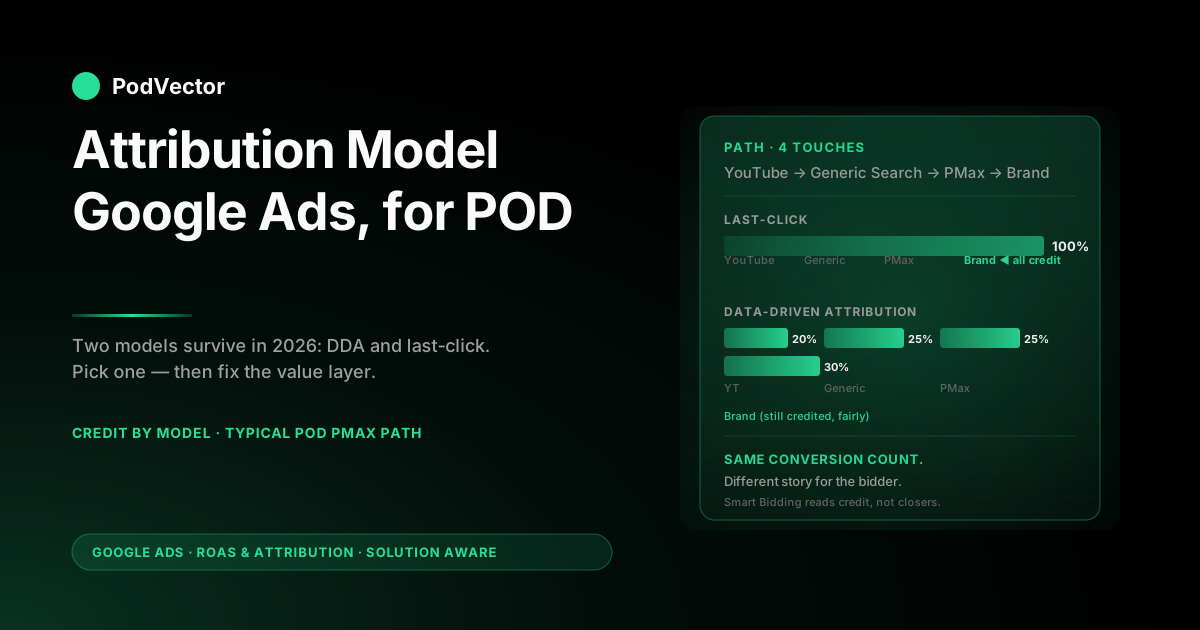
A POD shopper might see a YouTube ad on Tuesday, click a Performance Max product ad on Wednesday, search your brand name on Thursday, and finally check out on Friday. One conversion, four touches. The attribution model decides which touch — or which combination of touches, with what weights — gets credit in your reports.
That sounds like a reporting choice. It isn't. The attribution model has three downstream effects, and the order matters:
- It is the input Smart Bidding optimises against. Target ROAS, Maximize Conversion Value, Maximize Conversions — every Smart Bidding strategy reads conversion data through whatever attribution model you've set. The same campaign can look like 3.0× ROAS under last-click and 4.2× ROAS under DDA because credit moves upstream into discovery touches the bidder can then bid up.
- It decides which channels look profitable. YouTube and Demand Gen rarely close conversions, so under last-click they look like waste. Under DDA, they get visible credit for the assists they produced. The model is what makes upstream value showable.
- It is the lens through which budget decisions get made. If your reports keep telling you generic Search keywords are unprofitable while branded Search is your hero, that's last-click talking. DDA usually flips the relationship — generic was the discovery, branded was the finisher — and the budget should follow.
The model does not change how many conversions actually happen. It changes how the conversions are distributed across campaigns, ad groups, keywords, devices, and audiences. The total number of conversions is identical under last-click and DDA. The story those conversions tell about your account is not.
For the broader picture of how attribution sits inside the full Google Ads measurement stack — windows, reports, Smart Bidding, value tracking — start at the cluster pillar, the complete guide to Google Ads ROAS and attribution for POD.
Which attribution models still exist in 2026
This is the section every other guide on this query bloats with content about deprecated models. Here it is in two paragraphs.
Google Ads supports two attribution models for new conversion actions as of 2026: data-driven attribution (DDA), which is the default and Google's recommendation, and last-click attribution, which is the legacy fallback. DDA uses a machine-learning model trained on your account's actual conversion paths (or, below the volume threshold, on aggregated Google data) to distribute credit fractionally across touches based on how much each one moved the conversion probability.
Last-click gives 100% of the credit to the final ad interaction before the conversion. Those are the only two choices in the dropdown.
The four deprecated models — Linear (equal credit to every touch), Time Decay (more credit to recent touches), Position-based (40% first, 40% last, 20% middle), and First Click (100% to the first touch) — were retired in September 2023. Google cited adoption rates of less than 3% combined.
If you read older guides referencing those models, the advice is now historical. You cannot select them on new actions, and Google has finished migrating the holdouts: every conversion action that was still running a deprecated rules-based model has been auto-upgraded to data-driven attribution. There is no manual migration left to do and nothing to flag. The effective choice for POD sellers in 2026 is binary: DDA or last-click.
DDA vs last-click for a POD account
The right answer for almost every POD account doing more than $5K/month in Google Ads spend is DDA. The right answer for almost every POD account below that bar is also DDA, because the modeled fallback is still better than last-click. The cases where last-click is the correct choice are narrow:
- You're running entirely manual CPC with one campaign and one or two keywords and you genuinely want simple credit math you can reconcile by hand.
- Your conversion tracking is broken or partial — you're missing some interactions — and the gaps would make DDA's distribution actively misleading. (Fix tracking first; then switch.)
- You're running a measurement test where you need stable, deterministic credit assignment for an A/B comparison and DDA's daily re-fit would add noise.
Outside those cases, DDA wins because POD buyers' paths are exactly the kind DDA was built to credit honestly. Most POD conversions involve a discovery moment (YouTube short, Pinterest pin that bounces them to your store, generic search for "custom hoodie") followed by a finisher (branded search, retargeted PMax click, direct return visit).
Last-click hands the finisher 100% of the credit. The bidder then bids up the finisher and bids down the discovery, which starves the funnel and drops volume over the next 30 days.
DDA hands the discovery 40–60% of the credit, the finisher 40–60%, and the bidder allocates accordingly. The total volume holds; the channel mix shifts toward what's actually working.
One nuance worth knowing: DDA needs at least 300 conversions and 3,000 ad interactions in 30 days per conversion action to use your account-specific model. Below that, it falls back to a "modeled" version trained on aggregated Google data.
The modeled version is still better than last-click for the multi-touch reasons above, but it can't see your account's specific patterns. If you have 80 conversions a month, DDA on the modeled fallback will under-credit your branded discovery touches because the generic model doesn't know your brand exists yet.
That's still better than last-click giving the brand click 100%. It's just not the full DDA experience.
For the operator-level reading of how DDA works under the hood and how to read its reports, see data-driven attribution Google Ads help explained for POD sellers and about data-driven attribution Google Ads help explained for POD sellers.
How to set or change the attribution model
The mechanic itself is fast — under five minutes once you know where the setting lives. The Google Ads Help page about attribution models covers the steps; the version below is the same path with the 2026 navigation and the POD-relevant warnings.
- In Google Ads, click Goals in the left navigation, then Conversions → Summary. (In the older UI, this was Tools → Conversions.)
- Click the conversion action you want to change. The detail page opens.
- Click Edit settings, then expand the Attribution model section.
- Pick Data-driven or Last click from the dropdown. Save.
If you have multiple conversion actions (Purchase, Add to Cart, Begin Checkout), you set the model per action. There is no account-wide attribution setting that overrides individual conversions.
Smart Bidding optimises against whatever model is set on the action(s) it's targeting. If your tROAS campaign is targeting "Purchase" and "Purchase" is on DDA, the bidder reads DDA; the model on "Add to Cart" is irrelevant unless you bid on it.
Three POD-specific warnings about the switch itself:
- Don't switch during a sale. The first 14 days after switching the model produce noisy reports as DDA re-fits to a different credit distribution. If you flip during a Black Friday week, you'll spend the next two weeks unable to tell what was the sale and what was the model. Switch in a quiet period.
- Don't switch all your conversion actions at once. If "Purchase" is on DDA but "Add to Cart" stays on last-click, that's fine — they don't have to match. Switching one at a time gives you a controlled comparison via the Model Comparison report (next section).
- Don't switch back the moment numbers move. Brand keyword conversions will drop 20–30% under DDA. PMax conversions will rise. The total is the same. Reverting to last-click because brand campaigns "lost" conversions is the most common POD attribution mistake we see.
Reading the Model Comparison report
The single most useful tool for understanding what an attribution-model change will do to your account is the Model Comparison report, and most POD sellers never open it. It lives under Goals → Conversions → click any conversion action → Model Comparison tab.
The report shows your conversions and conversion value side-by-side under your current model and a comparison model you pick (typically last-click vs DDA). You can filter by campaign, ad group, keyword, device, or network.
The percentage delta column tells you exactly how much credit moves where if you switch models. For a POD account, four filtered views are worth running before any model change:
- By campaign type. PMax almost always shows DDA crediting it 15–30% more than last-click. Branded Search shows DDA crediting it 20–30% less. Both are expected and both are correct — DDA is moving credit upstream from finishers to discoverers.
- By keyword (Search only). Generic keywords ("custom hoodie", "graphic tee design") get more credit under DDA. Brand keywords get less. This is the report telling you which keywords to bid up if you switch.
- By device. Mobile-to-desktop paths are common in POD because shoppers discover on phones and check out on laptops. Last-click credits whichever device closed; DDA spreads it. Big mobile DDA increase = mobile bids are too low.
- By network. YouTube and Display under-credit themselves under last-click. The Model Comparison report shows the size of that under-crediting in dollars before you commit to the switch.
Run the report on a 30-day window before any model change. Run it again 30 days after, with the same date filter shifted forward. The two snapshots together tell you whether the switch did what the report predicted, and whether you need to adjust bids by campaign type to track the new credit distribution.
How the model feeds Smart Bidding for POD
This is where the choice of attribution model stops being a reporting question and becomes a budget question. Smart Bidding reads conversion data through the lens of whatever attribution model is set on the conversion action it's targeting. The bidder's optimisation function is: predict the probability that this auction produces a credited conversion at the value Google has on file, then bid accordingly.
Under last-click, the bidder learns: "Branded Search converts; bid it up. Generic Search rarely converts; bid it down.
YouTube never converts; basically don't bid." Over 60–90 days, this drains spend out of the discovery layer because the bidder can't see discovery's contribution. The account hits a ceiling — branded Search saturates, and the bidder has no other lever to pull because last-click told it generic and YouTube don't work.
Under DDA, the bidder learns: "Branded Search closes 30% of conversions but only deserves 50% of credit. Generic Search opens 25% of conversions and deserves 30% of credit.
YouTube assists 15% of conversions and deserves 20% of credit." The bid distribution flattens. Generic Search keywords get bid up; YouTube placements get bid up; branded Search slows down. The funnel feeds itself.
For POD specifically, this matters more than for most categories because POD demand is taught, not searched. Almost nobody types your brand into Google before they've seen one of your designs somewhere — Pinterest, Etsy, Instagram, a YouTube ad, a TikTok.
The first touch is almost always discovery, not intent. Last-click hands the brand click 100% credit and lets the bidder kill the discovery layer.
DDA gives the discovery layer its fractional credit and lets the bidder protect it. Over a quarter, that's a 15–35% volume difference at the same blended ROAS. Not theoretical — observable in any 90-day comparison report on a POD account that switched.
The value-layer trap that breaks any model
Switching from last-click to DDA is the easy part. The trap nobody warns POD sellers about: the conversion value you send to Google Ads is, by default, the Shopify order subtotal. For a POD seller, that number is wrong before any attribution model touches it.
Take the standard math. A $34 hoodie sale on Printify with a base cost of $22.30, a $1.20 Shopify transaction fee, and a $4.50 fulfilment-and-shipping pass-through to the customer.
The order subtotal Shopify sends to Google Ads is $34. The actual contribution margin on the sale is $34 − $22.30 − $1.20 = $10.50.
Your real ROAS at $7 of ad spend is $10.50 ÷ $7 = 1.5×, not the $34 ÷ $7 = 4.86× the Google Ads dashboard shows. Smart Bidding, optimising on the wrong number, will happily bid up auctions for products with thin margins because it sees them as profitable.
The model — DDA, last-click, anything — distributes that wrong number across touches. The distribution is correct relative to itself.
The number being distributed is wrong. POD sellers who switch to DDA expecting their ROAS to improve are sometimes disappointed because DDA didn't change the value, only the credit. The fix is to send margin (or a margin proxy) as conversion value, not subtotal. That's a separate setup project — covered in Shopify Google Ads conversion tracking setup guide for POD sellers — but it's the precondition for any attribution model to mean what you think it means.
The order of operations for a POD account that wants accurate attribution is: (1) send margin as conversion value, (2) confirm conversion tracking is firing for every order, (3) then switch the attribution model from last-click to DDA. Doing it in any other order produces precise reports of inaccurate numbers.
Choosing a model by campaign type for POD
You can't actually choose a different model per campaign — the model is set on the conversion action, not the campaign. But the model interacts with each campaign type differently, and knowing those interactions is what lets you read your reports honestly after the switch. Here's the per-campaign-type read for a POD account on DDA.
Performance Max. DDA matters most here. PMax routes spend across Search, Shopping, YouTube, Display, Demand Gen, and Maps placements based on Google's prediction of which placement will convert.
That prediction is itself trained on DDA-credited conversions. Under last-click, PMax over-rotates toward closing placements (branded Search, retargeted Shopping).
Under DDA, PMax allocates more spend to upstream placements (YouTube, Display, generic Shopping). Most POD PMax accounts see this shift visibly: YouTube spend goes from $0 to 8–15% of campaign cost, and overall PMax conversion volume rises 10–25% over 60–90 days.
Search. DDA's effect on Search-only campaigns is smaller because most Search paths are short — typically two or three clicks max. The redistribution that does happen is generic-up, branded-down.
If you have separate Brand and Generic campaigns (you should), expect the Brand campaign's reported conversions to drop 20–30% on DDA. That's not a problem; it's the model correctly noting that the brand click finished, but didn't originate, the path. Total Search conversions stay flat.
Shopping. Same dynamic as Search but for product listings. Generic Shopping gets credit; branded Shopping loses credit. The implication for POD: don't pause underperforming generic Shopping ad groups based on last-click numbers — DDA is going to credit them more once you switch.
Demand Gen. Demand Gen almost never gets credit on last-click because Demand Gen rarely closes conversions; it discovers. DDA is essentially a precondition for running Demand Gen profitably. POD sellers who run Demand Gen on last-click usually conclude "Demand Gen doesn't work for POD" — but it's the model, not the channel.
YouTube. Engaged-view conversions (10+ seconds of a video ad followed by a conversion within the window) only count under DDA. Last-click ignores them entirely. If you run YouTube and your YouTube reports under last-click look empty, switching to DDA is the only way to see what YouTube actually did.
Rules of thumb for switching models safely
If you've decided to switch from last-click to DDA — which, for the reasons in the sections above, is the right move for nearly every POD account — these are the operator-level rules that prevent the switch from looking like a disaster in week one.
- Switch in a quiet period. Not during a sale, a product launch, or the week before a holiday. The first 14 days are noisy.
- Run the Model Comparison report before and after. 30-day windows. Before tells you what to expect; after tells you whether the switch did what was predicted.
- Hold bids constant for the first two weeks. Don't react to per-campaign conversion drops or rises until the redistribution settles. Reactions in week one create thrash.
- Don't change Smart Bidding strategy at the same time. If you're on Maximize Conversions and want to move to tROAS, do that switch separately, weeks before or after the attribution change. Two changes at once and you'll never know which one moved the numbers.
- Watch branded Search separately. It will drop 20–30% on conversions. Don't pause it. The credit moved upstream, not the demand.
- Watch PMax separately. Conversions will rise 10–25%. Don't credit PMax for the rise — the rise is the credit it was already earning becoming visible.
- Re-validate value tracking before switching. If your conversion value is broken (subtotal instead of margin, or only firing on some orders), DDA is going to distribute the broken value perfectly. Fix value first.
Five attribution-model mistakes POD sellers make
- Leaving the default at "data-driven" without confirming volume. DDA is the default for new conversion actions in 2026. Below 300 conversions/30 days per action, you're on the modeled fallback. That's still fine, but it's not full DDA. Confirm in the conversion action's settings whether you're on the modeled or account-specific version, especially if you've recently set up a fresh action.
- Switching during a sale. Black Friday and the two weeks after are the worst possible time to flip the attribution model. The DDA stabilisation window overlaps with the sale's data, and you can't tell what was the sale, what was the new model, and what was both.
- Reverting to last-click because branded Search dropped. The single most common attribution mistake in POD accounts. Brand campaign conversions drop 20–30% under DDA. That is the credit moving upstream to where it was earned. Total account conversions are flat. Reverting puts the credit back in the wrong place and re-strangles the discovery layer.
- Tuning attribution while sending order subtotal as value. The model doesn't matter if the value is wrong. Send margin (or a margin proxy that excludes Printify or Printful base cost), then choose a model. Doing it in the other order produces precise reports of inaccurate numbers.
- Comparing DDA performance to last-click in the same window without using Model Comparison. If you switch on the 1st and look at the 15th, you're comparing two halves of one month with one model each — a useless comparison. The Model Comparison report shows both models on the same data, which is the only honest comparison.
How Victor reads the model against live POD margin
The hardest part of attribution-model decision-making for a POD seller is that you need three numbers in one place to make the call: Google Ads spend by campaign, the credit distribution under each model, and the actual margin per order after Printify or Printful base cost. Google Ads has the first two.
Shopify has the order data. Printify and Printful have the supplier costs. None of those systems share a screen.
Victor — the AI agent layer PodVector AI is building for POD operators — is the integration that pulls all three into one queryable place. It connects to Google Ads, Shopify, Printify, and Printful via live data warehouse, joins ad spend to orders to line items, computes contribution margin per conversion, and re-runs the Model Comparison numbers on the margin-corrected value. So instead of reading the Google Ads dashboard's "ROAS 4.2× under DDA" — which is on subtotal — you read Victor's "true ROAS after COGS: 1.6× under DDA, 1.4× under last-click." That number drives the actual decision: stay on DDA, but cut PMax spend on the Printify SKUs running on premium-tee base prices.
Victor answers those questions on demand. Ask "what's my true ROAS after Printify costs by campaign last 30 days, under DDA?" and the answer comes back in seconds, sourced from the live data warehouse rather than a stale spreadsheet. Victor also acts on the answer with your approval — pausing a thin-margin asset group, raising a target ROAS, switching a conversion action's attribution model — under operator approval.
FAQs
Is data-driven attribution the default for new Google Ads conversion actions in 2026?
Yes. Since late 2024, every new conversion action created in Google Ads defaults to DDA. You can change it to last-click after creation, but the dropdown's default position is DDA. POD sellers setting up their first conversion tracking land on DDA whether they understood the choice or not.
Can I still use Linear, Time Decay, Position-based, or First Click attribution?
No. Google deprecated all four rules-based models in September 2023, citing combined adoption of less than 3%, and has since auto-upgraded every conversion action that was still using one to data-driven attribution. There is nothing left to select and no manual migration to do. The two surviving choices are DDA and last-click.
What's the minimum data threshold for DDA to work properly on a POD account?
Google requires 300 conversions and 3,000 ad interactions in 30 days per conversion action for the account-specific DDA model. Below that, DDA falls back to a modeled version trained on aggregated Google data.
The modeled version is still better than last-click for multi-touch reasons, but it can't see your specific brand patterns. Most POD accounts above $5K/month spend hit the threshold for "Purchase" but not for "Add to Cart."
Does the attribution model affect total conversion count, or just credit distribution?
Just credit distribution. Total conversions across the account are identical under last-click and DDA for the same date range. What changes is which campaigns, ad groups, keywords, devices, and networks the conversions are attributed to. A 30-day Model Comparison report makes this explicit by showing both totals on the same data.
If I switch from last-click to DDA, how long until reports stabilise?
Roughly 14 days. DDA re-fits its credit distribution daily for the first two weeks after a switch as it learns your account's new path patterns. Don't make budget decisions during that window. After day 14, the daily delta drops to noise levels and the new credit distribution is what it is.
Why did my branded Search conversions drop 30% after switching to DDA?
That's the model working correctly. Branded Search clicks are usually finishers — they close paths that started somewhere else.
Last-click handed them 100% of the credit. DDA hands them 50–70% of the credit and gives the rest to whichever upstream touch (generic Search, PMax, YouTube, Demand Gen) actually opened the path.
Total conversions across the account are unchanged. Don't pause branded Search. Don't revert to last-click.
Should I send margin or order subtotal as conversion value?
Margin, or a margin proxy that excludes Printify or Printful base cost. Sending Shopify order subtotal — the default — means Smart Bidding optimises against revenue, not profit, and will happily bid up auctions for thin-margin SKUs. The attribution model is irrelevant if the value layer is wrong. Fix value first; then choose a model.
Can different conversion actions in the same account use different attribution models?
Yes. The model is set per conversion action, not account-wide. Common setup: "Purchase" on DDA (because that's what Smart Bidding is targeting); "Add to Cart" or "Begin Checkout" on last-click (for simpler funnel reporting). There's no requirement they match.
Does the attribution model affect cross-device tracking?
Indirectly. Last-click credits whichever device closed the conversion.
DDA distributes credit across devices in the path. For POD accounts where mobile-to-desktop paths are common (mobile discovery, desktop checkout), DDA usually shifts 15–30% of credit onto the mobile interaction the closer was sitting on. Cross-device tracking requires Enhanced Conversions and signed-in user data; the model uses whatever paths are tracked.
Where exactly do I change the attribution model in the 2026 Google Ads UI?
Goals → Conversions → Summary → click the conversion action → Edit settings → expand Attribution model → pick from the dropdown → save. Five clicks. The change applies immediately, but reports take 14 days to stabilise to the new distribution.
Pick the model. Then make it tell the truth.
Switching to DDA is five clicks. Knowing whether the report is honest about your actual margin — after Printify base cost, Printful upcharges, and Shopify fees — is the work. Victor connects Google Ads, Shopify, Printify, and Printful and computes true POD ROAS under each attribution model on live data. Ask "what's my true ROAS after COGS by campaign under DDA last 30 days," get the answer in seconds.
Try Victor free