
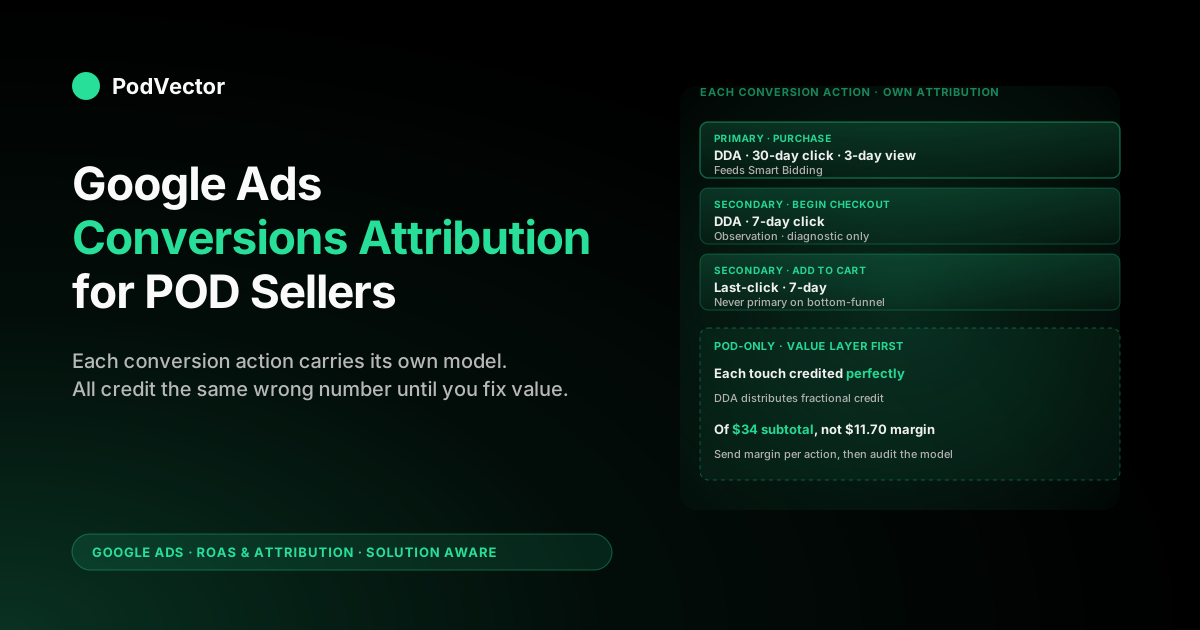
Quick Answer: Google Ads conversions attribution is the layer that decides which click, view, or interaction gets credit when a customer converts after touching multiple ads. Each conversion action — Purchase, Begin checkout, Add to cart, Lead — carries its own attribution model and its own attribution windows, so a single Google Ads account can have several different attribution rules running in parallel.
For POD sellers, the trap isn't choosing the model; it's that the conversion value Google Ads receives by default is order subtotal, so even perfectly attributed credit gets multiplied against a number that ignores Printify and Printful supplier cost. Fix the value layer per conversion action, set DDA per primary conversion, and treat secondaries as observation-only — that's the floor.
What "conversions attribution" actually means in Google Ads
"Attribution" and "conversions" sound like two different topics. In Google Ads they're the same topic.
A conversion is the event you told Google to count — a Shopify Purchase, an Etsy outbound click, a Begin checkout, an Add to cart. Attribution is the rule Google applies to decide which ad interaction (click, engaged view, view-through impression) gets credit for that event when the path included more than one. Conversions attribution is the configured pair: which event, credited under what rule.
That pairing is per conversion action. You can — and most POD sellers should — have a Purchase conversion using data-driven attribution with a 30-day click window, and a Begin checkout conversion using the same model but a shorter window, and an Add to cart configured as observation-only with last-click. Three different attribution behaviours inside one Google Ads account, all running simultaneously, each feeding (or not feeding) Smart Bidding through a different lens.
The downstream consequences flow through three layers, in order of impact:
- Smart Bidding's training signal. Each Smart Bidding strategy reads conversion totals from whatever attribution model is set on whichever conversion actions are marked Primary in that campaign's conversion goal. Misalign the model on the primary conversion and you mis-train the bidder.
- Per-campaign ROAS in your reports. The
Conv. value / costcolumn you stare at in the Campaigns view is summed from the credit each campaign got under whatever attribution model is configured — and from the conversion value the conversion event sent. Wrong model, wrong number. Wrong value, also wrong number. - Channel-mix decisions. The Model comparison report under Tools → Measurement → Attribution shows what credit each campaign would get under last-click versus DDA. The gap between the two columns is what you'd be missing if you ran on the wrong model — usually upper-funnel YouTube or Performance Max value going uncredited.
For the broader picture of how conversions attribution sits inside the full Google Ads measurement stack for POD operators, see the complete guide to Google Ads ROAS and attribution for POD.
Each conversion action has its own attribution settings
This is the single most-missed setting in POD ad accounts. Most sellers configure one conversion action — Purchase, usually piped through the Shopify pixel — and assume the attribution settings they picked there apply to everything.
They don't. Every conversion action under Tools → Measurement → Conversions has its own dropdown for attribution model and its own field for click-through, engaged-view, and view-through windows.
The default Google applies to a newly created conversion action is data-driven attribution with a 30-day click window, 3-day engaged-view, and 1-day view-through. New POD stores almost always inherit those defaults silently.
The problem starts when you add secondary conversions later — Add to cart from a different tag, Begin checkout from GA4 import, lead form from a separate landing page. Each of those carries its own attribution settings, and they're often misaligned with the primary Purchase action.
What goes wrong when settings drift across conversion actions:
- Different windows produce different credit on the same path. If Purchase uses a 30-day window and Begin checkout uses 7-day, a customer who clicked on day 10 and converted on day 28 will be credited for Purchase but not for Begin checkout. The Begin checkout column in your reports will under-count the same path the Purchase column is counting.
- Mixing DDA and last-click muddies model comparison. The Model comparison report only compares apples to apples within a single conversion action. If half your actions use DDA and half use last-click, you can't read the redistribution effect cleanly across the account.
- Secondary actions still feed Smart Bidding when included in a conversion goal. If you've added a secondary action — even with "Don't include in 'Conversions'" toggled — to a campaign-level conversion goal, it influences bidding. Many POD sellers accidentally include Add to cart in their Maximize Conversion Value goal and then wonder why bids look profitable on bottom-funnel keywords that don't actually drive purchases.
The fix is mechanical. Audit Tools → Measurement → Conversions monthly. For each conversion action, confirm: model is DDA (unless you have a structural reason for last-click), click window is consistent across the actions you treat as a path, secondary actions are excluded from primary conversion goals on revenue-driving campaigns. For the focused audit walkthrough, see Google Ads attribution settings explained for POD sellers.
The two conversions attribution models available in 2026
As of mid-2026, every conversion action you create in Google Ads uses one of two attribution models. The four legacy models — Linear, Time Decay, Position-based, First Click — were deprecated in September 2023 and removed from the dropdown for new conversion actions. Older accounts may still see those legacy models on conversion actions created before the cutoff, but creating a new action gives you exactly two choices.
- Data-driven attribution (DDA). The default. A per-account machine-learning model that compares converting paths to non-converting paths and assigns fractional credit to each interaction based on how much it changed the probability of conversion. Credit summed across an interaction's role in the path equals one. Requires roughly 300 conversions per conversion action in 30 days plus 3,000 ad interactions in 30 days for the model to fully train on your data; below those thresholds Google blends your data with a generic vertical-similar training set and still calls it "data-driven attribution."
- Last-click attribution. 100% of credit goes to the final ad interaction before the conversion. No fractional distribution; no upstream credit. Simple, deterministic, and increasingly inadequate as POD accounts add YouTube, Display, and Performance Max alongside Search.
The pragmatic POD seller defaults to DDA for the Purchase conversion action and audits whether their account hits the volume threshold. A store doing $20K monthly at $35 AOV is at roughly 570 monthly purchases — comfortably above DDA's threshold.
A store at $5K monthly is at 140 — below the threshold, so its DDA model is partially generic. If you sit below threshold, you have two real options: stay on DDA and accept the generic-blend behaviour, or run a higher-volume micro-conversion (Begin checkout typically runs 3–5x Purchase volume) as a co-primary specifically to give DDA enough signal to train.
For the dedicated walkthrough on data-driven attribution for POD, see Google Ads data-driven attribution explained for POD sellers. For the focused comparison of all attribution models in their POD context, see Google Ads attribution models explained for POD sellers.
Primary versus secondary conversions and why it changes attribution
Google split conversion actions into two roles in 2022: Primary conversions, which feed Smart Bidding and appear in the standard Conversions column, and Secondary conversions, which appear only in the All conversions column and don't directly drive bidding. Each campaign-level conversion goal lists which actions count as primary for that goal.
Why this matters for conversions attribution specifically: attribution is computed on every action regardless of role, but the credit on a secondary action doesn't shape Smart Bidding. So a POD account running DDA on both Purchase (primary) and Add to cart (secondary) will see redistribution of credit across campaigns in both — but only the Purchase redistribution actually changes which campaigns Smart Bidding bids more or less aggressively on.
The POD-specific gotcha: many sellers turn on "Maximize Conversions" or "Maximize Conversion Value" with Add to cart marked as primary because purchase volume is too thin to bid on. That works to break out of cold-start, but it has a hidden side effect — the attribution model now distributes credit to interactions that drove Add to cart, which is a much shallower commitment signal than Purchase.
The campaigns that look like winners under that bidding setup are the ones that drive cart adds, not the ones that drive checkouts. Switch back to Purchase-as-primary the moment volume sustains it, otherwise you're scaling the wrong metric.
Three rules of thumb for primary/secondary on POD accounts:
- Purchase should be the only primary conversion on revenue-driving campaigns above 200 monthly purchases. Below that, co-primary with Begin checkout for Smart Bidding signal density. Always demote back to single-primary as soon as volume sustains.
- Add to cart is observation-only. Track it, look at it in reports, never let it bid your campaigns. The path between Add to cart and Purchase is too noisy on apparel POD (typical cart-to-purchase rate: 8–15%) for Smart Bidding to optimise against it without rewarding the wrong patterns.
- Lead form / email capture / wishlist are secondary conversions on retargeting campaigns only. They're useful for upper-funnel campaigns where you want Smart Bidding to find audiences that engage; they're misaligned for bottom-funnel campaigns where Purchase is the goal.
The conversion-column maze: which attribution number is real
POD sellers open the Campaigns view in Google Ads and immediately face four conversion-related columns plus a half-dozen variants nested in the column chooser. Each one tells you a different version of the truth depending on the attribution settings of the underlying conversion actions. The five that matter:
- Conversions. Sum of credit assigned by the attribution model on conversion actions marked as Primary for that campaign's conversion goal. This is what Smart Bidding optimises on. If your Purchase action uses DDA, this column shows DDA-credited purchases — fractional, summed across touches. The number can be non-integer, which sometimes confuses operators new to DDA ("0.7 conversions?"). It's correct; that's how fractional credit aggregates.
- All conversions. Same as above plus secondary conversions plus cross-device, cross-environment estimates. Bigger than
Conversions, almost always. Useful for sanity-checking that your primary count isn't missing a meaningful chunk of activity. - Conv. value. Conversion value of primary actions, weighted by the attribution model. This is the number Smart Bidding's value-bidding strategies (Maximize Conversion Value, Target ROAS) optimise. For POD with subtotal-as-value, this is also the number that lies — beautifully attributed credit on a number that ignores supplier cost.
- Conv. value / cost (ROAS). The headline KPI most POD operators read.
Conv. valuedivided by ad spend. Inherits both the attribution model's distortion (which campaign got credit) and the value layer's distortion (subtotal vs margin). On a POD apparel account with a 35–40% net contribution margin, a "Google ROAS" of 4.0 typically corresponds to a true ROAS of 1.4–1.6 — close to break-even, not 4x profitable. - Cross-device conversions. A subset of
All conversionsthat estimates cross-device paths Google modeled rather than directly observed. Worth glancing at on apparel/accessory POD where Pinterest-on-phone, research-on-desktop, buy-on-mobile is the modal path. If this number is below 5% of total conversions on a Performance Max campaign, your enhanced conversions setup likely isn't passing first-party data and you're losing path stitching.
The mental model: Conversions is what Smart Bidding sees, All conversions is what your account broadly accomplishes, and Conv. value / cost is what gets reported up to you or your client — and all three are computed against attribution rules and conversion values you may not have audited. Treat the headline ROAS as a hypothesis, not a fact, until you've checked both the attribution model and the value source.
Why POD conversion paths break the textbook attribution story
The attribution literature is written for retailers with stable margin, predictable consideration cycles, and a single conversion definition. Print-on-demand violates each of those assumptions in ways that change how conversions attribution should be configured.
- The conversion event itself is the wrong unit. Google's "Purchase" event fires when checkout completes. For POD, that's the moment before any cost has accrued — Printify or Printful supplier invoice happens later, payment processor fee gets debited, occasional refunds and chargebacks reverse the order. Attribution credits a touch for a "$34 conversion" that, by the time fulfilment is done, was either a $11.70 contribution-margin event or a refund. The conversion attribution model isn't wrong; the conversion definition is incomplete.
- Path lengths are bimodal. POD apparel shows roughly 60% single-touch paths (impulse Search → buy) and 40% multi-touch paths (Pinterest discovery → research → branded search → buy). That bimodality means DDA's value comes from the second mode; on accounts that are 90% single-touch, DDA collapses toward last-click and the attribution choice barely matters.
- Cross-device research-then-buy is the default. Visual product categories — apparel, mugs, wall art — get researched on phone (often via Pinterest or TikTok) and purchased on desktop. Google's cross-device modeling stitches the path only when both sessions are in signed-in Chrome, which is the minority case. Privacy-led measurement makes this less reliable each year. The attribution model assumes a path it can no longer fully see.
- Refund rates are 2–6%, higher than ecommerce averages. Apparel sizing returns and mug breakage happen. Without offline conversion adjustments wired up, attribution credits are awarded to interactions that led to a return.
None of this makes attribution useless on POD accounts. It means three POD-specific configurations need to happen before the textbook attribution advice produces useful answers: the value layer needs to send margin not subtotal, refund adjustments need to feed back, and conversion windows need to match your actual path-length data — not Google's defaults.
The rest of this article walks each piece. For a deeper look at refund handling specifically, see Google Ads attribution window explained for POD sellers.
Enhanced conversions and the value layer fix
Enhanced conversions are Google's mechanism for sending hashed first-party data — email, phone, address — alongside each conversion event. They were introduced as a privacy-respecting replacement for third-party cookie-based path stitching, and as of 2026 they are essentially mandatory for POD accounts that want DDA to perform anywhere near its potential.
Two things enhanced conversions do for conversions attribution specifically:
- Restore cross-device path visibility. When the Purchase event fires with a hashed email, Google can match that to the same hashed email on an earlier signed-in YouTube view from a different device. Without enhanced conversions, that path looks single-touch; with enhanced conversions, DDA sees the full sequence and credits the upstream touch.
- Improve match rates for Smart Bidding's audience modeling. Higher match rates mean better look-alike audience generation, which means Performance Max and Demand Gen campaigns find higher-quality cohorts. The compounding effect on conversion volume is meaningful — typical lift after enabling enhanced conversions on a properly configured Shopify POD store is 8–15% in reported conversions over the following 30 days.
The value layer fix is the second half. Enhanced conversions get the path right; the conversion-value field needs to get the dollars right.
Default Shopify-to-Google-Ads pixel sends checkout.subtotal_price. For a $34 hoodie, that's $34.
The actual contribution margin after Printify supplier cost ($18), processor fees ($1.30), and shipping subsidy ($3) is $11.70. Three implementation options, in order of effort and accuracy:
- Static margin assumption. Multiply
checkout.subtotal_priceby a fixed margin percentage (typically 35–45% for POD apparel) in the Shopify Additional Scripts field. Cheap; wrong on outliers; better than raw subtotal. - Per-SKU margin lookup. Maintain a SKU-to-margin map and have the conversion event resolve it per line item. Right for stores with 10–50 SKUs and stable supplier pricing.
- Live margin computation. Pull supplier cost from Printify or Printful API per order, subtract from Shopify gross, send the result. Right for 100+ SKUs, multi-supplier setups, or seasonal pricing variation. This is what Victor does automatically: live data joins of Shopify orders, Printify/Printful supplier invoices, and ad spend, surfaced as per-campaign true ROAS without you maintaining a margin spreadsheet.
The order matters. Fix the value layer first; let DDA accumulate at least 14 days of post-fix data; then audit the attribution-model setting.
Switching attribution before fixing the value layer just gives you a more accurate distribution of the wrong number. For the focused walkthrough on the Shopify-side conversion tracking edit, see add Google Ads conversion tracking to Shopify.
Offline conversion adjustments and refunds
Refunds are the conversion event Google Ads doesn't see by default. The order completes, the conversion fires, the credit is distributed across attributed touches, Smart Bidding learns from it. Three weeks later the customer returns the hoodie because the size is wrong; Shopify processes the refund; Google Ads still has the original conversion in its training data forever.
The offline conversion adjustment API is how you fix this. Each refunded order generates an adjustment record (a "Retract" for full refunds, a partial-value adjustment for partials) that's uploaded to Google Ads via the API or via a scheduled batch CSV upload from a tool. Google then retroactively reduces the conversion credit on the corresponding attributed touches and feeds that correction into the Smart Bidding model.
What this changes for POD attribution:
- Smart Bidding stops over-rewarding return-prone SKUs. If a particular keyword or audience drives orders with above-average return rates, the unadjusted feedback rewards them as much as low-return orders. Adjustments deduct credit on returns and the bidder learns to favour keywords that drive durable purchases.
- True ROAS in your reports converges with reality. The headline Google Ads ROAS minus refunds (in absolute dollar terms, 2–6% for POD apparel) starts approaching the true ROAS your bookkeeper sees.
- Attribution credit gets retroactively redistributed. A retracted purchase pulls credit from the touches that earned it. If those touches were upper-funnel YouTube views, YouTube's attributed ROAS for that period adjusts down. Use this to re-run channel-level decisions a month later with cleaner data.
The implementation: Shopify webhooks fire on order refund; a small worker (Cloud Function, Lambda, or a tool like Victor) translates the refund event into a Google Ads conversion adjustment payload and uploads it. The adjustment must reference the original order_id or gclid so Google can find the conversion to retract.
Retain those identifiers on every order. For the focused walkthrough on the integration, see Google Ads attribution email organic integration explained for POD sellers.
A 30-minute audit of your conversions attribution setup
This is the pragmatic check we run on every POD account that hires us. Block 30 minutes; you'll find at least two things misconfigured.
- Tools → Measurement → Conversions. List every conversion action. For each: model is DDA (or has a documented reason for last-click), click window is 30 days (or 60 for higher-AOV custom products), engaged-view is 3 days, view-through is 1 day or off. Anything inconsistent gets flagged.
- Primary vs secondary. Confirm Purchase is the only primary action on revenue-driving conversion goals. Add to cart and other shallow actions are secondary or excluded entirely. Email capture is secondary on retargeting only.
- Conversion value source. Click into the Purchase action. The "Value" tab should show "Use different values for each conversion" wired to a tag-level value variable. Confirm that variable is sending margin, not
subtotal_price. If you don't know what it's sending, view source on a checkout page in incognito and inspect the dataLayer push that fires on purchase complete. - Enhanced conversions enabled. Each conversion action should show "Enhanced conversions: On" with diagnostics showing match rate above 60%. Below 60% means your tag isn't passing user data correctly.
- Refund adjustment integration. Check Tools → Measurement → Conversions → Adjustments. There should be activity in the last 30 days. Empty means no refund adjustments are being uploaded — a meaningful gap on apparel POD.
- Model comparison report. Tools → Measurement → Attribution → Model comparison. Compare DDA versus last-click on Purchase for the last 90 days. The percentage redistribution tells you how much your attribution choice matters. Sub-5% means single-touch paths dominate and the choice doesn't move the needle; 15–35% means upper-funnel value is non-trivial and the model choice has real money on the line.
For the deeper audit including how to interpret the Model comparison report on POD-typical path-length distributions, see Google Ads attribution reports explained for POD sellers.
POD-specific mistakes to avoid
Six patterns we see repeatedly on POD ad-account audits. Each one wastes spend in a way the dashboards don't surface.
- Configuring DDA on the conversion action while sending raw subtotal as value. Polished credit distribution multiplied by a number that ignores supplier cost. ROAS in dashboard, bleeding in bank account. Fix value first.
- Marking Add to cart as primary on bottom-funnel campaigns. Smart Bidding starts optimising for cart adds instead of purchases. Cart-to-purchase rate on apparel POD is 8–15%, so this scales the wrong upstream signal.
- Different attribution windows on Purchase versus Begin checkout. The path metrics report shows mismatched path lengths on the same actual journey. Reconcile the windows before reading the reports.
- Switching attribution mid-Smart-Bidding-cycle. Each model change resets the bidder's learning. Pick the model before launching Target ROAS or Maximize Conversion Value and leave it alone for at least 30 days.
- No offline conversion adjustments wired up. Refunds remain invisible to Smart Bidding. Over 90 days, this meaningfully shifts budget toward return-prone SKUs that look profitable in dashboard ROAS.
- Comparing GA4 attribution to Google Ads attribution and panicking when they disagree. Different models, different windows, different conversion definitions. Pick one as your operational source of truth (Google Ads, for ad-spend decisions) and treat the other as cross-check.
For the broader strategic context on running Google Ads as a POD operator, see the complete Google Ads playbook for print-on-demand sellers. For Google's official attribution model documentation, the canonical reference is Google Ads Help: About attribution models.
FAQs
What's the difference between conversions attribution and a conversion action?
A conversion action is the event you're counting (Purchase, Begin checkout, lead form). Conversions attribution is the rule applied to that action to decide which ad interaction gets credit when the customer touched multiple ads before converting. Each conversion action carries its own attribution model and windows, configured separately under Tools → Measurement → Conversions.
Can I use different attribution models on different conversion actions?
Yes — and most POD sellers should at least consider it. A common configuration: DDA on Purchase (the primary, revenue-driving action), DDA on Begin checkout (used as observation or co-primary on low-volume accounts), and last-click on Add to cart kept purely as a diagnostic signal. Mixing models across actions doesn't break anything; it just means the Model comparison report has to be read per-action rather than account-wide.
How does conversions attribution interact with Smart Bidding?
Smart Bidding reads the conversion total and conversion value from primary conversion actions on the campaign's conversion goal — and those numbers are computed using whatever attribution model is set on each action. Change the attribution model on a primary action and the bidder sees a different signal; Smart Bidding takes 14–30 days to recalibrate after any attribution change.
What's the right click-through window for POD conversions?
30 days for impulse apparel and accessories. 60 days for higher-AOV custom products where buyers research multiple options before purchasing. 7-day windows make sense only for tightly-targeted retargeting where intent is already established. Avoid 90 days unless you've measured genuine multi-week consideration cycles in your own path data — longer windows credit more upstream noise.
Why does my Google Ads ROAS not match my actual margin?
Because the conversion value Google receives is order subtotal, not contribution margin. After Printify or Printful supplier cost, payment processor fees, and shipping subsidy, your actual margin is typically 35–45% of subtotal for POD apparel.
Send margin-based conversion value to Google Ads and the dashboard ROAS will start matching reality. The attribution model has nothing to do with this gap — it's a value-layer problem that has to be fixed at the conversion-event level.
Do refunds automatically reduce my conversion credit in Google Ads?
No. Google Ads receives the conversion when the order is placed and never hears about the refund unless you wire up an offline conversion adjustment via the Google Ads API or a tool that does it for you. Until you do, refunded orders are credited the same as fulfilled ones in attribution and Smart Bidding. On apparel POD with 2–6% return rates, this meaningfully misweights the bidder over time.
How long does it take DDA to retrain after I change a conversion's attribution settings?
14–30 days. Major changes — switching from last-click to DDA, modifying click window, changing the conversion-value formula — all force DDA to rebuild. Don't make multiple structural changes the same week if you want to read cause-and-effect cleanly. Stagger changes at least two weeks apart and let each one stabilise before evaluating the next.
What happens to attribution when third-party cookies finally go away?
Cross-device path stitching becomes less reliable, which means more conversions get attributed to a single touch (typically the conversion-driving one) because upstream touches are no longer visible. The practical effect: DDA looks more like last-click on your account because the data that distinguished them is gone.
Enhanced conversions and first-party data passthrough partially compensate; they don't fully restore visibility. POD sellers who still haven't enabled enhanced conversions are already seeing meaningful attribution-quality degradation, and the gap widens every quarter as signed-out, cross-device paths grow.
Want true ROAS, not subtotal ROAS?
Victor joins your Shopify orders, Printify/Printful supplier invoices, and Google Ads spend in a warehouse the moment the data lands — so the conversion value behind every attributed touch reflects contribution margin, not order subtotal. Ask in plain English ("which campaign actually made money last week after supplier cost?") and get the answer from live data, not a stale dashboard.
Try Victor free