
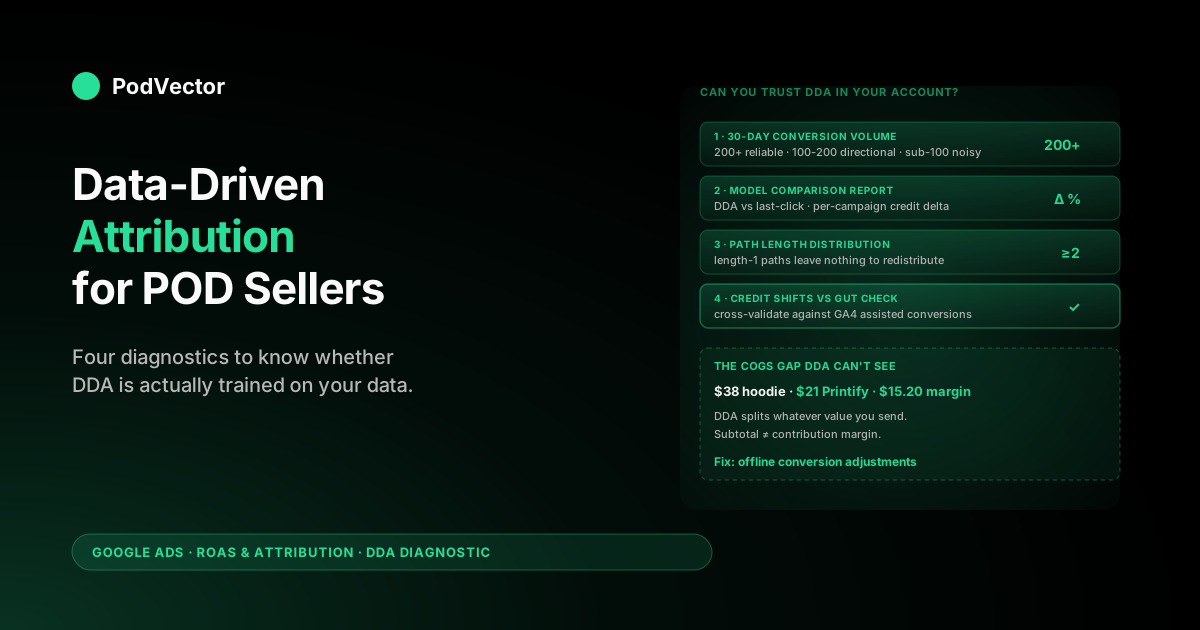
Quick Answer: Data-driven attribution (DDA) is Google Ads' machine-learning model that splits conversion credit across every touch in a customer's path — Search, Shopping, YouTube, Display, Demand Gen — instead of awarding all of it to the last click. As of 2026 it's the default for almost every conversion action and runs without a minimum data threshold.
For POD sellers the catch is that DDA splits credit on whatever conversion value you feed it, which is usually Shopify subtotal, not contribution margin after Printify base cost and shipping. Smart Bidding then optimises gross revenue, not profit. Fixing that gap with offline conversion adjustments is what turns DDA from a "fairer credit split" into actual profit per dollar spent.
Data-driven attribution in one paragraph
Data-driven attribution is a per-account machine-learning model that distributes the credit for a conversion across all of the Google Ads interactions on the path leading to it. Instead of giving 100% to one touch (which is how last-click works), DDA gives each interaction a fractional value based on how much it shifted the probability of that specific user converting.
The credit splits are not generic — they are computed from your conversion paths, recomputed continuously as new data arrives, and used by Smart Bidding strategies (Target ROAS, Maximize Conversions) to set bids. For a POD store, DDA's job is to answer: "given that this customer touched five ads before buying my $32 hoodie, how much credit does each of those ads deserve?"
Why Google made DDA the default in 2026
Google made DDA the default for almost every Google Ads conversion action in October 2021, sunset the four legacy rule-based models for new actions in 2023, and removed the original 300-conversion / 3,000-interaction minimum threshold in 2024. As of 2026, DDA is effectively the only mainstream attribution choice for new accounts — last click is still selectable but is no longer the recommended default. The official explanation lives in Google's data-driven attribution help page.
The reason for the push: Smart Bidding (which now drives the majority of Google Ads spend on Performance Max, Search, and Demand Gen) makes meaningfully better decisions when it can see fractional credit on upper-funnel touches. Under last click, an asynchronous YouTube view that nudged a customer toward branded search a week later looked like dead spend; under DDA it gets a partial conversion attached to it, and Smart Bidding can justify continuing to bid for it. For Google's commercial logic that's a feature — DDA unlocks more biddable inventory across YouTube, Display, and Demand Gen.
For POD sellers the same dynamic applies in reverse: DDA tends to shift spend earlier in the funnel, which can be right or wrong depending on whether your upper-funnel touches actually generate incremental orders. We come back to that diagnostic below. The broader picture of how all the Google Ads attribution moving parts fit together is in the complete guide to Google Ads ROAS and attribution for POD.
The mechanics: how DDA actually splits credit
Under the hood, DDA uses Shapley value-style logic from cooperative game theory. The model compares the conversion paths of users who converted to the paths of users who didn't, identifies which interactions are systematically associated with conversions even after accounting for the other touches, and assigns each interaction a fractional credit equal to its estimated marginal contribution.
Three POD-flavoured customer paths over a 30-day window make this concrete:
- Path 1: YouTube view → Generic Search click ("custom hoodies for dog moms") → Branded Search click → Purchase $34
- Path 2: Shopping click → Display remarketing impression → Branded Search click → Purchase $28
- Path 3: Demand Gen click → Direct return visit (not Google Ads) → Purchase $42
Last-click attribution looks at these three paths and gives Branded Search 100% of the $34, Branded Search 100% of the $28, and Demand Gen 100% of the $42 (because the direct return visit isn't a Google Ads touch and therefore doesn't compete for credit). Two out of three conversions credited to Branded Search.
DDA looks at the same three paths plus the hundreds of similar paths (converting and non-converting) in your account, and might output: YouTube view 0.18, Generic Search 0.31, Branded Search 0.51 on Path 1. Branded Search still gets the largest share because it's strongly associated with conversion, but it no longer monopolizes the credit. Total credit per path still sums to 1.0 conversion — DDA redistributes, it doesn't create credit out of thin air.
This is why aggregate conversions in your account barely change after enabling DDA, but per-campaign conversion counts and ROAS shift visibly. The published average lift after switching to DDA is around 6%, but the bigger story is the redistribution: branded search and remarketing usually lose credit, YouTube and prospecting Display usually gain it.
Data thresholds and the sub-scale POD store
Google's recommended (not required) data threshold for DDA to run reliably is at least 200 conversions and 2,000 ad interactions across supported networks within a 30-day period. Below that the model still runs and produces credit splits, but the splits are noisier and the model is less confident about which interactions are doing the work.
For a POD store the 200-conversion number maps to roughly $5,000–$8,000 of Google Ads-driven monthly revenue at typical $25–$40 average order values. At a 3x ROAS target that's about $1,650–$2,650 in monthly Google Ads spend. Many POD stores in the early scaling phase run between $400 and $1,200 per month — which means DDA is technically running on their account, but on conversion volumes that are below where the model becomes reliably trained.
Practical implications for a sub-scale POD account:
- The directional signal DDA produces ("YouTube and Display touches matter more than last click suggests") is usually correct even at 50–100 conversions/month. The specific credit fractions per campaign, though, will fluctuate.
- Switching back to last click is rarely the right answer. Last click on thin data is also wrong, just wrong in a different direction (over-crediting the close).
- The leverage point is signal density, not the model choice. Pick one primary conversion action (Purchase), demote everything else (Begin Checkout, Add to Cart, Sign Up) to secondary, and feed DDA every order through one channel.
- Enhanced Conversions is the second leverage point. It feeds Google Ads hashed first-party data (email, phone) at conversion time, which improves DDA's path-stitching across browsers and devices and meaningfully tightens the credit splits even at low conversion volumes.
DDA vs the legacy attribution models
The four legacy models Google sunset for new conversion actions are still worth knowing because they show up in older guides and account history:
- Last click: 100% credit to the last clicked Google Ads interaction. The simplest rule, still selectable for new actions, still the default in some legacy accounts.
- First click: 100% credit to the first interaction. Useful for prospecting analysis, never used for bidding.
- Linear: Equal credit to every touch in the path. A flat fairness rule that doesn't reflect how funnels actually work.
- Time decay: Exponentially more credit to touches closer in time to the conversion. A reasonable heuristic, but still a fixed rule.
- Position-based: 40% to first, 40% to last, 20% split among middle touches. The most defensible heuristic, but still not learned from data.
DDA is mathematically a generalization of all of these. Depending on what your account data shows, DDA's outputs can resemble first-click, time-decay, or position-based weighting — but produced from your conversion paths rather than imposed as a fixed rule. The case for DDA is essentially "let the model fit the rule to your customers, instead of guessing which fixed rule fits." A side-by-side comparison of all the models in their POD context is in Google Ads attribution models explained for POD sellers.
What changes for a POD account when DDA turns on
Three concrete things shift after DDA replaces last click on a POD store's primary conversion action:
1. Per-campaign ROAS rebalances. Branded search ROAS usually drops 15–40%, because some of its credit moves to upper-funnel touches that warmed the customer. YouTube and Demand Gen ROAS usually rise meaningfully. Total account ROAS shouldn't move much — the same orders, just redistributed.
2. Smart Bidding tilts spend earlier. Target ROAS and Maximize Conversions strategies see fractional credit on upper-funnel placements and start bidding for them. If you run Performance Max, more spend will flow to YouTube and Discover placements; if you run separate campaigns, Demand Gen and prospecting Display will get bid up.
3. Reported conversion counts on Search drop slightly. If you had non-Search campaigns running quietly with little credit under last click, they pull some conversions out of the Search column under DDA. Google's published average is a 6% account-level conversion lift, but distributions vary — some POD accounts see a 2% lift, some see a 12% redistribution that shows up as Search "losing" 8% and Demand Gen "gaining" 14%.
None of these changes mean campaign performance has actually changed. The orders are the same orders. What changed is the ledger Smart Bidding uses to make decisions, and that ledger is now (in theory) closer to reality. The next two sections are about whether it's actually closer to reality for your specific POD account.
DDA inside Performance Max (where it matters most)
Performance Max is where DDA does its heaviest lifting for POD stores. PMax campaigns run inventory across Search, Shopping, Display, YouTube, Discover, and Gmail simultaneously, all under a single Smart Bidding strategy. The bidding model needs cross-channel credit splits to know which placements are pulling weight, and DDA is the mechanism that produces those splits.
Under last click, PMax bidding effectively concentrates credit on Shopping clicks (which usually close conversions) and starves YouTube and Display placements that warmed the customer earlier in the path. The bidding model can still spend on those placements — but it does so on faith, because last click attribution makes them look like waste. Under DDA, PMax bidding sees fractional credit on YouTube view-throughs and Display impressions and bids for them with mathematical justification rather than guesswork.
For a POD store with healthy SKU diversity (at least 30–50 active products driving Shopping coverage) and a $1,500+ monthly PMax budget, this is genuinely better. PMax + DDA together will find combinations of audience, placement, and creative that legacy Shopping campaigns wouldn't have spent on. For a POD store with a thin product catalog (under 15 SKUs) or a small budget (under $800/month), PMax + DDA is usually still better than the alternative, but the improvement is smaller — most of the conversions come from Search anyway, so the cross-channel redistribution has less inventory to work with.
A 4-step diagnostic for trusting DDA in your account
DDA is now the default. The question is whether to trust its credit splits in your account well enough to make budget-shifting decisions on them. A four-step diagnostic:
Step 1: Check 30-day conversion volume. Google Ads → Tools → Conversions → Summary. Look at conversions over the last 30 days for your primary action.
Above 200: DDA is reliably trained. 100–200: DDA is directionally reliable, treat per-campaign credit splits as ranges rather than precise numbers. Below 100: DDA is running but noisy; trust the direction, not the magnitude.
Step 2: Pull the Model Comparison report. Google Ads → Reports → Predefined Reports → Attribution → Model Comparison. This is the only place that shows your actual DDA credit splits side-by-side with last click.
If branded search loses credit and YouTube/Demand Gen gain credit, DDA is doing what it's supposed to do. If credit barely moves, DDA isn't seeing enough multi-touch paths to redistribute.
Step 3: Look at path length distribution. Same report, "Path length" view. If 80%+ of your converting paths are length 1 (one Google Ads touch), DDA has nothing to redistribute and its outputs will look very similar to last click.
This is common for early-stage POD stores running mostly Branded Search and one Shopping campaign. As you add YouTube, Demand Gen, and prospecting Display, path length grows and DDA gets more useful.
Step 4: Compare DDA's credit shifts to your gut. If DDA says your YouTube campaign is generating 1.4 fractional conversions per week and you've been running it for two months with what felt like zero direct impact, that's the signal worth investigating. Don't blindly trust it; do investigate it.
Pull the same period's traffic in GA4 and look for assisted conversions on those YouTube touches. The two reports should roughly agree.
The COGS gap DDA can't see
Here is the part that nobody else writes about and that matters most for POD specifically. DDA splits credit beautifully across your funnel. What it can't do is tell you whether the orders it's crediting are profitable.
A POD store sells, say, three product types: a $22 t-shirt with $10 Printify cost, a $38 hoodie with $21 Printify cost, and a $48 sweatshirt with $26 Printify cost. Sale prices vary, base costs vary, shipping costs vary by destination and weight. Contribution margin per order ranges from $5 to $16 depending on what was bought, where it shipped, and what processing fees applied.
Smart Bidding sees a $38 hoodie purchase from Demand Gen with DDA giving Demand Gen 0.55 fractional credit, and a $22 t-shirt purchase from branded search with DDA giving branded search 0.92 credit. To Smart Bidding, the hoodie generated $20.90 of weighted revenue and the t-shirt generated $20.24 — close to a wash, slight edge to Demand Gen.
The actual contribution-margin reality:
- Hoodie: $38 sale - $21 Printify - $1.80 transaction fee = $15.20 contribution × 0.55 credit = $8.36 weighted profit
- T-shirt: $22 sale - $10 Printify - $0.95 transaction fee = $11.05 contribution × 0.92 credit = $10.17 weighted profit
The t-shirt order is meaningfully more profitable, even though Smart Bidding sees the two as roughly equal on revenue. Multiply this gap by 12 months of bidding decisions and a few thousand orders and the compounding cost is real. You bid up Demand Gen because revenue says you should, when contribution margin says you shouldn't. DDA is doing its job on credit distribution; it's just being fed the wrong unit.
This is the structural problem with running DDA on a POD store using out-of-the-box Shopify conversion values. It is not DDA's fault — it is a mismatch between what Smart Bidding optimizes (the value you pass to it) and what your business actually cares about (what's left after Printify, shipping, and fees). For an example walkthrough of the same problem viewed through the attribution-window lens, see Google Ads attribution window explained for POD sellers.
Fixing the gap with offline conversion adjustments
The fix is offline conversion adjustments — sending Google Ads a corrected conversion value after the order has settled and you know actual contribution margin. There are three pieces:
- Capture the click ID at order time. When a customer lands on your Shopify store from a Google Ads click, the URL contains a
gclid(orwbraid/gbraidfor app and cross-device journeys). Save it on the customer record or the order record so you can reference it later. - Compute true contribution margin per order. When the Printify order is placed and the actual base cost + shipping is known, compute order subtotal minus Printify cost minus processing fee. That's the number you want Google Ads to optimize against.
- Send adjustments via the Google Ads API. Use the conversion adjustments endpoint (Google's documentation) to send a new value for that gclid. Refunds work the same way: when a Shopify refund webhook fires, send a negative adjustment to remove that conversion's value.
Once these adjustments are flowing, Smart Bidding starts optimizing on contribution margin per order rather than gross revenue per order, and DDA's credit distribution gets meaningful in profit terms rather than just revenue terms. Most POD stores never set this up — it requires order-level Printify cost data, Shopify webhooks, and a Google Ads API connection — which is why so many DDA-enabled accounts still bid in ways that look fine on revenue ROAS and quietly lose money on actual margin. For broader context on how cross-channel signals (email, organic) interact with the same problem, see Google Ads attribution email organic integration explained for POD sellers.
A POD seller's DDA audit checklist
Run this once a quarter:
- Primary conversion action is set to DDA. Tools → Conversions → Summary → click your purchase action → confirm "Data-driven" attribution model.
- Only one conversion action is marked Primary. Multiple primaries dilute DDA's training signal and confuse Smart Bidding. Demote everything except Purchase to "Secondary."
- Enhanced Conversions is enabled. Tools → Conversions → click your purchase action → Enhanced conversions section. This dramatically improves DDA path stitching.
- Conversion value reflects contribution margin (or at minimum, gross profit). Subtotal sent as conversion value optimizes for revenue, not profit. If you can't pipe contribution margin live, gross profit (subtotal minus Printify cost only) is the next best signal.
- Model comparison report has been pulled in the last 30 days. Reports → Predefined Reports → Attribution → Model Comparison. This is the only place that shows what DDA actually changed for your account.
- Refund handling is wired up. If you don't send refund adjustments, your reported conversion value drifts upward over time as refunded orders stay credited. This corrupts Smart Bidding more than people realize.
- Path length is healthy. If 90% of your converting paths are length 1, DDA has nothing to redistribute. Either you're not running enough upper-funnel campaigns, or your tracking isn't capturing the touches.
For the broader audit framework that this checklist plugs into, see the complete Google Ads playbook for print-on-demand sellers. For the attribution model decision specifically, the lower-level read is attribution model for Google Ads explained for POD sellers.
FAQs
Should I keep last click on any of my conversion actions?
Generally no. Last click is selectable but is no longer recommended for any conversion action that drives Smart Bidding. The exception is a diagnostic conversion action you keep on last click purely for comparison reporting — but that action should not be marked "Primary" and should not feed bidding.
How long does DDA take to fully train after I switch?
Credit redistribution shows up in reports the same day, because DDA uses your historical conversion data. Smart Bidding takes 1–2 weeks to fully adjust to the new credit signal, during which CPCs and reported ROAS will be noisier than usual. Don't compare DDA day one to last-click day zero and panic — that's the redistribution playing out.
Can I see exactly what credit DDA is giving each campaign?
Yes. Reports → Predefined Reports → Attribution → Model Comparison. This is the report worth bookmarking. It shows DDA-credited conversions side-by-side with last-click conversions per campaign, and the delta tells you which campaigns DDA is shifting credit toward.
Does DDA work with iOS 14+ tracking signal loss?
Indirectly. DDA itself doesn't recover lost data, but Google's modeled conversions feature (which fills gaps left by tracking signal loss) is more accurate when combined with DDA, because the model has more conversion paths to learn from. Both should be enabled together for POD stores with iOS-heavy traffic.
Will DDA help my Branded Search ROAS look better?
No — usually the opposite. Under DDA, branded search loses some of the credit it had under last click, because that credit moves to upper-funnel touches that warmed the customer. The total revenue is the same; reported branded ROAS is lower. This is mathematically correct, not a performance regression. Branded search was usually just closing demand other touches created.
What conversion value should I send for DDA to optimize correctly?
For POD specifically, contribution margin (subtotal minus Printify cost, shipping subsidy, and processing fees) is the right signal. Subtotal — the default — makes high-Printify-cost SKUs (sweatshirts, hoodies) look more profitable than they are. If contribution margin is too hard to pipe live, gross profit (subtotal minus Printify base cost only) is the next best fallback.
Does DDA require Performance Max?
No. DDA is the default for any conversion action regardless of which campaign types feed into it. It does, however, work meaningfully better on accounts that run multi-channel campaigns (Search + Shopping + YouTube + Demand Gen), because that's where DDA has multi-touch paths to learn from. PMax happens to bundle all of those channels under one campaign, which is why DDA + PMax is the most common modern setup.
How does Victor fit into data-driven attribution?
Victor is an AI agent that runs on your live data — Google Ads spend, Shopify orders, Printify costs — and works the DDA problem the way an experienced POD operator would. It recomputes contribution margin on every order DDA credited to a campaign, flags the campaigns Google's model is bidding up on revenue that doesn't survive Printify base cost and shipping, and tells you where to pull or push budget. Google Ads' own UI can't do this because it never sees your Printify costs; Victor was built to close that gap for POD sellers.
Stop optimising DDA on revenue you don't keep
Victor is an AI agent for POD sellers that runs on your live Shopify, Printify, and Google Ads data, computes contribution margin per order after Printify base costs and shipping, and catches the campaigns where DDA is crediting orders that don't actually make money — then tells you where to move budget. And see your real DDA-weighted profit-per-click in under five minutes.
Try Victor free