
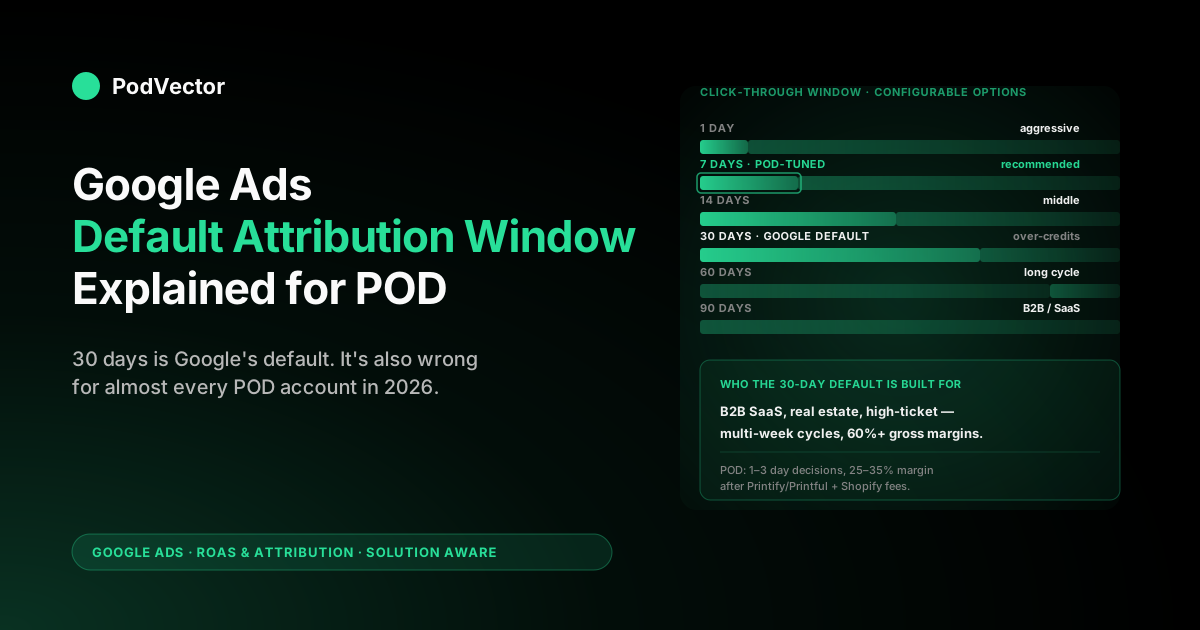
Quick Answer: The Google Ads default attribution window in 2026 is 30 days for click-through conversions on Search, Shopping, and Performance Max, paired with a 3-day default for engaged-view credit (and a 1-day default for any remaining view-through credit) on Display, YouTube, and Demand Gen (Search and Shopping carry no engaged-view or view-through credit by default). Google chose 30 days because it gives Smart Bidding enough credit-signal density to train across most verticals, not because 30 days reflects a typical buyer's decision cycle.
For print-on-demand sellers — where 70–85% of purchases close within 1–3 days of the click and gross margin after Printify or Printful supplier cost is often 25–35% rather than the 60%+ the default was tuned for — the 30-day default systematically over-credits early touches, leans Smart Bidding toward campaigns that produced the click but not the cause, and inflates reported ROAS relative to actual margin. Most POD accounts spending $750–$15,000 a month should override the default to a 7-day click-through window with engaged view at 1 day or off, but only after pulling the time-lag report to confirm the local distribution. The window choice is one decision; reading window-credited spend against real margin is the other.
What the Google Ads default attribution window actually is in 2026
The Google Ads default attribution window is the lookback period Google applies to every newly created conversion action unless you override it during setup. Two values live on every conversion action — a click-through window and an engaged-view window — and Google's defaults are set independently for each.
The click-through default is 30 days; the engaged-view default is 3 days (with a separate 1-day default for view-through where it still applies); all can be reconfigured at any time, with changes applying prospectively to new conversions only. Google's own help center documents this in About conversion windows, where the operative term is conversion window rather than attribution window — the broader marketing community uses the two interchangeably, but Google's UI consistently calls the setting a conversion window.
Two clarifications matter before any decision about whether to keep or override the default. First, the default window is not the same as the default attribution model.
The window decides which touchpoints are eligible to receive credit; the model decides how credit is distributed across the eligible touchpoints. In 2026, every newly created Google Ads conversion action defaults to data-driven attribution as the model — covered in our data-driven attribution default Google Ads help explained for POD sellers piece — and the 30-day window as the eligibility filter.
Both defaults are independent; changing one does not change the other. Second, the Google Ads default is not the GA4 default.
GA4 has its own conversion lookback configured separately in the GA4 admin and uses its own default of 30 days for acquisition reporting (with separate windows for paid vs. all channels). The two systems can show meaningfully different conversion counts on the same conversion action because they answer different questions with different inputs.
The wider context for any window decision sits inside the model–window–bidding triangle covered in Google Ads attribution explained for POD sellers; the cluster hub at Google Ads ROAS and attribution for POD ties window choice to actual ROAS measurement after supplier cost.
The exact defaults by campaign type
The phrase "the default" is slightly misleading because Google sets different defaults on different surfaces. The current 2026 defaults, with the conversion-window setting that applies on the purchase action by campaign type:
- Search and Shopping campaigns: 30-day click-through window, no engaged-view credit on the purchase conversion. These are typically the largest spend buckets in a POD account, so the 30-day click is the default that has the largest practical effect.
- Performance Max: 30-day click-through window, 3-day engaged-view window. PMax routes spend across Search, Shopping, Display, and YouTube simultaneously and uses the configured window across all of them — a single setting controls credit attribution across very different placements.
- Display: 30-day click-through window, 3-day engaged-view window (with the legacy 1-day view-through default in accounts where it still applies). Pure view-through credit (in-viewport impression for at least one second) has been progressively retired in favor of engaged view.
- YouTube and Demand Gen: 30-day click-through window, 3-day engaged-view window. The engaged-view default is the lever that most often misfires on POD accounts because YouTube and Demand Gen weak associations can scoop into the eligible set.
- App campaigns: 30-day click-through window for installs, with the 2026 change that conversions are now attributed to install date rather than click date. This compresses the effective window without changing the configured value — a subtlety covered in our Google Ads attribution news explained for POD sellers piece.
The configurable values for click-through are 1, 7, 14, 30, 60, or 90 days. Engaged-view is configurable from 1 to 30 days (or none). The fact that the engaged-view default is 3 days rather than 1 or "off" is significant: Google could have set the tighter value but didn't, which means every newly created conversion action accepts up to three days of engaged-view credit unless an employee actively shortens it or turns it off.
Why Google made 30 days the default (and who that default is built for)
Google's published rationale for the 30-day default is that conversion windows of at least 7 days produce richer credit signal for Smart Bidding, and 30 days specifically ensures that even accounts with multi-week consideration cycles capture enough credited conversions to train the bidder reliably. The published rationale is half the story. The other half is that Google's machine-learning bidder works on credit-signal density per dollar of spend, and 30 days is the window that produces enough density across the broadest possible advertiser base — including ones with small budgets, niche verticals, and long sales cycles — to keep Smart Bidding training stable.
The advertiser the 30-day default is built for has three characteristics. First, a meaningful tail of conversions occurring 7–30 days after the click — typical of B2B SaaS, enterprise software, real estate, education, and high-ticket professional services.
Second, monthly Google Ads spend in the tens of thousands and a single-digit thousands of monthly conversions, where credit-signal density is genuinely a constraint. Third, gross margins of 50–70% or higher, where over-crediting an early touch by a few percent costs a few percent of profit — annoying but not catastrophic. Most of those properties describe enterprise SaaS or high-ticket considered purchases, not impulse-buy ecommerce.
POD accounts share none of those three characteristics. The conversion tail is short (most POD purchases close within 3 days).
Spend is usually $500–$15,000 a month with hundreds of conversions, where credit-signal density is rarely the bottleneck. Gross margin after Printify or Printful supplier cost and Shopify fees is typically 25–35%, where over-crediting early touches by a few percent can flip a campaign from profitable to unprofitable. The 30-day default is not wrong for the advertisers it was tuned for; it is a poor fit for an advertiser whose buyers decide in 24 hours and whose margins live in single-digit dollars.
Why the default misfits a POD account
The strongest single argument for overriding the 30-day default on a POD account is the actual decision cycle that POD buyers exhibit. The data sits inside every POD operator's own Google Ads account in the time-lag report (Tools → Measurement → Attribution → Time lag), which shows the distribution of click-to-conversion latencies for the purchase action. Most POD accounts show roughly:
- ~70–85% of conversions within 1 day of the click.
- ~85–92% within 3 days.
- ~92–96% within 7 days.
- ~96–98% within 14 days.
- The remaining 2–4% spread out across day 14–30, much of it weak association rather than causal credit.
Three structural features of POD make the default's misfit worse than the same shape would be in adjacent verticals. First, impulse-purchase intent dominates.
POD products are emotional reactions to a design — a fan shirt for a niche show, a holiday-themed mug, a custom pet portrait — and the buyer typically decides on a phone within minutes of seeing the design. The classic considered-purchase logic that justifies a 30-day window (click, deliberate, return via branded search, complete) describes maybe 5–10% of POD purchases.
Second, margin is thin enough that misallocation matters in absolute dollars. A 30-day window over-credits early touches, Smart Bidding sees those touches as more valuable than they are, the bidder leans into them, and the misallocation lands on a campaign whose post-COGS margin was already compressed.
Third, the multi-channel mix is short. Most POD conversions are 1–3 ad touchpoints inside the same week; the 30-day tail is mostly noise from non-causal early touches. The one place a longer window genuinely helps POD is cross-device: a buyer who clicks a mobile ad at lunch and completes on a laptop that evening is a real conversion that a too-short window can drop. But that gap closes inside a day or two, not thirty — which is another argument for landing on 7 days rather than either extreme, since 7 days comfortably absorbs same-week cross-device paths without inheriting the 30-day tail of weak associations.
For a deeper read on how the broader window concept interacts with attribution model choice across the entire eligible set, our Google Ads attribution window explained for POD sellers guide covers the full window mechanics; this article focuses specifically on the default and whether to keep it.
When to keep the default vs. override it
The decision is not "always override the default" — it depends on credit-signal density and how confident you are in the time-lag distribution. Three reference profiles cover most POD accounts:
Profile A — Keep the 30-day default. POD accounts spending under $750 a month, with fewer than 30 conversions a month, running one or two campaigns, and not yet stable on Smart Bidding. The default over-credits some early touches but gives the bidder more credit-signal density per dollar of spend.
At low volume, signal density matters more than signal accuracy; you'd rather have the bidder learn from slightly noisy credit than not learn at all. Stay at the default until volume grows past the threshold where Smart Bidding stabilises.
Profile B — Override to 7-day click, 1-day engaged view (or engaged view off). The right setting for most POD accounts spending $750–$15,000 a month with 30–500 monthly conversions. Captures 92–96% of true purchase conversions based on typical POD time-lag distributions while excluding the over-credited 30-day tail.
Smart Bidding still has plenty of credit signal to train; the credit it receives reflects the real causal path more accurately. This is the setting we'd recommend in unattended judgement for a POD account at growth stage. Pair with the deliberate model choice covered in data-driven attribution Google Ads help explained for POD sellers.
Profile C — Override to 1-day click, view-through off. Worth testing only on accounts where the time-lag report shows 80%+ of conversions in day zero or day one and Smart Bidding has been stable on Profile B for at least 30 days. Strips the window down to the literal decision cycle.
Risks under-crediting weekend-funnel paths where a Friday click becomes a Sunday purchase. A small number of high-volume POD accounts run this profile profitably; most should not start here.
Whichever profile fits your account, the prerequisite is the same: pull the time-lag report and confirm the distribution before changing anything. If your distribution is significantly flatter than the typical POD shape — say, only 60% at 7 days — either you have a longer-than-typical consideration cycle (possible on higher-ticket POD products like custom canvases or wholesale event merch) or there's a tracking issue. Either way, don't override the default until you understand why your distribution differs.
The hidden cost of changing the default
The cost of changing the default window is not zero, and most POD operators underestimate it. Two costs in particular tend to surprise people who change the window for the first time:
Smart Bidding retraining lag. Any window change invalidates the credit-signal distribution Smart Bidding has been training on, and the bidder needs 14–21 days to retrain on the new distribution. During that retraining period, daily ROAS can swing 20–30% in either direction without indicating any actual change in business performance.
The validating measurement window for a window change is at minimum 30 days, ideally 45. If you're in the middle of testing a new asset rotation, a campaign restructure, or a budget increase when you change the window, the noise will mask whatever else you're trying to measure. The right operational pattern is: stabilise other variables first, change the window, wait 30 days, then re-evaluate.
Modeled-conversion recalibration. In 2026, modeled conversions — Google's statistical estimate of conversions it can't directly observe due to ITP, third-party cookie restrictions, or non-consenting users — are 10–30% of reported conversions on a typical POD account. The modeling is calibrated against the configured window.
Shortening the window from 30 days to 7 days does not just remove the day 7–30 directly-observed conversions; it shifts the modeled-conversion estimates too, sometimes by more than the directly-observed shift. The visible effect can be a larger reported drop in conversions than the actual change in causal credit, which then masks itself as an over-correction. The conventional advice — "if reported conversions drop more than expected, revert" — is wrong here; the drop is the measurement, not the underlying business performance, and reverting prematurely just adds another retraining cycle on top of the first.
The compound effect is that overriding the default is operationally cheap but measurement-noisy for 30–45 days. Plan for it. Don't change the window in the middle of a quarter-end sprint.
How to change the default (and what propagates where)
The window setting lives on the conversion action, not on the campaign. The path:
- Tools → Measurement → Conversions.
- Click into your purchase conversion action — typically called Purchase or Shopify Purchase depending on how your tracking was wired up. The Shopify-specific integration mechanics are covered in Shopify Google Ads ROAS reporting integration explained for POD sellers.
- Edit settings → expand Click-through conversion window. Choose 1, 7, 14, 30, 60, or 90 days.
- Expand Engaged-view conversion window. Choose any value from 1 to 30 days, or none (the default is 3).
- Save. The change takes effect immediately for new conversions; historical conversions continue to be reported under the window in effect at the time they occurred.
The change propagates to every campaign optimising toward that conversion action — including Performance Max, Search, Shopping, Display, and YouTube/Demand Gen campaigns whose conversion goals reference the action. PMax in particular uses the configured window across every placement it touches, which means a single edit on the purchase action can shift credit attribution across Search keywords, Shopping product clicks, Display impressions, and YouTube engaged views simultaneously.
The reporting in PMax can show slightly different numbers in different views (asset-level vs. campaign-level) because the bidder uses the configured window while some asset reports use a different aggregation; don't waste time reconciling these. Focus on the bidder's signal.
If you have multiple conversion actions — purchase, add-to-cart, view-product, newsletter signup — set each one's window deliberately. The decision cycle is different for each.
Purchase: 7-day click for most POD. Add-to-cart: 1-day click, because cart abandonment timing is much shorter than purchase timing.
Newsletter: 14-day click, because that lower-intent action has longer-tail decision behaviour. Setting wildly different windows for arbitrary reasons is just inconsistent measurement; setting different windows that match the action's decision cycle is correct.
How the default window interacts with the default attribution model
In 2026, the default attribution model on every newly created Google Ads conversion action is data-driven attribution. The default window is 30 days. The two defaults compound in ways that operators don't always anticipate.
DDA distributes credit across all eligible touchpoints inside the configured window using a counterfactual model — for any given conversion, DDA estimates how much each touchpoint actually contributed by comparing converters' paths to non-converters' paths and assigning fractional credit accordingly. With a 30-day window, DDA has a larger eligible set to distribute across; with a 7-day window, the eligible set is smaller and the per-touchpoint credit is denser. The same campaign can show meaningfully different credit-per-conversion under the two windows because the same conversion's credit is now split across fewer or more touchpoints.
The practical effect for POD: a 30-day window with DDA tends to spread credit thinly across many weak associations, particularly on accounts running YouTube or Demand Gen as upper-funnel channels. A 7-day window with DDA concentrates credit on the touchpoints that are inside the real decision cycle, which is what Smart Bidding actually needs to optimise toward purchase.
The deeper read on how DDA distributes credit, with POD examples, is in our Google Ads data driven attribution explained for POD sellers piece. For the model side of the same triangle, Google Ads attribution models explained for POD sellers covers DDA, last-click, and the legacy rule-based models.
For accounts choosing between defaults at conversion-action setup, the right pairing for most POD operators is: model = DDA (default), window = 7-day click + 1-day engaged view (override the default). The combination accepts Google's best-available model while filtering the eligible set to the touchpoints that actually drove POD purchases. Cross-cluster, this pairs with the bidding decisions covered in the complete Google Ads playbook for print-on-demand sellers.
Five mistakes POD sellers make with the default window
The default is a single setting, but the mistakes around it compound. The recurring patterns:
Mistake 1: Overriding the default before pulling the time-lag report. The reflex to "shorten the window because POD is impulse-buy" is correct on average and wrong on individual accounts where the time-lag distribution is unusual. Every override should be preceded by a time-lag pull. If your account's distribution diverges from the typical POD shape, the right window for you may be different from the right window for the median POD operator.
Mistake 2: Treating the 30-day default as evidence Google thinks 30 days is right for your account. The default is set across Google's entire advertiser base. It is the value that produces the broadest training stability across all verticals, not the value Google's bidder thinks is optimal for any specific account. Defaults are starting points; tuning them is part of running an account.
Mistake 3: Changing the window mid-campaign-test. Window changes invalidate Smart Bidding's training and cause 14–21 days of noise. If you're testing a new asset rotation, restructuring campaigns, or pushing a budget increase, do not change the window in the same period. Window changes deserve their own measurement window.
Mistake 4: Forgetting that view-through credit still exists in 2026 by default. Google has been deprecating pure view-through, but the engaged-view default is 3 days, not zero. Any new conversion action accepts up to three days of engaged-view credit unless an employee actively shortens or turns it off. On a POD account where YouTube spend is a small fraction of total spend, the engaged-view credit is rarely worth the noise — turn it off explicitly rather than relying on the default to be appropriate.
Mistake 5: Reading default-window-credited conversions as if they were a count rather than an estimate. The dashboard numbers are configured-window-filtered, DDA-credited, partly-modeled estimates with a 24–48 hour Privacy Sandbox reporting lag baked in. They are reliable enough for account-level decisions and noisy enough that small differences in single keywords or single ad groups should not drive action. Decisions on small slices need either a longer measurement window or a separate ground truth — typically the actual revenue-and-margin data sitting in Shopify and Printify or Printful, read against the same time period.
Reading the default-window-credited revenue against live POD margin
The window — default or otherwise — decides which spend gets credit for which revenue. It does not tell you whether the credited revenue made you any actual money.
A 30-day-window-credited Shopping conversion that sold a $34 hoodie with a $14 Printify supplier cost on a Performance Max campaign that cost $22 in CPC is reported as a 1.55x ROAS by Google Ads. After supplier cost the actual margin is $20 - $7 ad cost = $13 of margin on $7 of spend — which is a healthy ratio if the $20 net margin actually showed up, and which is a loss if the order was a $24 mug instead with a $9 supplier cost ($15 net minus $7 ad = $8 of margin). The window choice does not fix that gap; only sending margin-as-conversion-value, or reading window-credited spend against live margin data outside Google Ads, does.
That second path is what Victor does. Victor sits across Google Ads campaign spend, the DDA-credited and window-filtered conversion data, Shopify orders, and Printify or Printful line-item supplier costs, and answers questions like "which default-window-credited campaigns sold sub-25%-margin SKUs last week" or "is my new 7-day click window producing more or less actual margin per dollar than the 30-day default did" — the kind of question that doesn't fit any single dashboard but fits the live data when it's read together. Victor answers questions and adjusts the window-and-bidding combination against live margin — with your approval rather than reported subtotal.
FAQs
What is the Google Ads default attribution window in 2026?
30 days for click-through conversions on Search, Shopping, and Performance Max; 3 days for engaged-view credit on Performance Max, Display, YouTube, and Demand Gen (with a separate 1-day default for any remaining view-through credit). Search and Shopping carry no engaged-view credit on the purchase conversion by default.
Should POD sellers keep the default attribution window?
Most should override it. POD accounts spending $750–$15,000 a month with 30–500 monthly conversions should run a 7-day click-through window with 1-day engaged view (or engaged view off). POD accounts spending under $750 a month with fewer than 30 monthly conversions should keep the 30-day default until volume grows past the credit-signal-density threshold.
Why did Google make 30 days the default?
To produce enough credit-signal density for Smart Bidding to train across Google's entire advertiser base — including ones with multi-week consideration cycles, single-digit thousands of monthly conversions, and gross margins above 50%. The default is set for the broadest possible training stability, not for any specific vertical's actual decision cycle.
How do I change the default attribution window in Google Ads?
Tools → Measurement → Conversions → click into your purchase conversion action → Edit settings → adjust click-through and engaged-view windows. The change takes effect immediately for new conversions and propagates to all campaigns optimising toward that action.
What's the engaged-view default and is it the same as view-through?
The engaged-view default is 3 days on Performance Max, Display, YouTube, and Demand Gen campaigns (Google keeps a separate 1-day default for any remaining pure view-through credit). Engaged view requires the user to watch at least 10 seconds of a skippable in-stream ad (or the entire ad if shorter) — it is the tighter signal that has progressively replaced pure view-through credit (in-viewport impression for at least one second) since 2024.
Does changing the default window affect data-driven attribution?
Yes. DDA distributes credit across all touchpoints inside the configured window. A 30-day window has a larger eligible set; a 7-day window has a smaller, denser one. The same conversion's credit is split across more or fewer touchpoints depending on the window, which changes the credit-per-touchpoint signal Smart Bidding receives.
How long until Smart Bidding stabilises after a default-window change?
14–21 days of reporting noise during retraining, with 30–45 days of post-stabilisation data needed to validate against actual business performance. Don't change the window in the middle of an asset-rotation test, a campaign restructure, or a budget push — the noise will mask whatever else you're trying to measure.
Is the Google Ads default window the same as the GA4 default lookback?
No. Google Ads and GA4 have separate defaults configured in separate admin areas and rarely match unless explicitly aligned. Don't try to reconcile Google Ads conversion counts with GA4 conversion counts at the campaign level — they are answering different questions with different inputs and different windows.
What's the time-lag report and why pull it before overriding the default?
Tools → Measurement → Attribution → Time lag. Shows the distribution of click-to-conversion latencies for your purchase action over a configurable lookback.
Pull it before any window change to confirm your distribution matches the typical POD shape (~70%+ at 1 day, 92%+ at 7 days). If your distribution is flatter, you may have a longer-than-typical consideration cycle or a tracking issue, and the override decision changes accordingly.
Does the default window apply per campaign or per conversion action?
Per conversion action. The default window lives on the purchase conversion (and any other conversion actions you have configured) and propagates to every campaign optimising toward that action. You set it once per conversion action, not separately per campaign.
Should the window be the same for purchase, add-to-cart, and newsletter signup?
No. Different decision cycles need different windows. Purchase: 7-day click for most POD. Add-to-cart: 1-day click — cart abandonment timing is much shorter. Newsletter signup: 14-day click — lower-intent action with longer-tail decision behaviour. Set each conversion action's window deliberately rather than applying one window across all actions.
Does the 2026 cookieless modeling change how the default window behaves?
Yes. Modeled conversions are calibrated against the configured window, so a window change shifts both observed and modeled conversion counts.
Privacy Sandbox introduces a 24–48 hour reporting lag that makes 1-day click windows lose a small amount of signal to the lag itself; 7-day click stays clear of the lag while still tightening credit versus the 30-day default. This is one reason most POD accounts should land on 7 days rather than 1.
Is the conversion window the same as the "count" setting?
No — they sit next to each other on the same conversion action and are easy to conflate. The window decides how long a click stays eligible for credit; the count setting (Every vs. One) decides how many conversions a single click can be credited with inside that window. For a POD purchase action, count should be Every (a repeat buyer who orders twice from one click is two sales), while for a lead action like newsletter signup, One is usually correct. Set the window and the count deliberately and separately; changing one does not change the other.
Can I revert to the default if my override doesn't work?
Yes, but reverting is itself a window change that triggers another 14–21 day Smart Bidding retraining cycle. Don't revert at the first sign of reporting noise — wait at least 30 days after the override before evaluating, and if you do revert, plan for another 30 days of measurement noise before the bidder restabilises.
Tune away from Google's default with confidence — read window-credited spend against real POD margin
Google's 30-day default is built for advertisers who don't look like you. The right window for a POD account is the one that matches how POD buyers actually decide and how much margin each campaign actually produces after Printify or Printful supplier cost and Shopify fees. Victor reads window-credited Google Ads spend against live Shopify orders and itemized supplier costs and tells you which campaigns are over- or under-bid in real-money terms — so you can override the default with confidence, evaluate the change against ground truth, and stop guessing whether 7 days, 14 days, or 30 days is right for your account.
Try Victor free