
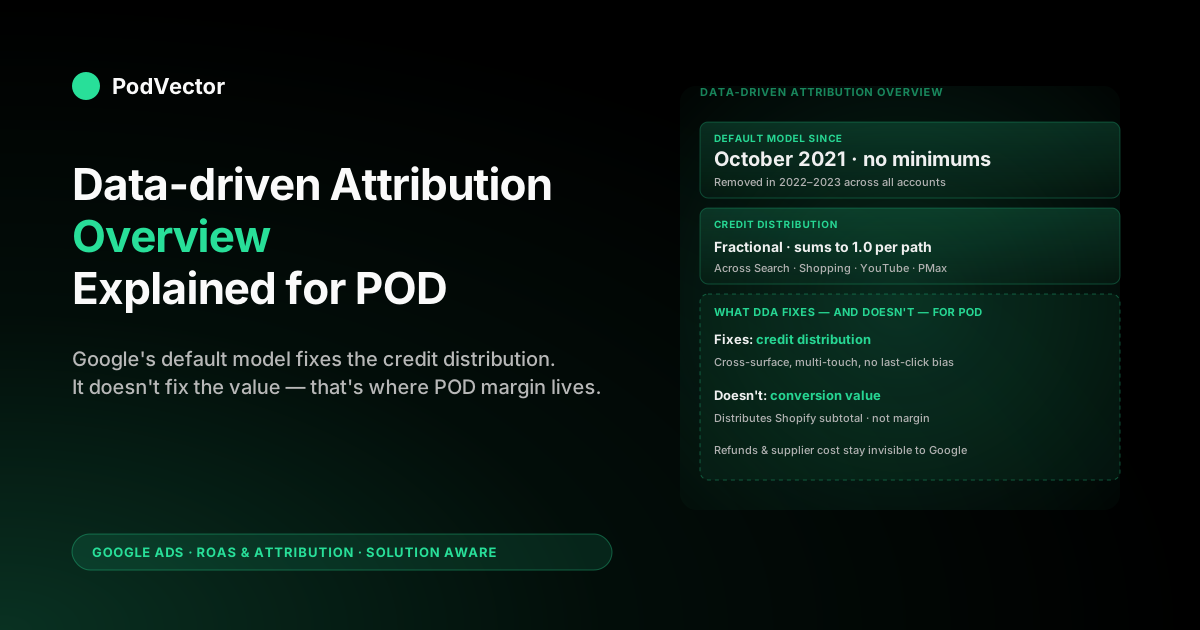
Quick Answer: Data-driven attribution (DDA) is the Google Ads attribution model that uses machine learning on your account's own conversion paths to assign fractional credit to every Search, Shopping, YouTube, Display, Demand Gen, and Performance Max touchpoint that contributed to a conversion. Since 2021 it has been the default model on every newly created conversion action, and as of 2026 the model runs without the old 300-conversion / 3,000-interaction minimum that previously gated it.
The overview most POD sellers need is shorter than Google's help page suggests: DDA distributes credit across touches more honestly than last-click ever did, it feeds richer signal into Smart Bidding, and it usually lifts reported conversions 5–8% — but the credit it distributes is tied to the conversion value you sent Google, which on most POD setups is order subtotal rather than contribution margin after Printify or Printful supplier cost. DDA fixes the credit-distribution problem; it does not fix the ROAS-quality problem. The two have to be solved together for the model to mean what POD operators need it to mean.
What data-driven attribution is in 2026
Data-driven attribution is a Google Ads attribution model that uses your account's own conversion-path data, run through Google's machine-learning system, to estimate the contribution of every ad interaction on a converted user's path. Instead of applying a fixed rule — last click, first click, linear split, time-decay weighting — DDA looks at the actual paths of users who converted and the actual paths of users who didn't, then allocates fractional credit (anywhere from a few percent to nearly all) to each touchpoint based on how much that touchpoint shifted the probability of conversion. Google's overview of the model lives in About data-driven attribution, and it is the default model on every new conversion action created in Google Ads since October 2021.
Two facts matter to a POD seller before any deeper read. First, DDA is account-specific.
The credit weights are computed from your conversion paths, not from an industry benchmark or a Google-wide model — two POD stores in the same niche, running similar campaigns, can end up with materially different credit distributions because their actual buyer paths differ. Second, DDA only allocates credit; it does not change the conversion value being credited.
The dollar amount that flows into the credited touchpoint is whatever you sent Google when the conversion fired, which on a stock Shopify or WooCommerce setup is order subtotal — not contribution margin after supplier cost, payment fees, refunds, or shipping subsidy. The honesty of the credit distribution is independent of the honesty of the value being distributed, and the model is only as useful as the value behind it.
The wider context for any model decision sits inside the model–window–bidding triangle covered in Google Ads attribution explained for POD sellers; the cluster hub at Google Ads ROAS and attribution for POD ties model choice to actual ROAS measurement after supplier cost.
How DDA actually distributes credit
The internal mechanic that produces DDA's fractional credits is a counterfactual one. For each click, video engagement, and (where configured) engaged view that lands on a converted user's path, the model asks: how much did this touchpoint shift the probability of the eventual conversion compared with the same path without that touchpoint?
That counterfactual probability difference, normalized so credits across the path sum to 1.0, becomes the touchpoint's credit. A touchpoint that mostly appears on paths that would have converted anyway gets thin credit.
A touchpoint that appears almost exclusively on paths that converted, and rarely on paths that didn't, gets thick credit. The model is comparing converted versus non-converted paths constantly, which is why it needs both — pure converter data alone cannot identify what mattered.
Three implementation details about the model are useful to internalize. First, DDA runs across Search, Shopping, YouTube, Display, Demand Gen, and Performance Max simultaneously — the credit allocation crosses surfaces, so a YouTube view earlier in the path can take credit away from a Search click that closed.
Second, the model is rebuilt regularly from fresh path data, so credit weights drift as your campaigns and audiences shift; a campaign that earned 35% average credit in February might earn 22% in April without anything visibly changing. Third, DDA outputs are inputs to Smart Bidding, not just reports — the bidder sees the credit-weighted conversion value (still in raw conversion-value terms) when deciding what each auction is worth, which is why the conversion-value quality flows directly into bid quality.
What changed when Google removed the data minimums
For most of DDA's life, the model required at least 300 conversions and 3,000 ad interactions per conversion action over a 30-day window before it would run. Accounts below those thresholds couldn't select DDA at all and got pushed back to last-click or rule-based models.
Through 2022–2023, Google progressively removed those minimums, and by 2024 every account — regardless of conversion volume — could use DDA. The blog announcement at The future of attribution is data-driven documents the rollout and the rationale: low-volume accounts borrow signal from a broader Google-wide model, then progressively shift to account-specific weights as their own data accumulates.
For POD operators this is the single most important practical change. A POD store doing 30–80 monthly conversions can now run DDA without any data-minimum gate. Coverage in data-driven attribution default Google Ads help explained for POD sellers walks through why Google made it the default at the same time.
The trade-off worth understanding is that low-volume accounts get DDA's interface and its bidder-feeding signal, but the credit weights they see in reports are partially borrowed from Google's broader model rather than derived purely from their own paths. As account-specific data accumulates, the borrowed component shrinks and the account-specific component grows. Most POD accounts hitting 200+ conversions a month over a sustained period will be running close to fully account-specific DDA; accounts under 100 conversions a month are running a hybrid that still works as a Smart Bidding input but should be read with a grain of salt at the campaign-credit level.
DDA versus the other attribution models
The five other attribution models that have ever existed in Google Ads are last click, first click, linear, time-decay, and position-based — though as of 2024 Google has retired all of them as user-selectable options on the conversion action page (only DDA and last click remain in the dropdown for new actions, and existing rule-based actions are migrating). The retirement matters less than it sounds because the practical comparison most POD sellers need is just DDA versus last click; the other rule-based models were always thin layers over the same fixed-rule logic, and most POD operators never used them seriously.
Against last click — historically the default and still the model that most POD operators learned attribution on — DDA differs in three ways that show up in real reports. First, DDA pulls credit away from the closing touch (the click that immediately preceded the conversion) and redistributes it across earlier touches, which shifts visible ROAS toward upper-funnel campaigns.
Second, DDA can credit YouTube and Demand Gen touches that last click would have ignored entirely, which can make those campaigns look meaningfully more profitable than under last click. Third, DDA-credited conversion totals are usually 5–8% higher than last-click totals for the same period, because the model assigns small fractional credit to multi-touch paths that last click would have collapsed onto a single touchpoint. Coverage in Google Ads attribution models explained for POD sellers walks through the rule-based alternatives in more detail; Google Ads data-driven attribution help explained for POD sellers covers the migration mechanics from rule-based to DDA.
What DDA fixes for a POD account
For a POD seller running Smart Bidding (Maximize Conversion Value, Target ROAS, or Maximize Conversions with a value-based bid signal), DDA fixes three real problems that last click left in place. First, it stops over-rewarding the last click on every path, which on POD usually means a branded-search click after the user has already decided.
Last click would credit the branded keyword for the full conversion value; DDA recognizes the prospecting touch that drove the user toward the brand in the first place and splits credit accordingly. The practical consequence is that prospecting Search and PMax campaigns look meaningfully more profitable under DDA than under last click, and the bidder allocates more to them.
Second, DDA captures multi-touch paths that last click systematically erased. On POD accounts where 20–30% of conversions involve more than one ad touchpoint (common for accounts spending above $5,000 a month with both Shopping and PMax running), last click was simply throwing away the credit signal on every touch except the final one.
DDA preserves that signal, which feeds Smart Bidding a more complete picture and tightens campaign-level ROAS reporting. Third, DDA accounts for cross-surface paths — the user who saw a YouTube ad, came back through a Search click, and converted later that day.
Last click could not see the YouTube touch at all on a click-through conversion; DDA can credit it fractionally and the bidder can value it appropriately. Coverage in Google Ads data-driven attribution overview help explained for POD sellers walks through the cross-surface mechanic in more detail.
What DDA does not fix for a POD account
Three problems DDA leaves entirely untouched, and a POD operator who does not separate the credit-distribution problem from these will misread the model badly. First, conversion-value quality.
DDA distributes whatever conversion value you sent Google when the conversion fired. On a default Shopify or WooCommerce setup, that value is order subtotal — including supplier cost, fulfillment, payment fees, and shipping subsidy that all get pulled out before the seller sees a dollar.
A $34 subtotal POD T-shirt with $13.50 Printify supplier cost, $4.20 fulfillment, $1.10 payment fee, and a $2.00 shipping subsidy contributes $13.20 in margin, not $34. DDA happily distributes the $34 across whatever touchpoints earned it, which makes upstream ROAS reports look 2.5x more profitable than the dollars actually flowing to the seller. The credit math is right; the value being distributed is wrong.
Second, refund handling. DDA does not subtract refunds, chargebacks, or canceled orders from the credit it has already assigned, because Google Ads doesn't see those events unless an explicit refund-conversion adjustment is sent — and almost no POD store sends them.
Most POD niches see 5–15% return or refund rates after order cancellation; that 5–15% sits inside DDA-reported revenue indefinitely. Third, supplier-cost variance.
Printify and Printful provider rotation, holiday surcharges, premium-blank upgrades, and shipping-class shifts all change actual margin per order without changing the subtotal Google sees. DDA's credit math has no visibility into any of it. Detail in Google Ads attribution news explained for POD sellers covers the recent mechanics changes that make conversion-adjustment uploads more important; the cross-cluster piece the complete Google Ads playbook for print-on-demand sellers covers how value-quality choices propagate into bidding strategy.
How to confirm DDA is the active model
For accounts created in or after October 2021, DDA is already the default on every new conversion action and there is nothing to set up. For accounts older than that, or for conversion actions created when rule-based models were still the default, the model needs to be confirmed and (in some cases) explicitly switched.
The path is Tools → Conversions → Conversion actions → click into the purchase action → Edit settings → Attribution model dropdown. The dropdown should show "Data-driven" with a green active indicator; if it shows "Last click" or any of the retired rule-based options, the action is still on the older model and DDA's signal is not flowing into Smart Bidding for that conversion.
Two related settings sit on the same conversion-action page and matter alongside the model. The conversion window (1, 7, 14, 30, 60, or 90 days for click-through; 1, 3, 7, or none for engaged-view) decides which touchpoints are eligible for credit at all.
A POD account on the 30-day default with DDA running is letting DDA distribute credit across the full 30-day path, which on a 1–3 day decision cycle means the model will try to find signal in noisy late touches. The default-window choice is covered in Google Ads default attribution window explained for POD sellers and in most POD cases the right call is to override the default to a 7-day click-through, which sharpens DDA's input data and tightens the bidder's training signal. The conversion-value field is the second setting that matters: stock Shopify and WooCommerce send order subtotal here, and overriding that to a margin-adjusted value is where the conversion-value-quality problem gets solved.
How to read DDA-credited reports honestly
The campaign-level ROAS column in the standard Google Ads campaigns view, with DDA active, is showing fractional-credit-weighted conversion value divided by spend. A campaign whose ROAS is 3.4x under DDA might be 2.1x under last click and 4.5x under first click — none of those numbers is wrong; they answer different questions.
The DDA number is the most useful for bidding decisions because it reflects the model the bidder is actually using, but it is still a credit-distribution number, not a profit number. Pulling the same period in the Attribution → Model comparison report side-by-side with last click gives the credit-shift picture: which campaigns gain credit under DDA versus which lose it.
Three secondary reports inside Tools → Measurement → Attribution are worth pulling at least monthly on any POD account on DDA. The Top paths report shows the most common multi-touch sequences that converted; on a healthy POD account, single-touch paths (one click, one conversion) dominate, and the multi-touch paths cluster around 2–3 touches inside the same week.
The Path metrics report shows average touches and average path length — when those numbers drift upward across a few months without a corresponding spend or conversion shift, it usually means weak association touches are creeping in (most often via Demand Gen or YouTube engaged-view) and the credit is being thinned out. The Time-lag report shows the click-to-conversion latency distribution and is the tightest source of truth on whether the conversion window is sized correctly for the decision cycle.
Five mistakes POD sellers make reading DDA
- Treating DDA-credited revenue as profit. DDA distributes whatever conversion value the conversion action received, which on stock Shopify or WooCommerce is order subtotal. A $34 reported revenue figure with 35% post-supplier margin is $11.90 of actual margin, not $34 of profit. The credit math is honest; the value being distributed is not, until the conversion-value field is set to a margin-adjusted number.
- Comparing DDA reports against last-click reports without normalizing. DDA-credited totals run 5–8% higher than last-click totals because of multi-touch paths, and credit shifts away from closing touches toward earlier ones. Reports from before and after the migration are not directly comparable; the model-comparison report shows the shift explicitly.
- Assuming low-volume accounts get the same DDA quality as high-volume ones. Accounts under 100 monthly conversions are running a hybrid model that borrows weights from Google's broader system. The credit weights at the campaign level are noisier; the bidder-feeding signal still works, but read campaign-credit reports with caution until your account-specific data accumulates.
- Setting DDA and ignoring the conversion window. DDA distributes credit across whatever window is configured. A 30-day window on a 1–3 day decision cycle gives DDA late-touch noise to find signal in, which produces unstable credit weights from period to period. The window setting and the model setting interact; covered in Google Ads attribution window explained for POD sellers.
- Reading credit weights as fixed. DDA's weights drift continuously as paths shift. A campaign that earned 32% average credit in March might earn 21% in April without changing structurally; that is the model adjusting to fresh path data, not a regression in campaign performance.
Reading DDA-credited revenue against live POD margin
The hard part of running DDA cleanly on a POD account is not turning it on — Google did that automatically on every new conversion action since 2021 — and not configuring the window correctly, though that helps. The hard part is connecting the DDA-credited revenue Google reports to the actual margin those orders produced after Printify or Printful supplier cost, fulfillment, payment fees, refunds, and shipping subsidy.
Most POD operators run a weekly or monthly reconciliation in spreadsheets: pull DDA-credited revenue per campaign from Google Ads, pull supplier cost per order from the Printify or Printful dashboards, pull payment fees from Shopify or Stripe, subtract, and read the result against spend. The reconciliation works once you build it; the lag and the manual lift mean it usually drifts out of date faster than ad-account decisions get made.
This is the layer Victor is built for. Victor is PodVector AI's analytics agent — it connects to your Google Ads, Shopify, and Printify or Printful accounts, lands every order, refund, and ad-click event in a a unified live data store, and answers natural-language questions against that data.
Ask "what was DDA-credited revenue minus Printify supplier cost for the holiday t-shirt campaign last week, and how does that compare to spend?" and Victor returns the post-COGS ROAS — the number DDA was supposed to point at — without a spreadsheet rebuild. The credit distribution Google produces is honest; Victor closes the gap to the margin number that decides whether a POD campaign is actually profitable. That answer-today layer is the foundation; the take-action-tomorrow layer (Victor proposing or executing bid adjustments based on margin-adjusted DDA signal) is the employee roadmap on the same architecture.
FAQs
Is data-driven attribution turned on by default in Google Ads?
Yes, on every conversion action created in October 2021 or later. Older conversion actions may still be on rule-based models and need to be confirmed in Tools → Conversions → Conversion actions → action → Attribution model.
Does data-driven attribution require a minimum number of conversions in 2026?
No. Google removed the previous 300-conversion / 3,000-interaction minimums during the 2022–2023 rollout. Every account, regardless of volume, can run DDA. Low-volume accounts run a hybrid that borrows weights from Google's broader model and shifts to account-specific weights as data accumulates.
How is DDA different from last-click attribution?
Last click gives 100% of credit to the final ad click before conversion. DDA distributes credit across all qualifying touchpoints based on each one's measured contribution to the conversion probability. DDA-credited totals are usually 5–8% higher because multi-touch paths get fractional credit on every touch.
Does DDA work across YouTube, Display, and Performance Max?
Yes. DDA distributes credit across Search, Shopping, YouTube, Display, Demand Gen, and Performance Max simultaneously. The cross-surface allocation is one of the model's primary advantages over last click, which on click-through conversions could not see view-only YouTube or Display touches at all.
Will switching to DDA change my reported ROAS?
Usually yes, in two directions. Total reported conversions and conversion value rise 5–8% relative to last click because multi-touch paths get fractional credit. Credit shifts away from closing touches (often branded search) toward earlier prospecting touches, which can move campaign-level ROAS materially up or down depending on the campaign's role in the path.
Does DDA fix the POD ROAS problem?
It fixes the credit-distribution half of the problem. It does not fix the conversion-value-quality half — DDA distributes whatever value the conversion action received, which on stock Shopify or WooCommerce is order subtotal rather than margin after supplier cost. Both problems have to be solved together for DDA's reported ROAS to align with actual POD profitability.
Should I override the default conversion window when running DDA on a POD account?
Most POD accounts should drop the default 30-day click-through window to 7 days and either disable engaged-view credit or hold it at 1 day. The time-lag report inside Tools → Measurement → Attribution shows the local distribution and is the right input to that decision. Detail in our default attribution window piece.
Read DDA against your real margin, not your Shopify subtotal
Google's data-driven attribution distributes credit honestly. The conversion value it distributes is whatever you sent it — usually order subtotal, before Printify or Printful supplier cost, payment fees, and refunds come out. PodVector AI's Victor agent connects your Google Ads, Shopify, and supplier accounts to a a unified live data store and answers margin-adjusted ROAS questions against the same DDA-credited paths Google reports. You see the credit distribution Google produces against the post-COGS profit those campaigns actually generated.
Try Victor free